My Account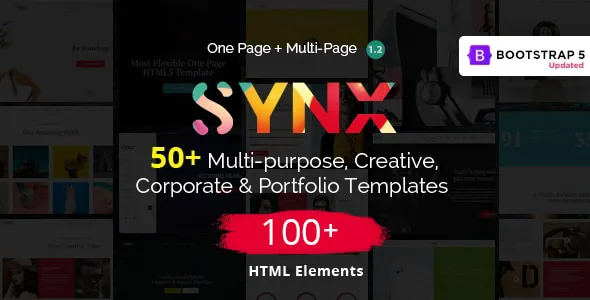
Synx – One Page Parallax
Synx – One Page Parallax is a modern and visually engaging one-page website template designed for businesses, creative professionals, agencies, startups, portfolios, studios, freelancers, and individuals who want to present their brand through a polished single-page experience. The template combines an attractive visual structure with smooth parallax effects, organized content sections, responsive layouts, and a contemporary interface that can be adapted to many different website concepts. With its one-page approach, Synx helps visitors discover important information in a natural scrolling journey without requiring them to navigate through numerous separate pages.
Modern One Page Website Experience
A one-page website can provide an efficient way to introduce a business, service, portfolio, product, or personal brand. Instead of sending visitors between multiple pages, the most important information can be arranged into carefully structured sections on a single page. Synx – One Page Parallax follows this concept by creating a continuous browsing experience where users can move from one section to another with a smooth and visually appealing flow.
The layout is suitable for modern websites where presentation and storytelling are important. Businesses can use the opening area to introduce their identity, followed by sections for services, company information, projects, team members, testimonials, pricing, contact details, and other relevant content. Creative professionals can use the same structure to showcase selected work, explain their expertise, introduce their background, and provide contact information.
The one-page structure also makes the template useful for landing-page-style projects. A focused page can communicate a clear message without overwhelming visitors with complicated navigation. This approach is particularly effective when a website has a specific goal such as promoting a service, introducing a startup, presenting a portfolio, announcing a product, or generating inquiries.
Elegant Parallax Visual Effects
Parallax scrolling is one of the key visual characteristics of Synx. Carefully designed background movement and scrolling transitions can create a sense of depth as visitors move through the page. Instead of presenting every section as a static block, parallax effects help create a more dynamic experience.
The visual movement can be used to separate major content areas and give the page a stronger sense of progression. When combined with typography, imagery, spacing, and modern section layouts, parallax scrolling can help create an immersive presentation.
For creative agencies, photographers, designers, architecture studios, digital agencies, and portfolios, visual storytelling can be an important part of the website. Synx provides a suitable foundation for building this type of presentation while allowing the content and branding to be customized according to individual requirements.
Designed for Creative Presentations
Synx can be used for projects where visual communication is a major priority. Creative businesses often need websites that do more than simply display text. They need a digital presentation that reflects their style, personality, work quality, and professional identity.
A creative agency can use the template to introduce its capabilities, highlight selected projects, describe its process, and encourage potential customers to get in touch. A freelancer can create a professional portfolio that places important work samples at the center of the page. A startup can use the layout to explain its product, mission, features, and value proposition in a structured sequence.
The flexible design approach means the same template can be adapted to different industries without requiring the overall page structure to be redesigned from scratch.
Strong Hero Section
The hero section is often the first major visual element visitors see. Synx provides a presentation style that can be used to communicate the main purpose of a website immediately.
A strong hero area can include a business name, headline, supporting message, call-to-action button, background image, visual element, or promotional statement. This makes it possible to establish the identity of the website before visitors begin exploring the remaining sections.
For a creative studio, the hero section might introduce the studio and its primary service. For a portfolio, it could display the designer’s name and professional role. For a startup, it could communicate the main product or service. For an agency, it could highlight the agency’s specialization.
The hero section can therefore become an important starting point for the website’s storytelling journey.
Smooth Scrolling Structure
One-page websites benefit from intuitive navigation because visitors can move through a sequence of sections without repeatedly loading new pages. Synx is structured around this concept, helping create a continuous browsing experience.
A well-organized one-page layout can guide visitors through information in a logical order. For example, a business website might begin with an introduction, continue with services, present portfolio projects, introduce the team, display testimonials, and finish with contact information.
This type of organization reduces unnecessary complexity and makes it easier for visitors to understand the website’s overall message.
Responsive Website Layout
Modern websites need to work across different screen sizes because visitors may access them from desktop computers, laptops, tablets, and smartphones. Synx is designed around a responsive layout approach so that the website can adapt to different viewport dimensions.
Responsive design allows content blocks, navigation areas, images, buttons, typography, and spacing to adjust according to the available screen width. This is particularly important for one-page websites because a long visual layout needs to remain comfortable to browse on smaller devices.
A responsive structure can also help businesses provide a more consistent experience across different devices. Visitors should be able to understand the primary message, explore sections, review projects, and locate contact information regardless of whether they use a large desktop display or a mobile device.
Ideal for Agencies
Digital agencies, creative agencies, marketing studios, design companies, branding businesses, development teams, and consulting firms can use Synx to create a professional online presence.
An agency website can include sections for:
- Company introduction
- Creative services
- Design services
- Development services
- Marketing solutions
- Portfolio projects
- Client information
- Team members
- Testimonials
- Pricing or packages
- Contact information
The one-page format is especially useful when an agency wants visitors to quickly understand what it does without navigating through a complex corporate website.
Suitable for Personal Portfolios
Personal portfolios require a clear way to present skills, experience, projects, and professional identity. Synx can be adapted into a personal portfolio for designers, developers, photographers, artists, architects, illustrators, consultants, writers, and other professionals.
A portfolio can begin with a personal introduction and then move into selected projects. Additional sections can explain professional skills, experience, services, testimonials, or achievements before directing visitors toward a contact area.
Because the template emphasizes visual presentation, it can be particularly useful for professionals whose work depends on images, creative projects, case studies, or visual examples.
Portfolio Showcase Sections
A portfolio section can become one of the most important components of a creative website. Synx provides a suitable structure for organizing project content in a visually appealing way.
Projects can be presented using images, project titles, categories, short descriptions, client information, or links. A well-structured portfolio allows visitors to quickly scan the available work and identify projects that match their interests.
Creative professionals can organize projects by categories such as branding, web design, photography, illustration, architecture, mobile applications, digital campaigns, or product design.
Business Website Applications
Synx is not limited to creative portfolios. Its one-page structure can also be adapted for business websites.
Small businesses can introduce their company, services, benefits, and contact information on a single page. Startups can use it to present their concept and attract early customers or investors. Consultants can describe their expertise and provide a clear path for potential clients to make inquiries.
Local service providers can also customize the sections according to their business model. This flexibility makes the template useful across many different professional categories.
Startup Landing Page Concept
Startups often need a focused website that explains a product or service quickly. A one-page layout can be an effective solution because it allows the business to create a direct narrative.
A startup page can begin with a strong product statement, followed by an explanation of the problem, the solution, key features, benefits, screenshots, testimonials, pricing information, frequently asked questions, and a final call to action.
Synx can serve as the foundation for this type of presentation, allowing the startup to replace the demo content with its own branding and messaging.
Creative Studio Website
Creative studios need websites that communicate creativity through visual design. Synx can be adapted for photography studios, design studios, production companies, animation teams, branding studios, and other creative businesses.
Large imagery, project previews, concise text, and carefully arranged sections can work together to produce a professional studio presentation.
The parallax experience can add additional depth to the page, helping individual sections feel visually distinct while maintaining a consistent overall identity.
Freelancer Website
Freelancers can use Synx to create a simple but professional online identity. A freelancer website does not always require dozens of pages. A well-designed single page can contain everything necessary to introduce the professional and generate inquiries.
Typical sections may include:
- Personal introduction
- Professional title
- About information
- Skills
- Services
- Selected projects
- Client testimonials
- Work experience
- Contact information
This allows potential clients to quickly understand the freelancer’s expertise and determine whether the professional is suitable for their project.
Product Presentation
A one-page layout can also be used to present a digital product, application, service, or creative project. The page can introduce the product and then progressively explain its features and benefits.
Visual sections can be used to present screenshots, illustrations, feature descriptions, user feedback, pricing information, and calls to action.
This structure is useful when the primary objective is to focus attention on one specific offering.
Service Business Website
Businesses that provide specialized services can use Synx to communicate their offerings clearly. Service providers can organize the page around the customer journey.
The opening section can communicate the main service, while subsequent sections explain what the company offers, how it works, why customers should choose it, and how to make contact.
This structure can be useful for consultants, creative professionals, agencies, repair services, marketing companies, technology businesses, event professionals, and many other service-based organizations.
Professional About Section
A strong About section can help establish credibility. Instead of displaying a large amount of information, the section can present concise details about the company, professional, team, or project.
Businesses can explain their mission, experience, approach, values, or specialization. Personal portfolios can introduce the professional’s background, interests, skills, and working philosophy.
The section can also include supporting imagery to create a stronger visual connection with visitors.
Services Presentation
A services section can organize different offerings into easy-to-understand content blocks. Each service can include a title, description, icon, image, or supporting information.
For example, a digital agency could present web design, web development, branding, SEO, content creation, and digital marketing services. A creative studio could present photography, video production, graphic design, and art direction.
Clear service presentation helps visitors understand what a business provides before they reach the contact section.
Testimonials and Social Proof
Testimonials can help communicate customer experiences and establish trust. A testimonial area can include client names, professional roles, short statements, profile images, or company details.
Businesses can use this section to highlight positive feedback from previous customers. Portfolio professionals can showcase client experiences related to specific projects.
Social proof is especially useful when visitors are unfamiliar with a brand. A thoughtfully designed testimonial section can complement the other content on the page without making the website feel crowded.
Team Member Section
Companies that work as teams can introduce their members through a dedicated section. Team cards can contain names, positions, profile images, and links to professional or social profiles.
This can make a corporate or agency website feel more personal. Visitors can see the people behind the company and understand the different roles involved in delivering its services.
A team section is optional, allowing businesses without large teams to replace it with another useful content section.
Contact Section
A website needs a clear way for visitors to initiate communication. Synx can be customized with a contact section containing business information, contact details, social links, location information, or a contact form.
The final section can serve as a natural conclusion to the page. After visitors learn about the business, review services, and explore projects, they can be encouraged to get in touch.
A clearly visible contact area can improve the overall usability of a one-page website.
Call to Action Areas
Calls to action guide visitors toward the next desired step. Depending on the purpose of the website, a call to action could encourage visitors to request a quote, view a portfolio, contact the business, purchase a product, schedule a consultation, or learn more.
Synx’s section-based structure allows calls to action to be placed at strategic points throughout the page.
For example, a service section can include a button leading to contact information, while a portfolio section can provide a project-related link. A final call to action can appear near the bottom of the page to provide a clear next step.
Minimal and Professional Content Structure
Modern websites often benefit from clean content presentation. Synx can be customized with concise text, strong headings, visual elements, and organized content blocks.
A minimal structure can make important information easier to scan. Instead of overwhelming visitors with large paragraphs, businesses can divide information into logical sections.
This approach is particularly suitable for landing pages and portfolios where visual content plays a major role.
Typography and Visual Hierarchy
Typography plays an important role in website usability and visual identity. A clear hierarchy helps visitors distinguish between major headlines, section titles, supporting text, buttons, and other content.
Synx can be customized with brand-specific typography and spacing to create a unique visual identity. Different font combinations can change the personality of the website, from corporate and professional to creative and expressive.
Consistent typography throughout the page can also improve readability and create a more polished presentation.
Image-Focused Layout
Visual content can make a major difference for creative websites. Synx is suitable for projects where photography, portfolio images, project screenshots, illustrations, or other visual assets need to be displayed prominently.
Images can be used in hero backgrounds, portfolio sections, feature areas, content blocks, and promotional sections.
Businesses can replace the included visual content with their own images to create a website that reflects their specific brand and services.
Easy Content Customization
A template becomes more useful when businesses can adapt its content to their own needs. Synx provides a foundation that can be customized with different text, images, colors, branding elements, and section content.
A developer can modify the structure to remove unnecessary sections or add new ones. This makes it possible to create different website concepts from the same base design.
The template can therefore be used as a starting point rather than a fixed design that must remain unchanged.
Brand Identity Integration
A professional website should reflect the identity of the business behind it. Synx can be adapted with a company logo, brand colors, typography, imagery, slogans, and custom content.
A consistent visual identity across the website helps visitors recognize the brand and creates a more professional presentation.
Businesses can also use different visual directions depending on their target audience. A technology startup might prefer a modern digital appearance, while a photography studio may emphasize large images and minimal text.
Suitable for Landing Pages
One-page websites and landing pages share many characteristics. Both focus on delivering information through a concentrated page structure.
Synx can be adapted for campaigns, service promotions, product introductions, event announcements, portfolio presentations, or temporary promotional websites.
A landing page can remove unnecessary navigation and focus visitors on one primary action. This makes the template suitable for marketing-focused projects as well as traditional websites.
Navigation Experience
Navigation is an important part of any one-page website. When a page contains several sections, visitors need a convenient way to move between them.
A well-structured navigation system can provide links to major sections such as Home, About, Services, Portfolio, Team, Testimonials, and Contact.
Section-based navigation allows users to jump directly to the information they want while still preserving the overall one-page experience.
Long-Scrolling Storytelling
One-page websites naturally create a vertical storytelling structure. Synx can use this structure to guide visitors through a sequence of visual and informational sections.
Instead of treating each section as an isolated component, the page can be planned as a complete journey. The introduction establishes context, the middle sections explain services or projects, and the final areas provide proof and contact opportunities.
This makes the template suitable for websites where the order of information matters.
Suitable for Multiple Industries
The flexible design can be adapted to many industries and website categories. Potential applications include:
- Creative agencies
- Digital agencies
- Marketing companies
- Design studios
- Photography portfolios
- Personal portfolios
- Freelance professionals
- Architecture studios
- Interior design companies
- Technology startups
- Software businesses
- Consulting services
- Branding agencies
- Event companies
- Media studios
- Production companies
- Fashion projects
- Art portfolios
- Product presentations
- Small businesses
The final website depends on the content, branding, images, and customization applied by the developer.
Architecture and Interior Design Websites
Architecture and interior design businesses often rely heavily on visual portfolios. Synx can be customized to emphasize project images, project descriptions, design philosophy, services, and contact information.
A project showcase can display completed work while supporting text can explain the design approach. Large visual sections and scrolling effects can help create an immersive presentation.
Photography Portfolio
Photographers need websites where images remain the central focus. Synx can be adapted to showcase photography collections, categories, featured projects, client work, and contact information.
The one-page structure can create a focused visual gallery experience while keeping supporting information accessible.
Digital Agency Website
Digital agencies can use the template to present their services and creative work. A typical agency layout might introduce the agency, explain its capabilities, showcase projects, present the team, include testimonials, and finish with a contact section.
The parallax presentation can add visual interest to the agency’s portfolio and help distinguish different areas of the page.
Event and Creative Production Websites
Event planners, production teams, media professionals, and creative organizers can use a visually focused one-page structure to promote an event or service.
Important information such as event details, services, schedules, galleries, speakers, sponsors, or registration calls to action can be arranged in a logical sequence.
Corporate Microsite
Not every corporate project needs a large multi-page website. A company launching a new service, campaign, initiative, or product can use a one-page microsite to communicate a focused message.
Synx can provide a visual foundation for this type of project, especially when the microsite needs to be attractive and concise.
Promotional Website
Promotional campaigns often require websites that immediately capture attention. A visually engaging hero area, parallax movement, strong typography, imagery, and calls to action can help create a compelling presentation.
Synx can be adapted for promotional campaigns where a single page needs to communicate the key message quickly.
Mobile-Friendly Presentation
Mobile users often interact with websites using touch gestures and smaller screens. A responsive one-page layout should therefore maintain comfortable spacing and readable content on mobile devices.
Synx can be customized to ensure important elements remain accessible on mobile screens. Images can be optimized for smaller displays, while content sections can be arranged vertically for easier scrolling.
Desktop Experience
Large screens provide more space for visual composition. Desktop visitors can experience wide hero sections, large imagery, structured content blocks, and visual transitions.
Synx’s visual approach can be especially effective on desktop displays where parallax imagery and spacious layouts have room to breathe.
Tablet Compatibility
Tablets occupy a middle position between desktop and mobile experiences. A responsive layout can adjust content width, spacing, navigation, and images to maintain usability.
Synx can therefore serve projects that expect visitors to access the website from a range of devices rather than focusing only on desktop users.
Developer-Friendly Foundation
A website template is most valuable when developers can adapt it to specific requirements. Synx can be used as a development foundation where the existing layout provides the initial structure and developers modify it according to the project’s needs.
Developers can update text, images, links, colors, sections, navigation, and other visual elements. They can also integrate additional functionality depending on the website’s requirements.
Flexible Section Management
One-page websites often require section customization. Different businesses need different information, so a template should not force every project to follow the same content structure.
Synx can be adapted by removing sections that are not required and adding content areas that support the specific website concept.
For example, a portfolio might need more project space, while a service company may require additional service descriptions and customer information.
Modern Visual Presentation
Contemporary web design often emphasizes clean composition, strong typography, generous spacing, high-quality images, and subtle motion. Synx brings these concepts together in a one-page format.
The visual style can be further modified through branding, imagery, typography, and content choices.
Performance Considerations
A visually rich website should also be developed with performance in mind. Large images, animation effects, scripts, and third-party resources can affect loading performance if they are not handled carefully.
When customizing Synx, developers can optimize images, remove unused resources, minimize unnecessary scripts, and use efficient hosting and caching configurations.
Good performance practices can help create a smoother experience while preserving the visual character of the design.
Search Engine Friendly Content Structure
A website’s visual design is only one part of its online presence. Search engines also need understandable content and structure.
When customizing Synx, developers can add meaningful page titles, descriptive headings, relevant text, image alternative text, logical navigation, and appropriate metadata.
Because the template uses a one-page structure, content organization becomes especially important. Each section should have a clear purpose and use relevant wording related to the business or topic.
SEO Content Customization
The template can support SEO-focused content when properly customized. Businesses can create descriptive headings around their services and include natural language that explains what they provide.
For example, a web design agency can discuss web design services, website development, branding, user experience, and related solutions in appropriate sections.
The goal should be useful content rather than excessive repetition of keywords. Search engines generally benefit from clear, relevant, user-focused information.
Semantic Section Planning
A one-page website can contain many sections, so semantic organization is useful. Each section should communicate a clear topic.
A business might use sections such as About, Services, Portfolio, Process, Testimonials, and Contact. This structure helps both users and developers understand the purpose of each area.
Meaningful section labels can also improve navigation and content organization.
Accessible Content Approach
Accessibility should be considered when customizing any website. Text should remain readable, interactive elements should be identifiable, and images should include meaningful alternative descriptions where appropriate.
Navigation should be understandable and content should maintain a logical structure.
Synx can serve as a visual foundation while developers apply accessibility best practices according to the needs of the final website.
Custom Contact Information
Different businesses need different contact methods. The contact section can be adapted to include email addresses, phone numbers, business locations, social profiles, inquiry forms, booking links, or other communication options.
A portfolio owner might only need an email and social links, while a service company may require a complete inquiry form and business address.
Social Media Integration
Creative businesses often depend on social platforms to showcase work and connect with customers. Social links can be included throughout the page or within the contact and footer areas.
A portfolio can direct visitors to professional networks or visual platforms, while a company can connect its official social channels.
Footer Area
The footer provides an opportunity to reinforce branding and provide secondary information. It can include a logo, copyright notice, navigation links, social profiles, contact information, or other useful links.
Although it appears at the end of the page, the footer can contribute to the overall professionalism of the website.
Flexible Color Customization
Color plays an important role in branding. Synx can be customized with different color palettes to suit the identity of the final project.
A technology business might use a clean modern palette, while a creative studio may choose more expressive colors. A luxury brand might prefer a restrained visual scheme.
Color customization allows the same layout to serve very different brands.
Visual Storytelling for Brands
Brands can use the one-page structure to tell a story from beginning to end. The opening section introduces the identity, the middle explains the offering, and the final sections encourage interaction.
Parallax movement can support this storytelling by creating visual transitions between sections.
This approach can be particularly effective for brands that want their website to feel like a presentation rather than a traditional collection of pages.
Portfolio for Designers
Graphic designers, UI designers, UX designers, product designers, and visual artists can use Synx as a portfolio foundation.
Projects can be arranged according to specialization, allowing potential clients or employers to quickly review the designer’s capabilities.
Each project can include a visual preview and supporting information about the design process, objectives, tools, and results.
Portfolio for Developers
Web developers and software professionals can customize Synx to create a personal portfolio. Sections can highlight technical skills, selected projects, services, professional experience, and contact information.
Project descriptions can explain the technologies used and the role performed in each project.
Portfolio for Architects
Architecture professionals can take advantage of large visual areas to present buildings, interiors, concepts, drawings, and completed projects.
A carefully structured project section can provide details such as project type, location, year, design concept, and visual gallery.
Portfolio for Creative Professionals
Artists, illustrators, animators, filmmakers, musicians, and other creative professionals can customize the template according to their portfolios.
The page can focus primarily on visual or multimedia content while keeping biography and contact information accessible.
Startup Team Presentation
Startups often need to introduce their founding team or core members. A team section can provide a quick introduction to the people responsible for the company.
Names, roles, short biographies, profile images, and professional links can create a more transparent presentation.
Product Feature Sections
Digital products can be presented through dedicated feature blocks. Each block can explain a specific feature with a heading, description, image, icon, or screenshot.
This makes it possible to gradually explain a product instead of presenting all information in one large paragraph.
Pricing Presentation
If a business offers multiple packages, a pricing section can display them in an organized way. Each package can contain a name, price, feature list, and call-to-action button.
Pricing content should be customized according to the actual business model.
Process Section
Businesses can explain their workflow through a process section. For example, an agency might describe discovery, planning, design, development, testing, and launch.
Showing the process can help potential clients understand what to expect when working with the business.
Why Choose Us Section
A business can use a dedicated section to communicate its key advantages. Instead of generic claims, this section can focus on actual differentiators such as experience, specialization, process, customer support, technology, or service quality.
This can help visitors understand why the business may be suitable for their requirements.
FAQ Section
A frequently asked questions area can provide concise answers to common customer questions. It can cover pricing, services, delivery timelines, support, project requirements, or other relevant topics.
For businesses with recurring customer questions, this can make the page more informative and reduce unnecessary uncertainty.
One Page for Focused Messaging
The biggest advantage of a one-page design is focus. When content is carefully planned, visitors can move through the website without distractions.
A focused page can be particularly useful when the website has one main objective. Whether that objective is generating leads, showcasing work, promoting a service, introducing a product, or building a personal brand, the page can be structured around that goal.
Suitable for Modern Brand Launches
New brands often need a website quickly while maintaining a professional appearance. A customizable template can provide the initial visual foundation.
A startup or new creative business can replace the sample branding with its own identity and gradually expand the website as the business grows.
Suitable for Temporary Campaign Websites
Some projects have a limited lifespan, such as product launches, events, promotional campaigns, exhibitions, or special announcements. A one-page website can be an efficient choice for these projects.
The content can be focused on the campaign and removed or updated after the event or promotion ends.
Creative Use of Background Sections
Background images and visual sections can be used to establish different moods throughout the page. Parallax movement can add depth while scrolling between those areas.
Developers can choose appropriate images based on the website’s subject, ensuring that the visual content supports rather than distracts from the main message.
Image Optimization Recommendations
When customizing a visually rich template, image optimization should be considered. High-resolution images can improve visual quality but may also increase page weight.
Using appropriately sized images, modern formats where suitable, compression, and responsive image techniques can help balance quality and performance.
Content That Supports Conversion
A website should not only look attractive; it should also make it easy for visitors to take action. Clear messaging, visible buttons, useful information, testimonials, portfolio examples, and contact opportunities can support conversion goals.
Synx provides a visual structure that can be adapted around those goals.
Custom Call-to-Action Buttons
Buttons can direct visitors toward important actions. Depending on the project, these could include:
- View Portfolio
- Explore Services
- Contact Us
- Request a Quote
- Get Started
- Learn More
- View Projects
- Book a Consultation
- Download Information
The wording should match the actual action that occurs after the click.
Suitable for Digital Products
Digital product creators can use Synx to present software, templates, applications, tools, courses, or creative products.
A product-focused page can introduce the product, explain its benefits, present screenshots, highlight features, display testimonials, and direct visitors to a purchase or inquiry page.
Suitable for Mobile Applications
App creators can use the one-page structure to introduce a mobile application. Screenshots and feature descriptions can be placed throughout the page, followed by download links or calls to action.
The responsive design approach is particularly important for app-related pages because many visitors may arrive from mobile devices.
Suitable for SaaS Presentations
Software-as-a-service businesses can use Synx as a marketing or introductory website. Sections can explain the software’s purpose, features, benefits, pricing, customer feedback, and contact options.
The visual presentation can be adapted to create a technology-focused identity.
Suitable for Personal Branding
Professionals building a personal brand can use the template to bring their biography, expertise, portfolio, services, and contact information together.
A single page can function as an online profile that is easy to share with clients, employers, collaborators, or professional contacts.
Suitable for Resume-Style Websites
A resume website can use sections for profile information, professional experience, education, skills, projects, achievements, and contact details.
The one-page format keeps the professional profile concentrated and easy to browse.
Suitable for Photography Businesses
Photography companies can use the template for wedding photography, commercial photography, fashion photography, portrait photography, travel photography, or other specialties.
A visually dominant portfolio section can demonstrate the quality and style of the photographer’s work.
Suitable for Fashion and Creative Brands
Fashion brands and creative labels can use a visually focused page to present collections, campaigns, brand stories, and contact or purchasing options.
Large imagery and carefully designed typography can help create a strong editorial presentation.
Suitable for Event Promotion
Events can be presented through a one-page website containing the event title, date, location, description, schedule, speakers, gallery, registration information, and contact details.
The page can be customized to match the event’s branding.
Customizable Navigation Labels
Navigation labels should reflect the content of the final website. A portfolio might use Work, About, Skills, and Contact, while an agency might use Services, Projects, Team, and Contact.
The navigation can therefore be aligned with the project’s content hierarchy.
Visual Separation Between Sections
Long pages can become difficult to scan if every section looks identical. Background changes, spacing, typography, imagery, and subtle transitions can create visual separation.
Synx’s parallax concept provides additional opportunities to distinguish sections while keeping the overall design unified.
Professional First Impression
The opening moments of a website can influence whether visitors continue exploring. A strong visual presentation combined with clear messaging can create a professional first impression.
Synx can be customized with high-quality branding and relevant imagery to create an introduction that matches the quality of the business.
Flexible for Small Businesses
Small businesses often need a professional online presence without the complexity of a large corporate website. A one-page template can provide a practical solution.
A local company can introduce its services, display customer reviews, provide contact information, and explain its business without creating dozens of pages.
Flexible for Growing Businesses
Although a one-page site can begin as a simple presentation, it can also serve as a foundation for future development. As the business grows, additional pages or functionality can be introduced according to requirements.
This makes the template useful for projects that may evolve over time.
Creative Landing Page Design
A landing page should communicate its main purpose quickly. Synx can be customized with a focused headline, supporting copy, visual content, feature sections, testimonials, and a clear call to action.
This structure can support campaigns where attention and clarity are important.
Visual Brand Communication
A website communicates a brand through more than text. Typography, imagery, spacing, movement, layout, and color all contribute to the overall impression.
Synx provides a visual foundation that allows these elements to work together in a one-page format.
Easy-to-Understand Content Flow
A successful one-page website should have a logical flow. Visitors should not have to guess where to find important information.
The page can be organized so that each section naturally leads to the next. For example, a service description can lead to a portfolio example, which can lead to testimonials and finally a contact opportunity.
Strong Visual Focus
The combination of imagery, scrolling, typography, and section layouts gives Synx a strong visual character.
This makes it especially appropriate for businesses where visual presentation is part of the brand itself.
Professional Project Showcase
A project showcase can provide potential customers with tangible evidence of a business’s capabilities. Instead of simply claiming expertise, the website can demonstrate previous work.
Project cards or visual blocks can provide an overview, while additional links can lead to detailed project pages if required.
Customer-Centered Website Structure
The final website should be designed around the information visitors actually need. Synx provides the structure, but the content should answer important questions such as what the business does, who it serves, why it is different, and how visitors can get started.
This customer-centered approach can make the website more useful and effective.
Custom Branding Opportunities
The template can be transformed through custom branding. A developer can update:
- Logo
- Brand colors
- Fonts
- Images
- Backgrounds
- Icons
- Text
- Buttons
- Navigation
- Social links
- Contact information
These changes can make the final website visually distinct from the original template presentation.
Suitable for Multiple Website Goals
Synx can support different objectives depending on how it is customized. It can function as a:
- Business website
- Creative portfolio
- Agency website
- Personal profile
- Startup presentation
- Product landing page
- Service landing page
- Campaign website
- Event website
- Photography portfolio
- Design studio website
- Corporate microsite
This versatility makes the template useful for developers working on multiple project types.
Building a Memorable Scrolling Experience
A one-page website gives designers an opportunity to think about the page as a continuous visual experience rather than a group of unrelated pages.
Parallax effects can contribute to this experience by adding movement and depth between sections. When used thoughtfully, motion can make the browsing journey more engaging.
Balanced Use of Animation
Animation should support content rather than make information difficult to access. When customizing Synx, developers can balance visual movement with usability.
Subtle effects can create interest while preserving readability and navigation.
Modern Portfolio Presentation
Creative professionals can use the template to create a portfolio that feels more like an interactive presentation than a traditional resume.
Projects can be introduced progressively, allowing visitors to discover the professional’s work while scrolling through the page.
Business Credibility
A professional website can provide important credibility signals such as a clear company description, services, project examples, testimonials, team information, and contact details.
Synx can combine these elements into one structured experience.
Clear Information Architecture
Information architecture is important even on a one-page site. Content should be grouped logically so visitors can quickly understand the relationship between sections.
The page can use a consistent pattern for headings, descriptions, images, and buttons.
Custom Project Requirements
Every website project has different requirements. Synx can be treated as a starting point that developers customize based on the client’s goals.
Some projects may require additional forms, integrations, animations, galleries, maps, booking systems, or external services. These features can be implemented according to the specific development environment and project requirements.
Template as a Development Starting Point
Using a ready-made template can reduce the time needed to create a visual foundation from scratch. Developers can focus more of their effort on customization, content, functionality, and client-specific requirements.
Synx provides the initial one-page visual structure, which can then be adapted to the final project.
Professional Online Presence
For a new business, freelancer, agency, or creative professional, having a well-organized online presence can make it easier for people to understand the services offered.
A polished one-page website can serve as the central online profile where visitors can discover information and initiate contact.
Why Choose Synx – One Page Parallax
Synx – One Page Parallax brings together a modern one-page structure, visual storytelling, responsive presentation, parallax-inspired movement, portfolio-friendly sections, business content areas, and flexible customization opportunities.
Its design concept is especially suitable for projects where the website needs to make a visual impression while keeping information organized on a single page.
Instead of requiring visitors to navigate through a large collection of pages, the template creates an opportunity to present a complete story through one continuous experience.
Final Thoughts
Synx – One Page Parallax is a versatile website template for anyone looking to create a modern, visually engaging, and responsive one-page website. Its combination of scrolling presentation, parallax visual effects, flexible sections, portfolio capabilities, business content areas, and customization opportunities makes it suitable for a wide variety of digital projects.
Whether the goal is to create a creative agency website, personal portfolio, startup landing page, photography presentation, design studio website, service business page, product presentation, event website, or professional profile, Synx provides a flexible starting point for development.
The template can be customized with unique branding, images, content, typography, colors, navigation labels, calls to action, and business information. Developers can adapt the available structure to meet the needs of individual projects while maintaining the overall benefits of a modern one-page experience.
For businesses and professionals that want to communicate their message through a focused scrolling journey, Synx offers a strong foundation for building an attractive online presence. With thoughtful customization, optimized content, responsive implementation, and user-focused design, the template can become the basis for a distinctive website that presents information clearly while delivering an engaging visual experience.