My Account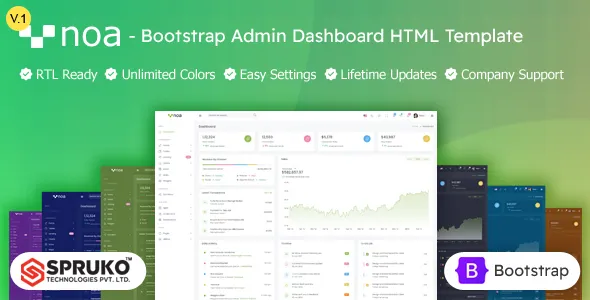
Noa – HTML Admin Bootstrap Dashboard Template
Noa – HTML Admin Bootstrap Dashboard Template is a modern and versatile admin interface designed for developers, businesses, agencies, startups, SaaS platforms, web applications, and dashboard-based digital products. Built around a clean Bootstrap-powered structure, this template provides a practical foundation for creating professional administration panels, management systems, analytics dashboards, internal business applications, and web-based control panels.
An effective admin dashboard should make complex information easier to understand and manage. Users need quick access to statistics, reports, tables, forms, notifications, settings, user management, and other application functions without unnecessary visual complexity. Noa provides a structured interface that can help developers organize these features into a consistent and professional administration environment.
Whether you are developing a SaaS application, CRM, ERP system, project management platform, analytics application, e-commerce backend, financial dashboard, customer portal, or custom business application, Noa – HTML Admin Bootstrap Dashboard Template can serve as a flexible starting point for your front-end development.
Modern Admin Dashboard Design
Noa is designed around the requirements of modern web administration interfaces. A dashboard typically contains a large amount of information, so a clean layout and logical navigation are important for maintaining usability.
The template provides a structured environment for presenting statistics, charts, tables, cards, forms, menus, notifications, and application controls. Developers can customize these elements according to the needs of their particular project.
The professional visual structure also makes the template suitable for client-facing administrative applications where appearance and usability are both important.
Bootstrap-Based Framework
Bootstrap provides a widely used foundation for responsive web development. Noa – HTML Admin Bootstrap Dashboard Template uses a Bootstrap-oriented structure, making it suitable for developers who are familiar with Bootstrap’s grid system, components, utilities, and responsive development approach.
Developers can use Bootstrap classes and established design patterns to modify layouts or build additional pages. This can make the customization process more straightforward for teams that already use Bootstrap in their development workflow.
The responsive grid approach also allows dashboard sections to adapt to different screen sizes.
Professional Administration Panel
An administration panel acts as the control center for many web applications. It can provide access to users, products, orders, reports, settings, content, notifications, and other application functions.
Noa can be customized to create a centralized administrative environment where these different features are presented through a consistent interface.
Developers can reorganize navigation menus, dashboard widgets, tables, forms, and other elements based on the application’s business logic.
Dashboard Overview
A dashboard overview can give administrators a quick understanding of important business information. Noa can be adapted with summary cards, statistics, charts, activity feeds, notifications, and other data-driven elements.
For example, an e-commerce application could display orders, sales, customers, products, and revenue. A SaaS platform could show subscriptions, active users, conversions, and usage statistics.
The dashboard structure can be customized to prioritize the information that administrators need most frequently.
Analytics Dashboard
Data visualization is an important part of many administration systems. Charts and statistics allow users to identify trends and understand business performance more efficiently.
Noa can be extended with analytics components that display metrics, reports, graphs, and performance indicators.
Developers can connect these components to APIs or backend data sources to create live analytics dashboards for business applications.
Tables and Data Management
Administrative applications frequently require tables for managing structured information. Users may need to review customers, products, orders, transactions, employees, projects, or other records.
Noa provides a suitable interface foundation for creating data management pages with organized tables and supporting controls.
Developers can integrate their preferred table libraries or backend systems to add features such as filtering, sorting, searching, pagination, and record management.
Forms and Input Pages
Forms are essential for administration systems because administrators frequently need to create, update, or manage data.
Noa can be customized with forms for user registration, product management, profile settings, content editing, configuration options, customer information, and other business processes.
Developers can connect these forms to their backend validation and processing systems to create complete application workflows.
User Management Interface
Many web applications require administrative tools for managing users. A user management section can provide access to account information, roles, permissions, profiles, and activity.
Noa can be adapted for user administration pages where administrators can view and manage user records.
Depending on the backend architecture, developers can connect these interfaces with authentication systems, role-based access controls, and permission management functionality.
CRM Dashboard
Customer relationship management systems require organized interfaces for managing customer records, interactions, leads, opportunities, and business information.
Noa can provide a strong visual foundation for building CRM dashboards. Developers can create customer tables, lead management pages, activity timelines, contact profiles, and performance statistics.
The flexible dashboard structure can be adapted to different sales and customer-management workflows.
ERP Application Interface
Enterprise resource planning systems often contain multiple modules and large amounts of business information. A professional administration interface can make these systems easier to navigate.
Noa can be customized for ERP applications involving inventory, employees, finance, sales, purchasing, operations, or other business processes.
Developers can create separate navigation areas and dashboard modules according to the organization’s requirements.
SaaS Application Dashboard
SaaS platforms commonly provide customers with a private dashboard where they can manage accounts, subscriptions, usage, settings, and application features.
Noa – HTML Admin Bootstrap Dashboard Template can be adapted for SaaS administration panels and user dashboards.
Developers can customize dashboard cards, account pages, billing sections, usage statistics, notifications, and application settings to match their SaaS product.
E-Commerce Admin Panel
Online stores require administrative interfaces for managing products, customers, orders, payments, inventory, promotions, and reports.
Noa can be customized into an e-commerce backend where administrators can access these functions through a unified dashboard.
Product management pages can include images, pricing, categories, inventory information, descriptions, and status fields. Order pages can display customer details, payment status, shipping information, and order history.
Financial Dashboard
Financial applications depend on clear presentation of numbers and transactions. Noa can be adapted for finance dashboards that display revenue, expenses, transactions, account information, financial reports, and performance metrics.
Developers can integrate charts and tables with financial data obtained from secure backend services.
The clean dashboard structure can help present complex financial information in an organized way.
Project Management Dashboard
Project management applications require dashboards for tracking tasks, teams, deadlines, milestones, and project progress.
Noa can be customized to display project statistics, task lists, team information, progress indicators, calendars, and activity updates.
Project managers can use such interfaces to monitor project status while team members can access relevant tasks and information.
Responsive Admin Experience
Modern administrative systems may be accessed from desktops, laptops, tablets, and mobile devices. Responsive layouts help maintain usability across different screen sizes.
Noa’s Bootstrap-based structure can be adapted for responsive administration interfaces where navigation, cards, tables, forms, and dashboard widgets adjust according to viewport dimensions.
While complex data tables are often best used on larger screens, responsive design can still provide convenient access to important administrative information on smaller devices.
Sidebar Navigation
Administrative dashboards often contain many sections, making navigation an important part of the user experience.
Noa can be customized with structured sidebar navigation that separates application modules into logical categories.
Developers can add or remove menu items depending on the project. Navigation can include dashboards, users, products, orders, reports, settings, support, and other application areas.
Header and Notification Areas
Dashboard headers commonly contain account information, notifications, search controls, and quick-access actions.
Noa can provide a structured environment for these interface elements. Developers can connect notifications to real application events and add user menus for account management.
A consistent header can help users understand where they are within the application while providing quick access to frequently used controls.
Cards and Summary Widgets
Dashboard cards are useful for highlighting important metrics. Noa can be customized with summary widgets for revenue, users, orders, tasks, sales, subscriptions, or other business statistics.
Cards can be connected to backend data so that administrators see current information when they access the dashboard.
The modular structure also makes it possible to create different dashboard configurations for different user roles.
Charts and Data Visualization
Charts can turn raw data into easier-to-understand visual information. Administrators can use charts to monitor sales trends, customer growth, website activity, financial performance, project progress, or other metrics.
Noa can be integrated with charting libraries to create interactive data visualization components.
Developers can select the chart types that best represent their application’s data and connect them to live or stored information.
Calendar and Scheduling Interfaces
Many business applications require calendars for appointments, deadlines, meetings, events, or schedules.
Noa can be extended with calendar interfaces to support administrative scheduling workflows.
A calendar module can be connected to backend services so administrators can create, update, and manage events from within the dashboard.
Profile and Account Settings
Administrative users often need access to profile information and account preferences. Noa can include dedicated profile and settings pages for managing personal details, passwords, preferences, notifications, and other configuration options.
Developers can connect these pages to authentication and user-management systems.
Authentication Pages
A professional dashboard often requires login and authentication screens before users can access administrative functions.
Noa can be adapted to create login, registration, password recovery, verification, and account-related pages.
These interfaces can then be connected to the application’s authentication infrastructure and security policies.
Developer-Friendly HTML Structure
Noa is designed as an HTML dashboard template, giving developers direct access to the front-end structure.
Developers can modify HTML, CSS, JavaScript, images, icons, navigation, and content to match project requirements.
This direct control can be useful when building custom administration systems because development teams can adapt the existing interface instead of being restricted to a fixed application structure.
Custom Branding
Businesses often need their internal applications to match their brand identity. Noa can be customized with company logos, brand colors, typography, icons, and other visual elements.
A consistent branded dashboard can create a more professional experience for employees, customers, and administrators.
Agencies can also customize the interface for individual clients when delivering dashboard-based web applications.
Easy Content and Layout Customization
Different applications have different requirements. A CRM may need customer management, while an e-commerce platform needs products and orders.
Noa can be adapted by adding, removing, or rearranging dashboard components according to the application.
Developers can create new pages, modify existing layouts, update navigation, integrate new components, and connect the interface to custom backend systems.
Useful for Web Applications
Noa is not limited to traditional admin panels. Its dashboard structure can support many different types of web applications.
Possible applications include business management systems, SaaS platforms, CRM tools, ERP systems, analytics dashboards, project management software, e-commerce administration panels, membership systems, booking applications, education platforms, and custom internal tools.
This broad applicability makes the template a practical starting point for different development projects.
Suitable for Startups
Startups often need to develop products efficiently while maintaining a professional user experience. A ready-made dashboard foundation can reduce the amount of time required for initial interface development.
Noa can provide the starting structure for startup dashboards and SaaS products while developers focus on implementing business-specific functionality.
As the product grows, additional modules and pages can be added to the dashboard.
Useful for Development Agencies
Web development agencies can use Noa as a reusable starting point when building dashboards for different clients.
Instead of creating common interface elements from the beginning for every project, developers can customize the existing structure and focus on client-specific requirements.
Branding, navigation, dashboard widgets, forms, tables, and page structures can be modified to create a customized final product.
Integration with Backend Systems
An HTML dashboard template provides the front-end interface, while application data and business logic are generally managed by a backend system.
Noa can be integrated with REST APIs, GraphQL services, databases, authentication systems, and custom backend applications.
Developers can connect dashboard widgets to live data, submit forms to APIs, populate tables dynamically, and implement application-specific workflows.
This makes the template suitable for projects using different backend technologies.
Performance and Usability Considerations
Dashboard applications often contain many interface components, so performance should be considered during development.
Developers can optimize images, minimize unnecessary scripts, load resources efficiently, and connect only required components to the final application.
Good dashboard performance combined with logical navigation can provide administrators with a more efficient working environment.
Scalable Dashboard Foundation
Business applications often evolve over time. New users, features, modules, reports, settings, and workflows may be added after launch.
Noa provides a flexible interface foundation that can be extended as the application develops. Developers can create additional pages and modules while maintaining the existing visual language.
This can make the template useful for both smaller applications and larger custom dashboard projects.
Professional Internal Business Tools
Companies frequently use internal web applications to manage business processes. These systems may include employee management, inventory, reports, project tracking, customer information, or operational workflows.
Noa can be customized to create professional internal tools that provide employees with centralized access to important information.
A consistent dashboard interface can help teams work with business data more efficiently.
SEO and Admin Dashboard Templates
Admin dashboards are generally private interfaces rather than public marketing pages, so traditional SEO is not usually the primary purpose of an administration panel. However, the template’s clean HTML structure can still be useful when developers create public-facing pages alongside the dashboard.
Developers can use appropriate semantic HTML, optimized content, accessible navigation, and performance practices for any public website components associated with the application.
For the dashboard itself, usability, accessibility, security, performance, and data organization are typically more important than search engine visibility.
Why Choose Noa – HTML Admin Bootstrap Dashboard Template?
Noa provides a flexible and professional foundation for developers who need to create a modern administration interface. Its Bootstrap-based structure, responsive layout approach, reusable dashboard components, navigation areas, tables, forms, cards, and data-focused sections can support a broad range of web application requirements.
It can be adapted for SaaS platforms, CRM systems, ERP applications, e-commerce backends, financial dashboards, analytics platforms, project management tools, internal business systems, and many other applications.
The HTML foundation gives developers direct control over the interface, while Bootstrap provides familiar tools for building responsive layouts and customizing components.
Build Your Next Admin Dashboard
A successful administration system should help users manage information efficiently while keeping the interface understandable and consistent. Noa – HTML Admin Bootstrap Dashboard Template provides a starting point for creating such an environment.
Developers can customize the dashboard according to their application’s functionality, connect it to APIs and backend services, implement authentication and permissions, and add the business-specific features required by the final product.
Whether you are developing a startup SaaS application, enterprise management platform, analytics system, e-commerce backend, or custom business tool, Noa can help establish a professional front-end foundation.
Conclusion
Noa – HTML Admin Bootstrap Dashboard Template is a versatile solution for developers and businesses looking to create modern administration panels and web application dashboards. Its Bootstrap-oriented structure and flexible HTML foundation make it suitable for a wide variety of projects, from SaaS and CRM platforms to ERP systems, analytics tools, e-commerce backends, financial applications, and internal business software.
With customizable navigation, dashboard cards, tables, forms, charts, user management, profile pages, settings, and other interface elements, Noa can be adapted to meet different application requirements.
By combining the template with a reliable backend, secure authentication, optimized data handling, responsive development practices, and customized branding, developers can transform Noa into a professional administration interface designed around the specific needs of their web application.