My Account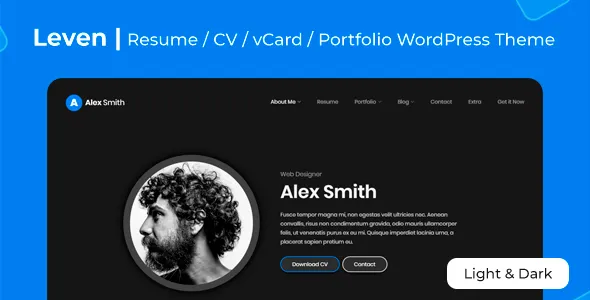
Leven – Personal Website Resume Theme
Leven – Personal Website Resume Theme is a professional website design solution for individuals who want to present their skills, experience, qualifications, achievements, and career goals through a modern personal website. Whether you are a job seeker, software developer, designer, freelancer, consultant, student, or experienced professional, Leven provides a starting point for building a personal online presence that communicates your professional identity and makes your background easier to explore. Instead of relying exclusively on a traditional resume document, you can use a dedicated website to showcase your experience, introduce your expertise, highlight selected projects, and provide visitors with convenient ways to contact you.
A personal website can play an important role in career development because it gives you greater control over how your professional story is presented. Recruiters, employers, clients, and collaborators can use your website to understand your capabilities, review your work, and learn more about your experience. Leven is designed around the personal website and resume concept, making it relevant for individuals who want to create a centralized destination for career information, portfolio content, and professional updates.
With WordPress-based content management and suitable customization options, a personal resume website can be adapted to different industries and career stages. A developer might highlight technical projects and programming skills, while a graphic designer could focus on visual case studies and creative work. A marketing professional might emphasize campaign experience, certifications, and measurable results, whereas a consultant could use the website to introduce services and professional achievements. The most effective website structure depends on your goals, audience, and the type of work you want to showcase.
What Is Leven – Personal Website Resume Theme?
Leven is a personal website and resume-focused theme concept intended for people who want to present their professional information online. It offers a starting point for creating a structured website that introduces an individual, explains their experience, showcases relevant projects, and makes important career information accessible.
A traditional resume usually has limited space, which means that detailed project examples, visual work samples, professional articles, and additional background information may be difficult to include. A personal website can expand on that information by providing separate pages or sections for different aspects of your professional identity.
Leven can be considered by job seekers, freelancers, designers, developers, photographers, consultants, business professionals, students, and other individuals who want to build a personal brand. The website can serve as an online resume, a portfolio, a professional introduction, or a combination of these purposes.
Because the theme is intended for the WordPress ecosystem, it can provide a foundation for managing website content through the WordPress dashboard. Depending on the available theme options and installed tools, you may be able to customize page content, update your biography, add project details, publish articles, and maintain your contact information.
Before building the website, review the current Leven theme documentation to confirm its available layouts, customization features, compatibility requirements, and any included integrations.
Key Features of Leven – Personal Website Resume Theme
Professional Personal Website Design
A professional website should introduce you clearly and help visitors understand what you do. A focused layout can present your name, professional title, key skills, and most important career information without overwhelming the reader.
Leven’s personal resume orientation makes it a relevant starting point for building this type of website. You can organize information into sections that explain your background, outline your expertise, and direct visitors toward your portfolio or contact details.
For example, a software developer might introduce their technical specialization and link to selected applications. A creative professional might feature a visual portfolio, while a business consultant could focus on industry knowledge, services, and professional achievements.
The objective is to create a coherent online identity that supports your career goals and gives visitors a clear reason to continue exploring.
Online Resume and Career History
A resume website can provide a structured overview of your education, professional experience, responsibilities, and accomplishments. Visitors should be able to understand your career progression without searching through unrelated information.
You can organize your career history into relevant sections, such as work experience, education, certifications, professional development, and selected achievements. Each entry should include accurate details about your role, organization, responsibilities, and contributions where appropriate.
A well-written online resume should focus on results and relevant experience rather than simply listing job duties. Where possible, describe the projects you worked on, the problems you helped solve, and the outcomes you contributed to.
Leven can provide a design framework for presenting these details, with the final layout depending on the available theme features and your chosen customizations.
Personal Biography and Introduction
A biography gives visitors context about your professional background, interests, and goals. It can explain what you do, how you approach your work, and which areas of expertise define your professional identity.
A useful introduction is specific and concise. Instead of relying on broad statements such as being passionate about success, describe the types of challenges you work on, the skills you bring, and the value you aim to provide.
For example, a web designer could explain their interest in accessible digital experiences, while a financial analyst might describe their experience with reporting, forecasting, and business analysis.
A personal biography can also communicate your professional values and interests, helping visitors understand the person behind the resume.
Skills and Expertise Presentation
A dedicated skills section helps visitors quickly identify your areas of expertise. Depending on your profession, this may include technical abilities, software knowledge, creative skills, communication, project management, research, or industry-specific competencies.
Group related skills into meaningful categories instead of displaying a long, unstructured list. A developer might separate programming languages from frameworks and development tools. A designer could distinguish interface design, prototyping, visual communication, and user research.
Keep the information accurate and relevant to your target opportunities. Listing skills that you cannot demonstrate may create unrealistic expectations, while a focused selection supported by project examples can make your profile more credible.
If the theme supports visual skill indicators, use them thoughtfully. Clear descriptions and real examples are often more informative than arbitrary percentage scores.
Portfolio and Project Showcase
A portfolio gives you an opportunity to demonstrate your abilities through examples of completed work. This can be especially useful for designers, developers, photographers, writers, marketers, architects, and other professionals whose skills are best understood through practical examples.
Each project can include a title, a short description, your role, the tools or methods used, and the outcome where appropriate. Images, screenshots, live project links, or case-study content can provide additional context.
A developer might explain how an application solves a particular problem, while a graphic designer could show selected branding work and describe the design decisions behind it. A marketing professional could outline campaign objectives and present results that can be shared responsibly.
Leven can serve as a foundation for a portfolio-focused personal website. The exact project grid, gallery, filtering, or portfolio functionality should be confirmed in the current theme package.
Responsive Design for Different Devices
Recruiters, hiring managers, clients, and collaborators may visit your website from smartphones, tablets, laptops, or desktop computers. A responsive website helps ensure that your professional information remains accessible across these devices.
Important elements include readable text, clear navigation, properly sized images, accessible buttons, and well-organized content sections. A portfolio should also remain usable on smaller screens, where large images and complex layouts can otherwise become difficult to navigate.
Mobile usability is particularly important when someone opens your website through a link in an email, job application, professional profile, or messaging conversation.
Test your finished website on different screen sizes to confirm that the resume, portfolio, contact information, and navigation work as intended. Actual behavior depends on the theme version, customizations, plugins, and content.
Customization and Personal Branding
Your website should reflect your professional identity rather than look like a generic collection of resume sections. Consistent typography, colors, imagery, and content presentation can help create a recognizable personal brand.
Depending on the theme’s available settings and compatible tools, you may be able to customize your logo or name treatment, colors, fonts, page layouts, profile images, and other visual details.
A creative professional may choose a distinctive visual style, while a lawyer, consultant, or corporate professional may prefer a restrained and formal presentation. The appropriate design depends on the industry, target audience, and personal preferences.
Avoid adding unnecessary animations, decorative elements, or competing colors that distract from your qualifications. Effective personal branding supports the content instead of overpowering it.
Benefits of Using Leven for a Personal Resume Website
Build a Strong Professional Online Presence
A personal website gives you a dedicated place to present your professional background and explain what makes your experience relevant. It can complement your resume, professional networking profiles, and job applications.
Leven provides a personal website design direction that can help organize this information into a consistent presentation. Visitors can learn about your skills, review selected work, and find your contact details in one place.
A professional online presence can also support long-term career development. As you gain experience, you can update your website with new projects, certifications, responsibilities, and achievements.
Present More Than a Traditional Resume
A conventional resume is usually designed to be concise. Although this is useful for applications, it can limit how much context you provide about complex projects or specialized expertise.
A personal website can expand on selected resume entries through detailed project pages, case studies, articles, visual examples, and additional professional information.
For example, a UX designer might explain the research and design process behind a project, while a software developer could describe technical decisions and implementation challenges. A consultant might provide an overview of their approach to solving a business problem.
The additional information should remain relevant to your professional goals. A website is most effective when it provides useful context rather than repeating every detail from your resume.
Improve Portfolio Visibility
A centralized portfolio makes it easier to share your work with potential employers and clients. Instead of sending several separate files or links, you can direct people to one website where your selected projects are organized.
A portfolio should prioritize your strongest and most relevant examples. Include a brief explanation of each project and clarify your contribution, particularly when the work was completed as part of a team.
Make sure that you have permission to publish the work and that confidential information is removed. Where a project cannot be shown publicly, you can describe your role at a high level without disclosing protected details.
Support Freelance and Consulting Opportunities
Freelancers and consultants can use a personal website to introduce their services, explain their expertise, and provide examples of previous work.
A service-focused website might include an introduction, service descriptions, selected case studies, testimonials where permission has been obtained, and a contact form. Clear information helps potential clients understand whether your experience matches their needs.
Leven can be adapted toward this approach when the available layouts and customization options support the required content. More advanced functions, such as appointment scheduling, client portals, or paid consultations, may require additional tools.
Keep Your Career Information Updated
Your career changes as you gain experience, complete projects, and develop new skills. A personal website allows you to update your professional information without redesigning an entire resume from scratch.
WordPress content management can help you maintain biography sections, portfolio pages, articles, and contact details. Keeping this information current ensures that visitors are seeing a useful representation of your present capabilities.
Create a regular review routine to remove outdated project links, correct previous job details, and update any certifications or skills that have changed.
Establish a Consistent Personal Brand
A personal brand is the combination of your expertise, professional values, visual identity, and communication style. A well-organized website can bring these elements together.
Use consistent language and visual styling throughout your website. Your biography, portfolio, resume, and contact page should communicate a coherent professional message.
If you also maintain profiles on professional networking platforms, keep your job titles, contact details, and major accomplishments reasonably consistent across those channels.
Who Should Use Leven – Personal Website Resume Theme?
Job Seekers and Recent Graduates
Job seekers can use a personal resume website to present their education, skills, internships, projects, and professional interests. This can be particularly useful for recent graduates who have limited full-time work experience but can demonstrate their abilities through academic projects, practical assignments, or independent work.
A well-structured website can include a short introduction, education details, relevant skills, project examples, certifications, and contact information.
Keep the content tailored to the type of roles you want to pursue. For example, an aspiring web developer should prioritize coding projects and technical knowledge, while a marketing graduate might highlight campaign exercises, writing samples, and research experience.
Software Developers and Programmers
Developers can use a personal website to demonstrate their technical skills through applications, code samples, project summaries, and development experience.
Useful sections may include programming languages, frameworks, tools, selected repositories, live demonstrations, and case studies. Each project should explain what it does and clarify the technologies used.
Where possible, describe the problem the project addresses and your contribution to its implementation. Make sure that repository links and live demos work correctly and that private credentials or sensitive technical information are not exposed.
Web Designers and Creative Professionals
Designers and creative professionals often need a portfolio that communicates both their visual abilities and their approach to problem-solving.
A personal website can present selected design projects, explain creative decisions, and show how the work responds to a particular brief or audience. Relevant categories might include branding, interface design, illustration, digital content, photography, or web design.
Use high-quality images and concise case studies. A smaller collection of strong, relevant examples is often more effective than a large gallery without context.
Freelancers and Independent Consultants
Freelancers can use a personal website to explain their services, showcase results, and make it easier for prospective clients to contact them.
A useful structure may include a professional introduction, service descriptions, portfolio examples, a process overview, frequently asked questions, and a contact section.
Clearly explain the type of work you accept, the industries you serve, and how prospective clients can begin a conversation. Avoid promising results that cannot be guaranteed.
Business and Corporate Professionals
Managers, analysts, marketers, project coordinators, sales professionals, and other business specialists can use a resume website to communicate their experience and strengths.
The content might focus on leadership, industry expertise, project delivery, certifications, and measurable achievements. Case studies should protect confidential business information and respect employer policies.
A clean, straightforward presentation can help visitors quickly understand your professional background and areas of specialization.
Students and Academic Professionals
Students and academic professionals may want to present research interests, publications, educational achievements, teaching experience, and professional development.
A website can provide additional context for work that cannot be explained fully in a short resume. Relevant pages might include research summaries, presentations, publications, academic projects, and contact information.
Ensure that all citations, co-author details, and publication information are accurate. Follow institutional rules when sharing research data or unpublished material.
Photographers, Writers, and Content Creators
Photographers, writers, and content creators often benefit from a central website that showcases selected work and explains their professional focus.
Photographers may organize galleries by project or subject. Writers can provide selected articles, editorial samples, and publication links. Content creators might highlight campaign examples, media work, and relevant collaborations.
Obtain permission before displaying work owned by clients or publishers, and provide appropriate attribution when required.
WordPress Content Management and Administration
Manage Your Professional Pages
WordPress allows website owners to manage pages and other content through an administration dashboard. This makes it possible to revise your biography, update career details, add project descriptions, and maintain contact information as your professional needs change.
A personal resume website might include Home, About, Resume, Portfolio, Services, Blog, and Contact pages. Not every website needs all of these sections; select the pages that serve your goals.
Keep navigation clear and avoid unnecessary menu items. Visitors should be able to find your qualifications and strongest work quickly.
Organize Projects and Case Studies
A consistent structure makes portfolio content easier to maintain. Each project page can include an overview, your responsibilities, tools used, relevant images, and the final outcome.
For collaborative projects, distinguish your own contribution from the work completed by other team members. This helps potential employers or clients understand your actual experience.
Review project pages regularly to ensure that images, external links, and demonstrations remain available.
Publish Professional Articles
A blog can support your personal website if you have useful knowledge to share. Articles might cover professional lessons, industry developments, technical tutorials, project reflections, or practical advice related to your field.
Publishing helpful content can demonstrate your communication skills and give visitors additional insight into your expertise. Choose topics that match your professional goals and the interests of your intended audience.
You do not need to publish frequently just to keep a blog active. A small collection of useful, original articles is preferable to a large quantity of low-value content.
Maintain Accurate Contact Information
Your website should make it easy for the right people to reach you. Provide a professional email address or an appropriate contact form and review the details periodically.
If you include social media or professional networking links, verify that each destination is correct and represents the profile you want to share.
Avoid publishing personal information that is not necessary for professional communication. A dedicated professional email address can help separate career inquiries from private correspondence.
SEO-Friendly Structure for Personal Websites
Optimize Your Homepage for Your Profession
Search engine optimization can help people discover your website when searching for your name, skills, or professional services. Your homepage should explain who you are and what you do using clear, natural language.
For example, a freelance web developer could introduce their specialization and the types of projects they work on. A designer might explain their creative focus and link to relevant portfolio categories.
Avoid repeating the same keyword excessively. The main goal is to make your expertise understandable to both visitors and search engines.
Create Descriptive Page Titles and Meta Descriptions
Each important page should have a distinct title and meta description that accurately summarizes its content.
A resume page might focus on your professional background, while a portfolio page could describe your selected projects or specialization. A service page should explain what you offer and whom you help.
A compatible SEO plugin can help manage metadata and other technical settings. Search results may display different snippets depending on the query, so metadata should be clear and informative rather than treated as a guarantee of a particular display.
Use Clear Headings and Page Structure
Organize content with meaningful headings and short paragraphs. Visitors should be able to scan your experience, skills, and portfolio without reading every line.
Use headings that describe the content of each section. Avoid using headings purely for visual decoration or repeating identical keyword phrases throughout the page.
A clear content hierarchy also helps make your website more understandable to assistive technologies and search engines.
Optimize Portfolio Images
Portfolio images can improve the presentation of creative work, but large files may slow down page loading. Resize images appropriately and use modern formats where supported.
Write descriptive alternative text for meaningful images. Describe the project or visual content rather than inserting unrelated keywords.
For projects that rely on screenshots or diagrams, make sure the text surrounding the image explains its relevance so visitors who cannot view the image can still understand the work.
Build a Helpful Professional Blog
Publishing original articles can provide additional ways for visitors to discover your expertise. Developers might publish tutorials, designers could explain their process, and consultants might share practical industry insights.
Each article should answer a genuine question or provide useful information. Include relevant internal links to portfolio pages or services when those links help readers explore related work.
Avoid publishing generic or repetitive articles solely to increase keyword frequency. Quality, accuracy, and usefulness should guide your content strategy.
Performance, Accessibility, and Security
Maintain Efficient Website Performance
A personal website should load efficiently, particularly when recruiters or clients access it from mobile devices or slower connections.
Large portfolio images, unnecessary animations, excessive plugins, and embedded media can affect performance. Optimize assets and keep the website’s functionality focused on your actual requirements.
Hosting quality, theme implementation, plugins, and customizations all influence loading speed. Test important pages after launch and address obvious performance problems.
Improve Website Accessibility
Use readable fonts, adequate contrast, descriptive links, and clearly labeled forms. Ensure that navigation is understandable and interactive elements are usable with appropriate input methods.
For image-heavy portfolios, provide meaningful alternative text and avoid conveying essential information through imagery alone.
Accessible design can make your professional website easier for a wider audience to use and can improve the overall quality of the user experience.
Protect Personal and Professional Information
Keep WordPress, the theme, and installed plugins updated. Use strong authentication, restrict administrative permissions, and maintain reliable backups.
If your website includes contact forms, collect only the information needed to respond to inquiries. Use reputable form tools and consider spam protection where appropriate.
Do not publish confidential client work, private employer information, sensitive project data, or personal details that you do not intend to make public.
Keep Your Website Current
Review your resume and portfolio periodically to reflect your latest experience. Remove broken project links, update contact details, and revise descriptions when your professional focus changes.
After significant theme or plugin updates, check that page layouts, forms, navigation, and portfolio elements still work correctly. Maintaining the website helps ensure that it remains a dependable representation of your professional identity.
Customization Ideas for Leven
Create a Clear Introduction Section
The first section of your website should quickly communicate your name, profession, and primary area of expertise. A concise headline can help visitors understand your professional focus immediately.
Add a short introduction and direct visitors toward your resume, portfolio, or contact information. Avoid vague statements that could apply to almost anyone.
Highlight Your Strongest Projects
Feature a small number of projects that best demonstrate your current skills and career direction. Explain the purpose of each project and your contribution to its completion.
If you have experience across several areas, organize projects into relevant categories so visitors can focus on the work that interests them.
Present Your Career History Clearly
Arrange work experience and education in a consistent format. Include role titles, organizations, dates, and concise descriptions of relevant responsibilities and accomplishments.
Use accurate dates and avoid unnecessary personal information. If your career includes freelance work, internships, or independent projects, describe them clearly so visitors understand the nature of the experience.
Add a Professional Contact Section
A contact section should make the next step obvious. Provide a professional email address or a contact form and explain the types of inquiries you welcome.
Freelancers may include service inquiries, while job seekers may indicate that they are open to relevant professional opportunities. Keep the wording direct and ensure that the form works correctly.
Maintain a Consistent Visual Identity
Choose a restrained set of colors, readable fonts, and consistent image styles. The visual presentation should complement your profession and make your content easier to understand.
Avoid excessive animations or decorative effects that distract from your experience. A clear and consistent design can make your personal website feel more professional and easier to navigate.
Compatibility and Maintenance Considerations
Before using Leven, review the current theme documentation and confirm the supported WordPress version, installation instructions, customization options, included assets, and any required plugins.
If you need advanced portfolio filtering, a blog, a contact form, downloadable resume files, or additional integrations, verify that the theme and selected plugins support the required functionality.
Test the website on desktop and mobile devices before sharing it with recruiters or clients. Check that all contact forms, external links, project previews, and downloadable files work correctly.
Maintain backups and test major updates before applying them to a live website whenever possible. Regular maintenance helps preserve the quality of your professional online presence.
Why Choose Leven – Personal Website Resume Theme?
Leven offers a personal website and resume-oriented design direction for individuals who want to present their professional background in a structured online format. It can provide a foundation for communicating career history, highlighting skills, showcasing projects, and creating a centralized point of contact.
Its potential uses extend across different professional fields, including development, design, consulting, marketing, photography, education, and freelance services. With thoughtful customization, the website can reflect your individual career goals rather than functioning as a generic digital resume.
WordPress content management can make routine updates more manageable, while compatible plugins may provide additional features when required. Specific capabilities should be verified against the current theme package before implementation.
The strongest personal websites combine an appropriate design with accurate information, relevant project examples, clear navigation, responsive layouts, and ongoing maintenance.
Conclusion
Leven – Personal Website Resume Theme is a relevant option for professionals, job seekers, freelancers, students, and creative individuals who want to establish a personal website using WordPress. Its resume-focused concept can help organize professional information and provide space for portfolio projects, career achievements, skills, education, and contact details.
A personal website can complement a traditional resume by offering more context about your experience and allowing you to showcase selected work in a format that is easy to share. Whether your goal is to attract employers, connect with clients, or strengthen your personal brand, a well-planned website can support your professional communication.
Before launching your website, confirm the theme’s current features and compatibility, choose content that aligns with your goals, and test the complete experience across devices. With consistent branding, useful content, and regular updates, Leven can serve as a foundation for a professional online presence that evolves alongside your career.