My Account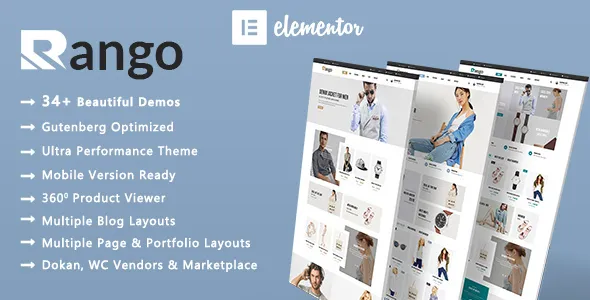
Rango | Elegant Fashion WooCommerce WordPress Theme
Rango | Elegant Fashion WooCommerce WordPress Theme is a stylish and versatile website solution designed for fashion retailers, clothing brands, online boutiques, and modern apparel businesses that want to establish a professional online shopping experience. With an elegant visual direction and an eCommerce-focused layout, Rango provides a strong foundation for presenting clothing collections, highlighting new arrivals, promoting seasonal offers, and helping customers discover products with ease. Whether you are launching a new fashion label, building an online boutique, or refreshing an existing clothing store, this WordPress theme offers a practical starting point for creating a visually appealing shopping website that reflects your brand identity.
Designed for businesses that value presentation and usability, Rango combines fashion-inspired aesthetics with the flexibility of WordPress and WooCommerce. You can organize products into meaningful categories, display featured collections, introduce promotional campaigns, and create dedicated pages for different types of apparel and accessories. From casual everyday clothing to premium fashion collections, the theme can support a wide range of store concepts when configured to suit your catalog. Its overall purpose is to help retailers create a consistent brand experience while making it convenient for visitors to browse products and move toward purchasing.
Discover an Elegant Fashion Store Design
A fashion website needs more than a collection of product photographs. It should communicate the personality of a brand, establish visual consistency, and make shopping enjoyable from the first visit. Rango is positioned for fashion businesses that want a polished online storefront with a contemporary appearance. Its design approach can help bring together product photography, collection highlights, promotional messages, and essential shopping information in a cohesive presentation.
An elegant storefront can make your products easier to appreciate while allowing your brand to stand apart from competitors. Use a consistent color palette, carefully selected typography, and high-quality product images to create a recognizable visual identity. Whether your brand focuses on minimalist essentials, modern streetwear, formal clothing, seasonal styles, or boutique collections, you can adapt the website presentation to match your target audience.
The theme can also provide a useful starting point for building a homepage that introduces your brand story and guides visitors toward relevant product categories. Carefully arranged content sections help customers understand what your store sells without requiring them to navigate through unnecessary pages. This balance between visual appeal and practical navigation is important for fashion retailers looking to create a professional online shopping destination.
Built for WooCommerce Online Shopping
WooCommerce is a widely used eCommerce platform for WordPress, allowing store owners to manage products, pricing, inventory, orders, and other essential aspects of online selling. Rango is designed around WooCommerce, making it suitable for businesses that want to build their fashion store using the WordPress ecosystem.
With an appropriately configured WooCommerce installation, you can create product listings for individual garments, accessories, footwear, and other fashion items. Each product can include a title, description, price, images, and relevant purchasing information. Depending on your product setup, you may also offer variations such as sizes, colors, and styles, helping shoppers select the option that matches their preferences.
A well-organized product catalog can simplify the shopping experience for both customers and administrators. Store owners can arrange items into categories, highlight selected products, and update product information as collections change. This flexibility is particularly useful for fashion retailers whose inventories evolve throughout the year.
WooCommerce also supports a broader eCommerce workflow through compatible payment gateways, shipping solutions, tax settings, and extensions. The availability of particular integrations depends on your chosen plugins, hosting environment, region, and configuration. Review the theme documentation and current WooCommerce compatibility information before launching your store to confirm that your required shopping features work as expected.
Create a Memorable Fashion Homepage
The homepage is often the first major interaction customers have with an online fashion brand. It should introduce your store, communicate your style, and make it easy for visitors to explore your most important collections. Rango can serve as a foundation for developing a homepage that balances attractive visuals with useful shopping pathways.
A large fashion banner can introduce a new season, showcase a signature collection, or communicate a limited-time promotion. Choose imagery that reflects your products and appeals to your intended audience. Clear messaging and a relevant call to action can guide visitors toward the collection or category you want them to explore.
You can also organize the homepage around featured products, popular categories, new arrivals, special offers, and curated collections. These sections give shoppers several ways to discover items based on their interests. A carefully structured homepage avoids overwhelming visitors while ensuring that important products and promotions receive appropriate attention.
For brands that rely on storytelling, the homepage can introduce the inspiration behind a collection or explain what makes the business different. Keep promotional messages concise and ensure that visual elements support the shopping journey. The exact sections available will depend on the theme’s supplied layouts and the page-building tools you use.
Showcase Clothing and Apparel Collections
Fashion retailers often sell products across multiple categories, making clear organization essential. Rango can support a catalog structure that reflects the way customers naturally shop. Instead of placing every item into a single long list, organize products into relevant collections and subcategories.
For example, a clothing store might separate its catalog into men’s fashion, women’s fashion, kids’ clothing, casual wear, formal wear, and seasonal collections. A boutique specializing in a narrower niche can create categories around its signature products or customer preferences. The most effective structure depends on the size of your catalog and the needs of your audience.
Category pages should use descriptive names and relevant images so customers can quickly understand what each section contains. Product titles should be clear, product descriptions should explain important details, and images should accurately represent the items being sold. Consistency across the catalog helps create a more professional store experience.
You can also create curated collections for occasions such as office wear, weekend outfits, holiday shopping, special events, and seasonal trends. These collections can help visitors discover related products without searching through the entire catalog. As your inventory grows, review category organization regularly to prevent duplicate or confusing navigation paths.
Present Products with Attractive Visuals
Product presentation plays a major role in fashion eCommerce because customers cannot physically inspect clothing before purchasing. High-quality imagery, helpful descriptions, and clear product information can make the online buying process more reassuring.
Use well-lit product photographs that show the garment’s color, texture, fit, and important design details. When practical, include multiple views and lifestyle photographs that demonstrate how an item looks when worn. Keep image proportions consistent across the catalog so product grids appear organized and visually balanced.
Your product pages should communicate essential information such as available sizes, colors, fabric details, care instructions, and fit guidance whenever those details are relevant. Clear sizing information can help customers make more informed decisions. If your products have unique measurements or fit characteristics, include a size guide that is easy to find.
Rango’s fashion-oriented presentation can provide a useful basis for showcasing these details, subject to the available product layouts and your configuration. Before publishing products, test how images and descriptions appear on desktop computers, tablets, and smartphones. Properly prepared product content can strengthen customer confidence and make your store easier to use.
Support Product Variations and Size Selection
Clothing products frequently come in different sizes, colors, patterns, or other variations. A well-configured WooCommerce store can represent these options through variable products, allowing customers to select the version they want before adding an item to their cart.
For example, a T-shirt might be available in several sizes and colors, while a jacket could include different size options and fabric variations. Product variations can be connected to their own pricing, stock levels, images, and other settings where supported by WooCommerce and the selected extensions.
Accurate variation setup is especially important for fashion retailers because shoppers need to understand which options are available. Use consistent naming conventions for sizes and colors, and avoid creating unnecessary variations that make product selection confusing. If a particular size is unavailable, ensure that inventory settings and purchasing behavior are configured appropriately.
You should also test variation selectors on mobile devices, where customers may interact with product options using a smaller screen. Verify that the selected option is easy to identify and that the add-to-cart process behaves correctly. Exact variation styling and advanced swatch functionality may depend on the theme version or additional plugins.
Highlight New Arrivals and Seasonal Trends
Fashion changes throughout the year, so retailers need a convenient way to introduce new products and keep the storefront current. New-arrival sections can help returning visitors discover the latest additions without browsing the entire catalog.
Use these sections to introduce fresh clothing collections, updated color palettes, seasonal essentials, and limited-edition designs. Give each new collection a clear visual identity while maintaining consistency with your broader brand presentation. You can also create dedicated landing pages for spring and summer styles, autumn layers, winter essentials, or occasion-based fashion.
Seasonal promotions provide another opportunity to keep the website relevant. A campaign might focus on festive clothing, holiday outfits, back-to-school apparel, or end-of-season discounts. Make sure that promotional banners link to the correct product categories and that offer details are accurate.
A regular content update schedule can help your store feel active and carefully maintained. Remove expired promotions, update unavailable products, and ensure that the homepage reflects your current catalog. These simple maintenance practices support a more reliable customer experience and make it easier for visitors to understand what is available.
Improve Product Discovery and Navigation
A convenient navigation system helps customers find relevant items without unnecessary effort. For a fashion store, this means creating menus and category structures that reflect common shopping habits while remaining manageable as the catalog expands.
Group related product categories together and use straightforward labels. Avoid overly complex menus that force shoppers to move through multiple layers before reaching a product. Important destinations such as new arrivals, featured collections, sale items, and customer support information should be easy to locate.
WooCommerce and compatible extensions can provide product filtering and sorting options, depending on your setup. Useful filters may include price, size, color, brand, availability, or product type. Sorting options can help customers organize products by price, popularity, or recency when the required functionality is enabled.
Search functionality can be particularly helpful for stores with large inventories. Product names, category labels, and descriptions should use language that customers are likely to recognize. Review your navigation periodically and test it with people who are unfamiliar with the website. Their feedback can reveal unclear category names or unnecessary steps in the shopping process.
Responsive Design for Mobile Shoppers
Customers may discover and purchase fashion products through desktop computers, laptops, tablets, and smartphones. A responsive storefront helps ensure that the shopping experience remains accessible across different screen sizes.
Mobile visitors should be able to read product information, view photographs, select variations, and navigate between categories without excessive zooming or horizontal scrolling. Buttons and interactive controls should be easy to tap, and important information should remain legible on smaller displays.
Fashion retailers should pay particular attention to image presentation on mobile devices. Product photographs need to remain clear while loading efficiently, and important visual details should not be cropped unexpectedly. Long product descriptions should also be structured with useful headings and concise paragraphs to make them easier to scan.
Although a responsive theme provides a foundation for cross-device presentation, the final experience also depends on the selected plugins, images, customizations, and content. Test the complete storefront on multiple devices and browsers before launching. Review the homepage, category pages, product details, cart, checkout, and account-related pages to identify layout issues that may affect customers.
Customize the Store to Match Your Brand
Every fashion business has its own personality. A luxury boutique may prefer restrained colors and editorial photography, while a streetwear label may use stronger contrasts and bold campaign images. A clothing store aimed at everyday shoppers may prioritize simplicity, clear pricing, and convenient product discovery.
Rango can serve as a starting point for creating a storefront that reflects your chosen brand direction. Depending on the theme’s supported customization options, you may be able to adjust colors, typography, layouts, banners, menus, and other visual elements through WordPress customization tools or compatible page-building software.
Begin by establishing a small set of brand guidelines. Choose a primary color, supporting colors, suitable typography, and a consistent approach to product photography. Apply these choices across the homepage, product pages, buttons, promotional graphics, and informational content.
Consistency makes a website easier to recognize and helps prevent the storefront from feeling disconnected. Avoid introducing too many fonts, colors, or decorative effects. A clear visual hierarchy should guide customers toward products and purchasing actions rather than competing for their attention.
Before making extensive changes, review the theme’s documentation and available customization settings. Some advanced layouts or visual effects may require additional tools, custom development, or third-party extensions.
Build Trust with Clear Store Information
Customers are more likely to shop confidently when a website explains who operates the store and what they can expect after placing an order. In addition to product pages, a fashion eCommerce website should provide clear business and customer-service information.
Consider creating dedicated pages for your brand story, contact details, shipping policy, returns and exchanges, privacy policy, and terms of service. If you offer size assistance or product recommendations, explain how customers can get help. Keep all policies accurate and aligned with the way your business actually operates.
Product descriptions should avoid vague claims and provide practical information. Where relevant, include material composition, fit, care instructions, country of manufacture, and other details that help shoppers evaluate a product. Be transparent about delivery estimates and any conditions attached to discounts or promotions.
Customer reviews may also help visitors understand the experiences of previous buyers when collected and displayed appropriately. Use genuine feedback and ensure that review functionality complies with applicable rules and platform requirements. A consistent approach to customer communication can help strengthen your store’s reputation over time.
WooCommerce Cart and Checkout Experience
A successful fashion store should make it straightforward for customers to move from product discovery to checkout. WooCommerce provides core shopping-cart and order-management functionality, while compatible payment and shipping extensions can help tailor the purchasing process to your business.
Before launch, review the cart page and checkout flow to ensure that product names, selected sizes, quantities, prices, shipping information, and totals are displayed correctly. Customers should understand what they are purchasing and what they will pay before confirming an order.
Choose payment methods appropriate for your market and business requirements. The available options depend on your location, payment provider, WooCommerce configuration, and selected extensions. Likewise, shipping rates and delivery options should reflect your fulfillment process.
Test the entire purchasing journey using the payment gateway’s recommended test mode where available. Confirm that orders are recorded correctly, stock levels update as expected, and customer notifications behave appropriately. Test common scenarios such as changing quantities, removing products, applying valid discount codes, and selecting different product variations.
The precise appearance and behavior of checkout pages can vary according to the WooCommerce version, theme templates, and installed extensions. Verify compatibility before relying on advanced checkout customization.
SEO-Friendly Product and Category Content
Search engine optimization can help potential customers discover your fashion store through relevant search queries. A useful SEO strategy combines clear website structure, descriptive product content, technically sound pages, and a good user experience.
Start with descriptive product titles that identify the item without unnecessary repetition. Write original descriptions that explain the product’s design, intended use, material, fit, available options, and other relevant characteristics. Avoid copying identical descriptions across multiple products, since unique and informative content offers more value to visitors.
Category pages can also benefit from concise introductory text when it genuinely helps customers understand the collection. Use relevant phrases naturally rather than repeating the same keyword in every sentence. The goal is to explain what the page contains, not to force keywords into content where they do not belong.
Use meaningful image filenames and descriptive alternative text for informative product photographs. Optimize image dimensions and file sizes to support efficient page loading. Provide sensible internal links between related categories, collections, and products so customers and search engines can discover relevant pages.
An SEO plugin may help manage page titles, meta descriptions, canonical settings, XML sitemaps, and other optimization tasks. Results are not guaranteed by a theme alone; rankings depend on many factors, including content quality, competition, site performance, technical configuration, and the overall value of the website.
Create Compelling Fashion Campaigns
Promotional campaigns can help fashion businesses introduce new collections, communicate discounts, and encourage customers to explore selected products. A carefully planned campaign should have a clear purpose and a consistent visual message.
For example, you might create a campaign for a new clothing line, a festive collection, a limited-time seasonal sale, or a collection built around a particular style. Use relevant photographs, straightforward headlines, and clear links to the products featured in the campaign.
Campaign landing pages can group related products into one convenient destination. This can reduce the effort required to find matching items and create a more coherent browsing experience. If you offer bundles or coordinated outfits, explain what each package includes and make pricing information easy to understand.
Promotional banners should remain readable on mobile devices and should not obscure important navigation or product information. Remove outdated campaigns promptly so customers do not encounter expired offers. When using countdowns, discount labels, or stock notices, ensure that they reflect genuine conditions and accurate information.
Useful for Different Fashion Business Models
The Rango fashion storefront concept can suit a variety of retail projects, depending on your catalog, configuration, and required integrations. Its WooCommerce foundation makes it a potential starting point for several types of fashion-oriented websites.
Clothing boutiques: Present carefully selected collections, highlight signature pieces, and create a consistent brand identity for a specialized clothing business.
Online apparel stores: Organize everyday clothing, seasonal products, and multiple apparel categories within a structured product catalog.
Independent fashion labels: Introduce your own designs and use product storytelling to communicate the inspiration and identity behind each collection.
Streetwear brands: Feature graphic clothing, casual essentials, and new drops using strong product photography and clear collection navigation.
Accessories retailers: Organize bags, belts, hats, jewelry, and complementary fashion products into useful shopping categories.
Designer and premium fashion stores: Use carefully selected imagery, restrained visual styling, and informative product details to present a more refined shopping experience.
Emerging online businesses: Start with a manageable catalog and expand product categories, marketing content, and compatible eCommerce functionality as the business grows.
The best configuration depends on the number of products you sell, the complexity of your inventory, your fulfillment requirements, and the experience you want to provide.
Performance and Website Maintenance
A fashion website often contains numerous high-resolution images, product variations, promotional banners, and third-party integrations. Maintaining good performance requires attention to the complete WordPress installation, not only the theme itself.
Prepare images for their intended display dimensions and use efficient file formats where appropriate. Avoid uploading unnecessarily large files, and consider suitable image optimization or caching tools after checking compatibility with your hosting environment and store configuration.
Choose reliable hosting that supports your expected traffic and WooCommerce requirements. Keep WordPress, WooCommerce, the theme, and installed plugins updated according to their maintenance guidance. Before applying major updates, create a backup and test important store functions in a staging environment whenever possible.
Remove unused extensions and avoid installing multiple plugins that perform the same task without a clear reason. Review checkout behavior, product pages, navigation, and mobile layouts after significant updates. Routine maintenance helps identify issues before they disrupt the customer experience.
If your store includes custom code, preserve documentation of your changes and use appropriate development practices to reduce the risk of losing modifications during updates. Confirm the theme’s support policy and update process before deploying the website for commercial use.
Accessibility and User-Friendly Content
An inclusive fashion store should make essential information accessible to as many visitors as possible. Clear text, consistent navigation, readable contrast, and understandable interface labels can make shopping easier for customers with different needs and browsing habits.
Use descriptive headings to divide long pages into logical sections. Write link labels that explain their destination rather than relying exclusively on generic phrases. Provide alternative text for meaningful product images and ensure that important product details are available as text instead of being communicated only through graphics.
Color should not be the sole method of indicating a selected size, availability status, or other important information. Where supported, ensure that interactive elements can be accessed and understood using common keyboard navigation patterns. Forms should have clear labels and helpful validation messages.
Accessibility depends on the theme, plugins, content, and customizations working together. Review the complete site rather than assuming that a responsive or visually polished design automatically meets accessibility standards. Making regular improvements can benefit both usability and customer confidence.
Getting Started with Rango
Setting up Rango begins with a WordPress installation and a hosting environment that meets the requirements of the theme and WooCommerce. Before installation, review the supplied documentation, supported software versions, required plugins, and any licensing conditions associated with your purchase.
After installing the theme, configure its available settings and install only the recommended dependencies. If demo content is provided, you may use it as a starting point for understanding the intended layouts. Replace demonstration text, images, prices, and product information before making the store public.
Next, configure WooCommerce with your store address, currency, payment methods, shipping settings, tax rules, and other relevant business information. Add a small selection of products first so you can test categories, product variations, image presentation, cart behavior, and checkout.
Customize the visual design to reflect your brand, then prepare essential policy and customer-support pages. Test the website on multiple screen sizes and complete sample purchasing journeys before launch. A staged setup process makes it easier to identify configuration problems and ensures that each part of the shopping experience receives attention.
Exact installation steps and available design options may differ by theme release. Always use the current theme documentation as the primary reference for version-specific instructions.
Why Choose Rango | Elegant Fashion WooCommerce WordPress Theme?
Choosing a suitable theme is an important step when creating a fashion eCommerce website. Rango brings together a fashion-focused design direction and a WooCommerce-oriented foundation, making it a potential choice for retailers who want to build a recognizable online storefront with WordPress.
Its main value lies in providing a starting point for presenting clothing and fashion products in an organized, visually appealing environment. With a thoughtfully arranged homepage, consistent product photography, useful category navigation, and clear shopping information, you can build an experience that supports your brand and helps customers find products more easily.
The WordPress ecosystem also offers room to extend a store as business requirements change. Depending on the plugins and services you choose, you can add marketing integrations, additional payment options, shipping tools, analytics, product filters, and other functionality. Each addition should be selected according to a real business need and checked for compatibility.
A successful store ultimately depends on more than its design. Product quality, accurate information, dependable fulfillment, customer service, security, and regular maintenance all contribute to the shopping experience. Rango can provide a visual and technical starting point, while your products and business practices determine how effectively the finished website serves its customers.
Final Thoughts
Rango | Elegant Fashion WooCommerce WordPress Theme offers a fashion-oriented foundation for building a modern online clothing store with WordPress and WooCommerce. It is suitable for retailers who want to organize apparel collections, showcase new arrivals, present product details, and establish a consistent visual identity across their eCommerce website.
Whether you are creating an independent boutique, launching a clothing label, or developing a broader fashion catalog, a carefully configured storefront can help customers explore products and understand your brand. Combine the theme with original product descriptions, professional photography, clear sizing information, reliable checkout configuration, and useful customer policies to create a more complete shopping experience.
Before purchasing or launching, verify the current theme features, supported WordPress and WooCommerce versions, included layouts, customization options, licensing terms, and compatibility with any required plugins. These checks help ensure that the theme fits your project’s actual requirements.
With a clear brand direction, an organized catalog, and ongoing attention to usability and performance, Rango can serve as the starting point for an elegant fashion eCommerce website designed around your business goals.