My Account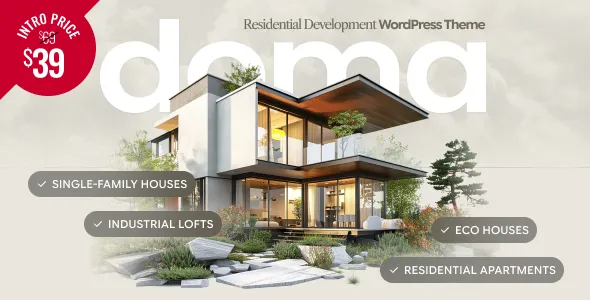
Doma – Real Estate Development WordPress Theme
Doma – Real Estate Development WordPress Theme is a professional website solution designed for real estate developers, property investment companies, residential construction businesses, commercial property firms, and real estate agencies looking to establish a strong online presence. Created for the property development industry, Doma provides a foundation for showcasing residential projects, presenting commercial developments, highlighting available properties, and communicating a company’s vision for modern living and investment opportunities. Whether you are developing luxury apartments, residential communities, commercial buildings, mixed-use projects, or premium housing developments, this WordPress theme can help you create a polished website that presents your properties and business professionally.
The real estate industry relies on presentation, accurate information, and customer confidence. Prospective buyers, investors, tenants, and business partners often visit a company’s website to explore developments, review property details, understand available amenities, and learn about the organization behind a project. A well-structured website can bring these details together in an accessible format, helping visitors understand the value and purpose of each development. Doma – Real Estate Development WordPress Theme offers a starting point for organizing project information, property photography, company details, development updates, and inquiry options in one digital destination.
From modern apartment complexes and luxury villas to office buildings, retail spaces, and large residential communities, property development projects require a clear and informative presentation. With suitable customization, Doma can support dedicated pages for ongoing developments, completed projects, available properties, investment opportunities, company information, and customer inquiries. Its suitability for a particular business depends on the theme’s actual features, selected configuration, and any additional WordPress plugins or services required.
Introduction to Doma – Real Estate Development WordPress Theme
Doma – Real Estate Development WordPress Theme is intended for businesses that want to communicate their property development expertise through a WordPress website. A property development company often manages multiple projects at different stages, from initial planning and construction to marketing and completed property sales. Presenting this information clearly helps prospective clients understand the company’s portfolio and explore the opportunities available.
A professional real estate website can introduce the organization, explain its development approach, highlight completed projects, and provide information about properties currently being marketed. It can also serve as a communication channel for buyers, investors, tenants, and business partners who need more information before making contact.
WordPress provides a content management environment for publishing property information, updating project pages, adding company announcements, and maintaining contact details. This flexibility can be valuable for developers whose portfolios change as new projects launch and existing developments progress.
With thoughtful planning, Doma can serve as a foundation for a website that reflects your company’s brand identity and property portfolio. The website should prioritize accurate information, clear navigation, compelling visuals, and straightforward ways for visitors to request further details.
Modern Design for Real Estate Development Businesses
A property development website should communicate professionalism while allowing the buildings and developments to remain the main focus. Its design needs to support high-quality photography, informative project descriptions, and clearly presented property details without overwhelming visitors.
Doma provides an opportunity to develop a real estate-focused visual presentation that reflects the company’s identity. Depending on the available layouts and customization options, the website can be adapted to showcase building exteriors, interior spaces, architectural concepts, landscaped areas, and community facilities.
A well-designed property page can combine images with information about the location, property type, development stage, available amenities, and contact options. This approach helps visitors understand the project before requesting additional information.
The visual identity can be personalized through the company logo, brand colors, typography, photography, and content structure. A consistent design across the homepage, project pages, company information, and contact sections creates a more unified experience.
For businesses operating in the premium property market, restrained typography and carefully selected imagery may help establish an elegant presentation. Developers focused on affordable housing, commercial properties, or large residential communities may prefer a more practical approach that emphasizes location, facilities, accessibility, and project information.
Ideal for Real Estate Developers and Property Businesses
Doma – Real Estate Development WordPress Theme can be considered by businesses working across different parts of the property industry.
Real Estate Development Companies
Property developers can use a dedicated website to introduce their organization, present their development portfolio, and communicate the status of individual projects. Separate pages can highlight completed buildings, ongoing construction, upcoming developments, and planned residential communities.
Each project page can explain the development concept, location, property types, facilities, and relevant inquiry details. This organized presentation allows visitors to explore the company’s work and understand its areas of specialization.
Residential Property Developers
Residential developers can showcase apartments, villas, townhouses, gated communities, and other housing projects. Website content can explain available unit types, community facilities, floor plans, location advantages, and the overall residential concept.
Accurate project information helps prospective buyers compare developments and identify properties that match their requirements.
Commercial Property Developers
Businesses developing office buildings, retail centers, business parks, warehouses, and mixed-use commercial spaces may use Doma as a foundation for presenting their projects.
Commercial property pages can describe building specifications, available spaces, access routes, facilities, surrounding business areas, and inquiry procedures. The information should reflect the actual project and the needs of its intended occupants.
Property Investment Companies
Property investment businesses can use a website to introduce their investment approach, present selected developments, and communicate relevant company information.
Where investment opportunities are promoted, the content should be accurate and transparent. Financial projections, expected returns, ownership arrangements, and risk information should be supported by appropriate documentation and professional review.
Real Estate Agencies
Real estate agencies that market newly developed properties can create pages for featured developments, available homes, commercial spaces, and property inquiries. The website can direct visitors toward the relevant sales representative or inquiry channel.
If the business requires advanced listing searches, agent accounts, or property management features, suitable real estate plugins or additional development may be necessary.
Construction and Development Firms
Construction companies involved in development projects can present their portfolio, describe their capabilities, and explain their experience in residential and commercial construction.
Pages can highlight project milestones, completed buildings, construction services, and company background. Any technical or performance claims should reflect verified project information.
Showcase Residential Development Projects
Residential developments are an important part of the real estate market. Buyers often want to compare property types, location, facilities, design, and the surrounding environment before arranging a visit or contacting a developer.
Doma can be customized to present residential projects through dedicated pages and supporting content, depending on the theme’s available layouts.
Apartment Complexes
Apartment development pages can showcase building exteriors, sample interiors, shared facilities, parking arrangements, and available unit configurations. Descriptions may explain apartment sizes, bedroom layouts, common areas, and the project’s location.
If floor plans or unit specifications are published, ensure they match the current approved documentation.
Luxury Villas and Premium Homes
Luxury residential developments often emphasize architectural design, private outdoor areas, interior finishes, privacy, landscaping, and selected amenities.
A dedicated page can introduce the property’s design concept and highlight the features that distinguish it from other developments. High-quality photographs and accurate descriptions help visitors understand the actual offering.
Gated Communities
Residential communities may include shared gardens, recreational facilities, walking areas, security arrangements, and community spaces where available. A project page can describe these facilities and explain how the development is organized.
Avoid listing amenities that are only proposed or that have not been confirmed. Where a project is under construction, distinguish planned facilities from completed ones.
Affordable Housing Projects
Affordable housing developers may need to communicate practical information such as unit types, location, transportation access, facilities, application procedures, and published pricing.
Clear descriptions help prospective buyers understand what is available and which steps they should follow to request further information.
Commercial Real Estate and Mixed-Use Developments
Commercial property projects serve businesses, retailers, professional organizations, investors, and other occupants. A website should explain how the property supports its intended use and provide relevant technical or operational information.
Office Buildings
Office development pages can highlight workspace configurations, building facilities, parking, access routes, shared meeting areas, and other features confirmed for the project.
Businesses considering office space may also want information about floor layouts, occupancy arrangements, leasing contacts, and the surrounding commercial district.
Retail and Shopping Developments
Retail developments can be presented through pages describing the project’s layout, location, access, parking, retail spaces, and planned tenant mix where information is available.
The website can provide a contact route for prospective tenants or commercial partners interested in learning more about leasing opportunities.
Industrial and Logistics Properties
Industrial developments, warehouses, and logistics facilities may require information about floor area, loading access, transport links, utilities, site access, and operational suitability.
These details should be based on verified specifications and should not imply compliance with technical standards unless that compliance has been confirmed.
Mixed-Use Projects
Mixed-use developments combine different property categories, such as residential units, offices, retail spaces, and hospitality facilities. A well-organized project page can explain the different components and how they relate to one another.
Separate content sections can help visitors explore the features most relevant to their interests.
Detailed Project Pages for Better Presentation
A real estate development website benefits from consistent project pages that provide enough detail for visitors to understand each development.
A project page may include:
- Project name and location.
- Development category and current status.
- Project overview and design concept.
- Property types and available unit configurations.
- Relevant floor plans or architectural drawings.
- Amenities and shared facilities.
- Location information and nearby services.
- Project photographs and approved renderings.
- Construction or development milestones.
- Published availability or inquiry information.
- Contact details for the relevant sales team.
Not every project requires every section. The content should reflect the actual development and the information that can be shared publicly.
It is also important to distinguish between completed properties, projects under construction, and proposed developments. Accurate labeling prevents visitors from mistaking concept images or preliminary plans for completed buildings.
Property Listings and Availability Information
Property information is central to many real estate websites. Buyers and tenants may want to understand which units are available, what property types are offered, and how to request further information.
Doma can be evaluated as a presentation foundation for property listings, while advanced listing functionality may require a compatible plugin or custom implementation.
Property Types and Specifications
Property pages can present information such as property type, floor area, number of rooms, layout, parking, and relevant amenities. For commercial properties, additional details may include permitted use, floor configuration, access, and leasing arrangements.
All specifications should be checked against the developer’s approved information before publication.
Availability and Sales Status
A development may include units that are available, reserved, sold, or not yet released for sale. Clearly displaying the current status helps reduce confusion and unnecessary inquiries.
If availability changes frequently, establish a process for updating the website or connecting it to a suitable property management system.
Floor Plans and Visual Materials
Floor plans and architectural drawings can help visitors understand a property’s layout. Where published, these materials should be accurate, readable, and clearly identified.
Renderings should be labeled appropriately when they represent proposed designs rather than completed construction.
Property Inquiry Options
Each listing can include a clear route for requesting further information, arranging a site visit, or contacting the relevant representative. A simple and consistent inquiry process helps visitors move from browsing to a meaningful conversation.
Location and Neighborhood Information
Location plays a major role in real estate decisions. Buyers and commercial occupants often evaluate transport access, nearby services, neighborhood facilities, and the surrounding environment before considering a property.
Doma can be customized to present location-related information on project pages and dedicated neighborhood sections.
Nearby Amenities
Depending on the development, relevant nearby facilities may include schools, healthcare providers, shopping areas, public transport, business districts, parks, and recreational facilities.
Publish only accurate information, and verify distances or travel times before including them on the website.
Connectivity and Access
Property pages can explain the development’s access routes and connections to major roads or transport services. Maps and location links may help visitors understand the surrounding area.
If a project is located in a developing area, distinguish existing infrastructure from proposed future improvements.
Neighborhood Overview
A neighborhood guide can introduce the surrounding area and explain relevant characteristics for prospective residents or businesses. Useful details may include local services, commercial activity, access, and community facilities.
Location content should be informative and factual rather than relying on unsupported claims about future growth or investment performance.
Development Progress and Construction Updates
For projects that take months or years to complete, progress updates help maintain communication with buyers, investors, and other stakeholders.
Doma can be customized to publish project news and milestone updates through regular content pages or articles.
Construction Milestones
Updates can describe verified stages of development, such as site preparation, structural work, installation, finishing, and completion. Photographs can help visitors understand progress over time.
The wording should accurately represent the current status and avoid presenting estimated dates as guaranteed completion dates.
Project Announcements
Developers may publish updates about new launches, completed phases, newly available units, or changes to project information. These announcements should include relevant dates and be revised when details change.
Completion and Handover Information
When a project approaches completion, the website can provide relevant information about handover procedures, inspections, and customer communication, subject to the developer’s policies.
Any dates or commitments should be verified before publication.
Present Company Information and Development Expertise
A real estate development website should explain who the company is, what it does, and how it approaches projects. This helps potential buyers, investors, tenants, and partners understand the organization behind the developments.
Company Overview
An About page can describe the company’s background, business focus, development approach, and professional values. The information should be concise, accurate, and relevant to the intended audience.
Experience and Completed Projects
A portfolio of completed developments can demonstrate the company’s experience. Each project should clearly identify the firm’s role and avoid implying responsibility for work completed by other organizations.
Where available and authorized, the page can include completion dates, project categories, and relevant design or construction information.
Team and Leadership
Introducing the leadership team or relevant professionals can help explain the expertise involved in the company’s work. Profiles may include roles, qualifications, experience, and responsibilities.
Professional titles and qualifications should be accurate and supported by appropriate records.
Partners and Consultants
Development projects often involve architects, engineers, contractors, planners, and other specialists. The website can explain the company’s collaborative approach and identify partners where publication is permitted.
Clearly distinguish internal employees from external consultants and independent project partners.
Responsive Design for Property Websites
Real estate customers may browse properties on desktop computers, tablets, and smartphones. A responsive layout helps project descriptions, property details, images, and inquiry forms adapt to different screen sizes.
The current version of Doma should be tested across common devices, particularly the navigation menu, project galleries, property specifications, floor plans, and contact forms.
Mobile visitors should be able to locate key property details without excessive scrolling or zooming. Important inquiry actions should remain easy to identify, while photographs should display clearly without unnecessarily slowing down the page.
Responsive behavior can also be affected by page builders, custom CSS, listing plugins, and third-party services. Testing the complete website after customization is essential.
Customization and Real Estate Branding
A development company’s website should reflect its business identity and the nature of its projects. Doma provides a starting point for creating a branded property website, with the extent of customization depending on its included settings and supported tools.
Logo and Brand Colors
Use a consistent logo and color palette throughout the website. Property businesses may choose understated neutrals, contemporary dark tones, or colors aligned with their existing brand identity.
Maintain sufficient contrast so that navigation, property details, and inquiry buttons remain easy to read.
Typography and Readability
Clear typography helps visitors understand detailed property specifications and development information. Establish a consistent hierarchy for page titles, section headings, body text, captions, and calls to action.
Avoid overly decorative text styles for essential information such as property dimensions, availability, pricing, and terms.
Project Images and Renderings
Use high-quality photographs, approved architectural renderings, and relevant floor plans to support each project page. Images should accurately represent the development and be published with the necessary permissions.
Optimize image files for loading speed and provide alternative text for meaningful visual content.
Consistent Layouts
Use consistent page structures for similar developments. Visitors should be able to find the same types of information in familiar locations when comparing different properties.
A reusable content structure can also simplify website maintenance as the company adds more projects.
WordPress Content Management for Real Estate Businesses
WordPress provides an administrative environment for creating pages, publishing articles, managing images, and updating website content. This can help real estate businesses maintain information as their development portfolios evolve.
With suitable configuration, Doma can serve as the design foundation for a website that grows alongside the business.
Updating Project Information
Project status, available units, amenities, timelines, and inquiry details may change over time. Establish a review process to ensure that pages remain accurate and that outdated information is corrected promptly.
For larger portfolios, consistent project fields and clear editorial responsibilities can make updates easier to manage.
Publishing Property News
News articles can cover new project launches, construction milestones, completed developments, company announcements, and relevant market information.
Articles should focus on useful, verifiable information rather than unsupported promises about property appreciation or investment returns.
Managing Media Files
An organized media library can simplify the management of project photographs, plans, brochures, and other documents. Use descriptive filenames and remove outdated or unused assets when appropriate.
Check image permissions and ensure that published documents do not expose confidential information.
Managing Multiple Contributors
Larger development companies may have different teams responsible for marketing, sales, project management, and administration. WordPress user roles and permissions can help control who may edit or publish website content, depending on the site’s configuration.
Important project information should be reviewed by the appropriate team before publication.
SEO-Friendly Structure for Real Estate Websites
Search engine optimization can help prospective buyers, tenants, and partners discover a real estate development business through relevant searches. A well-organized website creates a foundation for useful content and clear navigation.
Doma can be part of an SEO strategy, but search performance depends on many factors beyond the theme, including content quality, technical configuration, website speed, competition, and external authority.
Relevant Property Keywords
Select search terms that reflect the company’s actual projects and services. Examples may include real estate development company, residential property development, apartment projects, commercial real estate, luxury residential developments, and location-specific property searches.
Use relevant terms naturally in page titles, headings, descriptions, and project content. Avoid excessive repetition because it can reduce readability and does not guarantee better rankings.
Unique Project Descriptions
Each development page should explain the project’s actual characteristics, location, property types, amenities, and current status. Avoid using identical descriptions for every project.
Specific and useful content gives visitors a clearer understanding of each development and helps search engines distinguish between pages.
Meta Titles and Descriptions
Create descriptive page titles and meta descriptions for important pages. A residential project page can emphasize the development type and location, while a company page can summarize the organization’s services and focus.
A compatible SEO plugin may help manage metadata, XML sitemaps, canonical settings, and related search configuration.
Internal Linking
Connect related project pages, company information, property categories, location guides, and inquiry pages. Internal links help visitors discover relevant information and provide a more logical website structure.
Local SEO
Developers serving specific cities or regions should maintain accurate business information and create useful location-specific content where appropriate.
Business profiles on relevant local platforms may help customers discover the company. Location pages should provide real information about the development or service area rather than simply repeating geographic keywords.
SEO requires ongoing work, and no theme can guarantee indexing, rankings, or a particular level of traffic.
Website Performance and Image Optimization
Real estate websites often rely on large photographs, floor plans, renderings, and image galleries. These visual assets are valuable, but poorly optimized media can slow down pages and make browsing less convenient.
The performance of a Doma website will depend on the theme implementation, hosting, image sizes, caching, installed plugins, and third-party scripts.
Optimize Property Images
Resize images to suit their intended display areas and compress them while preserving suitable quality. Modern image formats and responsive image delivery can reduce unnecessary data transfer.
Avoid using full-resolution source files when smaller versions provide sufficient clarity for the page.
Optimize Floor Plans and Documents
Floor plans should remain readable while being reasonably sized. Where appropriate, provide downloadable documents or optimized previews rather than loading unnecessarily large files directly into a page.
Confirm that downloadable documents contain only information intended for public access.
Choose Suitable Hosting
Hosting should match the site’s expected traffic, media requirements, and plugin configuration. Websites with extensive galleries, property searches, and multiple integrations may require more resources than simple company websites.
Monitor performance as the website grows and investigate slow pages when necessary.
Review Plugins and Scripts
Install only the tools needed for the site’s requirements. Listing systems, maps, sliders, analytics, and other integrations should be tested to ensure they contribute value without adding unnecessary complexity.
Accessibility and User Experience
An accessible property website helps a wider range of visitors understand available information and contact the business. Clear navigation, readable text, suitable contrast, descriptive links, and properly labeled forms all contribute to a more usable experience.
Use alternative text for informative property photographs and ensure that important information is also available as text rather than only inside an image. Floor plans and downloadable documents should be presented in ways that support usability as far as practical.
Contact forms should clearly identify required fields and explain submission errors. Interactive elements should be tested for keyboard usability where applicable.
Accessibility depends on the entire website implementation, including the theme, plugins, media, and custom content. The finished site should be reviewed rather than assuming that a particular design automatically meets accessibility requirements.
Security and Website Maintenance
A real estate website may collect property inquiries, client contact details, and other business information. Maintaining a secure and reliable website helps protect these interactions and supports customer confidence.
Use reputable hosting, strong account credentials, suitable access permissions, regular backups, and timely updates for WordPress, the theme, and compatible plugins. Test important forms and integrations after updates.
If the website collects personal information, publish an appropriate privacy notice and follow applicable data-protection requirements. Restrict access to inquiry records to authorized personnel and avoid publishing confidential property or client information.
Regularly review project pages, availability information, contact details, links, images, and published documents. A planned maintenance process helps ensure that visitors receive current and dependable information.
Integration with Useful WordPress Plugins
WordPress plugins can add functionality that may not be included in the theme itself. The appropriate integrations depend on the business model, the size of the property portfolio, and the desired customer journey.
Property Listing Plugins
A compatible real estate plugin may support property records, searchable listings, property details, filters, and other listing-related features. Confirm that the plugin supports the fields and workflows required by the business.
Contact and Inquiry Forms
Contact form tools can collect inquiries about specific projects, available units, leasing opportunities, or general business questions. Forms should be tested for reliable delivery, spam protection, and clear confirmation messages.
Appointment Scheduling
If the business arranges site visits, sales consultations, or property viewings, a compatible scheduling tool may help organize requests. Confirm whether it supports the company’s availability, approval process, and notification requirements.
SEO Tools
SEO plugins can assist with metadata, XML sitemaps, and related technical settings. Review their configuration to avoid duplicate metadata or unintended indexing restrictions.
Analytics Tools
Analytics can help businesses understand which project pages attract visitors, how users discover the website, and which content encourages inquiries. Configure analytics responsibly and follow applicable privacy and consent requirements.
Maps and Location Tools
Mapping integrations may help visitors understand project locations and nearby areas. Confirm the accuracy of map markers, the service’s terms, and any applicable privacy considerations.
Plugin compatibility and availability can change, so consult the current theme documentation and plugin documentation before implementation.
Who Should Choose Doma – Real Estate Development WordPress Theme?
Doma – Real Estate Development WordPress Theme may be suitable for businesses that want to create a property-focused website using WordPress. Potential users include:
- Real estate development companies.
- Residential property developers.
- Commercial real estate businesses.
- Luxury housing and villa developers.
- Apartment and condominium development firms.
- Mixed-use property developers.
- Property investment companies.
- Construction and development businesses.
- Real estate agencies marketing new projects.
- Property consultants and development marketing teams.
The theme can be considered by organizations that need a website for presenting projects, communicating their services, and receiving property inquiries.
Businesses requiring advanced property inventory systems, multi-agent workflows, automated listing feeds, customer portals, or complex transaction management should confirm whether additional software or custom development is necessary.
Tips for Building a Successful Real Estate Development Website
A strong property website should help visitors understand the development, assess whether it meets their needs, and identify the next step.
Prioritize your most relevant developments. Showcase projects that best represent your company’s experience and current business focus.
Provide accurate property details. Keep specifications, availability, amenities, location information, and project status up to date.
Use authentic visual materials. Publish approved photographs, renderings, and floor plans that accurately represent the properties.
Explain the development clearly. Describe the purpose, location, property types, and key features of each project.
Make inquiries straightforward. Provide a clear way to request details, arrange a site visit, or contact the relevant representative.
Avoid unsupported investment claims. Any statements about returns, future value, or projected performance should be appropriately substantiated and reviewed.
Organize navigation logically. Help visitors move between projects, property categories, company information, and contact pages.
Test the complete website. Check responsive layouts, forms, image loading, plugin compatibility, and important links before launch and after major updates.
Final Thoughts on Doma – Real Estate Development WordPress Theme
Doma – Real Estate Development WordPress Theme offers a starting point for creating a professional website for property developers, residential construction businesses, commercial property companies, and real estate organizations. Its real estate development focus makes it relevant for presenting residential communities, commercial projects, available properties, company information, and development updates.
A successful implementation should combine strong visual presentation with accurate project details, clear navigation, helpful location information, and convenient inquiry options. WordPress content management can help keep development pages current, while compatible plugins can add listing, scheduling, mapping, and other functionality when required.
Before selecting the theme, review its current demo, documentation, included features, supported customization tools, and compatibility requirements. Confirm which capabilities are included in the version you plan to use and which require additional plugins or development.
With thoughtful branding, authentic property photography, well-organized project pages, optimized media, and consistent maintenance, Doma can form part of a professional digital presence that showcases your developments, communicates your company’s expertise, and helps prospective buyers, tenants, and business partners explore your real estate offerings.