My Account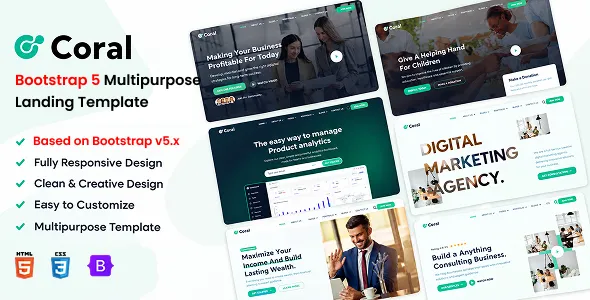
Coral – Bootstrap 5 Multipurpose Landing Template
Coral – Bootstrap 5 Multipurpose Landing Template is a versatile website template designed for businesses, startups, freelancers, agencies, and digital professionals who want to create modern, responsive landing pages. A landing page is an important part of a digital marketing strategy because it helps communicate a specific message, introduce a product or service, and encourage visitors to take a relevant action. Coral provides a potential front-end foundation for creating landing pages that combine organized content, professional presentation, and responsive layouts using Bootstrap 5.
Modern businesses often need dedicated web pages for product launches, service promotions, advertising campaigns, software applications, and lead-generation initiatives. A well-structured landing page helps visitors understand the offer quickly, explore its benefits, and find a clear next step. Coral can be evaluated for projects that require a flexible landing page design rather than a website restricted to a single industry or business purpose.
Built around the Bootstrap 5 framework, Coral is intended for developers who want a structured starting point for front-end website development. Bootstrap provides a responsive grid system, styling utilities, and reusable interface components that can help developers create consistent layouts across different screen sizes. The actual pages, sections, scripts, and interactive features included with Coral depend on the current product release and its documentation.
Whether you are building a startup presentation, a SaaS product landing page, a business website, a creative portfolio introduction, or a campaign-specific promotional page, Coral can be considered as a starting point for your project. With appropriate customization, original content, optimized assets, and any required integrations, developers can adapt the template to different branding requirements and marketing objectives.
What Is Coral – Bootstrap 5 Multipurpose Landing Template?
Coral is a multipurpose landing page template built around Bootstrap 5. Its intended use is to provide a front-end structure for creating focused web pages that introduce businesses, products, services, or digital projects.
A landing page generally concentrates on a particular audience or objective. Unlike a large website with numerous navigation paths, it often presents a clear message, supporting information, relevant visuals, and one or more calls to action. This structure can help businesses communicate a specific value proposition and guide visitors toward an intended destination.
Coral can be evaluated for projects such as startup websites, product announcements, software promotions, digital agency campaigns, consulting services, personal brands, and other business-focused landing pages. Its multipurpose positioning allows developers to consider different applications, subject to the layouts and components included in the current version.
As an HTML-based template, Coral provides a starting point for the front-end presentation of a website. Developers can modify the page structure, styles, images, typography, and scripts to suit their project. Features such as user authentication, database operations, payment processing, or advanced lead management require separate implementation or integration unless explicitly included in the product.
Before using the template, review its current demo, source files, installation instructions, supported dependencies, and licensing terms to confirm that it meets your technical and design requirements.
Built with Bootstrap 5
Bootstrap 5 is a widely used front-end framework that helps developers build responsive websites with a consistent design structure. It includes a grid system, layout utilities, form styles, and reusable interface components that can simplify common front-end development tasks.
Coral’s Bootstrap 5 positioning makes it relevant to developers who prefer working with this framework. The grid system can help organize content into columns and rows, while responsive utilities support layouts that adapt to different screen widths.
Developers can use Bootstrap’s conventions to organize content sections, adjust spacing, align interface elements, and maintain consistency across multiple pages. Familiarity with the framework may also make it easier for teams to understand the layout structure and customize the design.
However, the precise Bootstrap implementation, version details, and additional dependencies should be confirmed through Coral’s current source files and documentation. Developers should not assume that every Bootstrap component or optional library is included or configured automatically.
When customizing the template, maintain a consistent approach to the framework’s grid and utility classes. Avoid unnecessary overrides that create conflicting styles, and test the final design after modifying the layout or adding new components.
Multipurpose Landing Page Design
Different businesses require different landing page structures. A software startup may want to explain a digital product, while a creative agency may need to showcase services and previous projects. A consultant might focus on expertise and consultation requests, whereas a product launch page may emphasize features and benefits.
Coral can be assessed for these different use cases because it is positioned as a multipurpose landing template. Developers can adapt the content and visual presentation to match the goals of the project and the needs of its target audience.
A business landing page may include an introduction, service overview, benefits, company information, testimonials, frequently asked questions, and contact details. A software landing page may instead prioritize product screenshots, feature explanations, pricing information, and a demonstration request.
Not every landing page needs every section. A focused page with a clear message may be more effective than a long layout filled with unrelated content. Select sections according to the intended conversion goal and remove elements that do not contribute to the visitor’s decision.
The actual page variations and section layouts available with Coral should be checked in the current product demo.
Responsive Design for Desktop, Tablet, and Mobile
Visitors access landing pages through a wide range of devices, including desktop computers, laptops, tablets, and smartphones. Responsive design helps ensure that the layout remains usable when the available screen space changes.
Coral’s Bootstrap 5 foundation provides a framework for responsive layout development. Developers can adapt content columns, images, navigation, and spacing to suit different screen widths, subject to the template’s implementation.
On desktop screens, a landing page may use multiple columns to present text alongside product imagery. On mobile devices, those columns may stack vertically to create a more natural reading sequence. Buttons and form fields should remain easy to use with touch input, and headings should fit without awkward wrapping.
Responsive testing should cover the entire page rather than only the opening section. Long feature lists, image galleries, pricing tables, testimonials, and contact forms may need different adjustments for smaller screens.
Custom CSS, third-party scripts, embedded media, and additional libraries can also affect responsive behavior. Test the completed website on representative devices and browsers before publishing it.
A responsive layout should be combined with readable content, accessible controls, and efficient loading performance to provide a more consistent experience.
Landing Pages for Startups and New Businesses
Startups often need a website that explains their offering clearly while establishing a credible first impression. A landing page can introduce the business, communicate its main value proposition, and guide potential customers toward a relevant next step.
Coral can be evaluated for startup projects that need a front-end presentation for a new service, digital product, business concept, or technology platform. Developers can customize the introduction, feature sections, illustrations, and calls to action to reflect the startup’s identity.
A strong startup landing page should explain what the company offers, who it serves, and why the solution may be relevant. Supporting content can describe the main features, practical benefits, and next steps available to interested visitors.
For an early-stage business, the primary action might be joining a mailing list, requesting a demonstration, submitting an inquiry, or exploring product details. Choose an action that reflects the business’s actual goals and the readiness of its audience.
Avoid making unsupported claims about product capabilities, customer numbers, or business results. Clear and accurate communication helps establish trust and gives visitors a better understanding of the offering.
SaaS and Software Product Landing Pages
Software-as-a-Service businesses often use landing pages to explain their products, communicate benefits, and encourage visitors to register or request a demonstration. A focused page can help prospective users understand how a software product addresses a particular problem.
Coral may be considered for SaaS and software landing pages that require an organized presentation of product features, use cases, benefits, and calls to action. The final implementation should reflect the actual product and its intended audience.
A SaaS landing page can begin with a clear headline and concise supporting description. Product screenshots or interface previews can then demonstrate the user experience, while feature sections explain the main capabilities.
Additional sections may describe common use cases, subscription options, integration possibilities, support resources, or frequently asked questions. Include these only when they are relevant and supported by accurate information.
A landing page can link to a separate application or registration system, but it does not automatically provide software functionality, user accounts, recurring billing, or subscription management. Those capabilities require a separate application or appropriate integrations.
When customizing Coral for a software business, prioritize clear explanations and realistic visuals. Visitors should understand the product’s purpose without needing to interpret vague promotional language.
Digital Agency and Professional Service Websites
Digital agencies and professional service providers need websites that communicate their expertise and help potential clients understand the services available. A landing page can provide a focused introduction to the business and its approach.
Coral can be evaluated for agencies working in web design, development, branding, digital marketing, consulting, and other professional fields. Developers can customize the content to present services, explain the agency’s value proposition, and encourage suitable inquiries.
A service-focused landing page may include an introduction, service summaries, project examples, process information, client feedback, and a contact section. Case studies can provide useful context by explaining the challenge, the work completed, and the outcome where reliable information is available.
A professional service page should also explain who the service is intended for and how prospective clients can begin a conversation. A clear contact form or inquiry link can help visitors take the next step.
Use genuine project examples and accurate business information. Avoid presenting placeholder testimonials or invented results as real customer experiences.
The page should reflect the agency’s actual services rather than attempting to appeal to every possible audience. A clear focus can help visitors determine whether the business is a suitable fit for their needs.
Product Launches and Marketing Campaigns
Landing pages are frequently used to support product launches, advertising campaigns, new service announcements, and other marketing activities. A dedicated page allows businesses to organize information around a specific offer rather than sending visitors to a general homepage.
Coral can be considered for campaign pages that introduce a product, highlight a service, promote an event, or communicate a time-sensitive announcement. Its suitability depends on the available layouts and the changes required for the campaign.
A campaign page should maintain a clear relationship between the advertisement or promotional message and the content visitors see after clicking. If an advertisement promotes a particular product, the landing page should explain that product directly.
The main headline should communicate the offer, while supporting text provides relevant details. Product images, demonstrations, benefit summaries, and frequently asked questions can help visitors understand the proposition.
Calls to action should be easy to identify and lead to the appropriate destination. If the campaign uses a form, ensure that it collects only the information needed for the intended purpose.
For campaigns involving discounts, deadlines, or special offers, keep all terms accurate and update the page when the offer changes or expires.
Homepage Structure and Content Organization
A landing page’s content structure influences how visitors understand the message and move through the page. A logical sequence helps present information in manageable sections and reduces confusion.
When customizing Coral, begin by identifying the most important information visitors need. The opening section should explain the business or offer, while subsequent sections provide supporting details and answer likely questions.
A typical structure may include an introductory hero area, a benefits section, a feature overview, supporting imagery, social proof, frequently asked questions, and a final call to action. This is an example of a possible content strategy rather than a guarantee that all these sections are included with Coral.
Use headings that communicate the purpose of each section. Break longer explanations into readable paragraphs, and place related information together.
Visual elements should support the message instead of competing with it. Product screenshots, diagrams, photographs, or illustrations can help explain an offer when they are relevant and accurately represent the business.
Before publishing the page, review the content from the perspective of a first-time visitor. The main offering and the intended next step should be easy to understand without extensive searching.
Customization and Brand Identity
A landing page should reflect the business’s identity rather than appear like an unmodified template. Consistent branding helps create a recognizable visual experience across marketing materials and website pages.
Depending on the supplied source files and implementation, Coral may be customized through HTML markup, CSS styles, images, typography, and supported JavaScript behavior. The exact customization process should be confirmed in the current documentation.
A technology startup may prefer a clean interface with restrained colors and product-focused imagery. A creative agency might choose more expressive typography and project visuals, while a consulting business may emphasize readability and a structured presentation.
Establish a consistent color palette and typography hierarchy before making extensive design changes. Use the same visual treatment for headings, body text, buttons, and other repeated interface elements.
Replace placeholder images and content with original materials that accurately represent the business. Check that images have appropriate dimensions and that text remains readable against its background.
Organize custom styles carefully and avoid unnecessary duplication. Maintaining a clear relationship between the original template and project-specific modifications makes future updates easier.
Bootstrap Grid and Reusable Interface Components
Bootstrap 5 provides layout utilities and reusable interface patterns that can help developers structure landing pages efficiently. A grid-based approach makes it possible to arrange text, images, cards, and other content while supporting different screen widths.
Coral’s Bootstrap 5 foundation can be useful for developers who want to adapt existing layout patterns rather than manually define every column and spacing rule. However, the actual grid classes and components used by the template should be reviewed in its source files.
Reusable elements can help maintain consistency throughout the page. For example, repeated feature cards, service summaries, buttons, and content sections can follow a shared visual style.
When modifying the grid, check how columns behave on mobile, tablet, and desktop widths. Avoid fixed widths that cause content to overflow or create excessive horizontal scrolling.
Developers should also review the interaction between Bootstrap styles and custom CSS. Conflicting rules can lead to unexpected spacing, typography, or component behavior.
Using the framework consistently can simplify customization and help make the resulting code easier for other developers to understand.
Calls to Action and Lead Generation
A landing page often has a specific objective, such as collecting inquiries, encouraging registrations, generating demonstration requests, or directing visitors to a product page. Calls to action help make that objective clear.
Coral can be adapted to include relevant action links or buttons, depending on its available components. The appropriate action should be based on the business’s goals and the needs of its visitors.
For a service provider, the primary call to action might invite visitors to request a consultation. A software business may encourage visitors to explore a product or request a demonstration. A new brand might ask visitors to subscribe to receive updates.
Use concise, descriptive button text that explains what happens next. Make sure that each button leads to the correct destination and remains easy to identify.
If the page collects leads through a form, the form must be connected to a suitable processing system. HTML form fields alone do not provide secure storage, automated email delivery, spam protection, or customer relationship management functionality.
Test form validation, successful submission messages, error handling, and email delivery before launch. If personal information is collected, provide appropriate privacy information and handle the data responsibly.
SEO-Friendly Landing Page Structure
Search engine optimization helps make a landing page easier for search engines and visitors to understand. A well-organized template provides a foundation, but search performance depends on the quality of the content, technical implementation, competition, and other factors.
When customizing Coral, use a descriptive page title, a useful meta description, a clear heading hierarchy, and readable content that reflects the page’s purpose. Each landing page should focus on a distinct subject or offer rather than duplicating the same content across many URLs.
Include relevant keywords naturally in headings and body text when they help explain the offering. Avoid repeating phrases excessively or creating content solely to manipulate search rankings.
Images should be optimized and given meaningful alternative text when they communicate information. Internal links should connect the landing page with relevant service pages, product details, or other useful resources.
Technical considerations may include canonical URLs, mobile usability, indexability, sitemap inclusion, and structured data where appropriate. These settings may require additional configuration beyond the template.
For paid advertising campaigns, also ensure that the landing page content matches the ad and provides a clear, relevant experience after visitors click.
Website Performance and Loading Speed
Fast loading is important because visitors may leave a page that takes too long to display its main content. Performance is particularly relevant for landing pages used in advertising campaigns, where the visitor’s attention is limited.
The speed of a Coral-based website depends on the HTML structure, CSS and JavaScript files, images, external resources, hosting environment, and any additional integrations.
Begin by optimizing images and using dimensions appropriate to their display areas. Large hero images should retain sufficient visual quality without being unnecessarily heavy. Where appropriate, use modern image formats and responsive image techniques.
Review scripts and external libraries to identify resources that are not needed. Avoid adding multiple libraries that provide the same functionality, and defer nonessential scripts when suitable.
Test the finished page using performance tools and review both mobile and desktop results. Pay attention to layout shifts, delayed interaction, large assets, and resources that block the initial rendering.
A template does not guarantee a particular performance score. Regular testing and careful implementation are needed to identify bottlenecks and maintain a smooth experience.
Accessibility and User-Friendly Design
An accessible landing page helps visitors with different abilities and browsing preferences access the content and interact with its controls. Accessibility also supports general usability by encouraging clear content, predictable navigation, and readable interface elements.
When adapting Coral, use semantic HTML elements, logical heading levels, descriptive links, and appropriate labels for form fields. Ensure that text and controls have sufficient contrast against their backgrounds.
Interactive elements should have visible focus states and be usable with a keyboard where applicable. Buttons should communicate their purpose clearly, and form errors should explain what needs to be corrected.
Images that communicate meaningful information should include suitable alternative text. Decorative images can be handled differently so that they do not create unnecessary noise for assistive technology.
Do not rely exclusively on color to communicate status or meaning. If a section uses colored indicators, provide labels or other context that makes the information understandable.
Accessibility should be checked across the entire page, including navigation, forms, interactive elements, and responsive layouts. Automated testing can help identify some issues, but manual review is also valuable.
Browser Compatibility and Front-End Development
A landing page should behave consistently in the browsers and environments used by its intended audience. Differences in browser engines, screen dimensions, and device capabilities can affect layout and interactive behavior.
Before deploying Coral, review the documentation for supported browsers and required dependencies. Test the template’s typography, navigation, buttons, forms, and responsive layouts in common modern browsers.
Developers should inspect the HTML, CSS, and JavaScript structure before making substantial changes. Understanding the existing organization makes it easier to identify the files responsible for specific visual elements and interactions.
When adding new features, test them alongside the existing template components. Third-party scripts, embedded content, and custom styles can sometimes cause conflicts or unexpected layout changes.
Use version control to track customizations and maintain backups of the original files. A controlled development workflow helps identify regressions and makes future maintenance more manageable.
The exact setup process depends on the files and dependencies supplied with the current Coral release.
Integration with Backend Services and External Platforms
Landing pages often need to connect with services that handle form submissions, analytics, email marketing, customer management, or online transactions. An HTML template can provide the interface for these interactions, but the integrations require additional setup.
Coral may be adapted to work with appropriate backend services or external platforms, depending on the project’s technical requirements and the structure of the template.
A lead-generation page might connect a form to a server endpoint or customer management system. A product landing page could link to an existing online store, while a campaign page might use an email marketing service to manage subscriptions.
When implementing integrations, consider data validation, error handling, privacy requirements, and the reliability of external services. Do not expose private API credentials in publicly accessible front-end JavaScript.
Analytics and advertising tools should be configured responsibly and in accordance with applicable privacy requirements. Only collect information that is necessary for the intended purpose.
Test every integration before launch. A visually complete page is not ready for production if its forms, tracking, or destination links do not work correctly.
Who Should Use Coral – Bootstrap 5 Multipurpose Landing Template?
Coral may be relevant to a range of projects that require a flexible landing page design.
Startups: New businesses can evaluate the template for introducing a product, explaining a business concept, or presenting a service.
SaaS companies: Software businesses can adapt a landing page to communicate product features, use cases, and demonstration options.
Digital agencies: Creative and marketing agencies may use the template as a starting point for presenting services and encouraging project inquiries.
Freelancers: Independent professionals can consider it for a focused introduction to their services, expertise, and portfolio.
Small businesses: Companies can develop a dedicated promotional page for a particular service, product, or marketing campaign.
Product creators: Businesses launching a new product can use a landing page to explain its purpose and direct visitors toward relevant information.
Consultants: Professional service providers can organize information about their expertise, working approach, and consultation options.
Marketing teams: Teams managing digital campaigns can evaluate the template for a focused destination that aligns with a specific advertising message.
The best fit depends on the actual layouts, included components, licensing conditions, and technical requirements of the current template release.
Tips for Building a Successful Website with Coral
A successful landing page begins with a clear objective. Determine whether the page is intended to generate leads, introduce a product, encourage registrations, or communicate a particular offer.
Identify the target audience and prepare content that answers its most important questions. The opening section should communicate the main value proposition, while supporting sections provide evidence, context, and practical details.
Choose a simple content structure and prioritize the information visitors need to make a decision. Remove sections that do not support the page’s objective.
Use original images and consistent branding. Product screenshots, project examples, and other relevant visuals can make the page more informative, provided that they accurately represent the business.
Make the primary call to action clear and ensure that its destination works correctly. If the page includes a form, test validation, submission handling, and confirmation messages.
Review the finished page on mobile and desktop devices. Test performance, accessibility, browser compatibility, links, and all interactive elements before publishing.
Finally, monitor how visitors interact with the page and use reliable data to identify opportunities for improvement. A landing page should evolve as the offer, audience, and business objectives change.
Final Thoughts on Coral – Bootstrap 5 Multipurpose Landing Template
Coral – Bootstrap 5 Multipurpose Landing Template is a potential front-end solution for developers and businesses seeking a responsive landing page foundation. Its multipurpose positioning makes it relevant to startups, agencies, SaaS companies, freelancers, consultants, and organizations that need a focused way to present products or services.
The Bootstrap 5 foundation can provide a structured approach to responsive layout development and interface customization. Developers can adapt the content, visual identity, page sections, and calls to action to match the requirements of a particular project.
The final capabilities of Coral depend on the current product version, included layouts, source files, dependencies, and documented browser support. Reviewing the official demo and documentation before implementation helps establish whether the template matches the intended use case.
A successful landing page also requires original content, accessible design, optimized assets, clear navigation, and working integrations. Features such as form processing, analytics, payment handling, and database connectivity require suitable additional implementation when they are not included.
For businesses seeking a flexible starting point for a promotional or product-focused website, Coral can be evaluated as part of a broader front-end development strategy. With careful customization, thorough testing, and ongoing optimization, a landing page can provide a clear and professional experience that supports business communication and marketing objectives.