My Account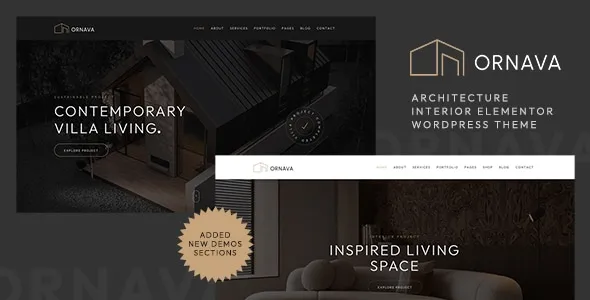
Ornava – Architecture & Interior Elementor WordPress Theme
Ornava – Architecture & Interior Elementor WordPress Theme is a modern website design solution for architecture firms, interior design studios, residential designers, commercial architects, renovation companies, and creative professionals looking to establish a distinctive online presence with WordPress. Designed for architecture and interior-focused projects, Ornava can provide a foundation for presenting design services, showcasing completed projects, introducing creative teams, communicating a studio’s design philosophy, and attracting potential clients. With thoughtful customization and well-organized content, businesses can develop a professional website that reflects their design identity and makes it easier for visitors to explore their expertise.
In architecture and interior design, visual presentation plays an important role in building trust. Potential clients often want to see previous projects, understand the firm’s approach, review its services, and learn how to begin a consultation before making contact. Ornava can be considered for websites that need to communicate these details through an attractive, structured, and user-friendly presentation. Its Elementor compatibility offers a visual page-building approach, subject to the requirements and features of the installed theme version.
Whether you operate an architecture practice, a boutique interior design studio, a residential planning business, or a commercial design consultancy, Ornava can serve as a starting point for creating a website aligned with your brand and business objectives. By combining high-quality project photography, clear service descriptions, consistent visual styling, and intuitive navigation, you can create an online experience that communicates your expertise and helps prospective clients understand the value of your work.
What Is Ornava – Architecture & Interior Elementor WordPress Theme?
Ornava is an architecture and interior design WordPress theme intended for professionals who want to present their projects and services through a specialized website. Its industry-focused positioning makes it relevant to businesses that need to communicate design expertise, showcase portfolios, explain their working process, and provide convenient ways for potential clients to get in touch.
Architecture and interior design websites have different requirements from general business websites. Visitors may want to explore residential projects, commercial spaces, renovation concepts, floor plans, material selections, or completed interiors. A well-organized website helps arrange these details into meaningful sections that support the client’s decision-making process.
WordPress provides a content management system for maintaining pages, publishing articles, updating project photographs, and managing navigation. Elementor offers a visual editing environment for building and arranging page content, depending on the installed version and the theme’s supported implementation.
Ornava can be evaluated as a foundation for an architecture or interior design website that needs a coordinated visual identity and a clear content structure. Before installation, review the current theme documentation and live demo to confirm its available layouts, required plugins, Elementor compatibility, and customization options.
Modern Design for Architecture and Interior Design Businesses
A design-focused website should reflect the creativity, precision, and professionalism of the studio it represents. The choice of typography, colors, spacing, imagery, and page composition can influence how visitors perceive a firm’s work.
Ornava can be customized to suit different design philosophies. An architecture practice may prefer a restrained layout with strong geometric imagery, while an interior design studio may use warm colors, detailed room photography, and editorial-style content. A commercial design firm might emphasize structured project information and clearly defined service categories.
The goal is to create a presentation that supports the work rather than competing with it. Generous spacing can give project photographs room to stand out, while readable text helps visitors understand the purpose and context of each design.
Consistency across the website is equally important. Repeating a defined set of colors, heading styles, image treatments, and button designs creates a recognizable brand experience. Avoid adding unnecessary visual effects that distract visitors from the portfolio or make navigation difficult.
Use authentic project images whenever possible. Photographs of completed buildings, interior spaces, material details, and design processes can communicate a studio’s capabilities more effectively than generic decorative imagery.
Elementor Page Building and Visual Customization
Elementor is a visual page builder for WordPress that allows users to design page layouts through an editing interface. Depending on the theme configuration and Elementor version, users can arrange content sections, edit text, position images, and adjust supported design settings without manually coding every page element.
For an architecture or interior design website, a visual page-building workflow can help organize project presentations, service sections, studio introductions, and contact information. A homepage might combine a large architectural image with an introduction to the firm, followed by selected projects and a summary of available services.
Elementor can also make it easier to revise content as a studio’s portfolio develops. New projects can be introduced, service descriptions updated, and page sections reorganized according to changing business priorities, subject to the site’s template structure and available editing features.
The exact level of customization depends on the Elementor version, the theme’s implementation, and whether additional plugins are required. Some advanced features may depend on Elementor Pro or other extensions, so verify the current product documentation before relying on specific functionality.
For best results, establish a consistent design system before creating multiple pages. Define heading styles, body typography, spacing, color choices, and image proportions so that the finished website remains visually coherent.
Portfolio Presentation for Architecture Projects
A portfolio is one of the most important components of an architecture website. Prospective clients often evaluate a firm’s experience and design approach by reviewing completed work and understanding the challenges each project addressed.
Ornava can serve as a starting point for presenting architecture projects through organized portfolio pages, subject to the layouts and content features available in the selected version. Each project should communicate more than its visual appearance. Useful details may include the project type, location where appropriate, design objectives, scope of work, materials, and the studio’s contribution.
A residential architecture project might describe the client’s requirements, the site’s characteristics, and the design decisions that shaped the final result. A commercial project could explain how the layout supports circulation, functionality, or the intended business use.
High-quality photographs should be selected carefully to show the building from meaningful perspectives. Exterior views can communicate form and proportion, while interior images may highlight materials, lighting, and spatial relationships.
Avoid overcrowding project pages with unrelated images or lengthy descriptions. A focused presentation allows visitors to understand the work while maintaining attention on the most important details.
Interior Design Portfolio and Project Galleries
Interior design studios rely on strong visual storytelling to communicate their creative approach. A portfolio can help visitors explore different styles, room types, materials, and design solutions.
Ornava can be customized for interior designers who want to showcase residential interiors, commercial environments, hospitality spaces, office designs, retail interiors, or renovation projects. The precise gallery layouts and portfolio options should be confirmed in the current theme demo.
Projects can be organized by category to help visitors find examples that match their interests. For instance, a studio might separate residential interiors from workplace design or hospitality projects. Each project page can include photographs, a short description, the design brief, and details about the materials or concepts used.
A strong gallery should prioritize image quality and consistency. Use photographs with appropriate lighting and composition, and ensure that each image contributes to the overall project story. Descriptive captions can explain a distinctive feature or design decision without overwhelming the page.
Image dimensions and file sizes should also be optimized. Large photographs can be essential for an architecture portfolio, but oversized files may slow down the website. Proper optimization helps balance visual impact with a convenient browsing experience.
Website for Residential Architects
Residential architects need to communicate their ability to design spaces that respond to the needs of homeowners, families, and property developers. A professional website can introduce the firm’s approach and provide examples of relevant projects.
Ornava can be considered for residential architecture practices that offer new-home design, house extensions, renovations, space planning, or related architectural services. Dedicated pages can explain each service and describe the typical stages involved in a project.
A residential portfolio may include contemporary houses, traditional homes, villas, apartments, or custom residential developments. Each project can demonstrate how the firm responds to site conditions, client requirements, building constraints, and aesthetic preferences.
The website can also introduce the design process, from initial consultation and concept development to documentation and coordination with other professionals, where these services are offered.
Clear service descriptions help prospective clients understand whether the firm is suitable for their project. Information about the firm’s service area, consultation process, and preferred project types can make the website more useful to visitors.
Avoid making promises about planning approvals, construction costs, completion dates, or project outcomes that cannot be guaranteed. Accurate descriptions help establish realistic expectations and support professional communication.
Website for Commercial Architecture and Design Firms
Commercial architecture firms often work on offices, retail environments, hospitality venues, educational facilities, and other business properties. Their websites should demonstrate both design capability and an understanding of practical project requirements.
Ornava can provide a starting point for organizing commercial architecture services and case studies. A firm may create dedicated pages for workplace planning, retail design, hospitality architecture, commercial renovations, or other services within its scope of practice.
Project pages can explain the client’s objectives, the intended use of the space, the design strategy, and the studio’s responsibilities. Where appropriate, the presentation may include photographs, plans, diagrams, or other visual materials that the firm has permission to publish.
A commercial project portfolio should balance visual appeal with useful context. Prospective clients may want to understand the project’s scale, the challenges addressed, and the design considerations that influenced the final solution.
A well-structured website can also introduce the firm’s team, professional experience, collaborative approach, and relevant qualifications. These details help visitors evaluate the business beyond its visual portfolio.
Services Pages for Architecture and Interior Design
A dedicated services section helps visitors understand what a studio offers and whether its expertise aligns with their requirements. Rather than placing every service in a single long paragraph, organize the information into clearly defined categories.
An Ornava-based website can be structured around services such as architectural design, interior planning, space optimization, renovation design, residential design, commercial interiors, and project consultation, depending on the business’s actual offerings.
Each service page should explain the purpose of the service, the type of client it is intended for, and the general scope of work. For example, an interior planning page might describe how the studio approaches furniture layouts, lighting considerations, material selection, and the use of available space.
A renovation service page could explain how the business evaluates existing conditions and develops a design concept for improving a property. A commercial design page might focus on functionality, circulation, customer experience, and brand alignment.
Clear service descriptions reduce uncertainty and help prospective clients prepare for an initial discussion. Include a relevant call to action that invites visitors to ask questions or request a consultation.
Only list services that the business actually provides, and explain when additional specialists or external consultants may be required.
Homepage Layout and Content Organization
The homepage introduces the firm and helps visitors navigate toward the information that matters most. For an architecture and interior design business, it should establish a clear identity while allowing the portfolio to remain central.
An Ornava homepage can be planned around a concise introductory section, selected projects, service summaries, information about the studio, and a contact invitation, depending on the available theme layouts.
The opening section should communicate the firm’s name, its primary area of expertise, and the kind of projects it undertakes. A strong project image can support the message, but the headline should remain clear and readable.
Featured projects give visitors an immediate view of the studio’s work. A services section can direct them to more detailed information, while an About section can introduce the firm’s philosophy, experience, and team.
The homepage does not need to contain every available detail. Its role is to establish the studio’s identity and guide visitors toward relevant pages. Long project descriptions, technical information, and detailed service explanations can be placed on dedicated pages.
Review the page hierarchy from the visitor’s perspective. Important information should be easy to locate, and every major section should contribute to understanding the firm or taking a relevant next step.
Brand Identity and Visual Consistency
A recognizable brand helps architecture and interior design firms communicate their values and distinguish themselves in a competitive market. The website should reflect the studio’s design philosophy rather than appear like an unchanged template.
Ornava can be customized to align with a studio’s logo, color palette, typography, and preferred image style, subject to the settings supported by the theme and Elementor configuration.
A minimalist architecture firm may choose neutral colors, structured layouts, and strong project photography. An interior design studio specializing in warm residential spaces might use softer tones and editorial-style imagery. A commercial design company could prefer a more structured presentation with clear navigation and concise project information.
Typography should support readability at every screen size. Use a consistent heading hierarchy and body text style, and avoid introducing too many fonts or decorative treatments.
The same design principles should be applied across the homepage, portfolio pages, services, About section, and contact page. Consistency makes the website feel intentional and professional.
Before making extensive customizations, identify which settings are controlled by the theme, Elementor, and any additional plugins. Maintain backups and test substantial changes in a staging environment when possible.
Responsive Design for Desktop, Tablet, and Mobile
Potential clients may browse an architecture portfolio from a desktop computer, view a project on a tablet, or discover a studio using a smartphone. A responsive website helps make information accessible across these different environments.
Ornava is positioned as a modern WordPress theme for architecture and interior design, but the actual responsive behavior should be checked using the current version and its installed components.
On smaller screens, headings should remain readable, navigation should be straightforward, and project images should fit the available width. Visitors should be able to access service details and contact information without struggling with oversized elements or horizontal scrolling.
Portfolio galleries need particular attention because large images and multi-column layouts may behave differently on mobile devices. Check image cropping, spacing, captions, and navigation at several screen sizes.
Elementor’s responsive editing controls, where available and supported by the installed version, may help adjust layouts for different devices. However, every important page should still be tested after changes to the design or plugins.
A responsive website is not simply a smaller version of a desktop layout. It should provide a clear and practical browsing experience regardless of the device being used.
Search Engine Optimization for Architecture Websites
Search engine optimization can help prospective clients discover an architecture or interior design firm through relevant searches. A WordPress theme provides a starting point, but search visibility also depends on content quality, technical setup, competition, and the firm’s broader online presence.
Each important page should have a descriptive title, a clear heading structure, useful original content, and a logical URL. Architecture firms can create separate pages for their primary services rather than relying on a single page to describe every capability.
Portfolio pages should include meaningful project descriptions instead of relying entirely on photographs. Information about the project type, design objectives, materials, and the studio’s contribution can help visitors understand the work and provide search engines with useful context.
Use relevant keywords naturally in headings, titles, descriptions, and body content. Avoid excessive repetition or creating multiple pages with nearly identical content solely to target different keyword variations.
Image optimization is especially important for design-focused websites. Compress photographs, use descriptive file names where practical, and provide appropriate alternative text for meaningful images.
Compatible SEO plugins may help manage metadata, sitemaps, redirects, and other technical settings. Regularly review broken links, indexing issues, mobile usability, and website performance. No theme can guarantee a particular search ranking or a fixed amount of organic traffic.
Local SEO for Architecture and Interior Design Studios
Many architecture and interior design businesses serve clients within specific cities or regions. Local search optimization can help people find a studio that works in their area.
An Ornava-based website can support local visibility by providing accurate business information, including the firm’s name, address where applicable, contact details, opening hours if relevant, and service areas.
A dedicated location or studio page can explain where the firm operates, the types of projects it accepts, and how prospective clients can arrange an initial discussion. If the business works across multiple regions, describe those service areas accurately.
Project case studies can also provide useful local context when the information is appropriate to share. Include a project’s location only when it is accurate and publication is permitted.
Maintain consistent business details across relevant online listings and directories. A properly maintained business profile can complement the website, while genuine client reviews may provide additional context for people evaluating the firm.
Local SEO should focus on useful information and accurate service descriptions rather than repeating city names unnaturally. Results depend on multiple factors beyond the theme itself.
Performance Optimization for Image-Heavy Websites
Architecture and interior design websites often depend on high-resolution photography, detailed project galleries, and visual content. These assets can improve presentation, but they may also affect loading speed if they are not optimized.
The performance of an Ornava website depends on the theme, Elementor configuration, hosting environment, image files, plugins, and third-party integrations. Test the finished website rather than assuming that the theme guarantees a particular speed.
Resize photographs to suit their display dimensions and compress them while preserving sufficient visual quality. Use suitable image formats supported by the website environment and avoid uploading unnecessarily large files.
Review animations, embedded media, external scripts, and decorative effects to determine whether they contribute enough value to justify their performance cost. Keep plugins updated and remove unnecessary extensions where appropriate.
Measure important pages, including the homepage, project galleries, service pages, and contact page. Image-heavy portfolio pages may require different optimization strategies from text-focused service pages.
Caching and other performance tools may help depending on the hosting environment and site configuration. Configure these tools carefully and retest important pages after changes.
Accessibility and User-Friendly Navigation
A professional architecture website should make information accessible and understandable to a wide range of visitors. Clear navigation, readable typography, appropriate color contrast, and descriptive links contribute to a better experience.
When customizing Ornava, use logical heading levels and familiar navigation labels. Visitors should be able to find the portfolio, services, studio information, and contact details without unnecessary effort.
Provide meaningful alternative text for project images when they convey relevant information. Links should describe their destination, and buttons should use clear action-oriented wording.
Forms should have visible labels and understandable instructions. Error messages should explain how to correct a problem, while keyboard navigation should remain practical for visitors who do not use a mouse.
Because architecture websites often rely heavily on images, make sure essential project information is not available only through visual presentation. Short descriptions and captions can help provide context.
Accessibility depends on the theme, Elementor configuration, selected plugins, and content decisions. Review the website manually as well as with suitable accessibility testing tools.
Useful WordPress Plugins and Integrations
Architecture and interior design websites may require additional tools for contact forms, SEO, analytics, performance, security, backups, and other business functions. The appropriate combination depends on the firm’s workflow and the functionality already available in the theme.
A contact form plugin can help collect project inquiries, while an SEO plugin may assist with metadata and sitemap settings. Analytics tools can provide insights into website traffic and visitor behavior, subject to applicable privacy requirements.
A gallery or portfolio extension may be useful if the built-in presentation options do not meet the firm’s requirements. However, check whether the theme already provides suitable functionality before adding another plugin.
Elementor-related extensions should be selected carefully. Review their compatibility with the installed Elementor version, WordPress version, and theme requirements. Some features may depend on a paid extension or a separate license.
Avoid installing multiple plugins that perform the same task without a clear reason. Overlapping tools can create conflicts and increase maintenance work.
After installing or updating a plugin, test the pages and features it affects. This is particularly important for portfolio layouts, navigation, responsive behavior, and inquiry forms.
Contact Forms and Project Inquiry Management
A clear inquiry process helps potential clients move from browsing a portfolio to discussing a project. Architecture and interior design projects often require an initial conversation about scope, budget, location, and design objectives.
Ornava can be configured to include contact opportunities through supported page layouts, buttons, and compatible form plugins. The exact functionality depends on the theme setup and the tools selected.
A project inquiry form may ask for a name, email address, project type, location, and a short description of the requirements. Additional fields can be included when they genuinely help the firm assess the inquiry, but the form should remain straightforward.
The contact page should also provide reliable contact details and explain how the firm prefers to receive inquiries. If the business offers consultations by appointment, describe the process clearly.
Test every form before launching the website. Confirm that submissions reach the intended email address, validation works, confirmation messages are understandable, and spam protection functions appropriately.
A well-organized inquiry process can help reduce uncertainty and make it easier for potential clients to take the next step.
Security and Ongoing Website Maintenance
A WordPress website requires regular maintenance to remain reliable, secure, and accurate. Architecture firms may depend on their websites to display current projects and collect business inquiries, so technical problems can affect both presentation and communication.
Use reputable hosting, enable HTTPS, maintain strong administrator passwords, and assign user permissions according to each person’s responsibilities. Keep WordPress, the theme, Elementor, and compatible plugins updated after checking relevant compatibility information.
Create backups before major updates or substantial design changes. It is also important to verify that backups can be restored if a technical issue occurs.
Obtain themes and plugins from trustworthy sources, and remove unused components when appropriate. Review form submissions and website settings regularly to ensure that inquiries are being handled correctly.
Maintenance should include content reviews as well. Update project descriptions, staff information, service details, contact information, and portfolio images when necessary. Remove outdated information that no longer reflects the firm’s work.
A consistent maintenance routine helps protect the website’s usefulness and supports a professional online presence over time.
Who Should Use Ornava – Architecture & Interior Elementor WordPress Theme?
Ornava may be suitable for a range of professionals and businesses involved in architecture, interior design, and related creative services, depending on the requirements of the project and the capabilities of the current theme version.
Architecture firms: Present architectural services, completed buildings, design concepts, and professional experience.
Interior design studios: Showcase residential and commercial interiors, material choices, styling concepts, and project case studies.
Residential architects: Introduce house design services, renovations, extensions, and custom residential projects.
Commercial design firms: Present offices, retail environments, hospitality spaces, and other commercial design projects.
Interior decorators: Display room transformations, styling projects, furniture selections, and decorative concepts.
Renovation companies: Explain renovation services and share examples of completed property improvements.
Freelance architects and designers: Build a professional portfolio featuring selected work, qualifications, services, and contact information.
Property development and design businesses: Present projects, explain design-related services, and provide a central source of company information.
Creative studios: Establish a consistent visual identity and communicate their design philosophy through a structured website.
Before selecting the theme, compare the available layouts, editing requirements, and supported integrations with your actual business needs. Confirm any requirements for Elementor Pro, premium plugins, or additional booking and form tools before installation.
Tips for Building a Successful Website with Ornava
A successful architecture or interior design website requires more than an attractive theme. It should present the firm’s work clearly, explain its services, and make it easy for potential clients to learn about the business.
Start by defining the primary objective of the website. Decide whether the main focus is portfolio presentation, lead generation, service information, studio recognition, or a combination of these goals.
Select the strongest and most relevant projects for the portfolio. Include concise descriptions that explain the design brief, project scope, and the firm’s contribution. Use photographs that accurately represent the completed work and ensure that you have permission to publish them.
Prepare clear service descriptions and organize them into logical categories. Make contact details easy to find and provide a straightforward way for visitors to submit project inquiries.
Establish a consistent visual identity with a defined color palette, typography, and image style. Use Elementor’s supported editing features to maintain consistency across the website rather than designing every page independently.
Before launch, test the website on desktop, tablet, and mobile devices. Review navigation, image loading, inquiry forms, accessibility, and page performance. Check every important link and ensure that all published details are accurate.
Finally, maintain the website through regular backups, updates, security checks, performance reviews, and portfolio improvements. A website should evolve alongside the studio’s projects and business objectives.
Final Thoughts on Ornava – Architecture & Interior Elementor WordPress Theme
Ornava – Architecture & Interior Elementor WordPress Theme is a theme option for architecture firms, interior design studios, residential designers, commercial design businesses, and creative professionals seeking to establish a polished online presence with WordPress. Its architecture and interior design focus makes it relevant to projects that require a visually engaging portfolio, organized service information, and a presentation aligned with a professional design identity.
With suitable customization, an Ornava-based website can bring together project galleries, service pages, studio information, contact details, and useful content in one coordinated experience. Elementor’s visual editing approach can help users manage page content and adjust supported layouts according to their needs.
The final capabilities depend on the theme’s current release, its documented requirements, Elementor compatibility, and the plugins used alongside it. Reviewing the official product documentation and demo before installation helps confirm whether the available layouts and tools match the intended project.
Long-term website effectiveness also depends on original portfolio content, responsive testing, image optimization, accessibility, security, and ongoing maintenance. A theme cannot guarantee search rankings or new client inquiries, but it can provide a useful foundation for a well-organized professional website.
For architecture and interior design professionals who want to communicate their expertise through a clear and visually consistent digital presence, Ornava can be evaluated as part of a broader website development strategy focused on showcasing work, explaining services, and helping potential clients make informed contact.