My Account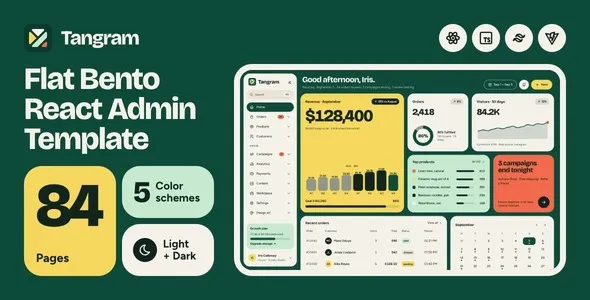
Tangram | React & Tailwind CSS Admin Dashboard Template
Tangram | React & Tailwind CSS Admin Dashboard Template is a modern frontend solution for developers, startups, businesses, and software teams looking to build professional administrative interfaces with React and Tailwind CSS. Designed as a foundation for dashboard-oriented web applications, Tangram can help streamline the development of structured user interfaces for analytics platforms, business management systems, SaaS products, internal tools, and other web-based applications. By combining a component-driven development approach with utility-first styling, this template provides a starting point for creating organized, responsive, and visually consistent dashboard experiences.
Administrative dashboards play an important role in modern web applications. They give users a central place to review information, navigate between modules, monitor key performance indicators, and manage application workflows. A well-organized dashboard can make complex information easier to understand while helping teams interact with business data more efficiently. Tangram is intended for projects that require a flexible interface foundation that developers can adapt to different branding requirements, application structures, and user needs.
React supports the creation of reusable interface components, while Tailwind CSS provides utility classes for styling layouts, typography, spacing, colors, and other visual elements. Together, these technologies can support a maintainable frontend architecture and make it easier to customize the appearance of an administrative application. The exact pages, components, integrations, and configuration options available in Tangram depend on the purchased version and its documentation. Developers should review the current demo and package details before implementation.
What Is Tangram React & Tailwind CSS Admin Dashboard Template?
Tangram is an admin dashboard template built around React and Tailwind CSS, intended to help developers establish the frontend structure of a web-based management application. Instead of building every interface element from the beginning, developers can use a suitable template as a starting point and adapt its layouts, components, and styling to their project’s requirements.
An administrative interface commonly includes navigation menus, page headers, data summaries, content panels, tables, forms, and settings screens. These elements help users move between application sections and perform everyday tasks. A consistent interface structure also makes it easier to introduce new modules as a product develops.
React encourages developers to divide interfaces into reusable components. Shared elements, such as navigation bars, buttons, form fields, cards, and page layouts, can be maintained in a consistent way throughout an application. Tailwind CSS complements this approach by providing utility classes that can be used to define visual styles directly within component markup.
Tangram can be evaluated for applications such as SaaS dashboards, customer management platforms, reporting tools, inventory interfaces, project management systems, and internal business software. The suitability of the template depends on the included layouts, its technical requirements, and the functionality that the project needs.
Modern Dashboard Design and User Experience
An effective admin dashboard should present information clearly without overwhelming users with unnecessary visual elements. The layout needs to establish a logical hierarchy so users can quickly identify important metrics, locate navigation options, and understand the purpose of individual sections.
Tangram provides a starting point for creating a structured administrative interface with a consistent visual direction. Developers can adapt the presentation to match a business’s identity, the application’s complexity, and the expectations of its intended audience.
A well-planned dashboard may include page titles, summary cards, data visualizations, activity sections, tables, and quick-access controls. These elements should be arranged according to their importance rather than displayed simply to fill available space.
Visual consistency also matters. Repeated spacing patterns, typography choices, button styles, and color treatments help users recognize familiar interface elements. When similar actions look and behave consistently, the application becomes easier to learn and navigate.
For business applications, a professional interface can improve the perceived quality of the overall product. However, successful dashboard design also depends on relevant information, clear interaction patterns, accessible controls, and thoughtful organization of application workflows.
React-Based Component Architecture
React is widely used to develop interactive web interfaces through reusable components. Its component-based approach allows developers to separate an application into smaller building blocks that can be combined to create complete pages and workflows.
Tangram’s React foundation can support a development process in which shared interface elements are reused across different dashboard sections. For example, a project may use common components for page headings, navigation items, action buttons, notification areas, and content containers.
Reusable components help reduce duplication and make interface changes easier to manage. When a shared element needs a visual adjustment, developers can update the relevant component instead of manually modifying every page where the element appears.
React can also support interactive states, conditional rendering, and data-driven content. These capabilities are useful for interfaces that need to display information based on user selections, loading states, permissions, or application data.
The exact component organization and development conventions depend on Tangram’s implementation. Before extending the template, developers should review its source structure, component naming, routing approach, dependencies, and recommended development workflow.
Tailwind CSS for Flexible Styling
Tailwind CSS uses utility classes to help developers create custom interface designs without writing a separate CSS rule for every visual adjustment. This approach can make it easier to modify layouts, responsive behavior, spacing, typography, borders, and colors as an application evolves.
With Tangram, developers can adapt the dashboard’s visual presentation to fit different products and organizations. A software company may choose a restrained design with neutral surfaces and clear data displays, while a creative platform may use more expressive colors and stronger visual accents.
Utility-based styling can also encourage consistency when a project follows shared design conventions. Developers can establish repeatable patterns for buttons, cards, navigation items, forms, and other common interface elements.
Responsive utility classes can help adjust layouts at different screen widths. For example, a multi-column dashboard can use fewer columns on smaller screens, while navigation and content spacing can be adapted for touch-based devices.
The precise Tailwind CSS version and configuration should be confirmed in the template documentation. Developers should also review how the project handles custom styles, theme tokens, reusable class patterns, and production builds before making extensive modifications.
Dashboard Layouts and Navigation
Navigation is a central part of any administrative application. Users need a reliable way to move between dashboard pages, understand their current location, and reach frequently used features without unnecessary steps.
Depending on the layouts included in the selected Tangram release, developers may be able to build around familiar dashboard patterns such as side navigation, page headers, content sections, and contextual actions. These structures can be adapted to suit applications with a small number of pages or more extensive management workflows.
A sidebar can organize major application modules, while a page header can display the current section and provide access to relevant actions. Breadcrumbs may help users understand the relationship between nested pages when the application contains several levels of navigation.
Good navigation design requires prioritization. The most frequently used sections should be easy to find, while less common administrative options can be grouped into appropriate categories.
Developers should also test navigation on smaller screens. A layout that works well on a desktop may require a collapsible menu or a different navigation pattern on mobile devices. Any additional behavior should be implemented and tested according to the capabilities of the template and the project’s requirements.
Analytics and Data Visualization Interfaces
Dashboards often transform large amounts of information into summaries that help users understand business activity. Metrics, charts, tables, and comparison views can make it easier to identify patterns and review performance.
Tangram can serve as a frontend foundation for an analytics interface when combined with suitable data visualization components and application data. Depending on the available components, configuration, and integrations, developers can build pages that present key indicators, reporting summaries, trends, or operational statistics.
A sales dashboard might display revenue totals, order counts, and performance over time. A SaaS platform could present subscription metrics, user activity, or service usage. An operations interface may focus on task completion, resource allocation, or workflow status.
Data visualizations should be selected according to the question they need to answer. Line charts can help communicate changes over time, bar charts can compare categories, and tables can present precise values that users may need to inspect.
The quality of an analytics dashboard depends on the accuracy and relevance of its underlying data. A frontend template does not automatically supply a live data source, reporting engine, or business intelligence system. These capabilities generally require appropriate APIs, backend services, data processing, and compatible visualization libraries.
Tables, Forms, and Administrative Components
Administrative applications frequently rely on tables and forms to present records and collect information. A consistent component system can help developers create interfaces that are easier to use and maintain.
Tables are useful for displaying structured information such as users, transactions, products, projects, or support requests. Depending on the selected implementation and additional libraries, developers may add capabilities such as sorting, filtering, pagination, selection, and record-level actions.
Forms support tasks such as creating records, updating settings, entering customer details, and submitting administrative requests. Clear labels, logical field grouping, helpful instructions, and understandable validation messages make these workflows easier to complete.
Buttons and action menus should communicate what will happen when selected. Destructive actions, such as deleting a record, may require confirmation to reduce accidental changes. Success and error messages should provide enough information for users to understand the result of an operation.
Not every advanced interaction is necessarily included in the base template. Developers should check the available components and implement additional behavior through suitable React logic, libraries, and backend integrations where necessary.
Responsive Design for Desktop, Tablet, and Mobile
Modern web applications are accessed from a range of devices. Administrators may work on desktop computers, review information on tablets, or check operational updates from smartphones. A responsive interface helps accommodate these different screen sizes.
Tangram’s React and Tailwind CSS foundation can support responsive layouts when the included components and styles are configured appropriately. Developers can adjust content widths, column structures, spacing, typography, and navigation behavior to suit different viewport sizes.
On desktop screens, a dashboard may use a sidebar and several content columns to present information efficiently. On smaller screens, the layout may need to stack cards vertically, simplify navigation, or allow wide data tables to scroll horizontally.
Responsive testing should include more than the main dashboard page. Forms, settings screens, tables, charts, dropdowns, and modal dialogs can each behave differently on smaller devices.
Touch targets should be large enough to select comfortably, text should remain readable, and important controls should not depend exclusively on hover interactions. Testing the finished application on real devices and different browsers can help reveal problems that are not obvious during desktop development.
Customization and Branding
A dashboard template should be adaptable to the visual identity and practical requirements of the application using it. Consistent branding can help distinguish a product while maintaining a familiar interface for users.
Developers can evaluate Tangram’s available styling and layout options to determine how easily the interface can be customized. Depending on the package and configuration, adjustments may involve colors, typography, spacing, page structures, icons, component styles, and navigation labels.
A finance application may benefit from a restrained palette and clearly emphasized financial values. A project management platform may prioritize status indicators and task organization, while an analytics tool may focus on readable charts and compact reporting panels.
A consistent design system helps prevent individual pages from developing unrelated visual styles. Shared tokens, component variants, spacing conventions, and typography rules can provide a common foundation across the application.
Before introducing extensive changes, developers should inspect the existing codebase and identify which styles are shared across multiple components. Keeping customizations organized can reduce duplication and make future updates easier to maintain.
SEO Considerations for React Admin Applications
Search engine optimization is important for public-facing websites, but private administrative dashboards generally have different requirements. Most admin pages are designed for authenticated users rather than public discovery through search engines.
For a dashboard built with Tangram, developers should prioritize appropriate access controls and prevent private or sensitive interface content from being unintentionally indexed. Public marketing pages associated with the same product may require their own SEO strategy, including descriptive titles, meaningful headings, useful content, and appropriate metadata.
Technical decisions depend on the application architecture. Developers should understand how the React application handles routing, page metadata, rendering, and access to protected routes. If the project also contains public-facing content, its rendering and indexing requirements should be assessed separately.
Performance, accessibility, logical navigation, and descriptive page structures remain important even when search traffic is not a primary goal. These practices support usability and can make the application easier to maintain.
No dashboard template guarantees search rankings, and SEO functionality should not be assumed to be included without reviewing the current documentation.
Performance and Frontend Optimization
A responsive and visually consistent dashboard should also provide a smooth interaction experience. Slow page transitions, oversized assets, unnecessary dependencies, and inefficient rendering can make administrative work frustrating.
Tangram’s actual performance depends on its implementation, the included dependencies, the size of the application, and the way it is customized. Developers should measure performance before making optimization decisions.
Potential improvements include compressing images, limiting unnecessary assets, removing unused dependencies, and loading nonessential components only when required. For larger applications, code splitting and route-level loading can help reduce the amount of JavaScript needed for the initial page.
Data-heavy screens require particular attention. Large tables, frequent updates, and complex visualizations can increase rendering costs. Pagination, virtualization, memoization, and efficient data fetching may help when supported by the application’s architecture and requirements.
Performance should be reviewed across representative pages and realistic data volumes. Testing only a simple homepage may not reveal problems that occur when a table contains many records or a report includes multiple charts.
Backend Integration and Application Functionality
Tangram is an admin dashboard frontend template, so developers should distinguish between interface components and complete application functionality. React can present data and respond to user interactions, but production features often require additional services and implementation work.
A complete administrative platform may need authentication, authorization, databases, API endpoints, validation, business rules, logging, and secure data processing. These capabilities are not automatically provided simply by using a frontend template.
For example, a user management screen may display account records, but retrieving those records and saving changes requires a suitable backend or API. Similarly, a reporting dashboard needs a reliable source of information before its charts can show meaningful live results.
Developers can connect the interface to compatible backend technologies according to their project architecture. They should also plan for loading states, empty results, API errors, expired sessions, and permission restrictions.
Security-sensitive operations must be validated on the server rather than relying only on frontend checks. This helps ensure that users cannot perform unauthorized actions by bypassing interface controls.
Accessibility and Usability Best Practices
Accessibility helps make an administrative application usable by people with different abilities, devices, and input methods. It also encourages clearer interaction patterns for all users.
When adapting Tangram, developers should use semantic HTML elements, descriptive form labels, sufficient color contrast, and meaningful button text. Keyboard users should be able to navigate interactive controls and identify the current focus position.
Charts should provide suitable text summaries or alternative ways to inspect important values. Status information should not rely on color alone, and validation messages should clearly identify fields that require attention.
Dialogs, dropdowns, and expandable navigation components need appropriate keyboard behavior and understandable state changes. Forms should provide useful error messages and preserve entered information where practical.
Accessibility should be reviewed throughout development rather than added as a final step. Automated testing tools can identify some common problems, while manual keyboard testing and assistive technology reviews can help uncover issues that automated checks may miss.
Security and Ongoing Maintenance
Administrative dashboards may provide access to important business information, so security and maintenance should be treated as essential parts of the development process.
Developers should keep project dependencies updated, review security advisories, and use trusted packages. Updates should be tested before being deployed to a production environment, particularly when they affect routing, authentication, styling, or shared components.
Sensitive information should not be stored unnecessarily in client-side code, and private API credentials must not be embedded in frontend bundles. Access restrictions and permission checks should be enforced by the backend for protected resources and administrative operations.
A reliable development workflow can include source control, automated tests, dependency checks, code reviews, and separate staging and production environments. These practices help teams identify problems before they affect users.
Maintenance should also include usability and performance reviews as the application grows. New modules, larger datasets, and additional integrations can change how the dashboard behaves, making periodic testing important.
Who Should Use Tangram Admin Dashboard Template?
Tangram can be evaluated by developers and organizations that need a React-based administrative interface and want to use Tailwind CSS for styling.
SaaS startups: Build a frontend foundation for subscription management interfaces, product analytics, or customer-facing account administration.
Software development teams: Establish reusable interface patterns for internal tools and custom web applications.
Business administrators: Develop structured interfaces for reviewing operational data, managing records, and navigating business workflows.
Analytics platforms: Create reporting interfaces that connect visual components with appropriate data sources.
Project management products: Organize task information, project summaries, team records, and workflow controls.
Customer management applications: Build screens for customer profiles, support records, and business information, with suitable backend integration.
E-commerce administration projects: Develop frontend screens for product catalogs, orders, customers, and reporting when connected to the required services.
Enterprise application developers: Establish a starting point for internal dashboards that can be customized to organizational requirements.
The best fit depends on the available components, the technical skills of the development team, and the project’s functional requirements. Reviewing the current demo, source code structure, dependencies, and documentation will help determine whether Tangram is suitable.
Tips for Building a Dashboard with Tangram
A successful dashboard begins with a clear understanding of its users and the tasks they need to perform. Before customizing the interface, identify the primary workflows and the information users need most often.
Start with a simple information architecture. Group related pages into logical sections, prioritize frequently used actions, and avoid adding navigation items that do not serve a clear purpose.
Next, establish consistent design rules for typography, colors, spacing, buttons, forms, and data displays. Reusing components can help maintain a coherent interface as new pages are introduced.
Connect the frontend to data sources only after the API structure and expected response formats are understood. Include appropriate loading, empty, success, and error states so the interface remains useful when requests take time or fail.
Test the application at multiple screen sizes and with realistic data. Pay special attention to tables, charts, forms, navigation menus, and other components that may behave differently across devices.
Finally, document important customizations, keep dependencies maintained, and use version control throughout development. A structured workflow can make the application easier to extend and support over time.
Final Thoughts on Tangram React & Tailwind CSS Admin Dashboard Template
Tangram | React & Tailwind CSS Admin Dashboard Template offers a potential starting point for developers building modern administrative interfaces with React and utility-first styling. Its technology foundation can support reusable components, adaptable layouts, and consistent visual patterns for business dashboards, analytics tools, SaaS applications, and internal management systems.
A well-planned implementation can bring together navigation, summary cards, data tables, forms, reporting views, and application settings in a coherent user experience. Developers can customize the interface to reflect their product identity while connecting the frontend to appropriate APIs and backend services.
The final capabilities depend on the version of Tangram, its included components, the project’s configuration, and any additional integrations. Features such as authentication, database operations, live analytics, and advanced table behavior should be verified rather than assumed to be included.
For teams seeking a React and Tailwind CSS foundation for dashboard development, Tangram can be considered as part of a broader frontend strategy. Careful customization, responsive testing, accessibility reviews, performance optimization, and secure backend integration can help turn the template into a maintainable interface suited to the application’s long-term needs.