My Account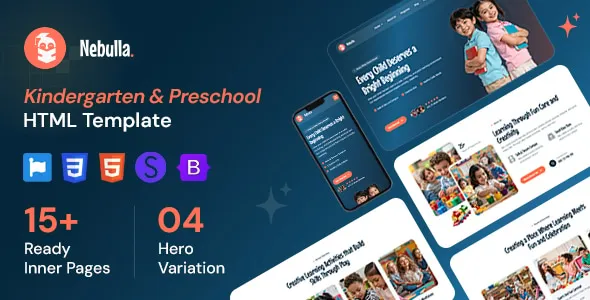
Nebulla – Preschool & Daycare HTML Template
Nebulla – Preschool & Daycare HTML Template is a professionally oriented website template designed for preschools, daycare centers, kindergartens, early learning facilities, and childcare service providers looking to establish a welcoming online presence. With a focus on presenting educational services, childcare programs, school activities, and essential parent information, Nebulla provides a potential frontend foundation for creating an engaging website for early childhood education businesses. Its HTML-based structure allows developers to customize page layouts, content, colors, typography, and other visual elements according to the identity and requirements of a childcare organization.
A well-designed preschool website helps parents understand an institution’s educational approach, explore available programs, learn about its facilities, and find important enrollment information. Families often want to know about age groups, daily routines, learning activities, safety practices, teacher qualifications, and communication options before choosing a childcare provider. An organized website can make this information easier to access while helping an institution communicate its values and build trust with prospective families.
Nebulla can be evaluated for projects that require a child-friendly visual presentation combined with practical information for parents and guardians. Developers can adapt the template for nursery schools, Montessori-inspired learning centers, kindergarten programs, early education academies, and daycare businesses. The exact layouts, page designs, and included components depend on the template version, so reviewing the current live demo and documentation is recommended before implementation.
What Is Nebulla Preschool & Daycare HTML Template?
Nebulla is an HTML website template intended for organizations working in preschool education, childcare, and early childhood development. It offers a starting point for presenting educational services through a structured website rather than developing every page layout from scratch.
A preschool website generally needs to communicate several types of information. Parents may look for program descriptions, age requirements, admission procedures, school hours, learning activities, staff information, facilities, and contact details. A daycare center may also need to explain its daily schedule, childcare arrangements, meal policies, and communication procedures.
An HTML template provides the frontend structure used to display this information in a web browser. Developers can work with the supplied HTML, CSS, JavaScript, images, and other included assets, depending on the package, to adapt the design to the institution’s needs.
Nebulla can serve as a foundation for a simple informational website or a larger collection of pages describing different educational services. However, features such as online enrollment processing, student databases, parent accounts, payment collection, and attendance management require additional development or compatible third-party integrations unless they are explicitly included in the package.
Child-Friendly Design for Early Education Websites
The visual presentation of an early education website should feel approachable, organized, and reassuring. Parents want to understand the institution’s services quickly, while children and families may respond positively to colorful visuals, friendly illustrations, and imagery that reflects a supportive learning environment.
Nebulla can be customized to reflect the personality of a preschool or daycare business. A center focused on creative learning may prefer playful colors and expressive illustrations, while a more traditional kindergarten may choose a balanced combination of bright accents, readable typography, and structured content sections.
A welcoming design should not sacrifice clarity. Important information such as program options, school hours, location, admission details, and contact methods should remain easy to find. Visual elements should support the message rather than distract visitors from the information they need.
Photographs of classrooms, outdoor play areas, learning materials, and educational activities can help parents understand the environment. Institutions should use authentic images only when they have the appropriate permissions, especially when photographs include children.
A consistent visual identity across the homepage, program pages, and contact sections can help the organization appear professional and dependable.
Responsive Layout for Mobile and Desktop Devices
Parents may visit a preschool website from a smartphone while commuting, use a tablet to compare childcare options, or browse from a desktop computer when reviewing enrollment information. Responsive design helps the website accommodate these different browsing environments.
Nebulla’s responsive behavior should be confirmed through its documentation and live demonstration. When the supplied layouts support responsive design, developers can use them as a foundation for presenting content across different screen sizes.
On mobile devices, navigation should be easy to operate, paragraphs should remain readable, and contact buttons should be convenient to select. Program cards and image galleries should adjust to smaller screens without making the content difficult to understand.
Desktop layouts can take advantage of wider screens to display multiple program cards, classroom photographs, school information, and other supporting content. Smaller screens may require content sections to stack vertically or navigation menus to collapse.
Responsive testing should cover all important pages, not just the homepage. Admission forms, galleries, teacher profiles, event listings, and contact sections can behave differently depending on their structure.
A website should also be tested across commonly used browsers to identify layout inconsistencies, oversized images, and interactive elements that may not work as expected.
Homepage Design for Preschools and Daycare Centers
The homepage is often the first introduction families receive to a childcare organization. It should communicate the institution’s purpose, highlight its main services, and guide visitors toward relevant information.
A Nebulla-based homepage can be organized around the institution’s identity, educational philosophy, available programs, learning environment, and enrollment opportunities, depending on the layouts included in the selected version.
An introductory banner can explain the center’s approach to early education and provide a clear pathway to explore programs or contact the institution. Supporting sections may introduce classroom activities, teaching methods, facilities, staff members, and upcoming events.
Program summaries can help parents identify suitable options for their children’s ages. A section about the learning environment can describe how the institution approaches play, creativity, communication, and social development.
The homepage may also include frequently asked questions or a brief overview of the admission process. These sections can reduce uncertainty by addressing common questions before families contact the school.
Every homepage section should have a clear purpose. Rather than filling the page with generic promotional messages, institutions should prioritize accurate details that help families understand the services available and decide whether the center matches their needs.
Preschool Programs and Daycare Service Pages
Dedicated program pages help parents compare educational options and understand what each service includes. They also allow an institution to provide more detailed information than would fit comfortably on the homepage.
Nebulla can be adapted to present programs such as nursery education, preschool classes, kindergarten preparation, toddler care, and full-day or part-day daycare, depending on the services offered by the organization.
Each program page should explain the intended age group, schedule, learning objectives, activities, and relevant enrollment requirements. If the center offers different session lengths or care arrangements, those distinctions should be described clearly.
A toddler program might focus on supervised play, language exposure, sensory activities, and early social interaction. A preschool class may introduce foundational concepts through storytelling, art, music, movement, and guided play. Kindergarten preparation may emphasize early literacy, numeracy, communication, and classroom routines appropriate to the children’s developmental stages.
Descriptions should reflect the institution’s actual curriculum and practices. Avoid presenting activities or educational outcomes that the center does not provide.
Clear program pages make it easier for families to identify the services that suit their schedules and children’s needs while helping the institution communicate its educational approach consistently.
Early Childhood Learning and Educational Activities
Parents often want to understand how children spend their time at a preschool or daycare center. A website can explain the activities used to encourage exploration, communication, creativity, and age-appropriate learning.
A Nebulla website can include sections describing classroom experiences, play-based learning, arts and crafts, music, storytelling, outdoor activities, and group participation where these reflect the institution’s actual program.
Activity descriptions should explain their educational purpose in accessible language. For example, building activities can encourage problem-solving and coordination, while storytelling can support listening, vocabulary, and imagination. Group games may help children practice cooperation, turn-taking, and communication.
Photographs and short descriptions can help parents visualize the learning environment. A gallery may show classroom materials, creative projects, outdoor spaces, or prepared activity areas, subject to appropriate permissions and privacy considerations.
Institutions should avoid making unsupported promises about children’s development. Learning experiences vary according to age, individual needs, and the teaching environment. Accurate descriptions help families form realistic expectations and understand the center’s approach.
Teacher Profiles and Staff Information
Teachers and childcare professionals are an important part of the relationship between a family and an early education institution. Introducing the team can help parents learn about the people responsible for supporting children’s everyday experiences.
Nebulla can be customized to present staff profiles if the selected layout supports team sections or if suitable components are added during development.
A teacher profile may include a professional photograph, role, relevant qualifications, experience, and a brief description of their teaching approach. The information should be accurate and shared with the staff member’s permission.
A daycare website may also explain how staff members support classroom routines, supervise activities, communicate with families, and respond to children’s individual needs. Any statements about qualifications, staffing ratios, or certifications should reflect verified information.
Team pages should remain clear and easy to scan. Parents generally need useful information about the people and roles involved rather than lengthy biographies that make essential details difficult to locate.
Keeping staff information current is equally important. When responsibilities change or team members leave, the website should be updated to avoid confusing families or presenting outdated information.
Facilities, Classrooms, and Learning Environment
The physical environment can influence how parents evaluate a preschool or daycare center. Information about classrooms, play areas, learning materials, and available facilities can help families understand what the institution offers.
A Nebulla website can present these details through dedicated content sections, photographs, and gallery layouts, depending on the available design components.
Classroom descriptions may explain how spaces are organized for learning, creative activities, quiet time, and supervised play. Outdoor areas can be introduced where the center offers them, while shared spaces may be described according to their actual purpose.
Safety-related information should be factual and specific. If the institution has documented visitor procedures, supervision practices, emergency arrangements, or facility certifications, these may be explained accurately where appropriate.
Photographs should represent the real premises and current facilities. Stock images can support general design concepts, but they should not mislead parents into believing that a particular room, playground, or piece of equipment belongs to the institution when it does not.
Clear facility information can help families prepare questions for a visit and understand the environment in which their children may spend time.
Admissions and Enrollment Information
An organized admissions section helps families understand how to enquire about a place, review eligibility requirements, and prepare the information needed for enrollment.
Nebulla can provide the frontend structure for presenting admission information, with specific forms or interactive workflows added according to the institution’s requirements.
An admissions page may describe available programs, age requirements, application steps, school hours, required documents, and the process for arranging a visit. If enrollment dates or places are limited, the information should be kept current.
A simple inquiry form might collect a parent’s name, contact information, the child’s relevant age group, preferred program, and a short message. The form should request only the information necessary for the initial enquiry.
An HTML template alone does not automatically process applications or securely store student records. Functional enrollment workflows require suitable form handling, validation, data storage, access controls, and privacy safeguards.
Before publishing an admissions form, developers should test required fields, confirmation messages, error handling, and the delivery of submitted enquiries. The institution should also explain how personal information is used and handled.
Parent Communication and Frequently Asked Questions
Parents may have practical questions about daily routines, meals, opening hours, holidays, policies, and communication with staff. A well-organized website can answer common questions before families need to make direct contact.
Nebulla can be adapted to include a frequently asked questions section, parent information page, or other content areas that organize these details.
Useful questions might cover program availability, age requirements, daily schedules, what children should bring, meal arrangements, illness policies, authorized pickup procedures, and how parents can contact the institution.
Answers should be concise, specific, and consistent with the center’s current policies. Where individual circumstances may differ, the website can invite parents to contact the institution for clarification.
A parent information section can also explain how the center shares announcements or communicates changes to schedules. If the organization uses a separate parent portal or messaging platform, the website can provide an appropriate link when that service is available.
Private student records and sensitive family information should not be displayed on a public website. Any personalized parent communication system requires appropriate technical safeguards and access permissions.
Events, Activities, and School Announcements
Events can give families a clearer picture of the preschool community and help them stay informed about relevant activities. A website may feature upcoming celebrations, classroom events, open days, parent meetings, and educational activities.
Nebulla can be customized to present event information through cards, lists, or dedicated pages where suitable layouts are available or can be implemented.
Each announcement should include relevant details such as the event name, date, time, location, and any preparation required from parents. Outdated events should be removed or clearly moved into an archive to prevent confusion.
A school might publish information about an open house, seasonal celebration, storytelling session, or parent orientation meeting. The details should reflect confirmed plans rather than tentative activities presented as final arrangements.
If an event calendar or registration feature is required, it may need additional JavaScript, a backend service, or a third-party integration. The presence of an event layout does not automatically provide calendar synchronization, registration management, or automated reminders.
Regularly reviewed announcements can make the website more useful to existing families as well as prospective parents.
Customization and Branding Options
Every childcare organization has its own educational philosophy, visual identity, and communication style. Customization allows a website to reflect those differences rather than appearing like an unchanged generic template.
With access to the supplied HTML and CSS files, developers can adjust the visual presentation according to the template’s structure and licensing terms. Depending on the package, changes may include colors, typography, spacing, images, icons, navigation, content sections, and page layouts.
A preschool focused on creative exploration may use bright accents and playful illustrations, while a Montessori-inspired center may prefer a calmer presentation that emphasizes learning materials and classroom environments.
Branding should remain consistent throughout the website. The logo, color palette, heading styles, buttons, and image treatments should work together to create a recognizable identity.
Developers should organize custom styles carefully and avoid making unnecessary changes to shared files. Keeping customizations documented can simplify future updates and reduce the risk of breaking existing layouts.
Before making major changes, review the template’s file structure, dependencies, responsive styles, and supported customization approach.
SEO-Friendly Structure for Preschool Websites
Search engine optimization can help families discover a childcare organization when looking for preschool, nursery, kindergarten, or daycare services in their area. A useful website structure supports both visitors and search engines by organizing information into clear, relevant pages.
Nebulla provides a potential frontend starting point, but SEO performance depends on the content, technical implementation, competition, and broader optimization strategy rather than the template alone.
Each page should have a descriptive title, a clear primary heading, and original content relevant to its subject. Separate pages for different programs can help parents find detailed information without navigating through one long, crowded page.
For local visibility, the institution should provide accurate business information, including its name, address, phone number, service area where relevant, and opening hours. These details should remain consistent across the website and other business listings.
Images should be appropriately sized and include meaningful alternative text when they communicate important information. Internal links can connect program pages with admissions information, contact details, and related resources.
Compatible SEO tools or additional development may be needed to manage metadata, XML sitemaps, redirects, structured data, and other technical requirements. No template can guarantee specific search rankings or visitor numbers.
Website Performance and Image Optimization
Website speed affects how easily parents can access important information, particularly when using mobile devices or slower internet connections.
Nebulla’s actual performance depends on the included assets, code, hosting environment, third-party resources, and any modifications made during implementation. Developers should test the finished website rather than assume that the template is automatically optimized for every situation.
Preschool websites often use photographs of classrooms, activities, and facilities. These images should be compressed appropriately and delivered at dimensions suited to their display areas. Oversized files can slow down page loading without providing meaningful visual benefits.
Unnecessary scripts, external widgets, and unused assets should also be reviewed. Where appropriate, developers can use browser caching, optimized font loading, and other performance techniques supported by the hosting setup.
Testing should cover the homepage, program pages, galleries, admissions information, and contact page. Large image galleries and embedded media deserve particular attention because they may affect performance more than simple text sections.
A fast, stable website makes it easier for parents to review information and complete important tasks.
Accessibility and Parent-Friendly Navigation
A preschool website should be understandable and usable for visitors with different abilities, devices, and levels of technical experience. Clear navigation and accessible design help parents locate information without unnecessary difficulty.
When customizing Nebulla, developers should use readable typography, sufficient color contrast, descriptive link text, and meaningful form labels. Important information should not be communicated through color alone.
Navigation menus should use familiar terms such as Programs, About Us, Admissions, Events, and Contact where appropriate. The most important pages should be easy to reach, especially on mobile devices.
Images that communicate useful information should have appropriate alternative text. Decorative images can be handled differently so that they do not add unnecessary noise for screen-reader users.
Forms should provide clear instructions and helpful error messages. Interactive elements should be keyboard-accessible, and focus indicators should remain visible.
Accessibility should be checked throughout development through automated tools, keyboard testing, and practical reviews of the completed pages. These measures can help create a more inclusive online experience for families.
HTML Template Structure and Technical Integration
As an HTML template, Nebulla is primarily a frontend resource for displaying website content and styling it in a browser. This makes it suitable for developers who want direct access to the markup and styles used to construct the website.
The package may include HTML pages, CSS stylesheets, JavaScript files, fonts, icons, and image assets, depending on the release. Developers should inspect the actual download and documentation to understand its structure and dependencies.
The template can be integrated into a broader website project when its code, license, and technical requirements support that use. A developer may also adapt its design for a content management system or connect it to a backend application, but those tasks require additional implementation.
For example, a static program page can display information directly in HTML, while a dynamic enrollment system needs form processing and a secure destination for submitted data. Likewise, a staff directory can display profiles without automatically providing a database for managing staff records.
Before deployment, developers should test links, scripts, responsive layouts, forms, and third-party assets. They should also verify that the final implementation follows the template license and any applicable privacy requirements.
Security, Privacy, and Ongoing Maintenance
Childcare websites require particular care when handling information about children and families. Even when the website primarily presents public information, contact forms and enrollment enquiries may collect personal details.
Developers should request only necessary information, use secure transmission through HTTPS, and ensure that form submissions are delivered to an appropriate destination. Sensitive records should not be stored in publicly accessible files or exposed through frontend code.
If the website connects to a backend system, access controls, server-side validation, secure storage, and appropriate retention policies should be implemented according to the information being processed.
Routine maintenance should include checking links, updating content, reviewing third-party dependencies, testing forms, and renewing any required services. Staff information, program descriptions, contact details, and admission policies should remain accurate.
Organizations should also review photographs and published announcements periodically, especially when content includes identifiable children or other personal information. Appropriate permissions and organizational policies should guide what is shared publicly.
A consistent maintenance process helps the website remain reliable, informative, and respectful of family privacy.
Who Should Use Nebulla Preschool & Daycare HTML Template?
Nebulla can be evaluated by organizations that need a website focused on early childhood education and childcare services.
Preschools: Introduce educational programs, classroom activities, teaching approaches, and admissions information.
Daycare centers: Explain childcare arrangements, daily routines, operating hours, and contact procedures.
Kindergartens: Present age-appropriate learning programs, facilities, staff information, and school announcements.
Nursery schools: Organize information about early learning, available classes, and parent enquiries.
Montessori-inspired learning centers: Describe educational principles, learning materials, classroom environments, and program options that reflect the institution’s actual approach.
Early learning academies: Build a public website that introduces the institution, its learning philosophy, and available educational services.
Childcare service providers: Present service details, location information, policies, and inquiry options.
Web development agencies: Use the template as a potential starting point for client projects in the preschool and childcare sector, subject to its licensing terms.
The best choice depends on the organization’s needs, the available layouts, and the amount of customization required. Reviewing the current demo and documentation can help confirm whether the template is suitable.
Tips for Creating a Successful Preschool Website
Start by identifying the questions parents ask most often. This will help determine which pages should be included and how the navigation should be organized.
Prepare accurate content for the institution’s introduction, programs, staff, facilities, admissions process, policies, and contact details before customizing every section. Genuine information is more valuable than generic promotional text.
Use photographs that represent the real learning environment and have been approved for publication. Keep the design consistent and ensure that important details remain readable across desktop and mobile devices.
Make the admissions process easy to understand. Explain the next steps clearly and provide a convenient way for parents to contact the institution. If forms are included, test their validation, submission, and confirmation behavior before launch.
Review the website for accessibility, loading speed, broken links, and outdated information. Confirm that privacy practices are appropriate for any personal details collected through the site.
Finally, maintain the website regularly. Updated program information, current contact details, and clear announcements help families use the site with confidence.
Final Thoughts on Nebulla Preschool & Daycare HTML Template
Nebulla – Preschool & Daycare HTML Template is a potential frontend solution for preschools, kindergartens, nursery schools, daycare centers, and early learning organizations seeking to establish a welcoming online presence. Its intended use makes it relevant to websites that need to communicate educational services, introduce childcare programs, present facilities, and guide parents toward useful information.
A well-customized implementation can combine child-friendly visuals with clear program descriptions, staff information, admissions guidance, event announcements, and convenient contact options. Responsive layouts, accessible navigation, optimized images, and accurate content can further improve the experience for families browsing from different devices.
The final capabilities depend on the specific template version, included assets, and additional development work. Features such as online enrollment processing, student management, parent portals, payment systems, and automated notifications should be verified or implemented separately where necessary.
For organizations looking to build a website in the early education and childcare sector, Nebulla can be considered as part of a broader web development plan. With thoughtful customization, responsible handling of family information, clear communication, and ongoing maintenance, the template can provide a useful foundation for presenting a professional and parent-friendly digital presence.