My Account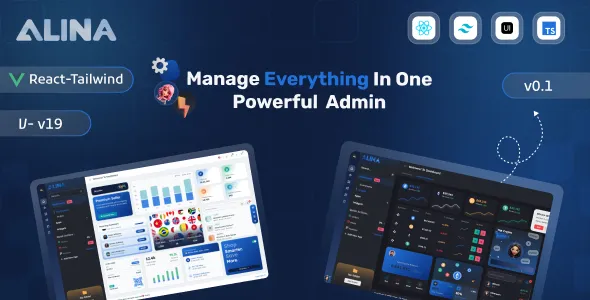
Alina React 19 Tailwind + Typescript Admin Dashboard Template
Alina React 19 Tailwind + Typescript Admin Dashboard Template is a modern frontend solution for developers building administrative interfaces, analytics dashboards, business management panels, and web application control centers. Combining React 19, Tailwind CSS, and TypeScript, this template provides a foundation for creating structured, responsive, and maintainable dashboard experiences. It is suitable for projects that need a consistent user interface for presenting information, navigating application sections, and managing common administrative workflows.
Modern web applications often require dashboards that bring important information together in one accessible place. Administrators may need to review business metrics, monitor activity, explore records, manage settings, and navigate between different tools. Alina can serve as a starting point for organizing these experiences while allowing developers to adapt the design and functionality to their project’s requirements.
React supports component-based interface development, Tailwind CSS provides utility-based styling, and TypeScript helps developers describe data structures and detect certain coding errors during development. Together, these technologies can support a flexible frontend architecture for dashboards of different sizes and purposes.
Whether you are creating an internal business tool, a SaaS administration panel, a reporting interface, or a custom management application, Alina offers a potential starting point for the user interface. The actual layouts, components, and functionality depend on the supplied package and its documentation. Backend services, database operations, authentication, and other dynamic features should be verified separately rather than assumed to be included.
What Is Alina React 19 Tailwind + Typescript Admin Dashboard Template?
Alina is an admin dashboard template intended for developers who want to build web application interfaces using React 19, Tailwind CSS, and TypeScript. An administrative dashboard typically provides a central workspace where users can view relevant information, access application tools, and perform authorized tasks.
Building such an interface from scratch involves creating layouts, navigation, page structures, reusable components, and responsive styling. A dashboard template can reduce some of this repetitive frontend work by providing an existing design foundation that developers can customize for their project.
React enables developers to divide the interface into reusable components, making it easier to maintain common elements across different screens. Tailwind CSS supports styling through utility classes, while TypeScript adds static type checking to help identify certain inconsistencies in code.
Alina can be evaluated for business dashboards, SaaS interfaces, operational management systems, analytics applications, and other projects requiring a structured administrative experience. Its suitability depends on the included components, project architecture, dependency requirements, and the features needed for the finished application.
Modern Dashboard Design and User Experience
A well-designed dashboard should make information easy to understand and common tasks straightforward to complete. Consistent spacing, readable typography, clear navigation, and a logical content hierarchy help users work efficiently.
Alina provides a starting point for building an organized administrative interface, with the final design capabilities determined by its included layouts and components. Developers can adapt the visual presentation to suit their application, brand identity, and target audience.
For example, a business dashboard may display important performance indicators near the top of the page, followed by recent activity and detailed information. A project management interface might emphasize ongoing tasks, deadlines, and project summaries, while a customer management system could prioritize account information and recent interactions.
The interface should focus on the information users need most. Excessive cards, decorative elements, or unnecessary visual effects can make a dashboard harder to navigate.
A consistent design system helps maintain a professional appearance across the application. Reusing the same typography styles, button treatments, spacing rules, and navigation patterns also reduces the need to make individual styling decisions for every page.
React 19 Component-Based Architecture
React is a JavaScript library for building user interfaces through reusable components. Its component-based approach allows developers to separate an application into smaller elements that can be composed into complete pages.
With a React-based dashboard such as Alina, developers can organize the interface into components for navigation, page headers, summary panels, tables, forms, filters, and other recurring elements where those components are supported by the supplied package.
Reusable components can improve maintainability by keeping shared interface patterns consistent. When a common element needs a design adjustment, updating its shared implementation may help propagate the change across multiple pages.
React also supports state-driven interfaces, where displayed content responds to changes in application state. This can be useful for interactive navigation, filter controls, expandable panels, and other frontend behaviors.
The precise React 19 compatibility and implementation details should be confirmed from the package documentation. Developers should review the project’s entry points, component structure, dependency versions, and build configuration before extending the template.
TypeScript for Maintainable Development
TypeScript adds static typing to JavaScript, allowing developers to describe the expected structure of data, function parameters, component properties, and other parts of an application.
For an administrative dashboard, type definitions can help represent records such as customers, employees, transactions, projects, and reports. Clear data models make it easier to understand which properties a component expects and how different parts of the application communicate.
For example, a table component may expect a collection of records with defined identifiers, labels, and status values. TypeScript can help identify certain mismatches during development before they become runtime problems.
Types are particularly useful as a project grows and multiple developers contribute to the same codebase. Shared interfaces and type definitions can clarify assumptions and make refactoring easier to manage.
However, TypeScript does not automatically validate every value received from an API or external source at runtime. Applications should still validate external data and handle unexpected responses appropriately.
The effectiveness of TypeScript also depends on the project’s compiler settings and how consistently types are used throughout the codebase.
Tailwind CSS for Flexible Styling
Tailwind CSS provides a utility-first approach to styling web interfaces. Developers can compose utility classes to control layout, spacing, typography, colors, borders, and responsive behavior directly within their markup or component files.
In an Alina-based project, Tailwind CSS can help developers customize dashboard layouts without creating a separate CSS rule for every small design change. Shared components and consistent utility patterns can also make it easier to maintain a unified appearance.
For example, a dashboard may use flexible grid layouts for summary cards, responsive containers for tables, and consistent spacing between sections. Utility classes can help implement these patterns while keeping the styling close to the components that use it.
A coherent design system remains important. Repeating unrelated color choices, spacing values, or typography treatments can make the interface inconsistent, even when utility-based styling is available.
Developers should review the Tailwind version, configuration files, and build process supplied with the template. Customizations should follow the existing project conventions and be tested after dependency or configuration changes.
Dashboard Overview and Summary Cards
The dashboard overview often serves as the main entry point for an administrative application. It can provide a concise summary of key information and help users identify areas that require attention.
Depending on the included components, Alina can be adapted to display summary cards, status indicators, recent activity, or other relevant information. The displayed metrics should reflect the actual purpose of the application rather than being included only for decoration.
A sales interface might summarize orders or revenue, while an operations dashboard could highlight pending tasks and active projects. A customer management application may display account totals or recent registrations.
Summary cards should use clear labels and meaningful values. If a metric includes a comparison with an earlier period, the date range and calculation should be understandable.
The template should not be assumed to provide live business analytics by default. Dynamic figures need to be connected to appropriate data sources, and calculations must be implemented and tested.
A useful overview prioritizes the information users need to make decisions and provides clear routes to the detailed pages where they can take action.
Navigation and Organized Application Pages
Administrative applications can contain many sections, so a predictable navigation structure is essential. Users should be able to understand where they are and locate relevant tools without unnecessary effort.
Alina can provide a foundation for organizing application sections through its available layout and navigation components. Developers can customize the structure according to the requirements of the project.
A business application might include overview, customers, projects, reports, and settings sections. An eCommerce administration panel could instead prioritize products, orders, customers, and sales reports.
Navigation labels should be descriptive, related pages should be grouped logically, and frequently used destinations should be easy to reach. The design should also account for smaller screens, where a large navigation menu may need a more compact presentation.
For applications with multiple user roles, the interface can display navigation options relevant to each user’s responsibilities. However, hiding a menu item is not sufficient security. Backend services must enforce permissions for protected data and operations.
A clear navigation system makes an application easier to learn and helps maintain consistency as additional pages are introduced.
Tables, Data Records, and Filtering Interfaces
Tables are commonly used in dashboards to display structured information such as customers, transactions, employees, products, or project records. They help administrators compare entries and find relevant information.
An Alina-based application can incorporate table interfaces where the required components are available or added during development. Developers should select columns that support the user’s task rather than displaying every possible field.
Search, sorting, filtering, and pagination can make large datasets easier to manage. Whether these features are included in the supplied package or require additional implementation should be verified before development begins.
For smaller datasets, client-side filtering may be sufficient. Larger datasets may benefit from server-side pagination and filtering to reduce the amount of data transferred to the browser.
Tables should also handle empty states, loading indicators, and errors. Responsive behavior is particularly important when tables contain numerous columns or long text values.
A well-designed data interface balances information density with readability. The goal is to help users locate, compare, and understand records without overwhelming the screen.
Charts, Analytics, and Reporting Interfaces
Charts and reporting panels can help administrators interpret business information more quickly than raw tables alone. They are useful when an application needs to communicate trends, comparisons, distributions, or changes over time.
Depending on the components included and the libraries selected, Alina can be extended with charts, report summaries, and visual indicators. The appropriate visualization depends on the data and the questions users need to answer.
A line chart may be useful for showing a metric over time, while a bar chart can help compare categories. Summary indicators can provide a quick overview, with detailed reports available for users who need additional context.
Charts should use clear labels, appropriate scales, and accurate data. Avoid visualizations that imply relationships or trends that the underlying information does not support.
A React dashboard does not automatically include live reporting or data processing simply because charts appear in its design. Developers must connect the visualizations to actual data sources and implement any required calculations, filtering, and update behavior.
For business-critical reporting, users should also be able to identify relevant date ranges, units, and other conditions that affect the displayed results.
Forms and Administrative Workflows
Forms allow administrators to create records, update information, change settings, and complete other application tasks. Their usability can have a significant effect on the overall dashboard experience.
Alina can be customized for form-based workflows using the components provided by the template or added during development. Examples include profile editing, record creation, search filters, and configuration forms.
A clear form should use descriptive labels, suitable input types, and logical groupings. Required fields should be identified, and validation feedback should explain how to correct an invalid entry.
Client-side validation can improve the user experience by identifying common errors before submission. However, important validation must also occur on the server or trusted API because browser-side checks can be bypassed.
Forms should account for submission progress, success messages, network failures, and repeated submissions. These details help users understand whether an action has been completed.
The frontend template does not necessarily include the backend logic needed to save data, upload files, send notifications, or perform other operations. These capabilities depend on the application architecture and the services connected to the interface.
Responsive Design for Desktop, Tablet, and Mobile
Administrative dashboards are often accessed from different devices. Responsive layouts help keep information usable when screen dimensions and input methods change.
Alina’s Tailwind CSS foundation can support responsive styling through the utility classes and layout patterns used in the supplied implementation. Developers should confirm the actual behavior of each page and component rather than assuming that every layout is automatically optimized for mobile devices.
On smaller screens, cards may stack vertically, navigation may collapse into a compact menu, and tables may require horizontal scrolling or alternative presentations.
Buttons and form controls should remain comfortable to use, while headings and body text should remain readable without excessive zooming. Important actions should not become difficult to locate because of unnecessary visual clutter.
Test the homepage, data tables, charts, forms, and settings pages at multiple viewport widths. Pay attention to clipped content, overflow, inconsistent spacing, and components that become difficult to operate.
Responsive testing should continue after customization because additional scripts, components, and styling changes can introduce new layout problems.
Customization and Brand Identity
A dashboard should reflect the application it supports. Customization helps align the interface with an organization’s branding, terminology, and operational requirements.
Depending on the supplied configuration, Alina can be adapted through its React components, Tailwind utility classes, theme settings, and supporting styles. Developers can adjust colors, typography, spacing, navigation, page layouts, and component appearance where supported by the implementation.
A finance application may prioritize precise information presentation and clear status indicators. A project management dashboard may emphasize tasks and timelines, while a customer management platform may focus on profiles and activity records.
Consistency is important across all these applications. Establish a small set of typography styles, spacing patterns, colors, and button treatments instead of styling every page independently.
Reusable components can make these changes easier to maintain. If a button, card, or navigation item is used throughout the application, a shared implementation can help keep its appearance consistent.
Before making substantial modifications, maintain version control and follow the project’s conventions. Test customized components across the application to ensure that visual changes do not disrupt responsive behavior or interactions.
API Integration and Dynamic Data
Many administrative dashboards need to display information from external APIs or application services. A frontend template can provide the visual interface, but the data flow and business logic must be implemented separately unless the supplied package explicitly includes them.
An Alina-based application can be extended to retrieve information from suitable APIs, display records, submit forms, and update interface state according to the responses received.
Developers should handle loading states, empty responses, network failures, and unexpected data formats. Clear error messages help users understand when information cannot be retrieved or an action has failed.
TypeScript can help describe expected API response structures, but external data should still be validated at runtime when appropriate. Applications should also avoid exposing private credentials or secrets in browser-delivered code.
Authentication and authorization should be handled according to the backend architecture. Sensitive operations must be protected by the relevant service rather than relying exclusively on frontend controls.
Careful API integration turns a visual dashboard into a functional application while helping keep its behavior understandable and maintainable.
Performance and Frontend Optimization
Dashboard performance affects how quickly users can access information and complete tasks. Large dependencies, unnecessary rendering, oversized assets, and inefficient data requests can make an interface feel slow.
The actual performance of Alina depends on the supplied implementation, dependency choices, build configuration, data volume, and hosting environment.
Developers should begin by reviewing the installed packages and removing dependencies that are not needed, where appropriate. Production builds should use the documented build process, and assets should be delivered efficiently.
React applications may benefit from appropriate component boundaries and careful state management. Expensive operations and repeated data requests should be reviewed when performance measurements indicate a problem.
For data-heavy pages, pagination, filtering, and selective rendering can help prevent unnecessary work. Caching and request optimization may also improve responsiveness when used appropriately.
Performance should be measured rather than assumed. Test important workflows, including opening dashboard pages, searching records, switching sections, and loading charts. Use the results to identify bottlenecks and prioritize meaningful improvements.
Accessibility and User-Friendly Interaction
Accessible design helps more people use an application effectively. Dashboard interfaces should provide readable content, clear controls, predictable navigation, and understandable feedback.
When customizing Alina, use semantic HTML, descriptive labels, appropriate contrast, and visible keyboard focus indicators. Interactive elements should have clear names, and status information should not rely only on color.
Forms should associate labels with their controls and provide useful validation messages. Tables should use appropriate headings, while charts may need accompanying summaries or alternative descriptions to communicate their key information.
Keyboard navigation should be tested across menus, dialogs, forms, and other interactive components. Third-party libraries may require additional adjustments to meet the application’s accessibility requirements.
Accessibility should be considered throughout development rather than treated as a final visual check. Consistent testing helps identify issues before they affect users.
Security and Application Maintenance
A dashboard may provide access to sensitive information or important business operations, so security needs to be addressed throughout development.
Alina is a frontend template, and its security characteristics depend on the implementation, dependencies, connected services, and deployment environment. A polished interface does not guarantee that the finished application is secure.
Keep React, Tailwind CSS, TypeScript, and other dependencies updated according to compatibility and security guidance. Review package changes before upgrading, and test the application after significant updates.
Avoid placing private API keys, database credentials, or other secrets in frontend code. Browser-delivered assets can be inspected by users, so sensitive operations should be handled by a secure backend.
Authentication, role-based permissions, and access controls should be enforced by the relevant server-side services. Frontend restrictions alone cannot protect sensitive data.
Maintain version control, backups, automated tests where appropriate, and a documented deployment process. Regular maintenance helps reduce avoidable issues as the application evolves.
Who Should Use Alina React 19 Tailwind + Typescript Admin Dashboard Template?
Alina may be suitable for developers and organizations that need a structured frontend foundation for administrative applications.
SaaS developers: Teams building software-as-a-service products can evaluate the template for internal administration screens and user-facing management interfaces.
Business application developers: Developers creating operational tools can adapt dashboard layouts to display business records, metrics, and workflow information.
Startups: Early-stage companies can use a prepared interface foundation while implementing the application-specific functionality their product requires.
Software development agencies: Development teams can evaluate the template for client projects that need a React-based administrative experience.
Data and analytics teams: Developers building reporting interfaces can customize the dashboard to present metrics, charts, and structured information.
Project management platform developers: Teams can adapt the interface for task summaries, project records, and operational status views, subject to the components and additional logic implemented.
Enterprise development teams: Organizations building internal tools can use a dashboard foundation as part of a larger application architecture, provided it meets their technical and security requirements.
React and TypeScript developers: Developers familiar with modern frontend workflows can use the template as a starting point for learning, prototyping, or building customized interfaces.
The best fit depends on the actual package, included pages, dependency versions, customization needs, and required backend functionality.
Tips for Building a Successful Dashboard with Alina
Start by defining the purpose of the application and identifying the people who will use it. Determine which information they need most frequently and which tasks should be easy to complete.
Review the template structure and documentation before making changes. Confirm the React version, Tailwind configuration, TypeScript settings, required packages, and build commands.
Plan the navigation and page hierarchy around actual workflows. Keep the overview focused, use clear labels, and avoid adding charts or summary cards that do not serve a specific purpose.
Replace sample content with accurate application data and implement the required API connections, validation, and error handling. Ensure that sensitive operations are protected by appropriate backend controls.
Test the interface across screen sizes and check navigation, tables, forms, charts, and other interactive components. Review accessibility and performance as part of the same testing process.
Finally, maintain the codebase through version control, dependency updates, testing, and regular reviews. A clear development process makes it easier to extend the dashboard without sacrificing consistency or reliability.
Final Thoughts on Alina React 19 Tailwind + Typescript Admin Dashboard Template
Alina React 19 Tailwind + Typescript Admin Dashboard Template is a potential starting point for developers creating modern administrative interfaces with React, Tailwind CSS, and TypeScript. Its technology stack supports a component-oriented frontend approach, flexible styling, and type-aware development practices.
The template can be evaluated for SaaS dashboards, business management tools, analytics interfaces, operational applications, and custom administration panels. With appropriate customization, developers can establish consistent navigation, structured data views, responsive layouts, and a user interface aligned with their project’s goals.
The capabilities of the finished application depend on the supplied template, its documented features, dependency compatibility, and the additional development performed. Database connectivity, authentication, permissions, live analytics, and other dynamic functions should be verified or implemented separately as needed.
By combining a suitable interface foundation with clear design decisions, efficient frontend development, secure backend integration, accessibility testing, and ongoing maintenance, developers can build a dashboard experience that supports both everyday usability and future application growth.