My Account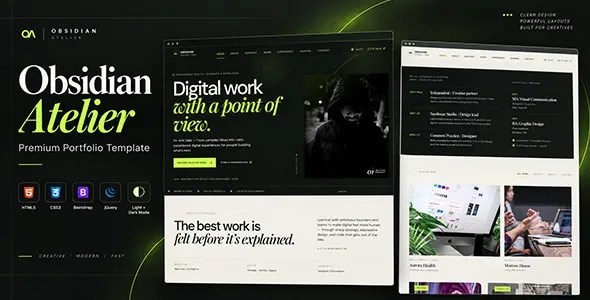
Obsidian – Creative Portfolio HTML Template
Obsidian – Creative Portfolio HTML Template is a modern website design solution for designers, photographers, freelancers, artists, creative agencies, and digital professionals who want to showcase their work through a polished online portfolio. Designed as a frontend foundation for creative websites, this HTML template can help professionals present their skills, highlight selected projects, communicate their personal brand, and make it easier for potential clients to get in touch. Its portfolio-focused purpose makes it suitable for individuals and creative teams seeking a visually engaging website that emphasizes project presentation and professional identity.
A strong portfolio website does more than display images or list completed projects. It tells a story about the creator’s expertise, creative approach, and ability to solve problems. Visitors should be able to understand what a professional offers, explore relevant examples, and find clear information about working together. Obsidian can serve as a starting point for organizing these elements into a consistent digital experience that supports professional visibility and client communication.
Whether you are a graphic designer, web developer, photographer, illustrator, branding specialist, or creative agency, Obsidian can be evaluated as a foundation for presenting your work online. As an HTML template, it primarily provides frontend structure and styling. Features such as dynamic project management, contact form processing, content publishing, and database connectivity depend on the included package or additional integrations. Reviewing the current demo and documentation helps confirm the exact layouts and capabilities available.
What Is Obsidian – Creative Portfolio HTML Template?
Obsidian is an HTML portfolio template intended for creative professionals who need a dedicated website to introduce their work, experience, services, and professional identity. Instead of building every page from scratch, developers can use a prepared frontend structure and customize it according to the creator’s goals and visual preferences.
A portfolio website may include a homepage, project gallery, individual case studies, biography, service descriptions, testimonials, and contact information. The specific pages available in Obsidian depend on the supplied package, while additional sections can be developed when a project requires them.
Creative professionals use portfolio websites for different purposes. A designer may focus on visual identities and branding projects, while a photographer may prioritize image galleries. A developer might showcase websites and applications, whereas a creative agency may present detailed case studies that explain its process and results.
The most effective portfolio structure depends on the work being presented and the audience the creator wants to reach. Obsidian can provide a starting point for organizing this information while allowing developers to tailor the website to a particular profession, niche, or brand identity.
Modern Design for Creative Professionals
Visual presentation is an important part of a creative portfolio because the website itself can influence how visitors perceive the creator’s attention to detail and design skills. A consistent layout, readable typography, appropriate spacing, and carefully selected imagery help the work stand out.
Obsidian provides a starting point for creating a portfolio-oriented website, with its actual visual components determined by the supplied design and documentation. Developers can adapt the presentation to suit the creator’s style, whether that involves a minimal layout, expressive typography, bold imagery, or a more structured agency presentation.
A minimalist approach can be especially useful when projects contain complex visual details. Reducing unnecessary decoration gives visitors more room to focus on the work itself, while clear headings and navigation help them explore the portfolio.
Visual consistency should extend across every page. Project titles, descriptions, buttons, image treatments, and typography should follow a recognizable pattern so visitors can move through the website without encountering distracting design changes.
The objective is not simply to create an attractive homepage. Every page should contribute to a cohesive experience that communicates the creator’s identity and makes the portfolio easy to explore.
Homepage Layout and Personal Introduction
The homepage is often the first point of contact between a creative professional and a potential client. It should communicate the creator’s main expertise and provide an inviting path toward the most relevant projects.
An Obsidian-based portfolio can be organized around an introductory headline, a short professional statement, selected projects, a biography preview, service information, and contact opportunities where supported by the available layouts.
A graphic designer might introduce a specialization in branding and visual identity. A photographer could emphasize a particular photography style, while a web developer may focus on building websites and digital experiences.
The introduction should be concise and specific. Rather than using broad statements about creativity, explain the type of work performed and the audience the professional serves.
Featured projects can provide immediate evidence of experience, while a short biography introduces the person or team behind the work. A clear contact link then gives visitors a practical next step.
Not every portfolio needs a large number of homepage sections. A focused presentation that highlights the most relevant work can be more effective than a crowded layout filled with unrelated information.
Portfolio Gallery and Project Presentation
The portfolio gallery is one of the most important parts of a creative website. It gives visitors a direct way to explore completed projects and understand the creator’s visual style, technical ability, and range of experience.
Obsidian can serve as a starting point for presenting selected projects through image-based layouts or other portfolio structures available in the package. Developers can organize work according to project type, industry, service, or creative discipline.
A designer may feature brand identities, packaging, editorial layouts, and digital interfaces. A photographer might group work into portraits, commercial photography, events, or travel. A web developer may present websites, landing pages, applications, and user interface projects.
Project selection matters as much as gallery design. Choose examples that represent the quality and type of work the creator wants to attract. A smaller collection of relevant projects can communicate expertise more clearly than a large gallery containing every completed assignment.
Images should be optimized for web delivery while preserving enough detail to communicate the quality of the work. Each project should have an understandable title, and visitors should be able to move naturally from the gallery to additional project information where available.
Individual Project Pages and Case Studies
A gallery provides a visual overview, but individual project pages can explain the thinking and process behind the work. These pages help visitors understand not only what was created, but also why particular decisions were made.
Obsidian can be customized to present individual project details if the necessary page layouts are included or developed. A case study may introduce the client or project context, explain the original challenge, describe the approach, and present the final deliverables.
For a branding project, the page might explain the visual identity, typography choices, color system, and intended audience. A website case study could discuss user experience, interface structure, responsive behavior, and the project’s objectives.
Where appropriate, include your specific contribution and clarify whether the project was completed independently or as part of a team. This helps visitors understand your responsibilities and areas of expertise.
Verified outcomes can add useful context, but results should not be exaggerated or presented without supporting information. Client names, project images, and confidential details should only be published when you have permission.
Detailed case studies can make a portfolio more informative and help prospective clients evaluate whether the creator’s experience matches their needs.
Personal Branding and Professional Identity
A portfolio website is also a personal branding tool. It gives creative professionals control over how their work, expertise, and professional personality are presented online.
Obsidian can be adapted to reflect an individual’s or agency’s brand through typography, colors, imagery, page structure, and written content, depending on the customization options available in the package.
A freelance illustrator might use a distinctive visual style that complements the artwork. A UX designer may prefer a clear and understated presentation that reflects a focus on usability. A creative agency could emphasize its collaborative approach and range of services.
Consistency across the homepage, portfolio, biography, and contact page helps create a recognizable identity. The language used throughout the website should also reflect the creator’s professional tone and intended audience.
A concise biography can explain relevant experience, interests, and areas of specialization. Professional qualifications, selected achievements, and genuine testimonials may provide further context when they are relevant to the work.
Personal branding should remain authentic. A website is most effective when its visual presentation and written content accurately represent the professional behind it.
Portfolio Website for Designers and Artists
Designers and artists often need a website that emphasizes visual work while providing enough context for visitors to understand each project. The structure should support the creative discipline rather than force every project into the same presentation style.
Obsidian can be evaluated for portfolios featuring graphic design, branding, illustration, digital art, UI design, product design, and related creative work. The final suitability depends on the available gallery layouts and the customization required.
A graphic designer may organize projects by visual identity, packaging, editorial design, or advertising. An illustrator could highlight selected collections, commissioned artwork, and personal experiments. A UI designer might showcase interface screens alongside explanations of user needs and design decisions.
For visual projects, use high-quality images with suitable dimensions and compression. Keep descriptions focused on the project’s purpose, your contribution, and any important decisions behind the final result.
Avoid presenting visual material without sufficient context when the process is central to the project’s value. Short explanations can help visitors understand the reasoning behind the work without overwhelming them with technical details.
A carefully curated portfolio helps potential clients recognize the creator’s strengths and determine whether the visual style matches their own project.
Portfolio Website for Photographers
Photographers rely on strong visual presentation to communicate their style, technical quality, and subject expertise. A portfolio website gives them a place to organize selected images and introduce their services to prospective clients.
Obsidian can be considered for photography portfolios where the available layouts support the intended presentation. Depending on the photographer’s needs, the website may feature commercial photography, portraits, weddings, fashion, events, architecture, or travel imagery.
Image sequencing is important. Arrange photographs so that visitors can follow a visual story or understand the focus of a collection. Consistent cropping and spacing can help create a more professional gallery experience.
Large photographs can improve presentation, but oversized files may slow down page loading. Use suitable image dimensions and compression while retaining enough detail for visitors to appreciate the work.
Photographers may also need dedicated service pages, information about packages, a biography, and a contact form. Any booking, payment, or client-gallery functionality requires the appropriate implementation or external service unless explicitly included in the supplied package.
The website should make it easy for interested clients to understand the photographer’s specialties and request further information.
Portfolio Website for Web Developers and Digital Creators
Web developers and digital creators need portfolios that demonstrate technical skills and explain the value of their work. A project gallery can introduce completed websites, applications, interface designs, and other digital products.
Obsidian can be customized to present web development and digital design projects with screenshots, descriptions, and links to public demonstrations where available. Each project should explain the type of work performed and the technologies or methods that were relevant.
A frontend developer might showcase responsive websites and interactive interfaces. A full-stack developer could describe the application architecture and the responsibilities handled across the project. A UI designer may focus on layout decisions, user flows, and interface consistency.
When possible, include links to live projects or public repositories, provided they are accessible and appropriate to share. Explain your contribution clearly, especially when a project involved multiple developers or designers.
Avoid displaying confidential source code, private customer information, or internal project details without authorization. A strong portfolio communicates technical ability while respecting client agreements and intellectual property.
A well-organized project presentation can help employers and clients evaluate experience more efficiently than a simple list of skills.
Responsive Design for Desktop, Tablet, and Mobile
Visitors may browse a portfolio using a desktop computer, tablet, or smartphone. Responsive design helps maintain an accessible presentation as screen dimensions change.
Obsidian’s responsive behavior should be confirmed through the supplied demo and implementation. Developers should test the available layouts across different viewport sizes and make any adjustments needed for the final website.
On smaller screens, navigation should remain easy to operate, headings should be readable, and images should fit within the available space. Project cards should maintain a sensible layout, while buttons and contact links should be convenient to select.
Responsive testing should cover the full website rather than only the homepage. Image galleries, case studies, biography pages, and contact forms may each introduce different challenges.
Large images, custom typography, embedded media, and third-party scripts can affect how a page behaves on mobile devices. These elements should be checked after customization to identify clipping, overflow, or slow loading.
A consistent responsive experience allows visitors to explore creative work comfortably, regardless of their preferred device.
Customization and Visual Consistency
Customization helps transform a general portfolio template into a website that reflects the creator’s identity. It also makes it possible to organize content around the needs of a particular profession or audience.
With Obsidian, developers can adapt the supplied HTML structure, CSS styling, JavaScript behavior, imagery, and content according to the package’s conventions. The exact options depend on the included files and documented features.
A minimalist portfolio might use a restrained palette and generous spacing, while an expressive creative brand may use stronger colors and more distinctive typography. A photography portfolio may prioritize large images, whereas a developer’s portfolio might focus on project descriptions and live demonstrations.
Establish a consistent set of design rules before making extensive changes. Define heading styles, body typography, image treatments, button appearances, and spacing patterns so that the website feels cohesive.
Replace placeholder content with original text and relevant imagery. Generic statements and unrelated stock visuals can weaken the impression created by an otherwise attractive layout.
Keep a backup of the original files and test significant modifications before publishing them. This makes it easier to identify errors and maintain a stable version of the website.
SEO-Friendly Structure for Creative Portfolios
Search engine optimization can help potential clients discover a portfolio through searches related to creative services, professional specialties, and project types. A well-structured HTML template provides a foundation, but search visibility also depends on content quality, competition, technical setup, and ongoing maintenance.
Each page should have a descriptive title, a relevant meta description, and a clear heading structure. Use separate pages for important services or project categories when they provide meaningful information to visitors.
For example, a photographer may create dedicated pages for commercial photography and portraits. A web developer could organize the website around frontend development, website design, and selected case studies.
Use descriptive URLs, meaningful internal links, and appropriate alternative text for informative images. Ensure that essential content is accessible to search engines and avoid creating multiple pages with nearly identical descriptions.
Portfolio images should be optimized for performance, and important project pages should provide enough text to explain the work. Visual quality remains central, but descriptive context helps visitors and search engines understand the content.
An HTML template does not guarantee search rankings. Additional work may be needed to configure metadata, redirects, canonical URLs, sitemaps, structured data, and other technical SEO elements.
Content Marketing and Creative Insights
Publishing useful articles can help creative professionals demonstrate expertise, explain their process, and connect with people interested in their work. Content can also provide additional entry points for visitors discovering the website through search engines.
Obsidian can be extended with article or blog pages if they are included in the package or created during development. Because a static HTML template does not automatically provide a content management system, frequently updated content may require a CMS or another publishing workflow.
Designers might write about branding principles, typography, visual communication, or design workflows. Photographers could publish project stories, equipment guidance, or practical photography tips. Developers may explain website performance, interface design, or development techniques.
Useful content should address genuine questions and reflect the creator’s actual knowledge. A detailed project breakdown or practical tutorial can be more valuable than a series of short posts written only to include search terms.
Internal links can connect articles with relevant portfolio projects and service pages. This gives readers a natural way to explore the creator’s work after learning about a particular topic.
Maintain a realistic publishing schedule and update older content when necessary. Consistent quality is more important than publishing large amounts of material without a clear purpose.
Contact Forms and Client Inquiries
A portfolio website should make it easy for visitors to ask questions, discuss a project, or request a quotation. Clear contact opportunities help turn interest in the portfolio into useful professional conversations.
Obsidian can provide a frontend foundation for contact sections and form layouts where available. Functional form submission requires an appropriate backend handler, form service, or third-party integration unless the supplied package explicitly includes that functionality.
A contact form may request a name, email address, project type, budget range, and short project description. The fields should reflect the creator’s workflow without making the initial inquiry unnecessarily complicated.
Use clear labels, understandable validation messages, and an appropriate confirmation after successful submission. Test email delivery and error handling before publishing the website.
A dedicated contact page can also include a professional email address, relevant social links, and general information about availability. Avoid publishing sensitive personal information that is not needed for business communication.
Calls to action should be specific and appropriate to the page. A case study might invite visitors to discuss a similar project, while a service page can encourage them to request additional information.
Performance and Image Optimization
Website performance is especially important for creative portfolios because they often contain many large images, visual effects, and custom fonts. Slow-loading pages can interrupt the browsing experience and discourage visitors from exploring additional projects.
The actual performance of an Obsidian website depends on the HTML structure, CSS, JavaScript, image assets, hosting environment, and external integrations.
Start by preparing images at suitable dimensions and compressing them without unnecessarily reducing visual quality. Avoid loading enormous source files when smaller versions can provide a clear presentation.
Review scripts and animations to determine whether they improve the user experience enough to justify their cost. Unnecessary libraries and effects can increase loading time and make the website harder to maintain.
Appropriate image formats, browser caching, compression, and suitable hosting configuration can help improve performance. Where supported by the implementation, lazy loading may also reduce the amount of image data loaded immediately.
Test important pages with performance measurement tools, paying attention to image galleries, project details, and the homepage. Regular testing after content updates helps prevent large new assets from slowing down the website.
Accessibility and User-Friendly Navigation
An effective portfolio should be easy to explore and understand. Clear navigation, readable text, appropriate contrast, and descriptive links help visitors find the information they need.
When customizing Obsidian, use semantic HTML elements, meaningful headings, descriptive link labels, and suitable alternative text for informative images. Decorative imagery should not introduce unnecessary noise for assistive technologies.
Interactive elements should be distinguishable from ordinary text, and keyboard users should be able to navigate menus, links, and forms. Visible focus indicators help users understand which element is currently selected.
Image galleries should provide useful context for projects and avoid interactions that are difficult to operate on mobile devices. Forms should use clear labels and explain validation errors in understandable language.
Accessibility should be reviewed across all pages and components. Automated checks can help identify some issues, while manual testing can reveal problems with keyboard operation, content clarity, and practical usability.
A portfolio that prioritizes accessibility creates a more inclusive experience while reinforcing the professional quality of the website.
Integration with External Services
Creative professionals may need additional tools for analytics, email marketing, client inquiries, scheduling, content publishing, or social media presentation. The appropriate integrations depend on the website’s purpose and the services already used by the business.
Obsidian can be adapted to link to or incorporate compatible external services, subject to the capabilities of the supplied HTML package. For example, analytics may help measure visitor activity, while a form service can process contact requests.
A scheduling service may be useful for consultants or freelancers who arrange appointments, while a CMS may simplify the publication of new articles and project updates. These functions require suitable configuration and should not be assumed to be included automatically.
Review privacy implications, loading performance, accessibility, and compatibility before adding third-party scripts or embedded content. Ensure that external services are configured according to their documentation and any applicable privacy requirements.
Keep integrations focused on genuine needs. Too many external tools can complicate maintenance and distract visitors from the portfolio itself.
Security and Ongoing Website Maintenance
A professional portfolio needs ongoing maintenance to remain reliable and accurate. Although a static HTML website generally has different security requirements from a full web application, hosting configuration, scripts, forms, and external services still need attention.
Use reputable hosting, enable HTTPS, and keep any server-side software or dependencies updated. If the website includes form processing or other dynamic functionality, validate incoming data and apply appropriate security controls.
Maintain backups of the website files before major design changes or deployment updates. Test significant modifications in a staging environment when practical, and verify that navigation, contact forms, and responsive layouts continue to work.
Review external scripts and remove unused dependencies when appropriate. Monitor broken links, outdated project information, and contact details that may have changed.
Portfolio content should also be maintained carefully. Update professional experience, featured work, service descriptions, and availability information so that visitors receive an accurate impression of the creator’s current capabilities.
A simple maintenance routine helps preserve a dependable user experience as the portfolio evolves.
Who Should Use Obsidian – Creative Portfolio HTML Template?
Obsidian may be suitable for different creative professionals and organizations that need a dedicated website for presenting work and professional information.
Graphic designers: Showcase branding, typography, packaging, editorial layouts, and visual identity projects.
Photographers: Present selected images, organize photography collections, and introduce relevant services.
Web developers: Highlight websites, applications, interface projects, and technical experience through organized project pages.
UI and UX designers: Present interface designs, explain design decisions, and document user experience case studies.
Illustrators and digital artists: Display artwork, creative collections, commissions, and personal projects.
Freelancers: Build a central professional destination that communicates expertise, selected work, services, and contact information.
Creative agencies: Introduce the team, explain service offerings, and present client projects through a consistent visual identity.
Branding specialists: Demonstrate brand identity systems, logo design, visual guidelines, and related creative work.
Creative consultants: Present professional experience, selected engagements, and services designed for specific client needs.
The best choice depends on the portfolio’s requirements, the available page layouts, the customization needed, and the technical capabilities of the supplied package. Reviewing the demo and documentation before implementation helps determine whether the template is appropriate for the intended project.
Tips for Building a Successful Portfolio with Obsidian
Start by defining the purpose of the portfolio. Decide whether the main objective is to attract freelance clients, find employment, promote an agency, or present personal creative work.
Choose projects that represent the quality and type of work you want to continue doing. Organize them into meaningful categories and provide enough context for visitors to understand your role and contribution.
Write a clear professional introduction that explains your expertise and the audience you serve. Use original descriptions, relevant images, and accurate project information rather than leaving placeholder content in place.
Maintain visual consistency across the website. Select a coherent color palette, typography system, and image presentation style that complements the work without competing with it.
Make contact information easy to find and ensure that inquiry forms work correctly. Test the complete website on desktop and mobile devices, checking navigation, page loading, image display, accessibility, and broken links.
Finally, update the portfolio regularly as new projects and skills develop. A carefully maintained collection of relevant work can communicate professional growth more effectively than an outdated gallery with no clear direction.
Final Thoughts on Obsidian – Creative Portfolio HTML Template
Obsidian – Creative Portfolio HTML Template is a potential starting point for designers, photographers, developers, artists, freelancers, and creative agencies looking to establish a professional online portfolio. Its intended focus supports projects that need to showcase selected work, communicate professional identity, and provide convenient ways for visitors to make contact.
A well-customized portfolio can combine a clear homepage, curated project galleries, detailed case studies, consistent branding, responsive layouts, and useful contact information. Each element should contribute to a cohesive experience that helps visitors understand the creator’s expertise and evaluate the relevance of their work.
The final website’s capabilities depend on the actual HTML package, available layouts, scripts, and any additional services or backend functionality implemented. Dynamic content management, form processing, booking, and other interactive features require suitable integration unless explicitly included.
With thoughtful customization, optimized imagery, accessible navigation, useful content, and regular maintenance, Obsidian can serve as a practical frontend foundation for a creative portfolio that supports professional visibility, client communication, and long-term career development.