My Account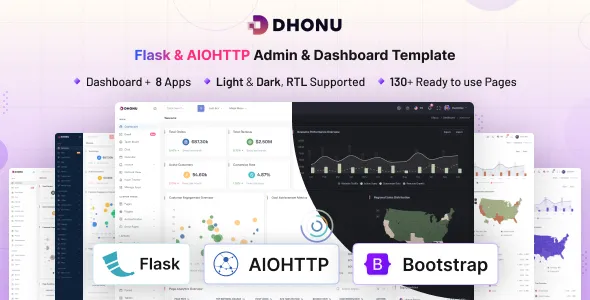
Dhonu – Flask & AIOHTTP Minimal Admin & Dashboard Template
Dhonu – Flask & AIOHTTP Minimal Admin & Dashboard Template is a web development solution for developers who need a clean, lightweight foundation for building administrative interfaces, management panels, and data-driven web applications. Combining Flask, AIOHTTP, and a minimal dashboard design approach, this template can be evaluated for projects that require organized navigation, structured information displays, and a practical interface for administrative tasks. Its technology-focused positioning makes it relevant to developers building internal business tools, monitoring interfaces, reporting applications, and custom web management systems.
Administrative dashboards help users access important information, review application activity, and navigate between different operational functions. A well-organized interface can simplify these tasks by presenting information clearly and maintaining consistent navigation throughout the application. Dhonu provides a potential starting point for developing this type of experience while allowing developers to adapt the design and implementation to their project requirements.
Flask is a lightweight Python web framework commonly used to build web applications and APIs, while AIOHTTP supports asynchronous HTTP clients and servers. These technologies can be useful in different parts of a web application, depending on the architecture and integration approach. Before implementation, developers should review the supplied package, supported Python versions, dependency requirements, and documentation to confirm how the template combines these technologies.
What Is Dhonu – Flask & AIOHTTP Minimal Admin & Dashboard Template?
Dhonu is an admin and dashboard template intended for developers who want a starting point for building administrative web interfaces with Python-based technologies. An admin dashboard typically provides a central workspace where authorized users can review information, navigate application sections, and manage supported operations.
Creating a dashboard from scratch requires decisions about layout, navigation, typography, reusable components, and data presentation. A prepared template can help reduce repetitive interface development by providing an existing structure that can be customized for a particular application.
A minimal dashboard approach emphasizes clarity, readable content, and practical navigation rather than unnecessary visual decoration. This can be useful for applications where users need to review information quickly or perform routine tasks throughout the day.
Dhonu may be evaluated for business management interfaces, operational tools, monitoring dashboards, reporting systems, and other custom web applications. Its actual suitability depends on the included files, supported components, framework integration, and project requirements.
The template should not automatically be treated as a complete business application. Features such as authentication, database operations, analytics, user management, and background processing depend on the supplied implementation or additional development.
Minimal Design for Administrative Interfaces
A minimal dashboard design helps users focus on important information without unnecessary distractions. Clear spacing, consistent typography, restrained visual elements, and predictable navigation can make administrative tasks easier to complete.
Dhonu’s minimal positioning makes it a potential starting point for interfaces that prioritize function and readability. Developers can adapt the available layouts and components to suit the needs of their application, subject to the design options provided by the package.
A business dashboard might present key metrics near the top of the page, followed by recent activity and detailed records. An operational interface could prioritize system status, pending tasks, or service information, while a reporting application might focus on tables and analytical summaries.
The goal is to create a logical hierarchy that distinguishes important information from secondary details. Avoid adding too many cards, charts, colors, or decorative elements if they do not help users understand the information or complete a task.
Consistency is equally important. Reusing common spacing patterns, heading styles, buttons, and navigation elements helps create a unified experience across different pages.
Flask Framework Integration
Flask is a Python web framework that provides a flexible foundation for developing web applications, routes, and server-side functionality. It is often selected for projects that need a straightforward application structure or customized backend behavior.
For a dashboard project, Flask can handle routes, request processing, server-rendered pages, and application logic, depending on how the system is designed. A Flask-based implementation may also connect to databases, APIs, authentication systems, and other services through appropriate extensions or custom code.
Dhonu can be evaluated as a starting point for applications that use Flask, provided its supplied files and dependencies match the intended environment. Developers should review how the template organizes routes, views, static assets, configuration, and any shared layouts before integrating it into an existing project.
A maintainable Flask application benefits from clear separation between presentation, application logic, and data access. The exact structure depends on the project’s size and the conventions used by the template.
Before installation, verify the required Python version, package dependencies, configuration steps, and startup instructions. Compatibility should be established from the documentation rather than assumed from the product name.
Understanding AIOHTTP and Asynchronous Requests
AIOHTTP is a Python library that supports asynchronous HTTP client and server functionality. It can be useful when an application needs to communicate with external services or perform network operations without blocking the event loop unnecessarily.
In dashboard projects, asynchronous requests may support workflows involving external APIs, remote data sources, or services that return information needed by the interface. The appropriate use of AIOHTTP depends on the application’s architecture and the way the library is integrated with the rest of the system.
Flask and AIOHTTP have different roles and execution models, so developers should confirm exactly how Dhonu combines them. They should not assume that every Flask application automatically supports asynchronous AIOHTTP server behavior or that the two frameworks can be combined without additional configuration.
Review the package documentation for integration patterns, dependency versions, and supported execution environments. If the application uses asynchronous network requests, ensure that connection handling, timeouts, error responses, and resource cleanup are implemented appropriately.
A clear architecture helps prevent unnecessary complexity and makes the application easier to test, debug, and maintain.
Dashboard Overview and Information Panels
The dashboard overview often serves as the main entry point for administrative users. It should provide a useful summary of the information that matters most to the application.
Depending on the components included in Dhonu, developers may be able to organize the overview around summary panels, status indicators, recent activity, or other information blocks. Additional components can be implemented when the project requires them.
A sales dashboard might summarize recent orders or revenue, while a business operations interface could show active tasks and pending requests. A system monitoring interface may present service status or recent events, provided the necessary data sources and monitoring logic are connected.
Each information panel should have a clear purpose. Use descriptive labels, meaningful values, and appropriate units so users can understand what is being displayed.
The template should not be assumed to provide live analytics or automated monitoring by default. Dynamic information must be connected to the appropriate backend services, and calculations should be tested before the dashboard is used for operational decisions.
A focused overview helps users understand current conditions and navigate to the relevant details when further investigation is needed.
Navigation and Application Structure
Administrative applications often contain multiple sections, making navigation a central part of the user experience. A logical menu structure helps users find tools and understand how different parts of the application relate to one another.
Dhonu can provide a starting point for organizing dashboard pages through its available layout and navigation components. Developers can adapt the structure to match the application’s workflow and intended users.
A business management system may include overview, customers, projects, reports, and settings. A technical monitoring tool may instead prioritize system status, logs, service information, and configuration.
Use familiar labels and group related functions together. Frequently used pages should be easy to reach, while less common administrative settings can be organized separately.
If different users have different responsibilities, the application may need role-specific navigation. However, hiding a menu item is not a substitute for authorization. Protected routes and backend operations must independently verify that the current user has permission to access them.
A consistent navigation system makes the application easier to learn and helps support future expansion as new sections are introduced.
Tables and Data Management Interfaces
Tables are useful for presenting structured records such as customers, employees, transactions, tasks, or system events. They allow administrators to review multiple entries and compare relevant information in a compact format.
An application built with Dhonu can incorporate table interfaces where supported by the supplied components or added during customization. Developers should select columns that help users complete their tasks without overcrowding the layout.
Search, sorting, filtering, and pagination can make larger datasets easier to navigate. Whether these capabilities are included or require custom development should be confirmed through the template documentation.
For small datasets, client-side filtering may be sufficient. Larger datasets may benefit from server-side pagination and filtering to reduce data transfer and browser workload.
Tables should also handle empty results, loading states, and errors. Responsive layouts are important when tables contain numerous columns or lengthy values.
If records are retrieved from a database or external API, the application should handle unexpected data formats and failed requests gracefully. A well-designed table interface combines readable presentation with reliable data handling.
Charts, Analytics, and Reporting
Charts can help users understand patterns, comparisons, and changes over time. They may be useful for dashboards that present business performance, operational activity, service statistics, or other measurable information.
Dhonu can be extended with charting components or suitable libraries when the application requires visual reporting. The available chart types and integration options depend on the supplied package and the developer’s implementation.
A line chart may help display a metric over time, while a bar chart can compare values across categories. Summary panels may provide a quick overview before users explore more detailed reports.
Visualizations should use appropriate labels, scales, and date ranges. The data behind each chart should be accurate, and the presentation should not imply trends or relationships that the underlying information does not support.
A dashboard template does not automatically provide live analytics simply because charts can be added to its interface. Developers need to connect the appropriate data sources, implement calculations, and decide how information should be refreshed.
For reporting that supports important decisions, include enough context for users to interpret the displayed figures correctly.
Forms and Administrative Workflows
Forms allow administrators to create records, update information, modify settings, and submit requests. They are essential to many management interfaces.
Dhonu can serve as a starting point for form-based pages where the required components are included or added during development. Typical examples include profile settings, record creation, search filters, and configuration screens.
A clear form should use descriptive labels, logical field groups, and suitable input types. Required fields should be identified, while validation messages should explain how to correct invalid entries.
Server-side validation is essential when submitted data affects application records or business operations. Client-side checks may improve usability, but they should not replace validation on the backend.
Forms should account for submission progress, successful completion, failed requests, and repeated submissions. These states help users understand whether an action has been completed.
Whether a form saves information, uploads files, sends notifications, or triggers another operation depends on the backend implementation and any configured integrations. Developers should test the full workflow rather than treating a visually complete form as proof of functional behavior.
Responsive Design and Device Compatibility
Administrative users may access dashboards from desktop computers, laptops, tablets, and smartphones. Responsive layouts help ensure that essential information remains accessible across these environments.
The responsive behavior of Dhonu should be verified using the supplied demo and files. Developers should test the actual layouts rather than assuming that every component automatically adapts to all screen sizes.
On smaller devices, navigation may need a compact presentation, information panels may stack vertically, and tables may require horizontal scrolling or an alternative layout.
Text should remain readable, interactive elements should be easy to select, and important actions should not become difficult to locate. Charts and forms also need to remain understandable when the available space is limited.
Responsive testing should cover all important pages, including tables, reports, configuration forms, and detailed information views. Custom CSS and additional libraries can introduce layout issues that are not visible in the original template.
A consistent experience across devices makes the dashboard more practical for users who need to access information away from their primary workstation.
Customization and Reusable Components
A dashboard often needs to evolve as an application grows. Flexible layouts and reusable components help developers introduce new sections while maintaining a consistent design.
Dhonu can be customized according to the structure and styling options available in the supplied package. Developers may adapt colors, typography, spacing, navigation, page layouts, and component presentation to match the application’s identity.
A business management system may prioritize readable tables and clear status indicators. A technical dashboard might emphasize compact information panels, while a reporting interface may devote more space to data visualizations.
Reusable components can reduce duplication by allowing common elements to be shared across multiple pages. The exact implementation depends on the template’s frontend structure and the conventions used in the project.
Keep customizations organized and avoid making unrelated styling changes across individual pages. Document important decisions and maintain version control so that changes can be tracked and reviewed.
Before modifying shared components, identify the pages that depend on them and test the results throughout the application. This helps preserve consistency and reduce the risk of unexpected layout problems.
API Integration and Dynamic Data
Many dashboards rely on APIs or backend services to retrieve information and perform operations. A template provides the interface foundation, while the application architecture determines how data is loaded, processed, and displayed.
Dhonu may be extended to connect dashboard components with suitable services, depending on its supplied implementation. Flask can support server-side routes and application logic, while AIOHTTP may be useful for asynchronous HTTP communication where appropriate.
Developers should implement loading indicators, empty states, error handling, and appropriate timeouts for requests. When external services are unavailable, the interface should communicate the issue clearly rather than displaying misleading or incomplete information.
Data returned by external APIs should be checked before it is used. Validate expected fields and types, and avoid assuming that every response will follow the same structure.
Private credentials should remain on the server or in secure configuration rather than being exposed in browser-delivered code. Sensitive operations should be protected by appropriate authentication and authorization mechanisms.
Careful integration makes a dashboard more useful while keeping its data flow understandable and maintainable.
Performance and Efficient Resource Management
Dashboard performance affects how quickly users can access information and complete administrative tasks. Slow page rendering, inefficient queries, and unnecessary network requests can reduce productivity.
The actual performance of a Dhonu-based application depends on its frontend implementation, Python configuration, database access, external services, hosting environment, and data volume.
Developers should review CSS, JavaScript, and image assets to identify unnecessary resources. On the backend, database queries and API requests should be examined for avoidable delays or repeated work.
Where asynchronous operations are used, handle network timeouts, connection pooling, and resource cleanup appropriately. Asynchronous programming can improve responsiveness for certain workloads, but it does not automatically make every application faster.
Large datasets should be paginated or filtered where appropriate. Caching may help with frequently requested information, provided cached values remain accurate enough for the application’s requirements.
Measure actual performance under realistic conditions. Test common workflows such as loading dashboard pages, searching records, opening reports, and requesting external data. Use the results to prioritize meaningful improvements.
Accessibility and User-Friendly Interaction
An accessible dashboard helps users understand information and operate interface controls effectively. Readable text, clear labels, sufficient contrast, and predictable navigation contribute to a better experience.
When customizing Dhonu, use semantic HTML, descriptive link text, meaningful headings, and visible focus indicators. Interactive controls should have understandable labels, and status information should not rely exclusively on color.
Forms should provide clear labels and useful validation feedback. Tables should have appropriate headings, while charts may need accompanying descriptions or summaries to communicate important findings.
Keyboard navigation should be tested across menus, forms, dialogs, and other interactive components. Third-party libraries may require additional adjustments to meet accessibility requirements.
Accessibility should be reviewed throughout the application rather than limited to the main dashboard page. Consistent testing can identify usability issues before they affect users.
Security and Application Maintenance
Administrative dashboards may expose business information or provide access to important application operations. Security should therefore be considered throughout the development and deployment process.
Dhonu’s security depends on the supplied implementation, dependency versions, server configuration, and any connected services. A minimal interface does not automatically guarantee a secure application.
Keep Python packages and related dependencies updated according to compatibility and security guidance. Use a controlled environment for configuration, and keep private credentials out of source files and public repositories.
If the application uses authentication, authorization, or role-based permissions, enforce them on the server. Hiding a button or navigation item in the frontend is not sufficient to protect a sensitive operation.
Validate incoming data, handle errors without exposing unnecessary internal details, and use HTTPS for deployed applications. Database access and external service requests should follow appropriate security practices.
Maintain backups, version control, and a documented deployment process. Test updates before releasing them, especially when changes affect dependencies, routing, data access, or authentication.
Ongoing maintenance helps reduce avoidable problems and keeps the application reliable as requirements evolve.
Who Should Use Dhonu – Flask & AIOHTTP Minimal Admin & Dashboard Template?
Dhonu may be suitable for developers and organizations that need a structured administrative interface and a Python-oriented development foundation.
Python developers: Developers can evaluate the template as a starting point for web applications that use Python-based server-side technologies.
Startups: Early-stage businesses can use a dashboard foundation while developing the backend functionality needed for their product.
Business application developers: Teams building internal tools can adapt the interface for records, reports, operational workflows, and configuration screens.
Data and reporting teams: Developers can extend the dashboard to present relevant metrics, summaries, and data visualizations when suitable data sources are available.
System monitoring projects: Technical teams can evaluate the interface for presenting service information, operational events, or status data with the required monitoring integrations.
Software development agencies: Agencies can consider the template for custom client applications that need an administrative interface.
Internal IT teams: Organizations can adapt the dashboard for internal management tools, subject to their security, deployment, and maintenance requirements.
Python learners: Developers learning Flask, asynchronous HTTP communication, and dashboard architecture may find the template useful for exploring practical implementation patterns.
The right choice depends on the actual package, supported dependencies, framework integration, available layouts, and required functionality. Review the current documentation before selecting the template for a production project.
Tips for Building a Successful Dashboard with Dhonu
Begin by identifying the main users of the application and the tasks they need to complete. Determine which information should appear in the overview and which functions belong on separate pages.
Review the supplied documentation, dependency requirements, project structure, and setup instructions before customizing the template. Confirm how Flask and AIOHTTP are used and whether the intended deployment environment supports the required architecture.
Organize navigation around real workflows. Use clear labels, prioritize essential information, and avoid filling the dashboard with metrics that do not support a specific decision or task.
Connect the interface to reliable data sources and implement validation, error handling, authentication, and authorization as required. Replace demonstration content with accurate application data before launch.
Test responsive behavior, accessibility, performance, and common user journeys. Pay particular attention to forms, data tables, external API requests, and pages that rely on asynchronous operations.
Finally, maintain the project with version control, dependency updates, backups, and regular testing. A consistent development process helps keep the dashboard maintainable as the application becomes more complex.
Final Thoughts on Dhonu – Flask & AIOHTTP Minimal Admin & Dashboard Template
Dhonu – Flask & AIOHTTP Minimal Admin & Dashboard Template is a potential starting point for developers who want to build administrative interfaces using Python-based web technologies. Its minimal dashboard positioning makes it relevant to projects that prioritize readable information, structured navigation, and practical management workflows.
The template can be evaluated for business administration tools, internal applications, reporting interfaces, and technical dashboards. With suitable customization, developers can organize information into clear pages and connect the frontend to the services required by their application.
The capabilities of the finished project depend on the supplied package, its supported dependencies, the way Flask and AIOHTTP are integrated, and the additional development performed. Dynamic reporting, database access, authentication, permissions, and external service integrations should be verified or implemented as needed.
By combining a suitable interface foundation with clear application architecture, responsible asynchronous request handling, responsive design, secure configuration, and regular maintenance, developers can build a dashboard experience that supports everyday administrative work and future application growth.