My Account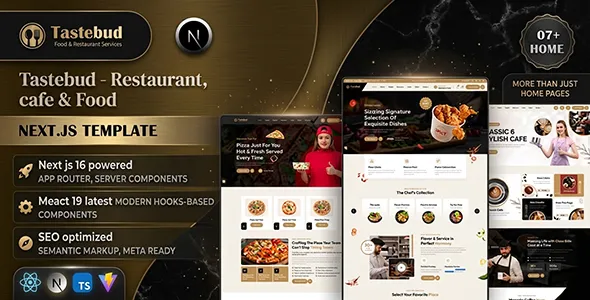
Tastebud – Restaurant, Cafe & Food Next.js Template
Tastebud – Restaurant, Cafe & Food Next.js Template is a modern website template designed for restaurants, cafes, food businesses, dining establishments, and hospitality brands looking to create an attractive and professional online presence. Built around the needs of the food and beverage industry, Tastebud provides a starting point for showcasing menus, introducing signature dishes, presenting restaurant information, and helping customers explore dining options. Its Next.js foundation makes it suitable for developers who want to customize a restaurant website using a modern React-based development framework.
A successful restaurant website should do more than display food photographs. It should communicate the restaurant’s personality, help visitors discover menu items, provide essential information, and make it convenient to contact the business or plan a visit. Whether a business operates a casual cafe, a family restaurant, a fine-dining establishment, a bakery, or a contemporary food outlet, a well-organized website can support its branding and customer engagement goals.
Tastebud can be adapted to different culinary concepts by customizing its layouts, imagery, colors, typography, and content. Restaurant owners can use a website built from this template to highlight signature dishes, communicate opening hours, introduce their chefs, display food categories, and share information about their dining experience. The exact pages, components, and integrations depend on the template version and its implementation, so reviewing the current demo and documentation is recommended before starting development.
What Is Tastebud Restaurant, Cafe & Food Next.js Template?
Tastebud is a website template intended for restaurants, cafes, food businesses, and hospitality brands that need a structured foundation for presenting their services online. Its restaurant-focused design approach can help businesses organize essential information, including menus, featured dishes, restaurant details, and contact options.
A cafe may use this type of website to introduce its coffee selection, breakfast offerings, desserts, and comfortable dining atmosphere. A restaurant might emphasize signature dishes, cuisine specialties, seasonal menus, and dining arrangements. A food business could focus on product offerings, brand identity, and information for customers interested in its products or services.
Next.js is a React framework that supports modern web development through reusable components, flexible rendering approaches, and structured routing capabilities. These tools can help developers customize the website and build additional functionality according to the project’s needs.
However, the framework itself does not mean that every restaurant feature is included. Online food ordering, payment processing, table reservations, delivery tracking, and customer account management may require additional development or third-party integrations. Reviewing the included files and documentation helps clarify which capabilities are available in the current template.
Modern Design for Restaurants and Cafes
The visual appearance of a food website can influence how customers perceive a restaurant before visiting it. Attractive food photography, clear typography, and thoughtful page organization help communicate the establishment’s atmosphere and culinary style.
Tastebud can be customized to suit different restaurant identities. A premium dining establishment may prefer elegant typography, refined colors, and spacious layouts. A casual cafe might use warm tones, inviting photography, and a relaxed visual style. A contemporary food brand may choose bold colors and prominent dish photography to create a more energetic presentation.
The design should reflect the actual business rather than rely entirely on generic food imagery. Photographs of signature dishes, the dining area, beverage selection, and food preparation can help visitors understand what makes the establishment distinctive.
Visual consistency is equally important. The restaurant’s logo, colors, typography, image style, and calls to action should work together throughout the website. A coherent design helps customers recognize the brand and navigate its information more easily.
Homepage Design and Content Organization
The homepage is often the first major introduction to a restaurant website. It should quickly communicate the business’s identity and direct visitors toward useful information, such as menus, featured dishes, opening hours, and contact details.
A Tastebud-based homepage can be organized around several practical sections, depending on the available components and business requirements.
Hero section: Introduce the restaurant with a clear headline, a concise description, and an attractive food or dining image. A relevant call to action can direct visitors toward the menu or contact information.
Featured dishes: Highlight popular meals, signature recipes, seasonal specialties, or selected items from the menu.
About the restaurant: Explain the restaurant’s story, culinary approach, atmosphere, or philosophy using accurate information.
Menu overview: Present food categories and selected dishes to help visitors understand the available choices.
Special offers: Communicate current promotions or seasonal offerings when the business provides them.
Customer testimonials: Display authentic customer feedback where permission and reliable sources are available.
Contact and location: Provide the address, operating hours, contact information, and directions where applicable.
The homepage should prioritize the information customers need most. A small cafe may benefit from a concise page focused on drinks, food, and opening hours, while a larger restaurant may require more detailed sections for menus, events, and reservations.
Restaurant Menu and Food Category Presentation
The menu is one of the most important elements of a restaurant website. Visitors want to understand the available dishes, compare options, and determine whether the restaurant suits their preferences.
Tastebud can be customized to present menus organized into categories such as starters, main courses, salads, desserts, beverages, breakfast, and chef’s specials. The exact structure should reflect the restaurant’s cuisine and the layouts included in the template.
Each menu item can include a dish name, concise description, price, and relevant photograph where appropriate. Descriptions should explain the main ingredients or preparation style without becoming unnecessarily lengthy.
A cafe may organize its menu around espresso drinks, specialty coffee, tea, pastries, sandwiches, and breakfast dishes. A family restaurant could feature appetizers, main courses, children’s meals, and desserts. A fine-dining establishment may emphasize tasting menus, seasonal ingredients, and carefully presented specialties.
If dietary information is provided, it should be accurate and clearly communicated. Restaurants should verify ingredient and allergen details before publishing them, particularly when customers rely on that information to make food choices.
Menu content should also remain current. Remove discontinued items, update prices when necessary, and explain seasonal availability so visitors receive accurate information.
Showcase Signature Dishes and Food Photography
Food photography can help a restaurant communicate its culinary identity and encourage visitors to explore the menu. High-quality images allow customers to see the presentation, portion style, and visual appeal of selected dishes.
Tastebud can serve as a foundation for displaying signature meals, desserts, beverages, and chef-recommended selections. A restaurant might feature its most popular dishes on the homepage while using separate sections to display the full menu.
Photography should reflect the food that the restaurant actually serves. Consistent lighting, appropriate framing, and careful composition can make the images more appealing without creating unrealistic expectations.
Images can also support storytelling. A cafe might show freshly prepared coffee and pastries, while a restaurant could present its kitchen, dining space, or selected stages of food preparation.
Optimize photographs for web delivery to preserve loading speed. Large image files can make a website slower, especially on mobile devices, so use suitable dimensions and modern formats where supported.
Responsive Design for Mobile and Desktop
Customers often browse restaurant websites on smartphones while deciding where to eat, checking opening hours, or reviewing a menu. A responsive design helps ensure that information remains accessible across mobile devices, tablets, laptops, and desktop computers.
When customizing Tastebud, developers should test navigation menus, menu layouts, food galleries, buttons, and contact sections at different screen sizes. Text should remain readable, photographs should fit their containers, and interactive elements should be easy to select on touchscreens.
Mobile visitors should be able to locate essential information without unnecessary scrolling. The restaurant’s address, phone number, operating hours, and menu access should be straightforward to find.
Responsive behavior should be checked across the entire website rather than only on the homepage. Long menu lists, image grids, reservation interfaces, and forms may require specific adjustments.
Next.js projects commonly use React components alongside CSS or styling tools to create responsive interfaces. The final experience depends on the template’s actual implementation and any customizations applied during development.
Customization and Restaurant Branding
A restaurant website should communicate the establishment’s personality and help distinguish it from other businesses. Consistent branding creates a recognizable experience and supports customer familiarity.
Tastebud can be customized for different culinary concepts. A traditional restaurant may use warm colors and familiar visual elements, while a modern cafe might prefer a minimalist layout and contemporary typography. A premium dining brand may emphasize elegant spacing and refined photography.
Developers can adjust colors, fonts, imagery, page layouts, buttons, and reusable components according to the template’s structure. The restaurant’s logo and visual identity should remain consistent across the homepage, menu pages, about section, and contact information.
Content should also match the brand. A casual cafe may use friendly, conversational language, while a formal restaurant may prefer a more refined tone. Clear descriptions help customers understand the establishment’s style and offerings.
Before making extensive changes, review the project’s component structure, styling configuration, image assets, routing, and setup instructions. Organized customization makes future updates easier and helps maintain consistency throughout the website.
Next.js and React Development Benefits
Tastebud uses Next.js, a framework built around React that supports structured website development and flexible rendering strategies. React allows developers to create reusable interface components, while Next.js provides tools for routing, rendering, and organizing a web application.
For a restaurant website, reusable components can help maintain consistent menu cards, navigation elements, buttons, food galleries, and content sections. If the business expands its website with additional pages, shared components can reduce duplicated work and simplify maintenance.
Next.js supports different rendering approaches, and the most suitable option depends on the requirements of each page. Informational pages and menu content may be implemented differently from interactive forms or customer-specific features.
The framework can also support integration with external services when additional functionality is required. However, the availability of such integrations depends on the project’s code and configuration rather than the framework alone.
Before development, review the included Next.js version, dependencies, routing structure, and build instructions. This helps ensure that customizations remain compatible with the supplied project.
Online Food Ordering and Delivery Expansion
Some restaurants want customers to place food orders directly through their websites. An online ordering experience may allow visitors to browse dishes, select quantities, customize available options, provide delivery or pickup information, and complete an order.
Tastebud can provide a visual foundation for such a project if the template’s structure suits the intended design. However, a standard Next.js website template does not automatically include a complete ordering platform, inventory system, secure checkout, or delivery management workflow.
If online ordering is required, developers must implement or integrate the necessary functionality. This may include menu data, cart management, order submission, payment processing, pickup scheduling, delivery details, and order confirmation.
Restaurants should also explain delivery areas, minimum order requirements, estimated preparation times, and applicable fees where relevant. Menu availability and customization options should be presented accurately.
A secure payment provider may be needed for online transactions. Customer information should be handled carefully, and order processing should be tested before the website accepts real orders.
These capabilities should be verified in the current template documentation or developed separately according to the restaurant’s operating model.
Table Reservations and Booking Functionality
Restaurants that accept reservations can use their websites to help customers inquire about available tables and dining arrangements. A clear reservation pathway can make it easier for visitors to communicate their preferred date, time, and party size.
Tastebud can be adapted to display reservation forms or booking-related calls to action when the available layouts support them or when developers add the necessary components.
However, a visible form does not automatically provide live table availability, booking confirmation, calendar synchronization, or reservation management. These functions require backend development or integration with a suitable reservation service.
The booking process should explain whether a request is confirmed immediately or requires approval from restaurant staff. Special occasions, large parties, and private dining arrangements may require additional information.
If the restaurant offers event dining or private functions, a separate inquiry form may help collect details about guest numbers, preferred menus, and event requirements.
Test the complete reservation workflow before launch to ensure that requests are received, errors are handled clearly, and customers understand the next step.
SEO-Friendly Website Structure
Search engine optimization can help restaurants reach people searching for food, dining options, and specific culinary services. A well-organized website provides a foundation for SEO, but search visibility also depends on content quality, competition, technical setup, and ongoing work.
Each important page should have a clear purpose and descriptive title. Restaurants may create dedicated pages for menus, dining services, catering, special events, or other offerings when these are relevant to the business.
Use logical heading structures, natural keyword placement, and original descriptions that explain the restaurant’s cuisine, menu, atmosphere, and services. Avoid repeating the same phrases excessively.
Internal links can connect menu categories, featured dishes, the restaurant’s story, and contact information. This helps visitors explore the website and find relevant details.
Developers should review metadata, canonical URLs, indexing settings, broken links, and sitemap configuration as appropriate. Images should use suitable file sizes and meaningful alternative text when they convey useful information.
No website template can guarantee a specific search ranking or amount of traffic. Sustainable SEO relies on useful content, technically sound implementation, and a good user experience.
Local SEO for Restaurants and Cafes
Many restaurants depend on customers who live, work, or travel nearby. Local SEO can help people discover a restaurant when searching for relevant dining options in a particular area.
A Tastebud-based website can display accurate business information, including the restaurant’s address, phone number, opening hours, and service details. If the restaurant operates multiple branches, each location should have useful and accurate information.
Content can answer common questions about the menu, dietary options, parking, takeaway availability, accessibility, and reservation arrangements where relevant.
Businesses should keep their details consistent across their website and relevant business listings. Genuine customer reviews and authentic food photographs can also help visitors evaluate the establishment.
Local search performance depends on multiple factors, including business relevance, location, customer feedback, and competition. A website can support local marketing efforts, but it cannot guarantee a particular ranking.
Website Performance and Image Optimization
Performance matters for restaurant websites because visitors often want to access a menu or location quickly. Large food photographs, unnecessary scripts, and excessive external resources can slow down page loading.
To improve performance, use appropriately sized images and modern formats where supported. Review animations, fonts, third-party widgets, and scripts to ensure that each component provides meaningful value.
Next.js provides tools that can support image handling and rendering optimization, depending on the version and configuration used. Developers should follow the project’s existing setup rather than assuming every optimization feature is already enabled.
Test the homepage, menu pages, gallery, and contact sections on desktop and mobile devices. Pay attention to loading behavior, layout shifts, and the responsiveness of interactive components.
After adding new images or external integrations, test performance again. Regular monitoring helps identify issues before they affect the visitor experience.
A fast, accessible website makes it easier for customers to review food options and obtain important restaurant information.
Accessibility and User-Friendly Navigation
An effective restaurant website should make information easy to locate and understand. Clear navigation, readable text, sufficient contrast, and descriptive links help improve usability for a broad range of visitors.
Organize menu categories logically and use familiar navigation labels. Visitors should be able to find the food menu, restaurant information, operating hours, and contact details without confusion.
Use a logical heading structure and meaningful alternative text for informative images. Forms should include clear labels, understandable instructions, and useful validation messages.
Interactive elements should be distinguishable and usable with appropriate input methods, including keyboard navigation where applicable. Focus indicators should remain visible, and animations should not interfere with essential content.
Accessibility should be considered throughout development. Automated tools can identify certain problems, while manual keyboard testing and usability reviews can reveal additional issues.
Integration with Restaurant and Marketing Tools
Restaurants may benefit from connecting their websites to tools that support customer communication, marketing, reservations, and daily operations.
Depending on business requirements, Tastebud can be adapted to work alongside analytics platforms, email marketing services, reservation providers, customer feedback tools, or online ordering systems.
For example, an inquiry form could send messages to the restaurant’s email address, while an analytics platform may help the business understand which menu pages attract visitor interest, subject to applicable privacy requirements.
If online orders or reservations are required, the appropriate integrations should be selected according to the restaurant’s workflow and technical environment.
These functions should not be assumed to be included in the template. Developers should verify compatibility, configure each integration securely, and test the full customer journey before launch.
Security and Website Maintenance
Regular maintenance helps keep a restaurant website reliable, accurate, and secure. Even a modern frontend project requires attention to dependencies, hosting configuration, content, and external integrations.
Developers should review package dependencies, apply appropriate updates, and remove unused components where practical. HTTPS should be enabled, particularly if visitors submit personal information through forms or booking interfaces.
If the website includes server-side order processing, customer accounts, or reservation management, those functions need appropriate validation, secure data handling, and access controls.
Routine maintenance should include backups, link checks, performance reviews, and content updates. Menus, prices, opening hours, contact details, and special offers should remain current.
Before major changes, maintain a backup and test updates in a suitable development environment. A consistent maintenance routine helps the website remain dependable as the restaurant’s needs evolve.
Who Should Use Tastebud Restaurant, Cafe & Food Next.js Template?
Tastebud can be evaluated by different businesses in the food and hospitality industry.
- Restaurants: Present menus, signature dishes, restaurant information, and dining options.
- Cafes and coffee shops: Showcase coffee selections, breakfast menus, snacks, and the cafe atmosphere.
- Fine-dining establishments: Highlight curated menus, culinary presentation, and the dining experience.
- Family restaurants: Organize food categories and provide useful information for visitors planning a meal.
- Bakeries and dessert shops: Display baked goods, cakes, pastries, and other food offerings.
- Food businesses: Introduce their products, brand identity, and available services.
- Casual dining outlets: Present affordable menu options, opening hours, and customer information.
- Hospitality entrepreneurs: Establish an online presence for a new restaurant or cafe concept.
The best choice depends on the business’s visual identity, content requirements, technical needs, and intended customer journey. Reviewing the current demo and documentation helps determine whether the template is suitable for the project.
Tips for Building a Successful Website with Tastebud
Start by defining the website’s primary objective. Determine whether the main goal is to promote dine-in service, showcase a menu, attract local customers, generate reservation inquiries, or support online food orders.
Prepare accurate menu information, prices, restaurant details, and high-quality food photographs before making extensive design changes. Real content helps visitors understand the business and sets realistic expectations.
Keep navigation simple and ensure that important information is easy to find. Customers should be able to access the menu, location, opening hours, and contact options without unnecessary steps.
Customize the design to match the restaurant’s identity. Consistent colors, typography, imagery, and calls to action help create a professional presentation.
Before launch, test the website across different devices and browsers. Check navigation, image loading, responsive layouts, forms, menu links, and any external integrations.
Finally, maintain the website with regular backups, dependency reviews, performance testing, and content updates. A consistent maintenance process helps the website remain useful as the business introduces new menu items or expands its services.
Final Thoughts on Tastebud Restaurant, Cafe & Food Next.js Template
Tastebud – Restaurant, Cafe & Food Next.js Template is a potential starting point for restaurants, cafes, food businesses, and hospitality brands seeking a professional online presence. Its food-focused purpose makes it relevant to businesses that need to showcase menus, present signature dishes, communicate restaurant information, and help customers explore dining options.
A successful website should combine attractive food photography, clear menu descriptions, responsive layouts, accessible navigation, and convenient contact information. Restaurants can emphasize their cuisine and dining experience, while cafes can highlight their drinks, food selections, and atmosphere.
The final capabilities depend on the supplied template files, current version, and any additional integrations. Features such as online ordering, secure payments, live reservations, and delivery management should be verified or implemented separately when required.
With thoughtful customization, accurate content, suitable technical implementation, and regular maintenance, Tastebud can form part of an effective website strategy for a restaurant or food business. A well-organized digital presence helps communicate the brand’s identity, make essential information accessible, and encourage customers to discover the dining experience on offer.