My Account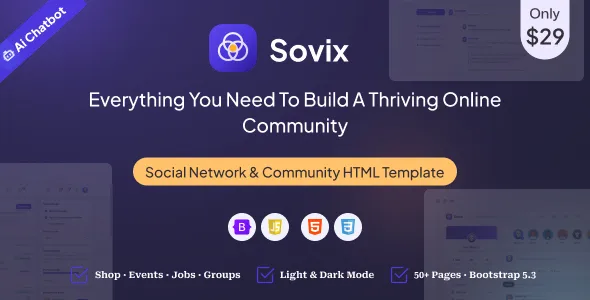
Sovix – Social Network & Community HTML Template
Sovix – Social Network & Community HTML Template is a modern website design solution for businesses, startups, creators, organizations, and developers who want to build an engaging online community or social networking platform. Designed for community-focused websites, this HTML template provides a foundation for presenting member profiles, discussion spaces, social updates, community information, and interactive-looking interface elements. Its adaptable frontend structure can help developers create a professional digital environment where users can discover content, explore shared interests, and connect with like-minded individuals.
Online communities play an important role in communication, collaboration, networking, and knowledge sharing. From professional networking portals and hobby communities to creator platforms, membership websites, and interest-based discussion groups, a well-organized website can help people find relevant information and participate in meaningful conversations. Sovix can be considered as a starting point for these projects, allowing developers to customize its visual presentation, page layouts, and interface components according to the intended audience.
As an HTML template, Sovix focuses on the frontend design and presentation layer. Features such as live messaging, user authentication, database-driven profiles, notifications, friend requests, and real-time social feeds typically require additional JavaScript functionality, backend development, or third-party integrations unless explicitly included in the product package. By combining a suitable design with reliable application logic, developers can create a community website that supports their project’s goals and user experience requirements.
What Is Sovix Social Network & Community HTML Template?
Sovix is an HTML website template intended for social networking, online communities, and membership-oriented digital platforms. It provides a starting point for designing interfaces where users can explore profiles, view community content, discover topics, and navigate different sections of a social website.
A community platform often includes several types of pages, such as a homepage, member directory, user profile, activity feed, discussion page, groups section, notifications interface, and contact or support page. A dedicated social networking template can help organize these elements into a consistent design.
Sovix can be evaluated for projects such as interest-based communities, professional networking websites, creator communities, online clubs, discussion platforms, and social portals. Developers can adapt the interface to match their branding, target audience, and preferred content structure.
The exact layouts, components, scripts, and included pages should be checked against the current product demo and documentation. A frontend template does not automatically provide a complete social networking service, so developers should identify which interactive features are included and which need to be developed separately.
Modern Design for Social Networking Websites
A social networking website should feel welcoming, organized, and easy to navigate. Visitors need to understand where to discover people, explore conversations, view updates, and access important account areas.
Sovix can provide a design foundation for building a visually consistent community website. Developers can customize its typography, color palette, spacing, navigation, content sections, and interface elements to reflect the platform’s purpose.
A professional networking community may benefit from a structured and business-oriented design, while a creative community could emphasize visual content, member portfolios, and project sharing. A hobby-based platform might focus on topics, group discussions, events, and member contributions.
Clear visual hierarchy helps distinguish major sections from secondary information. Consistent buttons, profile images, labels, and content cards can make the interface easier to understand.
The overall design should support participation rather than distract from it. Community members should be able to locate useful information, understand available actions, and move between relevant pages without unnecessary complexity.
Homepage and Community Landing Page
The homepage introduces the platform and explains why visitors might want to join or explore the community. It should communicate the site’s purpose quickly and guide users toward its main sections.
A customized Sovix website can include an introductory banner, community highlights, featured members, popular topics, recent discussions, or membership information, depending on the available template components.
A professional network may use the homepage to explain its networking opportunities and showcase member expertise. An interest-based community might emphasize discussions, shared resources, and active groups. A creator-focused platform may highlight portfolios, published content, or collaborative projects.
The homepage should provide a clear path for both new visitors and returning members. New visitors may need information about the community’s purpose and participation guidelines, while existing members may want quick access to discussions and profile pages.
Calls to action should match the platform’s actual capabilities. A button labeled Join the Community, for example, should lead to a working registration process once the necessary functionality has been implemented.
A focused homepage with relevant information and straightforward navigation can help visitors understand the value of the platform.
Member Profiles and Personal Information
Member profiles are an important component of many social networking websites. They allow users to introduce themselves, share relevant information, and discover people with similar interests or professional backgrounds.
Sovix can serve as a starting point for profile interfaces, depending on the layouts included in the selected template version. Developers may customize profile sections to display a member’s name, photograph, biography, interests, skills, professional experience, or other relevant information.
A professional community may emphasize job titles, areas of expertise, and portfolio links. A hobby community may prioritize interests, favorite activities, and shared projects. A creator network might focus on published work, media links, and creative achievements.
Profile pages should present information in a clear and organized way. Visitors should be able to identify the most relevant details without navigating through unnecessary content.
If members can edit their profiles, the website will need appropriate forms, validation, and data storage. Privacy settings should also determine which information is publicly visible and which details are restricted to authorized users.
A static HTML profile layout only provides the visual structure until it is connected to a suitable user management system or backend.
Social Feeds and Community Updates
An activity feed helps community members discover recent posts, announcements, discussions, and contributions from other users. It can provide a central place to explore what’s happening across the platform.
A Sovix-based interface can be adapted to display content cards with author information, timestamps, text, images, links, and other supported content types. The precise feed components depend on the included template version.
A professional networking platform may feature career updates, industry insights, and project announcements. A creative community might highlight artwork, photography, design projects, or collaborative work. A general interest community could organize posts around shared hobbies and discussion topics.
A useful feed should distinguish content clearly and make important information easy to scan. Post descriptions, author details, and media should be arranged consistently, while actions such as commenting or reacting should have recognizable labels.
A live activity feed requires more than a static layout. Developers may need to implement data retrieval, content submission, pagination, moderation, and updates through APIs or backend services.
The feed’s behavior should also account for empty states, loading indicators, failed requests, and content that has been removed or restricted.
Discussion Boards and Topic-Based Communities
Discussion boards allow members to ask questions, share knowledge, and exchange ideas. They can be especially valuable for communities built around professional development, technology, education, hobbies, and shared interests.
Sovix can be customized to present discussion categories, topic lists, conversation previews, and individual discussion pages where the available components support those layouts.
A technology community might organize topics around programming languages, troubleshooting, development tools, and tutorials. A professional group may focus on career advice, industry trends, and networking opportunities. A hobby community could organize conversations by activity, skill level, or equipment.
Clear topic categories help members locate relevant conversations. Discussion cards can display titles, short descriptions, author details, dates, and activity summaries where appropriate.
A functional discussion platform also needs a way to create topics, submit replies, manage content, and control access. These capabilities require suitable application logic and data storage unless the template explicitly includes them.
Moderation tools and community guidelines can help maintain respectful discussions and reduce spam. The interface should make reporting inappropriate content and finding relevant conversations straightforward.
Groups and Interest-Based Networking
Groups can bring members together around specific subjects, professional fields, projects, locations, or shared activities. They help organize a large community into smaller spaces with a more focused purpose.
A customized Sovix website may use group cards, group detail pages, and topic lists to present these spaces, depending on the template’s available layouts.
A business community could feature groups for entrepreneurs, marketers, designers, and technology professionals. A hobby network might organize groups around photography, fitness, gaming, travel, or creative activities.
Each group page can introduce its purpose, display relevant information, and guide visitors toward available discussions or resources. If the application supports group membership, the interface can also show membership status and participation options.
However, group creation, invitations, member approval, private access, and group-specific permissions require functional application logic. A visual Join Group button does not create or manage membership by itself.
For private or restricted groups, the backend should verify permissions before exposing content. Developers should also decide how inactive groups, removed members, and inappropriate contributions will be handled.
Search and Member Discovery
Search and discovery tools help visitors find members, discussions, groups, and other relevant content. Without clear discovery features, users may struggle to navigate a growing community.
Sovix can be used as a starting point for search fields, category navigation, member cards, and other discovery-oriented interface elements where supported by the selected version.
A professional networking platform may allow visitors to explore people by skills, profession, company, or location. A hobby community might organize discovery around interests and topics. A discussion website could prioritize categories, keywords, and recent conversations.
Search filters should be relevant to the type of content being explored. Too many unnecessary filters can make the experience more complicated, while too few may make large collections difficult to navigate.
Functional search requires appropriate logic. A small static website may use client-side filtering, while a larger platform typically needs a backend search process or an integrated search service.
Developers should test searches with different terms, empty queries, no matching results, and incomplete data. Clear empty-state messages can help users understand when they need to adjust their search.
Responsive Design for Mobile and Desktop
Community members may access social networking websites from desktop computers, tablets, and smartphones. A responsive design helps ensure that the interface remains usable across different screen sizes.
When customizing Sovix, developers should test the navigation, profile layouts, activity feeds, group cards, discussion pages, and forms on a range of devices.
On smaller screens, navigation may need a compact menu, while content cards should fit the available width without becoming difficult to read. Profile photographs, media, and other visual elements should scale appropriately.
Interactive controls should provide enough space for touch input, and forms should remain easy to complete on mobile devices. Long discussions and activity feeds should be organized so users can browse content without excessive horizontal scrolling.
Responsive testing should cover the entire website rather than only the homepage. Different page types may behave differently depending on their content and layout.
The final mobile experience depends on the template’s existing styles, the quality of custom modifications, and the behavior of any additional scripts or integrations.
Customization and Community Branding
A recognizable visual identity helps a social networking platform establish its personality and distinguish itself from other online communities.
Sovix can be customized according to the styling options and source files included in the selected package. Developers can adapt colors, typography, logos, spacing, imagery, navigation, and content presentation to reflect the platform’s brand.
A professional community may use a restrained color scheme and structured layouts, while a creative network may emphasize bold visual elements and member-generated media. An educational community might prioritize readability and organized topic sections.
Consistency matters across the homepage, profiles, discussion pages, groups, and account screens. Reusing visual patterns for buttons, cards, forms, and status indicators helps create a unified experience.
Before making extensive modifications, review the template’s file structure and styling conventions. Keeping customizations organized can simplify future maintenance and make it easier to update the design as the community grows.
The final design should reflect the needs and expectations of the intended audience rather than relying on visual effects alone.
SEO-Friendly Structure for Community Websites
Search engine optimization can help people discover public community pages, topic discussions, resources, and platform information through relevant searches.
Sovix can provide a frontend starting point for a well-organized website, but search performance also depends on content quality, technical implementation, competition, and ongoing maintenance.
Public pages should have descriptive titles, clear headings, meaningful text, and useful internal links. Topic pages and public member profiles should contain accurate information when they are intended to appear in search results.
Developers should use descriptive URLs and optimize images with suitable dimensions and meaningful alternative text. Performance, mobile usability, and accessibility also contribute to a better browsing experience.
Not every social networking page should be publicly indexed. Private profiles, restricted discussions, account settings, and sensitive member information should be protected through proper access controls. Search engine directives alone do not provide security.
For sites with dynamic content, developers may need to configure canonical URLs, sitemaps, metadata, and appropriate indexing rules. The implementation depends on the backend and rendering approach used by the application.
No HTML template can guarantee search rankings or organic traffic. Useful public content, sound technical practices, and ongoing optimization are essential.
Forms, Registration, and Member Onboarding
A smooth onboarding experience can help new visitors understand the community and complete the steps required to participate.
A Sovix-based website can be adapted to present registration forms, login screens, profile setup pages, and other onboarding interfaces if the relevant layouts are available in the template.
Registration forms should collect only the information necessary to create an account. Clear labels, understandable validation messages, and straightforward instructions can reduce errors and frustration.
A community may also need email verification, password recovery, account preferences, and consent controls, depending on its requirements and applicable regulations.
These features require functional authentication and account management. A static HTML form does not automatically create accounts, verify email addresses, store passwords securely, or maintain user sessions.
Developers should implement authentication using established security practices rather than storing sensitive credentials in client-side code. They should also test successful registration, invalid input, duplicate accounts, failed login attempts, and password recovery.
A clear onboarding process helps new members understand how to participate and where to find important community resources.
Messaging and Notifications
Messaging and notifications can make a community more interactive by helping members communicate directly and stay informed about relevant activity.
Depending on the intended application, a Sovix interface may be customized to display message lists, conversation previews, notification panels, or activity indicators if suitable components are included.
A professional network might use messaging for collaboration and introductions. An interest-based community may use notifications to highlight replies, group activity, or updates to followed discussions.
A messaging interface should make conversations easy to read and distinguish new messages from previously viewed content. Notifications should prioritize relevant information and avoid overwhelming members with unnecessary alerts.
Live messaging, message delivery, unread counts, notification preferences, and real-time updates require additional application logic and data services unless explicitly included in the product package.
Developers should also consider privacy, spam prevention, blocking, reporting, and message retention policies. Sensitive conversations should not be exposed to unauthorized users, and the backend must enforce the appropriate permissions.
Performance and Website Speed
Performance is important for social networking websites because they may contain profile photographs, media-rich posts, long feeds, and interactive components.
The performance of a Sovix-based website depends on its implementation, hosting environment, images, scripts, stylesheets, and third-party integrations. A template should be tested rather than assumed to be optimized for every use case.
Start by compressing images, using appropriate file formats, and loading assets at suitable dimensions. Avoid unnecessary scripts and review external resources that may slow down page loading.
For larger feeds and discussion lists, pagination or incremental loading can help reduce the amount of content rendered at once. Efficient data retrieval and sensible caching may also improve responsiveness when supported by the application architecture.
Developers should test common pages on mobile devices and slower connections. They should also monitor interaction responsiveness when the interface contains many cards, images, or dynamic elements.
Regular performance testing helps identify bottlenecks before they affect a large number of community members.
Accessibility and Inclusive Community Design
An inclusive community website should make content and interactions accessible to as many people as possible. Clear navigation, readable text, sufficient color contrast, and understandable controls can improve the experience for a wide range of users.
When customizing Sovix, developers should use logical heading structures, descriptive link text, accessible form labels, and meaningful alternative text for informative images.
Interactive elements should be keyboard accessible, with visible focus indicators. Color should not be the only method used to communicate membership status, notification state, or other important information.
Discussion content should remain readable at different zoom levels, and forms should provide useful instructions and error messages. Buttons that use icons without visible text should have accessible names that explain their purpose.
Accessibility testing should include keyboard navigation, form submission, mobile layouts, and screen-reader checks where practical. Automated tools can help detect common issues, but manual testing is also valuable.
By considering accessibility throughout development, businesses can create a more usable environment for members with different needs and preferences.
Security, Privacy, and Community Moderation
Security and privacy are especially important for social networking platforms because they may handle personal profiles, private messages, member activity, and account credentials.
Sovix should be treated as a frontend design foundation unless the selected package explicitly includes additional application functionality. Authentication, authorization, secure data storage, and moderation workflows need to be implemented appropriately.
Developers should use secure authentication practices, validate user-submitted data, protect sensitive endpoints, and enforce permissions on the server. Private content should only be accessible to authorized users.
Community platforms may also need tools for reporting inappropriate content, blocking unwanted interactions, managing spam, and handling account restrictions. These systems should be designed around the platform’s community guidelines and moderation policies.
Privacy settings should clearly explain which profile details and activities are public. Collect only the data necessary for the service, and review relevant privacy and data-protection requirements.
Keep dependencies updated, use HTTPS in production, maintain appropriate backups, and test security-sensitive workflows. A well-designed interface is only one part of a trustworthy community platform.
Who Should Use Sovix Social Network & Community HTML Template?
Sovix may be suitable for a range of community-focused website projects, depending on the available components and the amount of additional development required.
Social networking startups: Establish a frontend foundation for a platform where users can discover people, explore updates, and interact with community content.
Professional networks: Present member profiles, professional interests, networking information, and discussion areas.
Interest-based communities: Create an organized interface for people who share hobbies, activities, or specific interests.
Creator communities: Showcase member profiles, creative contributions, portfolios, and shared content.
Online clubs and organizations: Provide a digital space for member information, announcements, group discussions, and community resources.
Educational communities: Organize discussions, member profiles, learning resources, and topic-based interaction.
Gaming communities: Present member areas, group information, discussion topics, and community updates.
Membership platforms: Build frontend pages for member onboarding, account areas, and community participation when connected to suitable backend services.
The best fit depends on the project’s functionality, target audience, framework requirements, and development budget. Review the current demo and documentation before selecting the template for a production platform.
Tips for Building a Successful Website with Sovix
Begin by defining the purpose of the community. Determine whether the platform is designed for professional networking, shared interests, creative collaboration, education, or another specific audience.
Plan the core user journey before customizing the interface. Identify how visitors discover the platform, create accounts, complete profiles, find relevant content, and participate in discussions.
Keep the navigation simple and organize the most important sections clearly. Use consistent layouts for profiles, feeds, discussion topics, and group pages so members can understand the interface quickly.
Replace placeholder content with relevant text and appropriate imagery. Use realistic sample data during development to test how profile cards, posts, and discussion lists behave with different content lengths.
Implement the necessary application logic for registration, authentication, messaging, search, notifications, and content management. Test these features carefully instead of assuming that a visual interface automatically provides their behavior.
Review responsive layouts, accessibility, performance, and security before launch. Test forms, navigation, error messages, and empty states across common devices and browsers.
Finally, establish community guidelines and a maintenance plan. Regularly review content quality, software updates, moderation procedures, and user feedback to keep the platform useful as it grows.
Final Thoughts on Sovix – Social Network & Community HTML Template
Sovix – Social Network & Community HTML Template is a potential starting point for developers and organizations looking to create a modern community-oriented website. Its social networking focus makes it relevant to projects that require member profiles, content feeds, discussion areas, group pages, and other community-centered interface patterns.
With thoughtful customization, developers can create a consistent digital environment that helps members discover information, explore shared interests, and navigate the community more easily. Responsive layouts, clear navigation, accessible controls, and well-organized content can contribute to a professional user experience.
Because Sovix is an HTML template, its actual capabilities depend on the included files and components. Features such as live messaging, account management, notifications, database-driven profiles, content moderation, and real-time updates may require additional development or third-party integrations.
Before implementation, review the current demo, documentation, licensing terms, and available functionality. Test the finished website across devices and browsers, and ensure that authentication, privacy, security, and data management are handled appropriately.
For teams seeking a customizable design foundation for a social networking or online community project, Sovix can be evaluated as part of a broader development strategy. Combining an appropriate frontend design with reliable application logic, meaningful content, and ongoing maintenance can help establish a useful and engaging digital community.