My Account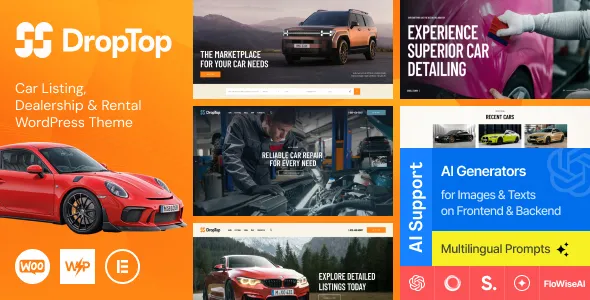
Drop-Top – Car Listing, Dealership & Auto Rental WordPress Theme
Drop-Top – Car Listing, Dealership & Auto Rental WordPress Theme is a website design solution for car dealerships, vehicle rental companies, automotive businesses, and independent vehicle sellers looking to establish a professional online presence with WordPress. Designed around automotive listings and vehicle-related services, Drop-Top can serve as a foundation for showcasing cars, presenting dealership information, promoting rental options, and helping potential customers explore available vehicles. With suitable customization, businesses can create a website that reflects their brand, organizes vehicle information, and provides visitors with convenient ways to make inquiries.
A well-designed automotive website helps customers compare vehicles, review specifications, explore photographs, understand pricing information, and contact a dealership or rental provider. Whether a business specializes in new cars, pre-owned vehicles, luxury automobiles, short-term rentals, or long-term leasing, a structured website can make its offerings easier to discover. Drop-Top can be considered for organizations that want to bring vehicle presentation and customer communication together in one online destination.
WordPress provides a flexible content management system for managing pages, publishing articles, uploading vehicle photographs, and maintaining business information. An automotive-focused theme can help organize these elements into a consistent visual experience. The exact vehicle listing features, search options, rental workflows, and integrations available with Drop-Top depend on its current version and documented functionality. Before installation, review the product demo and compatibility requirements to determine whether it meets your business needs.
What Is Drop-Top Car Listing, Dealership & Auto Rental WordPress Theme?
Drop-Top is a WordPress theme positioned for automotive businesses that need a website to present vehicles, explain services, and connect with prospective customers. It can be evaluated for car dealerships, used-car sellers, auto rental agencies, vehicle leasing providers, automotive marketplaces, and businesses offering related services.
A vehicle-focused website needs to present information clearly. Customers may want to compare models, review mileage, check transmission details, understand fuel type, view photographs, and learn about pricing or availability. Organizing these details into readable sections can help visitors evaluate their options more efficiently.
For dealerships, the website may emphasize vehicle inventory, individual car details, dealership information, and inquiry opportunities. Rental companies may focus on vehicle categories, rental conditions, pickup locations, and booking inquiries. Businesses serving several automotive markets may need separate sections for sales, rentals, and other services.
Drop-Top can be considered as a starting point for organizing these types of information. However, the precise listing management tools, filtering controls, booking capabilities, and administrative functions should be confirmed through the current theme documentation and product demo.
Professional Design for Automotive Businesses
An automotive website should combine an attractive presentation with practical information. Visitors need to understand what vehicles are available, compare important details, and find a convenient way to contact the business.
Drop-Top can be evaluated for businesses seeking a professional automotive-oriented design. A well-organized layout can highlight featured vehicles, introduce the company, present available services, and direct visitors toward relevant inventory or inquiry pages.
Vehicle photography is especially important because customers often rely on images to assess a car’s appearance and condition. High-quality photographs, consistent image dimensions, and useful captions can make vehicle pages easier to explore.
A dealership may prefer a layout that emphasizes inventory and vehicle comparisons, while a rental agency might prioritize categories, rental services, and reservation inquiries. A business offering premium vehicles could use larger images and refined typography to support its brand positioning.
The final presentation depends on the theme’s available layouts, customization controls, and selected content. Replacing placeholder text with accurate vehicle information and original business details helps create a more trustworthy website.
Vehicle Listings and Inventory Presentation
Vehicle listings are central to many automotive websites. Customers want to browse available cars and identify the options that match their preferences, budget, and intended use.
Drop-Top can be considered for a website that organizes vehicle information into individual listings, subject to the features supported by the installed version and any required compatible plugins.
A useful listing may include the vehicle make, model, model year, price, mileage, transmission, fuel type, body style, exterior photographs, and a short description. Additional information can cover engine specifications, seating capacity, service history, or other details when accurate and relevant.
Dealerships should keep inventory information current. Incorrect pricing, outdated photographs, or listings for vehicles that are no longer available can frustrate visitors and reduce confidence in the business.
If the website needs advanced inventory management, verify whether the theme supports the required listing system or whether a separate automotive plugin is necessary. Do not assume that every inventory-management function is automatically included with a WordPress theme.
A clear vehicle catalog can help customers explore the business’s offerings and identify vehicles worth discussing with a salesperson.
Individual Vehicle Detail Pages
An individual vehicle page gives potential customers a closer look at a specific car. It should provide enough information for visitors to understand the vehicle’s characteristics and decide whether to make an inquiry.
A Drop-Top website can be planned around dedicated vehicle detail pages if supported by its templates or compatible listing tools. Each page should present the information in a logical order, with important specifications and contact options easy to locate.
A typical vehicle description may include the make and model, model year, mileage, transmission, fuel type, engine details, condition, and price. Additional sections can describe interior features, exterior styling, safety equipment, service records, and other verified characteristics.
Photographs should show the vehicle from several useful angles. Where appropriate, images of the interior, dashboard, seating, boot space, wheels, and visible condition can help visitors understand what is being offered.
Descriptions should remain factual and transparent. Any statements about vehicle condition, ownership history, warranty, or inspection should be supported by reliable information.
A clear inquiry option can invite visitors to request more details, arrange an inspection, or discuss a test drive. The actual appointment or inquiry workflow depends on the website’s configuration and supporting tools.
Car Dealership Website Solutions
A dealership website serves as a digital showroom where customers can explore available vehicles before visiting the business. It can introduce the dealership, present inventory, explain purchasing options, and provide contact information.
Drop-Top may be suitable for new-car dealers, pre-owned vehicle sellers, independent automotive businesses, and dealerships specializing in particular vehicle categories.
The homepage can highlight selected vehicles, while dedicated inventory pages organize the available stock. An About section can introduce the dealership’s background and approach, and a contact page can provide its address, business hours, telephone number, and inquiry options.
Dealerships may also publish information about trade-ins, financing arrangements, warranties, inspection processes, or after-sales support if those services are genuinely available. Clear explanations help visitors understand the purchasing process before contacting the business.
Customer testimonials can add context when they are genuine and published with permission. Vehicle guides and maintenance articles may also help the dealership provide useful information beyond its current inventory.
Before launch, confirm that all inventory details, prices, contact information, and service descriptions are accurate. A dealership website should reflect the business’s actual operations rather than relying on generic marketing claims.
Auto Rental Website and Vehicle Categories
Car rental businesses need to explain their available vehicles, rental conditions, and service options. Visitors may want a compact car for city travel, a family vehicle for a holiday, a premium automobile for a special occasion, or a larger vehicle for group transportation.
Drop-Top can be evaluated for rental-oriented websites that organize vehicles into useful categories, depending on the available templates and configuration options.
A rental listing may include the vehicle model, seating capacity, transmission, fuel type, luggage capacity, rental price, and relevant conditions. The business can also explain minimum rental periods, mileage policies, security deposits, insurance requirements, and eligibility conditions where applicable.
Vehicle categories can help visitors browse options more efficiently. A rental company might separate economy cars, sedans, SUVs, premium vehicles, and larger passenger vehicles, provided those categories reflect its actual fleet.
Rental information should clearly distinguish indicative prices from confirmed quotes. Additional charges, taxes, deposits, and optional services should be explained accurately.
If customers need to check live availability or reserve vehicles online, verify whether Drop-Top includes that workflow or requires a compatible booking solution. A visual listing or inquiry form does not automatically provide live fleet availability, reservation management, or payment processing.
Search, Filtering, and Vehicle Discovery
Customers often want to narrow a large vehicle catalog to a manageable selection. Search and filtering features can help visitors locate cars that match their preferences.
When evaluating Drop-Top, check which search controls are included and whether advanced filtering requires an additional plugin or custom development.
Useful filters for automotive inventory may include vehicle make, model, price range, model year, mileage, body style, transmission, fuel type, or vehicle condition. Rental businesses may also need filters based on vehicle category, seating capacity, or other fleet characteristics.
The available filters should reflect the information actually stored in the vehicle listings. A filter is only useful when the underlying inventory data is accurate and consistently organized.
Search results should display clear summaries so users can compare vehicles without opening every listing. Relevant details such as price, model year, mileage, and a representative photograph can help visitors decide which vehicle pages to explore.
Test search behavior with different combinations of filters, including cases where no matching vehicles are available. Clear empty-state messages and simple ways to adjust search criteria can improve usability.
Responsive Design for Mobile and Desktop Devices
Automotive customers may browse vehicles on a smartphone while traveling, compare models on a laptop, or return to a listing from a tablet. A responsive website helps keep the inventory accessible across these different environments.
When evaluating Drop-Top, test the current theme version on desktop computers, tablets, and smartphones to confirm how its layouts adapt. Do not assume that every listing, gallery, or search component behaves correctly on every screen size.
On mobile devices, vehicle photographs should fit the screen, text should remain readable, and important specifications should be easy to scan. Navigation menus and contact buttons should be convenient to operate using touch controls.
Vehicle galleries, comparison tables, filters, and inquiry forms may need special attention because they often contain several interactive elements. Rental pages may also include longer descriptions of conditions and policies.
Custom styling, third-party listing tools, and additional plugins can influence responsive behavior. Test the homepage, inventory pages, vehicle details, and contact forms after customization.
A consistent mobile experience helps potential customers review available vehicles and contact the business using the device of their choice.
Customization and Automotive Brand Identity
A professional automotive website should reflect the dealership or rental company’s brand. Consistent colors, typography, imagery, and page layouts help create a recognizable identity.
When using Drop-Top, review the available customization controls to determine how the theme handles colors, fonts, headers, footers, page layouts, and other design elements. The exact options depend on the installed version and compatible editing tools.
A premium dealership may prefer a refined visual style with large vehicle photographs and restrained typography. A rental company may emphasize convenience, vehicle categories, and clear pricing information. A used-car business might prioritize inventory visibility and practical specifications.
Brand consistency should extend across vehicle cards, detail pages, service descriptions, buttons, and contact sections. This helps visitors move through the website without encountering unrelated visual styles.
Use genuine dealership photographs, accurate vehicle images, and original brand assets whenever possible. Avoid using images that misrepresent the actual vehicle or its condition.
Before making extensive changes, review the theme documentation and create a backup. Testing major modifications in a staging environment can help prevent problems on the live website.
Lead Generation and Customer Inquiries
For many automotive businesses, a website’s main purpose is to generate inquiries. Visitors may want to ask about a vehicle, arrange a test drive, request a rental quote, or confirm service details.
Drop-Top can be configured around these objectives through supported page layouts and compatible WordPress tools. The exact contact and inquiry functionality should be verified before installation.
A vehicle inquiry form may ask for a name, email address, telephone number, the vehicle of interest, and a message. A rental inquiry may require additional details such as the preferred rental period and pickup location.
Forms should collect only the information needed to respond effectively. Clear field labels, understandable validation messages, and a suitable confirmation after submission can make the process easier for visitors.
Calls to action should match the context. A dealership listing may invite customers to request more information or arrange a test drive, while a rental page may encourage them to request a quote or check reservation options.
Test form submissions, email delivery, spam protection, and mobile usability before launch. Ensure that inquiries reach the correct sales or rental team and that someone is responsible for responding.
SEO-Friendly Structure for Automotive Websites
Search engine optimization can help customers discover vehicle listings and automotive services through relevant searches. A suitable theme provides a design foundation, but visibility also depends on content quality, technical configuration, competition, and ongoing maintenance.
A Drop-Top website should use descriptive page titles, clear headings, readable URLs, and useful internal links. Individual vehicle pages should contain accurate descriptions and relevant specifications rather than relying entirely on short, duplicated text.
A dealership can create pages for its vehicle categories, sales services, location, and purchasing information. A rental company may organize pages around vehicle types, rental services, pickup locations, and customer requirements where those pages provide genuine value.
Image optimization is particularly important for automotive websites because high-quality photographs can be large. Use suitable image dimensions, compress files without excessive quality loss, and provide meaningful alternative text for informative images.
Compatible SEO plugins may assist with metadata, XML sitemaps, redirects, canonical settings, and other supported features. Review broken links, duplicate content, indexing issues, and page loading performance periodically.
Vehicle listings should be managed carefully when cars are sold or removed from inventory. Depending on the site’s setup, appropriate redirects or helpful unavailable-listing messages can reduce confusion.
No theme can guarantee search rankings or a specific amount of traffic. Useful content, accurate inventory information, and ongoing technical maintenance provide a stronger foundation for discoverability.
Content Marketing for Dealerships and Rental Businesses
Content marketing can help automotive businesses answer customer questions, explain services, and provide useful information beyond vehicle listings. WordPress offers publishing tools that can support articles, buying guides, and business updates.
Drop-Top may be considered for a website that combines inventory pages with educational content, depending on its available blog layouts and configuration.
A dealership could publish articles about choosing a used car, understanding vehicle specifications, preparing for a test drive, or maintaining a vehicle. A rental company might explain rental requirements, trip preparation, vehicle selection, or the differences between common car categories.
Useful articles should focus on genuine customer needs. They can explain a process, compare available options, or provide practical guidance that helps readers make informed decisions.
Internal links can connect articles with relevant vehicle categories, dealership services, or rental information. This gives readers a natural path from educational content to the business’s offerings.
Content should be accurate and updated when policies, regulations, or business services change. A manageable publishing schedule is more sustainable than creating large volumes of repetitive content.
Integrations and WordPress Plugin Compatibility
Automotive websites may need additional tools for vehicle inventory, advanced search, rental bookings, contact forms, online payments, analytics, security, and backups. The appropriate setup depends on the business’s requirements and the functionality already provided by the theme.
Before installing plugins alongside Drop-Top, review compatibility with the current WordPress version and the theme’s documented requirements. Check the plugin’s update history, support information, and setup instructions.
A vehicle listing plugin may be required for structured inventory management. A booking solution may be needed for rental reservations, while a form plugin can help collect customer inquiries.
If the business needs live availability, reservation confirmations, customer accounts, deposits, payment processing, fleet management, or automated reminders, verify that the selected integrations support those functions. A WordPress theme does not automatically include every business workflow.
Avoid installing several plugins that perform the same task without a clear reason. Overlapping functionality can introduce conflicts and make maintenance more complicated.
After adding or updating an integration, test the affected pages, filters, forms, and booking processes. A focused and compatible setup can help keep the website manageable.
Website Speed and Performance Optimization
Website speed matters when customers browse vehicle photographs, compare listings, and explore multiple pages. Slow-loading pages can interrupt the experience, particularly for mobile visitors using slower connections.
The performance of a Drop-Top website depends on the theme implementation, hosting environment, image sizes, scripts, plugins, and third-party integrations. Test the configured website rather than assuming the theme alone determines performance.
Start by optimizing vehicle photographs and using appropriate image dimensions. Automotive galleries often contain many large images, so compression and responsive image delivery can be particularly important.
Review unnecessary animations, external widgets, and scripts that may delay loading. Suitable hosting, caching, and other optimization tools may help depending on the site’s configuration.
Test the homepage, inventory pages, vehicle detail pages, category archives, and contact forms individually. Pages containing galleries or advanced search controls may perform differently from simpler pages.
Monitor performance after adding inventory or updating plugins. Regular testing helps identify oversized images, inefficient integrations, and technical problems before they affect a larger part of the website.
Accessibility and User-Friendly Navigation
An effective automotive website should make vehicle information easy to locate and understand. Clear navigation, readable text, sufficient contrast, and usable forms can improve the experience for a broad range of visitors.
When configuring Drop-Top, use logical heading structures, descriptive link text, meaningful alternative text for vehicle images, and clear form labels. Avoid relying on color alone to communicate important information.
Navigation should prioritize inventory, vehicle categories, dealership or rental information, and contact options. Visitors should be able to return to search results without unnecessary effort.
Filters should have understandable labels, while inquiry forms should provide clear instructions and error messages. Interactive controls should be easy to identify and use on both desktop and mobile devices.
Accessibility depends on the theme, the selected components, and the way the website is configured. Automated tools can identify some problems, but keyboard testing and practical usability reviews are also valuable.
A clear and accessible design helps customers explore listings and contact the business more comfortably.
Security and Ongoing Website Maintenance
A WordPress automotive website needs regular maintenance to remain reliable and secure. This is particularly important when the site publishes changing inventory details or collects customer inquiries.
Use reputable hosting, enable HTTPS, create strong administrator passwords, and assign user roles according to each person’s responsibilities. Update WordPress, the theme, and compatible plugins carefully.
Create backups before significant updates and confirm that the recovery process works. Store backups securely and review whether they are being created according to the intended schedule.
Install themes and plugins from trustworthy sources and check compatibility before use. Remove unused components when appropriate and avoid giving administrative access to people who do not need it.
Review inventory regularly to ensure that prices, vehicle specifications, photographs, and availability details remain accurate. Rental businesses should also check their published conditions, contact information, and service descriptions.
If the website collects personal information, use appropriate privacy practices and explain how inquiries are handled. Regular maintenance helps reduce avoidable problems and supports a more dependable customer experience.
Who Should Use Drop-Top WordPress Theme?
Drop-Top may be suitable for several types of automotive businesses seeking a WordPress-based website.
Car dealerships: Showcase available vehicles, provide detailed specifications, and encourage customers to contact the sales team.
Used-car sellers: Organize pre-owned vehicle listings and present verified information about condition, mileage, and pricing.
Auto rental companies: Introduce rental categories, explain rental conditions, and direct visitors toward inquiry or booking options.
Luxury car businesses: Present premium vehicles with high-quality imagery and detailed descriptions.
Independent vehicle sellers: Establish a professional online presence and make vehicle information easier for prospective buyers to explore.
Vehicle leasing providers: Explain available vehicle options and provide information about leasing services.
Automotive marketplaces: Evaluate the theme as a potential design foundation, while separately verifying the inventory and marketplace functionality required.
Fleet and mobility businesses: Present relevant vehicle categories and explain the services available to customers.
The best choice depends on the required inventory structure, rental workflow, and business functionality. Review the current product demo, documentation, supported features, and compatibility requirements before selecting Drop-Top for a production website.
Tips for Building a Successful Website with Drop-Top
A theme provides a design foundation, but the usefulness of the finished website depends on accurate vehicle information, a clear browsing experience, and reliable communication with customers.
Begin by defining the primary purpose of the website. Decide whether the main goal is to sell vehicles, generate dealership inquiries, promote rental services, or support several related automotive activities.
Organize inventory consistently. Use accurate specifications, clear photographs, current prices, and descriptive vehicle summaries. Remove or update listings when vehicles are no longer available.
Prepare the main business pages, including About, Services, Vehicle Inventory, Rental Information where applicable, and Contact. Make important details easy to find and avoid unnecessary navigation layers.
Establish a consistent brand identity through colors, typography, image styles, and button treatments. Use genuine vehicle photographs and ensure that images accurately represent the vehicles being advertised.
Before launch, test search filters, listing pages, inquiry forms, mobile layouts, navigation links, and page performance. If rental booking or payment features are integrated, test those workflows thoroughly before accepting real customer requests.
Finally, create a maintenance plan covering backups, software updates, security checks, inventory reviews, and content improvements. These practices help the website remain accurate and useful as the business develops.
Final Thoughts on Drop-Top Car Listing, Dealership & Auto Rental WordPress Theme
Drop-Top – Car Listing, Dealership & Auto Rental WordPress Theme is an option to evaluate for car dealerships, vehicle rental companies, independent sellers, and other automotive businesses seeking a professional website with WordPress. Its automotive-focused positioning makes it relevant to projects that need to present vehicle information, organize inventory, explain services, and provide convenient customer inquiry options.
With suitable customization, a business can build a website that combines vehicle listings, detailed specifications, high-quality photographs, category pages, company information, and contact opportunities. Dealerships can focus on vehicle discovery and sales inquiries, while rental companies can emphasize their fleet, rental conditions, and reservation pathways.
The exact capabilities depend on the current theme version, its documented features, available listing layouts, WordPress compatibility, and any additional plugins or integrations used. Advanced functions such as live inventory, filtering, booking, payment processing, and fleet management should be verified before installation.
Long-term success also depends on accurate vehicle data, useful content, search optimization, website performance, accessibility, security, and regular maintenance. A theme alone cannot guarantee sales, bookings, or search rankings, but it can provide a useful foundation for a well-organized automotive website.
For businesses looking to improve their digital presence in the automotive market, Drop-Top can be considered as part of a broader website strategy focused on clear vehicle presentation, practical navigation, trustworthy information, and effective customer communication.