My Account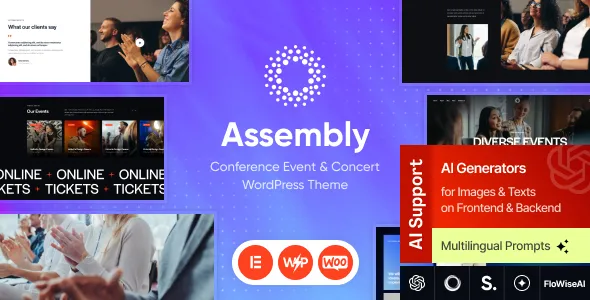
Assembly – Conference Event & Concert WordPress Theme + Events Calendar & Online Store
Assembly – Conference Event & Concert WordPress Theme + Events Calendar & Online Store is a versatile website design solution for event organizers, conference planners, concert promoters, festival coordinators, entertainment companies, and businesses looking to create a professional online presence for live events. Built around event-focused website requirements, Assembly can serve as a starting point for presenting upcoming conferences, music performances, industry gatherings, cultural festivals, workshops, and other live experiences. Its WordPress foundation offers a flexible content management environment, while the event calendar and online store positioning makes it relevant to projects that need to organize event information alongside event-related products or purchasing options.
Event websites need to do more than display attractive promotional graphics. Visitors want to discover upcoming events, check dates and venues, explore schedules, learn about speakers or performers, and understand how to attend. Organizers also need a convenient way to communicate updates, promote event merchandise, and direct interested visitors toward registration or purchasing options. A well-structured website can bring these elements together in one accessible location.
Assembly can be considered for organizations that want to create a dedicated platform for event promotion and audience engagement. With relevant content, compelling photography, clear navigation, and a consistent visual identity, businesses can present their events professionally and make important information easier to find. The exact features and integrations available depend on the theme version, included components, and compatible WordPress plugins.
What Is Assembly Conference Event & Concert WordPress Theme?
Assembly is an event-oriented WordPress theme intended for websites focused on conferences, concerts, festivals, and other organized experiences. It can provide a design foundation for promoting events, publishing schedules, introducing performers or speakers, sharing venue information, and guiding visitors toward relevant registration or purchasing options.
A specialized event website benefits from a structure that places upcoming activities at the center of the visitor experience. Instead of searching through unrelated business pages, visitors should be able to locate the events that interest them and quickly understand the essential details.
With Assembly, website owners can organize content around event listings, individual event pages, promotional sections, organizer information, and supporting articles, depending on the available templates and customization options. The online store aspect can also be relevant to businesses that want to present event-related merchandise or other products through compatible ecommerce functionality.
WordPress provides tools for managing pages, posts, images, and navigation menus. Additional plugins may extend the website with event calendars, registration forms, ticketing workflows, payment processing, and store features. Before installation, review the current theme documentation to determine which functions are included and which require separate extensions.
Ideal for Conferences and Business Events
Conferences bring together professionals, companies, speakers, sponsors, and attendees around a shared subject or industry. Their websites need to communicate the purpose of the event, explain the program, introduce important participants, and provide practical information for attendees.
Assembly can be considered for business conferences, corporate meetings, industry exhibitions, networking events, professional seminars, and technology summits. A conference website can introduce the event through a clear headline and summary, followed by information about the agenda, speakers, venue, registration process, and participating organizations.
Individual speaker sections can introduce presenters and their areas of expertise. Where appropriate, organizers can include biographies, professional photographs, session titles, and presentation summaries. This helps potential attendees understand the value of the program before deciding whether to participate.
A detailed agenda is also important. Sessions may be grouped by day, time, topic, or stage, making it easier for attendees to plan their schedules. If the event includes multiple rooms or simultaneous sessions, the website should explain those arrangements clearly.
Conference organizers can also provide information about accessibility, transport, accommodation, event policies, and contact details. Keeping these details accurate helps visitors prepare for the event and reduces repetitive inquiries.
Concerts, Music Events, and Live Entertainment
Concert promoters and entertainment businesses need websites that build interest while making event details easy to access. Visitors often want to know who is performing, when the concert takes place, where the venue is located, and how to obtain tickets.
Assembly can serve as a starting point for a concert website featuring live music performances, touring artists, music festivals, DJ events, cultural shows, and other entertainment experiences. The visual presentation can focus on event artwork, performer photography, promotional announcements, and upcoming performance information.
Dedicated concert pages can present the event date, venue, performer lineup, entry information, age restrictions where applicable, and relevant visitor guidelines. If several performances are scheduled, an organized listing can help visitors compare dates and locations.
Artist or performer profiles can provide additional context about the people appearing at an event. These pages may include biographies, promotional images, music links, and information about upcoming appearances, subject to the organizer’s permissions and content requirements.
Clear calls to action can direct visitors toward the appropriate ticketing or reservation platform. Actual ticket sales, seat selection, ticket delivery, and payment processing depend on the ticketing system or compatible integrations configured for the website.
Event Calendar for Organizing Upcoming Activities
An event calendar helps visitors understand what is happening and when. It is particularly useful for organizations that publish multiple events throughout the month or manage recurring programs.
Assembly’s event calendar positioning makes it relevant to websites that need to present scheduled activities in an organized format. Depending on the included functionality and supported plugins, an event calendar may display event titles, dates, times, locations, and links to individual event details.
A calendar can support several types of activities, including conferences, concerts, workshops, training sessions, exhibitions, community gatherings, and seasonal festivals. Visitors can use the available calendar or listing views to explore the schedule and identify relevant events.
For organizations with many listings, categorization can make browsing easier. Events may be grouped by event type, location, audience, or subject, provided the selected calendar solution supports those options.
The information displayed should remain consistent across the calendar and individual event pages. Organizers should update postponed events, cancellations, venue changes, and schedule adjustments promptly to avoid confusion.
The exact calendar capabilities, such as recurring events, filtering, calendar exports, or advanced scheduling, should be verified in the current product documentation and the requirements of any event management plugin.
Event Registration and Ticketing Options
A convenient registration process can help convert interest into attendance. Visitors should be able to understand the available options, review important conditions, and complete the required steps without unnecessary difficulty.
Assembly can be configured to direct visitors toward registration or ticket purchasing through suitable buttons, forms, or compatible event management integrations. However, the presence of an event calendar does not automatically mean that a complete ticketing system, seat selection interface, or payment gateway is included.
A registration workflow may collect information such as an attendee’s name, email address, selected session, or ticket category. The form should request only the information needed to manage the event and communicate with attendees.
For paid events, organizers may require a compatible ticketing plugin or external ticketing platform that supports pricing options, payment processing, confirmation emails, and attendee management. For free events, a simpler registration form may be sufficient.
Before choosing an integration, review its compatibility with the theme and installed WordPress version. Confirm how registration records are stored, how attendees receive confirmation, and how organizers can manage cancellations or changes.
Every registration pathway should be tested before the website launches. A clear and reliable process helps visitors complete their intended actions and gives organizers greater confidence in their event communications.
Festival Websites and Multi-Day Events
Festivals often include multiple performances, activities, stages, workshops, vendors, and visitor experiences. Their websites need a structure that can present a large amount of information without making the event difficult to navigate.
Assembly can be evaluated for music festivals, cultural celebrations, food festivals, arts events, community gatherings, and multi-day entertainment programs. The website can organize information by event day, activity type, performance area, or featured participant, depending on the available layouts and integrations.
A festival homepage can introduce the overall experience and highlight important announcements. Supporting pages may explain the daily schedule, performer lineup, venue information, transport arrangements, accessibility provisions, and event policies.
When a festival includes simultaneous activities, a clear timetable helps visitors plan their day. The schedule should identify start times, locations, and any relevant entry requirements. If activities are subject to change, organizers should explain where visitors can find the latest updates.
Festival websites may also need to promote merchandise, food vendors, sponsorship opportunities, and additional visitor services. These elements should support the main event information rather than distract from it.
For large festivals, mobile usability is especially important because visitors may check schedules and venue details while attending. Test the website on smartphones to ensure that essential information remains readable and easy to access.
Online Store for Event Merchandise and Products
The online store aspect of Assembly can be relevant to organizers who want to present products alongside event information. Merchandise can help extend an event’s brand beyond the venue and give visitors a convenient way to explore related products.
Depending on the supported ecommerce setup, an event website may offer items such as branded apparel, posters, souvenirs, accessories, publications, or other event-related products. A compatible store solution can provide product listings, descriptions, images, pricing, and purchasing options.
Product pages should include accurate information about sizes, materials, variations, availability, delivery, and return policies where applicable. Clear photographs help customers understand what they are purchasing.
If the website sells physical products, the ecommerce configuration may need inventory management, shipping rules, tax settings, order notifications, and payment processing. These capabilities generally depend on the selected ecommerce platform and its extensions rather than the theme design alone.
Organizers should also determine whether merchandise will be available online before an event, at the venue, or both. If products are limited to specific dates or locations, the purchasing information should explain those restrictions.
Before enabling transactions, test the entire shopping journey, including product selection, cart behavior, checkout, payment confirmation, order emails, and mobile usability.
Customization and Website Branding
An event website should reflect the identity and atmosphere of the event it represents. A corporate conference may require a structured and professional visual style, while a music festival may use bold imagery and energetic promotional elements.
Assembly can be customized according to the settings and tools supported by the installed theme. Website owners may be able to adapt colors, typography, imagery, page layouts, and content sections to match the event’s visual identity.
A consistent brand system helps create a recognizable experience across the homepage, event listings, speaker profiles, ticketing pages, and store. Logos, color palettes, typography, and image treatments should be applied consistently.
For conferences, clear typography and well-organized information can help visitors focus on the program and speakers. For concerts, large performer images and concise event details can emphasize the live entertainment experience. Festivals may benefit from flexible content sections that present several activities without overwhelming the page.
Before making extensive design changes, review the theme’s customization instructions and determine whether specific page-building tools or companion plugins are required. Test major changes in a staging environment when possible, especially if the website is already accepting registrations or orders.
Homepage Design and Event Promotion
The homepage is often the main entry point for visitors discovering an event. It should explain what the organization offers and direct users toward the most relevant upcoming activities.
An Assembly-based homepage can be structured around a featured event, upcoming event listings, key participants, schedule highlights, venue information, organizer details, and calls to action, depending on the available templates.
A featured event section can introduce the most important upcoming conference or performance. It should include the event name, date, location, and a concise description, with a clear link to more detailed information.
Upcoming event sections can help returning visitors discover additional activities. Featured speakers, performers, or sponsors may be presented where relevant, while supporting content can answer common questions about attending.
The homepage should avoid unnecessary clutter. Visitors should be able to distinguish the main event from supporting announcements and quickly identify where to find schedules, tickets, registration information, or merchandise.
Event promotion also depends on accurate content. When an event sells out, changes venue, or is postponed, the website should reflect that status promptly so visitors are not relying on outdated details.
Speaker, Artist, and Performer Profiles
Profiles help introduce the people who contribute to an event. They are especially useful for conferences, seminars, concerts, festivals, and professional workshops.
Assembly can be used as a foundation for pages that present speakers, performers, artists, hosts, instructors, or panel participants. Depending on the theme’s available layouts, profiles may include a photograph, biography, professional background, session title, and relevant links.
For conferences, speaker profiles can explain areas of expertise and the subjects participants will discuss. For concerts, artist profiles can introduce performers and provide links to official music or social channels. Workshop pages may include instructor information and a description of the skills or topics covered.
Profile information should be accurate, current, and approved for publication. Organizers should use authorized photographs and respect applicable rights when sharing biographies, promotional materials, and external media.
When a program includes many participants, categories or filters may help visitors find specific speakers or performers. The availability of these features depends on the content structure and any supporting plugins.
Well-organized profiles provide additional context and help visitors understand the people and expertise associated with an event.
SEO-Friendly Structure for Event Websites
Search engine optimization helps potential attendees discover event information through relevant searches. A WordPress theme can provide a useful design foundation, but search visibility also depends on the quality of the content, technical setup, competition, and the accuracy of published details.
Each major event should have a clear page title, descriptive URL, useful headings, and content that answers visitor questions. Important details may include the event date, venue, organizer, program, participation requirements, and registration process.
Organizers can create separate pages for conferences, concerts, workshops, festivals, and other event types rather than placing all information on a single page. These pages should provide original, specific information rather than repeating generic promotional text.
Internal links can connect event pages with speaker profiles, performer information, venue details, travel guidance, and related articles. This helps visitors navigate the website and understand how its content is connected.
Images should be compressed appropriately and given meaningful alternative text when they communicate relevant information. Page performance and mobile usability should be reviewed regularly, especially when event pages include large promotional graphics.
Compatible SEO tools may assist with metadata, XML sitemaps, canonical settings, redirects, and supported structured data. Event-related structured data must be accurate and follow the applicable search engine guidelines.
Event pages should also be maintained after the event has ended. Organizers can clearly mark completed events, publish recaps, or direct visitors to future activities rather than leaving outdated registration instructions online.
Content Marketing and Event Updates
Content marketing can help event organizers build interest, answer attendee questions, and keep audiences informed before and after an event.
An Assembly website can combine event listings with supporting articles, announcements, interviews, guides, and news updates, depending on the available WordPress templates and publishing setup.
Conference organizers might publish speaker interviews, session previews, industry insights, and attendee preparation guides. Concert promoters could share artist announcements, venue information, and updates about upcoming performances. Festival organizers may publish program highlights, transport advice, and visitor guidance.
Content should provide useful information rather than simply repeat promotional messages. A well-written attendee guide can explain arrival procedures, registration requirements, venue access, or what visitors should bring.
A consistent publishing plan can help organizers communicate changes and maintain interest as the event approaches. Important announcements should be dated where appropriate and clearly distinguish confirmed information from details that are still subject to change.
After an event, a recap can highlight key moments, thank participants, share authorized photographs, and direct visitors toward future programs. This approach helps maintain the website’s usefulness beyond a single event date.
Responsive Design and Mobile Usability
Many visitors browse event websites on smartphones while commuting, comparing activities, or attending a live event. A responsive layout helps ensure that essential details remain accessible across different screen sizes.
When configuring Assembly, test the event calendar, navigation menus, speaker profiles, promotional images, store pages, and forms on mobile devices. Event schedules should be easy to scan, and important links should be large enough to select comfortably.
Mobile users should not need to zoom excessively to read event times, ticket conditions, venue information, or product details. Checkout and registration processes should be straightforward and should avoid unnecessary steps.
Large images, embedded maps, animations, and third-party ticketing widgets can affect mobile performance. Review these elements carefully and remove components that do not contribute meaningfully to the visitor experience.
Responsive testing should cover both the homepage and individual event pages. The website should remain usable when visitors access it through search results, social media links, email announcements, or direct URLs.
A well-tested mobile experience makes it easier for attendees to obtain important information wherever they are.
Website Performance and Image Optimization
Event websites often use promotional banners, artist photographs, speaker portraits, venue images, and merchandise photography. These assets can improve presentation but may slow down the website if they are not optimized.
The performance of an Assembly website depends on its theme implementation, hosting environment, images, scripts, plugins, fonts, and external integrations. A responsive theme does not automatically guarantee fast loading.
Use appropriate image dimensions and compress files while preserving sufficient visual quality. Consider modern image formats where supported, and avoid uploading large graphics when smaller versions would provide the same visual result.
Review unnecessary animations, sliders, embedded media, and third-party widgets. Every additional component can increase page complexity, so prioritize features that serve a clear purpose.
Caching and other performance tools may help depending on the website’s configuration. If the website includes dynamic registration, cart, or checkout functionality, ensure that performance settings do not interfere with those processes.
Test important pages under realistic conditions, including mobile connections. Regular monitoring helps identify performance problems before they affect visitors trying to register, purchase products, or review event details.
Accessibility and Clear Navigation
An event website should make information easy to locate and understand for a broad range of visitors. Clear navigation and accessible content are especially important when the website contains complex schedules, long event descriptions, and interactive registration forms.
Use logical heading structures, readable typography, descriptive link text, and sufficient contrast between text and backgrounds. Buttons and links should be distinguishable without relying only on color.
Event schedules should use clear labels for dates, times, locations, and session names. If color is used to distinguish stages or categories, provide text labels as well.
Forms should include understandable labels, instructions, and error messages. Visitors should be able to identify required fields and correct mistakes without losing their progress unnecessarily.
Use meaningful alternative text for informative images and ensure that essential details are not available only within a graphic. Where possible, review keyboard navigation and the usability of menus, calendars, and interactive elements.
Accessibility depends on the theme, content, and configuration of individual components. Testing the complete visitor journey helps identify barriers that may not be apparent from a visual review alone.
Security, Maintenance, and Event Management
A WordPress website that manages event registrations or online orders needs regular maintenance. Reliable operations help protect visitor information and reduce the risk of disruptions during important promotional periods.
Keep WordPress, the theme, and compatible plugins updated carefully. Maintain backups before major changes and confirm that recovery procedures work. Use reputable extensions and review their compatibility, update history, documentation, and support arrangements.
If the website collects registration information or processes payments, review the privacy practices and security requirements of the relevant tools. Collect only necessary information, restrict administrative access appropriately, and use secure connections for transactions.
Test the website before major events and promotional campaigns. Verify event dates, registration links, payment flows, confirmation emails, store checkout, and contact forms. Ensure that visitors receive accurate information if schedules or venues change.
After an event, update the page status and review any remaining registration or purchase links. Remove outdated notices and preserve useful information where appropriate, such as recap articles or links to future events.
A practical maintenance routine helps the website remain accurate, dependable, and useful throughout the event lifecycle.
Who Should Use Assembly WordPress Theme?
Assembly can be evaluated by a variety of organizations that need to promote scheduled activities and provide event-related information through WordPress.
Conference organizers: Present agendas, speakers, venue details, registration information, and conference updates.
Concert promoters: Showcase live performances, artist profiles, concert dates, and ticketing links.
Festival coordinators: Organize multi-day programs, performer lineups, activities, visitor guidance, and announcements.
Corporate event planners: Promote seminars, networking sessions, product launches, and professional gatherings.
Entertainment companies: Maintain event listings and introduce upcoming shows, performers, and related experiences.
Workshop providers: Publish class schedules, instructor profiles, participation requirements, and registration details.
Event merchandise sellers: Present branded apparel, posters, souvenirs, and related products through a compatible ecommerce setup.
Community organizations: Promote local gatherings, cultural activities, public programs, and recurring events.
The right setup depends on the required features. Before choosing Assembly, review its current demo, documentation, calendar capabilities, ecommerce requirements, supported WordPress version, and any required companion plugins.
Tips for Building a Successful Website with Assembly
Start by defining the website’s primary purpose. Decide whether the main objective is to promote a conference, sell concert tickets, publish a festival schedule, collect registrations, sell merchandise, or support several related activities.
Prepare accurate content before customizing the layout. Gather event descriptions, dates, venues, schedules, participant information, policies, images, and contact details. Having the core information ready makes it easier to choose an appropriate page structure.
Use a consistent visual identity across the homepage, event listings, participant profiles, and store pages. Replace placeholder content with original text and authorized images that accurately represent the event.
Keep the visitor journey simple. Make the calendar easy to find, provide clear event details, and direct visitors toward the appropriate registration, ticketing, or purchasing platform. Avoid unnecessary steps and confusing calls to action.
Test the website thoroughly before promoting it. Check mobile layouts, calendar displays, registration forms, ticket links, payment processing, product pages, and confirmation emails. Verify every date, time, venue, and policy.
Finally, maintain the website throughout the event lifecycle. Publish updates promptly, communicate changes clearly, keep software current, maintain backups, and review completed event pages after the event has ended.
Final Thoughts on Assembly – Conference Event & Concert WordPress Theme + Events Calendar & Online Store
Assembly – Conference Event & Concert WordPress Theme + Events Calendar & Online Store is a potential solution for organizers and businesses looking to build a dedicated website for conferences, concerts, festivals, workshops, and other scheduled experiences. Its event-focused positioning makes it relevant to projects that need to present upcoming activities, share schedules, introduce participants, and direct visitors toward registration or purchasing options.
A well-organized Assembly website can combine event listings, detailed event pages, speaker or artist profiles, venue information, announcements, and supporting content. The online store aspect may also suit organizations that want to offer event merchandise or related products through a compatible ecommerce platform.
The final capabilities depend on the current theme version, included components, WordPress configuration, and compatible plugins. Advanced ticketing, attendee management, payment processing, recurring events, and ecommerce workflows should be verified before implementation rather than assumed to be included.
Long-term success also depends on accurate event information, mobile usability, accessibility, search optimization, security, and routine maintenance. A theme alone cannot guarantee ticket sales, registrations, or search rankings, but it can provide a useful foundation for a professional and accessible event website.
For businesses and organizations seeking a centralized online presence for live experiences, Assembly can be considered as part of a broader event promotion strategy. With thoughtful customization, clear information, dependable integrations, and consistent updates, an event website can help audiences discover activities, plan their attendance, and stay connected with future events.