My Account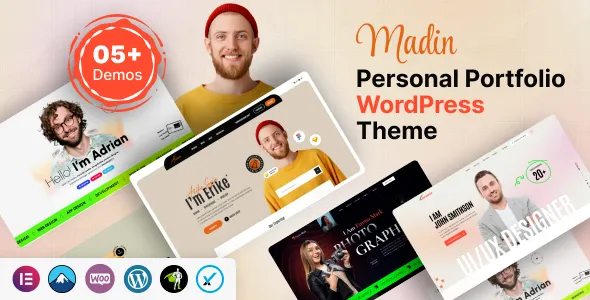
Madin – Personal Portfolio WordPress Theme
Madin – Personal Portfolio WordPress Theme is a website design solution for freelancers, designers, developers, creative professionals, consultants, and individuals who want to establish a professional online presence. A personal portfolio website provides a central place to showcase skills, present completed projects, introduce professional experience, and help potential clients or employers understand what makes an individual valuable. Madin offers a portfolio-focused foundation for building a website that reflects your personal brand, communicates your expertise, and organizes important professional information in one accessible location.
In today’s digital environment, a strong online portfolio can support career development, freelance opportunities, and professional networking. Instead of relying exclusively on social media profiles or third-party portfolio platforms, individuals can use a personal website to present their work in a format that reflects their goals and preferred visual identity. With a suitable layout and carefully prepared content, Madin can help organize project showcases, biographies, service descriptions, testimonials, and contact information into a cohesive presentation.
Whether you are a web developer, graphic designer, photographer, digital marketer, artist, writer, UI/UX designer, or business consultant, a personal portfolio website can help communicate your professional strengths. WordPress provides tools for managing pages, publishing articles, uploading images, and maintaining website content. The final features and customization options available with Madin depend on the installed theme version, its documentation, and compatible WordPress tools.
What Is Madin – Personal Portfolio WordPress Theme?
Madin is a personal portfolio WordPress theme intended for individuals who want to present their professional identity and creative work through a dedicated website. A portfolio-focused theme provides a visual foundation for organizing professional information, highlighting selected projects, and helping visitors discover relevant skills and experience.
A freelancer may use a portfolio website to attract new clients, while a job seeker may focus on professional achievements, employment history, and selected projects. A designer might prioritize visual case studies, whereas a developer could emphasize technical capabilities, completed websites, and links to relevant work.
Madin can be evaluated as a starting point for these types of websites. Its suitability depends on the layouts, design controls, and integrations available in the current release. Before installation, review the theme demo and documentation to confirm that the included options support your intended website structure.
With a clear content strategy and consistent branding, a personal portfolio website can become a valuable professional resource that evolves alongside your career.
Modern Design for a Professional Online Presence
The design of a personal website influences how visitors discover and interpret professional information. A clean layout, readable typography, balanced spacing, and relevant visuals can help present experience and creative work in a way that feels organized and credible.
Madin is positioned for portfolio-oriented websites, making visual presentation an important consideration when assessing the theme. A well-structured homepage can introduce the individual, communicate their professional focus, and guide visitors toward selected projects or additional information.
For creative professionals, project imagery may be a central part of the design. Developers and consultants may prefer layouts that give greater attention to technical skills, project descriptions, and professional achievements. Writers and marketers might prioritize published work, case studies, and educational articles.
The visual style should support the individual’s professional identity rather than distract from it. Consistent colors, typography, image treatments, and headings can help create a recognizable presentation across the website.
When customizing Madin, prioritize clarity and usability. Visitors should be able to understand what you do, review your work, and locate contact information without unnecessary navigation.
Responsive Layout for Desktop, Tablet, and Mobile
A personal portfolio should be accessible across different devices because visitors may discover your work through a mobile search, a shared project link, or a desktop browser. Responsive design helps website content adapt to different screen sizes and browsing conditions.
When evaluating Madin, check the current demo and test the installed theme on desktop computers, tablets, and smartphones. The actual responsive experience may depend on the theme version, additional plugins, custom styling, and the way individual pages are configured.
On smaller screens, headings should remain readable, navigation should be easy to operate, and portfolio images should fit the available space. Buttons and links should be convenient to select, while long descriptions should be divided into manageable sections.
Desktop layouts can accommodate more detailed project information, wider image galleries, and additional content sections. However, a larger screen should not lead to unnecessary clutter or excessively long pages.
Test important sections individually, including the homepage, project galleries, biography, blog, and contact page. A layout that looks correct on one page may behave differently when displaying larger images or additional content.
Responsive testing helps ensure that your work remains accessible to potential clients, recruiters, collaborators, and other visitors regardless of the device they use.
Ideal for Freelancers and Independent Professionals
Freelancers often need a website that explains their services, demonstrates their capabilities, and encourages potential clients to start a conversation. A personal portfolio provides a central destination where prospective customers can evaluate relevant work and learn about the person behind it.
Madin can be considered for freelancers working in web development, graphic design, branding, content writing, digital marketing, consulting, photography, and other professional fields.
A freelancer’s website may include a homepage introduction, service descriptions, a project portfolio, client feedback, a professional biography, and contact details. Each section should support the main objective of attracting suitable opportunities.
For example, a freelance web developer can present completed websites and explain their contribution to each project. A graphic designer may showcase branding work, packaging designs, or digital graphics. A content writer can highlight published articles, writing samples, and areas of specialization.
A strong portfolio should focus on relevant examples rather than simply displaying every completed assignment. Select projects that demonstrate the type of work you want to attract and provide enough context for visitors to understand your contribution.
With thoughtful customization and useful content, Madin can serve as a foundation for a professional website that supports freelance business development.
Build a Portfolio for Designers and Creative Professionals
Designers and other creative professionals often depend on visual examples to communicate their abilities. A portfolio website allows them to organize selected projects, explain their creative process, and present work in a consistent format.
Madin can be evaluated for portfolios featuring graphic design, branding, illustration, digital artwork, UI/UX design, photography, and other creative disciplines. The best layout depends on the type of work being presented and the expectations of the intended audience.
A designer may organize projects by category, such as brand identity, website design, packaging, or advertising. Each project can include images, a short overview, the objectives, the designer’s responsibilities, and the final deliverables.
For UI/UX designers, case studies can explain the user problem, research process, design decisions, and resulting interface. A branding professional may show logo development, typography, color systems, and practical applications of the visual identity.
Use high-quality images that accurately represent the work. Optimize large files to avoid unnecessary loading delays, and ensure that images remain clear on mobile devices.
A carefully organized creative portfolio helps visitors understand both the quality of the work and the thinking behind it. This makes the website more informative than a simple collection of images.
Personal Portfolio Website for Developers
Developers can use a personal website to showcase technical expertise, completed applications, development experience, and professional interests. A well-organized portfolio helps potential employers and clients understand the developer’s capabilities through concrete examples.
Madin can be considered for front-end developers, back-end developers, full-stack developers, WordPress specialists, software engineers, and other technology professionals who want to present their work online.
A developer’s portfolio might include an introduction, technical skills, selected projects, professional experience, education, and contact information. Project pages can describe the problem being solved, the technologies used, the developer’s contribution, and important implementation details.
Where available, include links to live projects, code repositories, technical articles, or other relevant resources. Make sure these links work and that any public code or project screenshots can be shared appropriately.
Avoid listing technologies without context. Explaining how a particular tool was used in a project provides a clearer picture of practical experience than presenting an unstructured list of programming languages and frameworks.
Developers can also use a blog to share tutorials, technical observations, or lessons learned from completed projects. This content can demonstrate communication skills and provide additional evidence of professional knowledge.
Showcase Skills, Experience, and Achievements
A personal portfolio should make professional strengths easy to identify. Visitors often want to understand what you do, which skills you possess, and what kind of projects you have completed.
With Madin, you can plan content around relevant skills, professional experience, education, certifications, and achievements, depending on the available page layouts and customization options.
A skills section should prioritize capabilities related to your target opportunities. A web designer might highlight interface design, prototyping, and responsive design, while a marketing professional may focus on content strategy, campaign planning, analytics, and audience research.
Professional experience can be presented in chronological order or grouped around relevant roles and projects. Use concise descriptions that explain responsibilities and meaningful contributions.
Where measurable results are available and can be shared accurately, include them with appropriate context. Avoid exaggerated claims or achievements that cannot be substantiated.
The purpose of this information is to help visitors understand your professional background quickly. Clear descriptions and relevant examples are more effective than lengthy lists of unrelated skills.
Create a Strong Personal Brand
Personal branding helps distinguish your work from that of other professionals in your field. A dedicated website provides control over how your expertise, personality, and professional values are presented.
Madin can serve as a foundation for a website that reflects an individual’s professional identity through consistent design and carefully selected content. The specific branding controls available will depend on the installed theme and its supported customization tools.
Start by defining your target audience and the main message you want visitors to remember. Consider whether you want to attract freelance clients, apply for employment, promote consulting services, or build recognition within a creative community.
Choose colors, typography, imagery, and writing style that suit your professional direction. A corporate consultant may prefer a restrained and structured appearance, while an illustrator or designer may use a more expressive visual approach.
Consistency matters across the homepage, biography, project pages, and contact information. The website should communicate the same professional identity throughout.
Your personal brand should also be supported by authentic content. Explain your actual experience, describe your services clearly, and present projects that demonstrate your abilities. A recognizable and honest professional identity can help visitors understand what you offer.
Homepage Layout and Content Organization
The homepage is often the first point of contact for visitors exploring your professional background. It should communicate your role, introduce your main strengths, and guide visitors toward the most relevant information.
A Madin-based website can be organized around an introductory section, selected projects, a short biography, skills, service summaries, and contact opportunities, depending on the theme’s available layouts.
Begin with a clear headline that explains your professional focus. Supporting text can briefly describe the type of work you do and the audience you serve.
A featured portfolio section can highlight a small number of relevant projects. Visitors should be able to open individual examples for more information rather than relying on thumbnail images alone.
A short biography can introduce your experience and working approach, while a skills section may summarize your main capabilities. Contact information should remain easy to find throughout the website.
Not every homepage needs every possible section. A developer may prioritize technical projects, while a photographer may lead with visual work. Select the sections that support your objectives and remove elements that do not add value.
A clear homepage structure makes it easier for visitors to understand your professional identity and decide where to explore next.
Project Pages and Case Study Presentation
Project pages are among the most valuable components of many personal portfolio websites. They allow professionals to explain their work in detail and demonstrate the process behind the finished result.
Madin can be evaluated for a project presentation structure that supports individual examples, depending on the layouts available in the theme. Each project should communicate its purpose and highlight the skills most relevant to your intended audience.
A useful case study can include the project background, objectives, responsibilities, process, tools used, and final deliverables. If the project involved collaboration, explain your specific contribution clearly.
For example, a web designer might describe the client’s needs, the design challenge, and the decisions that shaped the final interface. A developer could explain the architecture, important technical choices, and key implementation challenges.
Use screenshots, photographs, diagrams, or other visuals when they help explain the work. Ensure that you have permission to display client projects and respect any confidentiality requirements.
A portfolio should prioritize quality over quantity. A small selection of detailed, relevant case studies can communicate professional strengths more effectively than a large collection of unexplained project thumbnails.
Customization and WordPress Content Management
WordPress provides a content management system for creating pages, publishing articles, managing media, and maintaining website navigation. A portfolio theme builds on this foundation by providing a visual structure for presenting content.
Madin’s available customization options should be checked in its current documentation. Depending on the installed version, relevant settings may cover visual styling, page layouts, typography, colors, and other presentation details.
Before making changes, identify the website’s main requirements. Decide which pages you need, what information each page should contain, and how visitors will move between sections.
Prepare your project images, professional biography, skills, service descriptions, and contact details before completing the design. Real content makes it easier to choose appropriate layouts and maintain consistency.
If additional page-building tools or plugins are used, confirm that they are compatible with the theme and installed WordPress version. Avoid adding unnecessary extensions that duplicate existing functionality or increase maintenance complexity.
Keep a backup before making substantial changes, particularly when modifying theme settings, custom CSS, or plugin configurations. Test the resulting website before publishing updates to ensure that navigation and layouts remain functional.
SEO-Friendly Structure for Personal Portfolios
Search engine optimization can help potential clients, employers, and collaborators discover your portfolio through relevant searches. A clear website structure and useful content provide a foundation for improving search visibility.
Each page should have a specific purpose, a descriptive title, a logical heading hierarchy, and original information. A designer can create separate project pages, while a consultant may publish detailed service pages that explain their expertise.
Use descriptive URLs and relevant internal links to connect related content. For example, a case study can link to a service page, while a blog article can direct interested readers toward a relevant portfolio example.
Images should be appropriately sized and use meaningful alternative text when they convey important information. Optimized image files can help reduce loading time without sacrificing necessary visual detail.
Compatible SEO plugins may assist with metadata, XML sitemaps, canonical settings, and related technical tasks. The appropriate configuration depends on the website’s needs and the tools already installed.
Use professional keywords naturally in headings and descriptions where they accurately reflect your work. Avoid repeating the same phrase excessively or publishing generic content solely to target search queries.
SEO results depend on multiple factors, including content quality, competition, technical performance, and external signals. A theme can provide a useful structural foundation, but it cannot guarantee rankings or traffic.
Blogging and Professional Thought Leadership
Publishing articles can help professionals share knowledge, explain their process, and demonstrate expertise. WordPress provides tools for maintaining a blog alongside portfolio pages, making it possible to combine project showcases with educational content.
Madin can be considered for personal websites that include professional articles, tutorials, news, or reflections on industry developments, depending on the theme’s blog layouts.
A developer might publish coding tutorials or lessons learned from a project. A designer could discuss interface design, branding principles, or creative workflows. A consultant may share industry insights, practical recommendations, or explanations of common business challenges.
Articles should provide useful information rather than simply repeat general statements. Clear headings, concise paragraphs, and relevant examples make content easier to read.
Internal links can connect articles to related projects or services, allowing visitors to explore the website in greater depth. A consistent publishing schedule can help keep the site active, but quality and relevance should remain the priorities.
By sharing practical knowledge and documenting professional experience, a portfolio website can become a resource that supports long-term personal branding.
Contact Forms and Professional Inquiries
A portfolio website should make it easy for interested visitors to get in touch. Potential clients may want to request a quotation, discuss a project, ask about availability, or learn more about your services.
A Madin-based website can be planned with contact details, email links, or compatible contact form tools, depending on the theme’s features and the selected integrations.
A simple inquiry form may collect a name, email address, project category, and a short description of the request. Collect only the information needed to respond effectively, and provide clear instructions for submitting the form.
Calls to action should match the page’s purpose. A project page might invite visitors to discuss a similar assignment, while a service page could encourage them to request more information.
If you include links to professional networking profiles, code repositories, or other portfolio platforms, verify that the destinations are accurate and current.
Before launch, test form submission, email delivery, validation messages, and spam protection. A functional contact process helps ensure that professional opportunities are not lost because of avoidable technical problems.
Website Speed and Performance Optimization
A portfolio website often contains images, project screenshots, graphics, and other visual elements that can affect loading performance. Keeping these assets optimized helps visitors explore your work more comfortably.
The actual performance of a Madin website depends on the theme implementation, hosting environment, image sizes, fonts, scripts, plugins, and external integrations. Responsive presentation alone does not guarantee fast loading.
Start by resizing images to suit their intended display areas and compressing files while retaining sufficient quality. Avoid uploading unnecessarily large files when smaller versions will communicate the same information.
Review third-party widgets, animations, and scripts to determine whether they contribute meaningfully to the user experience. Remove components that add complexity without improving the website’s purpose.
Suitable hosting, caching, and other optimization tools may improve performance when configured correctly. Test important pages after changes to identify any unintended layout or loading issues.
Performance checks should include the homepage, project galleries, individual case studies, blog posts, and contact page. Regular monitoring helps maintain a reliable browsing experience as the portfolio grows.
Accessibility and User-Friendly Navigation
A professional portfolio should be straightforward to use for visitors with different devices, browsing preferences, and accessibility needs. Clear navigation and readable content help make your work easier to discover.
When configuring Madin, use descriptive menu labels, logical heading levels, sufficient color contrast, and readable font sizes. Buttons and links should be visually recognizable, and interactive elements should support appropriate keyboard navigation.
Portfolio images should include meaningful alternative text when necessary, while decorative visuals should not introduce unnecessary distractions. Contact forms should have clear labels and understandable instructions.
Navigation should prioritize the pages visitors need most, such as Home, About, Portfolio, Services, Blog, and Contact. The exact menu will depend on the size and purpose of your website.
Avoid overly complex effects or navigation structures that make it difficult to locate important information. Test the website on mobile devices and with keyboard navigation before publishing.
Accessibility depends on the theme, content, and implementation. Regular usability reviews can help identify issues that automated testing may not detect.
Security and Ongoing WordPress Maintenance
A portfolio website needs ongoing maintenance to remain reliable, secure, and accurate. Even a well-designed website can experience problems if its software and supporting components are not maintained.
Use reputable hosting, enable HTTPS, choose strong administrator credentials, and assign access permissions carefully. Keep WordPress, the theme, and compatible plugins updated after reviewing changes and compatibility.
Create regular backups and ensure that you understand how to restore the website if a technical problem occurs. Test significant updates in a staging environment when possible, especially if the website relies on several plugins or customized layouts.
Remove unused components when appropriate and obtain themes and plugins from trustworthy sources. Review contact forms and external links periodically to ensure that they continue to work as intended.
Maintenance should also include content updates. Replace outdated project information, correct broken links, update professional details, and ensure that service descriptions accurately reflect your current work.
A consistent maintenance routine helps preserve the quality of your online portfolio and supports a dependable experience for visitors.
Who Should Use Madin – Personal Portfolio WordPress Theme?
Madin may be suitable for different professionals who want to present their work, skills, and experience through a dedicated WordPress website.
- Freelancers: Showcase services, completed projects, professional experience, and contact information.
- Web developers: Present technical projects, development skills, live websites, and code-related resources.
- Graphic designers: Display branding, visual identity projects, illustrations, and other creative work.
- UI/UX designers: Explain design processes, interface projects, user research, and case studies.
- Photographers: Organize selected photographs and introduce their creative services.
- Digital marketers: Highlight campaigns, content projects, marketing skills, and professional achievements.
- Writers and content creators: Present writing samples, published work, editorial experience, and specialist topics.
- Consultants: Explain professional services, industry experience, and examples of completed assignments.
- Job seekers: Create a central professional profile that complements a resume and other application materials.
- Creative professionals: Build a personal brand around selected projects, expertise, and professional interests.
The best choice depends on the website’s purpose, the type of content being presented, and the theme’s documented capabilities. Review the available layouts and compatibility requirements before making a final decision.
Tips for Building a Successful Portfolio with Madin
Start by identifying your primary objective. Decide whether you want to attract freelance clients, apply for jobs, promote consulting services, or build recognition within your professional field.
Select projects that demonstrate the kind of work you want to do more often. Explain your role, the challenges addressed, and the outcome of each project where the information can be shared accurately.
Prepare a concise professional biography that introduces your background, areas of expertise, and working approach. Keep skills and experience relevant to your intended audience instead of including every detail of your career.
Maintain consistent branding across the website. Choose suitable typography, colors, imagery, and page layouts that support your professional identity without distracting visitors from the work itself.
Make contact information easy to find and test every form, button, and external link. Review the mobile experience, loading performance, accessibility, and content accuracy before launching the website.
Finally, update the portfolio as your skills develop and new projects are completed. A current and carefully maintained website is more useful than a portfolio that no longer reflects your professional capabilities.
Final Thoughts on Madin – Personal Portfolio WordPress Theme
Madin – Personal Portfolio WordPress Theme is a potential option for freelancers, developers, designers, consultants, and other professionals looking to establish a personal website with WordPress. Its portfolio-focused positioning makes it relevant to projects that need to combine professional information, selected work, personal branding, and accessible contact options.
A successful portfolio should communicate a clear professional identity, present relevant projects with useful context, and make it easy for visitors to understand your skills and experience. Responsive design, thoughtful customization, readable content, search optimization, and regular maintenance all contribute to a stronger online presence.
The final capabilities of a Madin website depend on the installed theme version, its documented features, available customization options, and compatible plugins. Review the current demo and documentation before installation, particularly if you require specific portfolio layouts or additional functionality.
A theme alone cannot guarantee employment opportunities, client inquiries, search rankings, or business growth. However, when combined with authentic project examples, clear professional messaging, and a well-maintained website, Madin can provide a useful foundation for presenting your work and developing your personal brand online.