My Account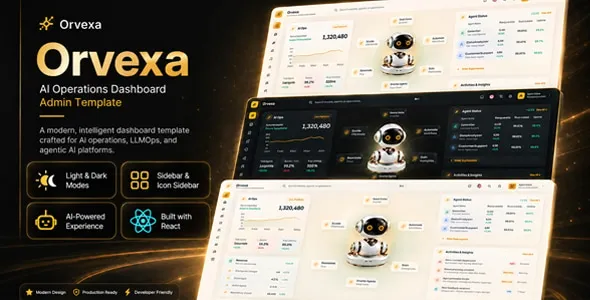
Orvexa | AI Operations React Admin Template
Orvexa | AI Operations React Admin Template is a modern administrative dashboard template designed for AI startups, SaaS businesses, software developers, technology companies, and organizations that need a structured interface for managing digital operations. Built around the React ecosystem, Orvexa provides a potential starting point for creating an AI operations dashboard that organizes application information, presents business data, and supports administrative workflows through a consistent user interface. Its AI-focused positioning makes it suitable for projects involving artificial intelligence applications, workflow automation, operational monitoring, data management, and technology-driven business processes.
As organizations increasingly adopt artificial intelligence and automation, they need practical ways to organize information, review system activity, and manage their digital tools. An administrative dashboard can bring important information into a centralized interface, helping users navigate different sections and understand the status of their operations. Orvexa can be evaluated by teams seeking an AI operations React admin template that can be adapted to their product requirements, brand identity, and development workflow.
React is a JavaScript library for building user interfaces through reusable components. This component-based approach can help developers create consistent dashboard elements, including navigation menus, summary cards, forms, tables, charts, and configuration panels. Orvexa offers a potential foundation for organizing these interface elements into an administrative experience that can grow alongside an application. The actual functionality depends on the template’s current version, included components, and any additional integrations or backend services implemented during development.
What Is Orvexa AI Operations React Admin Template?
Orvexa is an AI operations administration template intended for projects that need an organized interface for managing application information, reviewing operational data, and navigating business workflows. It can be considered by developers creating AI-powered products, automation platforms, SaaS applications, internal management tools, and other technology-oriented web applications.
An admin dashboard serves as a central interface where authorized users can access information and perform administrative tasks. Depending on the application’s requirements and the template’s available components, an AI operations dashboard may include overview panels, activity records, workflow listings, configuration screens, data tables, and operational summaries.
For example, an AI software company may need a dashboard for organizing project information and reviewing application activity. An automation platform might require interfaces for managing workflow configurations and inspecting execution records. A SaaS business may need administrative screens for application settings, user activity, and operational reporting.
Orvexa can provide a starting point for designing these interfaces, helping developers establish a consistent visual structure before connecting the dashboard to actual application data. However, a front-end template does not automatically provide AI models, automation engines, real-time monitoring, database services, or complete business logic. These capabilities depend on the underlying application and its integrations.
Before choosing Orvexa, developers should review its current demo, documentation, included components, dependency requirements, and licensing conditions to determine whether it fits the intended project.
Modern Dashboard Development with React
React provides a component-based approach to developing interactive web interfaces. Instead of creating every page as an isolated structure, developers can build reusable elements and combine them into different layouts.
For an administrative dashboard, reusable components may include sidebars, navigation headers, metric cards, forms, buttons, notification panels, tables, and dialog windows. A consistent component structure helps maintain the same visual language across multiple pages and makes interface updates easier to manage.
Orvexa can be evaluated as a React-based starting point for organizing these elements into a practical dashboard. Developers can examine the existing component structure and adapt the interface to the application’s requirements.
React is particularly useful when an interface needs to respond to user interactions. For example, users may need to open navigation menus, switch between dashboard sections, filter displayed records, update form fields, or interact with charts. These interactions can be implemented through React state, event handling, and suitable data-flow patterns.
The actual behavior depends on the source code included with the template. Some components may be ready to use, while others may require additional development or integration.
Developers should also review the React version, package dependencies, build tools, and installation instructions before beginning implementation. A clear understanding of the project’s structure helps establish a maintainable foundation for future changes.
AI Operations Dashboard for Technology Businesses
AI operations can involve organizing the systems, processes, and information associated with artificial intelligence applications. Depending on the business, these activities may include workflow coordination, task management, application usage monitoring, data processing, and operational reporting.
An administrative dashboard can help present this information in a centralized and understandable format. Instead of navigating through disconnected interfaces, users can access relevant sections from a common workspace.
Orvexa may be suitable for building an AI operations interface that organizes application activity, workflow information, configuration options, and other operational details when the required components and data integrations are available.
For example, an AI content platform might organize its interface around projects, processing activity, and task history. A business automation application could present workflow records, execution statuses, and configuration settings. An internal AI tool might use a dashboard to provide access to project information and administrative controls.
The dashboard should reflect the actual capabilities of the application. Metrics must come from reliable data sources, and the interface should clearly distinguish sample values from live information.
A useful AI operations dashboard focuses on clarity, organization, and efficient navigation. Its purpose is to help users understand relevant information and access the controls they need without unnecessary complexity.
Dashboard Overview and Key Performance Indicators
An overview page provides users with a starting point for understanding the current state of an application. It may summarize important metrics, recent events, outstanding tasks, or other information that supports operational decisions.
Orvexa can be assessed for use as an overview dashboard, depending on the components included in the current release. Developers can select metrics that match the application’s purpose and arrange them according to their importance.
An AI operations application might display workflow activity, task completion summaries, request volumes, or processing information when those measurements are available. A SaaS operations dashboard could focus on application usage, active projects, or account activity.
Key performance indicators should be selected carefully. Displaying too many metrics can make the interface difficult to interpret, while a small number of relevant measurements can help users identify important changes more quickly.
Charts and summary cards should include clear labels and appropriate units. If the information covers a specific time period, that period should be visible. Data that is delayed, incomplete, or estimated should be identified accordingly.
A dashboard overview is most useful when it connects meaningful data with practical actions. For example, a user might move from an activity summary to a detailed record or from a workflow count to a filtered list of relevant processes.
The accuracy of these displays depends on the application’s data collection and processing systems, not just the visual template.
Workflow Management and Business Automation
Workflow management is an important part of many AI applications and business automation platforms. A workflow may consist of connected tasks, processing stages, integrations, or decision points that help an application complete a defined operation.
Orvexa can be considered for projects that need administrative interfaces for organizing workflow information. Depending on the available components and custom development, these interfaces may display workflow lists, configuration fields, execution histories, or status summaries.
A workflow listing can help users identify individual processes and review their current state. A detailed workflow page may provide information about configuration, recent activity, and execution results, provided the underlying application collects and exposes that information.
For example, an automation platform might organize processes that transfer information between business applications. An AI-powered service may use workflows to process documents, classify incoming requests, or prepare content for review.
A dashboard interface must be distinguished from the automation engine itself. The template can provide visual components, but actual execution, scheduling, retry logic, error handling, and external integrations require suitable backend functionality.
Developers should also consider permissions and validation when building workflow configuration screens. Users need clear feedback when a setting is saved, an action fails, or a process cannot be completed.
With appropriate customization, Orvexa can serve as a foundation for presenting workflow-related information in a consistent administrative environment.
AI Application Monitoring and Operational Insights
Monitoring helps teams understand how their applications behave and identify problems that may affect users or business operations. Depending on the system, useful information may include request activity, task completion, error counts, response times, resource usage, and recent events.
Orvexa can be evaluated for building monitoring-oriented interfaces when its available layouts suit the project. Developers can connect the dashboard to the appropriate data sources and determine how operational measurements should be displayed.
For instance, an AI application may need to present request activity and processing failures. A workflow platform might organize task executions by status, while a SaaS product may require an overview of service activity and usage trends.
Monitoring interfaces should make it easy to understand the meaning and timing of the information shown. Historical records should be distinguishable from current status, and periodic updates should not be presented as continuous real-time monitoring.
A complete monitoring system also requires reliable data collection, storage, processing, and alerting mechanisms where needed. These capabilities must be implemented separately if they are not already part of the application.
Developers should choose metrics that support meaningful operational decisions rather than adding visualizations simply to fill the dashboard. Useful monitoring helps teams recognize changes, investigate errors, and understand the behavior of their systems.
Data Tables, Search, and Administrative Controls
Data tables and structured lists are essential for many administrative applications. They help users review records, locate information, compare entries, and access actions associated with specific items.
Orvexa can be reviewed for the table layouts and administrative components available in its current version. Developers can adapt suitable components to display workflow records, application projects, user information, task histories, or other data relevant to their systems.
A well-designed table should use understandable column headings and present important information in a readable order. Sorting, filtering, pagination, and search can help users navigate larger collections when these features are included or implemented.
Search controls should make it clear which records are being searched, while filters should communicate the criteria currently applied. If no matching results are found, the interface should display an understandable empty state rather than an unexplained blank area.
Administrative actions should be clearly differentiated from ordinary links. Changes that affect important data may require confirmation, validation, or additional permission checks.
Developers should also account for loading indicators, failed requests, and invalid form submissions. These states are part of a complete user experience and help users understand what the application is doing.
The actual behavior of these controls depends on the template’s code and the backend implementation. Each feature should be tested to determine whether it works as intended or requires additional development.
User Management and Access Control
Many AI and SaaS applications need to manage access for different categories of users. Administrators, operators, analysts, and regular users may have different responsibilities and therefore require different levels of access.
Orvexa can be evaluated for projects that need user management screens, depending on the available components. A customized dashboard may provide views for user records, account status, profile details, or role assignments when supported by the application.
A user management interface should reflect the organization’s access policies. Administrators may need broader permissions, while other users should see only the information and actions required for their responsibilities.
Authentication and authorization must be implemented securely. Hiding a menu item or disabling a button in the front end does not prevent an unauthorized user from accessing a protected backend operation.
Developers should enforce permissions at the appropriate server or API layer and ensure that each protected request is validated. If the application manages sensitive information, access rules should be reviewed regularly.
User management may also involve account creation, profile updates, session handling, password recovery, and audit records. These features should be verified in the current implementation rather than assumed to be included with the visual template.
A well-organized interface can make account administration easier, but the security of user information depends on the complete application architecture.
Customization and Brand Identity
A dashboard should reflect the identity of the product while maintaining a consistent and practical interface. Good visual design helps users recognize the application and understand how its sections relate to one another.
Orvexa can be assessed for its layout structure, styling approach, and available customization options. Depending on the included source code, developers may be able to adapt colors, typography, spacing, icons, navigation elements, and dashboard components.
An AI startup may prefer a clean, contemporary interface, while an enterprise operations tool may prioritize compact data layouts and clearly differentiated controls. The visual approach should support the needs of the users rather than introduce unnecessary decoration.
Consistency is important throughout the dashboard. Buttons, form fields, tables, alerts, headings, and navigation elements should follow recognizable patterns. This helps users learn the interface and reduces confusion when moving between pages.
Developers should review the existing styling system before making broad changes. Reusable styles or centralized design tokens, where available, can make it easier to maintain a consistent appearance across the application.
Customization should preserve readability and accessibility. Text sizes, color contrast, focus indicators, and spacing need to remain suitable for the people using the dashboard.
Responsive Design for Desktop, Tablet, and Mobile
Administrative dashboards are commonly used on desktop computers, but some users also need to access operational information from tablets and smartphones. Responsive design helps the interface adapt to different screen sizes and input methods.
Orvexa should be tested across the devices and browsers relevant to the intended audience. Navigation menus, dashboard cards, tables, forms, and charts should be checked to confirm that they remain usable at different viewport sizes.
On smaller displays, a sidebar may need to collapse into a mobile navigation menu. Multi-column layouts may become single-column sections, while wide tables may require horizontal scrolling or a more compact presentation.
Interactive controls should remain easy to use with touch input. Buttons and form fields need suitable spacing, and essential information should not disappear when the layout changes.
Not every administrative operation needs to offer an identical experience on every device. A mobile dashboard may prioritize reviewing status information and accessing key records, while complex configuration tasks may be better suited to larger screens.
The final responsive behavior depends on the template’s implementation and any custom components added during development. Testing real workflows across multiple devices helps identify issues before deployment.
SEO Considerations for React Admin Applications
Search engine optimization has a different role in private administrative dashboards than it does in public-facing websites. An admin interface is generally designed for authorized users, so its primary priorities are usability, security, and reliable application behavior rather than public search visibility.
However, businesses may use React to develop public product pages, marketing websites, documentation portals, or educational resources alongside their administrative applications. Those public-facing pages can benefit from clear titles, relevant descriptions, logical headings, descriptive links, and useful original content.
Developers should distinguish between public content and protected dashboard routes. Private application pages should not be exposed to search engines merely to increase indexing. Appropriate authentication, authorization, and indexing controls should be applied according to the project’s requirements.
The application’s rendering approach should be selected based on its intended use. Public pages may need different rendering and metadata strategies from authenticated administrative sections.
Technical checks can include page titles, canonical URLs where relevant, sitemap configuration for public content, and confirmation that protected data is not accidentally exposed. These considerations should be addressed as part of the overall application architecture.
An admin template alone cannot guarantee search rankings. Search performance depends on public content quality, technical implementation, competition, and the broader website strategy.
API Integration and Backend Connectivity
An AI operations dashboard often needs to retrieve information from APIs, databases, workflow systems, or other business services. Connecting the interface to reliable data sources allows users to review actual information and perform meaningful administrative tasks.
Orvexa can be evaluated as a React front-end foundation for these integrations. Developers should first inspect the existing code and determine how components manage state, receive data, and handle user interactions.
An API integration may support retrieving workflow records, submitting configuration changes, updating account information, or displaying operational metrics. The exact implementation depends on the backend service, authentication method, and data requirements.
Developers should define consistent data structures and handle loading states, empty results, validation errors, and failed requests. The interface should not silently present outdated information as if it were current.
Private API credentials must not be exposed in browser-delivered JavaScript. Sensitive operations should be handled through an appropriate server-side layer, with access permissions checked for protected requests.
Integration testing is important because a visually complete dashboard may still fail when connected to real services. Developers should verify response formats, authorization, error handling, and the behavior of the interface when a service is unavailable.
A reliable integration strategy helps ensure that the dashboard represents actual application behavior rather than operating only as a static interface.
Performance Optimization for React Admin Dashboards
Performance affects how quickly users can navigate between dashboard sections and interact with data. Slow responses and delayed rendering can make routine administrative work more difficult, particularly in applications with large datasets or complex visualizations.
The performance of an Orvexa implementation depends on its component structure, JavaScript bundles, dependencies, data-fetching approach, asset sizes, hosting environment, and backend response times.
Developers should measure the application and identify specific bottlenecks before making optimizations. Unnecessary dependencies, repeated requests, inefficient rendering, and excessive data processing can all affect responsiveness.
Large tables and charts may benefit from pagination or selective data retrieval so that the browser does not process more information than the user needs. Components should also avoid unnecessary updates where practical.
Images, icons, and fonts should be handled efficiently. Third-party scripts should be reviewed to determine whether they contribute meaningful functionality to the application.
Performance testing should cover common workflows, including opening the overview page, navigating between sections, filtering records, and submitting forms. The application should also be tested with realistic data volumes and network conditions.
Regular testing after updates and new feature additions helps maintain a responsive experience as the dashboard becomes more complex.
Accessibility and Usability in Administrative Interfaces
Accessibility helps make a dashboard usable by people with different abilities and interaction preferences. It also supports a clearer, more predictable experience for all users.
When customizing Orvexa, developers should use semantic HTML, logical heading structures, descriptive labels, and sufficient color contrast. Buttons and links should communicate their purpose, and form fields should include understandable labels and validation messages.
Interactive components should support keyboard navigation where appropriate. Visible focus indicators help users identify the currently selected element, while accessible names allow assistive technologies to interpret controls.
Charts should provide meaningful labels and, when necessary, alternative ways to access the underlying data. Status information should not depend on color alone; text or recognizable symbols can provide additional context.
Tables should use clear headings and maintain a logical reading order. Dialogs, dropdown menus, and other interactive elements should behave predictably when users navigate with a keyboard or assistive technology.
Accessibility testing should include automated checks and manual review of important workflows. Developers should test navigation, filtering, form submission, error handling, and other common interactions.
An accessible dashboard can help users complete administrative tasks more efficiently and reduce confusion when working with complex information.
Security and Maintenance for React Admin Dashboards
Security is especially important for administrative interfaces that manage application settings, user information, operational records, or AI-related resources. The appropriate safeguards depend on the application’s architecture and the sensitivity of its data.
Developers should use supported versions of React and project dependencies, review security advisories, and test updates before deploying them. Configuration values and private credentials should be stored securely rather than exposed in client-side code.
Authentication and authorization should be implemented through suitable trusted services or server-side controls. Every protected operation should verify that the requesting user has the required permissions.
If the application stores workflow information, account records, or operational logs, appropriate access controls, data retention policies, and backup procedures should be considered. Error messages should provide useful feedback without revealing confidential information or internal implementation details.
AI integrations may introduce additional considerations, including API key protection, control over data sent to external services, and the handling of generated outputs. These requirements should be addressed according to the application’s purpose and data sensitivity.
Regular maintenance should include dependency reviews, access audits, backup verification, performance testing, and checks of critical workflows. A well-maintained dashboard depends on the complete application and the practices used to develop and operate it.
Who Should Use Orvexa AI Operations React Admin Template?
Orvexa can be evaluated by different teams building AI-related products, business applications, and administrative tools.
AI startups: Develop a starting interface for organizing AI product operations, application information, and administrative workflows.
SaaS companies: Create dashboard layouts for reviewing application data, managing settings, and navigating operational tasks.
Automation platforms: Build interfaces for reviewing workflows, presenting task records, and organizing process-related information when supported by the backend.
Technology companies: Establish a consistent administrative interface for internal tools and application management.
Software development agencies: Evaluate the template as a starting point for client projects that require an AI-oriented dashboard, subject to licensing and technical requirements.
Data-focused teams: Develop interfaces for presenting datasets, operational summaries, and metrics when appropriate data services are available.
Enterprise development teams: Create a customized dashboard experience aligned with internal systems, user permissions, and business workflows.
Independent developers: Consider the template as a potential foundation for prototypes, learning projects, or customized dashboard applications, depending on its source code and license.
The best fit depends on the template’s current version, available components, project dependencies, and required backend functionality. Reviewing the demo and documentation before implementation helps determine whether Orvexa meets the intended use case.
Tips for Building a Successful Dashboard with Orvexa
Begin by identifying the users who will access the dashboard and the tasks they need to complete. Administrators, analysts, operators, and business managers may require different information and permissions. Understanding these requirements helps determine which pages and metrics deserve priority.
Plan the dashboard structure before customizing individual components. Identify the main navigation sections, overview metrics, tables, configuration pages, and common user workflows. Remove unnecessary elements that do not support a clear operational purpose.
Use realistic sample data during design and testing, but distinguish demo values from live information. Once the backend is connected, verify that displayed metrics and records accurately represent the source data.
Maintain a consistent visual system for navigation, buttons, forms, alerts, and tables. Prioritize readable text, clear labels, and predictable interactions over decorative complexity.
Implement secure API connectivity, authentication, and role-based authorization according to the project’s requirements. Test loading states, empty results, failed requests, validation errors, and permission restrictions.
Review responsive behavior, accessibility, and performance across the pages users rely on most. Establish a maintenance routine for dependency updates, security reviews, backups, and regression testing.
These practices help turn an administrative template into a more dependable application interface that supports real operational needs.
Final Thoughts on Orvexa | AI Operations React Admin Template
Orvexa | AI Operations React Admin Template is a potential starting point for developers, AI startups, SaaS businesses, and technology teams looking to build an organized administrative interface for modern web applications. Its AI operations focus makes it relevant to projects that require a structured dashboard for presenting information, organizing workflows, and navigating application management tasks.
A well-developed dashboard can combine overview panels, operational data, workflow interfaces, user management screens, and configuration pages within a consistent environment. React provides a flexible component-based development approach, while the template can offer a starting point for the interface design and component organization.
The final capabilities of an Orvexa-based application depend on the current template release, included source code, React version, and the backend integrations implemented by the development team. Reviewing the demo, documentation, dependencies, and licensing terms before starting a project helps establish whether the template fits the requirements.
Long-term application quality also depends on secure authentication, reliable API connectivity, accurate data, responsive layouts, accessible interactions, and ongoing performance testing. A dashboard template cannot independently provide a complete AI operations platform or guarantee operational results, but it can help establish the visual foundation for a customized application.
For teams planning an AI-focused administrative interface, Orvexa is worth evaluating alongside the project’s technical architecture and operational needs. With thoughtful customization, secure implementation, and regular maintenance, it can support the development of a structured dashboard experience for AI and business operations.