My Account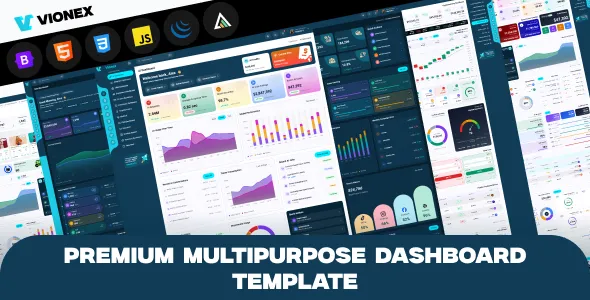
Vionex – Multipurpose Bootstrap 5 Admin Dashboard Template
Vionex – Multipurpose Bootstrap 5 Admin Dashboard Template is a versatile dashboard template designed for developers, startups, agencies, and businesses that need a modern interface for managing web applications and administrative workflows. Built around the Bootstrap 5 framework, Vionex can serve as a starting point for creating admin panels, analytics dashboards, business management portals, reporting interfaces, and internal management systems. Its multipurpose approach makes it suitable for projects that require a structured layout, consistent visual presentation, and a flexible foundation for organizing application information.
An effective admin dashboard helps users access important information without navigating through complicated interfaces. It can bring together navigation menus, summary cards, data tables, forms, charts, and other interface elements in a single administrative workspace. Vionex can be evaluated for projects that need an organized frontend structure that developers can adapt to their own requirements. The available layouts, page designs, interactive elements, and included resources depend on the specific template release and product package.
Bootstrap 5 provides a responsive grid system and reusable interface components that help developers build layouts for different screen sizes. A dashboard template built around this framework can reduce the effort required to establish a consistent interface across multiple application pages. However, the template itself should not be treated as a complete backend application. Features such as database connectivity, user authentication, business logic, report generation, and data processing require the appropriate implementation or compatible integrations.
Whether you are developing a SaaS management panel, a customer administration portal, an inventory dashboard, or an internal business tool, Vionex can be considered as a design foundation for organizing your application. Before implementation, review the current product demo, documentation, supported dependencies, and licensing conditions to confirm that the template meets your technical requirements.
What Is Vionex Multipurpose Bootstrap 5 Admin Dashboard Template?
Vionex is a multipurpose admin dashboard template intended to provide a structured user interface for web-based management applications. An administrative dashboard generally serves as a central location where authorized users can review information, navigate application sections, and perform tasks related to their responsibilities.
Instead of designing every frontend component from the beginning, developers can evaluate a dashboard template as a reusable starting point. The supplied page structures and interface elements can help establish a consistent visual system, while custom development connects those elements to the application’s data and functionality.
The multipurpose nature of Vionex makes it worth considering for different project categories, including business administration tools, analytics portals, customer management systems, project tracking applications, and operational dashboards. Its suitability depends on the actual components provided in the selected version and the amount of customization required.
A frontend dashboard is only one part of a complete web application. Developers may need to connect interface elements to APIs, databases, authentication systems, and server-side processes. Buttons, forms, charts, and tables should be connected to real application behavior before the dashboard is used in a production environment.
By beginning with an organized interface, developers can concentrate on application-specific workflows while maintaining a consistent experience across the administrative pages.
Bootstrap 5 Framework for Modern Dashboard Development
Bootstrap 5 is a popular frontend framework that provides a collection of layout utilities, responsive grid features, and reusable interface components. It helps developers create structured web pages without having to write every layout rule and component style from scratch.
Vionex is positioned as a Bootstrap 5 admin dashboard template, making it relevant to developers who want to work with this established frontend framework. Bootstrap’s responsive utilities can help create interfaces that adapt to different viewport sizes, while its component patterns support a consistent approach to layout and interaction.
Developers can use Bootstrap-based structures to organize dashboard sections, navigation areas, cards, forms, tables, and other common interface elements. Custom CSS and JavaScript can then be added where necessary to meet the requirements of a particular application.
Bootstrap does not automatically provide the backend functionality of an administrative system. Data storage, account management, reporting calculations, and application-specific permissions must be handled through the chosen backend framework or services.
Before starting development, check which Bootstrap version and supporting libraries are included in the Vionex package. Using compatible dependencies and following the product’s setup instructions can help prevent styling conflicts and unexpected behavior during integration.
Responsive Admin Dashboard Design
Responsive design helps ensure that a web application remains usable across desktop computers, laptops, tablets, and smartphones. Administrative users may need to check records, review reports, or manage routine tasks while working on different devices, making responsive layouts an important consideration.
Vionex can be evaluated for projects that require a Bootstrap-based dashboard interface with adaptable page structures. The actual responsive behavior should be verified using the supplied demo and tested after the template has been integrated into the application.
On smaller screens, navigation menus may need to collapse, wide tables may require horizontal scrolling, and dashboard cards may need to stack vertically. Forms should remain readable, while buttons and other interactive controls should be easy to identify and operate.
Charts and data-heavy components deserve particular attention because their layouts can become crowded on narrow screens. Developers should check whether information remains understandable and whether users can access all necessary controls without excessive scrolling or awkward navigation.
Custom CSS, third-party libraries, and additional scripts can influence responsive behavior. Testing the complete application rather than only the homepage helps reveal layout problems across different page types.
A responsive dashboard should prioritize access to essential information and common tasks, regardless of the device being used.
Multipurpose Layouts for Different Applications
A multipurpose dashboard template can provide a common design foundation for applications with different objectives. Developers can organize its layouts around the information users need and the actions they perform most frequently.
Vionex may be considered for several application categories, depending on its included components and customization options.
Business management dashboards: Organize business summaries, operational records, team information, and frequently used administrative actions.
Customer management systems: Present customer profiles, account details, communication history, and follow-up activities when the required data and workflows are implemented.
Inventory management applications: Display product records, stock information, supplier details, and order status through database-connected interfaces.
Project tracking platforms: Organize projects, assigned tasks, deadlines, progress information, and team activity.
Analytics and reporting portals: Present numerical summaries, charts, tables, and filtered reports when compatible visualization tools and data-processing logic are available.
SaaS administration panels: Provide an interface for reviewing user accounts, service activity, and application settings. Subscription processing and billing require separate implementation or integrations.
Internal company portals: Help authorized employees access records, review requests, and complete operational tasks through a centralized interface.
These examples represent possible uses rather than guaranteed built-in features. Developers should match the actual template components to their project requirements and add any missing functionality through appropriate development.
Dashboard Overview and Summary Cards
The main dashboard overview is often the first screen users see after accessing an administrative application. It should communicate the most important information quickly and help users identify which tasks or records require attention.
Depending on the available layouts, a Vionex-based dashboard could be customized to display summary cards, recent activity, status indicators, data tables, charts, and shortcuts to commonly used sections. The information should be selected according to the application’s purpose rather than added simply to fill the page.
For example, a sales management application could prioritize order totals, revenue summaries, and recent transactions. A project dashboard might highlight active projects, pending tasks, upcoming deadlines, and recent updates. An inventory interface could emphasize stock availability and products that need attention.
Summary cards should use clear labels and reliable data sources. Important metrics need appropriate context, such as the relevant reporting period or unit of measurement. Visual indicators should communicate meaningful information rather than relying on decorative colors alone.
The dashboard can also be adapted for different user roles. Administrators may need a broad overview, while individual team members may benefit from a more focused display of assigned work.
When connected to real application data, a well-organized overview can help users understand current conditions and reach the appropriate section with fewer steps.
Data Tables and Administrative Record Management
Data tables are widely used in admin dashboards because they provide a structured way to display multiple records. They allow users to review entries, compare information, and locate specific items within a larger collection.
A Vionex-based application could use tables to present customers, products, orders, projects, support requests, transactions, or other records. The exact table layouts and interactions depend on the supplied template files and any additional libraries integrated by the developer.
Effective tables should prioritize important fields and avoid unnecessary visual clutter. Clear column headings, consistent spacing, and readable values help users scan information more efficiently. Developers should also consider how long text and numerous columns will behave on smaller screens.
Features such as searching, sorting, pagination, filtering, bulk actions, and exporting may require additional JavaScript and backend development if they are not included in the selected version. These functions should be tested with realistic data rather than only a small set of demonstration records.
For larger datasets, server-side pagination and efficient database queries can help prevent unnecessary loading and improve performance. Record visibility and editing permissions should also be enforced on the server.
A well-designed table interface can make routine record management more organized while supporting the application’s wider administrative workflows.
Forms and Data Entry Interfaces
Forms provide a way for users to create records, update information, change settings, and submit requests. In an administrative dashboard, forms should be easy to understand because users may complete them regularly or work with many fields at once.
Vionex can be evaluated for projects that need consistent form layouts as part of their administrative interface. Depending on the available components, developers may customize forms for customer records, product information, employee details, project creation, and application settings.
A practical form uses descriptive labels, appropriate input types, clear instructions, and understandable validation messages. Required fields should be identified, and users should receive useful feedback when information is missing or entered incorrectly.
Related fields can be grouped into sections to make longer forms easier to navigate. Where appropriate, defaults and selection controls can reduce repetitive data entry, provided that they do not introduce incorrect assumptions.
Frontend validation can help users correct mistakes before submitting a form, but server-side validation remains essential. The backend should verify submitted data and enforce the application’s business rules before making changes to stored records.
Developers should also test success messages, error handling, and form behavior on different devices. A consistent data-entry experience helps reduce confusion and supports more reliable administration.
Charts, Analytics, and Reporting Dashboards
Charts and numerical summaries can help users understand patterns, compare results, and monitor important business indicators. They are particularly useful when an application needs to present large amounts of data in a format that is easier to interpret.
Vionex may be considered as a starting point for analytics and reporting interfaces, depending on the layouts included in the product package and its compatibility with visualization libraries. Charts should be connected to reliable data sources and configured to answer specific questions.
A sales dashboard might display changes in revenue over time, compare product categories, or summarize order activity. A project tracking interface could present task completion rates and workload distribution. An operations dashboard might display service request volumes or performance indicators.
Different visualizations serve different purposes. Line charts are useful for examining changes over time, while bar charts can help compare categories. Tables may be preferable when users need exact figures or detailed records.
Each chart should include clear labels, relevant units, and enough context to avoid misleading interpretations. If the underlying data is incomplete or delayed, the interface should communicate those limitations.
Chart rendering and report calculations are not guaranteed by the dashboard’s visual design alone. Developers may need to integrate a compatible charting library, prepare the required data, and implement the backend logic that produces accurate results.
Navigation and User-Friendly Dashboard Structure
Clear navigation helps users understand the application and find the tools they need. A dashboard with many pages should organize its sections logically instead of presenting every link at the same level.
Vionex can serve as a starting point for an administrative navigation structure, subject to the components included in the selected version. Developers should arrange menu items around the application’s primary workflows and use familiar labels that communicate the purpose of each section.
A business management system might group customers, reports, projects, and settings into distinct areas. An inventory application may prioritize products, suppliers, stock records, and orders. The exact structure should reflect how users work rather than follow a generic layout without consideration.
Page titles and breadcrumbs can help users understand their current location within a larger application. Frequently used actions should be easy to reach, while less common administrative settings can be organized into secondary sections.
Navigation should also work on smaller displays. Collapsible menus and responsive layouts can help preserve screen space without hiding essential controls or creating confusing interactions.
Developers should test links, active menu states, keyboard navigation, and access restrictions after customization. A clear navigation system makes the dashboard more predictable and reduces the effort needed to complete routine tasks.
Customization and Brand Identity
An administrative interface should reflect the identity and practical requirements of the application it supports. Customization helps developers create a consistent experience that feels connected to the wider product or organization.
Depending on the available settings and source files, Vionex may provide a foundation for adapting colors, typography, spacing, navigation, page structures, and other visual details. The current product documentation should be checked to determine which options are included and which require custom development.
A corporate application may benefit from a restrained color palette and clearly separated sections. A reporting tool may prioritize dense but readable data layouts, while a customer management interface may need prominent search controls and straightforward record views.
Consistency is more important than adding numerous visual effects. A shared color palette, typography system, spacing scale, and set of button styles can make different pages feel like parts of the same application.
Developers should also consider how customizations affect readability and accessibility. Text should remain legible, controls should be distinguishable, and important status information should not rely only on color.
Keep custom code organized and test the application after modifying styles or scripts. Where possible, separate project-specific changes from the original template assets so that future updates are easier to manage.
Integration with Backend Frameworks and APIs
A dashboard interface becomes useful when it connects to the data and services that power the application. The backend may handle authentication, database queries, business rules, reporting, and communication with external systems.
Vionex is a frontend dashboard template, so developers should confirm how its files can be integrated into their preferred application architecture. Depending on the project, the backend may use a framework such as Django, Laravel, Express, or another suitable technology. Compatibility depends on the template’s structure and the way the integration is implemented.
API-based applications can retrieve data from server endpoints and update the interface based on the returned responses. For example, a dashboard card could display the number of active records, while a table lists recent entries retrieved from an API.
Developers should define clear data formats, handle loading and error states, and validate inputs on the server. API requests should follow appropriate authentication and authorization rules when they access protected information.
Integration work may also involve environment configuration, error logging, pagination, and rate-limit handling. These considerations become especially important when the application communicates with external services or manages large amounts of data.
Before selecting Vionex, review its documentation and demo to confirm the supported frontend libraries, dependencies, and intended integration workflow.
User Authentication and Access Control
Administrative dashboards often contain information that should only be available to authorized users. Authentication and access control are therefore important parts of a complete dashboard application.
The Vionex template should not be assumed to include a fully configured production authentication system unless the product documentation explicitly confirms it. Login screens, password recovery, account management, session handling, and role-specific access may require backend implementation or integration with an existing authentication service.
Different user roles often need different permissions. An administrator may manage application settings and user accounts, while a manager may review reports and approve records. A standard user may only need access to assigned tasks or selected information.
Access control should be enforced on the server rather than relying on hidden menu items or frontend conditions. Every protected page, API endpoint, and sensitive operation should verify the user’s authorization.
Secure authentication also requires careful handling of sessions, passwords, account recovery, and HTTPS. Additional controls may be appropriate for applications that manage confidential business or customer information.
A well-implemented access system helps protect application data and ensures that users can reach the functions relevant to their responsibilities.
Performance Optimization for Admin Dashboards
Dashboard performance influences how efficiently users can work with the application. Slow pages, oversized assets, inefficient scripts, and excessive data loading can make even a visually appealing interface difficult to use.
The performance of a Vionex-based application depends on the template implementation, the amount of custom code, the selected libraries, the backend architecture, and the hosting environment. Bootstrap 5 provides responsive layout tools, but it does not guarantee that the complete application will load quickly.
Developers should measure page performance and identify bottlenecks before making changes. Unused scripts, oversized images, and unnecessary visual effects can be reviewed to reduce frontend overhead.
Backend performance is equally important. Efficient database queries, appropriate indexes, pagination, and carefully configured caching can help applications handle larger datasets. Caching must be designed with care when pages contain user-specific or sensitive information.
Test representative pages rather than focusing only on the main dashboard. Data tables, reports, forms, and pages containing charts may have different performance characteristics.
Regular testing after significant updates helps identify problems before they affect users. A balanced approach to frontend optimization and backend efficiency supports a smoother administrative experience.
Accessibility and Usability Best Practices
An effective dashboard should make information easy to locate and controls easy to understand. Accessibility and usability should be considered during both initial integration and later customization.
Developers working with Vionex should use clear labels, readable typography, appropriate color contrast, and logical heading structures. Interactive elements should have recognizable states, and users should be able to identify keyboard focus when navigating through supported controls.
Forms should associate labels with their fields and provide understandable feedback when validation fails. Tables should use clear headings, while charts should include suitable text summaries or alternatives where practical.
Color should not be the only method used to communicate status. Combining labels, icons, and other visual indicators can make important information easier to understand for more users.
Accessibility depends on the actual markup, scripts, and configuration used in the finished application. Automated testing can reveal some issues, but manual keyboard checks and usability reviews are also valuable.
A clear and accessible dashboard can reduce confusion, support more efficient workflows, and make the application more approachable for a wider range of users.
Security and Ongoing Maintenance
Security and maintenance are essential when a dashboard is used to manage application data or business operations. A template provides the frontend foundation, but the complete application must be configured and maintained according to its risk level.
Developers should keep dependencies updated, use trusted sources for libraries, configure HTTPS, protect secret values, and avoid exposing debugging information in production. Access to administrative functions should be limited according to user roles and responsibilities.
Forms and API endpoints should validate incoming data on the server. Sensitive operations should enforce authorization checks, and file uploads should be handled using appropriate restrictions and validation.
Backups should be scheduled according to the importance of the stored information, and restoration procedures should be tested. Changes to dependencies, backend logic, or frontend components should be reviewed in a development or staging environment before being applied to the live application.
Routine maintenance should include compatibility checks, error monitoring, security reviews, and testing of important workflows. This helps identify problems that may appear as the application grows or its dependencies change.
A dependable dashboard requires ongoing attention to both its visual interface and the underlying application architecture.
Who Should Use Vionex Multipurpose Bootstrap 5 Admin Dashboard Template?
Vionex may be suitable for different developers and organizations looking for a Bootstrap-based dashboard foundation.
Web developers: Developers can evaluate the template when building administrative interfaces for web applications and business tools.
Development agencies: Agencies can consider it for client projects that need a consistent dashboard design and room for customization.
Startups: Early-stage product teams can assess whether the template helps establish an administrative interface for an application or service.
SaaS product teams: Developers building software platforms can evaluate it for account management, operational monitoring, or internal administration pages.
Business software developers: Teams creating customer management, inventory, project tracking, or reporting systems can assess whether the available components fit their workflows.
Freelancers: Independent developers can use a dashboard template as a starting point for suitable client projects, subject to the product’s license and technical requirements.
Internal IT teams: Organizations can consider the template for internal portals and management tools used by authorized employees.
The right choice depends on the template’s actual layouts, documentation, supported dependencies, licensing terms, and the application’s functional requirements.
Tips for Getting Started with Vionex
A clear implementation plan can help developers use a dashboard template efficiently and avoid unnecessary rework.
Begin by reviewing the product demo, documentation, included files, and dependency requirements. Identify the layouts and components available in the selected release, then compare them with the pages and workflows your application needs.
Define the primary users and the tasks they must complete. Decide which information belongs on the overview page, which records need dedicated management screens, and which actions should be available to each user role.
Set up the project using the documented installation procedure. Confirm that the required Bootstrap version and supporting libraries are configured correctly, and keep the development environment separate from production settings.
Customize the layout and branding after establishing the application’s structure. Use consistent typography, spacing, colors, and interface patterns so that the dashboard remains coherent across pages.
Connect frontend components to the necessary backend services. Implement data retrieval, form submission, validation, authentication, permissions, and error handling according to the application’s requirements.
Test the application with realistic data on desktop and mobile screen sizes. Review navigation, forms, tables, charts, loading states, and error messages. Before deployment, check performance, accessibility, security settings, dependency compatibility, and backup procedures.
A deliberate approach helps turn the template into a practical interface rather than simply a collection of styled pages.
Final Thoughts on Vionex – Multipurpose Bootstrap 5 Admin Dashboard Template
Vionex – Multipurpose Bootstrap 5 Admin Dashboard Template is a potential choice for developers who need a structured frontend foundation for administrative web applications. Its Bootstrap 5 positioning makes it relevant to projects that require responsive layouts, organized navigation, and a consistent visual approach across dashboard pages.
The template can be evaluated for business management portals, analytics interfaces, customer administration systems, inventory tools, project dashboards, SaaS management panels, and internal applications. The most appropriate use depends on the layouts and components included in the selected version and how closely they match the project’s requirements.
A successful implementation involves more than selecting a visual design. Developers need to connect the interface to reliable data sources, implement appropriate authentication and permissions, validate user input, and test the application across relevant devices and workflows.
Before adopting Vionex, review the current product demo, documentation, supported dependencies, and licensing conditions. Confirm which components are included and which functions need additional development or third-party integrations.
With thoughtful customization, responsive testing, careful backend integration, and ongoing maintenance, a dashboard template can provide a useful foundation for a professional administrative interface. Vionex can be considered as part of that process when its documented capabilities align with the technical and operational needs of the intended application.