My Account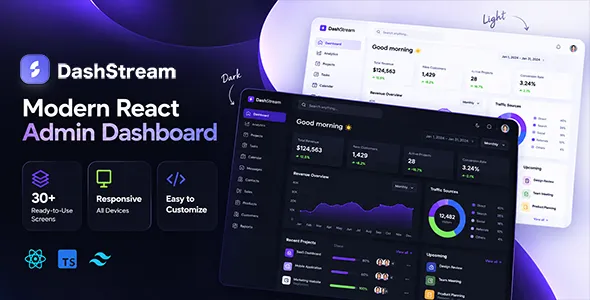
DashStream – React Admin Dashboard Template with Tailwind CSS & shadcn/ui
DashStream – React Admin Dashboard Template with Tailwind CSS & shadcn/ui is a modern dashboard template designed for developers, startups, software companies, and businesses that need a flexible interface for managing web applications and administrative workflows. Combining the component-based development approach of React with the utility-first styling capabilities of Tailwind CSS and the reusable interface components associated with shadcn/ui, DashStream can serve as a foundation for building administrative panels, analytics dashboards, business management portals, and internal web applications.
A well-structured admin dashboard helps users access important information, review records, and complete routine tasks through a consistent interface. Rather than building every page and interface element from the beginning, developers can evaluate a dashboard template as a starting point for organizing navigation, summary cards, forms, data tables, and other common interface patterns. DashStream is intended for projects that require a customizable frontend structure that can be adapted to specific product requirements.
React supports the development of interactive user interfaces through reusable components, while Tailwind CSS provides utility classes for styling layouts and visual elements. shadcn/ui offers a component approach that developers can incorporate and customize within their projects. Together, these technologies can support a flexible development workflow, although the exact components, dependencies, layouts, and setup process depend on the DashStream release.
DashStream can be considered for SaaS administration panels, customer management interfaces, reporting tools, project dashboards, inventory applications, and other browser-based management systems. Its suitability depends on the included components and the amount of customization needed. Developers should review the current product demo and documentation before implementation to verify the available features, supported dependencies, and licensing terms.
What Is DashStream React Admin Dashboard Template?
DashStream is a React-based admin dashboard template intended to provide a structured interface for web applications that require administrative pages and organized information displays. An admin dashboard typically serves as a central workspace where authorized users can review metrics, navigate application sections, manage records, and access tools related to their responsibilities.
A dashboard template can reduce the amount of initial frontend work by providing reusable layouts and interface patterns. Developers can adapt these elements to their application instead of creating every screen from scratch. The React component model can help organize the interface into smaller, reusable sections, making it easier to maintain consistent presentation across different pages.
DashStream’s positioning around React, Tailwind CSS, and shadcn/ui makes it worth evaluating for projects that need a customizable interface built with these technologies. Depending on the supplied files and supported components, developers may be able to adapt the template for different dashboard concepts and application workflows.
However, a frontend template is not necessarily a complete application. Features such as database connectivity, user authentication, authorization, report calculations, notifications, and business-specific operations require suitable backend services or additional implementation unless explicitly included in the product package.
By using a structured dashboard foundation, developers can focus on connecting interface components to real application data and creating workflows that meet the needs of their users.
React-Based Dashboard Development
React is a JavaScript library used to build interactive user interfaces through reusable components. It allows developers to organize an application into smaller elements that can be composed into larger pages and updated according to application state and data.
For an admin dashboard, reusable React components can represent navigation menus, page headers, summary cards, tables, form sections, dialogs, and other interface elements. This approach can help maintain a consistent design across multiple administrative pages while allowing individual components to be adapted to different requirements.
DashStream can be evaluated by developers who want a React-based starting point for a dashboard project. The actual component structure and implementation approach should be verified against the template’s documentation and source files.
React handles the frontend presentation layer, but application data and business rules may come from a backend API, server-rendered application, or another data source. Developers need to implement the appropriate communication between the interface and the systems that store or process information.
For example, a dashboard card could display the number of active customers retrieved from an API, while a data table could show recent orders. React components can render the returned information and respond to user interactions, while the backend validates requests and applies the relevant business rules.
A well-organized component structure makes it easier to extend an application over time, particularly when new dashboard pages or workflows are introduced.
Tailwind CSS for Flexible Dashboard Styling
Tailwind CSS is a utility-first CSS framework that allows developers to style interfaces using utility classes directly within their markup or component templates. Instead of relying entirely on large collections of predefined component styles, developers can combine utilities to control layout, spacing, typography, colors, borders, and responsive behavior.
In a React dashboard, Tailwind CSS can help create consistent styling across navigation areas, cards, forms, tables, and other interface elements. Developers can also establish reusable design patterns to reduce repetition and keep the visual language consistent throughout the application.
DashStream’s Tailwind CSS foundation makes it relevant to developers who prefer a utility-based styling workflow. The available design tokens, theme configuration, and responsive utilities depend on the version of Tailwind CSS and the configuration supplied with the template.
A consistent styling system can make dashboard customization easier. For example, developers can establish shared spacing rules, typography scales, and color choices instead of styling every page independently.
Tailwind CSS also supports responsive utility patterns that can help adapt layouts to different screen sizes. However, developers still need to test the actual application and address any issues caused by wide tables, complex forms, charts, or custom components.
Before modifying the design, review the existing Tailwind configuration and project conventions. Keeping styles organized and avoiding unnecessary duplication can improve maintainability as the dashboard grows.
shadcn/ui Components and Interface Customization
shadcn/ui is a collection of reusable interface components that developers can add to and customize within their projects. It is commonly used alongside React and Tailwind CSS to create consistent controls and interaction patterns.
Depending on the components included in DashStream, shadcn/ui may provide a foundation for interface elements such as buttons, dropdown menus, dialogs, tabs, form controls, and other reusable patterns. The precise components available should be confirmed through the current product documentation and source files.
One advantage of a customizable component approach is that developers can adapt the interface to their application’s design requirements. Components can be styled consistently, reused across different pages, and extended when project-specific behavior is needed.
Developers should pay attention to component dependencies and accessibility behavior during customization. Interactive elements need clear labels, appropriate keyboard behavior, and understandable focus states. Dialogs, menus, and other controls should work predictably rather than relying only on their visual appearance.
The use of shadcn/ui does not automatically mean that every possible component or workflow is included in DashStream. Some elements may need to be added, configured, or connected to application logic separately.
Reviewing the template’s component structure before development helps establish which elements can be reused directly and which require additional implementation.
Responsive Admin Dashboard Layout
Responsive design helps ensure that an administrative interface remains usable across desktop computers, laptops, tablets, and smartphones. Users may need to review reports, update records, or access application information from different devices, making responsive behavior an important consideration.
DashStream can be evaluated for projects that need a React dashboard with Tailwind CSS styling. The actual responsive behavior depends on the supplied layouts, component implementations, and any custom changes made during development.
A responsive dashboard may use a collapsible sidebar, flexible content areas, adaptive card grids, and appropriately sized controls. These patterns can help preserve access to important functions while making efficient use of the available screen space.
Data tables require special attention because a large number of columns can become difficult to read on smaller devices. Developers may need to introduce horizontal scrolling, hide secondary information, or provide alternative record views. Forms should also remain readable, with fields and buttons that are easy to operate.
Charts and visualizations should scale appropriately without hiding labels or making values difficult to interpret. Developers should test actual interactions instead of relying solely on the appearance of a static preview.
Responsive testing should include the dashboard overview, navigation, forms, data tables, detail pages, and any modal or dropdown interfaces. A consistent experience across devices helps users complete administrative tasks more comfortably.
Multipurpose Applications and Dashboard Use Cases
A multipurpose dashboard template can be adapted to a range of projects when its included components align with the application’s needs. DashStream may be considered for several categories of web applications.
SaaS administration panels: Organize account information, application activity, usage summaries, and administrative settings. Billing and subscription management require appropriate backend services or integrations.
Customer management systems: Present customer profiles, account records, communication history, and follow-up activities when supported by the application data model.
Inventory management interfaces: Organize product records, stock information, supplier details, and order status through connected data tables and forms.
Project management dashboards: Display projects, tasks, deadlines, assignments, and progress information according to the application’s requirements.
Analytics and reporting portals: Present metrics, charts, and data summaries when compatible visualization components and reporting logic are implemented.
Human resources applications: Organize employee records, leave requests, recruitment information, and internal administrative workflows where appropriate.
Content management interfaces: Provide administrative pages for reviewing, creating, and updating content when connected to a suitable content backend.
Internal business tools: Help organizations manage operational records, service requests, and internal processes through a centralized interface.
These are potential development applications rather than guaranteed built-in functions. Before choosing DashStream for a specific use case, compare the available components with the required workflows and identify any backend or frontend features that must be added.
Dashboard Overview and Summary Cards
The dashboard overview is often the first page users encounter after entering an administrative application. It should highlight the most relevant information and provide a clear path to commonly used functions.
Depending on the included layouts, DashStream can be evaluated as a starting point for an overview page containing summary cards, recent activity, status indicators, charts, and links to important sections. These elements should be connected to appropriate data sources when used in a functional application.
For a sales management system, the overview might display order counts, revenue summaries, and recent transactions. A project dashboard could highlight active projects, outstanding tasks, and approaching deadlines. An inventory application might prioritize stock availability and items that need attention.
Summary cards should communicate meaningful information through concise labels and accurate values. Where necessary, metrics should identify their reporting period, units, or comparison baseline so users can interpret them correctly.
The overview should avoid unnecessary visual clutter. Displaying too many unrelated cards can make the most important information harder to identify. Instead, developers should select metrics based on the needs of the application’s primary users.
Different user roles may require different dashboard views. An administrator may need a broad system overview, while a team member may benefit from a focused summary of assigned work.
A well-organized overview helps users understand current conditions and navigate to the records or actions that need attention.
Data Tables, Lists, and Record Management
Data tables and structured lists are common features in administrative applications because they allow users to review many records in an organized format. They can support tasks such as searching for customers, checking orders, reviewing projects, or managing product information.
A DashStream-based application may use table interfaces for customers, inventory, transactions, support tickets, employees, or other records. The specific table components and available interactions depend on the supplied template and its dependencies.
Effective tables should present relevant fields with clear column headings and consistent formatting. Developers should avoid overcrowding tables with unnecessary columns and consider how the information will be displayed on smaller screens.
Searching, sorting, pagination, filtering, exporting, and bulk actions may require additional implementation if they are not provided in the selected version. These functions should be designed around real user workflows rather than added without a clear purpose.
When data is retrieved from an API, the frontend should handle loading states, empty results, failed requests, and unexpected responses. These states are important because a table is not useful when it displays nothing without explaining why.
Large datasets may require server-side pagination and filtering to avoid transferring excessive amounts of data to the browser. Access to individual records should also follow the application’s authorization rules.
A carefully designed record-management interface makes administrative information easier to review and supports more predictable workflows.
Forms and User Input Workflows
Forms allow users to create records, update information, submit requests, and configure application settings. Their design has a direct impact on the usability of an administrative dashboard.
DashStream can be considered for projects that need structured form layouts and reusable input components. Depending on the available component set, developers may adapt forms for customer records, products, team members, project details, or application configuration.
A clear form should use descriptive labels, suitable input types, and straightforward instructions. Required fields should be identified, while validation messages should explain what needs to be corrected.
Related information can be grouped into sections to make longer forms easier to understand. Selection controls can help standardize certain inputs, while sensible defaults may reduce repetitive entry when they are appropriate for the workflow.
In a React application, form state and submission behavior need to be implemented using suitable state management and form-handling patterns. The backend must validate submitted data and enforce business rules before creating or updating records.
Developers should test successful submissions, validation failures, loading indicators, and error messages. They should also ensure that users receive clear feedback after completing an action.
Forms should collect only the information needed for the task. Keeping data entry focused can reduce mistakes and make administrative work more efficient.
Charts, Analytics, and Reporting Interfaces
Charts and analytics interfaces help users interpret numerical information, compare categories, and identify trends. They can be valuable in dashboards that support decision-making, performance monitoring, or operational reporting.
DashStream may serve as a frontend foundation for analytics pages, depending on its supplied layouts and compatibility with visualization libraries. Developers should verify which chart-related components are included before planning the reporting interface.
A business dashboard might display sales trends, order activity, customer growth, or product performance. A project management application could show task completion and workload distribution, while an operations portal might present service request volumes or response times.
Each visualization should have a clear purpose. Line charts can help display trends over time, while bar charts can compare values across categories. Tables may be better when users need exact figures or detailed records.
Charts should use meaningful labels, suitable units, and consistent time periods. If a report uses incomplete or delayed information, that limitation should be communicated clearly.
A charting library may need to be installed and connected to real data. Backend calculations and API integration are also required when the dashboard displays live or dynamically updated reports.
Developers should test charts at different screen sizes and confirm that labels, tooltips, legends, and values remain understandable. Accurate data and thoughtful presentation are more important than decorative complexity.
Navigation and Information Architecture
A clear navigation structure helps users find the correct page without unnecessary searching. As an application grows, organizing its sections logically becomes increasingly important.
DashStream can be evaluated for projects that require an administrative navigation system, subject to the layouts included in the selected version. Developers should arrange pages according to the application’s core workflows and use concise labels that communicate the purpose of each section.
For example, a business application may group customers, projects, reports, and settings into separate sections. An inventory system may prioritize products, suppliers, orders, and stock records.
Page titles can help users understand the current section, while breadcrumbs may be useful in applications with deeper navigation hierarchies. Frequently used actions should remain easy to access, but less common settings can be organized into secondary areas.
Responsive navigation is also important. A sidebar that works well on a desktop may need to collapse or change behavior on smaller screens. Developers should verify that menus remain usable and do not obstruct essential content.
Navigation links should accurately reflect the user’s permissions. Hiding a link is not sufficient security by itself; the backend or API must enforce access restrictions for protected pages and operations.
A well-planned information architecture makes the dashboard easier to learn and helps users move between related tasks efficiently.
Customization and Branding with Tailwind CSS
Customizing the dashboard allows developers to align the interface with a product’s visual identity and operational needs. A consistent design can make the application feel more professional and easier to recognize.
Depending on the available configuration and source files, DashStream may provide a starting point for adapting colors, typography, spacing, page layouts, and component appearance. Developers should consult the product documentation to confirm which customization options are supported.
Tailwind CSS can help implement design changes through utility classes and reusable patterns. Shared styles can be established for buttons, cards, forms, navigation elements, and other repeated interface components.
A corporate dashboard may benefit from a restrained palette and clear visual hierarchy, while an analytics product may need compact layouts and prominent data displays. The chosen style should support the users’ tasks rather than compete with the information being presented.
Consistency matters across the entire application. Headings, button styles, spacing, borders, and status indicators should follow a recognizable system. Too many unrelated styles can make different pages feel disconnected.
When customizing shadcn/ui components, developers should consider both appearance and behavior. Interactive states, keyboard accessibility, and component dependencies should remain reliable after styling changes.
Organized customization makes the dashboard easier to maintain and helps future developers understand how the interface is structured.
API Integration and Dynamic Data
Many dashboards need to display information from backend services or external APIs. Connecting the interface to reliable data sources transforms a static visual layout into a functional application workspace.
DashStream’s React-based approach can be evaluated for projects that retrieve data through API requests. The actual integration process depends on the backend architecture, available endpoints, authentication requirements, and the way the template is structured.
For example, a dashboard could retrieve customer records from an API and display them in a table. A summary card could show the number of active projects, while a detail page could present information about a selected record.
Developers should handle loading, success, empty, and error states. API responses should be validated before being used, and users should receive clear feedback when a request fails.
Authentication tokens, session credentials, and other sensitive values must be handled securely. Private secrets should never be placed in publicly accessible frontend code. The backend should enforce authorization for protected information and operations.
API integration also requires consideration of pagination, filtering, error logging, and rate limits where applicable. For applications that update data frequently, developers should choose an appropriate refresh or state-update strategy.
A clear separation between interface components and data-access logic can make the project easier to test and maintain as new features are added.
State Management and Interactive Components
Administrative applications often contain interactive elements that respond to user actions and changing data. Examples include dropdown menus, tabs, dialogs, filters, notification panels, and multi-step forms.
React provides tools for managing component state and updating the interface when values change. Depending on the complexity of the application, developers may use local state, shared context, or an additional state-management library.
DashStream can be assessed as a starting point for applications that require interactive dashboard components. The actual controls and behaviors included depend on the selected release and its implementation.
For example, a filter control may change the records displayed in a table, while a dialog can request confirmation before a user performs a sensitive action. Tabs may organize related information without requiring separate pages for every section.
Interactive components should provide clear feedback. Buttons should indicate when an operation is in progress, and destructive actions should be handled carefully. Empty states and errors should not leave users uncertain about what happened.
Developers should also test keyboard interactions and component behavior after customization. Menus, dialogs, and popovers should open, close, and receive focus in a predictable manner.
A consistent interaction model helps users understand how to operate the dashboard and reduces friction during routine tasks.
Performance Optimization for React Dashboards
Dashboard performance affects how quickly users can access information and complete their work. Large JavaScript bundles, inefficient rendering, unnecessary requests, and oversized assets can all influence the user experience.
The performance of a DashStream-based application depends on the template implementation, dependencies, data volume, API design, and hosting environment. Using React and Tailwind CSS does not automatically guarantee fast loading or efficient rendering.
Developers should measure performance before optimizing. They can review bundle size, network requests, component rendering, and the time required to load important dashboard pages.
Where appropriate, code splitting and lazy loading can reduce the amount of JavaScript needed for an initial page. Efficient list rendering and pagination can help when working with large datasets. Unused dependencies and unnecessary effects should also be reviewed.
Backend performance matters as much as frontend behavior. APIs should avoid returning excessive amounts of data, and database queries should be designed to support the application’s access patterns.
Developers should test overview pages, data tables, forms, charts, and other complex sections under realistic conditions. Performance checks should be repeated after major changes because new components and integrations can introduce additional overhead.
A balanced approach to frontend and backend optimization helps maintain a responsive dashboard as the application develops.
Accessibility and User Experience
A dashboard should make information understandable and controls easy to operate. Accessibility should be considered throughout development rather than treated as a final visual adjustment.
When customizing DashStream, developers should use clear labels, readable text, appropriate contrast, and logical heading structures. Interactive components should provide visible focus states and support appropriate keyboard behavior.
Forms should associate labels with their inputs and provide useful validation feedback. Tables should use clear headings, while charts should offer suitable text summaries or alternatives where practical.
Color should not be the only way to communicate status. Combining text labels with visual indicators can make important information easier to understand. Controls should also have recognizable states so users can distinguish actions that are available, disabled, or in progress.
Although shadcn/ui components can provide a useful starting point for accessible interaction patterns, accessibility still depends on how each component is implemented and customized. Developers should test the finished application rather than assuming that a component library guarantees complete accessibility.
Automated checks can identify some issues, but manual keyboard testing and practical usability reviews remain valuable.
A clear and accessible interface can improve usability for a wider range of people and make administrative tasks more predictable.
Security and Application Maintenance
Security is essential when an admin dashboard provides access to customer records, business information, or operational controls. A frontend template cannot replace the security measures required by the complete application.
Developers should use trusted dependencies, keep packages updated, protect sensitive configuration values, and configure HTTPS for production deployments. Authentication and authorization must be enforced by the backend or API for protected pages and operations.
Frontend controls should not be treated as security boundaries. Hiding a button or navigation item does not prevent a user from sending a direct request to an endpoint. The server must verify permissions and validate incoming data.
Applications should also follow appropriate practices for handling sessions, credentials, file uploads, and error messages. Sensitive information should not be exposed in browser-visible configuration or client-side logs.
Maintenance should include dependency reviews, testing after updates, monitoring for errors, and verification of important user workflows. Backups and recovery procedures should be planned for the backend systems that store application data.
Before deploying a DashStream-based project, test it in a staging environment and review its production configuration. A structured maintenance routine helps keep the application reliable as the template, dependencies, and business requirements evolve.
Who Should Use DashStream React Admin Dashboard Template?
DashStream may be worth evaluating for different types of developers and organizations that need a React-based administrative interface.
React developers: Developers can consider the template when building dashboards that use reusable React components and a customizable frontend structure.
Web development agencies: Agencies can evaluate it for client projects that require administrative pages, reporting interfaces, or internal business tools.
SaaS startups: Product teams can assess whether the template provides a suitable starting point for account management, application monitoring, or other administrative workflows.
Business application developers: Teams building inventory, customer management, project tracking, or reporting systems can compare the available components with their requirements.
Freelancers: Independent developers may use the template as a foundation for suitable client projects, subject to its license and technical requirements.
Internal software teams: Organizations can consider it for private dashboards that help authorized employees manage records, review information, and coordinate operational tasks.
The best choice depends on the template’s included components, source structure, documentation, licensing conditions, and compatibility with the application’s technical stack.
Tips for Getting Started with DashStream
A structured development process can help developers use DashStream efficiently and avoid unnecessary rework.
Begin by reviewing the product demo, documentation, source files, and dependency requirements. Identify the layouts and components included in the selected release and compare them with the application’s required pages.
Define the primary users and the tasks they need to complete. Decide which metrics belong on the overview page, which records need dedicated management screens, and which actions should be available to each user role.
Set up the development environment according to the documented installation procedure. Confirm that the required React, Tailwind CSS, shadcn/ui, and supporting package versions are compatible with the project.
Organize the application into reusable components and establish consistent styling conventions. Customize the branding and layouts after the primary workflows are clear, rather than changing every visual detail before understanding the application’s structure.
Connect the interface to the necessary APIs or backend services. Implement data loading, validation, authentication, permissions, error handling, and form submission according to the project’s requirements.
Test the dashboard with realistic data on desktop and mobile screen sizes. Review tables, charts, forms, navigation, dialogs, loading states, and error messages. Before deployment, check accessibility, performance, security configuration, and dependency compatibility.
This process helps turn a dashboard template into a functional application interface that supports real user tasks.
Final Thoughts on DashStream – React Admin Dashboard Template with Tailwind CSS & shadcn/ui
DashStream – React Admin Dashboard Template with Tailwind CSS & shadcn/ui is a potential starting point for developers who need a customizable frontend for administrative web applications. Its combination of React, Tailwind CSS, and shadcn/ui makes it relevant to projects that benefit from reusable components, flexible styling, and a structured dashboard interface.
The template can be evaluated for SaaS administration panels, analytics dashboards, customer management tools, inventory systems, project tracking platforms, and internal business applications. Its suitability depends on the components and layouts included in the current version and how closely they match the intended workflow.
A successful implementation requires more than an attractive interface. Developers need to connect components to reliable data sources, implement appropriate authentication and authorization, validate user input, and test interactions across relevant devices and screen sizes.
Before selecting DashStream, review the current demo, documentation, supported dependencies, and licensing terms. Confirm which features are included and which require additional development or third-party integrations.
With thoughtful customization, effective API integration, responsive testing, and ongoing maintenance, a dashboard template can provide a useful foundation for a professional administrative application. DashStream can be considered as part of that process when its documented capabilities align with the project’s technical requirements and user needs.