My Account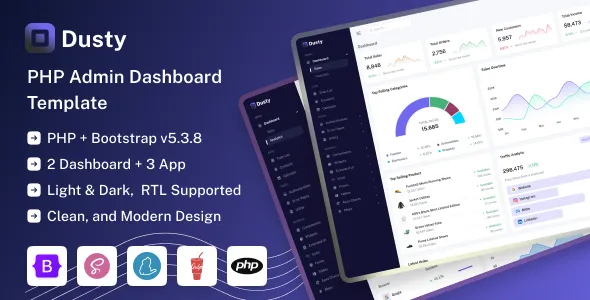
Dusty – PHP Admin & Dashboard Template
Dusty – PHP Admin & Dashboard Template is a dashboard and administration interface template designed for developers, businesses, startups, and software teams that need a structured foundation for building web-based management applications. An admin dashboard provides a central interface for viewing information, managing records, monitoring operations, and accessing important application tools. With Dusty, developers can establish a starting point for creating administrative panels, business management systems, internal portals, and data-driven web applications using a PHP-based development environment.
Modern web applications often require an organized administrative area where authorized users can review information, manage content, and perform routine tasks efficiently. A well-designed dashboard can bring these activities together through navigation menus, data tables, forms, summary panels, and other interface components. Dusty can be evaluated as a foundation for these requirements, depending on the layouts, components, and functionality included in its current package. Its final capabilities will depend on the supplied source files, the PHP application architecture, the database configuration, and any additional integrations implemented during development.
Whether you are developing a customer management system, an inventory application, a reporting dashboard, a business administration portal, or a custom web application, Dusty may help provide a consistent interface for the administrative experience. Before implementation, review the product demo, documentation, supported dependencies, and technical requirements to confirm that the template fits your project.
What Is Dusty PHP Admin & Dashboard Template?
Dusty is a PHP-oriented admin and dashboard template intended to provide a starting point for the administrative interface of a web application. Admin templates help developers establish a consistent visual structure without creating every interface element from scratch.
An administrative dashboard typically includes navigation, page layouts, forms, tables, summary sections, and other tools that allow users to interact with application data. Depending on the components included in Dusty, developers may be able to adapt its layouts for different types of management systems and business workflows.
For example, a business application may need an interface for managing customers, products, orders, employees, or reports. A content management application may require screens for organizing articles, categories, media, and publishing information. A SaaS application may need administrative pages for monitoring account information, managing subscriptions, or configuring system settings.
The exact components available in Dusty should be verified through its current demo and documentation. Some admin templates provide mostly front-end layouts, while others include PHP examples or additional application structure. A template should not automatically be assumed to include a complete authentication system, database integration, role management, or production-ready business logic.
Understanding this distinction helps developers plan the work required to turn the template into a functioning application.
Why Choose a PHP Admin Dashboard Template?
PHP remains a widely used technology for server-side web development. It can support dynamic pages, database interactions, form processing, session management, and other backend tasks when implemented with an appropriate application architecture.
A PHP admin dashboard template can help developers establish a consistent administrative interface while focusing on the application’s underlying requirements. Rather than spending time designing every table, form, navigation element, and content area independently, developers can adapt existing layouts to match their project’s needs.
Dusty may be suitable for development projects that use PHP and require a dedicated administrative interface. It can provide a foundation for applications where users need to manage records, review information, and access operational tools from a central location.
The actual value of the template depends on the quality of its source code, the clarity of its documentation, its compatibility with the intended environment, and the degree of customization required. Before selecting it, check the supported PHP version, required libraries, file structure, licensing terms, and any framework dependencies.
A suitable template can streamline the initial interface development process, but application architecture, data integrity, security, and maintainability still require careful planning.
Admin Dashboard Layout and Interface Organization
An effective admin dashboard should make important information easy to find. Users should be able to move between sections, understand the current page, and complete common tasks without navigating through confusing menus.
Dusty can be evaluated as a foundation for an organized administrative interface, depending on its included page layouts and components. A typical dashboard structure may include a navigation sidebar, a header area, page titles, summary cards, content panels, tables, and form sections.
The navigation should reflect the actual structure of the application. A customer management system might include Customers, Orders, Products, Reports, and Settings, while a content administration platform may organize pages around Posts, Categories, Media, Users, and Configuration.
Summary panels can highlight relevant information such as record counts, recent activity, pending requests, or operational indicators. These values should come from reliable application data rather than static placeholder content when the dashboard is connected to a live system.
Consistency is equally important. Buttons, forms, tables, and page headings should follow a predictable design pattern throughout the interface. This helps users become familiar with the application and reduces unnecessary learning time.
When customizing Dusty, remove sections that do not serve the project and prioritize the features that users need most frequently.
Responsive Design for Desktop, Tablet, and Mobile
Administrative applications are often accessed from different devices. A responsive interface can help users review information on desktop computers, tablets, and smartphones, although some complex workflows may still work best on larger screens.
Dusty’s specific responsive behavior should be confirmed through the current demo and source files. If the supplied layouts support responsive design, developers can adapt them to present navigation, tables, forms, and dashboard panels across different screen sizes.
A mobile-friendly admin interface should prioritize essential actions. Navigation may need to collapse into a compact menu, while content panels should adjust to the available width. Buttons and form fields should remain easy to select, and important information should not become difficult to read.
Data tables require particular attention. Wide tables may need horizontal scrolling, responsive column visibility, or an alternative card-based presentation. Developers should avoid hiding important information without providing another way to access it.
Test the dashboard across common device sizes and browsers after making customizations. Third-party scripts, added widgets, and modified CSS can affect responsive behavior, even if the original template handles smaller screens effectively.
Responsive testing should include real application workflows, such as opening a record, completing a form, reviewing a report, and navigating between sections.
Data Tables and Record Management
Data tables are common in administrative applications because they help users review and organize structured information. They can be useful for managing customers, products, orders, employees, transactions, inventory, and other business records.
Dusty may provide table layouts or related interface components that developers can adapt, depending on the available package. A well-organized table should display relevant columns, readable values, clear headings, and suitable actions for the records being managed.
For example, a customer table might show a customer name, email address, account status, and registration date. An inventory table could present product names, stock quantities, categories, and update actions. An order management page might display order references, dates, statuses, and totals.
Additional features such as sorting, filtering, pagination, bulk actions, and exporting should be verified in the supplied template. If they are not included, developers may need to implement them using JavaScript libraries, PHP logic, or database queries.
For large datasets, pagination and server-side filtering can help avoid loading unnecessary records into the browser. Search should be designed to return relevant results efficiently, while destructive actions should include appropriate confirmation and permission checks.
The table interface should also communicate empty states and errors clearly. Users should understand when no records match their filters or when data cannot be loaded.
Dashboard Cards, Metrics, and Reporting
Dashboard metrics can help administrators understand the current state of an application without opening every section individually. Useful metrics may include the number of registered users, active orders, pending requests, available inventory, or recently completed tasks.
Depending on the layouts included in Dusty, developers may be able to use summary cards and content panels to present these indicators. Each metric should have a clear label and should be connected to a reliable data source when used in a live application.
For example, a sales dashboard might summarize completed orders and revenue over a defined period. An inventory system could highlight low-stock products, while a customer support application might display unresolved requests.
Charts and graphs can help users recognize trends, compare categories, or review changes over time if appropriate components or integrations are available. Visualizations should have clear labels and should not make the data harder to interpret.
The backend should calculate metrics using consistent definitions. A dashboard that combines different time periods or counts records incorrectly can lead to poor decisions. Where figures are time-sensitive, display the relevant reporting period and update the values according to the application’s requirements.
If charting components are not included in Dusty, developers can integrate a compatible visualization library after checking its documentation, licensing, and technical requirements.
Forms and Administrative Workflows
Forms allow administrators to create records, update information, configure settings, and complete other routine tasks. A consistent form design can make these workflows easier to understand and reduce input errors.
Dusty may provide form layouts or related interface elements that can be adapted for different application needs, depending on its included components. Typical forms may contain text fields, dropdown menus, checkboxes, radio buttons, date fields, and action buttons.
A product management form could collect a product name, category, price, and description. A user management form might allow authorized administrators to update profile information or account status. A configuration page may include settings for application behavior or notification preferences.
Good forms should use clear labels and indicate which fields are required. Related fields should be grouped logically, while validation messages should explain how users can correct errors.
Front-end validation can improve usability, but it must not replace server-side validation. PHP should validate submitted data before processing it, and the application should apply suitable permission checks before changing records.
After a form is submitted, the interface should communicate whether the operation succeeded or failed. For important or destructive changes, confirmation steps and clear error handling can help prevent accidental data loss.
PHP Integration and Backend Development
A dashboard template becomes a functioning application when its interface is connected to appropriate backend logic. PHP can handle server-side operations such as retrieving records, processing form submissions, validating requests, managing sessions, and interacting with databases.
Dusty can be considered for projects where developers want a dashboard interface that can be integrated into a PHP application. The amount of backend work required depends on the source package and the architecture of the intended project.
Developers may need to connect page components to database queries, create reusable templates, manage application routes, process user input, and return data to the interface. They should also separate presentation from business logic where practical to improve maintainability.
Database access should use secure techniques such as prepared statements or a suitable database abstraction layer. Input must be validated and output escaped according to its context to reduce the risk of common web vulnerabilities.
If the project uses a PHP framework, confirm that Dusty’s structure and dependencies are compatible with the intended framework and version. A generic PHP template may require adaptation before it can be integrated into an existing framework-based application.
Before implementation, review the available source code and documentation to understand how the template is intended to be used. This can help reduce integration work and prevent assumptions about functionality that is not included.
Database Connectivity and Dynamic Content
Many admin dashboards need to display and modify information stored in a database. Common examples include user records, inventory items, content entries, service requests, and transaction summaries.
The actual database integration required for Dusty depends on the application being developed and the features included in the product package. If the template primarily provides front-end layouts, developers will need to create the necessary PHP and database logic separately.
A typical implementation connects the application to a database, retrieves records through controlled queries, and displays the results in suitable dashboard components. When administrators update or delete records, the backend should verify the request, confirm permissions, and perform the operation safely.
Data validation is essential. The application should check that submitted values match the expected format, enforce required fields, and reject invalid or unauthorized changes. Database constraints can provide an additional layer of protection for data integrity.
For larger applications, developers should consider query performance, indexing, pagination, and appropriate database access patterns. Repeatedly retrieving large amounts of unnecessary data can slow down the dashboard and create avoidable resource usage.
Database credentials and other secrets should be stored securely outside publicly accessible files. Use environment-specific configuration and restrict database permissions to the minimum required for the application.
User Authentication and Role-Based Access
Administrative dashboards often contain sensitive business information, so access control must be planned carefully. Authentication determines who can sign in, while authorization determines which actions each authenticated user is allowed to perform.
Do not assume that Dusty includes a complete and secure authentication system unless its documentation explicitly confirms this. If the template provides login or registration page designs, those screens may still need to be connected to a backend authentication process.
A PHP application may require secure session management, password hashing, login validation, session expiration, and protection against common authentication attacks. Passwords should never be stored as plain text.
Role-based access control can help separate administrative responsibilities. For example, a system might define administrator, manager, editor, and read-only roles, each with different permissions. These roles should reflect actual business requirements rather than being added without a clear purpose.
Access checks must be enforced on the server for every protected operation. Hiding a button in the interface does not prevent a user from attempting to access the corresponding endpoint directly.
If the application manages confidential or personal information, review its security requirements before launch and consider professional security testing where appropriate.
Search, Filtering, and Navigation
As an application grows, administrators need efficient ways to find records and move between sections. Search and filtering features can reduce the time required to locate relevant information.
Dusty’s included navigation and search components should be checked in the current demo and source files. If suitable components are available, developers can adapt them to the structure of the application.
A customer management dashboard might support searches by name or email address. An inventory system could allow filtering by category, availability, or stock status. A reporting interface might let users choose a date range or compare selected categories.
Filters should be clearly labeled and should behave consistently across pages. Provide an obvious way to clear filters and return to the default view. When results are empty, explain whether no records exist or the selected filters returned no matches.
For large datasets, search and filtering should generally be handled efficiently on the server rather than loading all records into the browser. Database indexes and well-designed queries can improve response times when the volume of information grows.
Navigation should reflect the user’s workflow. Group related sections together, use descriptive labels, and avoid creating menus with too many unnecessary options.
Customization and Application Branding
A consistent visual identity helps an administrative application feel cohesive and professional. Customization also allows developers to adapt the dashboard to a company’s brand and the needs of its users.
Depending on Dusty’s implementation, developers may be able to customize colors, typography, spacing, navigation, icons, page layouts, and other visual elements through the supplied source files. The exact options should be verified in the current documentation.
A finance application may benefit from a restrained interface that emphasizes numerical information. An inventory management system might prioritize dense tables and clear status indicators, while a content platform may need more space for editing and publishing workflows.
Maintain consistency across pages by using a defined set of colors, heading styles, button treatments, and spacing rules. Use icons to support recognition, but avoid relying on unfamiliar symbols without text labels.
Before making extensive changes, back up the original files and document important modifications. If several developers are working on the same project, shared coding conventions and reusable components can help maintain consistency.
Test custom styles across different browsers and screen sizes. Changes to navigation, tables, forms, and third-party widgets may affect usability if they are not reviewed as a complete system.
SEO and Public-Facing Pages
Admin dashboards are generally intended for authenticated users rather than search engine visitors. However, developers may use the same project to support public-facing pages, documentation, or a service website.
If Dusty is used only for an internal dashboard, search optimization is usually less important than security, usability, accessibility, and operational reliability. Protected administrative pages should not be publicly indexed or exposed through inappropriate server configuration.
If the project also includes public pages, those pages should use descriptive titles, useful content, meaningful headings, accessible navigation, and suitable metadata. Keep public content separate from private application functionality where appropriate.
Developers should ensure that sensitive records, internal reports, and private application routes are protected by proper authorization. Robots directives alone do not secure private content; access must be controlled on the server.
For applications that serve both public and authenticated users, plan routing and permissions carefully. Test that public pages remain accessible to their intended audience while administrative resources remain restricted.
Performance and Efficient Dashboard Loading
Dashboard performance affects how quickly administrators can complete their work. A slow interface can become frustrating when users repeatedly open records, submit forms, or review reports throughout the day.
The performance of a Dusty-based application will depend on its source files, PHP implementation, database queries, hosting environment, JavaScript libraries, and external services. The original template should be evaluated after integration rather than assumed to determine the performance of the final application.
Optimize large images and remove unused assets. Load only the scripts and styles required by each page where practical, and avoid including multiple libraries that provide the same functionality.
On the backend, use efficient database queries and retrieve only the data needed for the current view. Pagination can help when tables contain many records, while caching may be appropriate for information that does not need to be recalculated on every request.
Reports and analytics pages may require special attention if they process large datasets. Consider precomputed summaries, background processing, or optimized queries when appropriate for the application’s scale.
Use performance monitoring and testing tools to identify actual bottlenecks. Measure changes after optimization and repeat testing after adding major components or integrations.
Accessibility and Usability for Administrators
An admin dashboard should be easy to understand and operate. Clear visual hierarchy, predictable navigation, readable text, and accessible interactive elements help users work efficiently.
When customizing Dusty, use descriptive labels for buttons and form fields, maintain suitable color contrast, and ensure that interactive controls have visible focus states. Important status information should not rely on color alone.
Tables should use clear headings and present data in a logical order. Forms should provide understandable validation messages, and confirmation dialogs should explain the action being performed.
Keyboard navigation is especially important for users who do not rely on a mouse. Check that menus, buttons, dialogs, and form controls can be reached and operated through the keyboard where applicable.
Avoid adding unnecessary visual effects that distract from important information. A dashboard should prioritize the user’s tasks and make common actions easy to identify.
Accessibility testing should be performed after customization because added components and scripts can introduce issues. Automated evaluation tools can help identify some problems, but manual testing remains valuable for checking practical workflows.
Security and Maintenance for PHP Applications
A dashboard used to manage business data requires regular maintenance and appropriate security controls. The template is only one part of the overall application, and security depends heavily on the backend implementation and hosting environment.
Developers should use supported PHP versions, maintain dependencies, configure HTTPS, protect administrative credentials, and create reliable backups. Database credentials and application secrets should not be exposed through public files or version-controlled source code.
Validate all incoming data on the server and escape output according to its context. Protect state-changing requests against cross-site request forgery where applicable, and use appropriate defenses against SQL injection and cross-site scripting.
File uploads, if supported by the application, require additional controls such as file type validation, size limits, safe storage, and access restrictions. Administrative actions should be logged where appropriate, particularly when they affect important records or system settings.
Keep a record of installed libraries, custom modifications, and deployment requirements. Test updates in a staging environment before applying them to production, especially when changes affect authentication, database operations, or other critical functionality.
A maintenance plan should include backups, dependency reviews, error monitoring, access audits, and periodic security checks. These practices help keep the application dependable as requirements change.
Who Should Use Dusty PHP Admin & Dashboard Template?
Dusty may be suitable for a range of projects that require an administrative interface, depending on its actual components, technical requirements, and the amount of development needed.
Business management applications: Create a central interface for reviewing operational information, managing records, and accessing internal tools.
Customer management systems: Organize customer details, inquiries, account information, and related administrative workflows.
Inventory management applications: Present product records, stock information, categories, and inventory-related actions.
SaaS platforms: Build an administrative interface for managing application data and operational settings, with additional backend functionality where required.
Content management systems: Adapt dashboard layouts for managing articles, categories, media, and publishing information.
Reporting applications: Present business indicators, summaries, tables, and charts when suitable components and data integrations are available.
Internal business portals: Provide authorized users with a structured interface for accessing company tools and information.
Web developers and agencies: Use an admin dashboard template as a starting point for client applications that require a consistent interface and PHP integration.
The best choice depends on the project requirements. Review Dusty’s live demo, documentation, included source files, dependencies, licensing terms, and compatibility with the intended PHP environment before beginning development.
Tips for Building a Successful Application with Dusty
A dashboard template provides a starting point, but the success of the final application depends on how well the interface supports real workflows and how reliably the backend handles data.
Begin by defining the application’s main purpose and identifying the users who will access it. Determine which records they need to view, which tasks they need to complete, and which permissions should apply to different roles.
Plan the database and backend architecture before connecting the interface to live data. Decide how records will be created, retrieved, updated, and deleted. Establish validation rules and access controls early rather than adding them after the application is already in use.
Customize the dashboard to match the most important workflows. Remove irrelevant sections, organize navigation logically, and make common actions easy to locate. Use clear labels and consistent layouts so administrators can learn the interface quickly.
Test all interactive elements after integration. Confirm that forms submit correctly, tables display accurate data, search and filters return expected results, and errors are handled clearly. Check responsive layouts and keyboard accessibility as part of the same review.
Prioritize security throughout development. Use secure database access, protect credentials, validate server-side input, enforce authorization, and maintain backups. Test significant changes in a staging environment before deploying them to production.
Finally, monitor performance and maintain the application regularly. Review error logs, update dependencies, check access permissions, and refine workflows based on actual user needs.
Final Thoughts on Dusty – PHP Admin & Dashboard Template
Dusty – PHP Admin & Dashboard Template is a potential starting point for developers and businesses building web-based administrative applications with PHP. An admin dashboard can provide a central interface for managing records, reviewing operational information, and accessing application tools, while a consistent layout helps make complex workflows easier to navigate.
Depending on its included features, Dusty can be evaluated for projects such as business management systems, customer administration tools, inventory applications, reporting dashboards, internal portals, and SaaS administration interfaces. Developers can customize the source files and connect the interface to suitable backend services to meet specific project requirements.
The actual functionality depends on the template package and the implementation. A dashboard design alone does not guarantee that authentication, database operations, role-based permissions, reporting, or other business features are included. These capabilities should be verified in the current demo and documentation, and additional development should be planned where necessary.
A reliable application also requires secure PHP development, efficient database queries, responsive layouts, accessible controls, careful validation, and ongoing maintenance. These elements are essential to creating an interface that remains useful as the application grows.
For developers seeking a PHP-oriented foundation for an administrative project, Dusty can be considered as part of a broader development strategy. By combining the appropriate template components with a well-designed backend, clear workflows, and sound security practices, teams can build a maintainable application that supports everyday management tasks.