My Account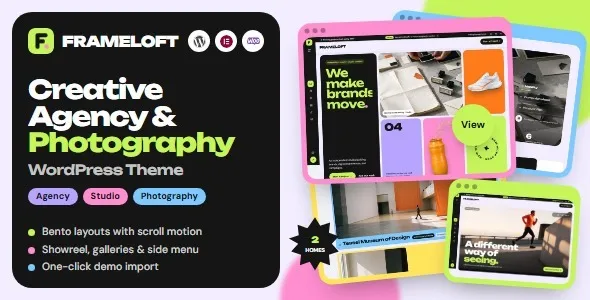
Frameloft – Creative Agency & Photography WordPress Theme
Frameloft – Creative Agency & Photography WordPress Theme is a website design solution for creative agencies, professional photographers, design studios, visual artists, freelancers, and businesses looking to establish a distinctive online presence. Designed around creative presentation and visual storytelling, Frameloft provides a starting point for building a website that showcases projects, introduces services, communicates brand identity, and helps visitors explore a portfolio. Whether you are developing a photography portfolio, creative agency website, branding studio, digital design business, or independent artist platform, this WordPress theme can be evaluated as a foundation for presenting your work in a professional and organized way.
Creative businesses depend on strong visual communication to attract attention and demonstrate their capabilities. A well-structured website allows potential clients to explore previous projects, understand available services, learn about the team, and find convenient ways to make contact. Frameloft is positioned for projects where photography, design, and creative content play an important role in the overall presentation. By customizing its layouts with original images, thoughtful typography, relevant copy, and consistent branding, website owners can create an experience that reflects their artistic direction and professional goals.
WordPress offers a content management system for managing pages, publishing articles, organizing media, and maintaining website content. Using a dedicated creative WordPress theme can help reduce the time required to establish the initial website structure. The final appearance and functionality of Frameloft depend on the installed theme version, its included templates, supported customization tools, and any compatible plugins used alongside it. Reviewing the current product demo and documentation before installation is recommended to confirm that its available features meet your project requirements.
What Is Frameloft – Creative Agency & Photography WordPress Theme?
Frameloft is a WordPress theme intended for creative agency and photography-related website projects. Its focus makes it relevant to professionals who want to present visual work alongside business information, service descriptions, project details, and contact opportunities.
A creative agency may need to display branding projects, advertising campaigns, digital experiences, and client case studies. A photographer may want to organize portrait sessions, wedding photography, commercial shoots, editorial work, or landscape collections. A freelance designer may need a portfolio that highlights selected projects, professional skills, and the services available to prospective clients.
Frameloft can be considered as a starting point for these different website goals, depending on the layouts and customization options available in the current release. WordPress provides tools for managing website content, while compatible themes and plugins can help determine how that content is presented and extended.
The best approach is to adapt the theme to the needs of the intended audience rather than simply filling every available section. A photography portfolio may benefit from a strong image-first layout, while a creative agency may need more space for services, client projects, team information, and business inquiries.
Creative Design for Modern Agency Websites
A creative agency website should communicate its identity quickly and give visitors a clear understanding of its work. Prospective clients often review several agencies before deciding whom to contact, so an organized portfolio and consistent visual presentation can help make the evaluation process easier.
Frameloft can be evaluated for websites that require a creative presentation of services, projects, and brand identity. Depending on its included layouts, website owners may adapt the design to introduce the agency, feature selected work, explain its process, and provide information about its capabilities.
Visual consistency is essential. Typography, colors, image treatments, spacing, and page layouts should work together to create a recognizable brand experience. A branding agency may choose a bold editorial direction, while a digital studio might prefer a contemporary interface that highlights website designs, applications, and digital campaigns.
The content should also explain the value behind the visuals. Project images can attract attention, but concise descriptions help visitors understand the challenge, the creative approach, and the final result. When reliable project outcomes are available, relevant evidence can provide additional context.
A well-planned agency website balances visual impact with clear information, helping potential clients move naturally from exploring the portfolio to learning about services and making contact.
Build a Professional Photography Portfolio
Photography portfolios require a website structure that allows images to remain the main focus without making navigation difficult. Visitors should be able to explore relevant collections, understand the photographer’s style, and find information about available services.
Frameloft may be suitable for photographers who want to create a dedicated portfolio using WordPress. Depending on the supported layouts, the website can be organized around photography categories, featured projects, client work, personal collections, and contact information.
Wedding photographers may want to organize galleries by event or photography package. Portrait photographers can present individual sessions, while commercial photographers may focus on product photography, corporate portraits, advertising campaigns, or editorial projects. Landscape and travel photographers might prioritize curated collections that reflect their artistic perspective.
Each gallery should be selected carefully. Displaying a smaller collection of strong, relevant images can create a more coherent impression than publishing every available photograph. Image order, cropping, and presentation should support the story being communicated.
Photography websites also need to balance image quality with performance. Large image files can slow down page loading, especially on mobile devices. Optimized images, suitable dimensions, and careful testing help maintain a smoother browsing experience without unnecessarily reducing visual quality.
Suitable for Freelancers and Independent Creatives
Freelancers often need a central website that introduces their professional identity, demonstrates their skills, and helps attract suitable projects. A portfolio can serve as a practical destination for prospective clients who want to review experience and understand the services offered.
Frameloft can be considered for independent photographers, graphic designers, visual artists, creative consultants, illustrators, and other professionals whose work benefits from visual presentation. The final structure should reflect the individual’s profession and the type of opportunities they want to attract.
A graphic designer may highlight brand identities and visual campaigns, while an illustrator might organize artwork by style or project category. A photographer may emphasize selected galleries, and a creative consultant could combine portfolio examples with information about strategy, collaboration, and deliverables.
A strong freelancer website should make it easy to understand the professional’s role. A short introduction can explain the main area of expertise, while dedicated project pages demonstrate relevant work. Contact information and a clear call to action help visitors take the next step.
Keeping the portfolio current is equally important. Removing outdated examples, correcting contact information, and adding relevant new projects can help the website continue to represent the professional accurately.
Showcase Creative Projects and Case Studies
A portfolio is more informative when projects are presented with context. Prospective clients often want to know not only what the final work looks like, but also what the project involved and how the creative professional contributed.
Frameloft can be adapted for a project-based portfolio where each selected work receives its own presentation, depending on the available page layouts and WordPress configuration. A project page may include the client’s industry, project objectives, creative approach, deliverables, and final images.
For a branding project, the case study could show the original brief, identity development, logo applications, typography, and supporting materials. A website design project might include interface screenshots, responsive views, and a summary of the user experience goals. A photography project could explain the assignment, creative direction, location, and intended audience.
Case studies should remain accurate and focused. Do not disclose confidential client information or publish work without the appropriate permission. If results or performance metrics are included, provide enough context to explain what they represent.
A well-organized portfolio makes it easier for visitors to identify relevant examples and understand the professional’s capabilities. It also gives creative businesses a useful way to demonstrate their working process rather than relying entirely on promotional claims.
Website Solutions for Branding and Design Studios
Branding and design studios need to communicate their creative approach, services, and ability to solve visual communication challenges. A professional website can introduce the studio’s philosophy while presenting selected work that reflects its strengths.
Frameloft can be evaluated for a design studio website that includes an introduction, service overview, portfolio, studio information, and contact details. Depending on the theme’s supported features, developers and website owners can organize content around brand strategy, logo design, visual identity, packaging, editorial design, digital interfaces, or other creative services.
The homepage should communicate the studio’s positioning clearly. Visitors should understand whether the business focuses on startups, established brands, small businesses, cultural organizations, or another audience.
Portfolio pages can then provide concrete examples. Instead of displaying images without explanation, studios can describe the project’s objectives, the creative decisions involved, and the final applications. Relevant images and concise text help visitors understand the work more fully.
A consistent visual system across the website can reinforce the studio’s identity. The presentation should feel intentional while remaining easy to navigate, particularly for visitors who want to review specific services or discuss a potential project.
Present Digital Agency Services
Digital agencies often provide several services, such as website design, user experience, digital branding, content creation, advertising, social media campaigns, or creative strategy. A website helps organize these offerings and explain how they relate to client goals.
Frameloft can serve as a starting point for a digital agency website when its available layouts support the required content structure. Service sections can explain individual offerings, while project pages demonstrate how the agency applies its expertise to real assignments.
Each service description should answer practical questions. What does the service include? Who is it intended for? What problem does it address? What deliverables can the client expect? Clear answers help potential customers decide whether the agency is a suitable partner.
A web design agency might present interface design, website development, and user experience services. A creative marketing company may emphasize campaign concepts, visual content, and brand communication. A multidisciplinary studio could organize its offerings into related categories rather than placing everything into a single long description.
Contact opportunities should be easy to locate. A project inquiry form or consultation request can provide a clear next step for interested visitors, subject to the functionality configured on the website.
Homepage Design and Content Organization
The homepage provides an introduction to the business and helps visitors discover the most important sections of the website. For a creative agency or photographer, it should communicate the brand’s identity while making selected work easy to explore.
A Frameloft-based homepage can be organized around a prominent introduction, featured projects, service highlights, portfolio previews, an About section, client feedback where available, and contact information, depending on the layouts included in the installed version.
The opening section should explain the business’s focus. A photographer might introduce a particular photography specialty, while an agency could summarize its creative services and intended audience.
Featured projects can guide visitors toward relevant portfolio pages. A concise service overview explains what the business offers, while an About section provides context about its experience, values, and working approach.
Not every website needs every possible section. A photographer may benefit from a streamlined, image-led homepage, while a larger agency may need additional information about services, the team, and its process.
The most effective structure is based on the needs of the target audience. Each section should contribute something useful, whether it demonstrates work, explains a service, establishes credibility, or encourages a visitor to make contact.
Customization and Brand Identity
A creative website should reflect the business’s personality rather than appear like an unmodified theme demo. Customization helps create a consistent visual identity and makes the website more relevant to its intended audience.
Depending on the available theme settings and supported tools, Frameloft may be customized through elements such as colors, typography, page layouts, images, spacing, and navigation. The exact controls should be verified in the current documentation.
A photography portfolio may prioritize large images and restrained typography, while a branding agency may use more expressive layouts and carefully selected colors. A digital studio might focus on project previews and structured service pages. The chosen design should support the content rather than compete with it.
Consistency across the website is important. Headings, buttons, link styles, image treatments, and spacing should follow a coherent visual system. The logo and business information should also remain consistent throughout the site.
Use original photography, genuine project examples, and accurate descriptions wherever possible. Replacing sample content with relevant material helps the website communicate the business’s actual capabilities.
Before making extensive changes, review the theme documentation and determine which design elements are controlled by WordPress, the theme, the editor, or additional plugins. Maintain backups and test significant changes before applying them to the live website.
WordPress Content Management and Publishing
WordPress provides an administrative interface for managing pages, posts, images, and other website content. This makes it a useful platform for creative businesses that want to update their portfolios and business information over time.
With Frameloft, the available content-management experience depends on the theme’s implementation and compatibility with the installed WordPress environment. Website owners should review the current documentation to understand how pages, portfolio items, galleries, and other content types are managed.
A photography business may regularly add new galleries, while an agency may publish case studies and company updates. A freelancer could update service descriptions, add recent projects, and maintain a professional biography.
A simple publishing process can make these updates easier. Establish consistent image dimensions, naming conventions, project descriptions, and content review practices so that new material fits the existing website structure.
If the website includes custom content types or requires specific portfolio functionality, confirm how those elements are supported before installation. Additional plugins or configuration may be necessary depending on the project.
Keeping the website current helps ensure that visitors see relevant examples and accurate business information when evaluating the services offered.
SEO-Friendly Structure for Creative Websites
Search engine optimization helps search engines understand website content and can support the discovery of relevant pages. A WordPress theme provides a design foundation, but rankings depend on many factors, including content quality, technical setup, competition, and the relevance of each page to a search query.
An effective Frameloft website should use descriptive page titles, meaningful headings, clear navigation, and useful page content. Each important service or portfolio category should have a clear purpose rather than relying on one generic page to cover every topic.
A photographer could create dedicated pages for wedding photography, portrait sessions, commercial photography, or other genuine specialties. A creative agency may organize pages around branding, website design, creative strategy, and selected case studies where those services are offered.
Image optimization is particularly important for visually focused websites. Use descriptive file names and meaningful alternative text for informative images. Compress images appropriately and avoid using unnecessarily large files that slow down the site.
Relevant internal links can connect project pages with service descriptions and contact information. Search-friendly URLs and accurate meta descriptions can also help communicate page topics.
Compatible SEO tools may assist with metadata, sitemaps, canonical settings, redirects, and supported structured data. These functions depend on the website’s configuration and should be tested after implementation.
Use keywords naturally where they help explain the content. Avoid repetitive text written only to manipulate rankings. No theme can guarantee a specific search position, amount of traffic, or number of client inquiries.
Content Marketing for Creative Agencies and Photographers
Content marketing can help creative professionals demonstrate expertise, answer client questions, and maintain an active online presence. Articles, project stories, and practical guides can provide additional ways for visitors to discover the website.
Frameloft can be considered for creative businesses that want to combine portfolio pages with a blog or news section, subject to the layouts and publishing options available in the selected version.
Photographers might publish articles about preparing for a portrait session, selecting locations, planning commercial shoots, or organizing a wedding photography timeline. Creative agencies could discuss brand consistency, website planning, design processes, and common challenges faced by clients.
Articles should offer genuine value rather than simply repeating service keywords. A useful guide can explain a process, answer a common question, or help readers make an informed decision.
Internal links can guide readers from educational content to relevant services or project examples. For instance, an article about preparing for a branding project can link to the agency’s branding service page.
A sustainable publishing schedule is generally more practical than producing large amounts of shallow content. Focus on accuracy, originality, relevance, and clear writing to build a useful library of resources over time.
Lead Generation and Client Inquiries
For many creative businesses, the website’s main purpose is to generate inquiries and start conversations with prospective clients. Visitors need a convenient way to ask about availability, request a quote, discuss a project, or learn more about services.
Frameloft can be configured to include contact opportunities through suitable page layouts, buttons, and compatible form tools. The appropriate setup depends on the theme’s capabilities and the website’s technical configuration.
A photographer may ask visitors to provide the type of session, preferred date, location, and contact details. A creative agency might request a project summary, business name, service of interest, and approximate timeline. Forms should collect only information needed to respond effectively.
Clear labels and concise instructions help visitors complete forms. The website should provide understandable confirmation messages and display alternative contact details where appropriate.
A visual form does not automatically guarantee message delivery. Form submissions, email routing, validation, and spam protection must be configured and tested before launch.
Calls to action should be relevant to the page. A portfolio project may invite visitors to discuss a similar assignment, while a service page could encourage them to request further information. Clear next steps make the website more practical for both the business and its potential clients.
Responsive Performance and Image Optimization
Photography and creative agency websites often use large visual assets, which can affect page loading speed if they are not optimized. A website should balance image quality with performance so visitors can explore projects without unnecessary delays.
The actual performance of Frameloft depends on the theme implementation, hosting environment, image files, scripts, fonts, plugins, and third-party integrations. Responsive design and loading speed should be tested after customization.
Start by resizing images to suit their display areas and compressing them while retaining suitable visual detail. Modern image formats can reduce file sizes when supported by the site’s implementation and target browsers.
Review unnecessary animations, external scripts, and third-party widgets. Complex effects may add visual interest, but they should not interfere with usability or create excessive loading delays.
Caching, suitable hosting, and other performance techniques may help depending on the website’s configuration. Use testing tools to identify specific problems before adding additional optimization plugins or services.
Test the homepage, portfolio galleries, project pages, and contact forms on desktop and mobile devices. Large galleries may require particular attention because image-heavy pages can behave differently from text-focused pages.
Regular performance reviews help maintain a smoother browsing experience as the website grows.
Accessibility and User-Friendly Navigation
A creative website should remain usable for visitors with different needs and browsing preferences. Clear navigation, readable text, appropriate contrast, and understandable interactive elements help make the website easier to use.
When customizing Frameloft, use logical heading levels, descriptive links, and suitable alternative text for informative images. Contact forms should have clear field labels and useful error messages. Color should not be the only way important information is communicated.
Portfolio navigation should help visitors explore work without becoming confusing. Categories should use familiar names, while menus should prioritize the pages that matter most to the intended audience.
Interactive elements should be distinguishable and usable with appropriate input methods, including keyboard navigation where applicable. Visible focus indicators should be preserved or implemented, and text should remain readable on smaller displays.
Accessibility depends on the theme, content, and the way each component is configured. Automated tools can help identify some problems, but manual keyboard testing and practical usability reviews are also valuable.
By combining a visually engaging presentation with clear navigation and accessible content, creative businesses can make their websites more useful to a broader audience.
Integrations and Additional WordPress Functionality
A creative website may need additional tools for contact forms, search engine optimization, analytics, image galleries, backups, security, or other business requirements. The appropriate combination depends on the features already provided by the theme and the goals of the website.
Frameloft should be used with compatible plugins and tools that support the installed WordPress version and the theme’s documented requirements. Before installing an extension, review its compatibility information, documentation, update history, and support arrangements.
A form plugin may support client inquiries, while an SEO plugin can assist with metadata and sitemap management. Analytics tools may provide information about website traffic and visitor behavior, subject to relevant privacy and consent requirements.
Photographers may also need specialized gallery or client-proofing tools, while agencies could require project inquiry workflows or scheduling integrations. These features should be checked individually rather than assumed to be included with the theme.
Avoid installing several plugins that perform the same function without a clear reason. Overlapping tools can increase maintenance work and introduce compatibility or performance issues.
After adding or updating a plugin, test the affected pages, forms, navigation, and responsive layouts. A focused integration strategy can help keep the website manageable over time.
Security and Ongoing Website Maintenance
A professional WordPress website needs ongoing maintenance to remain reliable and secure. Even a well-designed creative theme can encounter problems if its software, plugins, content, or access permissions are not maintained.
Website owners should use reputable hosting, enable HTTPS, use strong administrator credentials, and assign appropriate user permissions. WordPress, the theme, and compatible plugins should be updated carefully, with backups available before significant changes.
Themes and plugins should be obtained from trustworthy sources and reviewed for compatibility before installation. Remove unused components when appropriate and monitor the website for broken links, outdated information, and technical issues.
Regular backups provide a recovery option if a technical problem or accidental change affects the website. It is also important to understand how to restore those backups and verify that the recovery process works.
Content maintenance is equally important for creative businesses. Review portfolio projects, client permissions, service descriptions, biographies, contact details, and published articles periodically. Outdated or inaccurate information can create confusion for potential clients.
A planned maintenance routine helps the website continue to represent the business accurately and provide a dependable experience for visitors.
Who Should Use Frameloft – Creative Agency & Photography WordPress Theme?
Frameloft may be suitable for a variety of creative website projects, depending on the available layouts, documented functionality, and customization requirements.
Creative agencies: Present services, selected projects, team information, and the agency’s approach to creative work.
Professional photographers: Showcase photography collections, introduce specialties, and provide information about sessions or commercial assignments.
Branding studios: Display visual identities, brand applications, design projects, and case studies.
Freelance designers: Build a portfolio that communicates skills, experience, and available services.
Digital agencies: Introduce website design, digital branding, and other relevant creative services.
Visual artists: Organize selected artwork and provide background information about their practice.
Commercial photographers: Present product photography, corporate portraits, advertising work, and editorial assignments.
Creative consultants: Explain their expertise, professional approach, and consultation services.
Photography studios: Introduce the studio, show selected galleries, and help prospective clients make inquiries.
Personal brands: Create a professional destination for selected projects, biography information, articles, and contact details.
The best choice depends on the intended audience and the functionality required. Review the current demo, documentation, supported layouts, customization tools, and plugin compatibility before committing to the theme.
Tips for Building a Successful Website with Frameloft
Begin by defining the website’s main objective. Determine whether the priority is showcasing photography, attracting agency clients, presenting design projects, or combining several related services.
Choose portfolio examples carefully. Select work that represents the services and opportunities you want to attract, and organize projects into clear categories where appropriate. Provide context for important projects instead of relying exclusively on images.
Prepare original content before making extensive layout changes. This may include a business introduction, service descriptions, portfolio captions, team information, client-approved testimonials, and accurate contact details.
Create a consistent visual identity using suitable typography, colors, image treatments, and spacing. Replace placeholder content with genuine work and relevant imagery so the website reflects the business rather than a generic demo.
Keep navigation simple and make the most important information easy to find. Each page should have a clear purpose and provide a useful next step for visitors.
Before launch, test the complete website on different screen sizes. Review image loading, contact forms, navigation links, accessibility, search metadata, and any interactive components. Check that all published information is accurate and that project images are displayed appropriately.
Finally, maintain the website through regular backups, software updates, performance checks, and content reviews. A thoughtful maintenance process helps the site remain useful as the creative business develops.
Final Thoughts on Frameloft – Creative Agency & Photography WordPress Theme
Frameloft – Creative Agency & Photography WordPress Theme is a potential option for photographers, creative agencies, designers, visual artists, and independent professionals who want to build a visually focused website with WordPress. Its intended use makes it relevant to projects where portfolio presentation, creative services, and brand identity are central to the online experience.
A well-planned website can combine carefully selected images, organized project pages, clear service descriptions, accessible navigation, and practical contact opportunities. Photographers can focus on presenting their work, while agencies and studios can use project case studies to explain their capabilities and creative process.
The final capabilities of Frameloft depend on the theme version, its documented features, the supported customization tools, and the plugins used alongside it. Features such as advanced client galleries, booking, ecommerce, or specialized project management may require additional solutions.
Before installation, review the current product demo and documentation to confirm that the theme supports your design goals, technical environment, and required functionality. With original content, thoughtful customization, responsive testing, and regular maintenance, Frameloft can provide a starting point for a professional creative website that showcases work and helps connect businesses with potential clients.