My Account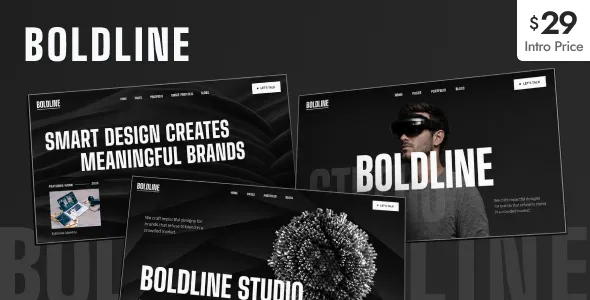
Boldline – Creative Portfolio WordPress Theme
Boldline – Creative Portfolio WordPress Theme is a modern website design solution for creative professionals, designers, photographers, freelancers, artists, and digital agencies looking to showcase their work through a professional online portfolio. A creative portfolio website helps individuals and businesses present their projects, communicate their expertise, establish a recognizable brand identity, and connect with potential clients. Boldline provides a theme option for WordPress users who want to build a visually engaging online presence centered around creative work, professional services, and personal branding.
In today’s digital environment, a well-organized portfolio can make a significant difference in how clients and visitors perceive a creative business. Whether you are a graphic designer, web developer, photographer, illustrator, branding specialist, content creator, or creative agency, your website should make it easy for visitors to explore your work and understand your capabilities. With thoughtful customization, suitable imagery, clear content, and a consistent visual identity, Boldline can serve as a starting point for developing a portfolio website that reflects your individual style and professional goals.
WordPress offers a flexible content management platform for creating pages, publishing articles, organizing media, and maintaining website content. A portfolio theme can help structure this information into a coherent presentation that highlights selected projects and guides visitors toward relevant services or contact options. The final website experience depends on the installed theme version, its documented features, available customization settings, and any compatible plugins used during development.
What Is Boldline – Creative Portfolio WordPress Theme?
Boldline is a creative portfolio WordPress theme intended for website projects that prioritize visual presentation, personal branding, and professional project showcases. It can be evaluated by designers, independent creatives, freelancers, and agencies that need a dedicated online destination for displaying their work and introducing their services.
A portfolio website differs from a conventional business website because its projects often serve as the primary evidence of professional ability. Visitors may want to review previous work, understand the creative process, learn about the person or team behind a project, and decide whether the professional is suitable for their requirements. A clear portfolio structure helps make this information accessible.
With a suitable configuration, a Boldline-based website can organize content into sections such as a homepage, portfolio, project details, about page, services, blog, and contact page. The exact layouts and available components should be verified against the current theme demo and documentation before installation.
Rather than relying entirely on visual effects, a successful creative website should combine attractive presentation with useful information. Project descriptions, clear navigation, readable text, and relevant calls to action help visitors move from browsing the portfolio to understanding the professional’s value.
Creative Portfolio Design for Modern Professionals
Creative professionals need websites that demonstrate their abilities while remaining easy to navigate. A portfolio should highlight the most relevant work, maintain a consistent visual style, and help visitors understand the services being offered.
Boldline can be considered for portfolio projects that require a visually focused website with room for creative expression. Depending on the available theme layouts, configuration, and compatible tools, website owners can organize their content around selected projects, professional introductions, service information, and other relevant sections.
For a graphic designer, the website may focus on branding systems, typography, packaging, and visual communication. A web designer may highlight website interfaces and digital experiences, while a photographer may prioritize carefully selected image galleries. An illustrator can present artwork collections, and a creative agency may use case studies to explain its approach to client projects.
The presentation should reflect the professional’s industry and audience. A minimalist design may suit a branding specialist, while a photography portfolio may benefit from larger images and a more visual layout. A digital agency may need additional space for service descriptions and project outcomes.
The objective is to create a clear and memorable experience that allows visitors to concentrate on the work without struggling to find essential information.
Build a Professional Personal Portfolio Website
A personal portfolio website gives freelancers and independent professionals a central place to present their experience, skills, achievements, and selected projects. Unlike a social media profile, a dedicated website provides greater control over content organization, branding, and the overall visitor experience.
Boldline can be evaluated as a foundation for a personal website that introduces an individual’s professional identity. A homepage can provide a concise introduction, while a portfolio section displays selected work. An about page can explain the person’s background, and a services section can outline the types of projects they accept.
A designer might include brand identities, digital designs, and creative campaigns. A developer could showcase websites, applications, and technical projects. A photographer may present portraits, commercial assignments, or editorial work, while a marketing professional could share campaign examples and content projects.
Each portfolio item should include enough context to help visitors understand the work. A short description of the project’s objective, the professional’s role, the approach taken, and the final deliverables can make a portfolio more informative than a collection of images alone.
A well-structured personal portfolio also makes it easier to share professional work with potential clients, employers, and collaborators.
Ideal for Graphic Designers and Branding Specialists
Graphic designers and branding specialists often rely on visual examples to communicate their expertise. Their portfolios may include logos, brand guidelines, packaging, editorial layouts, advertising graphics, typography, and digital design assets.
Boldline can be considered for a design portfolio that organizes these projects into an accessible visual presentation. Depending on the theme’s supported layouts and customization options, projects may be arranged into relevant categories or presented through dedicated portfolio pages.
A strong branding case study should explain the client’s needs, the visual direction, and the designer’s contribution. For example, a brand identity project may include the logo system, color palette, typography, packaging applications, and supporting brand materials. This gives visitors a better understanding of the thinking behind the finished design.
Designers should select portfolio examples that reflect the type of work they want to attract. Displaying relevant, high-quality projects helps establish a consistent professional identity and makes it easier for prospective clients to evaluate the designer’s style.
The website should also maintain appropriate image quality without compromising loading performance. Optimized visuals, clear project titles, and descriptive text help balance visual impact with usability.
Showcase Photography and Visual Artwork
Photographers, illustrators, and visual artists need portfolio websites that allow their work to remain the main focus. Image presentation, spacing, navigation, and the organization of creative collections all contribute to the overall visitor experience.
Boldline may be suitable for evaluating a visually driven portfolio, especially when the selected theme configuration supports the image presentation required by the project. Before committing to a particular layout, photographers and artists should review the current demo to confirm that its gallery and project presentation options meet their needs.
A photographer can organize work by subject, such as portraits, weddings, travel, fashion, commercial assignments, or editorial photography. An illustrator may group artwork by style, client, or medium. Artists can create dedicated project pages that explain the inspiration, materials, creative process, or context behind selected pieces.
Image quality is important, but every image does not need to appear on the homepage. A carefully curated selection often communicates a clearer creative direction than a large collection of unrelated work.
Where appropriate, image captions and alternative text can provide useful context. Optimized image files help maintain reasonable loading times, particularly for portfolios containing high-resolution photographs or extensive visual collections.
A Flexible Website for Creative Agencies
Creative agencies need websites that demonstrate the quality of their work while explaining their services and working approach. Potential clients may be interested in branding, web design, digital marketing, advertising, content production, creative strategy, or related services.
Boldline can be assessed for an agency portfolio that combines selected projects with information about the team’s capabilities. The website can be organized around the agency’s main services, featured case studies, company introduction, and contact information, subject to the layouts and customization tools available in the chosen version.
A useful agency homepage should communicate what the team does and which types of clients it serves. Featured projects can then provide evidence of its creative approach, while service pages explain the scope of its work.
Detailed case studies are particularly valuable for agencies. Instead of displaying a finished design without context, a case study can explain the challenge, the strategy, the creative execution, and the deliverables. Verified results may also be included when reliable data is available and the agency has permission to share it.
A clear project inquiry pathway helps interested visitors take the next step. The combination of portfolio examples, service information, and accessible contact details can make the website more useful for business development.
Homepage Layout and Content Structure
The homepage is often the first page visitors see, so it should communicate the website’s purpose quickly. For a creative portfolio, this usually means introducing the professional or agency, highlighting selected work, and making important information easy to find.
A Boldline-based website can be planned around a structure that suits its intended audience and the theme’s available components. Possible sections include:
- Introduction: A concise headline explaining the professional’s role, creative focus, or primary services.
- Featured portfolio: A curated selection of projects that demonstrates relevant skills and style.
- About section: A short introduction to the individual, studio, or agency.
- Services: A summary of the work offered to clients.
- Project case studies: More detailed explanations of selected assignments.
- Testimonials: Genuine client feedback published with appropriate permission.
- Blog or insights: Articles about creative work, professional experience, or industry topics.
- Contact section: A clear way for visitors to ask questions or discuss a project.
Not every portfolio needs every section. A photographer may prioritize galleries and booking inquiries, while a digital agency may require more detailed service pages and case studies.
The best homepage is one that supports the website’s primary objective without overwhelming visitors with unnecessary information.
Customization and Brand Identity
A portfolio website should reflect the identity of the person or business it represents. Consistent typography, colors, spacing, imagery, and messaging help create a recognizable presentation.
Depending on the available theme settings and compatible tools, Boldline may be configured to suit different creative directions. Website owners should confirm the precise customization options in the current documentation rather than assume every design control is included.
A branding studio may prefer a restrained visual palette and carefully arranged project imagery. A photographer might emphasize large photographs, while an illustrator may choose a more expressive presentation. A digital agency may combine visual projects with clear service descriptions and business-focused calls to action.
Consistency matters across all pages. Headings, body text, buttons, links, and image treatments should follow a coherent design system. This makes the website feel intentional and helps visitors focus on the portfolio itself.
Before making significant design changes, create a backup and test the adjustments in a staging environment when possible. This is particularly useful when modifying templates, installing page-building tools, or adding custom CSS.
WordPress Content Management and Website Editing
WordPress is widely used for creating and maintaining websites because it provides an administrative interface for managing pages, posts, images, and other content. A suitable theme helps present this content according to the website’s design requirements.
With Boldline, website owners should review the theme’s installation instructions and editing workflow to understand how pages, portfolio items, menus, and other supported elements are managed. The exact editing experience depends on the theme version and its compatibility with the WordPress environment and any additional tools.
A practical content workflow helps keep the portfolio organized. New projects can be prepared with consistent titles, descriptions, images, and categories. Older projects can be updated or removed when they no longer reflect the professional’s current direction.
It is also useful to maintain a consistent naming system for images and project content. Clear organization makes routine editing easier as the portfolio grows.
Before publishing changes, preview each page to confirm that the layout, text, images, and links appear as intended. This helps reduce errors and maintain a professional presentation.
SEO-Friendly Structure for Portfolio Websites
Search engine optimization can help potential clients discover a creative professional through relevant searches. A portfolio theme can support the visual and structural side of a website, but search visibility also depends on content quality, technical configuration, competition, and other factors.
Each important page should have a clear topic and a descriptive title. For example, a web designer may create separate pages for website design, landing page design, and selected projects rather than placing all information on one generic page.
Portfolio entries can provide additional search value when they include original descriptions that explain the project, services involved, and relevant context. These descriptions should be accurate and useful rather than filled with repetitive keywords.
Other practical SEO considerations include:
- Writing descriptive page titles and meta descriptions.
- Using logical headings to organize content.
- Creating readable and descriptive URLs.
- Linking related service pages, projects, and articles.
- Adding meaningful alternative text to informative images.
- Optimizing image dimensions and file sizes.
- Ensuring important pages can be crawled and indexed.
- Reviewing broken links and technical issues.
- Using a compatible SEO plugin when additional controls are required.
A creative portfolio should not rely exclusively on images. Search engines and visitors benefit from clear text that explains what each project represents. No WordPress theme can guarantee specific search rankings or a particular amount of website traffic.
Responsive Design for Desktop, Tablet, and Mobile
Visitors may discover a portfolio on a smartphone, review projects on a tablet, and return later from a desktop computer. A responsive website helps maintain a consistent experience across different screen sizes.
Boldline is positioned as a WordPress portfolio theme, but its exact responsive behavior should be checked using the current demo and supported documentation. Website owners should test the actual pages and content they intend to publish rather than assume every layout will work perfectly without adjustment.
Important checks include navigation usability, readable text, image scaling, spacing, button accessibility, and contact form behavior. Portfolio grids and large visual sections may need particular attention on narrow screens.
Mobile visitors should be able to identify the professional, browse selected projects, and find contact information without unnecessary scrolling or difficult navigation. Images should remain visually clear while fitting within the available screen space.
Responsive testing should be repeated after significant theme changes, plugin updates, or custom styling. A page that works well on desktop may behave differently when its content is displayed on a smaller device.
Website Performance and Image Optimization
Portfolio websites often use large images, animations, custom fonts, and interactive elements. These features can enhance presentation, but they may also increase page loading time if they are not managed carefully.
The performance of a Boldline website depends on the theme implementation, hosting environment, image sizes, scripts, plugins, fonts, and external integrations. A responsive layout alone does not guarantee fast performance.
Start by preparing images at appropriate dimensions for their intended display areas. Compress image files while retaining sufficient visual detail, and avoid uploading unnecessarily large assets when smaller versions will provide the same visible quality.
Review third-party scripts, embedded content, and decorative effects to determine whether they contribute meaningful value. Remove unnecessary components and use performance tools that suit the site’s configuration.
Caching, suitable hosting, and other optimization techniques may help, depending on the website’s needs. Performance should be measured on important pages such as the homepage, portfolio archives, individual project pages, and contact forms.
A balanced approach preserves the quality of the creative presentation while making the website more convenient to browse.
Lead Generation and Client Inquiries
For many freelancers and creative agencies, a portfolio website is not just a gallery. It is also a way to attract relevant inquiries and start conversations with potential clients.
Boldline can be configured around suitable contact pathways using the options supported by the theme and compatible WordPress plugins. These may include contact pages, inquiry buttons, email links, or forms, depending on the selected setup.
A project inquiry form should collect useful information without becoming unnecessarily complicated. Common fields include a name, email address, project type, estimated timeline, and a short description of the client’s needs. The exact fields should match the professional’s workflow.
Calls to action should be specific and relevant. A web designer may invite visitors to discuss a website project, while a photographer might encourage clients to inquire about a session. An agency may offer a general project consultation.
Before launch, test form validation, confirmation messages, email delivery, and spam protection. Ensure that contact details are accurate and that visitors can find them easily.
A well-planned inquiry process helps connect the visual portfolio with the professional services offered.
Content Marketing for Creative Professionals
Publishing useful articles can help creative professionals explain their expertise, share ideas, and answer common questions from potential clients. WordPress blogging tools can support this activity alongside portfolio pages.
A designer might write about branding principles, design workflows, or website usability. A photographer could share preparation advice, explain photography techniques, or discuss project planning. An agency may publish articles about creative strategy, digital experiences, and client collaboration.
The most useful content addresses genuine audience needs. Articles can explain processes, compare approaches, discuss common challenges, or provide practical guidance. Original insights and clear explanations are generally more valuable than publishing repetitive content solely to include keywords.
Internal links can connect articles with related portfolio projects and service pages. For example, an article about website redesign can direct readers to relevant case studies or a web design service page.
A realistic publishing schedule is easier to maintain than an ambitious plan that produces inconsistent results. Focus on accuracy, usefulness, and relevance to the audience.
Accessibility and User-Friendly Navigation
A professional portfolio should be straightforward to navigate and comfortable to read. Clear labels, suitable contrast, logical headings, and recognizable interactive elements contribute to a better visitor experience.
When configuring Boldline, use descriptive link text and ensure that important information is not communicated through color alone. Informative images should have appropriate alternative text, while decorative images should be handled according to accessibility best practices.
Navigation menus should prioritize the pages visitors are most likely to need. A simple structure might include Home, Work, About, Services, Blog, and Contact, although the best arrangement depends on the website’s purpose.
Buttons and forms should be clearly labeled. Visitors should understand what happens when they select an action, and form errors should provide helpful instructions.
Accessibility depends on the theme, the content, and the way individual components are configured. Review the website using keyboard navigation and practical testing, alongside automated accessibility tools where appropriate.
Compatible Plugins and Additional Functionality
WordPress plugins can extend a website with tools for SEO, contact forms, analytics, security, backups, image optimization, and other functions. The right selection depends on the project’s requirements and the features already provided by the theme.
Before adding a plugin to a Boldline website, check its compatibility with the installed WordPress version and the theme’s documented requirements. Review the plugin’s maintenance history, documentation, licensing, and support information.
An SEO plugin may help manage metadata and XML sitemaps, while a form plugin can support client inquiries. Analytics tools may help website owners understand how visitors interact with portfolio pages, subject to applicable privacy and consent requirements.
Avoid installing multiple plugins that perform overlapping tasks without a clear reason. Too many extensions can increase maintenance requirements and create compatibility or performance problems.
After installing or updating a plugin, test the affected pages and visitor journeys. This is particularly important for portfolio grids, navigation menus, contact forms, and other interactive components.
Security and Ongoing Website Maintenance
A creative portfolio requires ongoing maintenance to remain reliable. Regular checks help protect website content, reduce avoidable errors, and keep the visitor experience consistent.
Use reputable hosting, enable HTTPS, choose strong administrator passwords, and assign account permissions according to each user’s responsibilities. Keep WordPress, the theme, and compatible plugins updated after reviewing compatibility and creating suitable backups.
Install themes and plugins from trustworthy sources. Remove unused components when appropriate, and maintain backups that can be restored if a technical issue affects the website.
Content maintenance is equally important. Update service descriptions, replace outdated project examples, check contact details, and review links periodically. A portfolio should represent the professional’s current skills, direction, and availability as accurately as possible.
After major updates, review the homepage, portfolio pages, mobile navigation, and contact forms. A simple maintenance schedule can help prevent small issues from becoming larger problems.
Who Should Use Boldline – Creative Portfolio WordPress Theme?
Boldline can be evaluated by different professionals and businesses seeking a WordPress website centered around creative work.
Graphic designers: Present branding, typography, packaging, editorial design, and other visual projects.
Web designers and developers: Showcase websites, interfaces, applications, and digital experiences.
Photographers: Organize selected photographs into collections that reflect their style and professional focus.
Illustrators and artists: Present artwork, creative collections, and selected commissioned projects.
Freelancers: Build a professional online destination featuring experience, skills, services, and contact information.
Creative agencies: Combine project showcases with service descriptions, company information, and case studies.
Branding studios: Explain brand identity projects and demonstrate the thinking behind visual systems.
Art directors and creative consultants: Highlight campaign work, creative direction, and relevant professional achievements.
Content creators: Present selected work, collaborations, and professional services in a structured format.
The suitability of the theme depends on the specific requirements of the project. Before choosing it, review the current demo, documentation, available layouts, customization options, responsive behavior, and compatibility with any required plugins.
Tips for Creating an Effective Portfolio with Boldline
A successful portfolio needs more than a visually attractive theme. The content should clearly communicate the professional’s capabilities and help visitors determine whether the person or agency is right for their project.
Start by defining the primary audience. Decide whether the website should attract business clients, creative agencies, employers, collaborators, or a particular customer group. This decision will help determine which projects and services deserve the most attention.
Choose a curated collection of relevant work. Each project should demonstrate a useful skill, a distinctive style, or experience with the type of assignment you want to attract. Include concise descriptions that explain the objective and your contribution.
Maintain a consistent visual identity throughout the website. Use a considered color palette, readable typography, and a coherent image style. Avoid adding decorative elements that distract from the work or make navigation harder.
Make contact information easy to locate. Visitors should not need to search through several pages to find a way to discuss a potential project.
Before launch, test the website on different devices, review loading performance, check all links, and submit test inquiries through the contact form. Correct spelling errors and replace any placeholder content that remains.
Finally, review the portfolio periodically. Remove outdated examples, add relevant new work, and ensure that your services and professional information remain accurate.
Final Thoughts on Boldline – Creative Portfolio WordPress Theme
Boldline – Creative Portfolio WordPress Theme is an option for designers, photographers, freelancers, artists, and creative agencies looking to establish a professional portfolio website with WordPress. Its creative portfolio positioning makes it relevant to projects that prioritize visual presentation, project showcases, personal branding, and clear communication with potential clients.
A well-planned portfolio can combine selected projects, useful descriptions, professional background, service information, and accessible contact options. Designers can use it to present visual work, photographers can organize image collections, and agencies can explain their creative approach through detailed case studies.
The final website experience depends on the theme version, documented features, available customization settings, and compatible plugins. Reviewing the current demo and documentation before installation helps confirm whether the theme supports the required design and functionality.
Long-term results also depend on original content, search optimization, responsive testing, performance, accessibility, security, and regular maintenance. A theme alone cannot guarantee search rankings or client inquiries, but it can provide a useful starting point for a carefully designed online portfolio.
For professionals seeking to communicate their creative identity and present their work online, Boldline is worth evaluating as part of a broader WordPress website strategy. With relevant projects, consistent branding, clear navigation, and ongoing improvements, a portfolio website can support professional visibility and help create opportunities for future collaboration.https://themeforest.net/item/boldline-creative-portfolio-wordpress-theme/65213096