My Account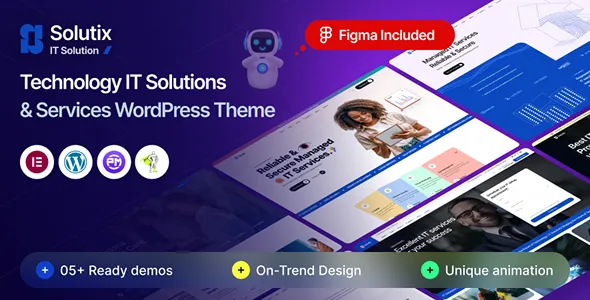
Solutix – IT Solutions and Business Technology WordPress Theme
Solutix – IT Solutions and Business Technology WordPress Theme is a professional website design solution for IT companies, technology service providers, software development firms, digital transformation consultants, and businesses offering modern technology solutions. In a competitive digital marketplace, technology companies need a website that communicates their expertise, explains their services, builds customer confidence, and helps potential clients understand how their solutions can address business challenges. Solutix can be considered as a WordPress theme option for creating a structured online presence that supports these objectives.
A professional IT website should do more than display company information. It should explain technical services in accessible language, present relevant projects, introduce the team, and provide clear ways for businesses to make inquiries. Whether you operate an IT consulting firm, software development agency, managed service provider, cybersecurity company, cloud solutions business, or technology startup, a carefully customized website can help communicate your value to the right audience.
WordPress offers a flexible content management platform for managing pages, publishing articles, organizing media, and maintaining business information. With an appropriate configuration, Solutix can serve as a starting point for building a corporate technology website with service descriptions, company profiles, project showcases, industry insights, and contact information. The final functionality depends on the theme version, its documented features, available customization options, and compatible plugins.
What Is Solutix – IT Solutions and Business Technology WordPress Theme?
Solutix is an IT solutions and business technology WordPress theme intended for organizations that want to present technology-related services through a professional website. It can be evaluated by IT consultants, software companies, technology agencies, digital service providers, and businesses helping other organizations adopt or manage technology.
Technology services often involve complex concepts that may be difficult for prospective customers to evaluate. A well-organized website helps explain these services through clear descriptions, relevant examples, and logical navigation. Instead of presenting visitors with unexplained technical terminology, companies can describe the business problems they solve and the outcomes their services are designed to support.
A Solutix-based website can be planned around sections such as Home, About Us, Services, Solutions, Projects, Industries, Blog, and Contact, depending on the available layouts and customization options. Dedicated service pages can explain individual offerings, while case studies can demonstrate how the company approaches real-world challenges.
Before selecting the theme, review its current demo and documentation to confirm that its available templates, editing workflow, and compatibility meet your project requirements. This helps ensure that the theme is suitable for the website you intend to build.
Professional Website Design for IT Companies
An IT company website is often one of the first places prospective clients visit when researching a service provider. The presentation should communicate reliability, technical knowledge, and a clear understanding of customer requirements.
Solutix can be evaluated as a foundation for a technology company website that brings together company information, service descriptions, project examples, and contact opportunities. The precise page layouts and design controls available will depend on the installed theme version and supported tools.
A professional IT homepage should quickly explain what the company does, which customers it serves, and what types of challenges it addresses. Supporting sections can introduce its core services, highlight relevant experience, and direct visitors toward detailed information.
For example, a software development company may emphasize custom applications, web development, and system integration. A managed IT service provider may focus on technical support, infrastructure management, and business continuity. A technology consultancy may explain its approach to digital transformation and technology planning.
Clear messaging makes the website easier to understand for both technical and non-technical audiences. By organizing content around customer needs, businesses can present their expertise without overwhelming visitors with unnecessary complexity.
Website Solution for IT Consulting Businesses
IT consulting companies help organizations assess technology requirements, improve existing systems, and plan technology investments. Their websites should explain their consulting services and show prospective clients how an engagement may support business objectives.
Solutix can be considered for a consulting website featuring service descriptions, company experience, project examples, and consultation inquiries. A suitable structure can help visitors understand the types of problems the company addresses and how it approaches technology decisions.
Possible consulting topics include technology strategy, infrastructure planning, software selection, cloud adoption, system modernization, process automation, and digital transformation. The exact services presented should reflect the company’s real expertise rather than relying on generic claims.
Each consulting service page can explain its intended audience, common challenges, assessment process, and potential deliverables. For example, a technology assessment page might describe how existing systems are reviewed, while a cloud consulting page could explain planning, migration considerations, and operational requirements.
Useful case studies can further support credibility by describing the client’s challenge, the work performed, and the verified results. Companies should obtain permission before publishing confidential client information and avoid promising outcomes that cannot be substantiated.
Showcase Software Development Services
Software development companies need a website that explains their capabilities and helps potential clients evaluate whether their expertise matches a project. Service information should be organized around the applications, platforms, and business requirements the company supports.
A Solutix-based website can be planned to introduce software development services, subject to the available page layouts and customization tools. Dedicated pages may cover custom software, web applications, enterprise systems, API development, application modernization, and ongoing software maintenance when these services are genuinely offered.
A custom software development page can explain the company’s approach to discovery, requirements analysis, design, development, testing, deployment, and maintenance. This gives prospective customers a clearer understanding of how a project may progress.
Portfolio examples can demonstrate relevant experience. Each project description should identify the business challenge, the company’s role, the technologies used when appropriate, and the solution delivered. Where client confidentiality permits, verified performance improvements or operational benefits can provide additional context.
Technical details should be presented in a way that remains accessible to decision-makers. Clear explanations of project scope, communication practices, and ongoing support can be just as important as a list of programming languages or frameworks.
Cloud Computing and Digital Transformation Solutions
Cloud computing and digital transformation are important considerations for businesses looking to modernize their technology environments. Organizations may explore cloud infrastructure, application migration, data management, collaboration tools, and automated workflows to improve how their systems operate.
Solutix can be evaluated for a technology website that explains cloud-related services and digital transformation offerings. The final page structure should reflect the company’s actual capabilities and the features supported by the chosen theme configuration.
A cloud solutions page can describe the services offered, such as cloud readiness assessments, migration planning, infrastructure configuration, application deployment, or ongoing management. It should also explain relevant considerations, including security, access control, costs, system availability, and operational support.
A digital transformation page may explain how technology can help modernize workflows, connect business systems, improve access to information, or reduce manual processes. Practical examples are more useful than vague claims about innovation.
Businesses should communicate the scope of their services accurately. Cloud migration, for instance, may involve assessment, planning, data transfer, testing, staff training, and post-migration support. Explaining these stages can help prospective clients understand what an engagement may involve.
Cybersecurity and IT Infrastructure Services
Organizations increasingly rely on digital systems to manage customer information, internal operations, communications, and business-critical applications. Cybersecurity and infrastructure services help businesses manage technical risks and maintain reliable operations.
If cybersecurity or infrastructure management is part of a company’s offering, a Solutix website can provide a structured way to explain these services. The exact presentation depends on the theme’s available layouts and any compatible tools used to build the site.
A cybersecurity service page might cover security assessments, access management, vulnerability reviews, security awareness, incident response planning, or other services that the company is qualified to provide. Descriptions should remain accurate and avoid implying that any system can be made completely risk-free.
An IT infrastructure page may explain network planning, server management, device configuration, system monitoring, backup planning, and technical support. Businesses can describe how these services fit into their broader operational requirements.
Case studies, certifications, service-level details, and clear support procedures can help establish trust when they are genuine and current. Sensitive technical information should not be published merely to make the company appear more advanced.
Managed IT Services and Technical Support
Managed IT service providers support organizations that need ongoing technology assistance without maintaining every technical function internally. Their websites should explain the available support arrangements, service scope, and intended customer groups.
Solutix can be considered for a managed IT services website that presents support offerings, service descriptions, and inquiry options. The final setup should be checked against the theme’s documented capabilities.
A service provider may offer help desk support, device management, network monitoring, software updates, user account administration, backup management, or IT planning. These services should be described clearly so customers understand what is included and what requires a separate agreement.
A dedicated support page can explain how customers submit requests, what information they should provide, and which channels are available. If the business offers different support packages, a comparison section may help visitors evaluate the options.
Businesses should publish realistic service commitments and avoid making guarantees that cannot be met consistently. Accurate descriptions of response processes, operating hours, and escalation procedures help set expectations and support stronger client relationships.
Business Technology and Enterprise Solutions
Business technology websites often need to explain how different systems and services support everyday operations. This may include software integration, workflow automation, enterprise applications, data reporting, infrastructure modernization, and technology advisory services.
Solutix can be evaluated for a website that presents these offerings in an organized and accessible way. The structure should make it easy for visitors to identify relevant services and understand how those services relate to their business needs.
For example, an enterprise solutions page may explain how systems can be connected to reduce duplicate data entry or improve information flow between departments. An automation page might describe how repetitive processes can be reviewed and streamlined. A data solutions page could outline reporting, integration, or data management services where these are part of the company’s expertise.
Use examples that accurately reflect the company’s experience. If a solution is customized for each client, explain the discovery and implementation process instead of presenting every project as identical.
Clear service descriptions can help decision-makers understand the scope of a potential engagement before contacting the company for further discussion.
Build a Strong Homepage for Your Technology Business
The homepage should introduce the business and help visitors locate the information they need. For an IT company, this means communicating its main services, expertise, and customer focus without making the page unnecessarily complicated.
A Solutix website can be planned around a homepage structure that suits the business and the theme’s available components. Potential sections include:
- Hero section: Introduce the company and its primary technology services.
- Services overview: Summarize the main offerings with links to dedicated pages.
- Company introduction: Explain the organization’s background, expertise, and approach.
- Featured projects: Present selected examples of relevant work.
- Industries served: Identify the sectors the business supports, when applicable.
- Working process: Explain the stages involved in delivering a project.
- Testimonials: Share genuine client feedback with appropriate permission.
- Insights and articles: Highlight useful technical or business content.
- Contact section: Make it easy to request information or discuss a project.
Not every business needs every section. A small IT consultancy may benefit from a concise homepage, while a larger technology provider may need more detailed service navigation.
The goal is to help visitors understand the company quickly and move naturally toward the information most relevant to their requirements.
Customization and Brand Identity
A technology website should reflect the company’s brand and communicate a consistent professional identity. Visual design, typography, colors, imagery, and content style all contribute to how visitors perceive the organization.
Depending on the theme version and supported customization tools, Solutix may be adaptable to different brand requirements. Review the current documentation to determine which elements can be adjusted through the theme settings and which may require additional tools or custom development.
A cloud services provider may prefer a clean, structured presentation, while a creative technology agency may use more expressive visuals. A cybersecurity company may prioritize clear information architecture and reassuring, accurate messaging. The design should support the company’s positioning rather than distract from its services.
Use a consistent color palette, heading hierarchy, body text style, and button treatment throughout the website. Images should be relevant to the company’s work and audience. Generic technology imagery can support the visual presentation, but original team photographs, project screenshots, and authentic service illustrations may provide more useful context.
Before applying major design changes, create a backup and test them in a staging environment where possible. This helps reduce the risk of disrupting the live website.
WordPress Content Management and Website Editing
WordPress provides an administrative interface for managing pages, posts, media, menus, and other website content. This makes it a practical platform for businesses that need to update information as their services and operations evolve.
When using Solutix, review the installation guide and documentation to understand how its layouts and content elements are managed. The editing workflow may depend on the theme’s implementation, supported page-building tools, and installed WordPress version.
A clear content management process helps keep the website organized. Service pages should follow a consistent structure, project descriptions should include relevant details, and blog articles should use a logical category system where appropriate.
Website administrators should also maintain a record of important configuration choices and avoid making untested changes directly on a live site. Backups and staging environments can be particularly helpful when updating themes, plugins, or custom styling.
Before publishing a page, preview it on desktop and mobile screens. Check headings, images, links, forms, and other interactive elements to ensure that the content appears as intended.
SEO-Friendly Structure for IT Solutions Websites
Search engine optimization helps businesses make their services easier to discover through relevant online searches. A WordPress theme can provide a visual and structural foundation, but search visibility depends on many factors, including content quality, technical performance, competition, and the website’s overall authority.
For a Solutix website, each important service should have a clear purpose and a descriptive page title. A company offering cloud consulting, software development, and managed IT services may benefit from separate pages explaining each service instead of relying on a single general description.
Useful SEO practices include:
- Writing unique page titles and meta descriptions.
- Organizing content with a logical heading hierarchy.
- Creating readable, descriptive URLs.
- Linking related service pages and case studies.
- Publishing original, useful technical articles.
- Adding appropriate alternative text to meaningful images.
- Optimizing image sizes and page loading performance.
- Checking that important pages can be crawled and indexed.
- Reviewing broken links and duplicate content.
- Using a compatible SEO plugin when additional controls are required.
Content should address the questions prospective customers actually ask. For example, an article explaining the stages of cloud migration may help readers understand the process before they contact a provider.
Avoid excessive keyword repetition or unsupported claims. Natural language, accurate information, and a helpful page structure create a stronger foundation for sustainable search visibility. No theme can guarantee a specific ranking position or amount of traffic.
Content Marketing for Technology Businesses
Content marketing allows IT companies to demonstrate their expertise, explain technical concepts, and provide useful information to prospective customers. WordPress blogging tools can support this approach alongside service pages and project showcases.
A software development company might publish articles about application planning, software maintenance, or system integration. A managed IT provider could explain backup practices, device management, or common infrastructure challenges. A technology consultancy may discuss digital transformation planning and technology selection.
The most useful articles answer real questions and provide practical guidance. They can explain processes, compare approaches, outline considerations, or help business owners understand technical decisions.
Content should be written for the intended audience. Articles for business decision-makers may need clear explanations of costs, risks, and operational benefits, while technical resources can provide greater implementation detail.
Internal links can connect relevant articles to service pages, project examples, and contact information. A consistent publishing schedule and periodic content reviews help maintain quality without producing large volumes of repetitive material.
Lead Generation and Contact Forms
For many IT companies, the website’s main purpose is to generate relevant business inquiries. Visitors should be able to request a consultation, discuss a technical challenge, ask about a service, or seek a project estimate.
Solutix can be configured with appropriate contact pathways using the features and compatible plugins available for the chosen setup. These may include contact pages, inquiry buttons, email links, or forms, depending on the implementation.
A project inquiry form may request a name, business email address, company name, service of interest, project requirements, and preferred contact method. Only collect information that is useful for responding to the inquiry.
Clear labels and concise instructions make forms easier to complete. The website should provide understandable confirmation after submission and make alternative contact details available where appropriate.
Calls to action should match the service being described. A software development page might invite visitors to discuss an application idea, while an IT support page could direct them toward the relevant support process.
Before launch, test form validation, email delivery, spam protection, and confirmation messages. Regular testing helps prevent lost inquiries caused by technical issues.
Responsive Design for Desktop, Tablet, and Mobile
Business customers may browse a technology website from office computers, laptops, tablets, and smartphones. A responsive layout helps keep content accessible across these devices.
Solutix should be evaluated for its responsive behavior using the current demo and documentation. The actual website should also be tested after installation, because custom styling, plugins, embedded content, and changes to page layouts can affect how individual sections behave.
Check that navigation remains convenient, text is readable, images fit the screen, and buttons are easy to select. Long service descriptions should be divided into useful sections, while forms should remain practical to complete on mobile devices.
Important information such as the company’s services, contact options, and support details should not be hidden behind confusing navigation. Mobile visitors should be able to locate these details without unnecessary effort.
Responsive testing should cover the homepage, service pages, project examples, blog articles, and contact forms. Recheck the website after significant updates to help maintain a consistent user experience.
Website Speed and Performance Optimization
Website performance affects usability, particularly for visitors accessing the site through mobile networks or slower connections. A technology website should load its essential content efficiently while preserving a professional presentation.
The performance of a Solutix website depends on the theme implementation, hosting environment, images, fonts, scripts, plugins, and third-party integrations. A responsive design alone does not guarantee fast loading.
Start by optimizing image dimensions and compressing files appropriately. Review large background images, unnecessary animation, external widgets, and scripts that may delay the display of important content.
Caching, suitable hosting, and other performance tools may improve loading times depending on the website’s configuration. These tools should be selected based on actual performance measurements rather than installed without evaluation.
Test the homepage and key service pages using performance tools, and pay attention to mobile results. Check contact forms and interactive components as well as static content, because different page elements can have different performance characteristics.
Regular monitoring helps identify problems introduced by new plugins, additional content, or design changes.
Accessibility and User-Friendly Navigation
A professional IT website should make information easy to locate and understand. Clear navigation, readable text, suitable color contrast, and recognizable interactive elements help improve the visitor experience.
When configuring Solutix, use descriptive link text and maintain a logical heading structure. Form fields should have clear labels, and important information should not be communicated through color alone. Meaningful images should include suitable alternative text.
Navigation should reflect the needs of the intended audience. A technology company might organize its main menu around Services, Solutions, Industries, Projects, Insights, About, and Contact. The exact menu should remain simple enough for visitors to understand quickly.
Buttons and links should be visually distinguishable, and interactive elements should be usable with appropriate input methods. Forms should provide clear instructions and understandable error messages.
Accessibility depends on the theme, the content, and the way each component is configured. Automated checks can help identify some issues, but manual keyboard testing and practical usability reviews are also valuable.
Compatible Plugins and Additional Integrations
WordPress plugins can extend a business website with tools for SEO, contact forms, analytics, backups, security, caching, and other functions. The appropriate combination depends on the website’s requirements and the capabilities already available in the theme.
Before installing a plugin alongside Solutix, review compatibility with the current WordPress version and the theme’s documented requirements. Check the plugin’s maintenance history, documentation, licensing, and support arrangements.
An SEO plugin may help manage metadata and sitemaps, while a form plugin can support business inquiries. Analytics tools can help the company understand website traffic and visitor behavior, subject to applicable privacy and consent requirements.
Other integrations may be relevant to specific business models, such as appointment scheduling, customer relationship management, or support ticket management. These should be selected according to genuine operational needs and verified compatibility.
Avoid installing multiple plugins that perform overlapping functions without a clear reason. After an update or new installation, test important pages, forms, navigation, and interactive components to identify any compatibility issues.
Security and Ongoing Website Maintenance
A professional technology website should be maintained carefully to protect its content and provide a reliable experience for visitors. Routine maintenance helps reduce avoidable technical problems and supports the long-term operation of the website.
Use reputable hosting, enable HTTPS, choose strong administrator passwords, and assign user permissions according to each person’s responsibilities. Keep WordPress, the theme, and compatible plugins updated after reviewing compatibility and creating backups.
Install themes and plugins from trustworthy sources, and remove unused components when appropriate. Backups should be stored securely, and website owners should understand how to restore them if an update or technical issue causes disruption.
Maintenance should also include reviewing the accuracy of published information. Service descriptions, team profiles, case studies, contact details, and technical articles should remain current.
After significant changes, test the homepage, service pages, mobile navigation, contact forms, and any essential integrations. A planned maintenance routine helps keep the website professional and dependable.
Who Should Use Solutix – IT Solutions and Business Technology WordPress Theme?
Solutix can be evaluated by different types of organizations that need a website focused on technology services and business solutions.
IT consulting companies: Present technology advisory services, assessment processes, and consulting experience.
Software development firms: Explain custom software, application development, integrations, and maintenance services.
Managed IT service providers: Introduce technical support, infrastructure management, and ongoing service offerings.
Cloud service businesses: Describe cloud planning, migration, infrastructure, and related services that the company provides.
Cybersecurity companies: Present qualified security services, assessment processes, and risk management offerings.
Digital transformation consultants: Explain how technology can support business modernization and process improvement.
Technology startups: Introduce their products, services, business objectives, and company background.
Enterprise technology providers: Organize information about complex business systems, integration services, and technology projects.
IT support businesses: Make support options, service information, and contact pathways easy to find.
The right theme depends on the specific project. Before choosing Solutix, review the current demo, available layouts, documentation, responsive behavior, editing workflow, and compatibility with any required plugins.
Tips for Building a Successful Website with Solutix
A well-designed website begins with a clear understanding of the business and its audience. Before customizing the theme, identify the main purpose of the website and the actions visitors should be able to take.
Prepare accurate service descriptions that explain what the company offers, who the service is intended for, and how a typical engagement works. Avoid generic claims that do not explain the business’s actual capabilities.
Organize services into logical categories and create dedicated pages for important offerings. Include genuine project examples where possible, and explain the business challenge and work performed rather than displaying screenshots without context.
Maintain consistent branding through typography, colors, imagery, and messaging. Make contact information easy to find and ensure that every important page has a clear next step.
Before launching the website, test it on different screen sizes, review page loading performance, check all links, and submit test inquiries through any contact forms. Confirm that the content is accurate and that no placeholder text remains.
Finally, establish a maintenance schedule for backups, updates, performance reviews, and content improvements. A website should evolve as the company adds services, develops new capabilities, and serves different customer needs.
Final Thoughts on Solutix – IT Solutions and Business Technology WordPress Theme
Solutix – IT Solutions and Business Technology WordPress Theme is a potential option for IT companies, technology consultants, software development firms, and business technology providers looking to build a professional website with WordPress. Its intended focus makes it relevant to organizations that need to explain technical services, present business capabilities, showcase projects, and encourage prospective clients to get in touch.
A well-planned Solutix website can bring together service pages, company information, case studies, technical articles, and clear contact options. With accurate content and thoughtful customization, businesses can make complex services easier to understand and present a consistent professional identity.
The final capabilities depend on the installed theme version, its documented features, available customization tools, and compatible plugins. Reviewing the current demo and documentation before installation helps determine whether the theme supports the required layouts and functionality.
Long-term website success also depends on useful content, search optimization, responsive testing, performance, accessibility, security, and regular maintenance. A theme alone cannot guarantee search rankings, traffic, or new customers, but it can provide a useful foundation for a structured online presence.
For organizations seeking a WordPress design starting point for IT solutions and business technology services, Solutix is worth evaluating as part of a broader website development strategy. With clear messaging, relevant project examples, reliable technical maintenance, and a user-focused design, the website can support brand visibility and help businesses communicate their technology expertise.