My Account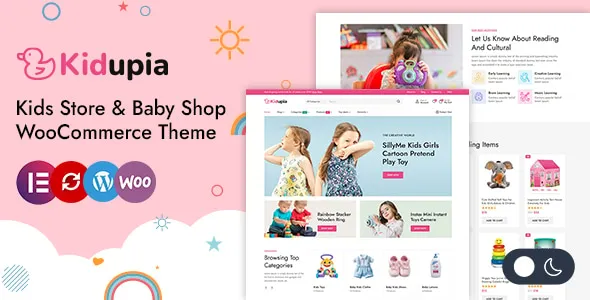
Kidupia – Kids Fashion & Toy Store WordPress WooCommerce Theme
Kidupia – Kids Fashion & Toy Store WordPress WooCommerce Theme is a website design solution for businesses selling children’s clothing, baby apparel, toys, educational games, accessories, and other products for kids. Designed for the children’s retail and eCommerce industry, Kidupia provides a potential foundation for creating an attractive online store where parents and families can explore products, compare options, and shop for items suited to their children’s needs. By combining WordPress with WooCommerce, this theme can be evaluated by store owners who want to build a flexible online shopping experience around kids’ fashion, toys, baby essentials, and children’s lifestyle products.
The children’s retail market includes a wide variety of products, from everyday clothing and seasonal outfits to educational toys, plush animals, building sets, school accessories, and gifts. An effective online store should help shoppers navigate these categories, understand product details, and complete purchases through a convenient checkout process. Kidupia can serve as a starting point for organizing these products through category pages, product listings, promotional sections, and brand-focused design elements. Its final capabilities depend on the theme version, available layouts, WooCommerce configuration, and any compatible plugins used to extend the store.
Whether you operate a children’s clothing boutique, an online toy shop, a baby products business, or a general kids’ lifestyle store, Kidupia offers a theme concept aligned with this retail niche. With thoughtful customization, accurate product information, quality product photography, and a well-organized shopping structure, businesses can create a professional eCommerce website that presents their products clearly and helps customers shop with confidence.
What Is Kidupia – Kids Fashion & Toy Store WordPress WooCommerce Theme?
Kidupia is a WordPress WooCommerce theme positioned for online stores that specialize in children’s fashion, toys, and related products. Its intended audience includes retailers that want to present products in a family-friendly shopping environment while maintaining a consistent brand identity.
A kids’ fashion store may use a website built with Kidupia to showcase clothing collections, footwear, accessories, and seasonal outfits. A toy retailer may focus on educational games, puzzles, construction toys, dolls, action figures, and creative play products. Businesses selling a combination of clothing and toys can organize their inventory into distinct categories to help shoppers find relevant items.
WordPress provides the content management platform, while WooCommerce supports core eCommerce functions such as product management, shopping carts, order processing, and checkout when configured appropriately. Compatible extensions can provide additional functionality, depending on the store’s needs.
The precise layouts, product display options, customization controls, and integrations included with Kidupia should be confirmed through the current product demo and documentation. Features such as advanced product filtering, wishlists, product comparisons, size guides, or loyalty programs may require specific theme support or additional plugins.
Build a Professional Online Kids Store
An online store for children’s products should combine appealing presentation with clear navigation and practical shopping tools. Parents and gift buyers often browse several product categories in one visit, so the website should help them move between clothing, toys, accessories, and other items without confusion.
Kidupia can be evaluated as a starting point for an online store that introduces featured collections, promotes popular products, and organizes inventory into easy-to-understand categories. The homepage can communicate the store’s identity, highlight selected products, and guide visitors toward relevant shopping sections.
A clothing retailer might emphasize new arrivals, everyday essentials, seasonal outfits, and special-occasion wear. A toy store may feature educational games, creative play products, outdoor toys, and gift ideas. A combined store can provide separate navigation paths for fashion and toys while maintaining a consistent visual identity.
Clear product categories are especially useful when the catalog grows. Instead of placing every item in one long listing, group products according to their type, intended age range, size, or other meaningful attributes where appropriate.
With suitable customization and a properly configured WooCommerce installation, Kidupia can help retailers develop an organized online shopping experience that supports browsing, product discovery, and purchasing.
Children’s Clothing and Fashion Collections
Children’s fashion includes everyday wear, party outfits, seasonal clothing, sleepwear, footwear, and accessories. An online store should present these products in a way that makes it easy for shoppers to understand available styles, sizes, colors, and materials.
Kidupia can be considered for a children’s clothing store that organizes its inventory into collections for babies, toddlers, and older children, where these categories match the products offered. Dedicated sections may also cover tops, T-shirts, shirts, dresses, trousers, shorts, jackets, sweaters, pajamas, and other clothing types.
Product pages should provide useful information about fit, fabric, care instructions, available sizes, and color options. A size guide can help parents select suitable clothing, while clear photographs can show garment details and styling.
Seasonal collections can make browsing more convenient. Retailers may highlight summer clothing, winter essentials, festive outfits, schoolwear, or special-occasion apparel depending on the time of year and their inventory.
Accurate product information is essential. Size availability should be kept current, and product descriptions should avoid unsupported claims about materials, durability, or manufacturing practices. If a garment has specific care requirements, include them clearly.
A well-organized fashion catalog helps customers compare options and reduces uncertainty during online shopping. Kidupia can provide a design foundation for presenting these collections in a consistent and visually appealing way.
Toy Store Categories and Educational Products
Toys are an important category in children’s retail, ranging from simple play items to educational products that encourage creativity, problem-solving, and imaginative play. A well-structured toy store helps shoppers find products suited to different interests and age groups.
Kidupia may be suitable for retailers selling puzzles, building blocks, board games, dolls, plush toys, toy vehicles, craft kits, pretend-play sets, and outdoor play products. Dedicated categories can help customers navigate the catalog according to product type, intended age range, or play activity.
Educational toys can be presented with clear descriptions of their intended use, included components, and recommended age range as provided by the manufacturer. Products designed for creative activities may include details about materials and instructions, while games can explain the number of players and general play requirements.
Product safety information deserves particular attention when selling toys for children. Retailers should publish accurate age recommendations, warnings, and relevant manufacturer guidance. Small parts, batteries, magnets, and other product-specific considerations should be described according to the applicable product information.
Clear photography and informative descriptions help parents and gift buyers understand what they are purchasing. By organizing toy categories thoughtfully, a Kidupia-based store can make product discovery easier and present a broad inventory without overwhelming visitors.
Baby Products and Everyday Essentials
Many children’s retailers also sell products for babies and toddlers, including clothing, soft toys, blankets, nursery accessories, and other everyday essentials. These products may appeal to parents, relatives, and gift buyers looking for practical or special items.
Kidupia can be evaluated for a store that combines baby products with children’s fashion and toys. Depending on the retailer’s catalog, categories may include newborn clothing, bodysuits, baby blankets, bibs, soft toys, nursery accessories, and gift sets.
Product pages should communicate essential details such as dimensions, material composition, washing instructions, intended use, and manufacturer-provided age guidance. Where relevant, include product safety information and clear instructions for care.
For products intended for infants, accurate labeling and responsible presentation are particularly important. Retailers should not make unsupported health, safety, or developmental claims. Any applicable safety certifications or standards should be mentioned only when they are verified for the specific product.
Gift collections can also help customers shop for baby showers, birthdays, and other occasions. Organizing these items into relevant categories can reduce the time needed to find suitable products.
A carefully structured baby essentials section can broaden the store’s product range while maintaining a consistent shopping experience.
WooCommerce eCommerce Functionality
WooCommerce is an eCommerce platform for WordPress that supports product catalogs, carts, checkout, orders, and related store management functions. When used with a compatible theme such as Kidupia, it provides the foundation for operating an online retail website.
Store owners can use WooCommerce to create product pages, organize items into categories, manage product prices, and configure inventory settings. Depending on the product type and store configuration, products may include variations such as clothing sizes, colors, or other selectable options.
WooCommerce also supports order management and a range of payment and shipping integrations. The available payment methods, delivery options, taxes, and checkout behavior depend on the store’s settings, location, chosen providers, and compatible extensions.
Kidupia’s role is to provide the visual presentation and theme-level styling supported by its current version. Before purchasing or installing the theme, review the demo and documentation to confirm compatibility with the WooCommerce version and the specific store features required.
Test the complete shopping journey after configuration, from browsing a category to selecting product options, adding items to the cart, entering delivery information, and completing a test order. This helps identify issues before customers begin purchasing.
Homepage Design and Featured Product Sections
The homepage provides an opportunity to introduce the store’s brand, showcase selected products, and guide shoppers toward the most relevant categories. A clear layout can help visitors understand what the business sells without requiring them to explore every page.
A Kidupia-based website can be organized around an introductory banner, category links, featured products, new arrivals, popular items, seasonal collections, and promotional content, depending on the theme’s available layouts.
A children’s fashion store may highlight the latest clothing collection, while a toy retailer might feature educational games or gift ideas. A combined store can use distinct category sections to introduce both fashion and toys without making the homepage feel crowded.
Product cards should provide essential information, including the product name, price, available options where relevant, and a clear way to view details. Promotional messages should be accurate and reflect the actual terms of an offer.
The homepage should prioritize the products and categories most relevant to the target audience. Too many competing banners, pop-ups, or promotional sections can make shopping less convenient.
With thoughtful organization, the homepage can create a welcoming introduction and help shoppers reach product pages quickly.
Product Pages and Product Information
Product pages play a central role in eCommerce because they help customers decide whether an item meets their needs. For children’s clothing and toys, clear descriptions, accurate photographs, and practical specifications are particularly important.
Kidupia can be evaluated for presenting product information through WooCommerce product pages. The final layout and available presentation options depend on the theme version, WooCommerce settings, and any additional extensions.
A clothing product page should include the available sizes, colors, material details, fit information, and care instructions where applicable. Toy listings should describe the product’s contents, intended age range, dimensions, materials, and relevant usage or safety information based on verified manufacturer details.
High-quality product photography can show different angles, details, and color variations. Images should represent the actual item as accurately as possible, especially when customers cannot examine the product physically before purchase.
If products have variations, ensure that customers can select the correct option and see its availability. Inventory information should be updated to avoid accepting orders for unavailable sizes or items.
Product descriptions should answer common questions without unnecessary repetition. Accurate details can help customers compare products, make informed purchasing decisions, and understand what they will receive.
Product Categories, Filters, and Store Navigation
A clear category structure helps customers find products efficiently, especially when a store offers a large range of children’s items. Visitors may arrive looking for a specific garment, a birthday gift, an educational toy, or a product for a particular age group.
Kidupia can be considered for a store that organizes products into categories such as kids’ clothing, baby essentials, toys, educational games, accessories, and gift collections. Subcategories can divide large collections into more specific product types.
Depending on the theme’s capabilities and the selected WooCommerce extensions, shoppers may also be able to filter products by attributes such as size, color, price, brand, or age range. Verify which filtering tools are included and which require additional plugins.
Filters should use meaningful attributes that are consistently assigned to products. For example, a size filter will be useful only when clothing products have accurate size attributes, while an age filter requires reliable product information.
Navigation menus should prioritize the categories customers use most frequently. Avoid creating too many overlapping categories, as this can make browsing more confusing.
A well-planned product taxonomy improves store organization and helps shoppers discover relevant products with fewer steps.
Shopping Cart and Checkout Experience
A smooth checkout process is important for converting product interest into completed purchases. Customers should be able to review their selections, confirm quantities and variations, understand delivery charges, and complete payment without unnecessary confusion.
WooCommerce provides standard cart and checkout functionality, while the appearance and behavior of these pages depend on the theme, WooCommerce version, configuration, and installed extensions. Confirm how Kidupia presents these pages in its current demo and test the complete checkout process before launch.
The cart should clearly display product names, selected sizes or variations, quantities, prices, and available editing options. Delivery costs, taxes, discounts, and other charges should be communicated transparently before the order is finalized.
Checkout forms should request only the information needed to process and deliver the order. Clear labels and helpful error messages can reduce confusion when a required field is incomplete.
Offer payment methods that are appropriate for the business and its customers, subject to provider availability and applicable requirements. Confirm that payment confirmations, order notifications, and inventory updates work as expected.
Test the checkout process on mobile devices as well as desktop screens. A convenient and reliable shopping experience can help build trust and encourage repeat purchases.
Customization and Kids-Focused Brand Identity
A children’s store often benefits from a distinctive visual identity that feels welcoming, energetic, and suitable for its target audience. However, the design should remain easy to navigate and should not distract customers from product information.
Depending on the available theme settings and compatible editing tools, Kidupia may support adjustments to colors, typography, page layouts, images, spacing, and other visual elements. Review the current documentation to understand the actual customization options.
A children’s fashion boutique might choose a clean, contemporary design with prominent product photography. A toy store may use playful visual accents and category illustrations, while a baby products shop might prefer a softer and more minimal presentation.
Consistency is important across the homepage, category pages, product pages, checkout, and other key sections. A defined color palette and typography system can help create a recognizable brand experience.
Use relevant imagery and ensure that decorative elements do not make text difficult to read. Product photography should remain the focus of product listings, and promotional graphics should not obscure important details.
Before implementing substantial design changes, test them across different devices and keep a backup of the website. Thoughtful customization can help the store stand out while maintaining practical usability.
Mobile Shopping and Responsive Design
Many customers browse and purchase children’s products using smartphones. A mobile-friendly store should therefore make product discovery, option selection, cart management, and checkout convenient on smaller screens.
Kidupia should be evaluated across desktop, tablet, and mobile layouts to confirm how its navigation, images, product cards, and interactive elements respond to different screen sizes. Actual behavior depends on the theme implementation, additional plugins, and any custom changes.
On mobile devices, product images should fit the screen, text should remain readable, and buttons should be easy to tap. Size selectors, quantity controls, filters, and checkout fields should be usable without requiring awkward horizontal scrolling.
Parents shopping on a phone may need to compare several products quickly, so important information such as price, size availability, and product details should be easy to find.
Responsive performance can be affected by large images, third-party scripts, sliders, and additional widgets. Optimize images and review unnecessary design elements that may slow down loading.
Test the complete shopping process on common screen sizes, including product selection, cart updates, address entry, and payment. A consistent mobile experience can make the store more accessible and convenient for customers.
Search Engine Optimization for Kids Fashion and Toy Stores
Search engine optimization can help customers discover a children’s eCommerce store through relevant search queries. A suitable theme contributes to the website’s presentation, but search visibility also depends on product content, technical setup, competition, site performance, and ongoing optimization.
Begin with a logical category structure. Create distinct pages for important product groups, such as children’s clothing, baby essentials, educational toys, and accessories, when these categories match the store’s inventory.
Product titles should accurately describe each item and include relevant attributes when useful. Product descriptions should explain features, materials, sizing, intended use, and other details that customers may need to make a decision.
Avoid copying manufacturer descriptions without review or publishing large numbers of nearly identical product pages. Original, useful descriptions can help distinguish the store and provide more value to shoppers.
Descriptive URLs, meaningful internal links, optimized images, and clear heading structures can support website organization. Compatible SEO plugins may help manage metadata, XML sitemaps, canonical settings, and other technical elements.
Category pages can include concise introductory content that helps visitors understand the products available. However, unnecessary keyword repetition should be avoided, particularly when it makes descriptions less useful.
No theme can guarantee search rankings or sales. Effective eCommerce SEO requires relevant product information, sound technical practices, useful category pages, and regular monitoring.
Content Marketing and Shopping Guides
Content marketing can help children’s retailers provide useful information while introducing relevant products. Shopping guides and educational articles can answer common customer questions and support product discovery.
Kidupia can be evaluated for a store that combines product listings with WordPress blog content, depending on the available templates and configuration.
A children’s fashion retailer might publish guides about selecting clothing sizes, caring for different fabrics, organizing seasonal wardrobes, or choosing outfits for special occasions. A toy store could create articles about age-appropriate play products, creative activities, or selecting gifts for birthdays and holidays.
Content should remain accurate and practical. Age recommendations and product suitability should be based on verified manufacturer information rather than broad assumptions about children’s development.
Internal links can connect relevant articles to category pages or individual products. For example, a guide about selecting winter clothing can link to the store’s winter collection, while a gift guide can direct readers to appropriate toy categories.
A consistent publishing schedule is often more useful than producing large quantities of repetitive content. Review older articles periodically to ensure that product links, prices, availability references, and recommendations remain current.
Useful content can strengthen the store’s information resources and help customers make more informed purchasing decisions.
Discounts, Seasonal Promotions, and Gift Collections
Seasonal campaigns and gift collections can help retailers organize products around customer needs and shopping occasions. Children’s stores may promote birthday gifts, holiday collections, school essentials, seasonal clothing, or special offers depending on their inventory.
WooCommerce supports product pricing and coupon features, while additional promotional options depend on the store configuration and compatible extensions. Confirm whether Kidupia includes any theme-specific promotional layouts or whether additional tools are needed.
A promotional banner should explain the offer clearly, including relevant dates, eligibility conditions, and exclusions where applicable. Avoid displaying expired discounts or advertising savings that cannot be verified.
Gift collections can group products by age range, interest, price range, or occasion when reliable product information supports those categories. This can help shoppers who are looking for a suitable present but do not know exactly which item to choose.
For seasonal collections, plan content and inventory updates ahead of time. Remove unavailable products and revise banners when a campaign ends.
Promotions should complement the store’s regular navigation rather than overwhelm it. Clear category links and accurate product details remain essential even during major sales events.
Website Performance and Loading Speed
Website speed affects how comfortably customers can browse products and complete purchases. A slow store may frustrate visitors, particularly when browsing image-heavy catalogs on mobile devices.
The performance of a Kidupia website depends on the theme implementation, hosting, product images, fonts, scripts, plugins, and third-party services. A responsive layout does not automatically guarantee fast loading, so performance should be tested after the store is configured.
Optimize product photographs by using suitable dimensions and compressed file formats while maintaining enough detail to show the items accurately. Avoid uploading unnecessarily large images or using too many heavy visual effects.
Review plugins and external scripts for their impact on loading time. Caching and other optimization tools may help, depending on the website’s configuration, but they should be tested for compatibility with WooCommerce and the checkout process.
Test the homepage, category pages, product pages, cart, and checkout. These sections may behave differently, especially when they include filters, galleries, or payment integrations.
Regular monitoring can help identify performance issues as the catalog grows. A fast and stable website supports a more convenient shopping experience and can contribute to broader technical SEO efforts.
Secure Payments and Customer Trust
Trust is essential for an online store that sells products for children and families. Customers should be able to understand the purchasing process, review product information, and identify the business’s policies before placing an order.
WooCommerce can integrate with supported payment gateways, but the available options depend on the retailer’s country, payment provider, account setup, and installed extensions. Configure payments through reputable providers and follow their security and verification requirements.
Use HTTPS across the website and maintain appropriate access controls for store administrators. Keep WordPress, WooCommerce, the theme, and plugins updated, with backups available before significant changes.
Publish clear shipping, return, refund, and privacy policies that reflect the store’s actual practices and applicable consumer requirements. Explain how customers can contact the business if they have a question about an order.
Avoid collecting unnecessary personal information during checkout. Review third-party integrations to understand what customer data they process and how it is handled.
Test payment confirmations, failed-payment messages, order notifications, inventory updates, and refund procedures. Reliable store operations help reduce confusion and support a more professional shopping experience.
Shipping, Inventory, and Store Management
Managing stock and delivery information is an important part of operating a children’s fashion and toy store. Customers need to know whether an item is available, when it may be dispatched, and what delivery options apply to their order.
WooCommerce provides inventory and order management features that can be configured according to the store’s needs. Product variations can be useful for clothing sizes and colors, while separate product listings may be appropriate for different toy models or product bundles.
Kidupia’s theme-level features should be reviewed separately from WooCommerce’s standard store functionality. Shipping calculations, delivery tracking, stock alerts, and advanced inventory workflows may require configuration or additional extensions.
Maintain accurate stock records and update product availability promptly. If an item becomes unavailable, the website should not continue presenting it as ready for immediate purchase unless a suitable backorder or preorder arrangement has been clearly established.
Shipping information should explain the service areas, estimated delivery arrangements, charges, and any relevant restrictions. If delivery estimates vary by location, communicate this before customers complete their orders.
Regularly review order status, inventory levels, and product details. A consistent management process can help reduce fulfillment errors and keep customer information accurate.
Who Should Use Kidupia – Kids Fashion & Toy Store WordPress WooCommerce Theme?
Kidupia may be suitable for a variety of retailers and businesses focused on products for children and families.
Kids’ clothing stores: Retailers selling T-shirts, shirts, dresses, trousers, jackets, sleepwear, and other children’s apparel can organize their collections into clear categories.
Toy shops: Businesses offering puzzles, dolls, building sets, games, plush toys, and creative play products can create a structured product catalog.
Baby product stores: Retailers selling baby clothing, blankets, soft toys, and selected nursery accessories can present their products in a dedicated section.
Children’s footwear and accessories retailers: Stores can organize shoes, bags, hats, and other accessories according to the products they carry.
Educational toy businesses: Retailers can highlight learning games, activity kits, puzzles, and other products using accurate age guidance and descriptions.
Gift shops: Businesses selling children’s gifts can organize products around birthdays, holidays, celebrations, and other occasions.
Kids’ lifestyle brands: Brands combining clothing, accessories, toys, and related products can use a unified store structure to present multiple collections.
New eCommerce businesses: Entrepreneurs entering the children’s retail market can evaluate the theme as part of a broader WordPress and WooCommerce store setup.
The best choice depends on the product catalog, desired shopping experience, and required integrations. Businesses should confirm that the theme supports their design goals and works with the WooCommerce features they plan to use.
Tips for Building a Successful Online Kids Store with Kidupia
A successful children’s eCommerce store should combine attractive product presentation with accurate information, convenient navigation, and reliable order processing.
Start by defining the main product categories and target customers. Decide whether the store will focus on clothing, toys, baby products, or a combination of these categories. Organize the catalog so shoppers can find products without navigating an unnecessarily complicated menu.
Prepare clear product descriptions and use high-quality photographs that accurately represent the items. Include sizes, materials, care instructions, dimensions, age guidance, and safety information where relevant and verified.
Create a consistent brand identity through colors, typography, product photography, and promotional graphics. Keep important information readable and avoid adding decorative elements that make the shopping process harder to follow.
Configure WooCommerce carefully, including product variations, stock management, payment methods, shipping settings, taxes where applicable, and customer notifications. Test the complete purchase journey before launch.
Develop useful content such as size guides, product care instructions, gift guides, and educational articles. Review content regularly and remove outdated promotions or unavailable products.
Finally, test the website across desktop and mobile devices, check performance, verify all forms and payment flows, and maintain regular backups and software updates. These practices help create a more dependable store as the business grows.
Final Thoughts on Kidupia – Kids Fashion & Toy Store WordPress WooCommerce Theme
Kidupia – Kids Fashion & Toy Store WordPress WooCommerce Theme is a potential option for retailers seeking to build an online store focused on children’s clothing, toys, baby products, accessories, and family-oriented shopping. Its niche positioning makes it relevant to businesses that need to present product collections, organize a WooCommerce catalog, and develop a recognizable brand identity.
A well-planned store can combine clear category navigation, informative product pages, responsive layouts, secure payment integrations, and a convenient checkout process. Children’s fashion retailers can emphasize clothing collections and size information, while toy stores can focus on product descriptions, age guidance, and gift ideas.
The final capabilities depend on the theme version, available layouts, WooCommerce configuration, and compatible plugins. Reviewing the current product demo and documentation before installation helps ensure that the selected setup meets the store’s requirements, particularly for product filters, wishlists, promotional tools, and other advanced features.
Long-term success also depends on accurate product information, effective SEO, website performance, secure transactions, and dependable order management. A theme alone cannot guarantee search rankings or sales, but it can provide a useful foundation for a well-organized online shopping experience.
For businesses planning to sell children’s fashion and toys through WordPress, Kidupia is worth evaluating against their catalog, branding, and operational needs. With thoughtful customization, quality product presentation, and consistent store maintenance, a professional WooCommerce website can help customers discover products and shop with greater confidence.