My Account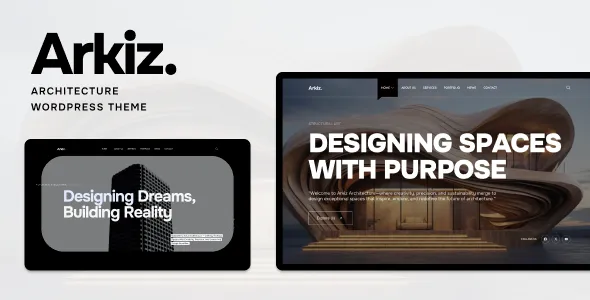
Arkiz | Architecture WordPress Theme
Arkiz | Architecture WordPress Theme is a website design solution for architects, interior designers, architecture studios, construction professionals, and creative firms looking to establish a professional online presence with WordPress. Designed around the needs of architecture-focused websites, Arkiz can serve as a starting point for presenting architectural projects, showcasing design expertise, introducing professional services, and communicating a studio’s creative vision. Whether you are developing a website for an architecture firm, an independent architect, an interior design consultancy, or a multidisciplinary design studio, this architecture WordPress theme offers a foundation for organizing business information and visual project content in a structured online environment.
Architecture websites need to balance strong visual presentation with practical navigation and informative content. Potential clients often want to explore completed projects, understand the firm’s design philosophy, learn about available services, and find a straightforward way to discuss their requirements. Arkiz can be considered for projects that need to communicate these details while maintaining a cohesive brand identity. With appropriate customization, relevant photography, and carefully written content, website owners can create a digital portfolio that reflects their professional approach and helps visitors understand their capabilities.
WordPress provides a flexible content management system for publishing project pages, service descriptions, company information, articles, and contact details. A suitable architecture theme helps establish a consistent visual structure for this content while allowing the website to evolve as the business grows. The precise layouts, customization controls, integrations, and other capabilities available with Arkiz depend on the current theme version and its documentation. Reviewing the official demo and technical requirements before installation is recommended to confirm that the theme matches your website goals.
What Is Arkiz Architecture WordPress Theme?
Arkiz is an architecture-focused WordPress theme intended for professionals and businesses that want to present their work through a dedicated website. Architecture projects frequently involve visual storytelling, technical expertise, spatial planning, and attention to detail. A website designed for this industry should make it easy for visitors to explore projects while learning about the people and processes behind them.
An architecture WordPress theme provides a starting structure for organizing this information. Instead of building every page design from scratch, website owners can customize an existing theme framework to suit their brand, audience, and services. Depending on the available templates and configuration options, an Arkiz-based website may be organized around a homepage, project portfolio, service pages, company profile, articles, and contact information.
Architectural practices can use their websites to introduce residential designs, commercial buildings, renovation work, interior concepts, landscape projects, or other areas of specialization. Interior designers may emphasize material choices, spatial arrangements, lighting concepts, and finished interiors. Construction and design consultancies may focus on project coordination, planning, technical capabilities, and professional experience.
The objective is to create a website that reflects the business accurately and makes its information easy to understand. Before selecting Arkiz for a production website, review its current documentation, included layouts, WordPress compatibility, and any required plugins to ensure that its capabilities align with the intended project.
Responsive Design for Architecture Websites
Responsive design is important for architecture websites because visitors may browse a portfolio on a desktop computer, review project photographs on a tablet, or search for a design professional using a smartphone. A responsive website adapts its layout to different screen sizes, helping visitors access information without struggling with oversized images, crowded navigation, or difficult-to-read text.
For an architecture firm, responsive presentation is particularly important because project photography and visual details often play a central role in communicating design quality. Images should fit the available screen space, project descriptions should remain readable, and navigation should be convenient on smaller devices.
When configuring Arkiz, website owners should test how the homepage, project galleries, service pages, articles, and contact forms appear across different screen sizes. Large architectural photographs may need suitable dimensions and compression to preserve visual quality without unnecessarily slowing page loading.
Mobile usability also depends on the site’s navigation, typography, buttons, spacing, and interactive elements. A menu that works well on a desktop may require different behavior on a smartphone. Similarly, long project descriptions should be divided into logical sections so that visitors can scan the content easily.
Responsive behavior should be evaluated on the complete website rather than assumed from the theme’s promotional screenshots. Custom styling, page-building tools, embedded media, and additional plugins can influence the final result. Testing the configured website before launch helps identify issues and supports a more consistent experience across devices.
Architecture Portfolio and Project Presentation
A professional portfolio is one of the most important components of an architecture website. Prospective clients often want to see examples of completed work before deciding whether to contact a studio. A well-organized portfolio allows visitors to explore a firm’s design approach, understand its experience, and evaluate whether its work aligns with their expectations.
Arkiz can be evaluated as a foundation for presenting architecture projects in a structured format, subject to the portfolio layouts supported by the installed version. Projects may include residential buildings, commercial developments, office interiors, hospitality spaces, renovation work, landscape design, or other architectural assignments.
Each project should communicate more than its visual appearance. A useful project page can include the project name, location where appropriate, project type, design objectives, scope of work, materials, challenges, and final outcome. When information is available and approved for publication, the page may also identify the architect, design team, completion date, or other relevant project details.
High-quality photographs help communicate spatial relationships, materials, lighting, and architectural details. Drawings, diagrams, plans, and renderings may also be useful when they help explain the design process. Images should be selected carefully to maintain a consistent presentation across the portfolio.
Organizing projects by category can make navigation easier for visitors. For example, an architecture studio might separate residential projects from commercial buildings, while an interior design firm could organize its portfolio by homes, offices, hospitality spaces, and retail environments. Use only categories that reflect the firm’s actual work.
A focused portfolio is often more effective than an unstructured collection of images. Prioritize representative projects, provide useful context, and make it easy for visitors to move from a project page to related services or contact information.
Website Design for Architecture Firms
Architecture firms need websites that communicate professional expertise, design philosophy, and the range of services they provide. A well-structured website can introduce the firm, explain its approach, demonstrate experience, and help prospective clients understand how to begin a project discussion.
Arkiz can be considered for an architecture firm website that brings these elements together through consistent layouts and carefully organized content. The exact page structures available depend on the theme version and supported customization tools.
A homepage can introduce the studio’s identity, highlight selected projects, summarize its main services, and direct visitors toward more detailed information. An About page can explain the firm’s background, design principles, professional experience, and working approach. Dedicated service pages can describe the types of projects the firm accepts and the stages involved in its work.
Architecture firms may also need pages for their team, project process, professional credentials, publications, or frequently asked questions. These sections should be included when they provide useful information rather than simply increasing the number of pages.
Clear communication is especially important for prospective clients who may be unfamiliar with architectural terminology. Explain services in accessible language and describe the firm’s role in each stage of a project. If the firm offers consultations, planning, design development, documentation, or project coordination, describe the scope accurately and avoid promising services that are not available.
A consistent website structure can help visitors understand the firm and identify the information they need before making contact.
Interior Design Studio Website
Interior designers rely on visual presentation to communicate their understanding of space, color, materials, lighting, furniture, and functionality. A professional website can showcase completed interiors while explaining the studio’s design philosophy and service offerings.
Arkiz may be suitable for an interior design website that combines project imagery with detailed descriptions of the work, depending on its available layouts and customization options. Designers can organize their websites around residential interiors, commercial spaces, hospitality projects, retail environments, renovation work, or other specializations.
A portfolio entry can introduce the client’s objectives, the space’s original condition, the design concept, material selections, and the completed result. Before-and-after images may help visitors understand the transformation when they are available and authorized for use. Captions can provide context about the design decisions behind each project.
Interior design websites should maintain a consistent visual language. Carefully selected photographs, restrained typography, balanced spacing, and readable project descriptions can help the work remain the focus. A cohesive layout also makes it easier for visitors to compare different projects.
Service pages can explain whether the studio offers full interior design, space planning, consultation, furniture selection, styling, renovation planning, or other services. The descriptions should reflect the actual scope of work and the studio’s professional qualifications.
By combining a focused portfolio with clear service information, an interior design studio can use its website to communicate its capabilities and encourage suitable project inquiries.
Services Pages for Architects and Designers
Service pages help visitors understand what an architecture or design business offers. Instead of relying on a brief list of service names, a professional website should explain the purpose of each service, the types of clients it supports, and the general process involved.
An Arkiz-based website can be organized around dedicated service pages when the theme’s supported layouts and configuration allow. These pages may cover architectural design, residential planning, commercial architecture, interior design, renovation consulting, space planning, or project coordination, depending on the firm’s actual capabilities.
A residential architecture page might explain how the firm approaches client requirements, site conditions, space planning, materials, and design development. A commercial architecture page could describe the considerations involved in designing offices, retail premises, or other business spaces. An interior design page may explain how functionality, circulation, lighting, finishes, and furniture contribute to a coherent interior.
Each page should answer practical questions. What does the service include? Who may benefit from it? What information is needed to begin? What are the usual stages of the process? Are there specific project types the firm specializes in?
Clear answers help prospective clients understand whether the service is appropriate for their requirements. Relevant project examples can provide additional context and connect the service description with real work.
Avoid vague descriptions that repeat the same phrases across every page. Original content tailored to each service is more useful to visitors and can also support a stronger search engine optimization strategy.
Homepage Layout and Visual Storytelling
The homepage provides an introduction to the architecture firm and guides visitors toward the most important parts of the website. It should communicate the studio’s identity quickly and make it easy to explore projects, services, and professional information.
When customizing Arkiz, website owners can plan the homepage around the layout elements supported by the theme. A useful structure may include a concise introduction, selected portfolio projects, a services overview, a brief studio profile, and a contact section.
The opening section should explain what the firm does and what kind of work it specializes in. A strong architectural photograph can support the message, while a clear heading helps visitors understand the business without needing to search through several sections.
Featured projects can demonstrate the firm’s visual approach and direct visitors to detailed case studies. A services summary can introduce the firm’s main offerings, with links to dedicated pages for additional information. A studio introduction can communicate the firm’s values, experience, or design philosophy.
The homepage should not attempt to display every project and every service at once. Too many competing sections can make the page difficult to navigate and weaken the impact of the strongest content.
Choose imagery that reflects the firm’s actual work and use consistent visual treatments across the page. Each section should have a clear purpose, whether it introduces the business, showcases expertise, answers a question, or encourages a relevant next step.
Customization and Brand Identity
An architecture website should reflect the identity of the practice rather than look like an unchanged template. Branding choices help communicate the firm’s personality, professional positioning, and approach to design.
Depending on its current version and supported tools, Arkiz may provide options for adjusting layouts and visual elements such as colors, typography, spacing, images, and other presentation details. Consult the theme’s documentation to confirm the customization features available before planning extensive design changes.
A contemporary architecture studio may prefer a minimal visual approach with generous whitespace and strong project photography. A residential design practice might use warmer colors and inviting imagery, while a commercial architecture firm may prefer a more structured presentation. The appropriate style depends on the firm’s audience and brand identity.
Consistency is more important than decorative complexity. Use a defined color palette, a clear heading hierarchy, readable body text, and consistent button styles. Navigation labels should be understandable, and important information should remain easy to locate throughout the site.
Project photography should be treated as part of the brand presentation. Use images that represent the quality and character of the firm’s work, and ensure that the studio has the appropriate rights to publish them.
Before making extensive customizations, identify which design elements are controlled by the theme, the WordPress editor, a page builder, or additional plugins. Maintain backups and consider testing significant changes in a staging environment before updating the live website.
WordPress Content Management for Architecture Websites
WordPress provides a content management system that allows website owners to publish and maintain pages, articles, images, and other website information through an administrative interface. This flexibility can be useful for architecture firms that regularly add projects, update services, or publish news.
Arkiz provides a theme-based starting point for a WordPress website, while the exact content-management workflow depends on the installed version, the editing tools it supports, and any additional plugins.
A firm can maintain a set of essential pages covering its background, services, portfolio, team, and contact details. New projects can be added as work is completed, while blog articles can explain design concepts, discuss materials, or answer common questions from prospective clients.
A consistent publishing process helps keep the website organized. Each project should follow a repeatable structure for titles, descriptions, photography, project details, and related links. This makes the portfolio easier to maintain as the firm’s body of work expands.
Website administrators should also review older content periodically. Outdated contact information, broken links, unavailable services, or incomplete project details can create a poor impression. Updating information helps ensure that the website remains a reliable representation of the business.
Before installation, review the theme documentation to understand its supported editing methods, recommended plugins, and any setup requirements. A clear content-management process can make ongoing maintenance more manageable.
SEO-Friendly Structure for Architecture Websites
Search engine optimization can help an architecture or interior design website become more discoverable when potential clients search for relevant services. A theme can provide a foundation for organizing website content, but search visibility also depends on useful information, technical quality, competition, and the website’s overall SEO implementation.
Start with a logical site structure. Important pages should have descriptive titles, clear headings, meaningful URLs, and content that addresses the needs of their intended audiences. An architecture firm may benefit from separate pages for residential architecture, commercial design, interior design, renovation services, and other genuine specializations.
Location-based content can be useful when a firm serves a defined geographic area. For example, a practice may explain the types of projects it handles in its service region, provided the information is accurate. Avoid creating repetitive location pages that offer no distinct value to visitors.
Project pages can support SEO by providing original descriptions of the work. Instead of publishing only photographs, explain the project’s goals, design approach, relevant constraints, and completed outcome. Use descriptive image filenames and meaningful alternative text where appropriate.
Internal links can connect project examples with relevant service pages and related articles. This helps visitors discover additional information and creates a more understandable relationship between website sections.
Compatible SEO plugins may assist with metadata, XML sitemaps, redirects, and other supported settings. Website owners should also monitor indexing, broken links, duplicate content, and page performance.
No WordPress theme can guarantee search rankings or traffic. A useful SEO strategy combines a suitable website structure with original content, technical maintenance, and ongoing improvements based on user needs.
Blog and Content Marketing for Architecture Firms
A blog can help architecture firms demonstrate expertise, explain design concepts, and answer questions that prospective clients may have before starting a project. Informative content can also support the firm’s wider digital marketing strategy by giving visitors useful reasons to explore the website.
Arkiz can be evaluated for a website that combines portfolio pages with articles and company updates, depending on the blog layouts and templates available in the installed version.
Potential topics include architectural planning, sustainable design principles, renovation considerations, interior design ideas, material selection, lighting strategies, space optimization, and the general stages of a building project. Firms should publish topics that reflect their genuine expertise and the interests of their intended audience.
An article might explain what homeowners should consider before renovating a property, while another could discuss how lighting affects the experience of an interior space. A commercial architecture practice may publish guidance about office planning, workplace functionality, or the considerations involved in adapting an existing building.
Useful articles should be clear, accurate, and practical. Use headings to organize longer explanations, add relevant images when they improve understanding, and link to related services or project examples where appropriate.
A sustainable publishing schedule is generally more useful than producing large amounts of repetitive content. Prioritize quality, originality, and relevance so that the blog becomes a helpful resource for clients and readers.
Lead Generation and Contact Opportunities
An architecture website should make it easy for potential clients to start a conversation. Visitors may want to discuss a new building, request information about a renovation, explore interior design services, or ask whether a studio is available for a particular project.
An Arkiz-based website can include clear contact opportunities using the layouts and compatible integrations supported by its configuration. Depending on the firm’s needs, these may include a contact page, inquiry form, consultation request, email address, telephone number, or other appropriate communication channels.
A project inquiry form should request only the information needed to begin a useful conversation. Common fields may include a name, email address, project type, location, approximate project stage, and a short description of the requirements. Additional details can be collected later when necessary.
Clear labels and concise instructions help visitors complete forms without confusion. The website should provide an understandable confirmation after submission and make alternative contact methods available when appropriate.
Calls to action should be relevant to the page. A project portfolio may invite visitors to discuss a similar project, while a service page could encourage them to request further information.
Before launch, test form validation, email delivery, confirmation messages, and spam protection. Check that forms work on mobile devices and that the business can respond to inquiries promptly. These practical steps help create a more reliable contact experience.
Website Performance and Image Optimization
Performance matters for architecture websites because project galleries and large photographs can contain substantial amounts of visual data. A visually impressive design should still load efficiently and remain convenient to use on different devices.
The performance of an Arkiz website depends on its implementation, hosting environment, image sizes, scripts, plugins, fonts, and third-party integrations. Responsive layouts alone do not guarantee fast loading, so performance should be tested after the website has been configured.
Start by optimizing images. Architectural photography should retain enough detail to communicate materials and spatial qualities, but unnecessarily large files can slow down page loading. Use appropriate dimensions, modern image formats where supported, and compression that preserves acceptable visual quality.
Avoid loading excessive animations, external widgets, or scripts that do not contribute meaningfully to the visitor experience. Review plugins periodically and remove redundant tools where appropriate.
Caching and other performance solutions may help, depending on the hosting setup and website requirements. Use testing tools to identify actual bottlenecks rather than installing several overlapping optimization plugins without a clear need.
Test important pages, including the homepage, portfolio galleries, project details, services, and contact forms. Review performance on both desktop and mobile devices, as the same page may behave differently across screen sizes and connection speeds.
Regular monitoring helps identify new issues as the website grows. Maintaining a balance between visual quality and loading efficiency supports a better overall experience.
Accessibility and Easy Navigation
A professional architecture website should make its information accessible and straightforward to navigate. Clear structure benefits visitors who want to explore a portfolio, compare services, read project details, or contact the studio.
When configuring Arkiz, use descriptive navigation labels, a logical heading hierarchy, readable typography, and sufficient contrast between text and backgrounds. Important information should not be communicated through color alone.
Images should include meaningful alternative text when they convey information relevant to the page. Decorative images can be handled appropriately so that they do not create unnecessary distractions for assistive technologies.
Interactive elements, such as menus, buttons, and forms, should be easy to identify and use. Form fields should have clear labels, while error messages should explain what needs to be corrected. Keyboard navigation should also be tested where practical.
Keep menus focused on the pages visitors need most. For an architecture firm, these may include Projects, Services, About, Journal, and Contact. Additional sections can be introduced when they provide clear value.
Accessibility depends on the theme, its configuration, the content, and any added components. Automated checks can identify some problems, but manual testing and usability reviews remain important. Regularly reviewing the site helps maintain a more inclusive and user-friendly experience.
Plugins and Integrations for WordPress
A WordPress architecture website may require additional plugins for contact forms, search engine optimization, analytics, security, backups, caching, and other functions. The right combination depends on the firm’s requirements and the features already available in the theme.
Before installing plugins alongside Arkiz, check compatibility with the current WordPress version and review the theme’s documentation. Consider the plugin’s maintenance history, support arrangements, licensing, security practices, and performance impact.
A contact form plugin may help manage project inquiries. An SEO plugin can assist with supported metadata and sitemap settings, while analytics tools may provide information about visitor behavior, subject to applicable privacy requirements.
Backup and security tools can support maintenance, while image optimization and caching solutions may improve performance when correctly configured.
Avoid adding multiple plugins that perform the same function without a clear reason. Overlapping tools can create conflicts and increase maintenance work. After installing or updating a plugin, test the relevant pages and user journeys, especially navigation, forms, project galleries, and mobile layouts.
A carefully selected set of integrations can extend the website’s functionality while keeping its management process organized.
Security and Website Maintenance
A professional website needs ongoing maintenance to remain reliable and secure. Installing a theme is only one part of the process; WordPress, plugins, content, access permissions, and backups also need regular attention.
Website owners should use reputable hosting, enable HTTPS, choose strong administrator passwords, and assign user permissions according to each person’s responsibilities. Keep WordPress, Arkiz, and compatible plugins updated carefully, with backups available before significant changes.
Download themes and plugins from trustworthy sources and review their compatibility before installation. Remove unused components when appropriate, and avoid giving administrative access to people who do not need it.
Backups should be created regularly and stored in a way that supports recovery if a technical issue or accidental change affects the website. Test the restoration process so that the backup can be used when needed.
Maintenance also includes checking the accuracy of published content. Review service descriptions, project information, team profiles, contact details, and article links periodically. Replace outdated information and correct broken links as they are discovered.
A planned maintenance routine helps protect the website’s reliability and supports a professional experience for visitors.
Who Should Use Arkiz Architecture WordPress Theme?
Arkiz can be evaluated by different professionals and organizations that need a website focused on architecture, design, and project presentation.
Architecture firms: Practices can create a website to introduce their design philosophy, display completed projects, and explain architectural services.
Independent architects: Individual professionals can establish an online portfolio that presents their experience, design approach, and selected work.
Interior designers: Design studios can showcase residential interiors, commercial spaces, renovations, and material concepts.
Architecture and planning consultants: Consultants can explain their areas of expertise and provide information about their professional services.
Construction and building design businesses: Relevant companies can organize project examples, business information, and service descriptions in one location.
Residential design studios: Practices specializing in homes can highlight floor plans, design concepts, completed residences, and renovation projects where relevant.
Commercial architecture practices: Firms working with offices, retail environments, hospitality spaces, and other commercial projects can organize their portfolios around their specializations.
Creative design studios: Multidisciplinary teams can use an architecture-focused website as a starting point for communicating their visual work and professional capabilities, provided the theme’s layouts suit their needs.
The best choice depends on the project’s requirements. Before using Arkiz for a live website, review the current demo, supported layouts, technical documentation, compatibility details, and customization options.
Tips for Building a Successful Website with Arkiz
A theme provides a design foundation, but a successful architecture website depends on the quality of its content and how effectively it communicates the firm’s work.
Begin by defining the website’s primary purpose. Decide whether the main objective is to attract residential architecture projects, present commercial work, promote interior design services, build a professional portfolio, or support several related activities.
Prepare the essential content before extensively customizing the site. This may include the firm’s introduction, service descriptions, project photographs, case studies, team information, and contact details. Using real content early helps determine which layouts are useful and which sections are unnecessary.
Choose representative projects and present them consistently. Each portfolio entry should include relevant images and a concise explanation of the project’s objectives and design approach. Ensure that images and client information are approved for publication.
Maintain a consistent visual identity through typography, colors, spacing, and image selection. Keep navigation simple and make important pages easy to locate. Each page should have a clear purpose and guide visitors toward useful information or a relevant next step.
Before launch, test the website on multiple screen sizes. Check image loading, navigation, contact forms, accessibility, spelling, internal links, and page performance. Confirm that all business information is accurate and that visitors can contact the firm through the intended channels.
Finally, establish a maintenance plan that includes backups, updates, performance reviews, and content improvements. Regular maintenance helps the website remain useful as the practice develops and its portfolio grows.
Final Thoughts on Arkiz Architecture WordPress Theme
Arkiz | Architecture WordPress Theme is a potential starting point for architects, interior designers, architecture studios, and related professionals who want to establish a dedicated online presence with WordPress. Its architecture-focused positioning makes it relevant to websites that need to communicate design expertise, organize project portfolios, introduce professional services, and provide clear contact opportunities.
A carefully planned architecture website can combine project photography, detailed case studies, service descriptions, studio information, and useful articles in a consistent visual environment. Architects can use portfolio pages to explain their design approach, while interior designers can highlight materials, lighting, spatial planning, and completed interiors. Firms can also use dedicated service pages to help prospective clients understand their capabilities.
The final capabilities of an Arkiz website depend on the installed theme version, its documented features, supported editing tools, and compatible plugins. Reviewing the official demo and documentation before installation helps establish whether the theme suits the project’s design and technical requirements.
Long-term success also depends on original content, responsive testing, accessibility, search engine optimization, website performance, security, and ongoing maintenance. A theme cannot guarantee rankings, inquiries, or business growth, but it can provide a useful foundation for a professional digital presence.
For architecture professionals seeking a WordPress-based website framework, Arkiz is worth evaluating alongside the firm’s content strategy and branding requirements. With thoughtful customization, meaningful project presentation, clear navigation, and consistent maintenance, an architecture website can help communicate expertise and support stronger connections with prospective clients.