My Account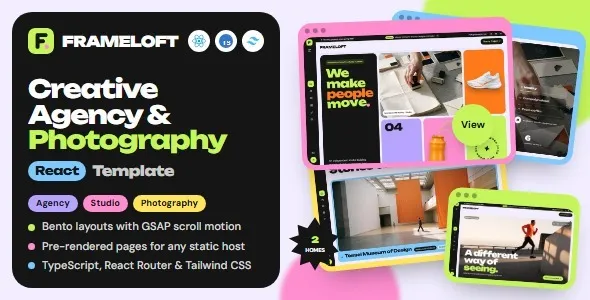
Frameloft – Creative Agency & Photography React Template
Frameloft – Creative Agency & Photography React Template is a modern website template designed for creative agencies, photographers, design studios, visual artists, freelancers, and digital professionals who want to showcase their work through a professional online presence. Built with React, Frameloft provides a potential foundation for creating visually engaging websites that highlight creative projects, photography portfolios, agency services, professional experience, and client collaborations. Its creative positioning makes it suitable for businesses and individuals who need a website that communicates their visual identity while helping visitors explore their work and discover available services.
Creative professionals rely on their websites to present a portfolio, explain their approach, and demonstrate the value of their services. Photographers may need to display image collections, describe photography packages, and introduce their specialties. Creative agencies may want to showcase branding projects, website designs, advertising campaigns, and case studies. Freelancers may need a central place to communicate their skills, experience, and contact information. Frameloft can be customized to support these different goals, depending on the layouts and components available in the supplied template package.
React is a JavaScript library used to build interactive user interfaces through reusable components. It can help developers organize a website into maintainable sections and create consistent experiences across multiple pages. With appropriate customization, Frameloft can serve as a starting point for a photography portfolio, creative agency website, visual storytelling platform, or personal portfolio. The exact page designs, animation effects, gallery functionality, routing setup, and other features depend on the template’s included files and documentation. Reviewing the current demo and technical requirements before implementation helps ensure that the template meets the needs of the project.
What Is Frameloft – Creative Agency & Photography React Template?
Frameloft is a React-based website template intended for creative businesses and professionals who need an organized platform for presenting visual work and professional services. Rather than building every page and interface component from the beginning, developers can use the existing template structure as a starting point and customize it according to their branding and content requirements.
A creative website typically needs to communicate its purpose quickly. Visitors should be able to understand what the business does, explore relevant projects, learn about the team or photographer, and find a convenient way to make contact. Frameloft can be adapted to support these goals through suitable page layouts, portfolio sections, service information, and contact pathways where available.
A photography studio may organize its website around wedding photography, portraits, commercial photography, events, or product images. A digital agency may focus on branding, web design, creative direction, marketing, and visual communication. An independent artist may prioritize selected work, a biography, exhibitions, commissions, and professional inquiries.
The best website structure depends on the audience and the type of work being presented. A portfolio should not simply display images without context; it should help visitors understand the creative approach, the project objectives, and the professional services available.
React Framework for Modern Creative Websites
React provides a component-based approach to building user interfaces. Developers can divide a website into reusable elements, such as navigation menus, project cards, service sections, image galleries, and contact forms. This approach can help maintain visual consistency and make future modifications easier.
For a creative website, reusable components are particularly useful when several pages share common design patterns. A portfolio page may use a consistent project-card structure, while service pages may share heading styles, content sections, and calls to action.
Frameloft can be customized within the structure provided by its React implementation. Developers should review how components are organized, how pages are rendered, and which dependencies are required before making significant changes. The exact routing approach, styling system, and build process depend on the included project files.
React itself does not automatically provide every website feature. Search engine configuration, form submission, content management, image delivery, analytics, and other requirements may need additional implementation or integrations.
By understanding the supplied codebase and following its established conventions, developers can adapt the template while maintaining a more consistent and manageable project structure.
Creative Agency Website Design
Creative agencies need websites that demonstrate both visual quality and professional capability. Prospective clients may be looking for branding, graphic design, website development, creative strategy, advertising, digital marketing, or photography services. The website should make those offerings easy to understand while presenting examples of the agency’s work.
Frameloft can be considered for an agency website that combines a compelling introduction with service summaries, selected projects, company information, and contact opportunities. The final page structure should reflect the components available in the template and the agency’s actual services.
A homepage can introduce the agency’s positioning and explain what makes its approach relevant to prospective clients. Featured projects can provide an immediate view of the agency’s creative direction, while service pages can explain specific offerings in more detail.
A project portfolio is more effective when it includes meaningful context. Each case study can describe the client’s objective, the creative challenge, the agency’s contribution, and the final deliverables. If measurable results are available and verified, they can be included to explain the project’s impact.
Clear calls to action can then guide interested visitors toward requesting a proposal, discussing a project, or making an inquiry.
Photography Portfolio for Professional Photographers
A photography portfolio is an important tool for communicating style, technical ability, and professional experience. Visitors often evaluate a photographer’s work before deciding whether to book a session or request a quotation.
Frameloft can be customized as a photography portfolio that presents selected images, photography categories, professional information, and contact details. Depending on the included layouts, developers may be able to organize the portfolio into separate collections or create individual project pages.
A wedding photographer might present wedding stories and engagement sessions. A portrait photographer could organize work around individual portraits, family sessions, and professional headshots. A commercial photographer may focus on product photography, advertising campaigns, architecture, or editorial work.
The portfolio should prioritize quality and relevance. Displaying a smaller collection of carefully selected photographs can be more effective than publishing every image from every assignment. Each collection should help visitors understand the photographer’s specialties and visual approach.
Image captions, project descriptions, and short explanations can provide additional context without distracting from the photography. The website should also make it easy to locate booking information and inquire about availability.
Responsive Layout for Desktop, Tablet, and Mobile
Creative websites often rely on large images and carefully arranged layouts, making responsive design especially important. Visitors may explore a portfolio on a desktop monitor, view a project on a tablet, or discover a photographer through a mobile search.
Frameloft should be tested across different screen sizes to confirm that its pages adapt appropriately. The actual responsive behavior depends on the included React components, CSS implementation, image handling, and any modifications made during development.
On mobile devices, navigation should remain easy to use, text should be readable, and portfolio images should fit the available screen space. Interactive controls should provide enough room for touch input, while calls to action should remain visible and understandable.
Responsive testing should include portfolio grids, individual project pages, service sections, contact forms, and any animated elements. Large images and unusual aspect ratios can introduce layout problems that are not obvious when testing only the homepage.
Developers should also check for horizontal overflow, overlapping content, distorted images, and excessively small text. A consistent mobile experience helps visitors explore creative work without unnecessary friction.
Visual Storytelling and Portfolio Presentation
Visual storytelling allows creative professionals to communicate the thinking and process behind their work. Instead of presenting a collection of disconnected images, a portfolio can guide visitors through projects in a way that demonstrates the professional’s approach and capabilities.
Frameloft can be used as a starting point for organizing visual projects into meaningful collections, depending on the available layouts. Each project can combine selected imagery with a concise description of the objectives, creative decisions, production process, and final outcome.
A branding project might show the original brief, visual identity development, logo applications, typography, and supporting materials. A photography project could present a sequence of images that communicates a particular atmosphere or narrative. A web design case study might explain the client requirements, interface decisions, and final digital experience.
Consistent project presentation helps visitors compare examples and understand the creative professional’s strengths. The content should remain concise enough to preserve visual impact while providing sufficient information for potential clients.
Only publish work that the photographer, agency, or artist has permission to display. Client confidentiality, image licensing, and model releases should be considered when preparing the portfolio.
Customization and Brand Identity
A creative website should reflect the identity of the person or organization it represents. A template provides a starting point, but thoughtful customization helps make the finished website distinctive and relevant to its audience.
Depending on the available source files and design system, Frameloft may be customized through changes to colors, typography, spacing, layouts, imagery, navigation, and content. Developers should confirm which styling methods are used in the project before modifying its design.
A minimalist photography portfolio might emphasize whitespace, restrained typography, and large images. A creative agency may prefer stronger visual contrasts and expressive project layouts. A personal portfolio could use a more individual presentation that reflects the professional’s working style.
Consistency is important across all pages. Heading styles, button treatments, colors, spacing, and image presentation should follow a coherent visual system. This helps visitors focus on the work rather than experience an unrelated design on every page.
Use original brand assets wherever possible. A recognizable logo, suitable photography, and carefully chosen colors can help the website communicate a more authentic professional identity.
Portfolio Galleries and Image Presentation
Image galleries are often central to photography and creative agency websites. They allow visitors to explore selected work, compare projects, and understand the visual quality of the services offered.
Frameloft may provide portfolio-oriented layouts or gallery components, depending on the current template package. Developers should verify whether the supplied implementation includes specific gallery behaviors or whether additional functionality is needed.
A gallery can organize images by project, category, client, or photography specialty. Filters may be useful when a portfolio contains many different types of work, but they should only be added when they improve navigation.
Image presentation requires careful attention to file sizes and display dimensions. High-resolution originals may be important for archival purposes, but serving unnecessarily large images to every visitor can slow down the website. Responsive image sizes and appropriate compression can help balance visual quality with performance.
Alternative text should describe meaningful images where appropriate, while captions can provide additional project information. The portfolio should also maintain consistent spacing and avoid mixing unrelated visual styles without a clear reason.
Services Pages for Creative Professionals
A portfolio demonstrates work, but service pages explain what a creative professional offers and how prospective clients can engage them. These pages help visitors determine whether the business is suitable for their project.
Frameloft can be adapted to present service information for photography studios, branding agencies, web designers, creative consultants, and other professionals, depending on the intended use.
A photography studio may describe portrait sessions, wedding coverage, product photography, event photography, and commercial assignments. A design agency may explain branding, website design, digital experiences, and visual content creation.
Each service page should answer practical questions. What does the service include? Who is it intended for? What does the process involve? How can a prospective client request more information?
Clear descriptions help set expectations and reduce confusion during initial inquiries. Where pricing varies according to project scope, the website can explain the factors that influence a quotation rather than publishing misleading fixed prices.
Service pages should focus on genuine offerings and avoid making claims that cannot be supported by the professional’s experience or business practices.
Website Solutions for Freelancers and Personal Brands
Freelancers often need a website that brings together their portfolio, skills, experience, services, and contact information. A dedicated website can provide a central destination for sharing work with prospective clients, collaborators, and employers.
Frameloft can be considered for a personal portfolio that introduces the professional, highlights selected projects, and explains the services they provide. Its suitability depends on the available layouts and how easily they can be adapted to the intended content.
A designer may prioritize branding and interface projects, while a photographer may focus on image collections. An illustrator might present commissioned artwork, editorial projects, and personal creations. A creative developer could showcase websites, interactive experiences, and technical projects.
A strong personal portfolio should emphasize relevant work rather than trying to include everything. Each project should make the individual’s contribution clear, especially when it was completed as part of a larger team.
A short professional biography, relevant qualifications, client testimonials with permission, and links to professional profiles can provide useful context. Contact information should be easy to locate so that interested visitors can begin a conversation.
SEO-Friendly Structure for Creative Websites
Search engine optimization can help creative professionals make their websites easier to discover through relevant searches. A template provides a starting point, but effective SEO depends on content quality, technical configuration, website structure, competition, and the relevance of the information presented.
A Frameloft-based website should use descriptive page titles, meaningful headings, clear URLs, and original text that explains the business and its services. Each major page should have a distinct purpose and target a genuine user need.
A photographer may create dedicated pages for wedding photography, portrait sessions, or commercial photography if these are actual services. An agency may publish individual service pages and detailed case studies. This approach can help search engines understand the site’s content while giving visitors more specific information.
Image optimization is particularly important for photography websites. Use descriptive file names where practical, provide appropriate alternative text for meaningful images, and ensure that image-heavy pages load efficiently.
Because the template uses React, developers should review how page metadata, routing, and rendering are handled. Depending on the implementation, additional configuration may be needed for page titles, meta descriptions, canonical URLs, XML sitemaps, and search engine indexing.
A React website should not be assumed to be automatically optimized for search engines. The chosen rendering strategy and technical implementation should be tested. Useful content and sound technical practices are more valuable than repetitive keyword placement, and no template can guarantee a particular search ranking.
Website Performance and Image Optimization
Performance is especially important for creative websites because large image files can increase page loading time. Visitors should be able to explore portfolios without waiting unnecessarily for every image to load.
The performance of Frameloft depends on its source code, assets, dependencies, hosting environment, and the way the website is configured. Developers should test the completed website rather than assume that using React guarantees fast performance.
Start by optimizing images for their intended display sizes. Compression can reduce file sizes while preserving the visual quality needed for the portfolio. Responsive image delivery can help avoid sending desktop-sized images to small mobile screens.
Developers should also review JavaScript bundles, unused dependencies, fonts, animation effects, and third-party scripts. Components that are not needed immediately may be candidates for deferred loading, depending on the application’s implementation.
Image loading strategies should be selected carefully. Important images near the top of a page should remain readily available, while appropriate techniques may be used for content further down the page. Avoid applying lazy loading indiscriminately to every image if it delays important visual content.
Performance testing should cover the homepage, portfolio galleries, project details, and contact pages. Regular monitoring helps identify problems introduced by new content or integrations.
React Components and Developer Workflow
React’s component-based structure can make a creative website easier to maintain when reusable interface elements are organized clearly. Components can represent navigation, footers, portfolio cards, service summaries, calls to action, and other repeated patterns.
Frameloft’s exact component structure depends on the supplied source code. Developers should review the project folders, dependencies, entry points, routing approach, styling files, and build scripts before customizing the template.
Reusable components can reduce duplicated markup and help maintain consistent styling. For example, a project-card component can present different portfolio items using the same layout, while shared navigation and footer components can keep common sections consistent across pages.
Developers should also understand how content is stored. Some projects may use local data files, while others may require an API or content management system for frequently updated portfolio content. The correct approach depends on the size of the website and the owner’s workflow.
Before modifying the project, confirm the expected Node.js environment and package requirements from the documentation. Use version control where possible and test changes after updating dependencies or modifying configuration.
A clear development workflow makes it easier to add pages, update portfolio items, fix defects, and maintain the website over time.
Contact Forms and Client Inquiry Management
A creative website should make it easy for potential clients to ask questions, discuss projects, and request quotations. A visible contact pathway can help convert portfolio interest into meaningful business inquiries.
Frameloft can be customized to include contact sections, inquiry buttons, and forms where supported by the supplied design. However, a visual form does not automatically send messages or store submissions. Functional form processing generally requires a backend, email service, or compatible third-party integration.
A project inquiry form may collect a name, email address, project category, expected timeline, and a brief description of the requirements. The fields should match the information needed to respond effectively.
Photographers may want to ask about the event date, session type, or preferred location, while agencies may need a project summary and approximate budget range. Keep the form concise enough that visitors can complete it without unnecessary effort.
Test validation, error messages, successful submission feedback, spam prevention, and email delivery before launch. The website should also explain how the submitted information will be used and avoid collecting unnecessary sensitive details.
Accessibility and User Experience
Creative websites should be visually engaging while remaining accessible and easy to navigate. Good accessibility can improve usability for visitors with different abilities, devices, and browsing preferences.
When customizing Frameloft, developers should check text contrast, heading hierarchy, keyboard navigation, focus indicators, and form labels. Interactive elements should have meaningful names, and links should communicate where they lead.
Portfolio images should use appropriate alternative text when they convey meaningful content. Decorative images can be handled differently so that they do not create unnecessary noise for assistive technology.
Navigation should remain predictable across pages, and the website should not rely exclusively on color to communicate important information. Animation effects should be implemented thoughtfully and should not interfere with reading or interaction.
Automated accessibility tools can identify some common problems, but manual testing is also important. Test the website using a keyboard, review it at different screen sizes, and check whether essential information remains understandable when visual effects are reduced.
Who Should Use Frameloft – Creative Agency & Photography React Template?
Frameloft can be evaluated by a range of creative professionals and organizations seeking a React-based website foundation.
Photography studios: Studios can present selected image collections, describe their photography services, and provide contact information.
Wedding photographers: Professionals can organize wedding stories, engagement sessions, and event photography portfolios.
Creative agencies: Agencies can introduce their capabilities, display selected client projects, and explain their creative process.
Branding and design studios: Design teams can showcase visual identities, packaging, graphics, and other brand-related work.
Web design agencies: Agencies can present website projects, digital experiences, and related services.
Freelancers: Independent professionals can build a portfolio that introduces their skills, experience, and available services.
Visual artists and illustrators: Artists can organize selected work and provide information about commissions or collaborations.
Content creators: Professionals can use a customized portfolio to present visual content and explain their creative offerings.
Personal brands: Designers, photographers, and other creative professionals can establish a central destination for their professional identity.
The best use depends on the template’s actual layouts, the website’s content requirements, and the technical skills available for customization.
Tips for Building a Successful Website with Frameloft
Begin by defining the website’s primary objective. Determine whether the goal is to attract photography bookings, generate agency inquiries, showcase creative work, introduce professional services, or support a combination of these activities.
Select portfolio categories that reflect the business’s real strengths. Organize work into logical collections and prioritize projects that demonstrate the type of work the business wants to attract.
Prepare original content before customizing the entire website. Write clear service descriptions, provide an accurate professional biography, and replace placeholder text with information relevant to the intended audience.
Use high-quality images, but optimize them for web delivery. Keep colors, typography, spacing, and page layouts consistent. Make navigation straightforward and ensure that visitors can locate important information without unnecessary steps.
Test the website on desktop and mobile devices. Review image loading, responsive layouts, contact forms, links, accessibility, and browser compatibility. Confirm that metadata and indexing settings are appropriate for the final React implementation.
Finally, establish a maintenance process for dependency updates, backups, content reviews, performance checks, and security improvements. Regular maintenance helps the website remain useful as the portfolio and business evolve.
Final Thoughts on Frameloft – Creative Agency & Photography React Template
Frameloft – Creative Agency & Photography React Template is a potential starting point for photographers, creative agencies, designers, freelancers, and visual professionals who want to build a polished online portfolio. Its React-based foundation makes it relevant to projects that require reusable interface components and a customizable presentation for creative work.
A successful creative website combines strong visual presentation with useful project information, clear service descriptions, responsive layouts, and convenient contact options. Photographers can focus on selected image collections, while agencies can use case studies to explain their capabilities and demonstrate their approach.
The actual features of Frameloft depend on the supplied source files, included components, styling approach, and any additional integrations. Reviewing the documentation and testing the current demo are important steps before adopting the template for a production website.
Search visibility, performance, accessibility, and inquiry handling also require appropriate implementation. A template cannot guarantee rankings, bookings, or new clients, but it can provide a practical foundation for a well-organized digital presence.
For creative professionals seeking a React-based portfolio or agency website, Frameloft can be considered as part of a broader web development strategy. With thoughtful customization, original content, carefully optimized images, and ongoing maintenance, the finished website can help present creative work professionally and make it easier for prospective clients to explore services and get in touch.