My Account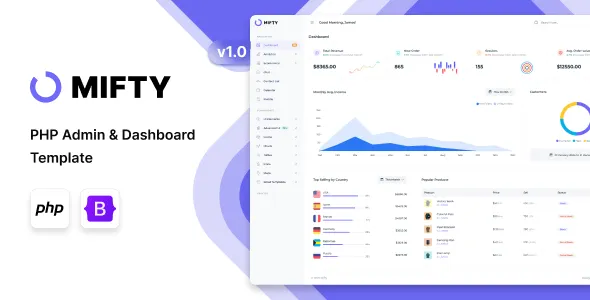
Mifty – PHP Admin & Dashboard Template
Mifty – PHP Admin & Dashboard Template is a versatile administration interface designed for developers, businesses, and digital teams that need a structured foundation for building web-based management systems. An admin dashboard template helps organize application data, administrative tools, navigation, and operational information within a consistent interface. Mifty can be considered for projects such as business management portals, customer administration systems, internal dashboards, reporting interfaces, and other PHP-based web applications, depending on the template’s available components and implementation requirements.
Modern web applications often require a centralized area where authorized users can review information, manage records, monitor activity, and access important functions. A well-organized dashboard can make these tasks easier by presenting relevant information through clearly structured pages, navigation menus, forms, tables, and visual summaries. Instead of creating every administrative screen from the beginning, developers can use an admin template as a starting point and adapt its interface to suit the project’s goals.
Mifty – PHP Admin & Dashboard Template is intended for projects where a consistent administrative layout can help streamline front-end development. By customizing the design, integrating suitable PHP functionality, and connecting the interface to the required database or application services, developers can create a management environment tailored to their business processes. The actual features, layouts, dependencies, and compatibility should be verified against the current template demo and documentation before implementation.
What Is Mifty – PHP Admin & Dashboard Template?
Mifty – PHP Admin & Dashboard Template is an administration-focused design resource for developers building web applications with PHP. An admin template generally provides the visual structure for an application’s back end, helping developers organize the screens that administrators, staff members, or other authorized users interact with.
Unlike a public-facing website template, which focuses on presenting products, services, or brand information to visitors, an admin dashboard prioritizes usability and information management. Its interface may include a sidebar, top navigation, page headings, content sections, data tables, form layouts, and summary panels, depending on the components included in the particular version.
A PHP dashboard template can support a range of development projects. For example, a business may need an interface for maintaining customer records, while a service provider may require tools for reviewing requests and updating operational information. A software company could use a dashboard layout as the starting point for an application that displays account details, usage information, or administrative settings.
The template supplies the interface foundation rather than automatically providing a complete application. Features such as authentication, user permissions, database operations, reporting logic, and business workflows generally need to be implemented or connected separately unless they are explicitly included in the product. Reviewing the documentation helps developers understand what is provided and what must be developed.
Designed for PHP-Based Web Applications
PHP remains a widely used server-side programming language for creating dynamic websites and web applications. Developers use PHP to process requests, interact with databases, manage application logic, and generate or deliver content. An administrative interface provides the front-end environment through which users interact with these functions.
Mifty can be evaluated as a dashboard interface for PHP-based projects that need a consistent administrative experience. Developers can adapt page structures and visual components to represent their own application data, provided the template’s files and dependencies support the intended implementation.
A typical PHP application may include public pages, administrative screens, account management, data-entry forms, and reporting tools. A dashboard template can help establish a shared visual language across the administrative portion of the application, making the interface easier to maintain as new pages are added.
The precise integration process depends on the template’s file structure and the application’s architecture. Some projects may use traditional PHP pages, while others may integrate the interface into a framework or a custom application. Developers should confirm whether the template supports their intended setup and review any requirements for PHP versions, dependencies, build tools, or front-end libraries.
Admin Dashboard Layout and Interface Structure
A clear dashboard layout helps users understand where they are and how to access important functions. Administrative applications often contain multiple sections, so consistent navigation and page organization are essential for usability.
Depending on the included layouts, Mifty may be adaptable to an interface that organizes application functions through navigation menus, page headers, content areas, and reusable design components. Developers can use a consistent structure across screens to reduce confusion and make routine administrative tasks more predictable.
A sidebar can group related sections, such as users, reports, settings, and records. A top navigation area may provide access to account-related controls or other global actions if supported by the template. Main content areas can then display the information relevant to the selected section.
Page consistency is particularly important for applications that grow over time. If every screen uses different spacing, heading styles, or navigation patterns, users may find the application difficult to learn. A shared dashboard layout provides a starting point for maintaining visual consistency while allowing individual pages to address different tasks.
Before customizing the interface, developers should inspect the supplied layouts and determine which elements are reusable. Reusing shared components can reduce duplication and make future design updates easier to manage.
Data Management and Administrative Workflows
Many business applications depend on accurate, accessible records. Administrative users may need to review entries, add information, update existing records, or search for specific data. An organized dashboard interface can help present these workflows in a clear and practical way.
Mifty can be considered for the visual layer of applications that manage customer information, inventory records, service requests, employee details, subscriptions, or other business data. The suitability of the template depends on the layouts and components provided, while the underlying data operations must be supported by the application itself.
Data tables are often useful for displaying multiple records in a structured format. Clear column labels, consistent spacing, and understandable actions can help users scan information and identify the next step. Forms can support data entry, while detail pages can provide a more complete view of individual records.
For more complex workflows, developers may need to add searching, filtering, sorting, pagination, validation, export options, or bulk actions. These capabilities should not be assumed to exist simply because an admin dashboard layout is available. They require suitable components, application logic, and testing.
A well-designed workflow should also provide meaningful feedback. Users need to understand whether an action succeeded, whether information is missing, and whether a record has been updated. Implementing these details can make a dashboard more dependable and easier to use.
Dashboard Cards and Business Information
Dashboard summary sections can help users understand important information without opening several separate pages. Business applications may display totals, recent activity, pending tasks, status summaries, or other key indicators in a central location.
Depending on the available components, Mifty may provide a foundation for arranging dashboard information into organized content panels or summary cards. Developers can adapt these areas to show metrics that are relevant to the application’s purpose.
For example, a customer management platform could summarize the number of active customers or recently created accounts. An operations dashboard might highlight outstanding requests, while an inventory application could display stock-related information. A service management system could present open and completed tasks.
Useful summaries should be connected to accurate application data and updated according to the needs of the business. Static demonstration values should be replaced with real values when the application is connected to its data source. Developers should also provide clear labels and context so users understand what each metric represents.
The most effective dashboard is not necessarily the one with the greatest number of cards. It is the one that prioritizes the information users need most often and avoids unnecessary visual clutter.
Tables, Forms, and Input Components
Tables and forms are common elements in administrative applications. Tables help present collections of records, while forms allow users to create, edit, or configure information.
Mifty can be assessed for projects that need a consistent design approach to these interface elements. The exact components, styling options, and interaction patterns depend on the supplied template version and should be checked in the product documentation.
A well-organized form groups related fields, uses clear labels, and explains required information. Validation messages should identify what needs attention without making users guess. For forms that handle important business data, developers should also consider saving behavior, duplicate submissions, and error recovery.
Tables should remain readable when displaying large amounts of information. Developers may need to configure responsive behavior, column priorities, pagination, and search controls to ensure that users can work efficiently across different screen sizes.
Form submissions and table actions must be connected to appropriate server-side logic. Visual controls alone do not create, update, or delete database records. PHP processing, authorization checks, input validation, and database operations should be implemented according to the application’s requirements.
Responsive Design for Different Devices
Administrative users may access applications from desktop computers, laptops, tablets, or smartphones. Responsive design helps maintain usability when screen sizes change, particularly for teams that need to review information while away from their main workstation.
Mifty’s responsive behavior should be evaluated using its current demo and documentation. Developers should confirm how the supplied layouts respond to narrower screens and whether the included navigation and content components remain practical on mobile devices.
A responsive administrative interface should keep important information readable, prevent unnecessary horizontal scrolling, and make interactive controls easy to select. Navigation should remain understandable, while tables and forms should adapt to the available space wherever possible.
Responsive testing should cover more than the dashboard homepage. Data-heavy tables, configuration pages, forms, charts, and detail views can each present different challenges on small screens. Developers should test the complete workflow that users are expected to follow.
Custom styles, embedded components, and third-party libraries can affect the final layout. After adding new features, developers should retest the interface at several viewport sizes to identify spacing problems, overlapping elements, and controls that are difficult to use.
Customization and Branding
A business application should reflect its purpose and provide a consistent visual experience. Customization allows developers to adapt the administrative interface to the organization’s branding, operational needs, and preferred user experience.
Mifty may be customized according to the styling options and source files included with the selected version. Possible areas to review include colors, typography, spacing, navigation, page layouts, icons, and reusable interface elements. The available controls should be confirmed before planning extensive changes.
A company may use its brand colors for key interface elements while maintaining enough contrast for readability. A reporting application might prioritize clear typography and structured data presentation, while a customer management portal may focus on navigation and frequently used actions.
Consistency matters more than adding decorative effects. Reusing a defined set of colors, heading styles, spacing rules, and button treatments can help the application feel cohesive. Developers should also ensure that customizations do not make important controls difficult to identify.
Before modifying template files, review the project’s structure and any guidance about customization. Keep a backup of the original files, document significant changes, and consider using a version-control system to track modifications. This makes it easier to identify problems and maintain the interface over time.
PHP Integration and Backend Development
An admin dashboard becomes useful when its interface is connected to the application’s backend. PHP can process user requests, validate submitted information, communicate with databases, and apply the business rules required by the application.
Mifty provides a possible starting point for the presentation layer, but developers must determine how its files should be integrated with their existing PHP code. This includes deciding how to organize page templates, reusable elements, routes, controllers, and application-specific logic according to the project’s architecture.
For example, a customer management application may require a PHP process that retrieves customer records from a database and displays them in a table. Editing a record may require a form, server-side validation, an update query, and a confirmation message. These functions are part of the application implementation rather than the visual template alone.
Developers should separate interface presentation from sensitive business logic wherever practical. This can make the project easier to maintain and helps prevent security checks from being overlooked during interface updates.
The integration approach will vary depending on whether the application uses a custom PHP structure, an established framework, or another architecture. Check the template’s documented dependencies and verify that its file organization is compatible with the intended project before development begins.
Database Connectivity and Dynamic Content
Most administrative systems rely on stored data. A dashboard may need to display records, update account details, track activity, or present summaries generated from a database.
Mifty can serve as the interface foundation for such projects when paired with suitable backend functionality. The template itself should not be assumed to include a configured database, database schema, or complete data-management system unless those elements are explicitly documented.
Developers must choose an appropriate data-storage solution, design the required tables or data structures, and implement secure database access. PHP database operations should use suitable parameterized queries or an established data-access layer to reduce the risk of SQL injection.
Dynamic content should be handled carefully. User-provided values must be validated and escaped appropriately when displayed in HTML. Server-side validation is essential even when the interface includes client-side checks, because browser-side validation can be bypassed.
Testing should include normal use, missing values, invalid input, duplicate submissions, and unexpected server responses. These checks help ensure that the dashboard behaves reliably when connected to real application data rather than demonstration content.
Security and Access Control
Security is a critical consideration for any administrative interface. Dashboards often provide access to private business information or operations that should only be available to authorized users.
Using an admin template does not automatically make an application secure. Developers must implement appropriate authentication, authorization, session management, request validation, and data protection measures according to the application’s requirements.
Authentication determines whether a user has successfully signed in, while authorization determines which actions that user is allowed to perform. For example, a staff member may be permitted to view records but not change administrative settings. These restrictions should be enforced on the server, not only by hiding links or buttons in the interface.
Developers should also consider protection against cross-site scripting, cross-site request forgery, SQL injection, session misuse, and other common web application risks. Sensitive operations should require suitable authorization and should be logged when appropriate for the business.
Passwords should be handled using secure password-hashing mechanisms rather than stored as plain text. Production applications should use HTTPS and keep their PHP runtime, dependencies, and server environment appropriately maintained.
The exact security requirements depend on the data and operations the application handles. A professional deployment should include a security review and testing before the dashboard is made available to real users.
Reporting and Data Visualization
Reporting interfaces help organizations review activity, understand trends, and make decisions based on available information. Depending on the application, a dashboard may need to display performance indicators, transaction summaries, operational metrics, or historical data.
Mifty may provide a layout foundation for presenting reporting content, but charting libraries and reporting logic should be confirmed separately. If the required visualization components are not included, developers can evaluate compatible libraries and integrate them according to their documentation and licensing terms.
Charts are most useful when they answer a specific question. A line chart may help show changes over time, while a bar chart can compare categories. Tables may be more appropriate when users need exact values rather than a visual overview.
Reporting interfaces should identify units, date ranges, and relevant filters. They should also communicate when data is unavailable or incomplete. Misleading charts and unexplained metrics can lead users to make incorrect conclusions.
The data source must be reliable, and calculations should be performed consistently. Developers should verify that displayed figures match the underlying records and that any filters or date selections work as intended.
Scalability and Maintainable Development
A dashboard may begin with a small number of administrative pages and expand as an application grows. Planning for maintainability can reduce the effort required to add new sections and update existing features.
Mifty can be evaluated as a shared interface foundation for projects that need consistent styling across multiple administrative pages. Developers should identify common elements and reuse them where the template’s structure permits. Shared navigation, page headers, form patterns, and table styles can reduce unnecessary duplication.
Maintainable code should also have a clear organization. Separate concerns such as data access, business rules, request handling, and presentation where appropriate for the project’s architecture. This makes it easier to test individual parts and understand the effects of future changes.
Before introducing additional dependencies, review whether they are necessary and compatible with the existing implementation. Excessive dependencies can increase maintenance work and create potential conflicts during updates.
Scalability depends on more than the dashboard’s appearance. Database design, query performance, caching strategy, server resources, and application architecture all influence how well the system performs as usage increases. Developers should measure actual performance and address bottlenecks based on evidence.
Performance and Loading Experience
An administrative application should respond predictably so users can complete routine tasks without unnecessary delays. Performance can affect productivity, especially when staff members use the dashboard throughout the working day.
The performance of a Mifty-based application will depend on its assets, scripts, PHP code, database queries, hosting environment, and third-party integrations. A template alone cannot guarantee a particular loading speed.
Developers should optimize images and static assets, avoid loading unnecessary libraries, and review the size of CSS and JavaScript files. Database queries should be efficient, particularly on pages that display many records or calculate summary statistics.
Caching may be appropriate for data that does not need to change on every request, but sensitive or user-specific information must be handled carefully. Caching rules should never expose private data to the wrong user.
Performance testing should include typical workflows and realistic data volumes. Measure the pages users access most frequently, review slow requests, and optimize the actual causes of delays rather than relying only on visual impressions.
Common Use Cases for Mifty – PHP Admin & Dashboard Template
Mifty can be considered for different types of administrative projects, subject to its documented components, licensing, and technical requirements.
Business management systems: Build an interface for reviewing operational records, managing business information, and organizing routine administrative tasks.
Customer management portals: Create screens for presenting customer profiles, maintaining contact details, and reviewing customer-related activity when supported by the backend.
Inventory management applications: Develop an administrative layout for displaying stock records, product information, and inventory-related data.
Employee management systems: Organize staff information, internal records, and administrative workflows according to the application’s access-control requirements.
Service management dashboards: Provide an interface for reviewing service requests, tracking statuses, and maintaining related information.
Reporting applications: Present business metrics, historical data, and summaries through suitable tables, cards, and compatible visualization components.
SaaS administration panels: Use a dashboard layout as a starting point for managing application settings, user accounts, and operational information.
Internal business tools: Develop private interfaces for teams that need a centralized way to review and update application data.
These examples describe possible project directions rather than guaranteed built-in features. The final suitability of Mifty depends on the specific components supplied and the amount of custom development required.
Who Can Benefit from Mifty?
Mifty – PHP Admin & Dashboard Template may be useful for developers, agencies, startups, and organizations building PHP-based web applications.
PHP developers can evaluate the template as a starting point for the presentation layer of an administrative application, reducing the need to create every layout from scratch.
Web development agencies may use an admin template as a design foundation for client projects that require management interfaces, provided the license permits the intended use.
Startups and small businesses can assess whether the template suits an internal tool or early-stage application that needs a structured administrative experience.
Product teams can use a consistent interface as a starting point for prototypes or application management screens while developing the underlying functionality separately.
Freelancers may find an admin dashboard template useful when organizing the front-end work for custom PHP projects.
Before choosing the template, each user should review the current documentation, inspect the demo, verify compatibility, and estimate the amount of backend development required.
Best Practices for Using Mifty
A successful dashboard project starts with a clear understanding of the users and tasks the application must support. Before customizing the interface, list the main workflows, identify the information each role needs, and determine which actions should be available.
Keep navigation focused on the most important sections. Group related functions logically and use consistent labels so users can learn the interface without unnecessary effort.
Replace placeholder values with real application data once the backend is ready. Use descriptive labels for metrics and provide useful feedback after form submissions or administrative actions.
Test the interface at different screen sizes, especially where tables, long forms, or complex navigation are involved. Review keyboard access, text contrast, input labels, and validation messages to improve accessibility.
Keep the codebase organized and document custom changes. Use version control and maintain backups before major updates. Test integrations whenever dependencies or application code change.
Finally, review the template’s license and technical requirements before using it in a commercial or client project. This helps ensure that the chosen implementation aligns with the product’s permitted use and the application’s operational needs.
Final Thoughts on Mifty – PHP Admin & Dashboard Template
Mifty – PHP Admin & Dashboard Template is a potential starting point for developers who need an organized administrative interface for a PHP-based web application. An admin dashboard can provide a consistent structure for navigation, data presentation, forms, and business information, helping developers focus their implementation work on the requirements of the application.
The template may be evaluated for business management tools, customer portals, reporting systems, internal dashboards, and other administrative projects. Its suitability will depend on the layouts and components included in the selected version, as well as the developer’s integration approach.
A complete administrative application requires more than visual design. Database connectivity, secure authentication, role-based permissions, validation, error handling, performance optimization, and ongoing maintenance must be implemented and tested as part of the overall solution.
Before starting a project with Mifty, review the current demo, documentation, dependencies, licensing terms, and compatibility requirements. With careful customization and reliable backend development, an admin dashboard template can serve as a useful foundation for building a consistent, maintainable, and practical management interface.