My Account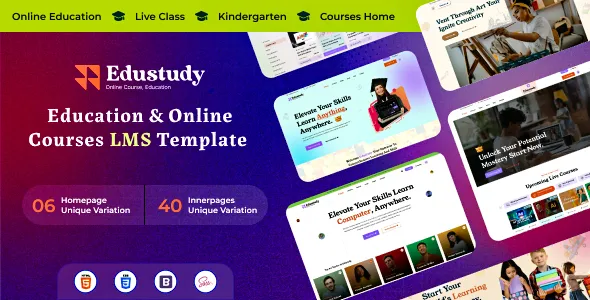
Edustudy – Education & Online Courses LMS HTML Template
Edustudy – Education & Online Courses LMS HTML Template is a versatile website template designed for educational institutions, online learning platforms, course creators, tutors, training organizations, and businesses offering digital education. Built for education-focused websites, Edustudy provides a starting point for creating a professional online presence where learners can explore courses, discover learning opportunities, review educational programs, and access important information about instructors and institutions. Whether you are developing an e-learning website, promoting online classes, presenting a coaching institute, or building a digital platform for professional training, this HTML template can help organize educational content within a structured and visually consistent website.
Online education continues to create opportunities for learners who want flexible access to knowledge, practical skills, and professional development. An effective educational website should make it easy for visitors to understand available courses, compare learning options, explore subject categories, and determine how to begin their learning journey. Edustudy can be customized to support these objectives through suitable page layouts, course presentations, educational content sections, and clear navigation. Its education-focused design makes it relevant to projects that need to present learning resources in an organized way. The exact pages, components, and interface elements available depend on the template package and its current version, so reviewing the official demo and documentation is important before implementation.
What Is Edustudy Education and Online Courses LMS HTML Template?
Edustudy is an HTML website template intended for education-related projects, including online course websites, learning management system interfaces, training portals, tutoring businesses, and academic organizations. It offers a front-end starting point for developers who want to create an education website without designing every interface element from scratch.
Educational businesses can use a suitable implementation to introduce their learning programs, display course information, present instructors, and communicate enrollment details. Schools and training centers may use the website to publish academic information, promote workshops, and share learning resources. Independent educators can build a website that introduces their teaching expertise and makes their courses easier to discover.
HTML provides the structural foundation of web pages, while CSS is commonly used to control presentation and layout. JavaScript can support interactive behavior where it is included in the template. Together, these technologies allow developers to customize the visual presentation and front-end interactions according to the requirements of a project.
Although Edustudy is described as an LMS HTML template, an HTML template should not automatically be considered a complete learning management system. Features such as student registration, course progress tracking, secure login, online examinations, payment processing, and learning analytics may require backend development or integration with an existing LMS unless explicitly included in the package.
Modern Website Design for Online Education
An education website should create a welcoming and organized experience for prospective learners. Visitors often arrive with specific questions about available subjects, course difficulty, teaching methods, duration, pricing, and expected learning outcomes.
Edustudy can be adapted to present this information through clear page sections and structured content. A homepage may introduce the platform, highlight selected courses, display educational categories, and guide visitors toward further information. Supporting pages can explain individual programs, introduce instructors, and provide contact or enrollment details.
For example, an online learning business offering programming courses may organize its content around web development, software engineering, and technical certifications. A language institute may present courses by proficiency level, while a professional training organization could organize programs around business, management, or workplace skills.
A well-designed education website should prioritize clarity over visual complexity. Course names, descriptions, instructor details, and calls to action should be easy to understand. Consistent spacing, readable typography, and a logical content hierarchy can help learners navigate the available options.
When customizing Edustudy, use authentic educational information and relevant visuals. Avoid displaying unsupported qualifications, misleading course outcomes, or inaccurate enrollment details.
Course Listing and Course Discovery
Course discovery is an important part of an online education website. Visitors need to identify the programs that match their interests, existing knowledge, schedules, and professional goals.
Edustudy can serve as a starting point for presenting course listings, depending on the layouts supplied with the template. Developers may organize courses by subject, skill level, learning format, or intended audience. A structured course listing helps visitors compare educational options without having to search through unrelated information.
Each course card or summary can include relevant details such as the course title, short description, instructor, duration, difficulty level, and price when applicable. The precise fields depend on the available components and the data supported by the final implementation.
A programming course, for instance, might be categorized as beginner, intermediate, or advanced. A business course could be grouped under marketing, leadership, finance, or entrepreneurship. A general education platform may organize its courses by academic subject or professional discipline.
If the website offers many courses, filtering and search functionality can improve discovery. These capabilities may require JavaScript development, structured course data, or backend integration, depending on what the template includes.
Course information should remain accurate and consistent across listing pages and individual course pages. Clear descriptions help learners choose suitable programs and understand what each course offers before enrolling.
Individual Course Details Pages
A dedicated course details page gives prospective students the information they need to evaluate a learning opportunity. It should explain the subject, identify the intended audience, outline the curriculum, and describe the learning experience.
Edustudy may be customized to support individual course pages using the layouts and components included in the template. A course page can begin with the course title and a concise introduction, followed by a more detailed description of its objectives and structure.
Useful information may include prerequisites, topics covered, instructor credentials, course duration, learning format, assessment methods, and available support. If the program includes downloadable resources, practical assignments, or recorded lessons, those details should be stated accurately.
For a web development course, the curriculum might describe HTML fundamentals, CSS styling, responsive layouts, and JavaScript basics. A business training program could explain its modules, practical exercises, and intended professional audience.
Course pages should also make the next step clear. Depending on the business model, this may involve requesting more information, registering for a class, purchasing access, or contacting an academic advisor.
The design should support informed decisions rather than rely on exaggerated promises. Specific, realistic descriptions help learners understand whether a course is suitable for their needs.
Learning Management System Website Structure
A learning management system helps organize educational activities, course materials, learner access, and related administrative processes. An LMS website often serves as the public-facing entry point to a broader learning environment.
Edustudy can be considered for the front-end presentation of an education platform, including public pages that introduce courses, explain the learning model, and direct visitors toward registration or course access. The precise suitability depends on the included HTML pages and available functionality.
A complete LMS may require several distinct components. Public pages can present courses and institutional information, while protected areas may provide student dashboards, lesson content, assignments, assessments, and progress reports. Administrators and instructors may also need separate interfaces for managing educational materials and learners.
These functions generally require appropriate application logic, data storage, authentication, and permission management. A static HTML template alone does not automatically provide them.
Developers can connect an education-focused front end to a suitable backend or learning management platform when the project requires dynamic course management. The integration approach should be selected according to the organization’s technical requirements, expected user volume, security needs, and maintenance resources.
Before development begins, identify which parts of the website are purely informational and which require live data or user-specific functionality. This distinction helps establish a realistic project scope.
Responsive Design for Desktop, Tablet, and Mobile
Learners use different devices to discover courses and access educational information. Some visitors browse on desktop computers, while others use tablets or smartphones to review course descriptions, contact instructors, or manage their learning activities.
Responsive design helps a website adapt to different screen sizes. Edustudy’s actual responsive behavior should be verified against its current demo and tested after customization, rather than assumed from its product title alone.
On smaller screens, course cards should remain readable, images should fit the available width, and navigation should be convenient to use. Buttons and form fields should be easy to select, while important information should remain visible without excessive scrolling or unnecessary interaction.
Responsive testing should include the homepage, course listing pages, course details, instructor profiles, registration forms, and other included layouts. A page that works well on a desktop may require adjustments when its content becomes narrower.
Custom CSS, embedded media, external widgets, and additional JavaScript can affect responsive behavior. Developers should test the complete website at several viewport widths and resolve issues before launch.
A consistent mobile experience helps make educational information more accessible to learners who rely on their phones as their primary browsing device.
Educational Institutions and Academic Websites
Schools, colleges, training centers, and academic organizations need websites that communicate programs, facilities, institutional information, and learning opportunities.
Edustudy can be evaluated for education-related projects that require a structured presentation of academic services. Depending on the supplied layouts, developers may adapt the template to introduce an institution, publish course information, present faculty members, and provide details about admissions or training programs.
A school website might emphasize academic programs, extracurricular activities, faculty information, and announcements. A professional training institute could focus on certification courses, workshop schedules, and practical learning opportunities. A college or higher education provider may require pages for departments, programs, admission procedures, and student resources.
The content should reflect the institution’s actual services and policies. Admission dates, eligibility criteria, course fees, qualification details, and contact information should be reviewed regularly to ensure accuracy.
If the website needs an academic calendar, application tracking, student records, or online examination features, additional development or integration may be necessary. These capabilities should be confirmed before choosing the final implementation.
By combining clear academic information with intuitive navigation, an education website can help prospective learners and existing students locate relevant resources more efficiently.
Online Coaching and Tutoring Websites
Tutors and coaching businesses need a convenient way to explain their teaching services, describe available classes, and connect with prospective students.
Edustudy can provide a front-end foundation for a tutoring website focused on academic subjects, competitive examination preparation, language learning, professional skills, or other specialized areas. The page structure can be adapted to the organization’s teaching model and intended audience.
A coaching institute may present its programs by examination or subject. A private tutor could introduce their teaching approach, experience, lesson formats, and availability. A language instructor may organize courses by proficiency level and learning objective.
Each program description should explain who the class is intended for, what topics are covered, and how lessons are delivered. If classes are available online, in person, or through a hybrid model, those arrangements should be clearly communicated.
Contact forms and inquiry buttons can help visitors ask about schedules, fees, or enrollment. However, form submission, appointment scheduling, and automated responses may require a compatible service or backend implementation.
Testimonials may support credibility when they are genuine and used with appropriate permission. Avoid unsupported claims about guaranteed grades, examination results, or career outcomes.
Instructor Profiles and Educational Expertise
Instructors play an important role in helping learners evaluate a course. A profile page can introduce an educator’s background, relevant qualifications, teaching experience, and areas of expertise.
Edustudy may be customized to present instructor information using suitable profile cards or dedicated pages, depending on the components available in the template. Consistent profiles help learners understand who is responsible for delivering the course and what experience they bring to the subject.
A useful instructor profile can include a professional photograph, a short biography, relevant credentials, teaching interests, and a list of associated courses. For an institution, faculty profiles may also include department information and academic responsibilities.
Course creators can explain their practical experience and teaching approach without making exaggerated claims. Relevant examples, professional accomplishments, and clearly stated qualifications are more informative than broad statements about being an expert.
If the platform includes multiple instructors, a consistent layout makes profiles easier to compare. Developers should also ensure that profile images are optimized and that text remains readable across different devices.
Keeping instructor information current helps maintain the quality and reliability of the website’s educational content.
Student Registration and Enrollment Interface
A clear registration experience can reduce confusion for learners who want to join a class or access an online course. Before starting enrollment, visitors should understand what information is required and what happens after they submit their details.
Edustudy can be adapted to present enrollment forms or registration-related pages if suitable layouts are included. The visual form is only one part of the process; storing student information, creating accounts, verifying email addresses, and managing enrollment require appropriate application functionality.
A registration form should request only the information necessary for its intended purpose. Depending on the course, this may include a name, email address, selected program, or other relevant details. Clear field labels and helpful validation messages can make the process easier to complete.
If a course requires payment, the enrollment process should explain the applicable price, payment method, and any important terms before the learner proceeds. Secure payment handling should be implemented through a suitable payment provider or trusted backend rather than relying on an unprotected front-end form.
After registration, users should receive clear confirmation and instructions about the next step. This may include course access details, a confirmation email, or information about how the institution will respond.
Test the full enrollment process before publishing the website. A form that looks correct but fails to save or deliver submissions can disrupt the learner experience.
Course Categories and Learning Resources
Organizing educational content into categories helps learners find subjects that match their interests and goals. A well-planned category structure also makes the website easier to maintain as the course catalog expands.
Edustudy can be adapted to present categories such as technology, business, design, languages, personal development, academic subjects, and professional training, depending on the organization’s actual offerings.
Each category should have a clear name and a meaningful purpose. Avoid creating too many overlapping categories, as this can make course discovery more complicated. When a platform offers a large number of programs, additional filtering or search capabilities may be useful.
Learning resources can extend beyond course listings. An education website may publish articles, study guides, frequently asked questions, downloadable resources, or educational announcements. These materials can help learners understand a topic before choosing a course.
If resources are hosted externally, ensure that links work correctly and that users understand any access requirements. Downloadable files should be clearly labeled and maintained so that visitors do not encounter outdated or incorrect material.
A logical information structure supports a better user experience and helps the organization present its educational offerings consistently.
Customization and Brand Identity
A professional education website should reflect the identity of the institution or learning business. Consistent branding helps distinguish one organization from another and creates a more coherent experience across different pages.
Depending on the supplied files and implementation, Edustudy may be customized through CSS, HTML, JavaScript, images, typography, colors, spacing, and page content. The precise customization process depends on the template’s structure and the tools used by the development team.
An academic institution may prefer a formal design with clear navigation and restrained visual elements. A creative learning platform could use more expressive imagery and engaging course presentations. A professional training provider may focus on readability, practical course information, and clear enrollment pathways.
Establish a consistent visual system before making extensive changes. Select a suitable color palette, define heading and body text styles, and use consistent treatments for buttons, cards, and content sections.
Replace placeholder imagery with relevant educational visuals and use authentic course information throughout the site. Ensure that the branding remains consistent on desktop and mobile layouts.
A template is a starting point, not a substitute for a clear identity. Thoughtful customization helps make the final website more relevant to its intended audience.
SEO-Friendly Structure for Education Websites
Search engine optimization can help prospective learners discover relevant courses and educational services through search engines. A template provides the visual foundation, but search visibility also depends on content quality, technical configuration, competition, and ongoing optimization.
When customizing Edustudy, give each page a clear topic and purpose. Use descriptive page titles, relevant headings, readable URLs, useful internal links, and original content that answers the questions learners are likely to ask.
An online course provider can create individual pages for important programs, subjects, and learning levels. A coaching institute may publish pages for particular classes or examinations, while a professional training business can explain its services and course outcomes.
Write content for learners rather than search engines alone. Course pages should provide practical information about the curriculum, intended audience, prerequisites, duration, and delivery method where applicable. Avoid duplicating nearly identical descriptions across multiple pages.
Image optimization can also improve usability. Use suitable file sizes and dimensions, and provide meaningful alternative text for informative images. Ensure that important content is accessible to search engines and that navigation links work correctly.
Depending on the website’s architecture, additional work may be needed for metadata, XML sitemaps, canonical URLs, structured data, redirects, and technical SEO settings. Verify these elements during development instead of assuming they are already configured.
No HTML template can guarantee a particular search ranking. Consistent publishing, useful educational content, technical quality, and ongoing improvements all contribute to a stronger SEO strategy.
Performance and Page Loading Optimization
Website speed matters for learners who may access educational content from mobile devices or slower internet connections. Pages that load efficiently make it easier to explore course information and complete important actions.
The performance of an Edustudy website depends on the template’s implementation, image assets, scripts, fonts, hosting environment, and additional integrations. Developers should measure the completed website rather than assume that a template is automatically optimized.
Start by compressing large images and selecting appropriate dimensions for their display areas. Course thumbnails, instructor portraits, and promotional banners should retain sufficient visual quality without unnecessarily increasing page size.
Review JavaScript files, external fonts, animations, and third-party resources. Remove unused assets where appropriate and avoid adding plugins or scripts that do not contribute meaningful functionality.
Depending on the hosting environment and website architecture, caching, compression, efficient asset delivery, and suitable loading strategies may improve performance. Test important pages individually because image-heavy course listings and complex layouts may behave differently from simpler pages.
Regular performance checks help identify problems as new content and features are added. A responsive, efficient website provides a better foundation for an accessible online learning experience.
Accessibility and User-Friendly Navigation
Education websites serve learners with different devices, abilities, technical experience, and learning preferences. Clear navigation and accessible interface design help more people locate information and use the website effectively.
When customizing Edustudy, maintain a logical heading structure and use descriptive link text. Form fields should have clear labels, and error messages should explain what needs to be corrected. Informative images should include appropriate alternative text.
Text and background colors should provide sufficient contrast, and important information should not be communicated through color alone. Buttons and other interactive controls should be visually distinguishable and usable with a keyboard where appropriate.
Navigation menus should use familiar labels and prioritize the most important destinations, such as courses, instructors, institutional information, and contact pages. Avoid overwhelming visitors with too many menu items.
If the website includes forms, dropdowns, modals, or interactive course filters, test their behavior with keyboard navigation and different screen sizes. Automated accessibility tools can identify some issues, but manual testing remains important.
Accessible design improves the usability of educational content and helps create a more welcoming digital environment for learners.
Integrations and Additional LMS Functionality
An education website may need additional tools to support course delivery, student communication, enrollment, and administration. The appropriate integrations depend on whether the project is a public course catalog, a tutoring website, or a complete online learning platform.
Edustudy can be evaluated as a front-end foundation for projects that may connect to a content management system, LMS platform, form service, analytics tool, email marketing service, or payment provider.
A public-facing website might require only course information pages and contact forms. A full learning platform may need user accounts, protected lessons, assignments, quizzes, progress tracking, certificates, and instructor dashboards. These features typically require a suitable backend or integration with an existing learning management system unless explicitly included in the template package.
Before choosing an integration, review compatibility, security, documentation, privacy requirements, and ongoing maintenance needs. Ensure that personal information is collected and processed appropriately and that payment transactions use a secure implementation.
Test every integration after configuration. Course links, registration forms, email notifications, account access, and payment workflows should behave as expected before the website is made available to learners.
Website Maintenance and Long-Term Management
Maintaining an education website involves reviewing its content, checking technical functionality, and ensuring that important information remains accurate.
Course descriptions, prices, instructor profiles, class schedules, admission details, and contact information should be updated whenever they change. Outdated course information can confuse learners and create unnecessary administrative work.
Developers should keep the website’s source files organized and document important customizations. Where external libraries or build tools are used, review updates and compatibility before applying changes to the live website.
Regularly test navigation links, forms, embedded resources, responsive layouts, and third-party integrations. If the website connects to an LMS or backend, make sure that account access and protected educational resources continue to function correctly.
Suitable hosting, HTTPS, backups, and access controls should be established according to the site’s architecture. If student accounts or personal data are handled, security and privacy should be treated as essential requirements rather than optional enhancements.
A consistent maintenance routine helps keep the educational website useful, reliable, and aligned with the institution’s current offerings.
Who Should Use Edustudy Education HTML Template?
Edustudy can be considered by different organizations and individuals who need a website focused on learning and educational services.
Online course providers: Businesses offering digital courses can present their programs, introduce instructors, and help prospective learners explore available learning opportunities.
Schools and colleges: Academic institutions can adapt suitable layouts to communicate programs, institutional information, and educational announcements.
Coaching institutes: Organizations preparing students for examinations or academic assessments can organize their classes, subjects, schedules, and enrollment information.
Private tutors: Independent educators can introduce their teaching expertise, explain lesson formats, and provide contact opportunities for students and parents.
Professional training companies: Training providers can present courses related to workplace skills, business knowledge, technology, and professional development.
Language learning centers: Language schools can organize programs by proficiency level, target audience, and learning objective.
Educational startups: New learning businesses can use a front-end template as a starting point for presenting their services and validating their website requirements.
Corporate training providers: Businesses offering staff training can communicate their programs, course structure, and professional learning services.
The suitability of Edustudy depends on the specific requirements of the project, the included pages, the template’s documented capabilities, and any additional functionality needed.
Tips for Building a Successful Education Website with Edustudy
Start by defining the primary purpose of the website. Decide whether it will promote an educational institution, list online courses, generate tutoring inquiries, or serve as the public interface for a larger LMS.
Review the supplied demo and files to understand the included layouts, assets, dependencies, and customization process. Confirm the technical requirements and license terms before beginning development.
Prepare accurate course information and institutional content before customizing every page. This may include course descriptions, curricula, instructor profiles, learning requirements, schedules, prices, and contact details.
Organize courses into clear categories and make the most important information easy to find. Each course page should explain what learners can expect and provide a logical next step, such as contacting the institution or proceeding to enrollment.
Use consistent branding and replace placeholder content with relevant visuals. Test the website on desktop, tablet, and mobile devices, paying particular attention to course cards, navigation, forms, and long descriptions.
Before launch, verify all links, form submissions, integrations, accessibility basics, and page performance. If the project requires student accounts or course delivery, test the complete learning workflow rather than focusing only on the public-facing design.
Finally, create a maintenance plan for content reviews, technical checks, backups, and security updates. A well-maintained education website can continue to serve learners as the organization adds new programs and resources.
Final Thoughts on Edustudy Education & Online Courses LMS HTML Template
Edustudy – Education & Online Courses LMS HTML Template is a potential starting point for developers, educational institutions, course creators, and training businesses looking to establish a professional online learning website. Its education-focused purpose makes it relevant to projects that need to present courses, introduce instructors, communicate academic information, and guide visitors toward suitable learning opportunities.
A well-customized implementation can combine structured course information, responsive layouts, clear navigation, consistent branding, and accessible content. Online course providers can focus on presenting their programs, while tutors and academic institutions can organize their services and communicate important details to prospective learners.
The final capabilities depend on the actual template package, its included HTML, CSS, and JavaScript files, and the integrations added during development. In particular, a front-end HTML template should not be assumed to include a complete learning management backend, student accounts, payment processing, or course progress tracking unless these features are explicitly documented.
Before implementation, review the current demo, available documentation, licensing terms, and technical requirements. Customize the design to reflect the organization, publish accurate educational information, and test the complete website across devices.
With thoughtful planning, useful course content, suitable integrations, and regular maintenance, Edustudy can provide a foundation for an organized education website that supports course discovery, student communication, and the broader goals of an online learning business.