My Account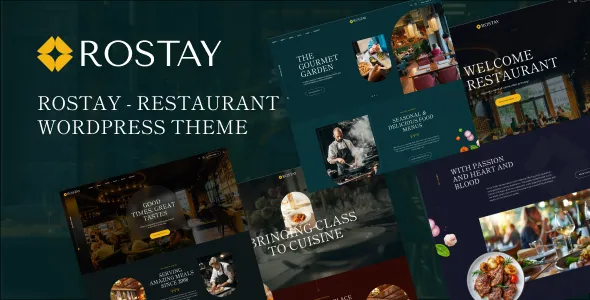
Rostay – Restaurant WordPress Theme
Rostay – Restaurant WordPress Theme is a website design solution for restaurants, cafés, dining establishments, food businesses, and hospitality brands looking to build a professional online presence with WordPress. A well-designed restaurant website helps customers discover the menu, explore signature dishes, learn about the restaurant’s atmosphere, find location details, and contact the business before visiting. Rostay can be considered as a starting point for creating a visually appealing restaurant website that combines food presentation, business information, and customer-focused navigation in one convenient online destination.
The restaurant industry depends on presentation, customer experience, and clear communication. People often visit a restaurant website to compare menu options, check opening hours, explore dining services, or decide whether a venue suits their occasion. A professional website can answer these questions while helping a restaurant communicate its identity and distinguish itself from competitors. With thoughtful customization, attractive food photography, informative content, and a well-organized page structure, a Rostay-based website can support restaurants in presenting their offerings to potential customers.
WordPress provides a flexible content management system for publishing pages, managing images, updating menus, and sharing restaurant news or articles. The final capabilities of Rostay depend on the current theme version, available templates, customization settings, and compatible plugins. Before installation, restaurant owners should review the latest theme demo and documentation to confirm that its layouts, technical requirements, and supported features match their business needs.
What Is Rostay – Restaurant WordPress Theme?
Rostay is a WordPress theme intended for restaurant-related websites. It can be evaluated by restaurant owners and food businesses that want to establish a dedicated website for showcasing their menu, introducing their brand, and communicating essential information to customers.
A restaurant website serves several purposes. It presents the business, explains the available food and dining options, displays important details, and provides convenient ways for customers to get in touch. A suitable theme provides the visual framework for organizing these elements into a consistent online experience.
A fine dining restaurant may prioritize elegant photography, carefully written menu descriptions, and information about its dining atmosphere. A casual restaurant might focus on popular dishes, family meals, and convenient location details. A café could highlight coffee, desserts, breakfast options, and its seating environment, while a multi-cuisine restaurant may need clear menu categories for different food styles.
Rostay can be considered for these types of projects, depending on the templates and customization options available in the installed version. A small restaurant may require a homepage, menu, about page, and contact page, while a larger establishment may need additional pages for events, private dining, catering, or multiple branches.
Before choosing the theme, review its current layouts and documentation to determine whether the required pages and integrations are supported directly or need additional plugins.
Responsive Design for Modern Restaurant Websites
Customers access restaurant websites through smartphones, tablets, laptops, and desktop computers. A responsive website helps ensure that the content remains readable and convenient to navigate across different screen sizes.
Rostay is positioned as a restaurant WordPress theme, making responsive presentation an important consideration when evaluating it for a modern food business. The final experience should be tested across multiple devices using the current theme version.
Mobile visitors should be able to locate the menu, opening hours, address, and contact information without unnecessary scrolling. Food images should scale correctly, headings should remain readable, and buttons should be easy to select. Navigation menus should provide a straightforward route to important pages.
Responsive design is especially relevant for restaurant websites because customers often browse menus and restaurant details while deciding where to eat. A poorly arranged menu, oversized images, or difficult navigation can interrupt that process.
Restaurant owners should test the homepage, menu pages, promotional sections, contact forms, and any booking or ordering interfaces individually. Custom CSS, page builders, and third-party integrations can affect the final layout, so regular testing is essential after significant design changes.
A well-organized mobile experience can make it easier for customers to discover the restaurant, understand its offerings, and take the next step toward visiting or contacting the business.
Website Solutions for Different Restaurant Types
Restaurants vary in their menus, customer expectations, dining environments, and business models. A restaurant website should reflect these differences rather than relying on a generic presentation that fails to communicate the business’s identity.
Rostay can be evaluated for a range of food-related businesses, including:
- Fine dining restaurants
- Casual dining establishments
- Family restaurants
- Cafés and coffee shops
- Italian and pizza restaurants
- Indian and multi-cuisine restaurants
- Seafood restaurants
- Bakeries and dessert shops
- Vegetarian and vegan restaurants
- Catering and hospitality businesses
A fine dining venue may emphasize its atmosphere, carefully presented dishes, and dining experience. A family restaurant may highlight its menu variety and convenient location. A bakery could focus on cakes, pastries, seasonal products, and special orders.
The structure should reflect the restaurant’s actual services. A café may benefit from a concise menu and location information, while a restaurant offering private dining may need a separate page explaining its event facilities and inquiry process.
The most effective website prioritizes the information customers need. Rather than adding every possible section, restaurant owners should choose layouts that communicate the business clearly and guide visitors toward relevant actions.
Showcase Your Restaurant Menu Online
The menu is one of the most important parts of a restaurant website. Customers want to understand what is available, compare dishes, check prices, and identify meals that match their preferences.
A Rostay-based website can be organized around menu categories that reflect the restaurant’s actual offerings. Depending on the business, these might include starters, main courses, soups, salads, vegetarian dishes, seafood, desserts, beverages, and specialty meals.
Each menu item should have an accurate name, a clear description, and a current price where appropriate. For example, a pasta dish can be described through its main ingredients and sauce, while a dessert listing might explain its key components and portion options.
Food photography can improve the menu experience when images accurately represent the dishes being served. Clear images can help customers understand presentation and portion style, but written descriptions remain important for communicating ingredients and other essential details.
Restaurants should keep menu information up to date. If an item is discontinued, its price changes, or a seasonal dish becomes unavailable, the website should be revised promptly. Inaccurate information can frustrate customers and create unnecessary questions.
Before launch, confirm that the selected theme layout can display the required menu information clearly. If the restaurant needs interactive filters, dietary labels, item variations, or online ordering, verify whether these features are included or require compatible extensions.
Highlight Signature Dishes and Popular Menu Items
Signature dishes can help a restaurant establish a recognizable identity. A website provides an opportunity to showcase the items that best represent the kitchen, culinary approach, or restaurant concept.
Depending on the available Rostay layouts, a restaurant may feature selected dishes on its homepage or within a dedicated menu section. These could include a house specialty, a chef’s recommendation, a popular dessert, or a distinctive beverage.
Each featured item should include a clear title, appealing photography, and a concise description. If the restaurant identifies a dish as a customer favorite or best seller, that description should reflect genuine information rather than an unsupported marketing claim.
Featured sections can also introduce new menu items and seasonal offerings. A restaurant might highlight a special festive menu or a limited-time dish while providing clear details about availability.
Visual consistency is important when displaying several dishes together. Similar image proportions and a consistent photography style can help the menu look organized without distracting visitors from the information.
Avoid filling the homepage with too many featured items. A focused selection can make the restaurant’s specialties easier to discover while encouraging visitors to explore the complete menu.
Homepage Design for Restaurants
The homepage is often the first introduction visitors receive to a restaurant. It should communicate the business’s identity quickly and help customers locate the information they need.
A Rostay website can be planned around an introductory section, featured menu items, food categories, restaurant information, selected photographs, and contact details, depending on the available templates and customization options.
The introductory section should explain the restaurant’s concept and give visitors a clear reason to explore further. A fine dining restaurant might emphasize its dining atmosphere, while a casual establishment may focus on its cuisine and signature meals.
A featured menu section can showcase selected dishes, while category links help customers find the complete menu. An about section can introduce the restaurant’s story, culinary approach, or hospitality philosophy.
Location details and opening hours should be easy to find. If the restaurant accepts reservations or online orders through a compatible system, the homepage can direct visitors to the appropriate booking or ordering page.
Not every restaurant needs every section. A small local establishment may benefit from a concise homepage, while a larger restaurant group may require more extensive navigation and location-specific information.
The most effective homepage balances visual appeal with practical usability. Food photography should support the message, and important information should not be buried beneath excessive decorative elements.
Restaurant Branding and Visual Customization
A restaurant website should reflect the identity of the business. Consistent branding helps customers recognize the restaurant and understand its style before visiting.
Depending on the current Rostay version and supported customization tools, website owners may be able to adjust colors, typography, imagery, spacing, and page layouts. The exact options should be confirmed in the theme’s documentation.
A fine dining venue might choose refined typography and spacious layouts, while a casual restaurant could use a more energetic visual style. A café may prefer warm colors and lifestyle photography, whereas a contemporary restaurant might use a minimalist presentation that emphasizes its dishes.
Consistency is more important than adding numerous visual effects. A recognizable logo, coordinated colors, readable headings, and consistent button styles can create a professional appearance across the website.
Food photography should match the restaurant’s real offerings and atmosphere. Original images of signature dishes, dining areas, and food preparation can provide a more authentic impression than generic images that do not represent the business.
Before making substantial design changes, identify which settings are controlled by the theme, WordPress, a page builder, or additional plugins. Keep backups before major customization and review the finished design on different devices.
Restaurant Information and Contact Details
Customers often visit a restaurant website to find basic information before deciding to dine there. They may want to check the address, confirm opening hours, ask about menu options, or contact the restaurant regarding a group visit.
A Rostay website should make essential business information easy to locate. Depending on the restaurant’s needs, this may include its address, telephone number, email address, opening hours, holiday schedules, and links to relevant social media profiles.
A dedicated contact page can organize these details in one place. If the restaurant accepts inquiries through a form, the form should request only the information needed to respond effectively.
Restaurants with multiple locations should provide accurate details for each branch. Customers need to know which location they are contacting and whether menu options, opening hours, or services differ between branches.
A map integration may help visitors understand the restaurant’s location if it is supported by the website setup. The map should complement a readable address and useful directions rather than replace them.
Before publishing the website, verify every contact detail. Incorrect telephone numbers, outdated opening hours, and broken links can prevent customers from reaching the restaurant and may undermine confidence in the business.
Online Reservations and Table Booking
Some restaurants rely on reservations to manage seating, particularly during busy periods, special events, or private dining occasions. A website can help customers understand how to reserve a table and communicate any relevant booking requirements.
Rostay can be evaluated as a design foundation for a restaurant that wants to provide reservation information. However, the presence of a restaurant-focused theme does not automatically mean that a complete table-booking system is included.
If online reservations are required, verify whether the current theme supports the desired booking workflow or whether a compatible plugin or external reservation service is necessary. Depending on the chosen system, additional functionality may be needed for date and time selection, party size, availability management, confirmation messages, and booking notifications.
A restaurant that accepts reservations by telephone can display a clear contact option. A venue using an external booking service can provide a link to the appropriate reservation page.
The reservation process should be tested before launch. Confirm that customers can understand the available options, submit their details, and receive appropriate confirmation. If the restaurant has specific booking policies, such as arrival times or cancellation requirements, these should be communicated clearly.
A straightforward reservation journey can make it easier for customers to plan their visit and help restaurant staff manage inquiries more efficiently.
Online Ordering and Food Delivery Integration
Online ordering can be valuable for restaurants offering takeaway, pickup, or delivery services. However, the required functionality depends on the business model and whether orders are handled directly or through an external platform.
Rostay can be considered for a restaurant website that wants to direct customers toward its available ordering channels. The actual ordering functionality should be verified separately because a restaurant theme does not automatically include a complete eCommerce or delivery management system.
Depending on the restaurant’s requirements, compatible plugins or external services may be needed for menu selection, cart management, payment processing, delivery charges, order notifications, and order status updates.
A restaurant using a third-party delivery platform may link to that service from its website. A business accepting telephone orders can provide a clear call option, while a restaurant with a compatible online ordering system can guide visitors to the relevant ordering page.
The complete ordering journey should be tested before launch. Verify item availability, pricing, order totals, pickup instructions, delivery conditions, payment behavior where applicable, and confirmation messages.
Restaurants should clearly communicate delivery coverage, minimum order requirements, service charges, and collection options. Accurate information helps customers understand the process and reduces confusion when placing orders.
Promote Special Offers and Seasonal Menus
Special offers and seasonal menus can help restaurants communicate new dishes, highlight current promotions, and encourage customers to explore different parts of the menu.
A Rostay website can be planned to include promotional content where the available layouts support it. Depending on the restaurant, this might include lunch specials, family meals, seasonal dishes, festive menus, or limited-time offers.
Each promotion should explain the relevant details. If a deal applies only on certain days, requires a minimum purchase, or is available at selected locations, those conditions should be clearly stated.
Seasonal menus can also give restaurants an opportunity to keep their websites current. A restaurant may introduce a summer beverage selection, a festive meal, or a special dessert collection and use its website to communicate the availability period.
Promotional sections should be reviewed regularly. Expired offers, incorrect prices, and unavailable dishes can frustrate customers and make the website appear neglected.
Restaurants should prioritize accuracy and clarity rather than relying on exaggerated promotional claims. A well-organized offers section can draw attention to relevant deals without making the main menu difficult to navigate.
Search Engine Optimization for Restaurant Websites
Search engine optimization helps search engines understand website content and can improve the opportunity for relevant pages to appear in search results. A WordPress theme provides only part of the foundation; SEO performance also depends on useful content, technical configuration, competition, and user experience.
A Rostay website should organize its pages around the information customers are likely to search for. These may include the restaurant’s name, cuisine, menu categories, location, and available services.
The homepage should clearly identify the restaurant and its general offering. Dedicated menu, about, and contact pages can provide more focused information than placing everything on one page.
Page titles and meta descriptions should accurately summarize each page. Headings should follow a logical hierarchy, and internal links should connect related sections. For example, a homepage feature about a signature dish can link to the full menu, while an article about a restaurant event can link to the relevant booking information.
Images should have suitable file sizes and descriptive alternative text where appropriate. These practices support accessibility and help provide context about food photographs.
Compatible SEO plugins may assist with metadata, sitemaps, canonical settings, and other technical tasks. Restaurant owners should also monitor broken links, indexing issues, duplicate pages, and mobile usability.
Avoid repeating the same keywords excessively. Clear menu information, original restaurant content, accurate business details, and a useful website experience provide a stronger foundation for sustainable SEO than keyword stuffing.
Local SEO for Restaurants
Local search visibility is particularly important for restaurants because many customers search for places to eat within a particular neighborhood or city. They may look for a specific cuisine, a nearby café, a family restaurant, or a venue with particular dining options.
A Rostay website can support local SEO by presenting accurate business information and clearly identifying the restaurant’s location and services. The business name, address, telephone number, and opening hours should remain consistent across the website and relevant business listings.
Where appropriate, restaurant owners can maintain a Google Business Profile and keep its information current. Genuine customer reviews, accurate photographs, and up-to-date hours can help people understand what the restaurant offers.
Location-specific pages may be useful for businesses with multiple branches. Each page should provide meaningful information about the relevant location rather than repeating identical text with only the city name changed.
Restaurant websites can also answer practical local questions, such as whether takeaway is available, whether reservations are accepted, or where customers can park when accurate information is available.
No theme can guarantee local rankings. Local SEO depends on accurate information, relevant content, customer experience, competition, and ongoing maintenance.
Content Marketing for Restaurants
Content marketing can help restaurants share useful information, introduce their culinary approach, and maintain an active online presence. WordPress provides publishing tools for creating articles, announcements, event updates, and other informational content.
Depending on the website’s goals and the layouts supported by Rostay, a blog or news section may be useful for sharing restaurant updates and relevant food-related content.
A restaurant might publish an article introducing its culinary concept, explaining the inspiration behind a signature dish, announcing a seasonal menu, or sharing details about an upcoming event. A café could feature information about its beverage selection, while a family restaurant might introduce its approach to group dining.
Content should be original, accurate, and relevant to the audience. Restaurant owners should avoid publishing repetitive articles solely to insert search keywords. Each piece should answer a question, explain something meaningful, or provide a useful update.
Articles can link naturally to the menu, contact page, event information, or reservation details. This helps visitors discover relevant information without forcing them through an unnecessary sales process.
A manageable publishing schedule is more sustainable than producing large volumes of shallow content. Regular reviews also help ensure that menu details, opening hours, event information, and other published content remain current.
Website Speed and Image Optimization
Restaurant websites often depend on large food photographs and attractive promotional images. However, oversized image files, excessive animations, and unnecessary scripts can slow down page loading.
The actual performance of a Rostay website depends on the theme implementation, hosting environment, image sizes, fonts, plugins, scripts, and third-party integrations. Performance should be tested on the completed website rather than assumed from the design.
Start by resizing photographs to appropriate dimensions and compressing them while preserving sufficient detail. Homepage banners and large menu images should be optimized because they can contribute significantly to page weight.
Where appropriate, modern image formats and lazy loading can improve loading efficiency. Review third-party widgets, external fonts, and unnecessary decorative effects to determine whether they provide enough value to justify their performance impact.
Choose hosting that suits the website’s needs. Caching and optimization tools may help, but they should be configured and tested carefully so that forms, reservation systems, and ordering features continue to work correctly.
Test important pages on mobile devices and slower connections as well as desktop computers. A restaurant website that loads efficiently makes it easier for customers to review the menu, find contact details, and plan a visit.
Accessibility and User-Friendly Navigation
A restaurant website should make information easy to locate and understand. Clear navigation, readable text, suitable contrast, and logical page structures can improve usability for a wide range of visitors.
When configuring Rostay, use familiar navigation labels and organize the website around the pages customers need most. Sections such as Menu, About, Location, and Contact should be easy to identify.
Headings should follow a logical hierarchy, and links should use descriptive wording. Food images that communicate important information should have suitable alternative text, while decorative images should not create unnecessary distractions for visitors using assistive technology.
Forms should include clear labels and understandable error messages. Interactive elements should be usable with appropriate input methods, and the website should remain readable across different screen sizes.
If the website includes reservations or online ordering, those processes should also be reviewed for accessibility. Important instructions and errors should be easy to understand.
Accessibility depends on the theme, the content, and the way each component is configured. Automated tools can identify some problems, but manual keyboard testing and practical usability reviews are also valuable.
WordPress Plugins and Restaurant Integrations
A restaurant website may require additional tools for contact forms, SEO, analytics, security, backups, performance, reservations, or online ordering.
The appropriate combination depends on the restaurant’s requirements and the features already available in the selected Rostay version. Before installing a plugin, review its documentation, compatibility information, update history, support arrangements, and licensing terms.
A contact form plugin can help collect customer inquiries, while an SEO plugin may assist with metadata and sitemap management. Analytics tools can provide information about website visits and popular pages, subject to applicable privacy and consent requirements.
Reservation or ordering features may require dedicated integrations. Restaurant owners should verify that the chosen tools work with the installed WordPress version, theme layouts, and other plugins.
Avoid installing several plugins that perform the same task without a clear reason. Overlapping functionality can increase maintenance work, introduce compatibility issues, and affect performance.
After adding or updating an integration, test the relevant pages and customer journeys. This is especially important for forms, reservation requests, payment processes, and mobile navigation.
Security and Ongoing Website Maintenance
A restaurant website needs regular maintenance to remain secure, accurate, and dependable. Even a well-designed website can develop problems if its software and content are neglected.
Website owners should use reputable hosting, enable HTTPS, choose strong administrator passwords, and assign user roles according to each person’s responsibilities. WordPress, the theme, and compatible plugins should be updated carefully, with backups available before significant changes.
Themes and plugins should be obtained from trustworthy sources and checked for compatibility before installation. Unused components should be removed when appropriate to reduce unnecessary maintenance and potential security exposure.
Regular backups provide a recovery option if an update or accidental change disrupts the website. It is also important to understand how to restore those backups and verify that the process works.
Maintenance should include content checks as well as technical reviews. Menu prices, opening hours, location details, contact information, promotional offers, and event information should remain accurate.
Test contact forms, reservation tools, and ordering links periodically to ensure that customers can still use them. Review loading performance and broken links, and make sure that the website continues to work correctly on mobile devices.
A planned maintenance routine helps the restaurant maintain a professional online presence and provide dependable information to customers.
Who Should Consider Rostay – Restaurant WordPress Theme?
Rostay may be worth evaluating for businesses that need a WordPress website focused on restaurants, food services, and dining experiences.
Fine dining restaurants: Establishments that prioritize presentation and atmosphere can create a website that introduces their dining concept and menu.
Casual dining businesses: Restaurants serving everyday meals can organize their menu, opening hours, location, and customer contact information.
Cafés and coffee shops: Cafés can highlight beverages, snacks, desserts, breakfast options, and details about their environment.
Family restaurants: Family-oriented establishments can communicate menu variety, location details, and relevant dining information.
Specialty cuisine restaurants: Businesses focusing on Italian, Indian, seafood, vegetarian, or other cuisines can organize content around their actual menu.
Bakeries and dessert shops: Businesses offering cakes, pastries, desserts, and specialty products can present their collections and explain ordering arrangements.
Catering businesses: Food service providers can introduce their offerings and provide inquiry options for events or group orders.
New restaurant businesses: Startups can evaluate a WordPress theme as a foundation for creating a dedicated website and establishing their online identity.
The best choice depends on the project’s goals and technical requirements. Review the current theme demo, available templates, mobile behavior, customization options, and compatibility requirements before deciding whether Rostay is suitable.
Tips for Building a Successful Restaurant Website with Rostay
A theme provides the design foundation, but a successful restaurant website also requires accurate information, clear navigation, and content that reflects the business.
Begin by defining the website’s primary purpose. Decide whether customers should mainly browse the menu, find the restaurant’s location, request reservations, place orders, or learn about the business.
Prepare essential content before customizing every page. This may include the restaurant introduction, current menu, dish descriptions, opening hours, location details, contact information, and any active promotions.
Use high-quality photographs that accurately represent the food and dining environment. Optimize image files to support efficient loading, particularly on mobile devices.
Keep the website structure simple. Give priority to important pages and make it easy for customers to move from the homepage to the menu, contact information, or available booking options.
If the restaurant needs online reservations or ordering, confirm that the necessary functionality is supported by the theme or a compatible integration. Test the complete process before launch.
Review the website on different devices and screen sizes. Check loading performance, navigation, image presentation, accessibility, forms, and the accuracy of published information.
Finally, establish a maintenance routine that includes software updates, backups, content reviews, and periodic checks of all important customer journeys. These practices help the website remain useful as the restaurant develops.
Final Thoughts on Rostay – Restaurant WordPress Theme
Rostay – Restaurant WordPress Theme is an option for restaurants, cafés, dining establishments, and food businesses looking to establish a professional website with WordPress. Its restaurant-focused positioning makes it relevant to projects that need to present menus, showcase dishes, communicate business information, and help customers explore the dining experience.
A carefully planned Rostay website can combine responsive layouts, consistent branding, clear menu information, attractive food photography, and practical contact options. Restaurants can use dedicated sections to introduce their specialties, explain their services, promote current offerings, and provide useful information about visiting the venue.
The final capabilities depend on the theme’s current version, documented features, customization options, and compatible plugins. Specific requirements such as online reservations, payment processing, delivery management, and advanced menu functionality should be verified before selecting the theme.
Long-term results also depend on content quality, local SEO, website performance, accessibility, security, and regular maintenance. A theme alone cannot guarantee search rankings, reservations, or sales, but an appropriate design foundation can support a well-organized and useful online presence.
For restaurant owners seeking to improve their digital presence, Rostay is worth evaluating against their branding preferences and operational requirements. With thoughtful customization, accurate menu information, original food photography, and dependable maintenance, a restaurant website can help communicate the business’s identity, support customer engagement, and contribute to long-term growth.