My Account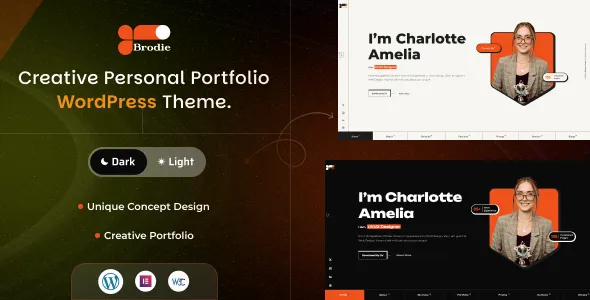
Brodie – Personal Portfolio WordPress Theme
Brodie – Personal Portfolio WordPress Theme is a website design solution for individuals and professionals who want to showcase their skills, experience, creative projects, and personal brand through a professional online presence. Designed for the personal portfolio niche, Brodie can be considered as a starting point for building a WordPress website that introduces your professional background, highlights selected work, communicates your expertise, and helps potential clients, recruiters, or collaborators connect with you. Whether you are a freelancer, designer, developer, photographer, consultant, digital creator, or other independent professional, a personal portfolio website can provide a central place to present your work and establish a recognizable identity online.
In a competitive digital environment, a well-organized portfolio helps people understand not only what you do but also how you approach your work. Visitors often want to explore project examples, review professional experience, understand your services, and find a convenient way to contact you. Brodie can serve as a foundation for organizing these details into a structured website, depending on the layouts and customization options available in the installed version. By combining relevant project examples, clear writing, consistent branding, and intuitive navigation, you can create a website that reflects your professional goals and communicates your value to the right audience.
WordPress provides a flexible content management system for managing pages, publishing articles, uploading media, and maintaining website content. A portfolio theme can help establish the visual framework for presenting this information. With suitable customization, original content, and a carefully selected collection of work, Brodie can be evaluated as part of a broader personal branding strategy. Before installation, review the current theme demo and documentation to confirm the available layouts, customization tools, supported plugins, and compatibility requirements.
What Is Brodie Personal Portfolio WordPress Theme?
Brodie is a personal portfolio WordPress theme intended for individuals who want to create a dedicated website around their professional identity and work. Instead of relying entirely on social media profiles or third-party portfolio platforms, professionals can use a personal website to organize their information in a format that supports their individual goals.
A designer may need a visually focused portfolio, while a developer may want to highlight technical projects, programming experience, and completed applications. A photographer might prioritize galleries, whereas a consultant may focus on professional achievements, services, and case studies. A freelancer may combine several of these elements to introduce their expertise and attract suitable projects.
Brodie can be evaluated for these different applications, subject to the layouts and features supported by the current release. WordPress makes it possible to manage portfolio pages, publish professional articles, add images, and update business or contact information without rebuilding the website each time content changes.
The most effective portfolio structure depends on the type of work being presented and the audience you want to reach. Before selecting the theme, review its documentation and available demo pages to understand how closely its design and customization options match your requirements.
Build a Professional Personal Brand Website
A personal brand website communicates who you are, what you do, and the kind of opportunities you want to attract. It can provide a more complete picture of your professional identity than a short biography or social media profile.
With Brodie, you can plan a website around essential sections such as Home, About, Portfolio, Services, Resume, Blog, and Contact, depending on the available page layouts. Each section should serve a clear purpose and provide information that helps visitors understand your experience and capabilities.
The homepage can introduce your professional identity through a concise headline, a short introduction, and a clear overview of your primary skills or services. Selected projects can then demonstrate your capabilities, while an About page provides additional context about your background and approach.
A personal portfolio should be consistent with your professional goals. Someone seeking employment may prioritize experience, skills, and selected achievements. A freelancer may emphasize services, project examples, and inquiry options. A creative professional may focus on visual storytelling and detailed case studies.
The goal is to create a recognizable and credible online presence that makes your professional information easy to discover and understand.
Portfolio Presentation for Designers and Creative Professionals
Designers and other creative professionals often rely on visual examples to communicate the quality and style of their work. A portfolio website provides space to present these examples with enough context for visitors to understand the thinking behind each project.
Brodie can be considered for portfolios featuring graphic design, branding, user interface design, user experience design, illustration, art direction, and other creative disciplines. Its suitability for specific gallery layouts should be verified through the current theme demo and documentation.
A strong portfolio should prioritize relevant projects rather than simply displaying a large collection of images. Each featured project can explain the original objective, the audience or client requirements, the creative approach, and the final deliverables.
For example, a branding project might include logo concepts, typography, color choices, packaging, and brand applications. A user interface project could present selected screens alongside an explanation of the user problem and design decisions.
Use high-quality images that accurately represent the finished work. Keep captions and supporting text concise, and organize projects so visitors can understand the type of work you specialize in.
A well-presented portfolio helps potential clients and employers evaluate your approach, creative strengths, and relevance to their requirements.
A Portfolio Website for Web Developers and Programmers
Web developers and programmers can use a personal portfolio to demonstrate technical capabilities and provide examples of completed projects. While a resume lists skills and experience, a portfolio gives visitors an opportunity to explore the practical application of those skills.
Brodie can be evaluated for a developer portfolio that includes website projects, web applications, software tools, open-source contributions, and other relevant technical work. Depending on the available layouts, project pages can be organized around individual examples with supporting descriptions.
Each project should explain its purpose, the technologies used, your role, and the main challenges addressed. When appropriate, include links to a live demonstration or source repository. Only publish links and code that you have permission to share.
Developers may also include a skills section covering programming languages, frameworks, content management systems, databases, and development tools. These details should reflect genuine experience rather than an unnecessarily long list of technologies.
A useful project description explains what you contributed rather than presenting only a screenshot. For collaborative projects, identify your individual responsibilities accurately.
By combining technical explanations with real project examples, a personal portfolio can help recruiters, clients, and collaborators understand your capabilities more clearly.
Personal Portfolio for Freelancers and Independent Professionals
Freelancers often need a website that introduces their services, presents previous work, and helps them attract suitable clients. A personal portfolio provides a central destination for professional information that can be shared in proposals, emails, applications, and professional profiles.
Brodie can be considered for freelancers working in web design, development, writing, digital marketing, photography, consulting, video editing, and other service-based fields. The final website should reflect the type of work you offer and the audience you want to reach.
A freelancer’s homepage can explain the primary service, identify the types of clients served, and direct visitors toward relevant examples. Individual service pages can provide more detail about the scope of work, deliverables, and typical project process.
Portfolio entries should demonstrate the work most relevant to prospective clients. Where appropriate, explain the original challenge, your contribution, and the outcome. Include measurable results only when reliable data is available and can be shared accurately.
A clear contact section can help visitors inquire about a project. Depending on your workflow, this may include an email address, inquiry form, professional profile links, or a booking integration supported by a compatible plugin.
The purpose is to help prospective clients understand your expertise and determine whether your services match their needs.
Showcase Your Resume, Skills, and Professional Experience
A portfolio website can complement a traditional resume by presenting professional experience in a format that is easy to explore. Visitors may want to review your education, employment history, technical skills, certifications, and selected achievements before deciding whether to contact you.
Brodie can be evaluated for a website that combines project examples with professional background information, depending on the available templates and customization features.
A resume section may include employment history, relevant responsibilities, education, professional training, and certifications. A skills section can highlight the capabilities most relevant to your current goals.
Keep this information focused. A portfolio intended for a design role may emphasize creative tools, design methods, and completed projects, while a developer portfolio may prioritize technical skills and software development experience.
Use accurate dates and descriptions, and avoid publishing confidential information from former employers or clients. If you include a downloadable resume, make sure the document is current and consistent with the information on the website.
Organizing experience and portfolio examples together gives visitors a broader understanding of your professional background without requiring them to search through multiple platforms.
Homepage Design and Content Organization
The homepage is often the first introduction to a personal portfolio. It should communicate your professional identity quickly and provide straightforward paths to the information visitors need.
A Brodie-based website can be planned around an introductory section, a short biography, selected projects, a summary of services, professional experience, testimonials where appropriate, and contact information. The actual layout depends on the theme’s available design options.
The opening headline should explain your professional role or the value you provide. A concise supporting paragraph can introduce your main skills and the kind of work you do.
Selected projects should be chosen carefully. Highlight examples that demonstrate your strongest capabilities and match the audience you want to reach. A smaller collection of relevant work can be more effective than a large gallery without clear organization.
The homepage may also include a short About section and links to detailed experience or service pages. A visible contact option gives interested visitors a clear next step.
Avoid placing too much information on the homepage. Use it as an overview that encourages visitors to explore the most relevant sections of your website.
Customization and Personal Visual Identity
A portfolio website should reflect your individual style while remaining easy to navigate. Customization helps establish a consistent visual identity and makes the website feel connected to your professional work.
Depending on the theme version and supported customization tools, Brodie may allow adjustments to elements such as colors, typography, page layouts, spacing, and imagery. Check the current documentation to confirm the exact options available.
A designer may choose a restrained visual style that emphasizes portfolio images, while a photographer might prefer larger image presentations. A consultant or business professional may prioritize readable text and a structured layout, whereas a developer may focus on project descriptions and technical information.
Consistency is more important than adding numerous decorative effects. Choose a small set of colors, a readable type system, and a clear heading hierarchy. Apply these choices throughout the homepage, project pages, biography, blog, and contact section.
Your visual identity should support your work rather than compete with it. Use relevant images, avoid excessive animation, and ensure that the content remains accessible on smaller screens.
Before implementing substantial changes, determine which elements are controlled by the theme, WordPress, or additional page-building tools. Backups and staging tests can help prevent unexpected issues on a live website.
Responsive Design for Mobile and Desktop Visitors
Visitors may discover your portfolio through a mobile search, open a project link from a professional network, or review your work on a desktop computer. Responsive design helps the website adapt to different screen sizes and maintain a consistent user experience.
Brodie should be evaluated for responsive behavior across its homepage, portfolio galleries, project descriptions, resume sections, blog articles, and contact pages. The exact behavior depends on the current theme version and any customizations or plugins installed.
On mobile devices, headings should remain readable, images should fit the available screen, and navigation menus should be straightforward to use. Important buttons and contact links should be easy to select.
Image-heavy portfolios require particular attention because large photographs and project screenshots can make pages difficult to browse when they are not optimized. Images should be appropriately sized and compressed without losing the details needed to understand the work.
Test the website on multiple screen sizes after making design changes. Custom CSS, embedded content, and third-party widgets can affect responsive layouts.
A portfolio should make it easy for visitors to explore your work regardless of the device they use.
Project Case Studies That Demonstrate Your Value
A strong portfolio explains the reasoning behind a project rather than displaying finished work without context. Case studies provide an opportunity to demonstrate your process, decision-making, and contribution.
Brodie can be considered for a portfolio structure that includes individual project pages, depending on the templates and content organization options available in the current version.
A useful case study can begin with a short overview of the project and its objectives. It can then explain the challenge, your responsibilities, the approach taken, and the final deliverables.
For a design project, this might include research, wireframes, visual direction, and interface decisions. For a development project, it could describe the technical requirements, architecture, implementation, and challenges addressed. A marketing case study may outline the campaign objective, activities performed, and verified results.
Keep project information accurate and respect confidentiality agreements. If a project belongs to a client or employer, obtain appropriate permission before publishing private materials or identifying details.
Case studies are particularly valuable when you want to demonstrate problem-solving skills, not just visual presentation. They give potential clients and employers a clearer understanding of how you approach professional work.
Contact Forms and Professional Networking
A portfolio website should make it convenient for interested visitors to contact you. Potential contacts may include recruiters, prospective clients, collaborators, agencies, and other professionals.
Depending on the available theme layouts and compatible plugins, Brodie can be configured with a contact section or inquiry form. The form should collect only the information necessary to begin a conversation.
Common fields may include a name, email address, subject, and short message. Freelancers who receive project inquiries may also ask about the requested service or general project scope, provided the form remains easy to complete.
Clearly display relevant professional contact information and links to profiles you actively maintain. If you publish social links, ensure that they lead to the correct accounts and represent your current professional identity.
Test form submissions, email delivery, validation messages, and spam protection before launch. A contact form that appears to work but fails to deliver messages can result in missed opportunities.
The contact section should feel like a natural extension of the portfolio. Visitors who have reviewed your work should be able to take the next step without searching through unrelated pages.
Blogging and Thought Leadership with WordPress
A personal portfolio can include a blog to share knowledge, explain professional methods, and demonstrate expertise. WordPress provides publishing tools that allow individuals to create articles, organize categories, and update content over time.
Brodie can be evaluated for a portfolio that combines project pages with professional articles, depending on its available blog templates and configuration.
A designer might write about user experience principles, design workflows, branding decisions, or creative tools. A developer could publish tutorials, technical explanations, and lessons learned from completed projects. A consultant may share industry insights, practical advice, or summaries of professional experiences.
Useful articles should address genuine questions from the intended audience. They should provide clear explanations and avoid publishing content solely to repeat keywords.
Blog posts can link to relevant portfolio examples or service pages where those links help readers explore related information. This creates a connection between educational content and the work you offer.
A manageable publishing schedule is more sustainable than producing large quantities of shallow articles. Focus on accuracy, originality, readability, and practical value to build a useful professional resource over time.
SEO-Friendly Structure for Personal Portfolio Websites
Search engine optimization can help people discover your portfolio when they search for your name, professional services, skills, or areas of expertise. A well-organized WordPress website provides a foundation for descriptive pages and useful content, but rankings depend on multiple factors beyond the theme.
Each important page should have a clear title, a descriptive URL, a logical heading structure, and original information. A designer can create separate project pages, while a freelancer may need dedicated service pages that explain individual offerings.
Use relevant phrases naturally in page titles and descriptions. For example, a portfolio page may identify the professional role and the type of work shown, while a service page can explain the specific offering.
Internal links can connect project case studies with relevant services, biography information, and related articles. Descriptive link text helps visitors understand where a link will take them.
Images should be optimized for performance and include meaningful alternative text when they communicate important information. Compatible SEO plugins may assist with metadata, XML sitemaps, redirects, and other supported settings.
Avoid duplicating the same descriptions across every project page. Original content that explains the details of each project is more useful to visitors and can help search engines understand the purpose of individual pages.
No WordPress theme can guarantee specific search rankings or website traffic. SEO performance depends on content quality, technical setup, competition, relevance, and ongoing work.
Website Performance and Image Optimization
Portfolio websites often rely on images, videos, and other media to communicate professional quality. These elements should be presented clearly without making the website unnecessarily slow.
The actual performance of a Brodie website depends on the theme implementation, hosting environment, media files, scripts, plugins, and third-party integrations. A visually attractive portfolio still needs technical optimization.
Start by resizing images to suit their display areas and compressing files while retaining sufficient detail. Avoid uploading multiple oversized versions of the same image when smaller files can provide an appropriate viewing experience.
Use video embeds carefully and avoid loading unnecessary external scripts. If a page contains many project images, test whether the layout remains responsive and efficient on mobile connections.
Reliable hosting, suitable caching, and other performance tools may improve loading times when configured correctly. However, any optimization should be tested to ensure that portfolio navigation, forms, and interactive elements continue to work.
Review the homepage, image galleries, project case studies, blog articles, and contact page. Different page types can have different performance characteristics.
Regular monitoring helps identify problems as you add new work and content. An efficient portfolio allows visitors to focus on your projects instead of waiting for pages to load.
Accessibility and User-Friendly Navigation
An effective portfolio should make professional information easy to access. Clear navigation, readable text, appropriate contrast, and descriptive links help visitors understand the website and locate relevant content.
When configuring Brodie, organize the main navigation around the most important sections, such as Home, About, Portfolio, Services, Blog, and Contact. The exact menu should reflect your professional goals rather than include every possible page.
Use a logical heading hierarchy and meaningful labels for buttons and links. Images that communicate important information should have suitable alternative text, while decorative images should not add unnecessary reading distractions.
Contact forms should clearly identify their fields and provide understandable error messages. Interactive elements should be distinguishable from ordinary text and usable with appropriate input methods.
Accessibility depends on the theme, content, and way each element is implemented. Automated checks can identify some issues, but manual keyboard testing and practical usability reviews are also valuable.
A clear and accessible portfolio supports a more inclusive experience and makes it easier for visitors to explore your professional work.
WordPress Plugins and Portfolio Extensions
WordPress plugins can extend a portfolio website with additional functions when the theme does not provide everything required. The appropriate tools depend on your professional goals and the features already available in Brodie.
A contact form plugin may help collect inquiries, while an SEO plugin can assist with metadata and sitemap management. Analytics tools may provide information about website traffic and visitor behavior, subject to applicable privacy requirements.
Depending on the portfolio requirements, additional tools may be useful for image galleries, performance optimization, security, backups, or appointment scheduling. Any plugin used for these purposes should be compatible with the installed WordPress version and the theme’s documented requirements.
Before installing an extension, review its documentation, update history, compatibility information, and support arrangements. Avoid adding several plugins that perform overlapping tasks without a clear reason.
After installing or updating a plugin, test the affected pages and functions. This is especially important for contact forms, image galleries, navigation menus, and responsive layouts.
A carefully selected set of extensions can provide useful functionality without making the website unnecessarily complicated to maintain.
Security and Ongoing Website Maintenance
A personal portfolio should be maintained regularly to ensure that it remains accurate, accessible, and dependable. Outdated project information, broken links, and technical problems can affect the professional impression visitors receive.
Website owners should use reputable hosting, enable HTTPS, protect administrator accounts with strong authentication practices, and assign permissions according to each user’s responsibilities. WordPress, the theme, and compatible plugins should be updated carefully.
Create backups before major changes and make sure the website can be restored if an update causes a problem. A staging environment can help test substantial changes before applying them to the live website.
Content maintenance is equally important. Review your biography, resume, project examples, professional links, services, and contact information periodically. Remove outdated details and add new work when it strengthens the portfolio.
Check navigation links, contact forms, image displays, and mobile layouts after updates. Remove unused plugins and themes when appropriate, and obtain software from trustworthy sources.
A simple maintenance routine helps keep the website useful as your career, skills, and professional objectives develop.
Who Should Use Brodie Personal Portfolio WordPress Theme?
Brodie can be evaluated by a range of professionals who need a website to present their skills, experience, and work.
Freelancers: Independent professionals can showcase services, completed projects, and contact information to attract relevant opportunities.
Web designers: Designers can present website layouts, interface concepts, branding projects, and case studies.
Developers and programmers: Technical professionals can highlight applications, websites, software projects, and development experience.
Photographers: Photographers can create an online destination for selected images, galleries, and professional information, depending on the available layouts.
Graphic designers and illustrators: Creative professionals can organize visual work into collections that communicate their style and capabilities.
Consultants: Consultants can present their expertise, professional background, services, and educational articles.
Job seekers: Individuals preparing for new career opportunities can combine a resume with selected work and relevant achievements.
Content creators: Writers and other digital creators can introduce their services, publish articles, and organize samples of their work.
Personal brands: Professionals can create a central website that connects their biography, projects, articles, and professional profiles.
The suitability of Brodie depends on the current version, available templates, customization options, and the type of portfolio you want to build. Review the demo and documentation before installation to confirm that the theme matches your needs.
Tips for Creating a Successful Portfolio with Brodie
A successful portfolio begins with a clear purpose. Decide whether the website should primarily attract freelance clients, support job applications, showcase creative work, or establish your professional identity.
Choose projects that demonstrate your strongest and most relevant capabilities. Explain your role in each project and provide enough context for visitors to understand the work. Avoid publishing confidential client information or making unsupported claims about project results.
Prepare a concise biography that communicates your background and professional focus. Keep your skills and experience accurate, and make sure your contact information is current.
Use a consistent visual identity throughout the website. Select readable typography, a suitable color palette, and relevant imagery that complements your work rather than distracting from it.
Keep the navigation simple and ensure that visitors can find your portfolio, background, and contact information quickly. Test the website on mobile devices and desktop computers, and review image quality, page loading, links, and form submissions.
Publish useful articles when you have practical knowledge to share, and update the portfolio as your experience grows. Regular maintenance helps ensure that the website continues to represent your professional capabilities accurately.
Final Thoughts on Brodie Personal Portfolio WordPress Theme
Brodie – Personal Portfolio WordPress Theme is a potential option for individuals who want to build a dedicated WordPress website for showcasing their work, professional background, and personal brand. Its portfolio-focused positioning makes it relevant to freelancers, designers, developers, photographers, consultants, and other professionals who need a central place to present their expertise.
A well-planned Brodie website can bring together an introductory homepage, selected projects, detailed case studies, a professional biography, experience information, articles, and contact options. The final layout and capabilities depend on the theme’s current release, documented features, supported integrations, and customization tools.
Long-term value also depends on the quality of your portfolio, the clarity of your message, responsive performance, accessibility, search optimization, and regular maintenance. A theme cannot guarantee job offers, clients, search rankings, or business growth, but a suitable design foundation can help communicate your work more effectively.
For professionals seeking a WordPress-based portfolio, Brodie is worth evaluating as part of a broader personal branding strategy. With thoughtful customization, authentic project examples, useful content, and consistent updates, a portfolio website can support professional visibility, strengthen credibility, and make it easier for the right people to discover your work.