My Account
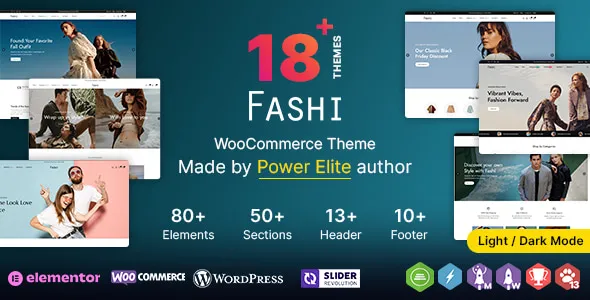
Fashi WP – Multipurpose Fashion WooCommerce WordPress Theme
Fashi WP – Multipurpose Fashion WooCommerce WordPress Theme is a versatile eCommerce website design solution for businesses looking to build a professional online fashion store with WordPress and WooCommerce. Created for the fashion retail niche, Fashi WP can be evaluated as a foundation for selling clothing, footwear, handbags, fashion accessories, jewelry, and other style-related products through an organized online storefront. Whether you are launching a new clothing brand, operating an established fashion boutique, managing a multi-category apparel store, or expanding an existing retail business into eCommerce, this multipurpose fashion theme offers a starting point for creating a digital shopping experience tailored to your brand and customers.
Fashion shoppers often rely on product photography, clear category navigation, accurate sizing information, and convenient purchasing options when choosing what to buy online. A well-designed fashion website should make it easy to explore collections, compare products, review available sizes and colors, and complete an order with confidence. Fashi WP can be considered for organizing these elements into a consistent store experience, depending on the layouts and features available in the installed version. With thoughtful customization, high-quality product images, detailed descriptions, and a carefully structured catalog, businesses can create an online destination that communicates their brand identity and helps customers discover relevant products.
WordPress provides a flexible content management system, while WooCommerce supplies core eCommerce functionality for managing products, orders, and store settings. Together, they offer a foundation for building and maintaining an online fashion business. Before installing Fashi WP, review its current demo and documentation to confirm its supported layouts, product display options, customization capabilities, compatible plugins, and technical requirements.
What Is Fashi WP Multipurpose Fashion WooCommerce WordPress Theme?
Fashi WP is a multipurpose fashion-oriented WordPress theme intended for businesses that want to establish an online store for apparel and related retail products. Its niche positioning makes it worth evaluating for brands that need a visual storefront capable of presenting fashion collections and guiding customers through the shopping process.
A clothing retailer may need separate categories for men’s wear, women’s wear, children’s clothing, footwear, and accessories. A fashion boutique may prefer to organize products around seasonal collections, new arrivals, or selected designers. A lifestyle store might combine apparel with handbags, jewelry, watches, and other complementary products.
Fashi WP can be considered for these types of projects, depending on the current theme version and its available templates. WordPress allows store owners to manage pages, publish blog articles, upload product imagery, and maintain website content. WooCommerce supports the underlying product catalog and purchasing workflow, with additional functionality available through compatible extensions where necessary.
The best theme configuration depends on the store’s product range, target audience, branding, and operational requirements. Reviewing the current demo and documentation helps determine whether Fashi WP provides the layouts and customization options needed for the intended business.
WooCommerce Functionality for Fashion Retail
WooCommerce provides the core eCommerce framework for creating an online store with WordPress. It allows businesses to publish products, configure prices, manage inventory, process orders, and set up supported payment and shipping methods.
For a Fashi WP-based fashion store, WooCommerce can help organize clothing, shoes, bags, accessories, and other products into a manageable catalog. Each product can include a title, description, price, photographs, and other relevant information. Products with variations, such as different sizes or colors, can be configured according to WooCommerce’s available product options and the store’s setup.
A clear catalog structure makes it easier for shoppers to find relevant items. For example, a clothing store can separate tops, trousers, dresses, outerwear, footwear, and accessories into distinct categories. Additional collections can highlight seasonal products, selected styles, or recently added inventory.
WooCommerce also provides tools for handling shopping carts, checkout workflows, and order management. The actual customer experience depends on the store’s configuration, selected payment gateway, shipping arrangements, and any additional extensions.
Before launching the store, test the complete shopping journey. Check product variations, stock availability, cart updates, payment processing, shipping calculations, order confirmation emails, and mobile checkout usability. A successful fashion store needs a reliable purchasing process as well as an attractive design.
Multipurpose Design for Different Fashion Businesses
Fashion businesses vary in size, product range, customer demographics, and visual identity. A multipurpose theme can provide a starting point for different store concepts, provided its available layouts support the intended catalog and shopping experience.
Fashi WP can be evaluated for businesses such as clothing boutiques, apparel brands, footwear retailers, accessory stores, online fashion shops, and lifestyle retailers. Each business can organize its website around its own products and customer needs.
A women’s clothing store might focus on dresses, tops, ethnic wear, and seasonal collections. A men’s fashion retailer may prioritize shirts, trousers, jackets, footwear, and accessories. A children’s apparel store may organize products by age group, clothing type, and size.
A fashion accessories business could concentrate on handbags, belts, jewelry, sunglasses, and other complementary items. A general fashion retailer may need a broader catalog with multiple departments and promotional collections.
Although a multipurpose theme offers flexibility, the final website should still have a clear identity. Consistent branding, relevant product categories, and well-planned navigation help prevent the store from feeling cluttered or confusing.
Create an Attractive Fashion Store Homepage
The homepage introduces the brand and guides visitors toward the products most relevant to them. In fashion eCommerce, it also establishes the visual style of the store through imagery, typography, colors, and the presentation of featured collections.
A Fashi WP-based homepage can be planned around an introductory banner, featured categories, new arrivals, popular products, seasonal collections, promotional sections, and brand information, depending on the theme’s available layouts.
The introductory section should communicate the store’s identity and direct visitors toward relevant products. A fashion brand might feature a new collection, while a multi-category retailer could highlight important departments such as clothing, shoes, or accessories.
Category sections help shoppers begin browsing without searching through the entire catalog. Featured products can draw attention to selected inventory, while seasonal collections can support changes in product demand throughout the year.
Promotional banners should communicate genuine offers and relevant information. Avoid displaying expired discounts or unsupported claims about product availability.
A successful homepage should balance visual appeal with usability. Large fashion images can create a strong first impression, but essential navigation, product links, and store information should remain easy to find.
Product Categories and Organized Navigation
Clear navigation is essential when managing a fashion store with multiple product categories, collections, and variations. Shoppers should be able to identify the type of product they want and move through the catalog without unnecessary effort.
With Fashi WP and WooCommerce, a store owner can plan a category structure around the available inventory. Possible departments include:
- Men’s clothing
- Women’s clothing
- Kids’ fashion
- Dresses and ethnic wear
- Shirts, tops, and T-shirts
- Jeans, trousers, and skirts
- Jackets and outerwear
- Shoes and footwear
- Handbags and backpacks
- Jewelry and fashion accessories
- New arrivals and seasonal collections
- Sale and clearance products
These are examples of possible catalog categories, not a guarantee that every category is predefined in the theme. The final structure should reflect the products actually sold.
Category labels should be familiar and descriptive. Where appropriate, filters can help shoppers narrow products by size, color, price, brand, or other relevant attributes. Any advanced filtering options should be confirmed in the theme documentation or added through compatible WooCommerce extensions if required.
A well-organized navigation system helps customers discover products and makes a large catalog easier to manage.
Product Pages for Clothing, Shoes, and Accessories
Product pages provide the details shoppers need before making a purchase. In fashion retail, clear imagery and accurate product information are especially important because customers cannot physically examine the item before ordering.
A Fashi WP fashion store can use WooCommerce product pages to present product names, prices, descriptions, photographs, available variations, and purchasing options. The exact visual layout depends on the installed theme version and its configuration.
Clothing descriptions should explain the garment’s material, fit, style, available sizes, color options, and care instructions where relevant. Footwear listings may need information about sizing, materials, construction, and intended use. Bags and accessories can include dimensions, materials, compartments, closures, and other useful specifications.
High-quality photographs help shoppers understand the appearance and details of a product. Multiple views can show the front, back, fabric texture, accessories, or other important features. Product images should accurately represent the item being sold.
Sizing information deserves particular attention. Provide a clear size chart when appropriate, and explain the measurement system used. Accurate descriptions can help customers choose suitable products and establish realistic expectations before placing an order.
Product Variations for Sizes and Colors
Fashion products often come in multiple sizes, colors, patterns, and other variations. A well-organized store should make these options easy to understand and select.
WooCommerce supports variable products, allowing store owners to configure options such as size and color where appropriate. Fashi WP can be evaluated for how these product variations are displayed within its supported product layouts.
For example, a T-shirt may be available in several sizes and colors, while a pair of shoes may have different size options. A dress might include several color choices and a size range. The available combinations should match the actual inventory.
Product pages should communicate which variations are available and whether particular options are out of stock. Shoppers should not have to guess which size or color they are selecting.
Store owners should test the behavior of product variations on desktop and mobile devices. Verify that customers can choose the intended option, see the correct price where applicable, and add the selected variation to the cart.
Accurate inventory management is equally important. Stock levels should be maintained consistently so that the website does not offer unavailable products without appropriate explanation.
Responsive Design for Mobile Shopping
Many customers discover fashion products through mobile searches, social media links, and online advertisements. A responsive website helps them browse collections and complete purchases across smartphones, tablets, and desktop computers.
Fashi WP should be evaluated for responsive behavior across the homepage, category pages, product details, shopping cart, and checkout. The actual experience depends on the theme version, its configuration, and any additional plugins or customizations.
On mobile devices, navigation should be straightforward, product photographs should fit the screen, and text should remain readable. Size selectors, color options, quantity controls, and purchase buttons should be easy to use without accidental selections.
Fashion stores often depend on imagery to communicate style and product details. Images should remain clear while being optimized for efficient loading. Product cards should present essential information without overwhelming the limited screen space.
Test the website on different devices and screen sizes before launch. Custom styles, third-party widgets, and additional plugins can affect how individual sections behave.
A convenient mobile experience allows customers to move from product discovery to checkout with fewer obstacles.
Customization and Fashion Brand Identity
A fashion store should communicate its own identity rather than look like an unmodified template. Branding helps customers recognize the business and creates consistency across product pages, promotional content, and other website sections.
Depending on the theme version and available customization tools, Fashi WP may support changes to design elements such as colors, typography, layouts, spacing, and imagery. Review the current documentation to confirm the precise customization options.
A luxury fashion boutique might prefer a restrained color palette, elegant typography, and generous spacing. A streetwear brand could use stronger graphics and bolder visual elements, while a children’s clothing store may favor a more playful presentation.
The visual style should match the products and audience. Use consistent image treatments, button styles, heading sizes, and page layouts across the website.
Product photography should also support the brand identity. Consistent lighting, backgrounds, image dimensions, and styling can make the catalog look more professional.
Before making extensive changes, identify which settings are managed by the theme, WordPress, WooCommerce, or additional page-building tools. Backups and staging tests are useful when changing a live website.
New Arrivals, Featured Products, and Seasonal Collections
Fashion retail often changes throughout the year as new styles, colors, and seasonal products become available. Organizing these products into collections helps shoppers discover relevant items and gives the store flexibility when updating its presentation.
A Fashi WP-based store can be planned around collections such as new arrivals, seasonal styles, everyday essentials, popular products, or selected fashion trends, depending on the layouts and product display features available.
A new arrivals section can help returning visitors discover recently added inventory. Featured products can draw attention to selected items, while seasonal collections can organize products around weather conditions, celebrations, or changes in customer demand.
These sections should remain accurate and regularly updated. Remove products from time-sensitive collections when they are no longer relevant, and avoid promoting unavailable items without clear stock information.
Store owners can also use descriptive collection pages to explain the products included and help customers navigate the catalog. When products are grouped thoughtfully, visitors can explore related items without needing to search for each product individually.
A focused collection strategy supports product discovery while keeping the shopping experience organized.
Shopping Cart, Checkout, and Order Management
The checkout process is a critical part of any fashion eCommerce website. Customers should be able to review their selections, confirm product variations, understand delivery costs, and complete payment without unnecessary confusion.
WooCommerce provides the core shopping cart and checkout functionality. A Fashi WP store can be configured with suitable payment methods, shipping options, and order settings according to the business’s requirements.
The cart should clearly display selected products, quantities, prices, and chosen variations. Customers should be able to review their selections and make changes before proceeding to checkout.
Checkout forms should request the information needed to process the order. Shipping fees, applicable taxes, and other charges should be communicated transparently before the customer confirms the purchase.
After an order is placed, confirmation messages and transactional emails should provide clear information about the order. Store owners should test these communications to make sure customers receive the expected details.
Before launching the website, test successful and unsuccessful payment scenarios where supported, order notifications, stock updates, and shipping calculations. The final checkout experience depends on the selected payment gateway, shipping integrations, and WooCommerce configuration.
Promotional Banners and Marketing Opportunities
Promotional content can help a fashion store communicate new collections, seasonal offers, and selected products. A well-planned promotion gives customers useful information without overwhelming the browsing experience.
Depending on its available layouts, Fashi WP can be evaluated for a homepage that includes promotional banners or featured collection sections. These areas may be used to introduce new seasonal styles, highlight selected departments, or communicate genuine discounts.
A banner should have a clear message and direct visitors toward a relevant page. For example, a campaign featuring new footwear should link to the appropriate collection rather than a general page unrelated to the promotion.
Promotional messages must be accurate. Clearly state the applicable terms, dates, and limitations of discounts where necessary. Avoid displaying expired campaigns or claims that cannot be substantiated.
A store can also use product recommendations and complementary collections to help customers discover related items. These features should improve navigation rather than distract from the products.
Review promotional sections regularly to keep the homepage current and ensure that visitors see relevant information.
SEO-Friendly Structure for Fashion eCommerce
Search engine optimization can help potential customers discover a fashion store through relevant product and category searches. A well-organized WordPress website provides a foundation for descriptive product pages, useful category content, and logical internal links.
For a Fashi WP store, each product should have an accurate title, an original description, and relevant product details. Category pages should explain the types of products available and help visitors navigate the catalog.
For example, a clothing store can create distinct categories for dresses, shirts, trousers, footwear, and accessories. Each category should have a clear purpose rather than duplicating nearly identical content across multiple pages.
Descriptive page titles, useful headings, and readable URLs can help users understand the content of a page. Internal links can connect related categories and products, making it easier to discover complementary items.
Image optimization is particularly important for fashion stores. Use appropriate image dimensions, compress files where practical, and add meaningful alternative text to informative images.
Compatible SEO plugins may assist with metadata, XML sitemaps, canonical settings, redirects, and supported structured data. Store owners should also monitor broken links, duplicate pages, indexing issues, and unnecessary filter URLs.
Avoid excessive keyword repetition. Original descriptions that explain product materials, fit, features, and intended use are more helpful than generic text repeated across the catalog.
A theme cannot guarantee rankings or traffic. SEO results depend on content quality, technical implementation, competition, product relevance, and ongoing optimization.
Content Marketing and Fashion Blogging
A fashion blog can support an online store by publishing useful content related to styling, clothing care, seasonal collections, and fashion choices. WordPress provides publishing tools that allow store owners to create articles and organize them into categories.
Fashi WP can be considered for a website that combines product listings with editorial content, depending on the supported blog layouts and configuration.
Potential article topics include choosing clothing for different occasions, understanding garment materials, caring for delicate fabrics, coordinating accessories, selecting footwear, and maintaining seasonal wardrobes.
Articles should provide practical information rather than simply promoting products. A guide about garment care may help customers understand how to maintain clothing, while a styling article can introduce relevant product categories when those links are useful to readers.
Internal links can connect blog posts with relevant products and collections. This gives readers a natural path from learning about a topic to exploring items that match their interests.
A consistent publishing schedule can help maintain the website’s content, but quality should take priority over volume. Original, accurate, and audience-focused articles are more valuable than repetitive posts written only to target search phrases.
Website Performance and Image Optimization
Fashion stores often contain numerous product photographs, promotional graphics, and collection images. These assets help communicate the brand’s style but should be optimized to avoid unnecessary loading delays.
The performance of a Fashi WP website depends on the theme implementation, hosting environment, image sizes, scripts, installed plugins, and third-party integrations. A visually appealing design does not automatically guarantee fast performance.
Start by resizing product images to suitable dimensions and compressing files while retaining enough detail for customers to evaluate the products. Avoid uploading unnecessarily large images when smaller files can provide a similar visual experience.
Review unnecessary animations, external widgets, and scripts that may affect loading speed. Reliable hosting, suitable caching, and other performance tools may improve the experience when configured correctly.
Test important pages, including the homepage, category listings, product details, cart, and checkout. These sections can have different performance requirements, especially when product variations or external integrations are involved.
After making optimization changes, verify that product images display correctly and that cart updates, product selection, and checkout functionality remain reliable.
Ongoing performance monitoring helps identify issues as the catalog expands and new products are added.
Accessibility and User-Friendly Navigation
An effective fashion store should be easy to navigate and understand. Clear headings, readable text, suitable contrast, descriptive links, and well-labeled form fields can help visitors use the website more comfortably.
When configuring Fashi WP, organize the main navigation around the store’s most important departments. Use familiar category names and avoid placing too many unrelated items in the primary menu.
Buttons should communicate their purpose clearly, and product variation controls should make size and color selections understandable. Important information should not rely on color alone.
Images that communicate product information should have meaningful alternative text where appropriate. Decorative images should not create unnecessary distractions for visitors using assistive technologies.
Forms should identify required fields and provide understandable error messages. The checkout process deserves particular attention because confusing fields or inaccessible controls can prevent customers from completing purchases.
Accessibility depends on the theme, the content, and how individual components are implemented. Automated checks can help identify some problems, while manual keyboard testing and usability reviews can reveal others.
WordPress Plugins and Additional Store Features
WordPress plugins can extend a fashion store with additional functions when they are not included in the theme itself. The appropriate combination depends on the business’s needs and the capabilities already available through Fashi WP and WooCommerce.
A contact form plugin can help customers submit inquiries, while an SEO plugin may assist with metadata and sitemap management. Analytics tools can provide information about traffic and visitor behavior, subject to applicable privacy requirements.
Additional extensions may be useful for product filtering, wishlists, product reviews, email marketing, shipping integrations, performance optimization, security, and backups. However, the exact requirements should be assessed before adding more tools.
Before installing a plugin, review its compatibility with the current WordPress and WooCommerce versions, documentation, update history, and support arrangements. Avoid using several plugins that duplicate the same function without a clear reason.
After installing or updating an extension, test the affected parts of the store. Pay particular attention to product variations, filters, cart behavior, checkout, and mobile layouts.
A carefully selected set of compatible plugins can extend the store’s capabilities while keeping the website manageable.
Security and Ongoing Website Maintenance
A fashion eCommerce website requires ongoing maintenance to remain secure and dependable. Regular checks help protect store operations and ensure that customers receive accurate product information.
Website owners should use reputable hosting, enable HTTPS, protect administrator accounts with strong authentication practices, and assign permissions according to each user’s responsibilities. WordPress, the theme, WooCommerce, and compatible plugins should be updated carefully.
Create backups before major updates or design changes, and confirm that a recovery process is available. Testing significant changes in a staging environment can help identify problems before they affect the live store.
Maintenance should include checking inventory, reviewing product prices, updating seasonal collections, testing checkout functionality, and verifying transactional emails. Broken links, outdated promotional banners, and inaccurate product descriptions should be corrected promptly.
Remove unused plugins and themes when appropriate, and obtain software from trustworthy sources. Security and backup tools can provide additional support when selected and configured according to the store’s requirements.
A regular maintenance routine helps the website remain useful as the business adds new collections and serves more customers.
Who Should Use Fashi WP Multipurpose Fashion WooCommerce WordPress Theme?
Fashi WP can be evaluated by different types of businesses that want to sell fashion products through a WordPress and WooCommerce website.
Clothing brands: Apparel businesses can organize product catalogs, present collections, and communicate their brand identity.
Fashion boutiques: Independent retailers can showcase selected styles, seasonal products, and complementary accessories.
Women’s fashion stores: Businesses can organize dresses, tops, trousers, ethnic wear, and other apparel categories.
Men’s fashion retailers: Stores can present shirts, jeans, jackets, footwear, and accessories in a structured catalog.
Children’s clothing stores: Retailers can organize products by age group, size, clothing type, and collection.
Footwear businesses: Shoe retailers can present different styles, sizes, and product details to support customer decisions.
Fashion accessory stores: Businesses selling handbags, jewelry, belts, sunglasses, and other accessories can create a focused product catalog.
Online fashion startups: New businesses can evaluate the theme as a starting point for establishing a digital storefront.
Lifestyle retailers: Stores selling apparel alongside related lifestyle products can organize multiple departments within a consistent brand presentation.
The right choice depends on the size of the catalog, product variations, customization requirements, and checkout workflow. Review the current theme demo and documentation before making a final decision.
Tips for Building a Successful Fashion Store with Fashi WP
A successful online fashion store requires a clear brand identity, organized products, accurate information, and a convenient shopping process.
Begin by defining your target audience and product range. Decide which categories deserve the most attention and organize the navigation around the way customers are likely to shop.
Prepare original product descriptions that explain materials, fit, available sizes, colors, care instructions, and other relevant details. Use accurate photographs that represent the items being sold.
Establish a consistent visual identity through typography, colors, photography, and page layouts. Keep the homepage focused on important categories and relevant collections instead of overcrowding it with promotional sections.
Test the entire customer journey, from browsing a product to selecting variations, adding items to the cart, and completing checkout. Review shipping rules, payment settings, confirmation emails, and mobile usability before launch.
Use useful blog content to answer customer questions and support product discovery. Maintain accurate category descriptions and ensure that promotional campaigns reflect genuine offers.
Finally, create a maintenance plan that covers updates, backups, security, inventory reviews, performance monitoring, and content improvements. These practices help the store remain reliable as the business grows.
Final Thoughts on Fashi WP Multipurpose Fashion WooCommerce WordPress Theme
Fashi WP – Multipurpose Fashion WooCommerce WordPress Theme is a potential option for businesses looking to establish an online fashion store with WordPress and WooCommerce. Its multipurpose fashion positioning makes it relevant to clothing brands, boutiques, footwear retailers, accessory businesses, and other fashion-focused eCommerce projects.
A well-planned Fashi WP website can bring together organized product categories, informative product pages, attractive imagery, a consistent visual identity, and a convenient shopping process. WooCommerce provides the core eCommerce foundation, while WordPress allows businesses to manage website content and publish helpful fashion-related articles.
The final capabilities depend on the theme’s current version, documented features, supported integrations, and customization options. Reviewing the official demo and technical requirements before installation helps determine whether the theme fits the intended store structure.
Long-term success also depends on product quality, accurate sizing information, reliable order processing, website performance, search optimization, customer service, and regular maintenance. A theme cannot guarantee search rankings or sales, but a suitable design foundation can help businesses present their products professionally and create a more organized shopping experience.
For retailers seeking a flexible WordPress solution for fashion eCommerce, Fashi WP is worth evaluating as part of a broader online retail strategy. With thoughtful customization, high-quality product photography, useful descriptions, and a carefully tested checkout process, a fashion store can support product discovery, strengthen brand recognition, and serve customers more effectively.