My Account
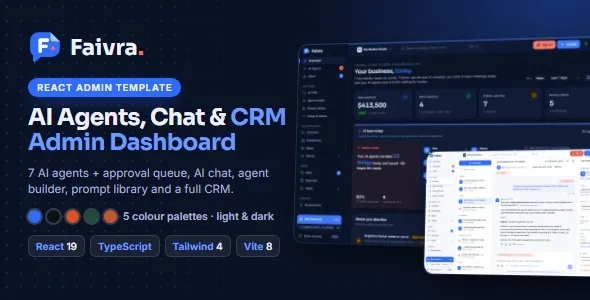
Faivra – AI Agents, Chat & CRM Admin Dashboard
Faivra – AI Agents, Chat & CRM Admin Dashboard is an administrative dashboard template designed for businesses, startups, SaaS companies, and development teams building platforms around artificial intelligence, customer communication, and customer relationship management. It provides a structured interface concept for managing AI agents, organizing conversations, monitoring customer interactions, and accessing CRM-related information from a centralized workspace. By bringing these areas together in one dashboard environment, Faivra can serve as a starting point for developing modern business applications that combine AI-powered workflows with customer support and relationship management.
As businesses increasingly use AI tools to improve communication and streamline everyday operations, they need organized interfaces that make complex activities easier to manage. An administrative dashboard can help teams review important information, navigate between different modules, and work with customer-related data through a consistent interface. Faivra is intended for projects that need an interface focused on AI agent administration, chat management, and CRM workflows. Its design can be adapted to different product requirements depending on the supplied components, technology stack, and customization options.
Whether you are developing an AI assistant management platform, a customer support application, a CRM system, or a SaaS administration panel, Faivra offers a foundation for organizing essential dashboard sections. Developers can customize the interface, connect suitable backend services, and extend the application according to their business requirements. The final functionality depends on the included source files, integrations, and development work implemented during customization.
What Is Faivra – AI Agents, Chat & CRM Admin Dashboard?
Faivra is an admin dashboard template created for web application projects involving AI agents, chat interfaces, and customer relationship management. An admin dashboard provides an organized environment where authorized users can access application sections, review information, and manage different operational activities.
AI agent platforms often require several administrative areas. These may include agent configuration, conversation monitoring, interaction history, user management, and performance-related information. A CRM application has different but connected requirements, such as customer records, contact details, communication history, and sales-related information.
Faivra brings these concepts together within a dashboard-oriented design. Instead of building every interface section from the beginning, developers can use the template as a starting point and customize its structure to match the intended application.
The template is particularly relevant to developers creating SaaS products, AI-powered business tools, customer service applications, and internal management systems. Its usefulness depends on how well the available interface components align with the project’s requirements.
It is important to distinguish between the dashboard interface and the underlying application functionality. A frontend template can provide screens and visual components, but features such as AI processing, authentication, persistent data storage, automated messaging, and CRM synchronization generally require backend development or compatible third-party services unless they are explicitly included.
AI Agent Management Dashboard
AI agents are increasingly used in business applications to assist with repetitive tasks, respond to questions, organize information, and support customer interactions. Managing these agents requires a clear interface where administrators can review configurations and organize their activities.
Faivra is designed around AI agent administration, making it a relevant starting point for applications that provide multiple assistants or automated workflows. Depending on the supplied layouts, developers can organize the dashboard around agent-related information and provide navigation to individual management areas.
An AI agent management interface may include information such as:
- Agent names and descriptions
- Agent categories or purposes
- Current configuration status
- Assigned tasks or responsibilities
- Conversation and activity history
- Usage information and operational indicators
- Options for reviewing or editing agent settings
These elements can help administrators understand how different agents are organized within an application. For example, a customer support platform may use separate assistants for product questions, order inquiries, and general support. A business productivity platform might organize agents around research, content assistance, or internal knowledge management.
The exact capabilities depend on the included template components and the application developed around them. Connecting an agent to an AI model, configuring prompts, managing knowledge sources, and processing requests require suitable APIs or backend services.
Chat Management and Customer Conversations
Communication is an important part of many modern business applications. Customer support teams need convenient ways to review conversations, understand customer questions, and maintain continuity across interactions.
A chat-focused dashboard can organize communication activities into a structured workspace. Faivra provides a starting point for projects where administrators or support agents need access to conversation-related sections alongside other management tools.
A chat management interface may be customized to display:
- Conversation lists
- Customer names and profile details
- Message previews
- Conversation status
- Recent interaction information
- Assigned support representatives
- Message history
- Search and filtering controls
A well-organized conversation area can help support teams locate relevant discussions without navigating through unrelated application sections. It can also provide a foundation for reviewing communication history and understanding the context of customer requests.
For businesses using AI-assisted support, the chat interface may be connected to automated response services. For example, an AI assistant could handle common questions while human representatives review conversations that need additional attention.
Real-time messaging, message delivery, conversation synchronization, file sharing, and AI-generated responses require the appropriate backend architecture and integrations. The template should therefore be evaluated as an interface foundation rather than assumed to include a complete messaging infrastructure.
CRM Administration and Customer Management
Customer relationship management helps businesses organize information about their customers, prospects, and ongoing interactions. A CRM dashboard provides a central place for authorized team members to review customer records and maintain relevant information.
Faivra is suitable for projects that combine CRM-related workflows with AI and chat management. This can be useful for businesses that want to connect customer communication with broader relationship management activities.
A CRM section may include customer profiles, contact information, company details, interaction history, lead status, and other records relevant to the business. Developers can organize these elements according to the structure of the intended CRM application.
For example, a sales team may need to review prospective customers and track their progress through a sales process. A customer success team may focus on existing accounts, support history, and follow-up activities. A service business may need to maintain customer details and records of previous conversations.
A structured CRM interface can make customer information easier to access and maintain. It can also provide a foundation for connecting communication activities with customer records, helping teams understand previous interactions before responding to a new request.
The actual CRM operations, including creating records, updating customer information, assigning leads, and synchronizing data, require application logic and persistent storage. These capabilities should be implemented through the chosen backend or compatible CRM services.
Centralized Workspace for AI, Chat, and CRM
One of the important considerations when developing an AI and CRM application is how different modules work together. An application may contain separate systems for AI agents, customer conversations, and customer information. Without a consistent interface, users may find it difficult to move between these areas.
Faivra brings these application concepts into a unified dashboard design. This makes it a useful starting point for projects where administrators need access to multiple business functions from a shared navigation structure.
A centralized workspace can help users move between agent administration, conversation management, and customer records. It can also make it easier for developers to establish consistent visual patterns across different modules.
Consider a customer support application where an AI assistant handles initial questions. If a conversation requires human assistance, the support representative may need to review the discussion and access the customer’s CRM profile. A connected application can make these activities part of one workflow.
The template provides the interface foundation for this type of experience. The relationships between AI agents, chat records, customer profiles, and user permissions must be implemented through the application’s data model and backend architecture.
Dashboard Layout and Information Organization
An administrative dashboard should present information in a way that makes everyday tasks easier to understand. Users need to identify important sections, access relevant tools, and review information without unnecessary navigation.
Faivra can be customized to organize application content into clearly defined dashboard areas. Depending on the available layouts, components, and configuration options, developers can adapt the interface to different operational requirements.
A well-planned dashboard may include:
- Navigation for major application modules
- Overview sections for important information
- Data tables for structured records
- Cards for key indicators
- Lists for recent activities
- Search and filtering controls
- Profile and account-related areas
- Settings and administrative sections
The purpose of these elements is to create a consistent experience across the application. For example, an administrator should be able to move from an overview section to agent management or customer conversations without learning a completely different interface.
Developers should avoid displaying too much information on a single screen. Grouping related functions and prioritizing frequently used actions can make the dashboard easier to navigate.
Useful for SaaS Application Development
Software-as-a-Service platforms often require an administrative environment where users can manage accounts, access product features, and monitor application information. An admin dashboard template can reduce the amount of interface work needed during the early stages of development.
Faivra can be considered for SaaS products involving AI assistants, customer support, chat management, or CRM-related services. Its dashboard-oriented structure provides a foundation that can be customized to the needs of a particular software product.
A SaaS application built around AI agents might provide different workspaces for administrators, team members, and customers. Administrators may manage account settings and agent configurations, while team members handle conversations and customer records.
Developers can adapt the interface to support different subscription plans, user roles, and feature access rules. However, subscription billing, account provisioning, usage limits, and tenant separation require backend implementation or appropriate third-party integrations.
The template can help establish the visual structure of a SaaS application while leaving the underlying business logic to the development team.
Suitable for AI Startups and Technology Companies
AI startups often need to present their products through interfaces that make advanced technology accessible to everyday users. An organized dashboard can help demonstrate how customers interact with AI-powered features and how administrators manage the platform.
Faivra may be evaluated by startups developing AI assistants, business automation platforms, conversational applications, and AI-enabled customer service tools.
A technology company could adapt the dashboard to organize different AI products or services. A development team might use it to create an internal administration interface for monitoring agent configurations and reviewing application activity.
A startup could also customize the template to match its brand identity, product terminology, and target audience. Navigation labels, colors, typography, data presentation, and page structures can be adjusted according to the requirements of the project.
For early-stage products, starting with an existing dashboard interface may help teams focus more development effort on the features that make their application valuable. Nevertheless, the final product still requires testing, backend implementation, security controls, and integration work.
Customer Support and Service Management Applications
Customer support applications help businesses manage questions, requests, and ongoing conversations. When support operations involve both human representatives and AI assistants, administrators need a clear way to organize communication activities.
Faivra can serve as a starting point for customer support software that combines chat management with AI agent administration and CRM information.
A customized support dashboard may provide sections for active conversations, customer details, support categories, assigned representatives, and interaction history. These elements can help teams organize their work and identify requests that require attention.
For example, an online store may use an AI assistant to answer basic questions about products or delivery policies. A human support representative can then review more complex issues and access the customer’s previous interactions through the CRM module.
The dashboard can be adapted to the specific processes followed by the support team. Features such as ticket assignment, escalation rules, service-level tracking, automated notifications, and conversation routing require the relevant application logic and integrations unless already provided.
Customization and Brand Identity
A professional admin dashboard should reflect the identity of the product it supports. Consistent branding can help create a recognizable interface and provide a more cohesive experience for administrators and team members.
Faivra can be customized according to the design requirements of the application. Depending on the supplied source files and customization options, developers may adjust visual elements such as colors, typography, spacing, component styles, navigation labels, and page layouts.
An AI startup may prefer a clean technology-focused appearance, while a customer service platform may prioritize readability and simple navigation. A CRM product may require a more information-focused layout that gives users convenient access to customer records and business activities.
Customization should be applied consistently across the application. Buttons, forms, cards, tables, navigation items, and status indicators should follow a shared design system.
Before making extensive changes, developers should review the included documentation and source structure. Testing significant modifications in a development or staging environment can help identify layout issues before the application is released.
Data Tables, Search, and Filtering
Administrative applications frequently work with structured information. AI agents, customer records, and conversations may need to be displayed in lists or tables so that users can review and locate relevant entries.
Data tables can make information easier to scan when they use clear column labels, appropriate spacing, and consistent formatting. Search and filtering controls can further improve navigation when the application contains many records.
Depending on the supplied components, Faivra can be adapted to display information such as agent names, customer details, conversation dates, activity status, and other application-specific fields.
Developers should choose table columns based on the tasks users need to complete. A customer support representative may need to see a customer’s name, conversation subject, and current status, while an administrator may need additional configuration or activity information.
Search, sorting, pagination, filtering, and data export require functional implementation and appropriate data sources. A visual control in a frontend template does not automatically provide these operations.
User Experience and Navigation
User experience is particularly important in administrative applications because users may spend extended periods working with the interface. Clear navigation and consistent interaction patterns can reduce confusion and help teams complete tasks more efficiently.
Faivra provides a dashboard-oriented foundation that can be organized around the primary activities of an AI and CRM platform. Developers should arrange navigation according to the importance and frequency of each module.
Common sections may include an overview, AI agents, conversations, customers, reports, and settings, depending on the final application’s requirements and the supplied template structure.
Navigation labels should be easy to understand. Related functions should be grouped together, and important actions should be placed where users can find them naturally.
Forms should use descriptive labels, tables should present information clearly, and status indicators should communicate their meaning without relying only on color. Consistent spacing and component behavior can also make the application feel more predictable.
A useful dashboard should support the user’s actual workflow rather than simply displaying many interface elements. Reviewing the needs of administrators, support representatives, and other user groups can help determine which sections deserve priority.
Responsive Design for Different Devices
Modern business applications may be accessed from desktop computers, laptops, tablets, and smartphones. A responsive administrative interface can help users access important information across different screen sizes.
Faivra can be evaluated for projects that require a dashboard interface with adaptable layouts. Developers should review its actual responsive behavior and test the supplied pages and components at common viewport sizes.
On desktop screens, the interface may have enough space for navigation panels, data tables, and detailed information sections. On smaller devices, these elements may need to reorganize into compact layouts or simplified navigation.
Responsive testing should cover more than the main dashboard. Conversation lists, agent settings, CRM records, forms, and tables may each require specific adjustments.
Developers should also consider touch interaction, readable text, button spacing, and horizontal scrolling. Complex tables may need alternative mobile presentations to remain usable.
The final responsive experience depends on the included styles and any custom components added during development. Testing the complete application on different devices helps identify issues before deployment.
Integration with AI Services and APIs
AI-powered applications commonly rely on external models, APIs, and supporting services. An administrative interface may provide controls for managing agents, but the actual AI processing takes place through connected services or a custom backend.
Faivra can provide a visual starting point for an application that integrates with AI providers. Depending on the chosen architecture, developers may connect the frontend to services responsible for generating responses, processing user input, retrieving information, or managing agent configurations.
Potential integrations may include:
- AI model APIs
- Conversational AI services
- Internal knowledge bases
- Customer support platforms
- CRM systems
- Analytics services
- Authentication providers
- Notification services
The appropriate integration depends on the application’s purpose and technical requirements. Developers should review API documentation, authentication methods, rate limits, data handling policies, and service costs before selecting external providers.
API keys and other sensitive credentials should be managed securely on the server side rather than exposed in public frontend code. Access controls and request validation are also important when building applications that process customer information.
Security and User Access Management
AI and CRM applications may handle customer details, conversation histories, and business information. Security should therefore be considered throughout the development process.
Faivra can serve as the interface foundation for an administrative application, but security must be implemented through the complete application architecture.
Important security considerations include authentication, authorization, session management, secure API communication, input validation, and appropriate data access restrictions.
Different users may need different permissions. For example, an administrator may configure AI agents and manage users, while a support representative may only need access to assigned conversations and relevant customer information.
Role-based access control can help ensure that users only access the information and actions required for their responsibilities. Sensitive customer records should be protected through appropriate server-side authorization checks.
Developers should also consider secure credential storage, HTTPS, audit logging, backup procedures, and data retention requirements. Security testing should be performed before the application is made available to customers or internal teams.
Performance and Application Optimization
Performance is an important part of the experience provided by an administrative dashboard. Users expect pages to load efficiently and interface elements to respond consistently.
The performance of a Faivra-based application will depend on its implementation, frontend architecture, backend services, database design, hosting environment, and connected APIs.
Developers can improve performance by optimizing images and other assets, avoiding unnecessary scripts, organizing components efficiently, and loading data according to the needs of each screen.
Large CRM datasets and conversation histories should be handled carefully. Pagination, filtering, caching, and efficient API requests can help reduce unnecessary data transfer when supported by the application architecture.
AI-related operations may introduce additional processing time because responses depend on external services or model execution. Clear loading states and appropriate error handling can help users understand what is happening while an operation is in progress.
Performance should be tested with realistic data volumes and common user workflows. Monitoring after deployment can help identify issues that are not visible during initial development.
Who Should Use Faivra – AI Agents, Chat & CRM Admin Dashboard?
Faivra may be useful for several types of businesses and development projects that require an interface for AI agents, communication, and customer management.
AI startups: Companies developing AI assistants or automated business tools can use the dashboard as a starting point for organizing agent-related administration.
SaaS developers: Development teams building subscription-based software can adapt the interface for AI-powered business applications and administrative workspaces.
CRM software providers: Businesses developing customer relationship management products can customize the dashboard around customer records and interaction workflows.
Customer support platforms: Teams building support applications can organize conversations, customer information, and AI-assisted communication in a shared interface.
Technology companies: Software businesses can adapt the template for internal administration tools or customer-facing management platforms.
Digital agencies: Agencies developing custom AI and CRM applications for clients can use the dashboard as an interface foundation for suitable projects.
Automation service providers: Businesses creating workflow automation solutions can customize the interface to organize agents and related operational information.
Web application developers: Independent developers and software teams can use the template as a starting point for building and customizing administrative interfaces.
Before choosing the template, review its current demo, documentation, included source files, supported dependencies, and available components to confirm that they match the intended development project.
Tips for Building an Application with Faivra
A successful AI and CRM application requires more than an attractive dashboard. The interface should be supported by a clear application structure, reliable data handling, and well-defined user workflows.
Start by identifying the primary purpose of the application. Decide whether it will focus mainly on AI agent administration, customer support, CRM management, or a combination of these areas.
Next, identify the main user groups. Administrators, support representatives, sales teams, and customers may require different permissions and workflows. Defining these roles early can make the application architecture easier to plan.
Prepare the data structure before connecting the interface to backend services. Determine how agents, conversations, customers, users, and related records will be stored and connected.
Choose suitable AI providers and integrations according to the product’s requirements. Review service documentation, privacy policies, authentication methods, and usage costs before implementing external APIs.
Customize the dashboard to match the product’s branding and terminology. Keep navigation simple and prioritize the information users need most often.
Finally, test the complete application. Review responsive behavior, forms, navigation, API connections, data validation, access permissions, loading states, and error handling. Regular maintenance and security updates will help support the application after launch.
Final Thoughts on Faivra – AI Agents, Chat & CRM Admin Dashboard
Faivra – AI Agents, Chat & CRM Admin Dashboard is a dashboard template intended for developers and businesses creating modern web applications around artificial intelligence, customer conversations, and customer relationship management. Its focus on these connected areas makes it relevant to AI startups, SaaS companies, customer support providers, CRM developers, and technology teams.
A centralized administrative interface can provide a consistent environment for organizing AI agents, reviewing conversations, and accessing customer-related information. With suitable customization, the dashboard can become part of a broader application designed around business communication and automated workflows.
The final capabilities of a Faivra-based project depend on the supplied template components, source code, documentation, integrations, and development implementation. AI model connectivity, real-time messaging, CRM data management, authentication, and automated workflows require the appropriate backend services or third-party integrations unless explicitly included.
For developers seeking a starting point for an AI-focused administration platform, Faivra can be evaluated as part of a broader software development process. Combining a well-organized interface with secure backend services, reliable integrations, responsive design, and careful testing can help create a practical application for managing AI agents, customer conversations, and business relationships.