My Account
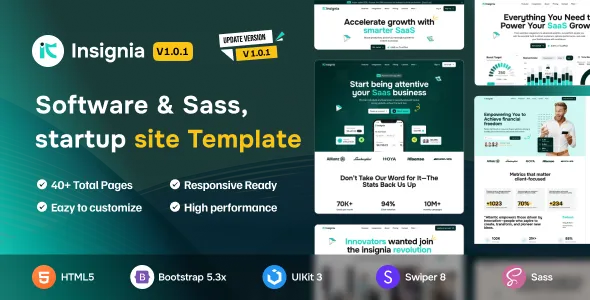
Insignia – Software, SaaS & Startup HTML5 Template
Insignia – Software, SaaS & Startup HTML5 Template is a modern and versatile website template designed for software companies, SaaS businesses, technology startups, IT service providers, digital agencies, and entrepreneurs looking to establish a professional online presence. With a contemporary design approach and flexible frontend structure, Insignia provides a foundation for creating engaging websites that showcase software products, introduce technology services, communicate business solutions, and connect with potential customers. Whether you are building a SaaS product website, a software company landing page, a startup presentation, or a technology service platform, Insignia offers a starting point for developing a visually appealing and user-friendly digital experience.
In today’s competitive technology industry, a professional website plays an important role in communicating product value, explaining software capabilities, and building trust with potential customers. Visitors often want to understand what a product does, how it addresses their challenges, and whether it is suitable for their business needs. Insignia can help organize this information through a structured website layout that supports clear communication, product presentation, and brand identity.
As an HTML5 template, Insignia is intended to provide frontend website layouts and design components that developers can customize according to their requirements. Features such as user authentication, subscription management, payment processing, customer dashboards, and database-driven functionality may require backend development or external integrations unless explicitly included in the package. Reviewing the available demos and documentation is recommended before implementation.
What Is Insignia Software, SaaS & Startup HTML5 Template?
Insignia is a website template focused on software, SaaS, and startup-related projects. It provides a design foundation for businesses that need to introduce technology products, present digital services, and communicate their solutions through a professional website.
A software company may use this type of template to showcase its applications, explain product capabilities, and introduce its development services. A SaaS business may create dedicated pages describing its platform, subscription plans, integrations, and target customers. A startup may use it to establish its brand identity and present its business concept to prospective clients, partners, and investors.
HTML5 templates offer flexibility for frontend development. Developers can customize the structure, styling, content, and interactive elements according to the project’s objectives. Insignia can be evaluated for different website types, including software landing pages, technology company websites, business solution platforms, and digital product presentations.
The actual capabilities depend on the supplied files, available components, and implementation. A frontend template should not automatically be considered a complete SaaS application or software platform.
Modern Design for Software and Technology Businesses
Technology websites need to balance visual appeal with clear communication. Visitors should be able to understand the business offering, explore product information, and find relevant details without navigating through unnecessary content.
Insignia provides a design foundation for creating a modern digital presence for software companies and technology startups. Developers can customize the website to reflect the product’s identity, target audience, and business objectives.
A software website may feature an introductory hero section, product highlights, service descriptions, technology capabilities, customer testimonials, and calls to action. Supporting pages can provide additional information about features, pricing, integrations, and company details.
A consistent visual hierarchy helps visitors understand the relationship between different sections. Clear typography, suitable spacing, and organized layouts contribute to readability and usability.
The most effective technology website design focuses on the user’s needs. By presenting relevant information in a structured manner, businesses can create an experience that communicates value and encourages meaningful engagement.
Responsive Design for Desktop, Tablet, and Mobile
Responsive design is essential for modern business websites because users access online information through different devices. A prospective customer may discover a software product using a smartphone, explore its capabilities on a tablet, or return later through a desktop computer.
Insignia can serve as a starting point for responsive website development, depending on the responsive implementation included in the template. Developers should verify the actual behavior of the supplied layouts and components.
A responsive website should maintain readable text, convenient navigation, appropriately sized images, and accessible interactive elements across screen sizes. Product sections, feature cards, pricing layouts, and contact forms should adapt to smaller displays.
Responsive behavior should be tested throughout the website rather than only on the homepage. Custom CSS, embedded media, third-party scripts, and additional components may introduce layout challenges.
Testing the completed website across different browsers and devices helps maintain a consistent and convenient user experience.
Website Solutions for Different Technology Businesses
The software and SaaS industry includes businesses with different products, audiences, and commercial objectives. Insignia can be evaluated for a variety of technology-focused website projects.
SaaS businesses: Introduce cloud-based software products, explain platform capabilities, and present subscription information.
Software companies: Showcase applications, development services, technical expertise, and digital solutions.
Technology startups: Establish a brand identity, communicate a business concept, and introduce innovative products.
IT service providers: Present consulting, software development, technical support, and technology services.
Digital agencies: Explain creative, development, marketing, and digital transformation services.
AI startups: Introduce artificial intelligence products, automation solutions, and software applications.
Productivity software companies: Showcase tools designed to improve workflows, collaboration, and business efficiency.
Business technology providers: Present enterprise software, operational tools, and technology solutions for organizations.
The best website structure depends on the business’s goals and audience. Developers should review the available layouts and components before selecting the template for a particular project.
Create a Professional SaaS Product Website
A SaaS product website needs to explain the value of a software platform in a way that is easy for prospective customers to understand. Visitors should be able to identify the product’s purpose, intended audience, major capabilities, and potential benefits.
Insignia can provide a frontend foundation for creating a SaaS website with sections dedicated to product introductions, feature explanations, use cases, integrations, and subscription information.
The homepage can introduce the software through a clear headline and supporting description. Feature sections can explain the main capabilities, while dedicated pages can provide additional details about specific workflows and use cases.
A SaaS website may also include product screenshots, interface previews, customer testimonials, frequently asked questions, and calls to action for requesting a demonstration or exploring the product.
Product communication should remain accurate and specific. Descriptions should explain what the software actually provides rather than relying on broad claims or unsupported promises.
If the project requires dynamic pricing, subscription processing, account registration, or product access management, developers will need to implement appropriate backend functionality or integrate compatible services.
Software Product Presentation and Feature Highlights
Software websites often need to communicate complex product capabilities in a simple and understandable format. Feature presentation helps visitors explore the software and determine whether it addresses their requirements.
Insignia can be customized to organize product features through structured sections, visual elements, and descriptive content, depending on the included design components.
A software product page may introduce key capabilities such as workflow automation, reporting, collaboration, data management, communication, or productivity tools. Each feature should explain its purpose and relevance to the intended audience.
Screenshots and visual demonstrations can help users understand how the software works. However, product visuals should accurately represent the actual interface and available functionality.
A clear feature hierarchy makes it easier for visitors to identify the most relevant capabilities without reading excessive amounts of information.
Build a Technology Startup Website
Startups often need a website that introduces their business concept, communicates their value proposition, and establishes credibility with potential customers and partners.
Insignia can serve as a starting point for startup websites that need a modern and professional visual presentation. Developers can customize the design according to the startup’s industry, product, and brand identity.
A startup homepage may include a business introduction, product overview, key benefits, technology capabilities, team information, and contact opportunities.
Dedicated pages can explain the product, outline the business model, introduce the team, or present company updates. A technology startup may also include a blog to share insights, educational resources, and relevant industry information.
The website should communicate the startup’s purpose clearly. Visitors should understand what the company offers, who it serves, and how they can learn more.
A focused content structure helps startups present their ideas without overwhelming visitors with unnecessary information.
Website Solutions for IT Services and Software Development Companies
IT service providers and software development companies need websites that communicate technical expertise, service offerings, and professional capabilities.
Insignia can be evaluated for creating websites that introduce services such as custom software development, web application development, mobile application development, cloud solutions, IT consulting, and digital transformation.
A service-oriented website may include a homepage, company overview, dedicated service pages, project portfolio, industry solutions, testimonials, and contact information.
Individual service pages can explain the challenges addressed, the development process, and the types of solutions available. Case studies can provide additional context by describing completed projects and documented outcomes.
Accurate descriptions of technical capabilities help potential customers understand whether the company is suitable for their requirements.
A well-organized website can support business communication by making service information accessible and providing convenient opportunities to request consultations or project estimates.
Landing Pages for Software Marketing Campaigns
Landing pages are useful for presenting a specific product, service, or marketing campaign. They help focus visitor attention on a particular offering and provide a clear pathway toward a relevant action.
Insignia can be considered for developing software landing pages that introduce products, highlight features, and communicate key benefits.
A product landing page may include an introductory section, feature highlights, product visuals, testimonials, pricing information, and a call to action. The structure should reflect the campaign’s purpose and the intended audience.
A startup launching a new application may use a landing page to introduce the product and collect inquiries. A SaaS business may create separate pages for different customer segments or use cases.
The most effective landing pages provide relevant information without unnecessary distractions. Developers should customize the content according to the campaign’s objectives and ensure that calls to action are clear and appropriate.
Customization and Brand Identity
A professional website should reflect the identity of the software company or startup rather than appear like an unmodified template.
Insignia can be customized according to the design options and source files included in its package. Developers may adapt supported elements such as colors, typography, spacing, layouts, imagery, and navigation.
A SaaS platform may prefer a clean and minimal presentation that emphasizes product clarity. A creative technology startup might use more expressive visuals, while an enterprise software company may prioritize structured content and professional communication.
Consistency should extend throughout the website. A defined color palette, typography system, and visual style help create a recognizable brand experience.
Product screenshots, illustrations, and supporting imagery should also reflect the actual business and software offering. Relevant visuals can help visitors understand the product more effectively than generic images.
Before making extensive changes, developers should review the template’s file structure and documentation. Organized customization can simplify future development and maintenance.
HTML5, CSS, and JavaScript Development
Insignia is an HTML5 template intended for frontend website development. Its source files can provide a foundation for developers who want to customize the structure and presentation of a software or SaaS website.
HTML5 provides the structural foundation for website content, CSS controls visual styling, and JavaScript can support frontend interactions and interface behavior where included.
Developers can modify the frontend according to their project requirements and integrate it with suitable backend technologies or application services.
The template may also be adapted within a broader development workflow, depending on its structure and compatibility. The final implementation should be based on the included documentation, dependencies, and supported technologies.
Before beginning development, review the available files, setup instructions, browser requirements, and any included third-party libraries. Understanding these requirements can help simplify implementation and avoid compatibility issues.
SEO-Friendly Structure for Software Websites
Search engine optimization can help software companies and startups reach people searching for digital products, SaaS solutions, technology services, and software-related information.
Insignia provides a frontend design foundation that developers can customize to support a logical content structure. However, SEO performance depends on content quality, technical implementation, competition, website authority, and other factors beyond the template itself.
A software website should use descriptive page titles, relevant headings, clear URLs, and original content that addresses the needs of its target audience.
Dedicated product pages can explain individual capabilities and use cases. Service pages can describe specific technical offerings, while educational blog posts can answer common questions about software development and technology.
Internal links can connect related product pages, services, case studies, and articles. This creates a more useful browsing experience and helps search engines understand the relationship between website content.
Image optimization, descriptive alternative text, appropriate metadata, and responsive usability are also important considerations.
No HTML template can guarantee search rankings or organic traffic. Sustainable SEO requires accurate information, useful content, and ongoing technical maintenance.
Content Marketing and Technology Blogging
Content marketing can help software businesses demonstrate expertise, educate potential customers, and build a useful online resource library.
Insignia can be adapted for websites that publish technology articles, software tutorials, industry insights, company updates, and educational resources.
A SaaS business may publish articles explaining product use cases, workflow optimization, or industry challenges. A software development company may share insights about application development, cloud computing, technology selection, and digital transformation.
Content should be accurate, relevant, and written for the intended audience. Articles can explain processes, answer common questions, compare approaches, or provide practical guidance.
Internal links can connect educational content to relevant product and service pages. This helps visitors discover additional information and explore the company’s offerings naturally.
A consistent publishing strategy focused on quality and originality can support long-term content development and search visibility.
Lead Generation and Contact Forms
For many SaaS businesses and technology companies, generating qualified inquiries is an important website objective.
Insignia can be customized to include contact opportunities, inquiry forms, and calls to action, depending on the included components.
A software company may use forms to collect project inquiries, consultation requests, product questions, or demonstration requests. A SaaS business may encourage visitors to request a product walkthrough or contact its sales team.
Forms should be straightforward and request only the information needed to respond effectively. Clear labels, appropriate validation, and understandable confirmation messages help improve usability.
Dynamic form processing, email notifications, CRM integration, and automated lead management require suitable backend functionality or third-party services.
Developers should test form submissions, validation, error handling, and email delivery before publishing the website.
Performance and Website Loading Speed
Website performance is an important part of the user experience, particularly for software businesses that rely on product visuals, interactive elements, and marketing content.
The performance of an Insignia-based website depends on the template implementation, hosting environment, images, scripts, fonts, and additional integrations.
Developers can improve performance by optimizing image dimensions, compressing suitable assets, reviewing unnecessary JavaScript, and minimizing external resources.
Performance testing should include the homepage, product pages, service pages, pricing sections, and landing pages. Different layouts may have different loading requirements, especially when they include animations or large product screenshots.
Regular monitoring can help identify performance issues and maintain a convenient browsing experience as the website expands.
Accessibility and User-Friendly Navigation
Accessibility and usability are important considerations for software websites because visitors need to understand product information and navigate the website conveniently.
When customizing Insignia, developers should consider readable typography, appropriate color contrast, descriptive link text, meaningful image alternative text, and clear form labels.
Navigation should be organized logically, with important sections easy to access. Visitors should be able to locate product information, services, company details, and contact opportunities without unnecessary effort.
Interactive elements should be recognizable and accessible through appropriate input methods. Forms should provide clear instructions and understandable validation messages.
Accessibility depends on the complete website implementation, including customized components and additional integrations. Practical testing and usability reviews can help identify areas that need improvement.
Integrations and Additional Software Functionality
Software and SaaS websites may require integrations beyond their frontend design. Depending on the project, developers may connect Insignia to external services or build additional application components.
Possible integrations include analytics platforms, CRM systems, email marketing services, customer support tools, payment gateways, subscription services, and software APIs.
For example, a CRM integration may help manage inquiries, while an analytics platform can provide insights into website traffic and visitor behavior. A SaaS product may require a separate application backend for account management, billing, and product access.
The suitability of each integration depends on its technical compatibility, API availability, and implementation requirements.
Developers should review the relevant documentation and test integrations carefully. Avoiding unnecessary tools can help reduce maintenance complexity and improve overall website performance.
Security and Ongoing Website Maintenance
A professional technology website requires ongoing maintenance to remain reliable and secure. The responsibilities depend on the hosting environment, frontend implementation, backend architecture, and external integrations.
Developers should use trusted hosting services, enable HTTPS, maintain appropriate access controls, and follow secure coding practices.
If the website includes forms, account management, payment processing, or application integrations, these features should be implemented with suitable validation, authorization, and data protection measures.
Third-party libraries and dependencies should be reviewed and updated according to their documentation. Regular backups and testing can help protect the website against unexpected issues.
Maintenance should also include reviewing product descriptions, pricing information, service details, company updates, and contact information.
A planned maintenance routine helps maintain a professional online presence and supports long-term website reliability.
Who Should Use Insignia Software, SaaS & Startup HTML5 Template?
Insignia may be suitable for different technology businesses and developers looking for an HTML5 website development foundation.
SaaS companies: Businesses offering cloud-based software can present their platforms, capabilities, use cases, and subscription information.
Software development companies: Organizations can showcase application development services, technical expertise, and completed projects.
Technology startups: New businesses can establish a digital identity and introduce their products or services.
IT service providers: Companies can present consulting, technology support, infrastructure, and digital solutions.
AI and automation businesses: Technology companies can introduce software tools, automation services, and AI-powered products.
Digital agencies: Agencies can showcase development capabilities, digital services, and client projects.
Productivity software providers: Businesses can present applications designed to improve collaboration, workflows, and operational efficiency.
Business technology companies: Organizations can introduce enterprise applications, management systems, and technology solutions.
The suitability of the template depends on the project’s requirements. Developers should review the available demos, source files, documentation, and customization options before implementation.
Tips for Building a Successful Software Website with Insignia
A successful software website begins with a clear understanding of the product, target audience, and business objectives.
Before customizing the template, determine whether the main purpose is to introduce a SaaS platform, showcase software development services, present a startup, or generate product inquiries.
Prepare accurate content for essential pages, including the homepage, product overview, features, services, company information, and contact details. Real content makes it easier to choose appropriate layouts and organize the website effectively.
Maintain consistent branding throughout the website. Use a recognizable color palette, readable typography, and relevant product visuals that reflect the company’s identity.
Keep navigation simple and make important information easy to find. Each page should have a clear purpose and guide visitors toward relevant next steps.
Test the completed website across desktop, tablet, and mobile devices. Review performance, navigation, forms, links, and accessibility before publishing.
Finally, establish a maintenance routine that includes technical updates, content reviews, backups, security checks, and performance monitoring. These practices can help the website remain useful as the business develops.
Final Thoughts on Insignia – Software, SaaS & Startup HTML5 Template
Insignia – Software, SaaS & Startup HTML5 Template is a potential solution for software companies, SaaS businesses, technology startups, IT service providers, and digital agencies looking to establish a professional online presence.
Its technology-focused design provides a foundation for presenting software products, communicating digital services, highlighting business solutions, and introducing startup offerings. With suitable customization, it can be adapted to different technology-related website projects and branding requirements.
As an HTML5 template, Insignia should be evaluated according to its included frontend components, source files, documentation, and implementation. Features such as user accounts, subscription management, payment processing, customer dashboards, and dynamic product functionality may require additional development or integrations.
By combining the template with original content, thoughtful customization, SEO practices, responsive design, accessibility considerations, performance optimization, and regular maintenance, developers can create a professional technology website that supports brand visibility, customer communication, and long-term business growth.