My Account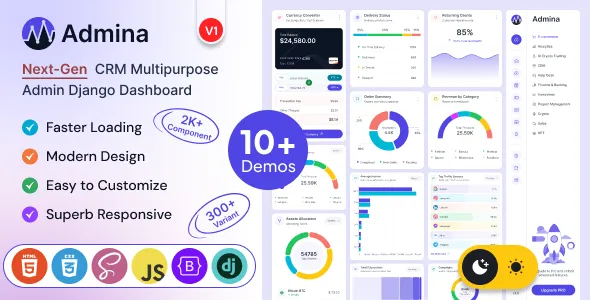
Admina – Bootstrap Admin Dashboard Django Template Multipurpose
Admina – Bootstrap Admin Dashboard Django Template Multipurpose is a versatile dashboard template designed for developers, businesses, startups, and organizations that need a structured interface for managing web applications with Django and Bootstrap. Combining a multipurpose dashboard approach with a familiar frontend framework and a Python-based web development environment, Admina can serve as a starting point for administrative panels, business management platforms, analytics interfaces, customer portals, and internal web applications. Its intended use is to help developers organize application information into clear, manageable interface sections while creating a consistent visual experience across different administrative workflows.
A well-designed admin dashboard makes complex information easier to understand and manage. Instead of presenting users with unorganized data, a structured dashboard can group important metrics, navigation links, tables, forms, and application controls into logical sections. Admina can be considered for projects that require a flexible administrative interface and a foundation that developers can adapt to their own application requirements. Depending on the template version and included components, it may support the development of different dashboard layouts and interface patterns suitable for business, technical, operational, or data-oriented applications.
Django provides a Python-based framework for building web applications, while Bootstrap offers a widely used frontend system for creating responsive layouts and reusable interface components. Together, these technologies can help developers establish a practical foundation for web-based management systems. The actual functionality of an Admina-based application depends on the supplied template files, the Django project configuration, the selected database, the backend logic, and any additional integrations implemented during development. Developers should review the current product demo and documentation to confirm the available layouts, components, dependencies, and setup requirements before choosing the template.
What Is Admina Bootstrap Admin Dashboard Django Template Multipurpose?
Admina is a multipurpose Django admin dashboard template intended for projects that need a dedicated administrative interface. An admin dashboard generally provides a central workspace where authorized users can review information, navigate application sections, manage records, and access tools relevant to their responsibilities.
Rather than building every interface element from scratch, developers can use a dashboard template as a visual and structural starting point. Existing page layouts and reusable interface patterns can help organize the frontend, while Django can handle server-side processing, routing, data access, authentication, and other application logic according to the project’s implementation.
The multipurpose nature of Admina makes it worth evaluating for a variety of application concepts. These may include business administration portals, inventory interfaces, customer management systems, project tracking applications, reporting dashboards, and internal operational tools. Suitability depends on the actual components supplied with the selected release and the amount of customization required.
A dashboard template should not be confused with a complete business application. A frontend template provides presentation and layout resources, whereas functions such as saving records, generating reports, processing transactions, managing permissions, and communicating with external services require appropriate backend implementation or compatible integrations.
By starting with an organized interface, developers can focus their efforts on connecting the design to application-specific workflows and creating a solution that meets the needs of its intended users.
Django-Based Development for Web Applications
Django is a Python web framework used to build maintainable, database-driven web applications. Its development approach includes features for handling URL routing, views, templates, database models, form processing, and application security. These capabilities make Django suitable for projects that need more than a static collection of frontend pages.
Admina can be evaluated by developers who want to build a dashboard interface within a Django-based project. The template can provide the presentation layer, while the Django application supplies the server-side functionality needed to display dynamic information and process user actions.
For example, a business dashboard might display information retrieved from database models, such as customer records, project statuses, order summaries, or operational reports. Developers can connect relevant interface elements to Django views and templates so that information changes according to the application’s stored data and business rules.
Django also provides a framework for managing users and permissions. These capabilities can be used to create access rules for different types of users, although the specific configuration and authorization logic must be implemented correctly for the application.
Before integration, developers should confirm the template’s supported Django version, dependency requirements, directory structure, and instructions for static assets. Following the documented setup process helps reduce avoidable configuration problems and makes future maintenance more manageable.
Bootstrap Admin Dashboard for Responsive Interfaces
Bootstrap is a frontend framework that helps developers create structured layouts and reusable interface elements. Its grid system, responsive utilities, and component patterns can simplify the process of building pages that adapt to different screen sizes.
A responsive dashboard is important because administrative users may access an application from desktop computers, laptops, tablets, or mobile devices. A layout that works well on a large monitor should remain usable when the available screen space becomes more limited.
Admina’s Bootstrap-based positioning makes responsive interface design a relevant consideration when evaluating the template. Developers should test the actual layouts supplied with the product rather than assuming that every component automatically adapts to all screen sizes.
For smaller displays, tables may need horizontal scrolling or alternative presentation patterns. Navigation panels may require collapsible behavior, while charts, cards, and forms should fit within the available width. Buttons and other controls should remain easy to identify and operate.
Responsive behavior can also be affected by custom CSS, third-party libraries, embedded content, and modifications made during development. Testing the complete application across representative screen sizes helps identify layout issues before deployment.
A well-organized responsive dashboard allows users to concentrate on their tasks without struggling with overcrowded sections, clipped content, or difficult navigation.
Multipurpose Dashboard Layouts for Different Projects
One of the main reasons developers choose a multipurpose admin dashboard is the ability to adapt a common interface foundation to different application goals. Instead of designing a new administrative experience for every project, developers can evaluate reusable layouts and modify them to fit the requirements of a specific product.
Admina may be considered for several types of dashboard-based applications, subject to the layouts and components included in the current release.
Business management applications: A business portal can organize operational information, performance summaries, staff records, and administrative tasks in one interface.
Customer management systems: A customer-facing or internal CRM-style application can present customer profiles, communication records, follow-up tasks, and account information when the necessary backend features are developed.
Inventory and order management: An inventory interface can display product records, stock information, supplier details, and order status through database-connected pages.
Project management platforms: A project dashboard can organize assignments, deadlines, team information, task statuses, and progress summaries according to the application’s data model.
Reporting and analytics interfaces: A reporting portal can present aggregated information through tables, charts, and summary cards when compatible visualization tools and data-processing logic are implemented.
Internal administrative portals: Organizations can develop private interfaces for managing resources, reviewing submissions, maintaining records, and coordinating operational processes.
The final design should reflect the actual work users need to complete. A dashboard intended for financial reporting may require a different information hierarchy from one used for inventory or customer support. Customization should prioritize clarity and task efficiency rather than adding unnecessary visual elements.
Dashboard Overview and Information Organization
The dashboard overview is often the first page users see after signing in. It should help them understand the current state of the application and identify the information that deserves attention.
Depending on the available layout and the project’s implementation, an Admina-based overview could include summary cards, recent activity, status indicators, charts, data tables, or shortcuts to frequently used sections. These elements should be selected according to the application’s purpose and should not be treated as automatically functional features of the template.
For example, a project management application might show the number of active projects, tasks awaiting review, upcoming deadlines, and recently updated records. An inventory application might prioritize stock levels, recent orders, and items requiring replenishment.
The information displayed should be accurate, useful, and easy to interpret. Summary values should come from reliable data sources, while visual indicators should have clear meanings. A chart that looks attractive but does not help users make a decision adds unnecessary complexity.
Developers should also consider different user roles. An administrator may need a broad overview of the system, while a team member may benefit from a more focused view of assigned work. Django permissions and application logic can help control which information is available to each authorized user.
A carefully organized dashboard can reduce the effort required to locate important records and make routine administrative tasks easier to complete.
Data Tables and Record Management Interfaces
Tables are common elements in administrative applications because they provide a structured way to display multiple records. They can help users review information, compare values, identify specific entries, and navigate larger datasets.
A Django application built with Admina may use table-based pages for customers, products, orders, projects, transactions, support requests, or other records. The available table styles and interactions depend on the supplied template files and any additional libraries integrated by the developer.
A useful data table should present the most relevant fields without overwhelming users with too many columns. Clear headings, consistent formatting, and readable spacing make records easier to scan. Long values should be handled carefully so that important information remains accessible on smaller screens.
Features such as pagination, searching, sorting, filtering, bulk actions, and export functionality require appropriate support in the frontend and backend. If these capabilities are not included in the selected template version, they may need to be implemented separately.
Django can retrieve records from database models and pass them to templates for rendering. For larger datasets, developers should consider query efficiency and server-side pagination rather than loading every record into a single page.
Administrative tables should also respect authorization rules. Users should only be able to view or modify records they are permitted to access. Correct permission checks and server-side validation are essential when implementing record-management workflows.
Forms and Data Entry Workflows
Forms allow users to submit information, update records, configure settings, and complete administrative tasks. Clear form design is especially important in dashboards because users may need to enter data frequently or work with multiple related fields.
An Admina-based Django application can use form pages for creating customers, updating inventory, registering projects, managing account details, or maintaining internal records. The exact form components available depend on the template version, while validation and data processing are handled by the application.
Django includes form-handling tools that can support field validation and the processing of submitted data. Developers can connect these mechanisms to database models and business rules to help ensure that records are stored consistently.
A well-designed form should use descriptive labels, appropriate input types, clear instructions, and understandable validation messages. Required fields should be identified, and users should receive feedback when information is missing or incorrectly formatted.
Forms should not ask for unnecessary information. Keeping data-entry workflows focused can reduce mistakes and make administrative tasks quicker to complete. Related fields can be grouped into logical sections when a form needs to collect more detailed information.
Security also matters. Server-side validation should be used even when browser-side validation is available. Sensitive operations must follow appropriate authentication, authorization, and request-protection practices.
By combining a clear frontend with Django’s form-processing capabilities, developers can create consistent workflows for entering and updating application data.
Customization and Branding Flexibility
A dashboard should reflect the purpose and identity of the application it supports. Customizing the interface can help create a consistent visual language and make the application feel like a unified product rather than an unmodified template.
Depending on the included files and supported configuration options, Admina may provide a foundation for adjusting colors, typography, spacing, navigation, page layouts, and other visual elements. Developers should consult the current documentation to establish which options are included and which changes require custom development.
A business application may benefit from a restrained design with clear visual hierarchy, while a data-intensive analytics interface may prioritize compact layouts and readable charts. A customer management platform may require prominent search tools and easily accessible record details.
Branding should remain consistent throughout the application. A defined color palette, typography system, icon style, and set of reusable components can help create a coherent interface across different pages.
Developers should avoid making too many unrelated visual changes. Excessive colors, inconsistent button styles, and unnecessary animations can make an administrative application harder to use.
Custom changes should also be tested after template updates. Where appropriate, keep project-specific styles and scripts separate from the original template files so that future maintenance is easier. A version-controlled workflow can help track changes and support collaboration among developers.
Charts, Metrics, and Reporting Interfaces
Many administrative applications need to present numerical information in a way that helps users understand trends, compare results, or identify unusual activity. Charts and metrics can support this process when they are based on reliable data and selected for a clear purpose.
An Admina dashboard may be evaluated as a starting point for reporting pages, depending on its supplied components and compatibility with charting libraries. A developer can connect the interface to application data and configure visualizations that reflect the needs of the project.
For example, a sales reporting dashboard might display monthly revenue, order counts, and product performance. A project dashboard could present task completion rates and workload distribution. An operations interface might show service requests, response times, or changes in activity over time.
Each visualization should answer a meaningful question. Line charts are often useful for displaying trends over time, while bar charts can support comparisons between categories. Tables may be more appropriate when users need exact values or detailed records.
Metrics should include clear labels, relevant time periods, and consistent units. If the underlying data is incomplete or delayed, the interface should communicate that limitation instead of suggesting greater precision than the data supports.
Reporting functionality requires data collection, calculations, and backend integration. Developers should verify that charts reflect the intended business definitions and that sensitive information is only displayed to authorized users.
User Authentication and Access Management
Administrative dashboards often contain business information that should not be publicly accessible. Authentication and authorization are therefore essential parts of the application architecture.
Django includes built-in mechanisms for user accounts, authentication, permissions, and session management. These capabilities can be integrated into an Admina-based project to control access to administrative pages and protected data.
The template itself should not be assumed to provide a complete, production-ready authentication system. Login pages, registration workflows, password recovery, account verification, and role-specific interfaces depend on the supplied implementation and the developer’s configuration.
Different user groups may require different levels of access. For example, an administrator might manage accounts and configuration, a manager might review reports and approve records, and a regular user might access only assigned tasks.
Access control should be enforced on the server, not merely by hiding navigation links. Every protected view and sensitive operation should verify that the current user has the required permissions.
Developers should also follow secure practices for password handling, session configuration, HTTPS deployment, and account recovery. Additional protections may be appropriate depending on the application’s risk profile and the sensitivity of the information it stores.
A carefully implemented authentication and authorization system helps protect business data while providing users with access to the functions they need.
Integration with Databases and Backend Logic
A dashboard becomes useful when its interface is connected to the data and processes that support the application. Django provides an ORM, or object-relational mapper, that helps developers work with database records through Python models and query operations.
In an Admina-based project, Django models can represent entities such as customers, products, employees, projects, invoices, or service requests. Views can retrieve the relevant records, apply business rules, and pass information to templates for display.
For example, a dashboard card could show the number of open support requests, while a table lists the most recently submitted requests. A project detail page could display task information and allow authorized users to update the project’s status.
The actual database may depend on the project’s requirements and deployment environment. Developers should review compatibility, configure database connections securely, and use appropriate migration procedures when the data model changes.
Backend logic should remain separate from presentation wherever practical. Clear separation between models, views, templates, and reusable application services can make the codebase easier to test and maintain.
Database queries should be designed with performance in mind. Related-object loading, pagination, indexing, and query optimization can become important as the number of records grows.
The result is a dashboard that does more than display a static design: it becomes a connected interface for the application’s real workflows.
Search, Filtering, and Navigation
As an application grows, users need efficient ways to locate information. Search tools, filters, and logical navigation can make a dashboard more practical, especially when it contains large collections of records or multiple functional areas.
Admina can be evaluated as a frontend foundation for pages that organize application sections into a clear navigation structure. The exact menu layouts and available interactive components should be confirmed in the current product demo.
A customer management application may need search by name, email, or account identifier. An inventory interface may require filters for product category, stock status, or supplier. A project dashboard might let users narrow tasks by owner, deadline, or completion status.
These workflows require suitable frontend controls and backend query logic. Developers should make sure that filtering parameters are validated and that search operations remain efficient when working with larger datasets.
Navigation labels should be concise and descriptive. Related pages should be grouped together, and frequently used actions should be easy to locate. Breadcrumbs or page titles can help users understand where they are within a larger application.
Search results should communicate when no matches are found and provide a straightforward way to revise the search. Filters should also be easy to reset when users want to return to the full dataset.
A thoughtful navigation and search strategy reduces unnecessary steps and helps users complete administrative tasks more efficiently.
Use Cases for Admina Django Dashboard Template
The multipurpose nature of an admin dashboard makes it relevant to several application categories. Admina may be considered for the following projects when its current components and technical requirements align with the intended use.
SaaS administration panels: Developers can build interfaces for reviewing subscription records, customer accounts, usage information, and system activity. Billing and subscription processing require separate backend logic or integrations.
CRM-style applications: Customer relationship tools can organize profiles, communications, follow-up activities, and account details using appropriate database models and permissions.
Inventory management systems: Product records, supplier information, stock quantities, and order details can be organized through customized dashboard pages.
Project management platforms: Teams can use task lists, project summaries, deadlines, and status information when the required workflows are implemented.
Education management portals: An administrative interface can organize course records, learner information, enrollment data, and academic activity according to the application’s requirements.
Healthcare administration software: Authorized staff may use a dashboard to manage permitted administrative records and workflows. Such projects require careful privacy, security, and regulatory consideration appropriate to the jurisdiction and data involved.
Analytics and reporting systems: Data-focused applications can present summaries, charts, tables, and filtered reports connected to backend data sources.
Internal business tools: Organizations can create private portals for reviewing requests, maintaining records, monitoring operations, and managing team workflows.
These examples describe possible development applications, not guaranteed built-in features. The required business logic, integrations, data structures, and permissions must be assessed before selecting a template.
Code Organization and Developer Workflow
A maintainable dashboard project benefits from a clear directory structure and a predictable development process. Django applications commonly separate configuration, models, views, URL patterns, templates, static assets, and reusable modules according to the project’s architecture.
When integrating Admina, developers should understand how the supplied files fit into the Django project. Template files may need to be placed in the appropriate template directories, while CSS, JavaScript, fonts, and image assets need to be served through the configured static-file system.
The exact installation procedure depends on the product package and its documentation. Developers should follow the supported setup instructions rather than assuming that every Django template uses the same directory layout or dependency configuration.
Reusable components can help reduce duplication across pages. Common elements such as navigation, headers, footers, page titles, and repeated interface patterns can be organized into shared templates when supported by the project structure.
Source control is useful for tracking customizations and collaborating with other developers. Meaningful commit messages, environment-specific settings, and a consistent testing process make it easier to identify and resolve issues.
Before deployment, developers should review debug settings, static asset handling, environment variables, database configuration, and other production requirements. Separating development and production settings helps reduce the risk of exposing sensitive configuration or relying on unsafe defaults.
A disciplined workflow supports easier debugging, more predictable updates, and long-term project maintenance.
Performance and Responsive Optimization
Dashboard performance affects how quickly users can review information and complete their work. Slow page loading, inefficient database queries, large assets, and unnecessary scripts can make an administrative interface frustrating to use.
The performance of an Admina-based application depends on the template implementation, Django configuration, hosting environment, database design, static files, and any additional libraries. Using a responsive Bootstrap layout does not automatically guarantee optimal performance.
Developers can begin by measuring representative pages and identifying the main sources of delay. Large images and unused frontend assets should be reviewed, while scripts should be loaded appropriately for the functionality required by each page.
Backend optimization is equally important. Efficient queries, suitable database indexes, pagination, and caching where appropriate can improve performance as application data grows. Caching should be designed carefully when pages contain user-specific or sensitive information.
Responsive testing should cover dashboards, tables, forms, navigation, charts, and detail pages. A layout that works on a desktop may require adjustments for smaller displays, particularly when the interface contains wide data tables or complex controls.
Performance should be evaluated using realistic data and common user workflows rather than only the initial demo content. Regular testing after significant changes can help prevent avoidable slowdowns.
Accessibility and User-Friendly Interface Design
A dashboard should be usable by people with different needs, devices, and interaction methods. Clear labels, readable typography, adequate contrast, logical focus order, and descriptive feedback can improve the overall experience.
When customizing Admina, developers should use semantic HTML where appropriate and ensure that interactive controls can be identified and operated through supported input methods. Form fields should have meaningful labels, and error messages should explain what needs to be corrected.
Color should not be the only way to communicate status. For example, an application can combine a status label with a visual indicator so that the meaning remains understandable without relying entirely on color.
Tables should use clear headings, and charts should provide suitable text alternatives or summaries where practical. Keyboard focus should remain visible, and modal dialogs or dropdown menus should behave predictably.
Accessibility depends on the actual template markup and any modifications made during development. Automated checks can identify some problems, but manual keyboard testing and usability reviews are also valuable.
A clear, accessible dashboard helps users understand the interface, reduces confusion, and supports more consistent administrative workflows.
Security and Maintenance Considerations
Security should be considered from the beginning of a Django project, particularly when the dashboard provides access to private business data or administrative controls.
Developers should follow Django’s security guidance, use supported software versions, configure HTTPS, protect secret settings, and keep dependencies updated. Production deployments should avoid exposing debugging information or sensitive configuration.
Authentication and authorization must be applied to protected pages and actions. Server-side validation, appropriate request-protection mechanisms, careful file-upload handling, and secure session configuration are important when the application supports these functions.
Backups should be planned according to the importance of the stored data, and restoration procedures should be tested rather than assumed to work. Database migrations and major template changes should be reviewed in a development or staging environment before being applied to a live application.
Regular maintenance should include dependency reviews, error monitoring, permission checks, and testing of important user journeys. Developers should also examine custom code and third-party libraries for compatibility when updating the project.
The template is only one part of the security picture. A reliable production application requires secure backend implementation, appropriate infrastructure, sound operational practices, and ongoing review.
Who Should Choose Admina – Bootstrap Admin Dashboard Django Template Multipurpose?
Admina may be worth evaluating for different types of users involved in Django application development.
Django developers: Developers building database-driven applications can assess the template as a starting point for an administrative interface.
Web development agencies: Agencies can evaluate it for client projects that require a Django-based dashboard and a customizable frontend foundation.
Startups and SaaS teams: Product teams can consider the template when developing internal management pages or application administration tools.
Business software developers: Developers working on CRM-style platforms, reporting portals, inventory systems, and operational applications can assess whether the available layouts fit their requirements.
Freelance developers: Independent developers may use a dashboard template to establish a consistent interface before implementing project-specific workflows.
Technical teams and organizations: Internal development teams can evaluate it for private portals that organize records, administrative actions, and reporting interfaces.
The most suitable choice depends on the template’s actual components, technical compatibility, licensing terms, documentation, and the project’s needs. Reviewing these details before implementation can help avoid unnecessary customization and integration work.
Tips for Getting Started with Admina
A structured development process can make it easier to turn a dashboard template into a functional Django application.
Start by reviewing the product demo, documentation, included files, and supported dependencies. Identify the layouts and components that are actually available, and compare them with the requirements of your application.
Next, define the primary users and their tasks. Decide what information should appear on the main dashboard, which records need to be managed, and which actions each user role should be able to perform.
Prepare the Django project structure and configure the required dependencies. Integrate the supplied templates and static assets according to the documented installation process. Keep configuration secrets outside publicly accessible files and use environment-appropriate settings.
Connect the interface to Django models, views, forms, and URL patterns as needed. Implement server-side validation and permissions for operations that create, update, delete, or expose records.
Customize the branding and layout after the main workflow is clear. Test the application with realistic data, review its behavior on different screen sizes, and verify that navigation, forms, tables, and interactive elements behave as expected.
Before deployment, check performance, security settings, static-file handling, database migrations, and backup procedures. A final review of accessibility and usability can help identify problems that may not be obvious during initial development.
Final Thoughts on Admina – Bootstrap Admin Dashboard Django Template Multipurpose
Admina – Bootstrap Admin Dashboard Django Template Multipurpose is a potential starting point for developers who need a structured dashboard interface for Django-based web applications. Its combination of Django-oriented development and Bootstrap-based frontend design makes it relevant to projects that require administrative pages, organized information displays, and a customizable user interface.
The template can be evaluated for business management tools, customer portals, reporting systems, inventory applications, project dashboards, and other web-based administrative solutions. The most effective implementation will depend on choosing the right page structures, connecting them to reliable backend data, and building workflows that match the needs of the application’s users.
Developers should distinguish between the supplied interface and the functionality that must be implemented separately. Database operations, authentication rules, access permissions, reporting calculations, external integrations, and production security all require appropriate configuration and development.
Before selecting Admina, review the current product demo, documentation, supported versions, included components, and licensing conditions. Testing the template within a small development project can help establish whether it fits the intended application and how much customization will be necessary.
With careful integration, thoughtful design, responsive testing, and ongoing maintenance, a Django admin dashboard can provide a practical workspace for managing application data and operational tasks. Admina can be considered as part of that development process when its documented capabilities align with the project’s technical and business requirements.