My Account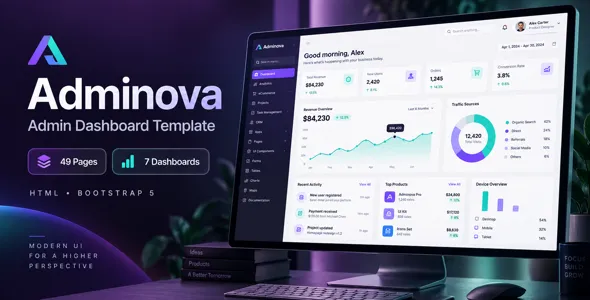
Adminova — Bootstrap 5 HTML Admin Dashboard Template
Adminova — Bootstrap 5 HTML Admin Dashboard Template is a modern dashboard interface template designed for developers, businesses, startups, and organizations that need a structured administrative interface for managing data, monitoring operations, and presenting important information in one place. Built around HTML and the Bootstrap 5 framework, Adminova provides a potential foundation for developing administration panels, business dashboards, analytics interfaces, project management systems, customer management platforms, and other web-based applications. Its purpose is to help developers establish a consistent user interface while reducing the need to build every visual component from scratch.
Administrative dashboards are important parts of many digital products. They allow authorized users to review information, navigate between application sections, manage records, monitor performance indicators, and access operational tools. A well-organized dashboard can make complex information easier to understand by grouping related functions into logical sections. Adminova can be evaluated for projects that require a professional administrative layout with reusable interface elements, provided that its included components and layouts meet the requirements of the intended application.
Bootstrap 5 is a popular frontend framework that provides a responsive grid system, utility classes, and reusable interface components. Combined with HTML, CSS, and JavaScript, it supports the development of interfaces that adapt to different screen sizes. Adminova can be customized to reflect a project’s branding, information architecture, and preferred workflows. The actual pages, charts, tables, widgets, plugins, and other features available depend on the supplied template package, so reviewing its current demo and documentation is important before implementation.
What Is Adminova — Bootstrap 5 HTML Admin Dashboard Template?
Adminova is an HTML admin dashboard template intended to provide a starting point for building web-based administrative interfaces. Instead of creating every layout and visual element independently, developers can use the template’s existing structure and customize it according to the requirements of their applications.
An admin dashboard commonly contains navigation menus, summary panels, data tables, forms, charts, account settings, and other interface elements. The precise components included in Adminova should be verified against its current package. Depending on the available layouts, developers may be able to adapt the interface for internal business tools, reporting applications, customer portals, inventory systems, or project management platforms.
A business management application might use an administrative interface to display operational summaries and organize business records. An analytics platform could present metrics and visual reports. An ecommerce management system might require sections for orders, products, customers, and inventory. Each project has different requirements, but a reusable dashboard foundation can help maintain a consistent visual structure.
It is important to distinguish between the interface and the application’s underlying functionality. An HTML dashboard template primarily provides frontend presentation. Features such as authentication, database storage, user permissions, payment processing, and live data synchronization generally require backend development or appropriate service integrations.
Bootstrap 5 Framework for Responsive Dashboard Development
Bootstrap 5 provides a collection of frontend tools that help developers create consistent, responsive web interfaces. Its grid system, spacing utilities, typography styles, and interface components can simplify the development of layouts that work across different devices.
For an administrative dashboard, responsive behavior is especially useful because users may access internal tools from desktop computers, laptops, tablets, and smartphones. A well-planned interface should present information clearly without requiring users to navigate an oversized desktop layout on a smaller screen.
Adminova can be customized using Bootstrap’s layout conventions and styling utilities, depending on how the supplied template is structured. Developers can adapt the page layout, spacing, navigation, forms, and content sections to match their application’s needs.
Bootstrap 5 also supports reusable interface patterns that can help maintain consistency throughout a project. Shared visual conventions make it easier for users to understand how to interact with buttons, form fields, navigation links, and other controls.
The exact Bootstrap version and implementation details should be confirmed from the template files. Developers should also review the JavaScript dependencies and ensure that any additional libraries are compatible with the supplied configuration.
Admin Dashboard Layout and Navigation Structure
Clear navigation is one of the most important elements of an administrative interface. Users should be able to move between application sections without confusion and understand where to find the functions they need.
Adminova can serve as a foundation for a dashboard layout with a navigation area, page header, main content section, and other interface elements, depending on the included designs. A sidebar can group related sections, while a top navigation area may provide access to account options, notifications, or other controls if these are supported by the template.
A business dashboard might organize its navigation around Overview, Reports, Customers, Projects, Products, Settings, and Support. An inventory application may need categories for stock levels, suppliers, purchase records, and product details. A project management interface may focus on tasks, teams, schedules, and progress reports.
The navigation should reflect the application’s actual information architecture rather than include unnecessary sections. Grouping related pages and using descriptive labels can reduce the effort required to complete common tasks.
Developers should also test navigation behavior on smaller screens. A menu that works well on a desktop may need a collapsible presentation or other adjustments on mobile devices. The final navigation behavior depends on the template’s implementation and any customization performed.
Suitable for Business Management Dashboards
Business management systems bring together information that helps organizations review operations and coordinate everyday activities. Their dashboards may display summary metrics, recent records, upcoming tasks, and links to important business functions.
Adminova can be considered for an internal business dashboard that organizes information into clear sections. Depending on the application’s requirements, developers could create pages for business performance, employee records, project tracking, customer information, operational reporting, or configuration settings.
A management overview might display selected indicators such as active projects, pending requests, completed tasks, or current operational totals. Additional pages can provide detailed tables and filters for users who need to investigate individual records.
The usefulness of a business dashboard depends on the relevance and accuracy of the information displayed. Avoid filling the interface with unnecessary charts or summary cards that do not support a real decision or workflow.
The template provides the visual starting point, while business logic, data retrieval, calculations, and access control must be implemented separately where required. This distinction helps developers plan the work needed to turn a static dashboard into a functional application.
Analytics and Reporting Dashboard Interfaces
Analytics dashboards help users interpret data by organizing measurements, trends, and comparisons into a readable visual format. Businesses may use them to review website traffic, sales activity, customer engagement, operational efficiency, or other performance indicators.
Adminova can be evaluated for analytics and reporting projects if its included layouts support the required presentation. Depending on the available components, developers may be able to incorporate summary cards, tables, chart areas, date filters, and other reporting elements through the template or additional libraries.
A useful analytics interface should make it easy to understand what each metric represents. Labels, units, reporting periods, and comparison ranges should be clearly identified. Charts should communicate meaningful relationships rather than simply decorate the page.
Developers may need a compatible charting library to render interactive visualizations. They must also connect the dashboard to a reliable data source and implement the required calculations and filtering logic.
A static HTML template does not automatically provide live analytics or data processing. Those capabilities depend on the backend, external APIs, data model, and integrations used in the completed application.
Data Tables and Record Management
Many administrative applications depend on tables for presenting structured information. Tables can help users review records, compare values, identify missing details, and navigate large collections of data.
Adminova may provide table layouts or other relevant interface patterns, depending on the included files. These can be adapted for customer lists, product records, employee directories, project information, transaction summaries, or other structured datasets.
A well-designed data table should use clear column headings, readable spacing, and appropriate alignment. Important information should remain easy to identify, while secondary details should not overwhelm the main content.
For larger datasets, developers may need to implement search, filtering, sorting, pagination, or export functionality. These capabilities are not guaranteed by the appearance of a table and may require JavaScript, a suitable plugin, or backend support.
Tables should also be tested on mobile devices. Wide datasets may require responsive layouts, horizontal scrolling, prioritized columns, or alternative record views to remain usable on smaller screens.
When tables display sensitive or business-critical information, developers should implement suitable authorization checks on the server. Hiding a column or button in the frontend is not a substitute for enforcing access permissions.
Forms and Data Entry Interfaces
Forms are central to administrative applications because users often need to create records, update information, configure settings, or submit requests. A consistent form design can make these activities easier to understand and complete.
Adminova can be customized to present form fields, labels, buttons, and grouped input sections according to the needs of the application. The specific form layouts and components available should be checked in the supplied template.
Forms should use clear labels and explain which fields are required. Input types should match the information being collected, while validation messages should tell users how to correct mistakes. Related fields can be grouped logically to avoid making long forms unnecessarily difficult to complete.
Depending on the project, developers may need to add date selectors, file uploads, dropdowns, multi-select controls, or other interactive elements. These may require additional JavaScript libraries or custom code.
A visual form does not automatically save information. Submission handling, server-side validation, database operations, and error management must be implemented as part of the application. For sensitive data, the completed system should also use suitable security controls and restrict access to authorized users.
Customer Relationship Management Interfaces
Customer relationship management systems help businesses organize contact information, track interactions, manage sales opportunities, and coordinate follow-up activities. An administrative dashboard can provide a central interface for these workflows.
Adminova may be adapted for a CRM-style application with sections for customer records, contact details, activity history, lead tracking, and reporting, depending on the required design and available components.
A customer overview page might display selected relationship indicators and recently updated records. A detailed record page could organize contact information, notes, interaction history, and related activities. Filters can help users locate records according to relevant categories or status values.
The actual CRM functionality depends on the application’s data model and backend services. Features such as record ownership, activity reminders, email integration, duplicate detection, and role-based access require additional implementation unless they are supplied separately.
Businesses should also consider privacy when designing customer management tools. Collect only information that is necessary for the intended business purpose, restrict access appropriately, and apply suitable data retention practices.
Ecommerce and Inventory Administration
Online stores and inventory applications require administrative interfaces for managing products, reviewing orders, monitoring stock, and maintaining business records. A dashboard template can provide a foundation for these interfaces when its layouts suit the project.
Adminova can be considered for an ecommerce administration panel or inventory management application. Depending on the included designs, developers may adapt its interface for product lists, stock summaries, order records, supplier information, and related reporting pages.
A product management page may need fields for product names, categories, descriptions, prices, and stock quantities. Order management may require order status, customer details, delivery information, and transaction references. Inventory pages can organize quantities, restocking requirements, and supplier records.
These examples describe possible custom applications rather than guaranteed built-in Adminova features. Real ecommerce operations require backend logic, data storage, and suitable integrations. Payment processing and order management must be handled through properly implemented services and secure workflows.
The dashboard should be designed around the actual needs of the store or inventory team. Prioritize frequent tasks and ensure that users can identify important statuses without navigating through excessive screens.
Project Management and Team Administration
Project management applications help teams organize tasks, review progress, coordinate responsibilities, and track deadlines. An administrative interface can make this information easier to access and maintain.
Adminova can be evaluated as a starting point for a project dashboard that presents project summaries, task records, team information, progress indicators, or reporting sections, depending on the available layouts.
A project overview might show current projects and their statuses, while a task list could display priorities, assigned team members, due dates, and completion states. A separate team section could organize employee information or project assignments.
For the interface to function as a real project management tool, developers need to implement task creation, editing, assignment, data persistence, and any required notification workflows. Collaboration features such as comments, file sharing, and activity history may also require additional development.
A useful project dashboard should focus on clarity. Users should be able to identify their responsibilities, find overdue work, and understand current project status without excessive navigation.
Customization and Branding Options
An administrative dashboard should feel consistent with the product or organization it supports. Customizing the interface can help align the visual presentation with the company’s branding and improve recognition across application pages.
Depending on its supplied styles and components, Adminova can be customized through changes to colors, typography, spacing, logos, icons, navigation, and content layouts. Developers should review the template’s CSS structure before making extensive changes.
A business application may use a restrained visual style with clear information hierarchy, while a creative platform may use a more expressive interface. Regardless of the chosen appearance, readability and usability should remain priorities.
Reusable styles and components help keep design changes consistent. For example, standard button treatments, form controls, alerts, and card layouts can be maintained across the application instead of customized independently on every page.
Before modifying the template, create a backup or use version control. Test changes across all relevant pages to ensure that updated styles do not break responsive layouts or create inconsistent behavior.
Responsive Design for Desktop, Tablet, and Mobile
Administrative dashboards are often used on large screens, but mobile accessibility can still be important for managers and staff who need to review information while away from their desks.
Adminova should be tested at different viewport sizes to confirm that navigation, cards, forms, tables, and other elements behave appropriately. The actual responsive experience depends on the included markup, Bootstrap classes, custom CSS, and JavaScript behavior.
On smaller screens, the layout should prioritize essential information. Navigation may need to collapse, multi-column sections may stack vertically, and wide tables may require an alternative presentation.
Interactive elements should remain easy to select using touch input. Form fields should fit within the available width, while headings and labels should remain readable.
Responsive design should not be treated as a purely visual requirement. Users must be able to complete essential tasks, understand validation messages, and access relevant controls on supported devices.
Testing the complete workflow across screen sizes can help identify problems that might not appear when viewing a static screenshot of the dashboard.
Performance Optimization and Efficient Loading
A responsive dashboard should also load efficiently. Excessive scripts, large images, unnecessary plugins, and inefficient data handling can make an administrative interface slow or difficult to use.
The performance of Adminova depends on the source files, assets, dependencies, hosting configuration, and customizations added during development. Developers should measure the completed application rather than assume that the template guarantees a particular speed.
Start by reviewing image dimensions and compression. Dashboard interfaces often rely more heavily on icons and data visualizations than large photographs, but oversized assets can still affect loading time.
Unused CSS and JavaScript should be reviewed where practical. Additional libraries should be included only when they provide useful functionality, and developers should verify that the required dependencies are maintained and compatible.
If the dashboard retrieves substantial amounts of data, backend pagination, efficient queries, caching, and appropriate API responses may be more important than visual optimization alone.
Performance testing should cover important pages and realistic workflows. Monitoring helps identify problems introduced by new components, integrations, or data requirements.
Accessibility and Usability Best Practices
An administrative interface should be understandable and usable by people with different abilities and input methods. Accessibility improvements can also make the dashboard easier for everyone to navigate.
When customizing Adminova, developers should use a logical heading hierarchy, maintain sufficient text contrast, provide visible keyboard focus indicators, and ensure that interactive controls have meaningful labels.
Form fields should have associated labels, while validation messages should clearly explain what needs to be corrected. Icons should not be the only source of meaning when a text label would make an action clearer.
Charts and other visual reports should provide sufficient context for users who may not be able to interpret color alone. Important statuses can use text labels or additional visual indicators.
Accessibility testing should include keyboard navigation, zoom behavior, mobile layouts, and practical review of common tasks. Automated tools can identify some issues, but manual testing remains important.
Security Considerations for Admin Dashboard Projects
An administrative dashboard may provide access to business information and operational functions, so security should be a core part of the application design.
Adminova is an HTML frontend template and should not be treated as a complete security solution. Authentication, authorization, session management, input validation, database access, and other sensitive functions must be implemented appropriately in the backend or supplied by a trusted service.
Developers should enforce permissions on the server rather than relying only on hidden buttons or frontend checks. A user who is not authorized to access a record should not be able to retrieve it simply by changing a request or URL.
Form inputs and uploaded files should be validated according to the application’s requirements. Sensitive information should be transmitted over HTTPS, and secrets or private credentials should never be placed in publicly accessible frontend files.
Regular dependency reviews, secure configuration, backups, and monitoring can help reduce risks. Projects handling personal, financial, or confidential business data should receive security review appropriate to their use case.
Developer-Friendly HTML, CSS, and JavaScript Workflow
HTML admin templates can be useful for developers who want direct control over the frontend without adopting a specific application framework. They can be integrated into a larger project or used as a starting point for a custom web interface.
Adminova’s exact project organization depends on the supplied package. Developers should inspect the HTML pages, stylesheets, scripts, image assets, fonts, and any bundled libraries before making changes.
A consistent structure helps separate layout, styling, and behavior. Shared navigation and repeated interface patterns can be organized for reuse where the project architecture supports it.
If the application will eventually use a backend framework, developers should consider how the HTML layouts will be integrated into that framework. Repeated components may need to be converted into reusable templates or components according to the chosen technology.
Before deploying the project, test the interface in supported browsers, verify asset paths, review console errors, and confirm that all required scripts load correctly. Version control can help developers track changes and collaborate more effectively.
Who Should Use Adminova — Bootstrap 5 HTML Admin Dashboard Template?
Adminova can be evaluated by a range of developers and organizations that need an administrative frontend.
Web developers: Developers can use the template as a starting point for building custom administrative interfaces.
Startups: New businesses can create internal tools or prototype dashboard layouts for their digital products.
Software development agencies: Teams can adapt the interface for client projects that need a consistent administration area.
Business managers: Organizations can develop dashboards for reviewing operational information and coordinating workflows.
Analytics platforms: Developers can create reporting interfaces when suitable charting and data integrations are implemented.
Ecommerce businesses: Store operators can develop product, order, or inventory administration pages with the necessary backend functionality.
CRM developers: Teams can build interfaces for managing customer records, leads, and relationship information.
Project management platforms: Developers can create task lists, project summaries, and team administration screens.
SaaS product teams: Product teams can evaluate the template as a frontend foundation for application dashboards, subject to the project’s design and technical requirements.
The most suitable use depends on the included components, the application’s complexity, and the level of customization required.
Tips for Building a Successful Dashboard with Adminova
Start by identifying the main tasks users need to complete. Determine which information they review most frequently, which records they manage, and which actions require the clearest access.
Organize the navigation around these tasks. Use descriptive section names and avoid including menu items that do not serve a real purpose. Keep the most important information visible without overwhelming users with too many widgets.
Review the available template pages and select only the layouts that fit the application. Replace placeholder content with realistic data structures and ensure that labels, units, dates, and statuses are meaningful.
Implement the required application logic separately. Connect data tables to suitable data sources, add validation to forms, and establish authentication and authorization where necessary. Test the interface with realistic data volumes rather than relying only on small sample datasets.
Check responsive behavior, accessibility, performance, and browser compatibility before launch. Finally, document the setup process and establish a maintenance routine for dependency updates, security reviews, backups, and future interface improvements.
Final Thoughts on Adminova — Bootstrap 5 HTML Admin Dashboard Template
Adminova — Bootstrap 5 HTML Admin Dashboard Template is a potential foundation for developers and businesses that need a structured frontend for an administrative application. Its HTML and Bootstrap 5 positioning makes it relevant to projects involving business dashboards, analytics interfaces, customer management tools, inventory systems, project tracking, and other web-based administration experiences.
A useful dashboard should combine clear navigation, readable data presentation, consistent interface elements, responsive layouts, and accessible controls. These design principles help users find information and complete common tasks efficiently.
The actual capabilities of Adminova depend on the files and components included in the current package. Developers should review its demo, documentation, dependencies, and responsive behavior before adopting it for a project. Features such as live charts, database operations, authentication, user roles, and automated reporting may require additional libraries, backend services, or custom development.
Performance, accessibility, security, and ongoing maintenance are also important parts of a successful dashboard. A template does not automatically provide a complete application, but it can reduce the initial effort required to establish a consistent interface.
For developers seeking a customizable Bootstrap 5 admin dashboard starting point, Adminova can be considered as part of a broader application development workflow. With careful implementation and attention to actual user requirements, it can help support a professional, maintainable, and user-friendly administrative experience.