My Account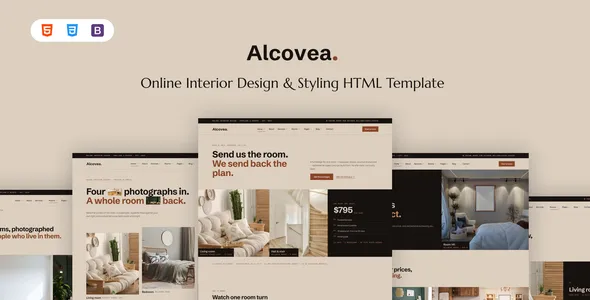
Alcovea – Online Interior Design & Styling HTML Template
Alcovea – Online Interior Design & Styling HTML Template is a modern website design solution for interior designers, home stylists, design studios, decorators, and creative professionals who want to establish a polished online presence. Created for interior design and styling projects, this HTML template provides a foundation for presenting design services, showcasing completed interiors, introducing creative professionals, and communicating with potential clients. Its design-focused approach can help businesses express their visual identity while creating an inviting browsing experience for visitors interested in transforming their living or working spaces.
A professional interior design website should communicate creativity, expertise, and attention to detail. Visitors often want to explore a designer’s portfolio, understand available services, review previous projects, and learn how to begin a consultation. Alcovea can serve as a starting point for organizing these elements into a cohesive website that reflects the designer’s approach to space planning, furniture selection, color coordination, decoration, and interior styling.
Built around HTML-based website development, Alcovea offers a customizable frontend foundation that developers can adapt to different branding requirements and business models. Whether you are creating a website for a residential interior designer, a home styling consultant, a commercial design studio, or an independent decorator, the template can be evaluated as part of a broader website development project. The final capabilities depend on the included files, page layouts, and customization options, so reviewing the current demo and documentation is recommended before implementation.
What Is Alcovea Online Interior Design & Styling HTML Template?
Alcovea is an HTML website template intended for interior design businesses and professionals who need an attractive way to present their services and creative work. It provides a frontend structure that can be customized to introduce a design studio, display interior photography, explain service packages, and guide visitors toward relevant contact opportunities.
Interior design websites typically combine visual storytelling with practical information. Potential clients want to see examples of completed projects, understand a designer’s aesthetic, and determine whether the available services suit their requirements. A dedicated design template can help organize this information into clear sections.
Alcovea can be considered for residential interior design, home styling, apartment decoration, furniture arrangement, renovation design, commercial interiors, and creative consulting projects. The exact page layouts and components should be verified through the current product demo and documentation.
As an HTML template, Alcovea primarily provides the website’s presentation layer. Features such as appointment scheduling, consultation bookings, customer accounts, online payments, and project management generally require additional JavaScript, backend development, or third-party integrations unless explicitly included in the package.
Modern Design for Interior Styling Websites
Visual presentation is central to interior design because potential clients often evaluate a designer’s work through photographs, layouts, colors, and examples of completed spaces. The website should reflect the same attention to detail that the business brings to its design projects.
Alcovea can provide a foundation for a contemporary interior styling website with a consistent visual identity. Developers can customize typography, colors, spacing, imagery, and content arrangements to match the studio’s creative direction and target audience.
A minimalist interior design studio may prefer generous whitespace, restrained typography, and large photographs. A luxury design company might emphasize sophisticated imagery and carefully arranged project presentations, while a home styling consultant may choose a warm and approachable visual style.
The most effective design balances aesthetics with usability. Navigation should remain straightforward, service information should be easy to find, and important contact options should be visible without overwhelming the page.
A cohesive visual system helps maintain consistency across the homepage, project galleries, service pages, and contact sections. When the design supports the content rather than competing with it, visitors can focus on the studio’s expertise and creative work.
Homepage Design and Brand Presentation
The homepage introduces the interior design business and provides a clear starting point for exploring the website. It should communicate the studio’s design philosophy, highlight its strongest work, and help potential clients understand the services available.
A customized Alcovea website can include an introductory banner, featured projects, service summaries, a studio introduction, testimonials, and contact opportunities, depending on the available template components.
A strong opening section might explain the studio’s approach to creating comfortable, functional, and visually balanced spaces. Supporting content can introduce the types of properties the business works with, such as apartments, family homes, offices, hospitality spaces, or retail interiors.
Featured projects can demonstrate the designer’s aesthetic and encourage visitors to explore the portfolio. A concise studio introduction can explain the team’s background, working philosophy, or design specialties.
The homepage should also guide visitors toward relevant next steps. Depending on the business model, these may include viewing the portfolio, exploring services, requesting a consultation, or contacting the studio.
Avoid overcrowding the page with too many competing sections. A clear message, carefully selected imagery, and logical navigation can create a more effective first impression.
Interior Design Portfolio and Project Showcases
A portfolio is one of the most important parts of an interior design website. It provides visual evidence of the designer’s work and helps prospective clients understand the style, quality, and scope of previous projects.
Alcovea can be customized to present portfolio images and project information using the layouts available in the selected version. Projects may include residential interiors, modern apartments, living rooms, bedrooms, kitchens, offices, hospitality environments, and other spaces.
Each portfolio entry should communicate more than visual appeal. A project description can explain the client’s goals, the challenges involved, the design concept, and the decisions that shaped the final result.
For example, a small-apartment project might demonstrate how furniture placement and storage choices improve the use of limited space. A living-room redesign could highlight color coordination, lighting, textures, and furniture selection. A commercial interior project might focus on functionality, customer experience, and brand identity.
High-quality photography is particularly valuable. Images should represent the completed work accurately and be presented consistently across the website.
If the studio has many projects, organizing them into meaningful categories can help visitors find examples relevant to their own needs. Detailed case-study pages can provide additional context for clients who want to understand the design process.
Interior Design Services and Styling Solutions
A well-organized services section helps potential clients understand what the business offers and which solutions may be appropriate for their project.
Alcovea can be adapted to present different interior design and styling services, depending on the needs of the studio and the layouts included in the template.
Residential interior design: Present services for apartments, houses, and other living spaces, including layout planning, material selection, lighting concepts, and coordinated interior finishes where offered.
Home styling: Explain how furniture, textiles, artwork, decorative accessories, and color choices can help create a cohesive atmosphere.
Space planning: Describe how a room or property can be arranged to improve circulation, functionality, and the use of available space.
Furniture and decor selection: Introduce guidance on selecting furniture, lighting, rugs, artwork, and accessories that work together visually and practically.
Color consultation: Explain how color palettes can support the desired mood, complement existing furnishings, and create consistency between rooms.
Commercial interior design: Present services for offices, retail environments, studios, hospitality spaces, or other business interiors, according to the company’s expertise.
Each service page should describe the intended audience, the work involved, and the expected process. Clear explanations help visitors determine whether the studio’s services align with their needs.
Residential Interior Design for Modern Homes
Residential interior design focuses on creating living spaces that balance appearance, comfort, functionality, and the preferences of the people who use them. A website should communicate how the designer approaches these priorities.
A customized Alcovea website can showcase residential projects through dedicated pages for living rooms, bedrooms, kitchens, dining spaces, home offices, and complete property interiors.
A living-room project may emphasize furniture arrangement, lighting, textures, and comfortable circulation. A bedroom design could focus on restful colors, storage solutions, and coordinated materials. A kitchen project may highlight layout efficiency, surface selection, lighting, and practical storage.
Project descriptions should explain the decisions behind the design rather than simply list decorative elements. Visitors often appreciate understanding how a designer responds to the property’s size, natural light, existing architecture, and the client’s lifestyle.
Residential design services may also involve collaboration with contractors, suppliers, architects, or other specialists. Where relevant, the website can explain the studio’s role and clarify which services are included in a typical engagement.
By presenting real projects and useful information, an interior design website can help prospective clients understand the studio’s approach before making an inquiry.
Online Interior Styling and Virtual Consultations
Online interior styling can help designers work with clients who prefer remote consultations or who live outside the studio’s immediate service area. Depending on the business model, these services may include video consultations, room assessments, styling recommendations, or digital design presentations.
Alcovea can be adapted to explain remote design services and outline how clients can work with the studio online. A dedicated page might describe the consultation process, the information clients need to provide, and the types of deliverables available.
For example, clients may be asked to share room measurements, photographs, inspiration images, and information about their goals or budget. The designer can then review the information and explain the next steps according to the service offered.
Clear service descriptions help set realistic expectations. The website should distinguish between general styling advice, detailed design plans, product recommendations, and full-service interior design.
If the business offers virtual appointments, an appointment scheduling tool can be integrated where appropriate. However, a static HTML template does not automatically provide a functioning booking system or video consultation service.
Online service pages should also explain how clients can make contact, what information they should prepare, and how project communication will be handled.
Color Palettes, Materials, and Design Inspiration
Color, texture, and material selection strongly influence the character of an interior. An interior styling website can help communicate a designer’s approach through curated photographs, project descriptions, and visual examples.
Alcovea can serve as a foundation for presenting design inspiration, material combinations, and completed styling concepts. Depending on the studio’s services, content may cover neutral palettes, natural materials, contemporary finishes, classic interiors, or more expressive decorative approaches.
A warm neutral scheme may combine natural wood, soft textiles, and muted tones. A contemporary space might use contrasting finishes, carefully selected accent colors, and clean-lined furniture. A more traditional interior could emphasize layered textures, classic details, and coordinated decorative elements.
The purpose of this content is to explain the design decisions that make a space work. Inspiration pages should provide context rather than simply display attractive images.
Designers can also publish practical articles about choosing paint colors, coordinating materials, arranging artwork, or selecting lighting. Useful educational content can help visitors understand the studio’s expertise and discover ideas for their own projects.
Any images used for inspiration should be appropriately licensed, and references to completed client projects should be accurate and authorized.
Responsive Design for Desktop, Tablet, and Mobile
Potential clients may discover an interior design studio through a mobile search, browse its portfolio on a tablet, or review project details on a desktop computer. A responsive website helps maintain a consistent experience across these devices.
When customizing Alcovea, developers should check the behavior of the navigation, portfolio galleries, service sections, image layouts, and contact forms at different screen sizes.
Interior design websites often rely on large photographs, so image presentation deserves particular attention. Images should scale appropriately without becoming distorted or cropping essential details unnecessarily.
On smaller screens, headings should remain readable, menus should be easy to operate, and service information should follow a logical order. Contact buttons and form fields should provide sufficient space for touch interaction.
Portfolio grids may need to change their column structure on mobile devices, while long project pages should remain comfortable to scroll through.
Responsive testing should cover the full website rather than only the homepage. Developers should also review the behavior of embedded media, external widgets, and custom CSS.
The final responsive experience depends on the template’s existing implementation and any additional modifications made during development.
Customization and Interior Design Branding
A website should reflect the personality of the design studio rather than look like an unmodified template. Consistent branding helps create recognition and supports a professional presentation.
Alcovea can be customized according to the HTML, CSS, JavaScript, and assets included in the selected package. Developers can adapt the color palette, typography, logo placement, image treatments, spacing, and page structure to match the studio’s identity.
A luxury interior design company may choose an understated palette and refined typography. A contemporary studio may prefer clean layouts and architectural imagery, while a home styling business may use warmer colors and more approachable content.
Consistency is essential across all pages. Portfolio cards, service sections, headings, buttons, and contact elements should follow a recognizable visual system.
Images should also align with the brand. A studio that specializes in modern residential spaces should prioritize photographs that demonstrate this expertise rather than use unrelated stock imagery.
Before making extensive changes, review the template’s file organization and styling conventions. Keeping customizations structured can simplify future updates and reduce the risk of inconsistent page layouts.
SEO-Friendly Structure for Interior Design Websites
Search engine optimization can help potential clients discover interior design services and portfolio projects through relevant searches. Alcovea can provide a frontend foundation for organizing website content, but search visibility depends on more than the template itself.
Each important page should have a descriptive title, a clear heading structure, and useful content that explains its purpose. Separate pages for major services can help visitors find information that closely matches their needs.
An interior design studio may publish pages about residential design, home styling, virtual consultations, commercial interiors, or its local service area. These pages should contain original information rather than repeating generic descriptions across the website.
Portfolio pages can benefit from descriptive project names, informative captions, and relevant supporting text. Images should use suitable file sizes and meaningful alternative text when they convey important information.
Internal links can connect related services, portfolio projects, and educational articles. This helps visitors navigate the site and understand the relationships between its content.
Developers may also configure metadata, canonical URLs, sitemaps, and other technical SEO elements according to the website’s structure. No template can guarantee specific search rankings or traffic levels.
Consistent content quality, technical maintenance, accessibility, and performance testing all contribute to a stronger website experience.
Contact Forms and Client Inquiries
A clear contact process helps convert interest into genuine project conversations. Visitors who like a studio’s work should be able to ask questions, request information, or discuss their interior design requirements without unnecessary effort.
Alcovea can be customized to include contact sections or inquiry forms where supported by the template’s layout. Depending on the business, a form may collect a name, email address, project type, property details, preferred consultation method, and a brief description of the client’s goals.
Keep forms focused on the information needed for the initial conversation. A long questionnaire may discourage visitors from submitting an inquiry, particularly when they are still exploring available services.
Clear labels and helpful validation messages make forms easier to complete. The website should also provide understandable confirmation after a successful submission.
A static HTML form does not automatically send emails or store customer inquiries. Developers must connect it to a suitable backend, form-processing service, or other integration and test the entire submission process.
Privacy information should explain how submitted details are handled where required. Reliable form delivery and straightforward contact information help support a professional client experience.
Performance and Website Speed
Website speed matters for interior design websites because portfolios frequently contain large photographs and visually rich sections. Slow-loading pages can make it difficult for visitors to explore projects and services.
The performance of an Alcovea-based website depends on its implementation, image assets, scripts, stylesheets, hosting environment, and third-party integrations.
Start by optimizing images for the dimensions in which they appear. Large photographs should be compressed appropriately while retaining enough detail to communicate the design effectively. Responsive image techniques can help deliver suitable image sizes to different devices.
Unnecessary scripts, external widgets, and decorative effects should be reviewed for their impact on loading time. Minifying assets, enabling suitable caching, and choosing reliable hosting may also improve performance when configured correctly.
Test the homepage, service pages, portfolio galleries, and detailed project pages separately. Pages containing many images may behave differently from simpler content pages.
Regular performance checks help identify oversized assets and inefficient integrations as the website grows. A visually impressive design should remain practical to use on mobile devices and slower connections.
Accessibility and User-Friendly Navigation
An effective interior design website should be easy to navigate and understand. Clear menus, readable typography, sufficient color contrast, and properly labeled controls can improve usability for a wide range of visitors.
When customizing Alcovea, developers should use logical heading levels, descriptive link text, and meaningful alternative text for informative images. Form fields should have clear labels, and error messages should explain how users can correct a problem.
Navigation should prioritize the most important pages, such as services, portfolio, studio information, and contact details. Avoid relying exclusively on visual effects or color to communicate essential information.
Portfolio galleries and interactive elements should be tested for keyboard usability. Text should remain readable at different zoom levels, and buttons should have recognizable labels.
Accessibility testing should include mobile layouts, navigation, forms, and common user journeys. Automated tools can identify some problems, but manual testing is also valuable.
An accessible website makes it easier for visitors to understand the studio’s services and explore its creative work.
Who Should Use Alcovea – Online Interior Design & Styling HTML Template?
Alcovea may be suitable for several types of design-focused businesses and professional website projects.
Interior design studios: Present residential and commercial projects, explain services, and introduce the studio’s design philosophy.
Home styling consultants: Showcase room transformations, decorative concepts, furniture arrangements, and styling services.
Independent interior designers: Build a professional portfolio that highlights personal expertise, completed projects, and contact information.
Interior decorators: Display decorating services, color consultation offerings, and examples of coordinated interiors.
Online design consultants: Explain remote consultations, digital design advice, and the process for working with clients online.
Architecture and design firms: Present selected interior projects alongside related architectural or planning services.
Furniture and decor stylists: Showcase product arrangements, styling concepts, and visual inspiration for residential spaces.
Commercial interior specialists: Present office, hospitality, retail, and other business-focused interior projects according to their expertise.
The best fit depends on the studio’s service model, branding needs, technical requirements, and the layouts included in the template. Reviewing the current demo and documentation can help determine whether Alcovea suits the intended project.
Tips for Building a Successful Website with Alcovea
Start by defining the website’s main purpose. Decide whether the studio primarily offers full-service interior design, home styling, remote consultations, commercial interiors, or a combination of services.
Prepare high-quality portfolio images and accurate project descriptions before customizing the page layouts. Select projects that demonstrate the studio’s strongest work and reflect the clients it wants to attract.
Organize services into clear categories and explain what each offering includes. Use straightforward language to help potential clients understand the process, expected deliverables, and appropriate next steps.
Maintain a consistent visual identity across the homepage, portfolio, service pages, and contact sections. Replace placeholder content with original text and relevant images.
Test all navigation links, contact forms, galleries, and interactive elements before launch. Review responsive layouts, image loading, accessibility, and performance across common devices and browsers.
If the business offers online consultations or appointment scheduling, connect the relevant services and test the complete booking process rather than relying on a visual interface alone.
Finally, establish a maintenance routine that includes content reviews, software updates where applicable, backups, and regular testing. Keeping project information and contact details current helps maintain a dependable online presence.
Final Thoughts on Alcovea – Online Interior Design & Styling HTML Template
Alcovea – Online Interior Design & Styling HTML Template is a potential starting point for interior designers, home stylists, decorators, and creative studios seeking a professional website design foundation. Its focus on interior design makes it relevant to projects that need to present visual portfolios, explain styling services, communicate a design philosophy, and encourage client inquiries.
With thoughtful customization, a studio can create a cohesive online presence that highlights its completed projects and helps prospective clients understand its approach. High-quality photography, clear service descriptions, responsive layouts, and straightforward navigation can contribute to a positive browsing experience.
Because Alcovea is an HTML template, the actual functionality depends on the included files and components. Features such as online appointment booking, consultation payments, customer accounts, and inquiry management may require additional development or third-party integrations.
Before implementation, review the current demo, documentation, licensing requirements, and supported components. Test the finished website for responsiveness, accessibility, performance, and reliable contact functionality.
For design professionals seeking a customizable foundation for an interior design website, Alcovea can be evaluated as part of a broader digital strategy. Combining a consistent visual identity with original portfolio content, useful service information, and ongoing maintenance can help build a professional online presence and support long-term client relationships.