My Account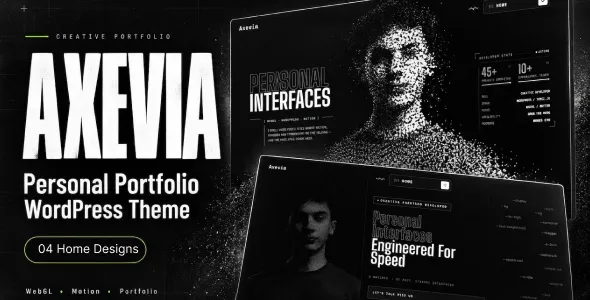
Axevia – Personal Portfolio WordPress Theme
Axevia – Personal Portfolio WordPress Theme is a modern website solution designed for freelancers, creative professionals, designers, developers, photographers, consultants, and individuals who want to present their skills, experience, and achievements through a professional online portfolio. With a personal branding-focused design approach, Axevia provides a foundation for showcasing projects, introducing professional services, highlighting career accomplishments, and building a memorable digital identity.
Whether you are an experienced professional looking to strengthen your online presence, a freelancer searching for new clients, or a creative individual preparing to showcase your latest work, Axevia can help you organize your professional information into an attractive and accessible website. A well-designed portfolio makes it easier for potential clients, employers, and collaborators to understand your expertise and evaluate the quality of your work.
Axevia – Personal Portfolio WordPress Theme is suitable for individuals who want to combine professional presentation with personal expression. With thoughtful customization, compelling project descriptions, consistent branding, and clear contact options, you can build a portfolio website that reflects your personality, communicates your value, and supports your career goals.
Modern Design for Personal Portfolio Websites
A personal portfolio website serves as a digital introduction to your professional identity. It gives visitors a central place to discover who you are, what you do, which projects you have completed, and how they can contact you. Axevia offers a design direction for presenting this information in a structured and visually engaging format.
You can organize your portfolio around your professional background, featured projects, skills, services, work experience, testimonials, and contact details. This approach helps visitors understand your strengths without navigating through unrelated information.
A clean layout, readable typography, consistent colors, and carefully selected imagery can support a professional appearance. You can customize these elements to match your industry and personal style, whether you prefer a minimalist portfolio, a creative visual presentation, or a polished corporate identity.
The website should reflect the kind of opportunities you want to attract. A graphic designer may prioritize visual projects, while a software developer may focus on technical case studies, and a business consultant may emphasize expertise, results, and professional services.
Professional Homepage for Your Personal Brand
The homepage is often the first impression visitors receive of your portfolio. It should communicate your identity, specialization, and professional value quickly and clearly.
With Axevia, you can create a homepage that introduces your name or brand, explains your role, highlights selected work, and guides visitors toward the most important sections of your website.
A well-planned homepage may include:
- A hero section introducing you and your professional role
- A concise personal introduction
- Featured projects or selected portfolio work
- An overview of your skills and expertise
- Professional services and areas of specialization
- Work experience and career highlights
- Client testimonials or professional recommendations
- Links to your résumé or professional profile
- A contact section with a clear call to action
You can adjust the structure according to your goals. A freelancer may emphasize service offerings and client inquiries, while a job seeker may prioritize work experience, technical skills, and résumé access.
Keep the introduction concise and specific. Visitors should be able to understand what you specialize in and why your work may be relevant to them.
Showcase Your Portfolio Projects
A strong project portfolio provides evidence of your capabilities. It allows visitors to explore completed work, understand your creative or technical approach, and evaluate whether your experience matches their requirements.
Axevia can be customized to present projects in an organized gallery or portfolio section. Depending on your profession, you can showcase website designs, branding projects, illustrations, photographs, software applications, marketing campaigns, business initiatives, or other relevant work.
Each project can include a title, description, supporting images, your role, the tools used, and a summary of the process. For more detailed projects, you can create dedicated case study pages explaining the original challenge, your approach, key decisions, and final deliverables.
Avoid presenting every project with the same level of detail. Highlight your strongest and most relevant work first, then organize additional examples into categories that make browsing easier.
A carefully curated portfolio helps communicate your professional strengths more effectively than a long collection of projects without context.
Personal Branding and Professional Identity
Personal branding helps people understand what distinguishes you from others in your field. A consistent identity across your website, résumé, professional profiles, and other communication channels can make your work easier to recognize.
Axevia provides a foundation for creating a personal website that reflects your professional positioning. You can customize your logo or wordmark, color palette, typography, profile photography, and introductory message to establish a cohesive identity.
Your branding should support the audience you want to reach. A creative professional may choose expressive colors and visual storytelling, while a consultant or corporate specialist may prefer a more restrained presentation.
Consider how your homepage headline, profile introduction, and project descriptions communicate your expertise. Rather than using broad claims, explain the specific problems you solve, the services you provide, or the professional skills you bring to a project.
A clear personal brand helps visitors understand your strengths and remember your portfolio after they leave the website.
About Me Page and Professional Story
The About Me page gives visitors a deeper understanding of your background, interests, experience, and professional approach. It is an opportunity to introduce the person behind the portfolio while keeping the information relevant to your career goals.
With Axevia, you can create a personal profile that explains your professional journey, areas of specialization, key experiences, and motivation for your work.
You might describe how you entered your industry, the types of projects you enjoy, the principles that guide your work, and the skills you have developed over time. If appropriate, you can also mention relevant education, certifications, volunteering, or professional interests.
Use a professional photograph if it supports your personal brand, and write in a natural tone that reflects your personality. Avoid turning the page into a lengthy autobiography; focus on details that help potential clients, employers, or collaborators understand your professional identity.
A thoughtful introduction can make your portfolio more approachable and help establish a meaningful connection with visitors.
Skills and Areas of Expertise
A well-organized skills section helps visitors understand your capabilities and identify the areas in which you can contribute.
Axevia can be adapted to present your skills through concise descriptions, categorized lists, visual indicators, or other formats supported by your chosen page layout.
For example, a web developer might highlight front-end development, WordPress customization, responsive design, and performance optimization. A graphic designer could feature branding, typography, layout design, illustration, and visual communication. A consultant might emphasize strategic planning, research, communication, and project coordination.
Group skills into meaningful categories rather than publishing an extensive list without context. Where possible, connect important skills to actual projects that demonstrate how you use them.
Only include capabilities you can confidently discuss or demonstrate. Accurate descriptions create more realistic expectations and help visitors assess whether your experience fits their needs.
Work Experience and Career Highlights
Professional experience gives visitors context about your career development and the environments in which you have worked. It can be especially important for job seekers, consultants, and professionals who want to demonstrate their experience in a particular industry.
With Axevia, you can present employment history, freelance engagements, internships, leadership responsibilities, and selected career milestones.
Each entry can include your role, organization, dates, responsibilities, and relevant achievements. Use concise descriptions that focus on your contributions rather than copying generic job duties.
Where you have measurable achievements, explain them accurately and provide enough context for readers to understand their significance. For example, you might describe a process you improved, a project you coordinated, or a product you helped develop.
If you are early in your career, you can emphasize academic projects, independent work, internships, volunteer experience, and relevant training.
An organized experience section helps visitors follow your professional development and understand the background behind your portfolio.
Résumé and CV Presentation
A personal portfolio often works best when it complements a traditional résumé or CV. While your portfolio demonstrates the quality of your work, a résumé provides a concise overview of your experience, education, and qualifications.
Axevia can be customized to include a résumé page, downloadable CV link, or a structured professional history section, depending on the website configuration.
You can organize your information into sections covering work experience, education, skills, certifications, and professional accomplishments. Use clear headings and consistent formatting so visitors can quickly locate the information they need.
If you provide a downloadable document, ensure that it is current, professionally formatted, and easy to read. Avoid including private information that is not necessary for professional evaluation.
Keep the online résumé aligned with your portfolio and professional profiles. Consistency across these resources helps employers and prospective clients verify your background and understand your experience.
Services for Freelancers and Independent Professionals
Personal portfolio websites are not limited to displaying previous work. They can also help freelancers and independent professionals communicate the services they offer.
Axevia can be adapted to feature service pages that explain your capabilities, ideal clients, project types, and working approach.
Potential services might include website development, graphic design, photography, content writing, digital marketing, consulting, video editing, user interface design, or creative direction, depending on your expertise.
For each service, explain what you provide, what information you need from a client, and how a typical engagement begins. You can also include links to related portfolio projects that demonstrate your experience.
If you work with different client groups, consider creating separate sections for the services most relevant to each audience.
Clear service descriptions help visitors determine whether your expertise matches their requirements and provide a straightforward path toward starting a conversation.
Client Testimonials and Recommendations
Testimonials can strengthen a personal portfolio by providing perspectives from people who have worked with you. They can help prospective clients or employers understand your communication style, reliability, collaboration, and professional strengths.
With Axevia, you can create a section for genuine client feedback, colleague recommendations, or approved professional endorsements.
Whenever possible, use comments that describe a specific aspect of your work, such as project coordination, design quality, problem-solving, or responsiveness. Relevant details provide more context than broad statements without examples.
Obtain permission before publishing identifiable testimonials, names, photographs, or company details. Never invent endorsements or imply that someone has recommended your work without their approval.
If you are new to freelancing and do not yet have client testimonials, focus on project case studies, practical demonstrations, and clearly documented work instead.
Authentic evidence of your professional approach helps build trust without relying on exaggerated claims.
Contact Forms and Professional Inquiries
An accessible contact section helps visitors reach you about employment opportunities, freelance projects, collaborations, or professional questions.
Axevia can be configured with contact information and inquiry forms that suit your goals. A simple form may request a visitor’s name, email address, subject, and a brief message explaining their requirements.
Freelancers may choose to ask about the project type, estimated timeline, or required services. Job seekers might prefer to direct visitors toward an email address or professional networking profile.
Keep the process straightforward and request only the information needed to respond. Include a clear call to action so visitors know how to proceed after reviewing your work.
Depending on your WordPress setup, compatible form plugins can support email notifications, spam protection, and submission management.
Test all forms before publishing the website, and ensure that messages reach the intended inbox. A reliable contact process helps prevent missed opportunities and supports a professional visitor experience.
Responsive Design for Desktop, Tablet, and Mobile
Visitors may discover your portfolio through search engines, professional networking platforms, email signatures, or social media links. A responsive website helps them review your work across different screen sizes.
Axevia provides a theme-based starting point for a personal portfolio website. Before launch, review its supplied layouts on desktop computers, tablets, and mobile phones.
Check that navigation menus are easy to use, project images display correctly, headings remain readable, and contact buttons are accessible on smaller screens. Long project descriptions should be structured so visitors can scan them comfortably.
For image-heavy portfolios, optimize photographs and design previews to reduce loading times while maintaining suitable visual quality. Ensure that important project details are not hidden behind difficult interactions.
A consistent mobile experience helps potential clients and employers explore your professional work wherever they are.
WordPress Customization and Website Management
WordPress provides a flexible content management environment for building and maintaining a personal website. Axevia offers a theme-based foundation for organizing your portfolio, professional profile, and contact information.
Depending on the theme’s included functionality, supported editing tools, and configuration, you can customize colors, typography, images, page content, and other design elements to reflect your personal brand.
You can create additional pages for services, case studies, publications, achievements, or professional resources as your career develops. This flexibility makes it possible to keep the website relevant as you gain experience and expand your skill set.
Compatible WordPress plugins can extend functionality for contact forms, search optimization, analytics, security, performance, and other requirements. Review compatibility before adding new tools, and avoid installing plugins that provide overlapping features without a clear purpose.
Regular backups, software updates, and periodic content reviews help keep your portfolio maintained. Update outdated project information, replace broken links, and make sure your contact details remain correct.
SEO-Friendly Structure for Personal Portfolios
Search engine optimization can help potential clients, recruiters, and collaborators discover your portfolio when searching for your name, expertise, or services. Axevia can serve as a foundation for an organized content structure that supports your visibility online.
Use descriptive page titles, informative meta descriptions, logical headings, readable URLs, and original text that accurately explains your professional work.
Create dedicated pages for important services or specializations where useful. For example, a freelance designer might have separate pages for brand identity and website design, while a developer could organize projects by technology or application type.
Use relevant keywords naturally and avoid repeating the same phrases excessively. Project descriptions should explain the work, your contribution, and the skills involved rather than simply listing search terms.
Optimize image file sizes and use meaningful alternative text for images that communicate important information. Link related projects and service pages together to help visitors navigate your website.
If you want to appear in searches related to your location, include accurate professional location information where appropriate. Search performance depends on many factors, including content quality, competition, technical setup, and ongoing optimization; a theme alone cannot guarantee rankings.
Blog and Professional Insights
A blog can help you demonstrate knowledge beyond the projects displayed in your portfolio. It gives you an opportunity to explain your process, discuss industry topics, share lessons learned, and provide practical information relevant to your audience.
Axevia can be adapted to support articles, tutorials, project breakdowns, opinion pieces, and professional updates.
A designer might write about visual identity, design principles, or creative workflows. A developer could publish technical guides, coding lessons, or project retrospectives. A consultant might share business insights, planning methods, or explanations of common challenges.
Choose topics that reflect your actual experience and provide value to readers. Articles should be clear, accurate, and original, with headings that make longer content easier to navigate.
You can link articles to relevant portfolio projects, helping readers understand how your ideas translate into practical work. A useful blog can support your professional identity while creating additional opportunities for visitors to discover your website.
Social Media and Professional Profile Integration
Your personal portfolio can work alongside professional networking platforms and social media channels to create a consistent online identity.
With Axevia, you can add links to relevant profiles, such as professional networking accounts, creative portfolios, code repositories, or social platforms that support your work.
Choose channels that are appropriate for your industry and audience. A developer may prioritize a code repository and professional profile, while a photographer or designer may focus on visual platforms that allow potential clients to explore their work.
Make sure linked profiles are current and consistent with the information on your website. You can also share new projects, articles, and portfolio updates through relevant channels to direct interested visitors back to your site.
Use analytics tools where appropriate to understand how visitors discover your portfolio and which pages attract attention. These insights can help you improve your content and make your professional presentation more effective.
Suitable for Different Professional Fields
Axevia can be adapted for individuals across many industries who want to showcase their work, experience, and professional identity.
Potential applications include:
- Freelance web developers: Presenting websites, applications, development skills, and technical projects.
- Graphic designers: Showcasing branding, illustration, visual identity, and creative work.
- Photographers: Displaying selected photographs, galleries, specialties, and booking information.
- UI and UX designers: Explaining design projects, user research, interface concepts, and case studies.
- Digital marketers: Highlighting marketing campaigns, strategy projects, and areas of expertise.
- Content writers: Presenting published articles, writing samples, and content services.
- Business consultants: Communicating professional experience, consulting services, and business insights.
- Video editors and filmmakers: Featuring selected productions, editing projects, and creative capabilities.
- Artists and illustrators: Building an online gallery for artwork, commissions, and creative projects.
- Job seekers: Presenting experience, skills, accomplishments, and a downloadable résumé.
- Students and recent graduates: Showcasing academic projects, internships, personal work, and developing skills.
- Independent professionals: Creating a central online profile for services, achievements, and professional contact details.
Choose a structure that reflects your main profession and career goals. A focused portfolio is generally more effective than one that attempts to represent unrelated services without a clear professional direction.
Why Choose Axevia – Personal Portfolio WordPress Theme?
A personal portfolio should do more than display a collection of images or a list of qualifications. It should communicate your professional identity, demonstrate your abilities, and help visitors understand how to work with you.
Axevia offers a personal branding-focused design direction that can be adapted for freelancers, creative professionals, developers, consultants, and other individuals. You can organize your experience, skills, services, and project examples into a cohesive website that reflects your professional goals.
Its practical value depends on the theme’s included features, your customization choices, the quality of your portfolio content, and the way your website is maintained.
By combining a clear introduction, carefully selected projects, informative case studies, relevant professional details, and convenient contact options, you can create a website that supports your personal brand and makes your work easier to discover.
Build Your Personal Website with Axevia
A successful personal portfolio website provides a central place to showcase your skills, communicate your experience, and introduce the projects that represent your best work. It should make your professional identity clear while giving visitors an easy way to explore your background and contact you.
Axevia – Personal Portfolio WordPress Theme provides a foundation for individuals who want to create a polished online portfolio using WordPress. With thoughtful customization, compelling project descriptions, consistent branding, and relevant professional information, you can develop a website that reflects your capabilities and supports your career ambitions.
Whether you are a freelancer seeking new clients, a designer presenting creative projects, a developer documenting technical work, or a professional preparing for new opportunities, Axevia can help you organize your online presence into a clear and engaging experience.
Build a personal website that highlights your strengths, tells your professional story, and gives potential clients, employers, and collaborators a convenient way to discover your work.