My Account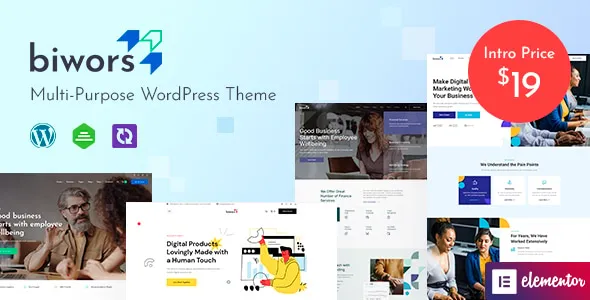
Biwors – Modern & Multipurpose WordPress Theme
Biwors – Modern & Multipurpose WordPress Theme is a versatile website design solution for businesses, creative professionals, freelancers, agencies, consultants, and organizations looking to establish a professional online presence with WordPress. Designed for multipurpose website projects, Biwors can serve as a starting point for creating corporate websites, business landing pages, creative portfolios, service-based websites, and other digital experiences tailored to different industries and audiences.
A modern website should do more than present information. It should communicate a brand’s identity, explain its services, help visitors navigate important content, and encourage meaningful interactions. A well-structured website can help businesses introduce their offerings, showcase completed projects, share company updates, and provide convenient ways for prospective customers to make contact.
Biwors can be evaluated for projects that require a flexible visual foundation and an adaptable WordPress website structure. WordPress provides content management capabilities for publishing pages, maintaining articles, organizing media, and updating website information. The theme’s actual layouts, customization options, and integrations depend on the installed version and its documented features. Reviewing the current demo and documentation before installation helps ensure that the theme fits your project requirements.
What Is Biwors Modern & Multipurpose WordPress Theme?
Biwors is a multipurpose WordPress theme intended for website owners who need a design foundation that can be adapted to different professional and commercial purposes. Rather than focusing on a single business category, a multipurpose theme can support a variety of website concepts through customization of layouts, content, imagery, and branding.
A company may use this type of theme to introduce its business, present services, share project examples, and publish important announcements. A freelancer might prioritize a portfolio and professional biography, while a creative agency could focus on case studies, capabilities, and client inquiries.
WordPress allows website administrators to manage content through its dashboard, making it possible to update text, publish blog posts, organize images, and maintain navigation menus. Depending on the theme’s supported features, compatible plugins and page-building tools may provide additional options for arranging website sections.
The final capabilities of Biwors should be verified against the current product documentation. Features such as advanced page building, e-commerce, booking, membership management, and specialized integrations depend on the supplied theme version and any additional tools installed alongside it.
Modern Design for Professional Websites
A modern website should balance visual appeal with practical usability. Visitors need to understand what a business offers, locate important information, and move between pages without confusion.
Biwors can be considered as a starting point for developing a website with a consistent visual identity and a structured content presentation. Depending on the available layouts, developers and website owners can customize elements such as typography, colors, imagery, spacing, and page sections to suit the brand.
A corporate organization may prefer a clean and structured design that emphasizes services and company information. A creative studio might use a more expressive presentation to highlight its work, while a consulting business may prioritize readable content and clear service descriptions.
Visual consistency is important across the entire website. Headings, body text, buttons, images, and navigation elements should follow a coherent style so visitors can recognize familiar patterns.
Avoid adding decorative elements that distract from the main message. A professional design should support the website’s purpose and help users understand the information presented on each page.
Multipurpose Layouts for Different Industries
One of the main reasons to consider a multipurpose WordPress theme is its potential adaptability across different business categories. Instead of building every page structure from the beginning, website owners can customize an existing design foundation around their particular objectives.
Biwors may be evaluated for corporate websites, digital agencies, consulting businesses, personal portfolios, startups, professional services, and other projects that benefit from a flexible presentation.
A corporate website can organize company information, services, leadership details, projects, and contact information. A digital agency may prioritize creative work, case studies, and service descriptions. A consultant could focus on professional experience, areas of expertise, and consultation inquiries.
Small businesses may prefer a concise website that explains their offerings and provides essential contact details. Larger organizations may require more extensive navigation, multiple service pages, and additional resources.
The most appropriate layout depends on the intended audience and the information visitors need. Customization should make the website more relevant to the business rather than simply adding more sections.
Build a Professional Corporate Website
A corporate website provides a central destination for communicating a company’s identity, services, experience, and business information. It can help customers, partners, and prospective clients understand the organization before making contact.
Biwors can be considered for a corporate website structure that includes pages such as Home, About Us, Services, Projects, Team, Blog, and Contact, depending on the available templates and customization options.
The homepage should introduce the business clearly and explain its main offering. Supporting sections can summarize important services, highlight selected projects, and direct visitors toward more detailed information.
An About page can communicate the company’s background, values, experience, and approach to its work. Individual service pages can explain specific offerings, while a project section can demonstrate relevant experience through examples.
Corporate websites should prioritize accurate information. Outdated team profiles, incorrect contact details, and old service descriptions can undermine visitor confidence. Reviewing the content regularly helps maintain a professional and reliable online presence.
Website Solutions for Creative Agencies and Studios
Creative agencies need websites that demonstrate their capabilities and communicate the value of their work. Their audiences may be looking for branding, web design, graphic design, marketing, content production, or other creative services.
Biwors can be evaluated for agency websites that combine service descriptions with portfolio presentations and project case studies. The precise layouts available depend on the current theme version.
A useful portfolio should explain more than what a finished project looks like. Case studies can describe the client’s objective, the challenge addressed, the work completed, and the outcome achieved where reliable information is available.
A branding studio may showcase visual identities and brand systems. A web design agency might present website interfaces and digital experiences, while a marketing company could explain campaign strategy and documented project results.
Consistent project presentation helps visitors understand the agency’s strengths. A clear contact pathway then allows interested businesses to discuss potential collaborations or request additional information.
Create a Personal Portfolio Website
Freelancers and independent professionals often need a website that introduces their expertise, demonstrates their work, and helps them connect with potential clients or employers.
Biwors can serve as a possible starting point for a portfolio website featuring a biography, professional skills, selected projects, work experience, services, and contact information.
The most useful portfolio structure depends on the individual’s profession. Designers may prioritize visual projects and case studies, developers may highlight technical capabilities and completed websites, and consultants may focus on professional achievements and examples of their work.
A strong portfolio should prioritize relevant projects instead of displaying everything without context. Each example should communicate the individual’s contribution and help visitors understand the value of the work.
Professionals may also include a resume, genuine testimonials, relevant certifications, and links to professional profiles. Keeping this information current helps ensure that the website accurately represents their experience and capabilities.
Homepage Structure and Content Organization
The homepage is often the first introduction visitors receive to a business. It should communicate the main message quickly and provide a clear path to the information most relevant to the audience.
A Biwors-based website can be organized around an introductory section, service summaries, selected projects, company information, testimonials, recent articles, and contact opportunities, depending on the layouts supported by the theme.
The introductory section should explain what the business does and why visitors might be interested. Supporting content can introduce important services or direct users toward dedicated pages.
Project examples can demonstrate experience, while genuine testimonials may provide additional context about the customer experience. Blog previews can encourage visitors to explore educational content or company updates.
Not every homepage needs every possible section. A small service business may benefit from a concise layout, while a larger organization may require a more extensive structure.
Each section should have a clear purpose and help visitors understand the business, explore its offerings, or take a relevant next step.
Customization and Brand Identity
A website should reflect the organization’s identity rather than appear like an unmodified design template. Customization helps align the visual presentation with the company’s branding, audience, and communication goals.
Depending on the available theme settings and compatible tools, Biwors may allow adjustments to colors, typography, layouts, spacing, images, and other visual elements. The precise options should be confirmed in the current documentation.
A professional services company may prefer restrained colors and structured layouts, while a creative business may choose more expressive typography and imagery. A startup may prioritize a clear introduction to its product or service, while a personal portfolio may emphasize selected work.
Consistency is essential. Define a color palette, heading hierarchy, body text style, and button appearance that can be used throughout the website.
Use images that reinforce the brand and provide meaningful context. Relevant project screenshots, professional photography, and original illustrations are generally more useful than generic visuals that do not support the content.
Before making extensive changes, review the theme’s customization options and identify which elements are controlled by WordPress, the theme, or additional plugins.
Responsive Design for Desktop, Tablet, and Mobile
Visitors may access a website through desktop computers, laptops, tablets, and smartphones. Responsive design helps keep content accessible and navigation usable across different screen sizes.
Biwors should be evaluated for responsive behavior using its current demo and documentation. Depending on the implementation, developers may be able to adjust page layouts, navigation, images, typography, spacing, and content widths for different devices.
Desktop layouts may accommodate multiple content columns and large visual sections. Mobile layouts should prioritize readable text, convenient navigation, and easy access to important information.
Responsive testing should cover the complete website rather than only the homepage. Service pages, project galleries, blog articles, contact forms, and other sections may each require separate adjustments.
Pay particular attention to image sizing, button placement, navigation behavior, and long blocks of text. Custom CSS, embedded media, and third-party components can affect the final experience.
Testing across multiple screen sizes helps identify issues before they affect visitors and supports a consistent browsing experience.
SEO-Friendly Website Structure
Search engine optimization can help a business improve the discoverability of its website through relevant search queries. A well-organized WordPress website provides a useful foundation, but rankings depend on content quality, technical implementation, competition, and other factors beyond the theme.
Biwors can be used as a starting point for organizing content into clearly defined pages with descriptive titles, logical headings, readable URLs, and relevant internal links.
A service business can create separate pages for its main offerings instead of describing everything on one page. Creative agencies can publish detailed case studies, while consultants can produce educational articles that answer common questions from prospective clients.
Internal links help connect related content. For example, a blog article can direct readers to a relevant service page, while a project case study can link to the service that supported the work.
Image optimization is also important. Use descriptive alternative text for meaningful images and appropriate file sizes to support efficient loading.
Compatible SEO plugins may help manage metadata, XML sitemaps, canonical settings, and other technical requirements. No theme can guarantee a specific search ranking or level of website traffic.
Content Marketing and WordPress Blogging
Content marketing can help businesses demonstrate expertise, answer customer questions, and provide useful information to their audiences. WordPress offers publishing tools that make it possible to maintain articles alongside service pages, portfolios, and company information.
Biwors can be considered for websites that combine business content with a blog or resource section, depending on its supported layouts.
A digital agency might publish articles about website design, branding, and marketing strategy. A consultant could explain industry developments or practical business processes, while a creative professional may share project insights and lessons learned.
Useful content should address genuine audience needs. Articles can explain procedures, compare approaches, answer common questions, or provide actionable guidance related to the business’s expertise.
A consistent publishing schedule can help keep the website current without sacrificing content quality. Internal links can guide readers from informational articles toward relevant services or project examples.
Focus on accuracy, originality, and practical value rather than publishing large volumes of repetitive material. Helpful content can strengthen the website’s usefulness and support a broader digital marketing strategy.
Lead Generation and Contact Forms
For many businesses, one of the primary purposes of a website is to generate inquiries. Visitors need a convenient way to ask questions, request a quotation, discuss a project, or learn more about a service.
Biwors can be configured to present contact opportunities through buttons, contact sections, and compatible form solutions, depending on the components included in the theme.
A simple inquiry form might collect a name, email address, requested service, and a short message. More detailed forms may be appropriate for businesses that need project specifications or consultation information.
Keep forms straightforward and explain which fields are required. Clear labels and useful validation messages help visitors complete the process without confusion.
A contact form does not automatically send messages unless a working submission system is configured. Developers should test form validation, email delivery, spam protection, and confirmation messages before launching the website.
Calls to action should match the surrounding content. A portfolio page may invite visitors to discuss a similar project, while a service page could encourage them to request further information.
Performance and Website Speed
Website speed contributes to a positive user experience. Visitors may leave if pages take too long to load, especially when browsing on mobile devices or slower connections.
The performance of a Biwors website depends on the theme implementation, hosting environment, images, scripts, fonts, plugins, and external integrations. A modern visual design does not automatically guarantee fast loading.
Begin by optimizing images and using appropriate dimensions for each display area. Large project galleries and homepage banners should be compressed carefully while preserving sufficient visual detail.
Review unnecessary scripts, external widgets, animations, and plugins that may affect loading time. Quality hosting, caching, and other optimization tools can help when selected according to the website’s actual requirements.
Test important pages, including the homepage, service pages, blog articles, and portfolio sections. Different layouts may perform differently, particularly when they contain large images or interactive components.
Regular performance monitoring helps identify new issues as the website grows and supports a more consistent experience across devices.
Accessibility and User-Friendly Navigation
An effective website should make information easy to locate and understand. Clear navigation, readable typography, sufficient color contrast, and recognizable interactive elements can improve usability for a wide range of visitors.
When customizing Biwors, use logical heading structures, descriptive link text, meaningful image alternative text, and clear labels for form fields.
Navigation menus should prioritize important pages and use familiar wording. Interactive elements should be distinguishable from ordinary text, and keyboard users should be able to navigate essential website functions.
Forms should provide understandable instructions and error messages. Important information should not be communicated through color alone, since some visitors may have difficulty distinguishing certain colors.
Accessibility depends on the final website implementation, not only the theme’s appearance. Test important pages with keyboard navigation and suitable accessibility tools to identify potential usability barriers.
Integrations and Supporting WordPress Plugins
WordPress websites often rely on additional tools for contact forms, search optimization, analytics, security, backups, performance, and specialized business functions.
Biwors should be used with plugins that are compatible with the installed WordPress version and the theme’s documented requirements. Before installing an extension, review its compatibility information, maintenance history, documentation, and support arrangements.
An SEO plugin may assist with metadata and sitemap management, while a contact form plugin can help collect inquiries. Analytics tools may provide information about traffic and visitor behavior, subject to applicable privacy and consent requirements.
Some businesses may need additional tools for e-commerce, appointment scheduling, membership access, or customer relationship management. These capabilities should be verified or implemented through appropriate integrations rather than assumed to be part of a multipurpose theme.
Avoid installing multiple plugins that perform overlapping functions without a clear reason. Too many extensions can increase maintenance work, introduce compatibility issues, and affect performance.
Test the website after adding or updating integrations to ensure that navigation, layouts, forms, and other important features continue to work correctly.
Security and Ongoing Website Maintenance
A professional WordPress website requires regular maintenance to remain secure, reliable, and accurate. Even a well-designed theme can experience problems if its software, plugins, content, and configuration are neglected.
Use reputable hosting, enable HTTPS, and assign WordPress user roles according to each person’s responsibilities. Keep WordPress, the theme, and compatible plugins updated carefully, with backups available before significant changes.
Obtain themes and plugins from trustworthy sources and remove unused components when appropriate. Strong administrator passwords and suitable access controls help reduce unnecessary security risks.
Regular backups provide a recovery option if a technical issue or accidental change disrupts the website. Website owners should also understand how to restore those backups and verify that the process works.
Maintenance should include content reviews as well as technical checks. Service descriptions, team profiles, contact details, project examples, and published articles should remain accurate and relevant.
A consistent maintenance routine helps protect the website and supports a dependable experience for visitors.
Who Should Use Biwors Modern & Multipurpose WordPress Theme?
Biwors may be suitable for a variety of website projects that require an adaptable WordPress design foundation.
Small businesses: Create a website that introduces services, explains the business, and provides clear contact information.
Corporate organizations: Organize company information, business services, project highlights, and professional resources.
Creative agencies: Showcase capabilities, present case studies, and communicate the value of creative services.
Freelancers: Build a portfolio that highlights skills, experience, completed projects, and professional contact details.
Consultants: Explain areas of expertise, describe services, and provide a convenient way for prospective clients to make inquiries.
Startups: Establish an online presence that introduces a brand, communicates its offering, and supports future development.
Professional service providers: Present service descriptions, business information, and customer resources through a consistent website structure.
Personal brands: Publish articles, highlight professional achievements, and create a central destination for online activities.
The suitability of the theme depends on the actual layouts, customization features, supported plugins, licensing, and technical requirements. Reviewing the current demo and documentation helps determine whether it fits the intended project.
Tips for Building a Successful Website with Biwors
Begin by defining the website’s primary purpose. Decide whether the main objective is to generate inquiries, showcase projects, introduce company services, publish educational content, or support several related activities.
Prepare the essential content before customizing every page. This may include a business introduction, service descriptions, company information, project examples, team profiles, and accurate contact details.
Establish a consistent visual identity using a suitable color palette, typography, image style, and button design. Replace placeholder content with original information that represents the business accurately.
Keep navigation simple and make important information easy to find. Each page should have a clear purpose and guide visitors toward relevant next steps without unnecessary distractions.
Test the website across desktop, tablet, and mobile devices. Review loading performance, accessibility, contact forms, navigation links, and any interactive elements. Confirm that all published information is accurate before launch.
Finally, establish a maintenance plan that includes backups, software updates, performance monitoring, and periodic content reviews. These practices help keep the website useful as the business evolves.
Final Thoughts on Biwors Modern & Multipurpose WordPress Theme
Biwors – Modern & Multipurpose WordPress Theme can be considered for businesses, agencies, freelancers, consultants, and organizations seeking a flexible foundation for a WordPress website. Its multipurpose positioning makes it relevant to projects that require adaptable page structures and a presentation tailored to different professional goals.
A successful website combines consistent branding, clear navigation, useful content, responsive layouts, and convenient contact opportunities. Corporate businesses can emphasize services and company information, while creative professionals can focus on portfolios and project examples. Consultants and service providers can organize their expertise into clear, informative pages.
The final capabilities of a Biwors website depend on the installed theme version, documented features, customization tools, and compatible plugins. Specialized functions such as online payments, booking, membership management, and customer portals should be verified before they become part of the project plan.
With thoughtful customization, original content, responsive testing, and regular maintenance, Biwors can provide a useful starting point for building a professional online presence. Reviewing the current demo and documentation before installation will help ensure that the theme aligns with the website’s design and technical requirements.