My Account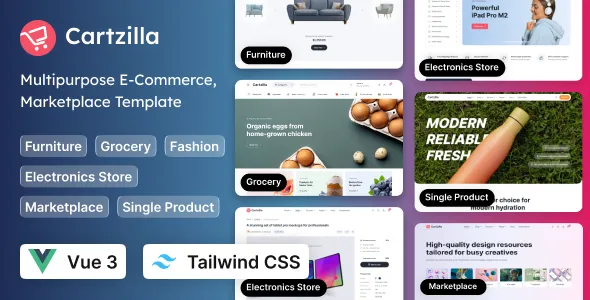
Cartzilla – Multipurpose E-Commerce Vue 3 Template (Tailwind CSS)
Cartzilla – Multipurpose E-Commerce Vue 3 Template (Tailwind CSS) is a modern frontend template designed for developers, online retailers, startups, and digital agencies building e-commerce websites with Vue 3 and Tailwind CSS. Created as a flexible starting point for online shopping interfaces, Cartzilla can be evaluated for projects involving product catalogs, category pages, shopping experiences, promotional sections, and other essential storefront layouts. Whether you are developing a fashion store, electronics marketplace, beauty products website, home and furniture shop, lifestyle store, or multipurpose online retail platform, this Vue 3 e-commerce template provides a frontend foundation that can be customized to match different business requirements.
A successful e-commerce website needs more than an attractive homepage. Customers must be able to discover products, explore categories, compare available options, understand product details, and move through the purchasing process without unnecessary confusion. Cartzilla can help developers establish a consistent interface for these shopping journeys, depending on the components and layouts included in the selected version. Its combination of Vue 3 and Tailwind CSS is relevant to development teams looking for a component-oriented JavaScript framework and a utility-first approach to styling.
Vue 3 supports reactive, component-based interface development, allowing developers to organize an application into reusable sections and manage changing interface data. Tailwind CSS provides utility classes for styling layouts, typography, spacing, colors, and responsive behavior. Together, these technologies can support a customizable frontend for e-commerce projects. The exact pages, components, integrations, and interactive features included with Cartzilla should be verified through its official demo and documentation before implementation.
What Is Cartzilla Multipurpose E-Commerce Vue 3 Template?
Cartzilla is a multipurpose e-commerce frontend template built around Vue 3 and Tailwind CSS. It is intended for developers and businesses that need a starting point for creating online shopping interfaces without designing every page from scratch.
E-commerce businesses have different presentation requirements. A fashion retailer may need product galleries, size options, collection pages, and promotional banners. An electronics store may prioritize technical specifications, product comparisons, and category filters. A home decor business may focus on large product images, room inspiration, and organized product collections. A multipurpose template can provide a foundation that developers adapt to these different shopping experiences.
Cartzilla can be evaluated for online stores, marketplace-style interfaces, specialty retail websites, and other product-focused projects, provided its available layouts and licensing terms meet the intended use. The actual page selection depends on the template version and the components included with it.
It is important to distinguish a frontend template from a complete e-commerce platform. A template primarily provides the visual interface and frontend structure. Features such as secure payments, inventory management, order processing, user authentication, product storage, shipping calculations, and tax handling generally require backend services or compatible integrations unless the product documentation explicitly states otherwise.
Before starting development, review the source code, required software versions, installation instructions, available page layouts, and included dependencies. This helps establish whether Cartzilla is suitable for the project’s design goals and technical requirements.
Why Choose Vue 3 for E-Commerce Development?
Vue 3 is a JavaScript framework for building interactive user interfaces. Its component-based architecture helps developers divide an application into reusable parts, making it useful for storefronts that contain repeated elements such as product cards, navigation menus, filters, product galleries, and shopping interface components.
An e-commerce website often includes several related pages that share common design patterns. A category page may display product cards, while a search results page uses a similar structure with different data. A product details page may combine an image gallery, product information, selection controls, and related items. Reusable Vue components can help maintain consistency across these screens.
Cartzilla’s Vue 3 foundation can be useful for developers who want to customize the storefront using Vue’s development patterns. The precise implementation depends on the template’s source code, project structure, and supported dependencies.
Vue’s reactivity system can help keep interface elements synchronized with application state. For example, selecting a product option may update the displayed selection, while changing a category filter may update the visible product list. These interactions still need to be implemented and connected to the relevant data sources.
Developers should review the existing component structure before introducing additional libraries. Depending on the project, routing, state management, form validation, or API communication may require separate tools. Select dependencies according to actual requirements and compatibility rather than adding unnecessary complexity.
A well-organized Vue 3 codebase can make an e-commerce interface easier to customize, test, and maintain as the store expands.
Tailwind CSS for Flexible Storefront Styling
Tailwind CSS is a utility-first CSS framework that allows developers to style interfaces using predefined utility classes. These utilities cover common design properties such as spacing, typography, display, alignment, borders, colors, and responsive layouts.
For e-commerce development, Tailwind CSS can help establish consistent styling across product cards, category grids, navigation elements, promotional banners, buttons, and forms. Developers can adjust the visual presentation without having to create a separate CSS rule for every individual element.
Cartzilla’s Tailwind CSS foundation is relevant to projects that require a customizable storefront design. Developers can evaluate how the template organizes its styles, whether it uses reusable components, and how its responsive classes are applied.
A fashion store may use large imagery and generous spacing to emphasize products, while an electronics retailer may need denser layouts for product specifications. A beauty store may prefer a refined visual presentation with clear category navigation. Tailwind CSS can support these different approaches when the template’s structure is customized appropriately.
Consistent design tokens and shared component patterns are helpful when maintaining a larger website. Establish a clear color palette, typography scale, spacing system, and button style rather than applying unrelated visual treatments to every page.
The exact Tailwind CSS version and configuration requirements should be checked in the project files. Developers should follow the template’s setup instructions and confirm that custom styles are compiled correctly for the intended build environment.
Responsive Design for Online Shopping Websites
Responsive design is essential for modern e-commerce websites because customers shop using smartphones, tablets, laptops, and desktop computers. A storefront should adapt to these different screen sizes while keeping product information and purchasing controls accessible.
Cartzilla can be evaluated for responsive storefront development, with its actual behavior determined by the layouts and styles included in the selected version. Developers should test the homepage, category pages, search results, product details, cart interface, and other key screens rather than assuming that every layout works equally well on every device.
On smaller screens, product grids may need fewer columns, navigation may need a compact menu, and product galleries may require different image arrangements. Buttons should remain easy to select, text should be readable, and forms should not require unnecessary horizontal scrolling.
Responsive product pages deserve particular attention. Product names, prices, availability details, option selectors, and purchase actions should remain clear when the screen becomes narrow. Large product images should resize appropriately without hiding important information.
Tailwind CSS responsive utilities can support layout adjustments at different breakpoints, but the final result depends on how those utilities are used in the template. Custom components, third-party widgets, and embedded content may introduce additional layout issues.
Testing with realistic product data and multiple screen widths helps identify problems before launch. A consistent mobile shopping experience can make it easier for customers to explore products and understand the available purchasing options.
Multipurpose Storefront Layouts for Different Industries
A multipurpose e-commerce template can provide a foundation for several types of online retail businesses. Rather than being restricted to one product category, a flexible frontend can be customized to reflect different branding, catalog structures, and customer needs.
Cartzilla can be considered for a range of store concepts, depending on the layouts and components available in the current version.
Fashion and clothing stores: A storefront can present clothing collections, seasonal promotions, product photography, category navigation, and product options such as size and color where applicable.
Electronics retailers: Product pages can emphasize technical specifications, model information, compatible accessories, and organized category navigation.
Beauty and skincare shops: A store can organize products by category, brand, intended use, and other relevant attributes while maintaining clear product information.
Home and furniture stores: Larger product images, room-focused collections, dimensions, material details, and delivery information can help customers understand the products.
Sports and fitness retailers: A storefront can present equipment, apparel, accessories, and related product categories with appropriate filtering and product details.
Lifestyle and general merchandise stores: A multipurpose catalog can combine several product categories within a consistent visual structure.
The final website should reflect the actual products and customer expectations. A multipurpose template offers flexibility, but the navigation, imagery, content, and shopping journey still need to be planned around the target audience.
Homepage Design for E-Commerce Businesses
The homepage is often the first major introduction to an online store. It should help visitors understand what the business sells and provide clear paths to relevant products and categories.
When customizing Cartzilla, developers can plan the homepage around the layouts supported by the template. A typical storefront might include a promotional banner, featured categories, selected products, seasonal collections, special offers, and links to important shopping sections.
A clear introductory area can communicate the store’s main focus. A fashion retailer might highlight a new collection, while an electronics store could feature selected product categories. A home decor website may emphasize room inspiration or curated product groups.
Category links help visitors begin browsing without having to use the search function. Featured products can highlight new arrivals, popular items, or selected collections when those labels reflect accurate store information.
Promotional banners should communicate genuine offers and use clear terms. If a discount has an expiration date or specific conditions, the website should present that information accurately.
Avoid placing too many competing elements on the homepage. Excessive banners, animations, and product sections can make the page difficult to navigate and slow down the shopping experience.
A useful homepage prioritizes the most important categories, presents relevant products, and guides visitors toward the next step without unnecessary distractions.
Product Catalog and Category Page Design
A product catalog helps customers browse the items available in an online store. Clear category pages make it easier to narrow a large catalog into manageable groups and discover products that match individual needs.
Cartzilla can be evaluated for catalog and category page layouts, depending on the page templates and components included in the current version. Developers should confirm whether the available interface supports the required grid arrangements, sorting controls, filtering patterns, and product information displays.
Categories should reflect how customers think about the products. A clothing store might organize its catalog by product type, audience, or collection. An electronics retailer may use categories for computers, mobile devices, audio equipment, and accessories. A home furnishings store may separate furniture, lighting, textiles, and decorative items.
Filters can help customers narrow results by relevant attributes. Depending on the product category, these may include price, brand, size, color, material, rating, or availability. Only include filters that correspond to reliable product data.
Sorting options may allow visitors to arrange products by price, newest additions, popularity, or other meaningful criteria. The available choices should accurately reflect how the application processes and displays the catalog.
Product cards should present the essential information without becoming overcrowded. Product names, prices, relevant images, and available status indicators should remain readable. Any quick-view or add-to-cart controls must be connected to working application logic rather than appearing as decorative elements.
A clear catalog structure helps customers browse efficiently and supports a more understandable shopping journey.
Product Details Pages and Shopping Experience
The product details page is an important part of the purchasing journey. Customers need enough information to understand the item, evaluate its suitability, and make an informed decision before adding it to a cart.
Cartzilla can be considered as a starting point for product detail layouts, subject to the components available in the template. A product page may include images, a title, pricing, product descriptions, specifications, available options, stock information, and related products where supported by the implementation.
High-quality product photography helps customers understand the item’s appearance. Multiple views can be useful for clothing, electronics, furniture, and other products where details affect purchasing decisions.
Product descriptions should explain practical characteristics rather than rely only on promotional wording. Depending on the product type, relevant information may include materials, dimensions, compatibility, care instructions, technical specifications, included accessories, or usage guidance.
If a product has selectable options, such as size, color, storage capacity, or configuration, the interface should clearly communicate the current selection. The add-to-cart action should validate required options before attempting to create a cart item.
Availability, delivery information, and return policies should be presented accurately when the business has the necessary data. Avoid displaying unverified stock counts or delivery promises.
Related products can help customers explore complementary or similar items when the recommendation logic is meaningful. The final behavior depends on the data source and application implementation.
A well-designed product page gives customers clear information and helps them move through the shopping process with confidence.
Shopping Cart and Checkout Interface
The shopping cart allows customers to review selected products before proceeding toward an order. It should make product names, quantities, prices, selected options, and totals easy to understand.
Cartzilla can be assessed for shopping cart and checkout-related layouts, but developers should verify which screens and interactions are included. A frontend template does not automatically provide a secure checkout system or complete order-processing infrastructure.
A cart interface may allow customers to adjust quantities, remove items, review selections, and continue shopping. Any quantity changes should update the displayed subtotal and other relevant calculations correctly. The application should also validate product availability and pricing against the authoritative backend before finalizing an order.
Checkout usually involves collecting necessary customer and delivery information, selecting supported delivery methods, reviewing order details, and completing payment through a secure payment provider. The exact workflow depends on the business model and technical architecture.
Sensitive payment details should be handled through an appropriate payment service rather than stored directly in an unprotected frontend. Server-side validation is necessary for pricing, inventory, discounts, taxes, shipping, and order creation.
The interface should provide clear feedback when a form is incomplete, a payment fails, or an item becomes unavailable. Customers should be able to understand what happened and what they can do next.
A carefully designed cart and checkout experience reduces confusion and helps customers review their purchases before submitting an order.
Vue Components and Reusable UI Elements
Reusable components are valuable in e-commerce projects because many interface elements appear across multiple pages. A product card, category tile, navigation item, form control, or button may be used throughout the storefront.
Vue 3 allows developers to build interfaces from components that can receive data and respond to user interactions. Cartzilla’s actual component structure should be reviewed in the source code to determine how existing elements can be reused and extended.
For example, a shared product card can display different product names, images, prices, and availability information without requiring separate markup for every item. A reusable category component can present different catalog sections using a consistent visual style.
Reusable components also help maintain design consistency. If the store needs a change to button styling, spacing, or product card presentation, shared components can reduce the number of locations that need to be updated.
However, components should remain flexible enough to support different product types. A simple clothing card may require different information from a technical electronics listing. Thoughtful component properties can accommodate these differences without creating unnecessary complexity.
Before developing new components, examine the template’s existing conventions for naming, styling, props, events, and data flow. Following the established patterns makes the code easier for other developers to understand and maintain.
A well-organized component system supports long-term customization as the storefront grows.
Customization and Brand Identity
An online store should reflect the business’s identity rather than look like an unchanged template. Consistent branding helps customers recognize the store and creates a more coherent experience across the homepage, product catalog, product pages, and checkout screens.
Depending on the included source code and styling configuration, Cartzilla may allow developers to customize colors, typography, spacing, buttons, product cards, navigation, and other interface details. The exact options should be confirmed through the current documentation.
A fashion retailer may choose expressive imagery and a refined visual style, while an electronics store may prioritize clear specifications and structured product information. A home decor business might emphasize photography and generous spacing, while a general marketplace may require a more information-dense layout.
Choose a color palette and typography system that supports the brand and remains readable across devices. Buttons should have consistent visual treatments, and important shopping actions should be easy to identify.
Product photography is an important part of e-commerce branding. Use images that accurately represent the products and maintain consistent quality across the catalog. Avoid mixing unrelated visual styles when they weaken the store’s presentation.
Tailwind CSS utilities can help developers adjust the layout and visual details, but customization should follow the project’s styling conventions. Keep shared components consistent and test visual changes across different pages and screen sizes.
A thoughtful branding approach allows the template to become a storefront that reflects the business’s own identity.
State Management and Interactive Store Features
An e-commerce interface must manage changing data and user selections. Customers may add products to a cart, adjust quantities, choose variants, apply filters, or update their preferences while browsing.
Vue 3 provides reactive mechanisms for reflecting changes in application state. The appropriate state management approach depends on the size and complexity of the project and the implementation included with Cartzilla.
Developers should test the template’s interactive elements to establish which behaviors already work and which are visual placeholders. A cart icon, filter control, or product option selector does not necessarily indicate that a complete shopping workflow is implemented.
A small storefront may manage some interface state within individual components. A larger application may need shared state for the cart, selected currency, user session, product filters, or other values used across multiple pages.
The interface should respond predictably to user actions. Adding an item to the cart should produce clear feedback, changing a product variant should update the selection, and filters should reflect the active criteria. Invalid actions should be handled with understandable messages.
When state depends on server data, the application should account for network delays, failed requests, outdated information, and conflicting updates. Important values such as prices and stock availability should be verified by the backend rather than trusted solely because they appear in the frontend.
A well-planned state management approach helps create consistent interactions across the shopping experience.
API Integration and E-Commerce Backend Connectivity
A production e-commerce website usually needs a backend to manage products, customers, inventory, orders, pricing, and other business data. A frontend template can provide the visual layer, while APIs connect the interface to the services that support the store.
Cartzilla can be evaluated as a frontend for an API-driven e-commerce application, subject to the architecture and dependencies included in the selected version. Developers should verify whether sample data, API examples, or backend integrations are provided.
A product API may supply names, descriptions, images, prices, categories, variants, and availability. Order-related endpoints may handle cart validation, customer details, shipping choices, payment status, and order creation. User-related services may manage authentication and account information.
When connecting an API, organize requests consistently and handle loading, success, empty, and error states. Validate returned data before displaying it and avoid assuming that every response will contain all expected fields.
Security is especially important for operations involving customer information, payments, and order changes. The backend should validate prices, stock levels, permissions, and submitted values. Private credentials should not be exposed in the browser bundle.
Developers may connect the frontend to a custom backend or a compatible commerce platform, depending on the project requirements. The appropriate solution should be chosen based on catalog complexity, order workflows, scalability, and maintenance needs.
A reliable API integration can transform a static storefront interface into part of a functional online retail system.
E-Commerce SEO and Search-Friendly Store Structure
Search engine optimization can help an online store make its product and category pages more discoverable. A frontend template can provide the presentation layer, but SEO performance also depends on page content, rendering behavior, metadata, internal linking, technical configuration, and competition.
An effective store structure begins with clear categories and descriptive URLs. Customers and search engines should be able to understand how products are organized and how category pages relate to individual product pages.
Product pages should use accurate titles and original descriptions that explain the item’s features and intended use. Avoid copying manufacturer descriptions without adding useful context when original information is available.
Category pages can include concise introductory content where it helps customers understand the products in that group. Internal links should connect relevant categories, product pages, and supporting articles naturally.
Developers should review how the Vue application renders content. Depending on the implementation, server-side rendering, static generation, or other rendering approaches may affect how efficiently search engines and social platforms access page content. Confirm the capabilities of the actual project rather than assuming a particular rendering method is included.
Technical considerations may include canonical URLs, metadata, structured data, sitemaps, redirects, and handling of filtered URLs. These need to be configured appropriately for the chosen application architecture.
Image optimization is also important. Use descriptive filenames, suitable alternative text, and efficient file sizes. Avoid keyword stuffing in titles, descriptions, or image attributes.
No frontend template can guarantee search rankings or traffic. A strong e-commerce SEO strategy combines useful product information, a logical catalog structure, technically sound implementation, and ongoing monitoring.
Website Performance and Optimization
Website performance affects how easily customers can browse product categories, view images, and interact with the shopping interface. Slow pages can interrupt the purchasing journey, particularly on mobile devices and slower internet connections.
The performance of a Cartzilla-based website depends on its code, dependencies, assets, hosting, data requests, and deployment configuration. Developers should test the actual application before assuming that the template is optimized for every production scenario.
Start by reviewing images and other static assets. Product photography should be clear enough to support purchasing decisions without using unnecessarily large files. Use suitable dimensions, compression, and modern formats where supported.
Review dependencies and remove packages that are not needed. Large JavaScript bundles may benefit from appropriate code splitting or lazy loading, depending on the application’s architecture. These techniques should be applied carefully and tested to ensure that important content remains available when needed.
Product listings can become expensive to render when a catalog contains many items. Depending on the data volume, pagination, filtering, or other suitable loading strategies may improve responsiveness.
Caching and content delivery solutions may also help, depending on the hosting environment and application requirements. Measure actual performance and identify bottlenecks before adding multiple optimization tools.
Test the homepage, category pages, product details, cart, and other important routes on different devices. Review loading behavior, layout stability, and interactions under realistic network conditions.
Regular performance checks help keep the shopping experience efficient as the catalog and application grow.
Accessibility and User-Friendly Shopping
Accessibility is an important part of building an e-commerce website that a wide range of customers can use. Clear navigation, readable text, accessible forms, and predictable interactions help users find products and complete shopping tasks.
When customizing Cartzilla, use meaningful labels for navigation links, form fields, and buttons. Product images should have suitable alternative text when they communicate important information. Decorative images can be handled appropriately so that they do not add unnecessary noise for assistive technology users.
Color contrast should be sufficient for text and interactive elements. Do not rely only on color to communicate product availability, validation errors, selected options, or other important information.
Forms should explain which fields are required and provide understandable error messages. Product variant selectors should communicate the available choices clearly, and cart controls should have descriptive labels.
Keyboard navigation should be tested for menus, dialogs, filters, forms, and checkout steps. Focus indicators should remain visible, and interactive elements should not depend exclusively on mouse interaction.
Long product names, large prices, unavailable items, and empty search results should also be tested to ensure that the layout remains usable with realistic content.
Accessibility depends on the template, custom implementation, content, and connected services. Automated tools can help identify some issues, but manual testing is also important. A clear and accessible shopping interface benefits usability across the storefront.
Who Should Use Cartzilla Multipurpose E-Commerce Vue 3 Template?
Cartzilla can be evaluated by different developers and businesses that need a Vue 3 and Tailwind CSS frontend for an online shopping project.
Fashion retailers: Businesses can adapt suitable layouts to showcase clothing, accessories, collections, and product variants.
Electronics stores: Retailers can organize product categories, specifications, accessories, and technical details.
Beauty and skincare businesses: Online shops can present product collections, descriptions, and category-based browsing.
Home and furniture retailers: Businesses can build product-focused interfaces for furniture, decor, lighting, and household goods.
Sports and lifestyle stores: Retailers can organize equipment, apparel, and related products through structured category pages.
Startups and entrepreneurs: New businesses can evaluate the template as a frontend starting point for a digital storefront.
Vue developers: Frontend developers can customize the source code to create a store that fits a project’s requirements.
Web development agencies: Development teams can assess the template for client projects, subject to its licensing terms and technical compatibility.
UI/UX designers: Designers can use the existing interface structure as a starting point for adapting layouts and shopping interactions.
Businesses building custom commerce platforms: Organizations with a separate backend can evaluate Cartzilla as a possible frontend for product browsing and shopping workflows.
The right choice depends on the required pages, integration needs, technical stack, and license. Review the official demo, documentation, and source files before using the template in a commercial project.
Tips for Building a Successful Store with Cartzilla
A frontend template provides a starting point, but the success of an online store depends on how effectively it serves customers and supports the business’s operations.
Begin by defining the target audience and product catalog. Decide which categories are required, what information customers need, and how they should navigate from the homepage to individual products.
Review the available pages and components before making extensive changes. Identify reusable elements and determine which layouts need customization. This can reduce unnecessary development and help maintain consistency.
Prepare accurate product data, including titles, descriptions, images, prices, variants, and availability. Realistic data makes it easier to test the interface and identify layout problems before launch.
Implement interactive behavior carefully. Verify that search, filters, product selectors, cart controls, and forms perform their intended actions. Connect the interface to reliable backend services when real products, customer accounts, and orders are required.
Prioritize mobile usability, accessibility, and performance. Test important screens across different devices, optimize images, and ensure that navigation and purchase controls remain easy to use.
Before launch, review payment integration, order validation, inventory handling, customer data protection, and applicable business requirements. These functions need secure implementation beyond the visual layer.
Finally, establish a maintenance plan for dependency updates, security reviews, performance testing, and content improvements. Regular maintenance helps keep the storefront reliable as the business expands.
Final Thoughts on Cartzilla Multipurpose E-Commerce Vue 3 Template (Tailwind CSS)
Cartzilla – Multipurpose E-Commerce Vue 3 Template (Tailwind CSS) is a potential starting point for developers, retailers, startups, and agencies building customized online shopping interfaces. Its combination of Vue 3 and Tailwind CSS makes it relevant to projects that need a component-oriented frontend and a flexible styling approach.
A well-planned e-commerce website can combine organized product catalogs, responsive category pages, informative product details, clear cart interactions, and consistent branding. Different businesses can adapt these interface patterns to their product ranges and customer needs, provided the available components and licensing conditions support the intended project.
The final capabilities of Cartzilla depend on the source code, supported dependencies, included layouts, and official documentation. Features such as product storage, payment processing, authentication, order management, inventory synchronization, and backend API connectivity should be verified rather than assumed from the template’s visual appearance.
Long-term quality also depends on responsive testing, accessibility, search engine optimization, performance, secure data handling, and ongoing maintenance. A frontend template cannot independently guarantee sales, search rankings, or a complete commerce system, but it can provide a useful foundation when its structure matches the project’s requirements.
For teams seeking a Vue 3 and Tailwind CSS foundation for an online store, Cartzilla is worth evaluating as part of a broader e-commerce development strategy. With thoughtful customization, reliable backend integration, accurate product information, and careful testing, the template can support the creation of a consistent and user-friendly online shopping experience.