My Account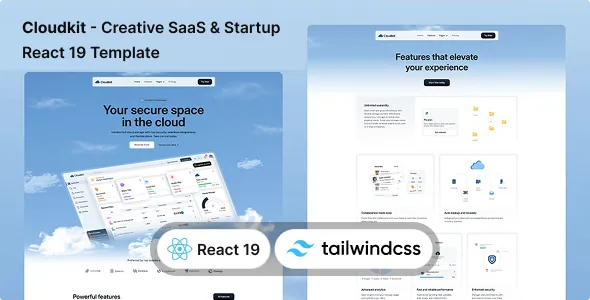
Cloudkit – Creative SaaS Startup React 19 & Tailwind CSS 4 Template
Cloudkit – Creative SaaS Startup React 19 & Tailwind CSS 4 Template is a modern website template designed for SaaS companies, technology startups, software developers, digital product businesses, and innovative teams looking to establish a professional online presence. Built around a creative startup-focused design concept and developed with React 19 and Tailwind CSS 4, Cloudkit provides a foundation for creating engaging websites that introduce software products, communicate business value, showcase product features, and encourage visitors to take meaningful action. Whether you are launching a new software platform, promoting a subscription-based application, introducing an AI-powered product, or building a website for a technology agency, this template can help you develop a consistent digital identity.
The software-as-a-service industry requires websites that explain products clearly while communicating their value to potential customers. Visitors may want to understand how a platform works, compare its capabilities, explore pricing information, or determine whether a product fits their business needs. Cloudkit offers a specialized design direction for presenting this information through structured content, product-focused sections, and customizable visual elements. By adapting the template to your business objectives, you can create a website that supports product discovery, brand recognition, customer education, and lead generation.
Modern startup websites must balance creative design with usability and performance. An attractive interface can capture attention, but visitors also need clear navigation, understandable messaging, and accessible information. Cloudkit can serve as a starting point for building a website that combines a contemporary visual presentation with a practical content structure. You can customize its branding, typography, colors, imagery, page content, and interface elements to reflect your product’s personality and target audience.
Using React 19 and Tailwind CSS 4 provides developers with a modern front-end technology foundation for customizing the website. React supports component-based interface development, while Tailwind CSS offers utility-based styling that can help developers adjust layouts and visual details efficiently. The exact components, page layouts, dependencies, and interactive features depend on the supplied template package. Additional development may be required for subscription processing, user authentication, database connectivity, dashboards, and other application-level features.
Modern Design for SaaS Startups
A startup website often serves as the first point of contact between a software company and potential customers. The design needs to introduce the business, communicate the product’s purpose, and guide visitors toward the information they need. Cloudkit is designed around the creative SaaS and technology startup category, making it a relevant foundation for businesses that want a modern presentation for their digital products.
The visual identity of a SaaS website can influence how visitors perceive the product. Consistent typography, carefully selected colors, readable content, and organized sections can help communicate professionalism and make the website easier to explore. Cloudkit allows developers to adapt the visual experience to suit different startup identities, from minimal software brands to more expressive creative technology companies.
You can personalize the template with your company logo, product illustrations, screenshots, feature descriptions, and brand-specific messaging. These changes help transform the initial design into a website that communicates your actual product offering rather than a generic startup concept.
A business developing workflow software may emphasize productivity and automation, while an AI startup may focus on intelligent tools and practical use cases. A project management platform might prioritize collaboration, organization, and team efficiency. With suitable customization, Cloudkit can support these different communication strategies.
Built With React 19
React 19 provides a component-based foundation for building interactive user interfaces. Instead of treating a website as a collection of unrelated pages, developers can organize its interface into reusable components that represent navigation, buttons, feature sections, content cards, and other visual elements.
Cloudkit uses React 19 as part of its stated technology stack, making it relevant to developers who want to work within a modern React-based front-end environment. Component-based development can make repeated interface patterns easier to maintain and update, particularly when the website contains multiple pages with a consistent design system.
For example, a SaaS website may reuse the same navigation structure, call-to-action components, feature presentation, and footer across different pages. Organizing these elements into reusable components can help maintain visual consistency and simplify future changes.
Developers can customize component properties, revise content structures, and adjust interface behavior according to project requirements. Depending on the supplied implementation, you may also be able to extend the website with additional React components or integrate suitable third-party libraries.
Before development, review the included source files, dependencies, package scripts, and installation instructions. React 19 compatibility does not automatically guarantee compatibility with every third-party library or deployment environment, so verify the requirements of the specific template version.
Tailwind CSS 4 for Flexible Styling
Tailwind CSS 4 provides a utility-first approach to styling web interfaces. Rather than relying exclusively on large collections of custom CSS classes, developers can use utility classes to adjust spacing, typography, layout, colors, borders, and responsive behavior directly within their markup.
Cloudkit’s Tailwind CSS 4 foundation gives developers a practical way to customize the website’s visual appearance. You can refine the spacing between sections, change background colors, modify typography, adjust content widths, and adapt interface elements to match your brand identity.
This approach can be useful when developing a consistent design system for a SaaS business. Shared color choices, spacing patterns, typography scales, and component styles help create a unified experience across landing pages and supporting content.
Developers should review the template’s Tailwind configuration and project structure before modifying the styles. Tailwind CSS 4 uses an updated styling workflow compared with earlier versions, so the exact setup and configuration requirements may differ from projects built with previous releases.
Designed for Software-as-a-Service Businesses
Software-as-a-service businesses often need a website that explains their product and helps potential customers understand how it addresses a particular problem. A clear product presentation can communicate the intended audience, important capabilities, and potential benefits without requiring visitors to understand every technical detail.
Cloudkit can be customized for SaaS companies offering subscription-based software, cloud tools, productivity platforms, business applications, analytics products, and specialized digital services.
A SaaS landing page may introduce the main product, identify a common customer challenge, explain the proposed solution, and present the next step. Additional sections can describe features, use cases, customer support, pricing information, and frequently asked questions.
For example, a workflow automation platform could explain how it helps teams organize repetitive tasks. A customer relationship management product might focus on contact management, sales processes, and customer communication. A collaboration tool could emphasize shared workspaces, team coordination, and project visibility.
These are potential customization scenarios rather than guarantees that every SaaS feature is included in the template. The final website should accurately reflect the functionality of your actual software.
Ideal for Creative Technology Startups
Creative technology businesses often need a website that communicates innovation while remaining easy to understand. A distinctive visual identity can help a startup present its ideas, introduce its products, and differentiate itself within a competitive market.
Cloudkit can serve as a starting point for technology startups working on productivity software, online platforms, digital tools, developer products, and other software-based services.
You can adapt the content to introduce your company’s mission, explain the problem your product addresses, and show how customers might use your solution. Product screenshots, interface previews, diagrams, and illustrations can help visitors understand what the software does.
Creative startups can also use the website to present their development philosophy, introduce the team, publish announcements, and link to product documentation. Organizing these resources clearly makes it easier for visitors to explore the business and determine whether its offering is relevant to them.
A well-defined visual identity should support the message rather than distract from it. Choose illustrations and animations that explain your product, and ensure that the primary call to action remains easy to identify.
Product-Focused Landing Page Structure
A landing page is often the most important part of a SaaS marketing website because it introduces the product and helps visitors decide what to do next. Cloudkit can be customized to create a focused landing page that communicates your software’s main value proposition.
An effective product landing page generally begins with a clear headline and supporting description. Visitors should quickly understand what the product does, who it is designed for, and why they might want to learn more.
Additional sections can explain core features, present screenshots, demonstrate common use cases, and answer questions that may prevent visitors from taking the next step. Depending on the business model, calls to action may encourage users to request a demo, create an account, explore a product tour, or contact the sales team.
The page structure should reflect the customer’s decision-making process. A simple tool aimed at individual users may need concise messaging and an easy signup path. An enterprise software product may require more detailed information about integrations, deployment, support, and business requirements.
Cloudkit provides a front-end starting point for organizing this information, while the specific pages and components available should be confirmed through the supplied demo and documentation.
Present Product Features Clearly
Potential customers want to understand what a software product can do and how its features relate to their needs. A feature section should translate technical capabilities into practical explanations rather than relying on vague marketing language.
Cloudkit can be adapted to present product features using structured content sections and visual components available in the template. You can customize these areas to describe automation tools, reporting features, collaboration functions, content management, integrations, or other capabilities supported by your product.
Each feature description should explain the function and its relevance to the intended user. For example, a reporting feature might help customers review activity, while an automation feature could reduce repetitive manual work. The wording should remain specific to the functionality your software actually provides.
Where possible, support descriptions with screenshots or short demonstrations. Visual examples can help potential customers understand the interface and imagine how it may fit into their workflow.
Avoid presenting planned features as already available. Accurate product information helps visitors make informed decisions and creates a more dependable foundation for long-term customer relationships.
Showcase Your Software Interface
For a software business, the user interface is often an important part of the product’s identity. Screenshots and interface previews can help visitors understand the application’s design, organization, and typical workflow.
Cloudkit can be customized with product images, dashboard previews, application screenshots, or explanatory illustrations where suitable. A project management tool might display a task board, while an analytics platform could show a reporting interface. A scheduling product could present a calendar or booking workflow.
Use screenshots that accurately represent the current software. If the product is still in development, clearly distinguish prototype visuals from functionality that customers can currently access.
Prepare images at appropriate dimensions and optimize them for the web. Avoid unnecessarily large screenshots that slow down page loading, and make sure important details remain readable on mobile screens.
A carefully presented product preview can strengthen the connection between the marketing website and the actual application, helping visitors understand what they are considering before signing up or requesting a demonstration.
Responsive Design for Different Screen Sizes
Customers may explore your SaaS website on a desktop computer, laptop, tablet, or smartphone. A responsive layout helps the content adapt to different screen sizes and supports a consistent browsing experience.
When customizing Cloudkit, test the navigation, hero section, product screenshots, feature cards, pricing tables, and calls to action across different viewport widths. Content that works well on a large monitor may need a different arrangement on a narrow mobile display.
Readable typography and suitable spacing help visitors understand the product without excessive zooming or horizontal scrolling. Interactive elements should also have adequate space and clear labels so that they remain usable on touchscreens.
Tailwind CSS supports responsive styling patterns, while React provides the interface structure. The actual mobile experience depends on how the supplied components are implemented and modified.
Test the completed website in modern browsers and on representative devices before launch. Responsive behavior should be verified as part of the final quality assurance process rather than assumed from the technology stack alone.
Customizable Branding and Visual Identity
A SaaS website should reflect the identity of the business it represents. Cloudkit can be customized to align the website’s visual style with your brand, product positioning, and target audience.
You can adjust the color palette, typography, logo, imagery, content hierarchy, buttons, and other visual details. A business-oriented platform may benefit from a restrained visual style, while a creative startup may choose more expressive colors and illustrations.
Consistent branding helps visitors recognize your company across the website. Reusing visual patterns for headings, feature cards, links, and calls to action also creates a more coherent interface.
If your business already has a brand guide, apply its colors, typography, logo rules, and image direction wherever practical. If you are developing a new brand, establish a small set of consistent design decisions before customizing individual components.
Review the website as a complete experience after making changes. A strong design is not simply a collection of attractive sections; each element should support the product’s message and help visitors navigate the site.
Pricing and Subscription Information
Many SaaS companies use subscription plans to explain how customers can access their software. A well-organized pricing page can help visitors compare options, understand included features, and determine which plan may suit their requirements.
Cloudkit can be adapted to present pricing information if the supplied layout supports it or if suitable sections are added during customization. Pricing cards may describe plan names, billing intervals, included features, usage limits, and the intended audience for each option.
Keep pricing details accurate and explain any important conditions. If plans differ by user count, storage, integrations, support, or usage limits, make those differences easy to understand.
The visual presentation of pricing does not itself implement subscription billing. Accepting payments, managing subscriptions, processing renewals, and handling cancellations generally require a payment provider and suitable back-end functionality.
If you intend to sell software subscriptions through the website, verify the technical and legal requirements of the chosen payment system. Clearly communicate recurring charges, billing terms, cancellation conditions, and applicable taxes where required.
Lead Generation for SaaS Companies
For many software businesses, the website’s main purpose is to attract qualified inquiries or encourage visitors to begin a trial. A well-placed call to action can help connect the marketing experience with the company’s sales or onboarding process.
Cloudkit can be customized with buttons and content sections that direct visitors toward a demo request, contact form, product registration page, or other relevant destination.
A business software provider might invite visitors to schedule a consultation. A self-service application may prioritize account creation, while an enterprise product could encourage potential customers to speak with a sales representative.
Keep forms focused on the information needed for the next step. Excessive fields can make the process more difficult, while unclear instructions may discourage visitors from completing the request.
Remember that form submission and lead management may require additional implementation. Configure the chosen form service or back-end, verify where submissions are delivered, and test the entire process before publishing the website.
React Components for Maintainable Development
Reusable components can help developers maintain a consistent interface across multiple pages. Rather than duplicating the same markup repeatedly, a React project can organize common elements into components that can be updated in one place.
Cloudkit’s React-based structure can be adapted to support reusable navigation, buttons, feature sections, content cards, and other interface elements, depending on how the supplied code is organized.
This approach can be useful when a SaaS website grows beyond a single landing page. Different pages may share a common header, footer, typography system, and visual components while displaying distinct content.
Developers can also organize repeated information using component properties and structured data. This can make it easier to update feature lists, customer stories, or service descriptions without rewriting the same layout for every entry.
The best component structure depends on the complexity of the project. Review the existing implementation before restructuring it, and follow consistent naming and coding conventions to keep the source maintainable.
Performance Optimization Opportunities
Website performance can affect how quickly visitors access product information and interact with the interface. A fast, efficient website helps reduce unnecessary waiting and provides a more comfortable experience, particularly on mobile connections.
When customizing Cloudkit, optimize product screenshots and illustrations, remove unused assets where appropriate, and avoid loading unnecessary libraries or scripts. Large hero images and animated elements should be reviewed carefully because they can contribute to slower page loading.
React applications can benefit from sensible component organization and appropriate handling of expensive operations. Depending on the project, developers may also consider code splitting, lazy loading, and other optimization techniques where they provide a practical benefit.
Tailwind CSS 4 can support a utility-based styling workflow, but the use of a modern CSS framework does not automatically guarantee excellent performance scores. The final result depends on the generated assets, scripts, hosting environment, external resources, and implementation choices.
Test the completed website using relevant performance tools and inspect it on devices with different capabilities and connection speeds. Use the results to identify meaningful improvements rather than relying on assumptions about performance.
SEO-Friendly Structure for SaaS Websites
Search engine optimization helps potential customers discover a software business through relevant searches. Cloudkit provides a front-end foundation that can be customized with descriptive content and appropriate technical SEO elements.
Developers can optimize page titles, meta descriptions, heading hierarchy, image alternative text, internal links, and page URLs. Each important page should focus on a clear subject and offer useful information that matches the needs of its intended audience.
For example, a project management SaaS may create dedicated pages explaining task management, team collaboration, workflow automation, and reporting. A software development company might organize pages around its actual services and technical expertise.
Use relevant search terms naturally. Repeating the same phrase excessively does not guarantee better rankings and can make the content less useful to readers.
Technical considerations include crawlable navigation, appropriate indexing settings, canonical URLs where needed, valid links, and clear page organization. If the project includes client-side rendering or dynamic routing, review how search engines access the resulting content.
SEO performance depends on content quality, competition, technical configuration, authority, and other factors. Cloudkit can support an SEO-conscious implementation, but the template alone cannot guarantee indexing, traffic, or ranking positions.
Suitable for AI and Automation Startups
Artificial intelligence and automation products often require websites that explain complex capabilities through practical examples. Cloudkit can be adapted for AI startups, workflow automation platforms, productivity tools, and software products that incorporate machine learning or intelligent assistance.
An AI product website might explain its intended tasks, describe supported workflows, present example outputs, and communicate important limitations. A business automation platform may emphasize process efficiency, integrations, and administrative convenience.
Visual demonstrations can help visitors understand how the software works. Product screenshots, short demonstrations, and clearly labeled examples can make technical concepts more approachable.
Be accurate about what the product can do. Avoid unsupported claims about guaranteed results, perfect accuracy, or autonomous capabilities that the software does not provide. If an AI system has known limitations or requires human review, explain these considerations appropriately.
The template serves as the website’s front-end presentation. Actual AI functionality, model access, data processing, and account management must be implemented through the relevant product infrastructure.
Integration With Third-Party Services
A SaaS website may need to connect with tools that support marketing, customer communication, analytics, scheduling, or software delivery. Cloudkit can be customized to include appropriate integrations, depending on the technical requirements of your project.
Potential integrations include analytics platforms, email marketing services, contact form providers, customer relationship management systems, scheduling tools, documentation platforms, and payment providers.
For example, an inquiry form might send customer information to a sales management system, while an analytics service could help the business understand which pages attract visitors. A scheduling integration might allow prospective customers to request a product demonstration.
Each integration should be evaluated for compatibility, security, privacy implications, and ongoing maintenance requirements. Some services require API credentials, server-side processing, subscription fees, or additional dependencies.
Do not expose secret API keys in public front-end code. Review each provider’s documentation and test the complete workflow before making an integration available to customers.
Accessibility and User Experience
A professional SaaS website should be understandable and usable by a wide range of visitors. Clear headings, readable text, adequate contrast, descriptive links, and accessible interactive elements all contribute to a better user experience.
When customizing Cloudkit, use a logical heading structure and ensure that important information is not communicated through color alone. Buttons and form fields should have understandable labels, while meaningful images should include suitable alternative text.
Animations and transitions should support the experience rather than interfere with reading or navigation. Avoid excessive motion and review how interactive elements behave for visitors using keyboard navigation or assistive technologies.
SaaS websites may contain detailed technical descriptions, feature comparisons, and pricing tables. Organize these elements carefully so visitors can scan the information and understand the differences between available options.
Use accessibility testing tools and manual keyboard testing during development. The final accessibility level depends on the implementation, so review both the original components and any custom features added to the site.
Who Should Use Cloudkit – Creative SaaS Startup React 19 & Tailwind CSS 4 Template?
Cloudkit may be a suitable starting point for developers and businesses that need a modern website for software products or technology-focused services.
Potential users include:
- SaaS Startups: Introduce subscription-based applications and explain their main value propositions.
- AI Technology Companies: Present AI-powered software, automation tools, and digital productivity products.
- Software Development Agencies: Showcase development services, technical expertise, and project capabilities.
- Productivity Platforms: Explain tools designed to organize tasks, simplify workflows, or support collaboration.
- Business Software Providers: Present applications for reporting, customer management, operations, and other business activities.
- Digital Product Companies: Promote online software tools and provide access to product information.
- Technology Entrepreneurs: Build a landing page for a new software concept or product launch.
- Freelance Developers: Customize a React-based website for a client or personal project.
- Web Development Agencies: Create tailored SaaS websites using a modern front-end stack.
- Startup Founders: Establish an initial online presence while preparing a software product for launch.
Before selecting the template, review the live demo, included page layouts, source files, documentation, licensing terms, and technical requirements to ensure they match your project.
Advantages of Choosing a React and Tailwind CSS Template
Using an existing front-end template can reduce the amount of initial design work required for a software website. Developers can start with an established visual direction and customize it to suit the product instead of designing every section from the beginning.
Cloudkit combines React 19 with Tailwind CSS 4, providing a modern development foundation for component-based interfaces and utility-driven styling. This combination can be useful for teams that prefer working with React and want flexibility when adjusting page layouts and visual details.
Reusable components can support consistency across multiple pages, while Tailwind utility classes can make many styling changes straightforward. The resulting codebase can then be extended according to the specific requirements of the project.
However, the template should not be confused with a complete SaaS application. Features such as user registration, account management, subscription billing, database storage, protected dashboards, and product-specific business logic typically require additional implementation unless explicitly included in the purchased package.
Customization Tips for Better Results
Start by identifying the main goal of your SaaS website. Decide whether the priority is product awareness, lead generation, demo requests, free-trial registration, or direct subscription sales. This decision will help determine the content hierarchy and the placement of important calls to action.
Replace all sample text, images, and branding with information relevant to your product. Explain your software’s actual capabilities and make sure that screenshots represent the current interface.
Keep the homepage focused on the most important information. Introduce the product, explain its main benefits, present key features, and guide visitors toward a clear next step. Use supporting pages for detailed pricing, documentation, company information, and other resources when appropriate.
Test the website at different screen sizes, verify navigation links, check forms, and review the appearance of all major sections. Optimize images and inspect performance before deployment.
Finally, maintain the website as your product evolves. Update feature descriptions, revise pricing information, replace outdated screenshots, and ensure that documentation and contact links remain accurate.
Build a Modern SaaS Website With Cloudkit
A professional website helps a software company explain its product, communicate its value, and establish a recognizable digital identity. Cloudkit – Creative SaaS Startup React 19 & Tailwind CSS 4 Template offers a starting point for creating this experience with a contemporary, technology-focused design direction.
Its combination of React 19 and Tailwind CSS 4 makes it relevant to developers who want to build and customize a modern front-end website for a SaaS startup, AI product, digital service, or technology business. Through thoughtful branding, clear content, responsive implementation, and appropriate technical testing, the template can be adapted to a wide variety of software marketing projects.
Whether you are launching a new SaaS product, promoting a digital platform, building a startup landing page, or developing a client website, Cloudkit provides a foundation for organizing your product information into a consistent online experience. Review the included documentation and demo to confirm the available features, then tailor the design to your brand, audience, and development requirements.
Choose Cloudkit – Creative SaaS Startup React 19 & Tailwind CSS 4 Template as a foundation for presenting your software product, communicating your business vision, and creating a professional digital presence in the competitive SaaS and technology marketplace.