My Account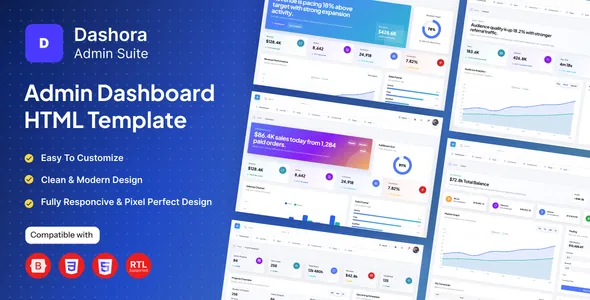
Dashora – Responsive Bootstrap 5 Admin Dashboard HTML Template
Dashora – Responsive Bootstrap 5 Admin Dashboard HTML Template is a versatile and modern dashboard solution designed for developers, startups, businesses, agencies, and organizations that need a professional interface for managing data, monitoring business activities, and presenting important information in a structured format. Built around the Bootstrap 5 framework, Dashora provides a practical foundation for creating administrative panels, analytics dashboards, management portals, and web-based applications. Its responsive design approach helps developers build interfaces that adapt to different screen sizes, making it suitable for desktop computers, laptops, tablets, and mobile devices.
Whether you are developing a business management system, an analytics platform, a customer administration panel, or an internal company application, this HTML dashboard template can help simplify the frontend development process. Instead of building every interface element from scratch, developers can use the template as a starting point and customize its layout, styling, components, and page structure to match their project requirements. Dashora combines the flexibility of HTML, CSS, JavaScript, and Bootstrap-based development with a dashboard-focused design approach that supports organized navigation, clear information presentation, and consistent user interface patterns.
What Is Dashora Admin Dashboard HTML Template?
Dashora is an admin dashboard HTML template intended for projects that require a structured administrative interface. An admin dashboard serves as the central area where authorized users can access information, review performance indicators, manage records, and navigate between different sections of a web application. A well-organized dashboard makes complex information easier to understand and helps users complete routine tasks more efficiently.
The Dashora Responsive Bootstrap 5 Admin Dashboard HTML Template offers a foundation for creating this type of interface. Developers can adapt its existing structure to support different business models, application categories, and administrative workflows. For example, a company could customize the interface for employee administration, a startup could use it as the frontend foundation for a SaaS management portal, and an agency could adapt the layout for project monitoring or client reporting.
Because Dashora is an HTML template rather than a complete backend application, it should be viewed primarily as a frontend development resource. Database connections, user authentication, server-side operations, API integrations, and business logic may need to be implemented separately according to the project’s requirements. This separation allows developers to connect the interface to their preferred backend technology and application architecture.
Modern and Professional Dashboard Design
A professional dashboard should present information in a clear and accessible way without overwhelming users with unnecessary visual elements. Dashora provides a dashboard-oriented starting point for building interfaces that prioritize organization, usability, and consistency. Its design can be adapted to suit different brand identities, business environments, and application purposes.
Administrative interfaces often contain multiple sections, including overview pages, data tables, reports, settings, and management tools. A consistent visual structure helps users understand how these sections relate to one another. With Dashora, developers can customize page layouts, typography, colors, spacing, navigation elements, and content areas to create an interface that feels appropriate for their application.
The template can also serve as a foundation for projects that require a polished presentation of operational data. Depending on the pages and components included in the purchased version, developers may be able to adapt available interface elements for summary cards, reporting areas, charts, tables, and other dashboard-oriented content.
Built with the Bootstrap 5 Framework
Bootstrap 5 is a widely used frontend framework that provides a system of responsive layout tools, reusable interface components, and utility classes. Dashora uses the Bootstrap 5 development approach to help developers organize page structures and build consistent administrative interfaces.
Bootstrap’s grid system makes it easier to arrange content into columns and rows. This can be useful when designing dashboard pages that contain multiple information panels, navigation sections, reporting components, and other interface elements. Developers can adjust layouts to make effective use of available screen space while maintaining a consistent structure across different pages.
The framework also provides a familiar development environment for professionals who already work with HTML, CSS, JavaScript, and Bootstrap. Developers can modify existing markup, apply custom styling, extend component behavior, and integrate compatible frontend libraries as needed.
Using Bootstrap 5 can make interface customization more manageable, particularly for projects that need a responsive design without requiring a completely custom layout system. However, the precise Bootstrap components, plugins, and dependencies available in Dashora should be confirmed from the product documentation and included files.
Responsive Layout for Multiple Devices
Modern web applications are accessed from a variety of devices. Administrators may review reports from a desktop computer, check business information on a tablet, or access essential records from a mobile phone. A responsive dashboard helps accommodate these different usage situations.
Dashora is presented as a responsive Bootstrap 5 admin dashboard HTML template. Its responsive layout approach provides a foundation for adapting interface elements to different viewport sizes. Developers can configure columns, content areas, navigation patterns, tables, and other components to improve usability on smaller screens.
Responsive design is particularly important for administrative applications because users may need to access information while away from their primary workstation. A mobile-friendly interface can help make essential dashboard information more accessible, provided that the relevant pages and components are appropriately configured.
For the best results, developers should test customized pages at common mobile, tablet, laptop, and desktop resolutions. Wide data tables, complex charts, long forms, and extensive navigation menus may require additional responsive adjustments to remain convenient on smaller screens.
Suitable for Business and Management Applications
Dashora can be used as a starting point for many types of administrative applications. Its general dashboard structure makes it adaptable to different industries and business requirements.
Potential applications include:
- Business administration dashboards
- SaaS product management interfaces
- Customer relationship management frontends
- Project tracking and reporting panels
- Employee and human resource management systems
- Sales and performance reporting interfaces
- Inventory management dashboards
- Customer support administration portals
- Finance and operational reporting interfaces
- Educational administration systems
- Agency and client management applications
- Internal company management tools
These are possible implementation scenarios rather than a guarantee that every specialized feature is included in the template. Developers can customize the supplied pages and interface elements to support the workflows required by their projects.
Organized Data Presentation
One of the main purposes of an admin dashboard is to make information easier to review. Data that is scattered across different application pages can be difficult to understand, especially when users need to monitor several activities at the same time. A well-designed dashboard brings related information together and provides a clear path to more detailed views.
Dashora can serve as a frontend foundation for presenting business information in organized sections. Depending on the included components, developers may be able to use dashboard cards, tabular layouts, visual summaries, and reporting areas to display relevant information.
For example, a sales management interface could present order totals, customer records, and sales reports. A project management application might display task summaries, project progress, and recent activity. A SaaS administration panel could organize subscription information, account records, and usage statistics.
To make these presentations meaningful, developers must connect the interface to accurate application data and design the appropriate data-handling logic. Static HTML content alone does not provide live analytics or automatic updates. Dynamic behavior requires JavaScript functionality, API connections, or backend integration as appropriate.
Customizable HTML, CSS, and JavaScript Structure
Customization is an important consideration when selecting an HTML admin dashboard template. Each project has its own visual identity, content structure, and functional requirements. Developers need the ability to adapt the original interface without rebuilding the entire frontend.
Dashora provides an HTML-based starting point that developers can inspect and modify. Depending on the package structure, the included HTML, CSS, and JavaScript files can be adjusted to change page content, update styling, organize navigation, and extend interactive elements.
Common customization tasks may include replacing sample content, modifying brand colors, adjusting typography, adding application-specific pages, changing navigation labels, refining layouts, and connecting frontend controls to application services.
Developers can also organize reusable interface patterns to maintain consistency across multiple pages. For example, a standard page heading, content container, table layout, or form structure can be adapted throughout the application to reduce repetitive development work.
Before making extensive changes, it is helpful to review the supplied folder structure, stylesheet organization, JavaScript dependencies, and documentation. Following the conventions used by the original template can make future maintenance and upgrades easier.
Dashboard Components and Interface Elements
Administrative applications commonly rely on reusable interface elements to display information and support routine tasks. Dashora can provide a starting point for building these elements into a consistent dashboard experience.
Depending on the components available in the purchased version, developers may be able to adapt interface patterns such as:
- Dashboard summary sections for important metrics
- Navigation elements for moving between application pages
- Content cards for grouping related information
- Tables for displaying structured records
- Form layouts for entering and updating information
- Buttons and controls for common interface actions
- Reporting sections for business and operational data
- Settings pages for configurable application options
- Status indicators for highlighting relevant information
The exact component list depends on the product package. Buyers should check the live product preview, included source files, and documentation before relying on a particular chart library, plugin, page, or specialized widget.
Using reusable interface elements can help developers maintain a coherent design across the application. It also provides a practical starting point for creating additional pages that follow the same visual language.
Navigation and Information Architecture
Effective navigation helps users move through an administrative application without unnecessary confusion. As an application grows, its pages may cover multiple departments, workflows, and categories of information. Organizing these sections clearly becomes increasingly important.
Dashora can be customized to reflect the information architecture of a particular project. Developers can adapt navigation labels, group related sections, create links to additional pages, and arrange content according to the needs of different user roles.
For example, an inventory application might group products, stock records, suppliers, and reports under separate sections. A business management portal could organize customers, projects, staff, and settings into clearly defined areas.
A well-planned navigation system should use meaningful labels, maintain consistent placement, and avoid presenting users with too many choices at once. The template can provide the visual foundation, while the application developer determines the actual page hierarchy, permissions, and navigation behavior.
Data Tables and Record Management Interfaces
Many administrative systems require users to view and manage structured information. Customer lists, product inventories, employee directories, transaction histories, and project records are common examples of data that may be presented in tables.
Dashora can be adapted to create record-management interfaces using suitable HTML and Bootstrap-based layouts. Depending on the included files, developers may be able to customize existing table designs or create new tables that display information in a consistent format.
A useful record-management page should make important fields easy to scan and provide a clear presentation of the available actions. Depending on the application’s requirements, developers can add sorting, searching, filtering, pagination, selection controls, or record-editing workflows through appropriate JavaScript libraries and backend services.
These advanced behaviors should not be assumed to work automatically simply because a table appears in the template. Developers must verify the available implementation and add the necessary logic where required.
Forms and Administrative Workflows
Forms are essential to applications that allow users to create records, update details, configure settings, or submit information. A consistent form design helps users understand which information is required and how to complete each step.
Dashora can serve as a foundation for building administrative forms that match the rest of the dashboard interface. Depending on the available layouts, developers can customize form fields, labels, spacing, buttons, help text, and validation messages.
Potential form use cases include customer registration, product entry, employee records, account settings, project details, and application configuration. The appropriate form structure depends on the type of information being collected and the workflow involved.
Client-side validation can improve usability by identifying incomplete or incorrectly formatted input before submission. However, important validation and security checks must also be implemented on the server. A frontend template does not replace backend validation, access control, secure data storage, or other application-level safeguards.
Integration with Backend Technologies
An HTML dashboard template can be integrated with different backend technologies, making it useful for developers who want to choose their own application stack. Dashora can act as the presentation layer while a separate backend handles data processing, authentication, database operations, and business logic.
Depending on the project architecture, developers may connect the interface to technologies such as PHP, Laravel, Node.js, Python, ASP.NET, or another server-side framework. These are possible integration approaches and should not be interpreted as included backend implementations.
For dynamic applications, JavaScript can communicate with backend services through suitable API endpoints. The returned data can then be displayed within the interface using the application’s chosen rendering and state-management approach.
Before integrating a backend, developers should review how the supplied HTML pages are structured and identify the components that need dynamic content. They can then create reusable layouts, connect data sources, and implement appropriate loading, success, and error states.
This approach separates the dashboard’s visual presentation from the business logic, making it easier to adapt the interface to different application environments.
Useful for SaaS and Startup Projects
SaaS products often need administrative interfaces for managing users, monitoring activity, reviewing subscriptions, and configuring application settings. Building these interfaces from scratch can require considerable frontend development time.
Dashora can provide a starting point for SaaS-related dashboards and startup management applications. Developers can adapt the visual structure to match their product and connect the interface to the services that power their application.
Possible use cases include internal administration panels, customer account management interfaces, usage-reporting pages, operational dashboards, and support tools. A SaaS product may require additional interface patterns depending on its subscription model, permissions system, billing provider, and technical architecture.
For example, a developer could create an account-management page that presents customer details, an activity view that summarizes relevant events, and a settings section that allows authorized users to update configuration options.
The actual functionality depends on the implementation. Authentication, subscription processing, payment integrations, and live usage tracking must be provided by compatible services or custom development when they are not included in the product package.
Suitable for Developers and Web Development Agencies
Dashora may be useful for freelance developers, web development agencies, and teams that build custom business applications. A ready-made dashboard layout can reduce the amount of initial interface work and help establish a consistent visual foundation.
Freelancers can use the template as a starting point for client projects that require administrative pages. Agencies may adapt the interface for internal tools, customer portals, reporting applications, and other web-based systems. Development teams can also use it as a reference for organizing frontend components and maintaining a common interface style.
The main advantage is the opportunity to focus more development effort on project-specific requirements rather than designing every common dashboard layout from the beginning. Developers still need to review the source code, customize the interface, test the implementation, and connect the frontend to the required services.
The template’s suitability for a commercial project should also be evaluated against its license terms, included assets, technical dependencies, and the client’s functional requirements.
Frontend Development Benefits
Starting from a prebuilt dashboard layout can help streamline several stages of frontend development. Instead of beginning with an empty project, developers can review an existing structure and identify which pages or components are relevant to their application.
Potential benefits include:
A faster starting point: Existing page structures and styling provide a foundation for the initial interface.
Consistent presentation: Reusing related layouts and components can help create a unified appearance across the application.
Flexible customization: HTML, CSS, and JavaScript can be adapted to match the project’s requirements.
Responsive layout foundation: Bootstrap 5 provides tools for building interfaces that accommodate different screen sizes.
Practical prototyping: Developers can adapt the interface to demonstrate an application’s proposed structure before all backend functionality is complete.
Reduced repetitive work: Existing patterns can help limit the need to recreate common visual elements.
These benefits depend on the quality of the implementation, the developer’s familiarity with the technology, and the amount of customization required. A complex application may still require substantial design, programming, testing, and integration work.
Performance and Maintainable Development
Performance matters for administrative applications because users may work with them for extended periods and navigate between several pages throughout the day. A responsive interface should load efficiently and avoid unnecessary complexity.
Dashora’s Bootstrap-based foundation gives developers a familiar environment in which to review and optimize the frontend. Performance improvements may include removing unused assets, compressing images, reducing unnecessary JavaScript, minimizing stylesheet overhead, and loading only the resources required by each page.
The actual performance of a completed website depends on many factors, including the supplied source files, hosting environment, third-party libraries, backend response times, data volume, and implementation choices. The presence of a dashboard template alone does not guarantee a particular page speed or performance score.
Maintainability is equally important. Developers should use consistent naming conventions, keep custom changes organized, document integrations, and test important interface behavior after modifying the original files. Separating project-specific code from vendor files where practical can also simplify future updates.
Security Considerations for Admin Interfaces
Administrative dashboards frequently provide access to sensitive business information and important application controls. Security must therefore be considered throughout the development process.
Dashora is an HTML frontend template, so developers should not treat it as a complete security solution. Production applications need suitable authentication, authorization, secure server-side validation, protected API endpoints, and appropriate handling of sensitive information.
Access restrictions should be enforced by the backend rather than relying only on hiding navigation items or interface controls. Data should be validated before it is processed or stored, and authentication credentials or private keys should never be embedded in publicly accessible frontend files.
Developers should also keep relevant dependencies updated, review third-party scripts, configure secure hosting, and test the application before deployment. These practices help ensure that the completed application is more than visually functional and is also appropriate for real administrative use.
Customizing Dashora for Your Brand
A dashboard should feel like a natural part of the product it supports. Consistent branding can help users recognize the application and understand its visual hierarchy.
Developers can customize the template’s appearance by adjusting colors, fonts, logos, icons, backgrounds, spacing, and content layouts. They can also refine headings, buttons, navigation labels, and status indicators to align with the brand’s design system.
For a corporate application, a restrained color palette and clearly structured content may create a professional experience. A technology startup may prefer a more distinctive visual identity, while a reporting tool may prioritize readability and the clear presentation of numerical information.
When customizing the interface, developers should maintain sufficient color contrast, readable typography, consistent spacing, and accessible control labels. These details contribute to a more usable experience across devices and for users with different accessibility needs.
Getting Started with the Dashora HTML Template
Getting started with Dashora involves reviewing the included files and identifying how the template should fit into the planned application.
Review the Download Package
Begin by extracting the downloaded package and reviewing its directory structure. Identify the HTML pages, stylesheets, JavaScript files, assets, documentation, and any included third-party libraries. The exact folder names and available files depend on the purchased version.
Preview the Included Pages
Open the relevant HTML pages in a suitable development environment or local web server. Review the layouts, navigation structure, responsive behavior, and available interface elements. This helps determine which pages can be reused and which require customization.
Configure the Visual Design
Replace demonstration content with project-specific text and data. Update the branding, colors, typography, logos, and navigation labels to match the application. Keep common elements consistent across the pages that will be used.
Connect the Required Data
Identify which dashboard areas need information from an API, database-backed service, or other data source. Implement the necessary frontend and backend connections, including suitable handling for loading states, empty results, and errors.
Test Across Screen Sizes
Review the application on desktop, tablet, and mobile viewport sizes. Pay particular attention to navigation, forms, tables, charts, and other elements that may need adjustments on narrower screens.
Prepare for Deployment
Before publishing the application, remove unused demonstration content, check dependencies, verify application routes, review security requirements, and test the completed workflows. Confirm that the production environment serves assets correctly and that backend services are configured securely.
Why Choose Dashora – Responsive Bootstrap 5 Admin Dashboard HTML Template?
Dashora is an option for developers who want a Bootstrap 5-based starting point for an administrative web interface. Its purpose is to help establish the presentation layer of a dashboard while allowing the developer to adapt the layout to the needs of a particular project.
The template is relevant to a broad range of web development scenarios, from internal business tools to SaaS administration portals and data-oriented management applications. Its HTML-based approach can be useful for developers who prefer direct control over the frontend and want to connect the interface to a separately chosen backend.
Rather than replacing application development, Dashora provides a foundation that can be refined, extended, and integrated into a larger system. Its overall value depends on how well the included pages and components align with the intended project.
Before purchasing or deploying the template, review the live demo, documentation, package contents, license, and current compatibility information. Confirm the availability of any specific layouts, plugins, or interactive features required for your implementation.
Frequently Asked Questions
What is Dashora – Responsive Bootstrap 5 Admin Dashboard HTML Template?
Dashora is an HTML dashboard template designed to provide a frontend foundation for administrative interfaces, business management panels, analytics pages, and other web applications. It uses a Bootstrap 5-based development approach and can be customized to meet different project requirements.
Is Dashora suitable for responsive web applications?
Dashora is described as a responsive template. Developers should still test the customized application across different screen sizes and make any adjustments required for navigation, data tables, forms, and other interface components.
Can I customize the Dashora dashboard?
Yes. HTML templates can generally be customized by modifying the supplied markup, stylesheets, and JavaScript. The extent of customization depends on the package structure and the developer’s requirements.
Does Dashora include a backend and database?
Dashora is an HTML dashboard template, so it should be treated as a frontend resource unless the product package explicitly states otherwise. Database operations, authentication, server-side processing, and live data integrations may require additional development.
Can Dashora be used for a SaaS admin panel?
It can serve as a starting point for a SaaS administration interface. Features such as account management, billing, subscription processing, permissions, and analytics need to be implemented or connected according to the application requirements.
Can I integrate Dashora with PHP or another backend framework?
An HTML frontend can generally be adapted to work with a suitable backend framework, provided the markup and assets are integrated correctly. Developers should review the template’s documentation and choose an implementation approach that matches their application architecture.
Is Bootstrap knowledge useful for customizing Dashora?
Yes. Familiarity with HTML, CSS, JavaScript, and Bootstrap 5 can make it easier to customize layouts, modify components, adjust responsive behavior, and maintain the interface.
Does the template automatically display live dashboard data?
Live data requires a connection to a suitable data source and the necessary application logic. Static demonstration values should not be considered live information unless the included implementation explicitly connects them to a working service.
Is Dashora suitable for beginners?
Developers with basic knowledge of HTML, CSS, and JavaScript can use an HTML dashboard template as a learning and development resource. More advanced tasks, such as API integration, authentication, and production deployment, may require additional technical experience.
What should I check before purchasing Dashora?
Review the live preview, included pages, responsive behavior, source files, documentation, dependencies, licensing terms, and compatibility requirements. If your project relies on a particular plugin or advanced component, verify that it is included and supported.
Conclusion
Dashora – Responsive Bootstrap 5 Admin Dashboard HTML Template provides a practical starting point for building modern administrative interfaces with HTML and Bootstrap 5. Its responsive design approach and customizable frontend structure make it a potential fit for business dashboards, management portals, reporting tools, SaaS administration pages, and other web application projects.
By adapting its layouts, styling, navigation, and interface components, developers can create a dashboard that reflects their brand and supports their specific workflows. The template can help reduce repetitive frontend setup while leaving room for project-specific customization and integration.
For developers, freelancers, agencies, and businesses seeking a Bootstrap-based admin dashboard foundation, Dashora offers an approach to organizing the frontend of a web application. Review the product documentation and included files to confirm the available components, then customize and integrate the template to build an administrative interface suited to your project’s needs.