My Account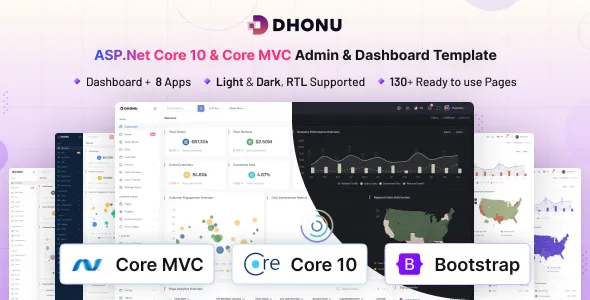
Dhonu – ASP.Net Core 10 & Core MVC Admin & Dashboard Template
Dhonu – ASP.Net Core 10 & Core MVC Admin & Dashboard Template is a modern administrative interface solution designed for developers, businesses, software teams, and organizations that need a structured foundation for building web applications with ASP.NET Core 10 and the Model-View-Controller (MVC) architectural pattern. Created for admin panels, business management systems, reporting interfaces, and data-driven applications, Dhonu provides a starting point for developing organized dashboards that can be adapted to different operational requirements. Its administrative focus makes it relevant to projects that need clear navigation, consistent page layouts, and an interface for managing information through a web browser.
Modern business applications often rely on administrative dashboards to help users review important information, manage records, monitor activity, and control application settings. A well-structured dashboard brings these activities into a centralized environment, allowing authorized users to access relevant tools without navigating disconnected systems. Dhonu – ASP.Net Core 10 & Core MVC Admin & Dashboard Template can help developers establish this interface foundation while focusing their development efforts on application-specific functionality, business rules, and integrations.
Whether you are creating an enterprise management portal, a customer administration system, an inventory application, an employee management platform, or a custom reporting dashboard, Dhonu can serve as a starting point for your project. Its ASP.NET Core and MVC-oriented approach is suited to developers who work within the Microsoft .NET ecosystem and want to customize an administrative interface to meet their technical and business requirements.
Modern Admin Dashboard for ASP.NET Core
An administrative dashboard should present information in a clear, logical, and accessible way. Users need to understand where they are within an application, locate relevant records, and complete common tasks with minimal confusion. Dhonu is positioned as an admin and dashboard template that developers can adapt for these purposes.
A dashboard interface may include navigation menus, content areas, summary panels, data tables, forms, charts, and configuration pages, depending on the components supplied with the particular product version. These interface patterns can help organize information and create a consistent experience across different sections of a web application. The exact layouts and included components should be confirmed from the current product preview and documentation.
With an appropriate implementation, Dhonu can be customized to support administrative workflows for different industries. A business application may prioritize customer records and reports, while an operations platform may focus on tasks, inventory, or service activity. Developers can adapt the navigation structure, page content, visual styling, and information hierarchy to match the intended users.
Starting with an existing dashboard design can also reduce the amount of initial interface work required. Instead of designing every page from the beginning, developers can review the supplied layouts and modify them to support the application’s objectives.
Built for ASP.NET Core 10
ASP.NET Core is a cross-platform framework for developing modern web applications and services with .NET. It supports server-side application development, request handling, routing, dependency injection, middleware, and integration with a wide range of development tools and libraries.
Dhonu – ASP.Net Core 10 & Core MVC Admin & Dashboard Template is intended for developers working with ASP.NET Core 10 and related MVC development workflows. This makes it relevant to projects that use C# and the .NET ecosystem to implement business logic, process requests, interact with databases, and deliver web-based administrative interfaces.
The framework provides a structured foundation for developing applications that can evolve as requirements change. Developers can organize application functionality into logical areas, introduce reusable services, and integrate additional packages where needed. The precise implementation depends on the structure and configuration provided with the template.
Before beginning development, confirm the required .NET SDK, target framework, dependencies, and supported environment in the supplied documentation. Compatibility should be verified against the actual project files, especially when using the latest framework versions or integrating existing systems.
Model-View-Controller Architecture
The Model-View-Controller architecture separates an application into distinct responsibilities. The model represents application data and related rules, the view handles presentation, and the controller processes incoming requests and coordinates the response. This separation can help developers organize code and maintain a clearer distinction between interface presentation and application behavior.
Dhonu’s ASP.NET Core MVC positioning makes it relevant to developers who prefer this established web application pattern. With a suitable implementation, views can present administrative pages, controllers can handle user requests, and models can represent the information needed by the application.
This structure can be particularly useful for administrative systems that contain several related modules. Customer records, reports, settings, and inventory pages can be organized according to the application’s design, while shared layout elements help maintain a consistent experience.
The benefits of MVC depend on how the project is structured. Developers should review the supplied source code, naming conventions, routing configuration, and existing patterns before introducing major changes. Following a consistent architecture can make future maintenance and collaboration easier.
Flexible Layouts and Interface Customization
Every business application has its own visual identity and operational priorities. An effective admin dashboard should be customizable enough to reflect those requirements while preserving a consistent user experience.
Dhonu can be adapted to match different branding and presentation needs, depending on the stylesheets, layouts, and components included in the product package. Common customization tasks may include updating brand colors, typography, logos, navigation labels, page titles, spacing, icons, and content sections.
A corporate management portal may require a restrained visual style with an emphasis on information density. A customer-facing administration system may benefit from a simpler interface with more prominent actions and clear status indicators. A reporting application may need a layout that gives priority to charts, summary metrics, and data tables.
The goal should be to create a practical interface rather than simply changing colors and decorative elements. Important actions should remain easy to identify, content should follow a logical hierarchy, and related functions should be grouped together.
Before making extensive changes, developers should inspect the existing layout system and determine which components can be reused. A consistent approach to customization can reduce duplicated code and make later updates more manageable.
Suitable for Business Management Applications
Businesses frequently use internal web applications to organize records, coordinate activities, and support daily operations. A centralized administrative dashboard can make these systems easier to navigate by bringing common tasks into a consistent interface.
Dhonu can serve as a starting point for a variety of business management applications. Depending on the requirements and additional functionality implemented, possible use cases include customer administration, employee records, service management, sales reporting, internal operations, and general business portals.
For example, a business management dashboard might provide an overview of recent activity, links to frequently used modules, and access to important records. A service management platform could organize requests, statuses, assignments, and reporting pages. An employee administration system might require dedicated views for employee information, departmental records, and administrative settings.
These are potential customization scenarios rather than guaranteed built-in features. Developers must implement the appropriate data models, backend operations, validation rules, and access controls to make each workflow functional.
A well-organized dashboard can provide a useful interface for business applications while allowing the underlying implementation to reflect the organization’s actual processes.
Data Visualization and Reporting Dashboards
Reporting dashboards help users interpret information and monitor activity across an application. They may present performance indicators, record summaries, historical trends, and other business metrics in a more accessible format.
Dhonu may be adapted for data-driven applications that need a central reporting interface. Depending on the supplied components and additional development, the dashboard could be configured to present information through summary cards, tables, charts, and other suitable visual elements.
A sales reporting application might display order totals and revenue trends. An operations dashboard could summarize completed tasks, pending requests, or resource utilization. A customer service platform might present ticket volumes and response statistics. Each example requires an appropriate data source and application-specific implementation.
Developers should ensure that all reported values are accurate, clearly labeled, and presented with sufficient context. Date ranges, measurement units, filters, and comparison periods should be explained wherever necessary to prevent users from misinterpreting results.
The backend must also retrieve and process data efficiently. Large datasets may require pagination, optimized queries, caching, or aggregation techniques. Visual reporting should be designed around the information users need to understand rather than adding charts without a clear purpose.
Database Integration and Data Management
Many administrative applications depend on a database to store and retrieve business information. ASP.NET Core applications can integrate with suitable data-access technologies and database systems according to the project’s architecture.
Dhonu can act as the interface foundation for applications that need to manage structured records. Developers can connect the relevant pages to database-backed services for viewing, creating, updating, and deleting information where those operations are required.
Depending on the project, data entities may represent customers, employees, products, orders, service requests, reports, or application settings. The database structure should reflect the real relationships between these entities and support the queries required by the application.
For projects using Entity Framework Core, developers may choose to define entity models, configure a database context, and use migrations to manage schema changes. The exact data-access approach should be selected according to the supplied project structure and technical requirements.
Database connectivity and complete CRUD functionality should not be assumed unless explicitly included in the template documentation. These features may require additional implementation, configuration, and testing before the dashboard can operate as a production application.
User Management and Access Control
Administrative dashboards frequently provide access to information that should only be available to authorized users. User management and access control therefore play an important role in the design of a secure web application.
A customized Dhonu-based application may include administrative areas for managing accounts, assigning roles, or controlling access to specific operations. The exact functionality depends on the supplied implementation and the authentication system selected for the project.
ASP.NET Core supports authentication and authorization mechanisms that developers can configure according to their requirements. These mechanisms can help determine who is signed in and which resources or actions an authenticated user may access.
Security should be enforced on the server, not merely through the visual interface. Hiding a navigation link does not prevent a user from attempting to access the corresponding route directly. Protected controllers, actions, and data operations should apply appropriate authorization policies.
Developers should also consider secure password handling, session management, account recovery, and other relevant requirements when building an application that manages user identities. Any authentication functionality should be verified against the current project documentation rather than assumed to be included automatically.
Forms and Administrative Workflows
Forms are an essential part of many management applications. They allow authorized users to enter new information, update records, change configuration settings, and submit requests.
Dhonu can provide a visual starting point for form-based workflows, depending on the components available in the supplied package. Developers can customize these interfaces to support the fields, controls, labels, and actions required by their applications.
A useful administrative form should be easy to understand and should explain which information is required. Related fields should be grouped together, labels should be descriptive, and validation messages should help users correct errors. Important or destructive operations should include appropriate confirmation steps.
Server-side validation is essential even when client-side validation is available. Incoming data should be checked against the application’s business rules before it is stored or processed. Developers should also handle failed submissions gracefully and avoid losing valid user input unnecessarily.
For workflows that involve multiple steps, the interface should communicate the current state and make it clear what happens after a user submits the form. These considerations can help make administrative tasks more predictable and reduce avoidable errors.
Responsive Design for Multiple Devices
Administrative dashboards are often used on desktop computers, but many teams also need access from tablets and mobile devices. Responsive design helps ensure that the interface remains practical across different screen sizes.
When supported by the supplied layout, Dhonu can be customized to provide a responsive administrative experience. Developers should test how navigation menus, cards, forms, tables, and other interface elements behave on different viewport sizes.
Wide data tables may need horizontal scrolling, compact column layouts, or alternative presentation patterns on smaller screens. Navigation may require a collapsible menu, while form controls should remain easy to use with touch input.
Responsive design is more than making page elements smaller. The interface should preserve a sensible reading order, keep important actions accessible, and avoid unnecessary horizontal overflow. Text should remain legible, and users should be able to understand the relationship between related controls and data.
The final responsive behavior depends on the template’s implementation and any changes made during customization. Testing the actual pages on supported browsers and devices is essential before deployment.
Navigation and Application Organization
A clear navigation system helps users move between application modules and understand how the dashboard is organized. Poor navigation can make even a visually attractive interface difficult to use, especially when the application contains many sections.
Dhonu can be customized around a navigation structure that reflects the application’s business functions. A customer management platform might group customer records, activity history, and reporting tools together. An inventory application might organize products, stock movement, suppliers, and orders into related sections.
Navigation labels should use familiar terminology and communicate the purpose of each destination. Frequently used functions should be easy to find, while less common configuration options can be placed in a suitable secondary area.
As the application grows, developers should review whether the existing hierarchy still makes sense. Grouping related pages and using consistent page titles can help maintain usability across a larger dashboard.
Access permissions should be integrated with the navigation design, but authorization must still be checked independently on the server. This distinction helps ensure that the application remains secure even when users attempt to access routes outside the visible menu.
E-Commerce and Inventory Administration
E-commerce operations often require internal tools for managing products, inventory, order information, customer records, and business reports. A customized administrative dashboard can provide a centralized interface for these activities.
Dhonu may be adapted for an e-commerce administration application when the required functionality is implemented. Potential pages could include product lists, stock records, order summaries, supplier information, and reporting views.
An inventory workflow might allow authorized users to review stock quantities, update product details, and inspect changes to inventory records. An order management interface could present order status, customer information, and relevant processing actions.
These capabilities require suitable backend services, database relationships, and validation logic. Developers should also consider how concurrent updates are handled and how changes are recorded when accurate operational history is important.
Payment processing, storefront functionality, shipping integrations, and other specialized e-commerce features should be treated as separate requirements unless they are explicitly provided by the product. Dhonu is an admin dashboard foundation, not automatically a complete e-commerce platform.
Customer Relationship Management Systems
Customer relationship management applications help businesses organize customer details, track interactions, and coordinate follow-up activities. These systems often need a dashboard that makes customer information and related tasks easy to access.
A customized Dhonu implementation could provide the interface for a CRM-style application, subject to the included layouts and additional development. The application might organize customer profiles, contact details, interaction histories, tasks, and reports into separate sections.
Developers would need to define how customer records are stored, which users may view or modify them, and how the application tracks changes. Integrations with email services, scheduling systems, or third-party CRM platforms may also be required depending on the intended workflow.
Data privacy should be considered when handling customer information. Access restrictions, appropriate retention practices, secure storage, and careful error handling can help protect records from unauthorized disclosure.
The flexibility of an administrative interface makes it possible to build a focused customer management tool around a particular business process rather than relying on a generic workflow that does not meet the organization’s needs.
Enterprise Portals and Internal Tools
Large organizations often use internal web applications to provide employees with access to operational information, administrative tasks, and shared resources. These portals may bring together multiple workflows under a consistent interface.
Dhonu can be evaluated as a starting point for internal tools or enterprise-oriented administrative portals built with ASP.NET Core. Possible applications include department dashboards, service request portals, employee administration interfaces, operational reporting systems, and project management tools.
The final architecture should reflect the size and complexity of the project. A small internal tool may require a straightforward set of pages and a database, while a larger enterprise application may need role-based access, auditing, external integrations, and more advanced deployment practices.
Developers should avoid adding unnecessary complexity to smaller projects, but they should also plan for maintainability when the application is expected to grow. Clear module boundaries, reusable services, and consistent coding conventions can support future development.
Before deploying an internal application, teams should verify its authentication model, permissions, data handling, logging, and backup procedures according to organizational requirements.
Performance and Efficient Data Handling
A responsive administrative dashboard should display information efficiently and remain usable as the application’s data volume grows. Performance depends on several factors, including frontend resources, backend processing, database queries, network conditions, and hosting configuration.
Developers working with Dhonu can review the supplied assets and application structure to identify opportunities for improvement. Images and icons should be used appropriately, unnecessary scripts should be avoided, and repeated resources should be managed efficiently.
On the server side, database queries should retrieve the data required for a particular view rather than loading unnecessarily large collections. Pagination, filtering, sorting, and query optimization can help support interfaces that manage substantial datasets.
Caching may be useful for information that does not change frequently, while time-sensitive data may require more frequent updates. Developers should choose the appropriate approach based on the application’s consistency requirements.
Performance should be measured in the completed application. Profiling tools, application logs, browser developer tools, and database diagnostics can help identify slow operations and guide targeted improvements.
Security and Reliable Application Development
Security is an important consideration for every administrative application, particularly when users can modify records or access confidential information. A dashboard template provides a visual foundation, but the security of the finished application depends on its implementation and configuration.
Developers should use appropriate authentication and authorization, validate incoming data, and apply safe database access practices. Sensitive configuration values should be stored securely rather than hardcoded into publicly accessible files.
ASP.NET Core applications should be configured for the intended deployment environment, including appropriate HTTPS settings, secure cookies, error handling, and protection for relevant form submissions. Cross-site request forgery protections should be applied where appropriate, and output should be handled safely to reduce the risk of cross-site scripting vulnerabilities.
Dependencies should be reviewed and updated through a controlled process. Updates should be tested to confirm that the application continues to behave correctly. Logging should support troubleshooting without unnecessarily recording passwords, tokens, or other sensitive information.
The required controls will vary depending on the application’s purpose and data sensitivity. Security reviews and testing should form part of the development lifecycle rather than being postponed until the website is ready to launch.
Maintainable Code and Future Expansion
Administrative applications often evolve as organizations introduce new workflows, data sources, and reporting requirements. A maintainable codebase helps developers make these changes without creating unnecessary duplication or breaking existing functionality.
The MVC architecture associated with ASP.NET Core can support separation between presentation, request handling, and application data structures when applied consistently. Developers can also organize business logic into services and use dependency injection where appropriate.
When customizing Dhonu, review the existing project conventions before adding new features. Consistent naming, reusable view components, clear configuration, and appropriate separation of responsibilities can make the application easier to understand.
Version control can help teams track changes and collaborate more effectively. Automated tests can provide additional confidence when modifying important workflows, while documented setup instructions can make it easier for other developers to run the project.
Future expansion should be guided by real requirements. Additional modules, integrations, and reporting tools should be introduced in a way that preserves usability and avoids unnecessary complexity.
Development Workflow and Deployment Preparation
A reliable development workflow begins with understanding the project structure and confirming the required environment. Developers should review the included source files, framework target, dependency requirements, configuration settings, and installation instructions before making changes.
After the project is configured, the interface can be adapted to match the intended application. This may involve updating branding, modifying navigation, preparing page content, and connecting views to the required controllers and services.
The next stage is to implement and test backend functionality. Database access, validation, authorization, error handling, and external integrations should be verified independently before the application is released.
Production preparation should include a review of environment-specific configuration, logging, HTTPS, dependency versions, database migrations, and backup requirements. The application should be tested using the same general conditions expected in its deployment environment.
The exact installation commands and deployment steps depend on the supplied package and chosen hosting infrastructure. Follow the product documentation and current Microsoft guidance for the appropriate framework version.
Who Can Use Dhonu – ASP.Net Core 10 & Core MVC Admin & Dashboard Template?
ASP.NET Core developers can use the template as a starting point for building administrative interfaces within the .NET ecosystem.
C# developers can adapt the interface to support custom business logic, data access, and server-side application workflows.
Web development agencies can evaluate the dashboard for client projects that need a customized administration area, subject to the relevant license terms.
Startups and small businesses can use it as a foundation for internal tools, business portals, and operational management applications.
Enterprise development teams can consider it for suitable administrative interfaces that form part of a larger application architecture.
Students and learning developers can use the project as a reference for exploring ASP.NET Core MVC concepts and dashboard organization, where permitted by the product license.
The level of technical experience required depends on the intended modifications. Basic presentation changes may be relatively straightforward, while authentication, database integration, business logic, and production deployment require appropriate development knowledge.
Why Choose an ASP.NET Core MVC Admin Dashboard Template?
Developing an admin interface from the ground up requires decisions about page structure, navigation, forms, data presentation, styling, and responsive behavior. A suitable dashboard template can provide an initial visual framework for these elements and help reduce repetitive interface work.
Dhonu combines an administrative dashboard concept with an ASP.NET Core 10 and MVC-oriented development approach. This makes it relevant to developers who want to work within the Microsoft .NET ecosystem while creating a customized management interface.
Its potential value lies in providing a starting point that can be reviewed, adapted, and extended according to a project’s requirements. The amount of time saved will depend on the supplied components, how closely they match the intended design, and the amount of backend functionality that must be developed.
Before selecting the template, review its current demo, documentation, supported dependencies, source structure, and licensing conditions. Confirm that the package matches the target .NET environment and the intended development workflow.
Conclusion
Dhonu – ASP.Net Core 10 & Core MVC Admin & Dashboard Template provides a potential starting point for developers who want to build administrative panels, management portals, reporting interfaces, and data-driven web applications using ASP.NET Core and MVC.
Its administrative focus makes it suitable for exploring a variety of possible applications, including business management systems, customer administration tools, inventory interfaces, employee portals, and operational dashboards. By customizing the supplied interface and connecting it to appropriate backend services, developers can create an application that reflects their branding, information structure, and business requirements.
For the best results, focus on clear navigation, responsive layouts, accessible forms, accurate data presentation, maintainable code, and appropriate security controls. Database integration, authentication, role-based permissions, and specialized business workflows should be verified in the package or implemented according to the project’s needs.
If you are looking for an admin dashboard foundation within the ASP.NET Core ecosystem, Dhonu can be evaluated as a starting point for developing a professional, adaptable, and maintainable web application tailored to your intended users and operational goals.