My Account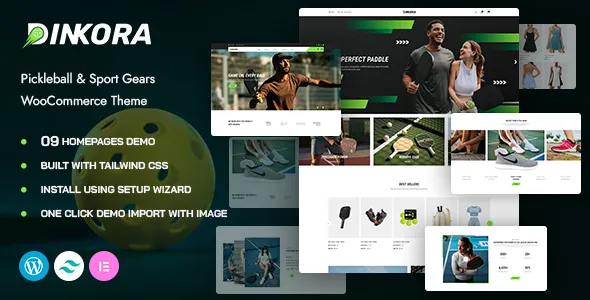
Dinkora – Pickleball & Sport Gear WooCommerce WordPress Theme
Dinkora – Pickleball & Sport Gear WooCommerce WordPress Theme is an eCommerce website design solution for businesses selling pickleball equipment, sports accessories, athletic apparel, fitness essentials, and recreational sporting goods. Designed for sports-focused online retail projects, Dinkora can serve as a starting point for building a professional WooCommerce store where customers can explore product categories, review item details, and discover equipment suited to their sporting interests. With appropriate customization, the theme can help retailers establish a recognizable brand identity and create an organized shopping experience for sports enthusiasts.
The growing interest in recreational sports creates opportunities for specialized online stores that make equipment discovery straightforward and convenient. A pickleball retailer may need to showcase paddles, balls, nets, court accessories, and protective gear, while a broader sports shop may offer clothing, footwear, training accessories, and equipment for different activities. Dinkora can be evaluated for these business models, depending on its available layouts and supported features.
Built around the WordPress and WooCommerce ecosystem, the theme provides a potential foundation for organizing product information and presenting a retail catalog. The actual functionality depends on the installed theme version, WooCommerce configuration, compatible plugins, and available customization tools. Before launching a store, review the current product demo and documentation to confirm that the theme supports your specific design and business requirements.
What Is Dinkora – Pickleball & Sport Gear WooCommerce WordPress Theme?
Dinkora is a WooCommerce WordPress theme intended for online stores focused on pickleball products, sports equipment, and related retail categories. Its specialized positioning makes it worth considering for businesses that want a sports-oriented website rather than a generic online shop.
Pickleball retailers often need to organize products according to equipment type, playing style, skill level, and customer requirements. Visitors may be looking for beginner paddles, replacement balls, portable nets, court accessories, sports bags, or apparel. A well-structured store helps customers browse these categories and compare relevant product details.
A WooCommerce-based website can support product catalog management, pricing, cart functionality, and order workflows when the required components are configured correctly. Dinkora can provide the visual foundation for presenting these elements, subject to the capabilities of the installed version and its compatible integrations.
The theme may also be considered for broader sporting goods stores that sell equipment for recreational activities, training, and outdoor sports. Website owners should confirm the available templates, product layouts, filtering options, and other required features before making a final decision.
Modern Design for Sports and Pickleball Stores
An online sports store should communicate energy, reliability, and product quality while keeping the shopping experience easy to understand. Visitors need to identify the products they want, review important specifications, and find a clear route toward purchasing.
Dinkora can be evaluated as a design foundation for a retail website that places products and shopping categories at the center of the experience. Depending on the available customization settings, store owners may be able to adapt colors, typography, images, banners, page layouts, and other visual details to match their brand.
A dedicated pickleball store may use bold product photography, clear category sections, and prominent promotions to showcase equipment. A multi-sport retailer might emphasize organized product collections, seasonal campaigns, and featured gear for different activities.
Consistent branding across the homepage, category pages, product listings, and checkout process helps create a more cohesive shopping journey. Use readable text, accurate product images, and concise descriptions to help customers understand the products without unnecessary distractions.
The best visual approach is one that supports product discovery and customer confidence rather than relying on decorative effects alone.
WooCommerce Functionality for Online Retail
WooCommerce provides eCommerce functionality within WordPress, allowing store owners to manage products, prices, inventory settings, orders, and other core retail information. When correctly configured, it can provide the operational foundation for a sports equipment store built with Dinkora.
A pickleball retailer can use product categories to separate paddles, balls, nets, bags, apparel, and accessories. A broader sporting goods shop may organize items according to sport, product type, brand, or intended use.
WooCommerce supports different product types and store workflows, although the exact setup depends on the extensions and configuration selected. Before launch, test product pages, cart behavior, checkout, shipping settings, tax configuration, order notifications, and payment processing.
Do not assume that every advanced shopping feature is included with the theme itself. Product comparison, advanced filtering, wishlists, subscription services, and specialized shipping rules may require additional plugins or configuration.
Keeping the store’s product structure simple and logical helps customers find suitable equipment and makes the catalog easier to maintain as the business expands.
Product Categories for Pickleball Equipment
A well-organized pickleball catalog helps shoppers explore the equipment they need for practice, recreational play, or competitive matches. Dinkora can be evaluated for a store that presents different product groups through clear category pages and product listings.
Pickleball paddles: Provide details such as materials, approximate weight, grip dimensions, paddle shape, and other specifications supplied by the manufacturer.
Pickleball balls: Organize products according to intended playing conditions, design, pack size, and other relevant characteristics.
Pickleball nets: Present portable and fixed net options with accurate dimensions, setup information, and included components where applicable.
Court accessories: Include relevant equipment such as line markers, court bags, storage solutions, and other permitted accessories.
Sports bags: Help customers compare storage capacity, compartments, materials, and carrying options.
Apparel and footwear: Display available sizes, color options, material information, and care instructions.
Training accessories: Organize equipment intended for practice, skill development, and general sports preparation.
The categories used on the website should reflect the products actually sold. Clear labels, consistent product images, and accurate descriptions make it easier for customers to browse the catalog.
Product Pages That Support Better Shopping Decisions
Product pages play an important role in helping customers decide whether an item meets their requirements. A useful page should explain what the product is, identify its main specifications, and provide clear information about pricing and availability.
A Dinkora-based store can be planned around product pages that include images, titles, descriptions, prices, and relevant purchasing information, depending on the supported layouts and WooCommerce configuration.
For pickleball paddles, relevant information may include weight, dimensions, grip size, construction materials, and manufacturer guidance. For sports apparel, customers may need a size chart, fabric details, care instructions, and available color choices. Sports bags may require information about capacity, compartments, and dimensions.
Use original descriptions that accurately represent each product. Avoid unsupported performance promises or claims that a particular item guarantees better athletic results.
Product photographs should show the item clearly, with additional images where they help explain construction, features, or size. If variations are offered, ensure that the selected color or size corresponds to the correct product information and inventory status.
A consistent product-page structure makes the catalog easier to navigate and maintain.
Homepage Layout and Featured Products
The homepage introduces the store and provides an entry point to its most important product categories. A well-planned layout helps visitors understand what the business sells and directs them toward relevant shopping sections.
Depending on the available theme templates, a Dinkora store could be organized around a prominent introductory banner, featured pickleball equipment, category links, selected products, promotional content, and helpful shopping information.
A pickleball specialist might feature paddles, balls, nets, and beginner equipment. A broader sporting goods store may organize the homepage around multiple sports and highlight selected seasonal collections.
Promotional banners should communicate genuine offers or useful information. Featured products should be selected according to customer demand, stock availability, and the store’s merchandising strategy.
Avoid overcrowding the homepage with too many competing sections. Give each element a clear purpose and make the main shopping categories easy to find.
A clear homepage structure can improve product discovery while maintaining a professional brand presentation.
Responsive Shopping on Mobile and Desktop
Customers may browse a sports store from a desktop computer, tablet, or smartphone. Responsive design helps ensure that product information and shopping controls remain usable across different screen sizes.
Dinkora is positioned as a WordPress eCommerce theme for sports retail, but its actual responsive behavior should be tested using the specific version you intend to install. Check the homepage, product listings, category pages, product details, cart, and checkout on different devices.
On smaller screens, product images should fit the available space, text should remain readable, and navigation should be straightforward. Buttons and form fields should be easy to select, while product variations and quantity controls should remain understandable.
The shopping process deserves particular attention. A layout may look attractive on mobile but still create difficulties if product options are hard to select or checkout fields are inconvenient to use.
Custom CSS, plugins, third-party widgets, and large images can affect responsiveness. Test the complete purchase journey after making design changes to identify issues before customers encounter them.
Customization and Sports Brand Identity
A recognizable visual identity can help a sports retailer distinguish its store from competing businesses. Customization allows the website to reflect the brand’s positioning, product range, and target audience.
Depending on the available theme options and supported tools, Dinkora may allow adjustments to visual elements such as colors, typography, page layouts, imagery, and other design details. Review the current documentation to understand which settings are included.
A specialist pickleball brand may choose a focused visual style with equipment photography and clear product categories. A multi-sport retailer might use a more flexible design that accommodates several sports without making the homepage feel cluttered.
Consistency is important throughout the store. Use a defined color palette, maintain a clear heading hierarchy, and apply button styles consistently. Product images should use a coherent presentation wherever practical.
Replace placeholder text and demo imagery with accurate business information and relevant product content. Before making substantial customizations, create a backup and test major changes in a staging environment where possible.
SEO-Friendly Structure for Sports Equipment Stores
Search engine optimization helps potential customers discover relevant products and informational pages. A well-organized WordPress store can provide a useful foundation, but search visibility also depends on content quality, competition, technical setup, and broader search engine factors.
A Dinkora website should use descriptive page titles, logical headings, readable URLs, and original product descriptions. Each product category should have a clear purpose and help visitors understand the products it contains.
For example, a store may create separate categories for pickleball paddles, balls, nets, apparel, and accessories. Category descriptions can explain the available products and help customers understand the differences between options.
Use relevant search terms naturally in page titles, headings, product descriptions, and supporting content. Avoid repeating the same phrase excessively or copying manufacturer descriptions across a large catalog.
Image optimization also matters. Use descriptive alternative text for informative images and compress product photographs without sacrificing necessary detail. Internal links can connect related products, categories, buying guides, and relevant articles.
Compatible SEO tools may assist with metadata, XML sitemaps, canonical settings, and other supported technical tasks. Review indexing issues and broken links periodically. No theme can guarantee specific rankings, traffic levels, or sales.
Content Marketing and Pickleball Buying Guides
Informational content can help a sports retailer answer customer questions and support product discovery. WordPress makes it possible to publish articles alongside the store’s categories and product pages.
A Dinkora-based website could include a blog or resource section if the required templates and settings are available. Useful topics may include equipment comparisons, beginner buying guides, product care, storage advice, and general explanations of pickleball gear.
A buying guide might explain which product specifications to compare when selecting a paddle. Another article could discuss how to choose a sports bag based on storage needs or how to maintain equipment according to manufacturer recommendations.
Content should remain practical, accurate, and relevant to the products offered. Avoid exaggerated claims or advice that is not supported by reliable information.
Link relevant articles to the appropriate category or product pages so readers can explore items related to what they have learned. A consistent publishing schedule focused on useful information is generally more valuable than producing large volumes of repetitive articles.
Navigation, Product Discovery, and Filtering
Clear navigation helps customers move between product categories and locate relevant equipment. A sports store may contain many products, so its information architecture should remain understandable as the catalog grows.
Dinkora can be evaluated for a store structure that includes category navigation, featured products, and clear links to key shopping pages. The availability of advanced search, filtering, or sorting controls should be confirmed in the current theme documentation and WooCommerce setup.
Useful filters may include price, brand, size, color, or other attributes relevant to the products being sold. For pickleball equipment, product specifications can help customers narrow their choices when those attributes are maintained consistently in the catalog.
Filters should provide meaningful results and avoid presenting options that do not apply to the selected category. Keep navigation labels concise and avoid creating too many overlapping categories.
Regularly review the shopping experience using realistic customer journeys. For example, test whether a new visitor can locate a particular paddle, understand its specifications, and proceed to checkout without unnecessary steps.
Website Performance and Loading Speed
Website performance affects how easily customers can browse products and complete purchases. Large product images, unnecessary scripts, poorly configured plugins, and unsuitable hosting can make a store slower than expected.
The actual performance of a Dinkora website depends on its implementation, hosting environment, image sizes, theme configuration, and installed integrations. Do not assume that a theme automatically guarantees a particular loading speed.
Optimize product photographs, use appropriate image dimensions, and remove unnecessary extensions. Caching and other performance tools may help when they are compatible with the store’s configuration.
Test key pages separately, including the homepage, product categories, individual products, cart, and checkout. Product-heavy pages may perform differently from simpler informational pages.
Review performance after installing new plugins or adding large product collections. Regular monitoring can help identify issues before they have a noticeable effect on the shopping experience.
Payment, Shipping, and Store Configuration
A WooCommerce store requires careful configuration of the purchasing process. Customers should be able to understand prices, review delivery options, provide the required information, and receive confirmation of their orders.
Before launching a Dinkora store, configure the payment methods, shipping zones, tax settings, stock management, order emails, and checkout fields according to the business’s needs. The available options depend on WooCommerce, selected extensions, and the services supported in the target market.
Display shipping costs, estimated delivery information where available, return conditions, and other important policies clearly. Test successful payments, failed transactions, order notifications, and refund procedures using the available testing tools before accepting live orders.
If the store serves multiple regions, verify that the selected payment provider and shipping services operate in those locations. Make sure that product restrictions and applicable consumer protection requirements are addressed.
The theme provides the presentation layer, while much of the store’s operational behavior depends on WooCommerce and its configuration.
Accessibility and User-Friendly Design
A good online store should be easy to navigate and understand for a wide range of visitors. Readable text, clear labels, suitable contrast, and recognizable controls all contribute to usability.
When configuring Dinkora, use descriptive link text, logical headings, and meaningful alternative text for informative product images. Product variations and form fields should have clear labels, and error messages should explain what needs to be corrected.
Navigation menus should prioritize essential shopping destinations, including product categories, account options where applicable, cart access, and customer support information.
Interactive elements should be tested with different input methods where practical. Do not rely only on color to communicate stock status, product selection, or important instructions.
Accessibility depends on the theme, the installed plugins, and the way content is added. Combining automated checks with practical testing helps identify potential usability issues.
WordPress Plugins and WooCommerce Integrations
Plugins can extend a WordPress store with additional functionality for SEO, contact forms, analytics, security, backups, shipping, and other business requirements. The appropriate combination depends on the features already available in Dinkora and the needs of the store.
Before installing an extension, review its compatibility with your WordPress and WooCommerce versions, update history, documentation, licensing, and support arrangements.
Additional tools may be required for advanced product filtering, wishlists, product reviews, email marketing, or other specialized functions. Verify whether each feature is already supported before adding another plugin.
Avoid installing several extensions that perform the same task. Overlapping functionality can increase maintenance work and introduce compatibility issues.
After updates, test the homepage, product pages, cart, checkout, account pages, and any other important customer journeys. This helps ensure that integrations continue to work correctly.
Security and Ongoing Store Maintenance
A professional eCommerce website requires regular maintenance to protect customer information and keep the store operating reliably.
Use reputable hosting, enable HTTPS, maintain strong administrator credentials, and assign WordPress user roles according to each person’s responsibilities. Keep WordPress, WooCommerce, the theme, and compatible plugins updated carefully.
Create regular backups and confirm that the restoration process works. Where possible, test major changes in a staging environment before applying them to the live store.
Review payment settings, order notifications, product availability, shipping information, and checkout functionality periodically. Remove unused plugins and themes when appropriate, and obtain software only from trusted sources.
Maintenance also includes reviewing product descriptions, prices, images, stock information, and store policies. Keeping these details current helps customers make informed decisions and reduces avoidable confusion.
Who Should Use Dinkora WooCommerce WordPress Theme?
Dinkora may be suitable for several types of sports and recreational retail businesses, depending on its documented features and the store’s requirements.
Pickleball equipment stores: Businesses can organize paddles, balls, nets, accessories, and other relevant equipment into a structured online catalog.
Sporting goods retailers: Stores selling equipment for multiple sports can evaluate the theme as a starting point for presenting different product categories.
Sports apparel shops: Retailers can showcase clothing, footwear, bags, and accessories, subject to the available product layouts and configuration.
Recreational sports brands: Companies can introduce their products, communicate their brand identity, and provide useful shopping information.
Fitness and training stores: Businesses selling permitted training accessories and related equipment can organize their catalog around customer needs.
New eCommerce businesses: Entrepreneurs can use WordPress and WooCommerce as the foundation for a store, provided the selected setup meets their technical and operational requirements.
Established online retailers: Existing businesses can evaluate Dinkora as a potential redesign option when they want a sports-focused presentation.
Before choosing the theme, review its demo, documentation, license, support arrangements, responsive behavior, and compatibility with your intended WordPress and WooCommerce versions.
Tips for Building a Successful Store with Dinkora
Begin by defining your target customers and the products your store will sell. A specialist pickleball retailer may need a different category structure from a business offering equipment for several sports.
Organize products into clear categories and maintain accurate specifications, pricing, images, and stock information. Use original descriptions that help customers understand product differences and make informed purchasing decisions.
Create a consistent brand identity with suitable colors, typography, and product photography. Keep the homepage focused on important categories, featured products, and useful shopping information.
Test the complete purchase process before launch. Check product variations, cart functionality, shipping calculations, payment methods, order emails, and mobile usability.
Make sure that the website’s privacy policy, shipping policy, return policy, and contact information are accurate and easy to find. Provide clear information about delivery and customer support.
After launch, monitor website performance, review customer feedback, update software carefully, and maintain regular backups. These practices help keep the store organized and dependable as the catalog grows.
Final Thoughts on Dinkora – Pickleball & Sport Gear WooCommerce WordPress Theme
Dinkora – Pickleball & Sport Gear WooCommerce WordPress Theme is a potential option for retailers looking to build an online store focused on pickleball equipment, sporting goods, athletic accessories, and related products. Its specialized positioning makes it worth evaluating for businesses that want a sports-oriented shopping experience built around WordPress and WooCommerce.
A successful store combines clear product categories, accurate descriptions, consistent branding, responsive layouts, and a reliable checkout process. Pickleball retailers can prioritize paddles, balls, nets, and accessories, while broader sporting goods businesses can organize their catalogs around different activities and product types.
The actual capabilities of Dinkora depend on the theme version, its included layouts, and compatible WooCommerce extensions. Review the current documentation and demo to confirm that it supports your required features before installation.
Long-term results also depend on product quality, customer service, website performance, search optimization, security, and regular maintenance. A theme alone cannot guarantee search rankings, traffic, or sales, but a suitable design foundation can help a business present its products clearly and manage a more organized online shopping experience.
With thoughtful customization, accurate product information, careful store configuration, and ongoing maintenance, Dinkora can be evaluated as part of a broader eCommerce strategy for a pickleball or sporting goods business.