My Account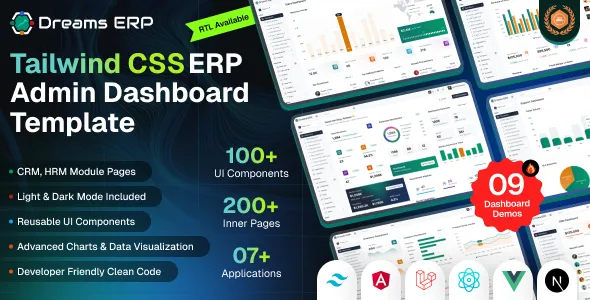
Dreams ERP – ERP & Business Management Dashboard Template | React, Next.js, Angular, Vue & Laravel
Dreams ERP – ERP & Business Management Dashboard Template | React, Next.js, Angular, Vue & Laravel is a comprehensive dashboard template designed for businesses, developers, software companies, and organizations looking to build modern enterprise resource planning systems and business management applications. With a focus on business operations, administrative workflows, data organization, and productivity, Dreams ERP provides a starting point for developing interfaces that help teams manage information and monitor important business activities from a centralized dashboard.
Enterprise resource planning systems bring together different business functions, helping organizations organize information related to employees, customers, sales, purchasing, inventory, finance, projects, and daily operations. A well-structured ERP interface makes it easier for users to navigate these areas, review important records, and understand business activity through organized tables, forms, dashboards, and reports. Dreams ERP can be customized to support these requirements and adapted to different industries, workflows, and application needs.
The template is particularly relevant for developers working with React, Next.js, Angular, Vue, and Laravel-based projects. These technologies provide different approaches to building web interfaces and applications, giving development teams flexibility when selecting a technology stack for their projects. The exact implementations and included features depend on the product package, so buyers should review the current documentation to confirm which versions, source files, pages, and components are provided.
Whether you are building a business administration platform, developing an ERP application for a client, creating an internal management dashboard, or planning a SaaS business solution, Dreams ERP offers a foundation that can be customized to match your technical and operational requirements.
What Is Dreams ERP – ERP & Business Management Dashboard Template?
Dreams ERP is a dashboard template intended for enterprise resource planning applications and business management platforms. It provides a starting point for designing administrative interfaces that organize information, present business metrics, and support common management workflows.
ERP applications typically connect several business functions within a single system. Depending on the organization’s needs, these functions may include sales, purchasing, inventory, accounting, human resources, customer relationship management, project tracking, and reporting. A clear dashboard interface can help users access relevant information without navigating through unrelated systems or disconnected screens.
Dreams ERP can be adapted to create interfaces for these types of applications. Developers can customize navigation, page layouts, tables, forms, cards, charts, and other interface elements according to the requirements of the project and the functionality included in the supplied package.
A dashboard template is the visual and interface foundation of an application, not necessarily a complete ERP backend. Features such as database operations, authentication, permissions, automated calculations, payment processing, and business integrations may require separate implementation. Buyers should verify which functions are included before relying on the template for a production system.
Modern ERP Dashboard Design
A business management dashboard should make important information accessible while keeping complex workflows organized. Users may need to review sales activity, check inventory levels, manage employee records, examine financial information, or monitor operational performance throughout the day.
Dreams ERP provides a starting point for creating a structured administrative interface that can be tailored to these activities. Developers can organize information into relevant sections and use consistent layouts to make related functions easier to discover.
A useful ERP interface should balance information density with readability. Tables need clear column labels, forms should explain the information being requested, and dashboard cards should present metrics in a way that users can interpret quickly. Navigation should also make it easy to move between business functions.
Organizations can customize the interface to reflect their brand identity, operational terminology, and preferred workflows. A retail business may prioritize inventory and sales, while a service company may focus on customers, projects, and invoices.
React-Based ERP Dashboard Development
React is a JavaScript library for building user interfaces through reusable components. It is widely used for developing administrative dashboards, internal business tools, and interactive web applications.
For an ERP project, reusable React components can help organize common interface elements such as navigation menus, data tables, search controls, form fields, metric cards, and dialog windows. Reusing components can support a consistent visual experience and simplify future updates.
Developers can customize the supplied interface to display business records, organize management pages, and connect the frontend to an appropriate backend or API. This allows the dashboard to be adapted to different business requirements rather than remaining limited to its demonstration content.
The availability of specific React features, dependencies, and components depends on the implementation included with Dreams ERP. Review the product documentation to confirm the supplied React version and understand the project structure before beginning customization.
Next.js Business Management Dashboard
Next.js is a React-based framework used to develop web applications with structured routing and different rendering options. It can be useful for projects that combine administrative interfaces with public-facing pages or require a well-organized application architecture.
Dreams ERP’s Next.js implementation, where included in the product package, can provide a starting point for creating management pages and organizing application routes. Developers can customize layouts and components to match the needs of an ERP system, subject to the features and configuration supplied.
Next.js may also be useful when a business application needs a broader web architecture that includes landing pages, documentation, user-facing account pages, or other sections alongside its dashboard.
A framework does not automatically provide business logic, database connectivity, or access control. These elements must be implemented or connected as appropriate for the application. Verify the exact Next.js version, rendering configuration, and dependencies before choosing the template for a specific project.
Angular ERP Dashboard Development
Angular is a framework for developing structured web applications, making it relevant to enterprise projects that require organized components, services, routing, and data-driven interfaces.
An Angular-based implementation of Dreams ERP, if included in the package, can serve as a starting point for building administrative screens and management workflows. Developers can adapt the interface to display employee records, sales information, inventory data, financial summaries, and other business information.
Angular’s architecture can support applications that require consistent conventions across a larger codebase. Development teams can organize shared interface elements and application services according to the requirements of the project.
Before implementation, confirm the Angular version, dependencies, setup requirements, and included pages. The precise capabilities of the supplied version should be evaluated through the product documentation rather than assumed from the framework name alone.
Vue ERP Dashboard Development
Vue is a JavaScript framework used to build interactive user interfaces and web applications. Its component-based approach can help developers organize reusable elements and build data-driven dashboard experiences.
A Vue-based Dreams ERP implementation, where provided, can be customized to support business management interfaces such as operational dashboards, employee directories, customer records, and administrative forms.
Developers can adapt the component structure, styling, and navigation to align with the workflows required by the organization. The dashboard can also be connected to a backend service to retrieve and update business information when the appropriate integration is implemented.
The included Vue version and available functionality should be confirmed before purchase. Different implementations may have different dependencies, routing arrangements, and setup requirements.
Laravel-Based ERP Dashboard Development
Laravel is a PHP framework commonly used for developing web applications and backend systems. It can be relevant to ERP projects that require server-side business logic, database interactions, application routing, and structured backend development.
A Laravel implementation of Dreams ERP, if included in the product package, may provide a foundation for creating management interfaces within a PHP-based project. Developers can customize the supplied views and integrate them with appropriate controllers, models, routes, and database structures according to the application’s requirements.
A complete ERP system typically needs more than dashboard pages. It may require data validation, secure authentication, role-based permissions, transaction handling, audit logs, and business rules. These capabilities should be verified in the supplied implementation or developed as part of the application.
Check the Laravel version, PHP requirements, database expectations, and setup instructions before deployment. Do not assume that every frontend demonstration page is automatically connected to a working business database.
Centralized Business Management Interface
One of the main purposes of an ERP application is to organize information from different business departments in a structured environment. A well-designed dashboard can help users move between related functions and understand how operational activities connect.
Dreams ERP can be adapted to provide a centralized interface for business records, administrative tasks, and performance summaries. Depending on the project’s requirements, this may include sections for sales, purchasing, customers, products, employees, projects, and financial records.
A centralized interface can reduce confusion when information is otherwise spread across separate spreadsheets or disconnected applications. However, achieving reliable centralization requires appropriate data architecture, integrations, permissions, and business processes in addition to the dashboard design.
Developers should identify which records need to be shared between departments and define how updates should be handled. A clear data model helps maintain consistency and reduces the risk of conflicting information across different parts of the system.
Sales and Order Management
Sales management is an important part of many ERP applications. Businesses may need to review customer inquiries, maintain order records, track sales activity, and understand the progress of transactions.
Dreams ERP can be customized to present sales-related information through organized tables, status indicators, summary cards, and detail pages where supported by the implementation. These interfaces can help users review records and navigate between customers, orders, products, and related business information.
A sales dashboard might display order counts, sales totals, pending transactions, or recent activity. The accuracy of these metrics depends on the underlying data, calculation logic, and connection to the relevant backend services.
Additional functionality such as order creation, approval workflows, automated notifications, or invoice generation requires appropriate application logic. Verify which functions are included before treating the template as a complete order management system.
Inventory and Product Management
Inventory management helps businesses monitor products, stock quantities, item details, and stock movements. A well-organized interface can make it easier to review product records and identify items that require attention.
Dreams ERP can serve as a starting point for an inventory dashboard with product tables, category information, stock summaries, and item-detail views, depending on the pages supplied.
A business may customize the interface to display product names, internal identifiers, categories, prices, stock levels, and supplier details. Search and filtering controls can help users locate records more efficiently when the necessary functionality is implemented.
A complete inventory system may also need stock adjustment rules, purchase order integration, warehouse tracking, transaction history, and validation to prevent inconsistent quantities. These features require suitable backend logic and should not be assumed to exist solely because an inventory screen is present.
Customer Relationship Management
Customer relationship management helps businesses maintain information about prospects, customers, communications, and sales opportunities. An ERP dashboard can provide an interface for accessing this information alongside other business records.
Dreams ERP can be customized to present customer directories, contact information, account details, and activity summaries where the relevant pages and components are available.
A customer management section may include searchable records, customer categories, notes, communication history, and links to related orders or invoices. The exact workflow depends on the organization’s requirements and the data structures used by the application.
When connecting customer information to a backend, developers should consider data accuracy, access permissions, privacy, and appropriate retention policies. Sensitive customer details should only be accessible to authorized users.
Finance and Accounting Dashboard
Financial information is central to many business management systems. Organizations may need to review invoices, payments, expenses, outstanding balances, and financial summaries.
Dreams ERP can be adapted to present finance-related information through tables, summary cards, and reporting interfaces where suitable components are included. A dashboard might show invoice statuses, pending payments, recorded expenses, or other relevant indicators.
Financial dashboards should be based on accurate, consistently maintained data. Developers need to define how amounts are calculated, how currency values are formatted, and how different transaction statuses affect totals.
More advanced financial functionality, including accounting rules, tax calculations, bank reconciliation, payment processing, and financial statement generation, requires dedicated implementation and validation. Businesses should confirm whether such features are included or need to be connected to a suitable accounting service.
A visual dashboard alone should not be treated as a complete accounting solution.
Human Resources and Employee Management
Human resources modules help organizations maintain employee information and coordinate administrative processes. Depending on business requirements, an ERP application may include employee directories, department records, job information, leave requests, attendance data, or recruitment workflows.
Dreams ERP can be customized to provide an interface for employee-related information when suitable pages or components are available. Structured tables and forms can help authorized staff locate records and maintain consistent data.
A human resources dashboard might summarize employee counts, department information, pending requests, or recruitment activity. The displayed information should reflect the actual capabilities and data sources of the application.
Sensitive employee records require careful handling. Authentication, role-based access control, audit logging, and secure data storage should be implemented where appropriate. Confirm the supplied functionality before using the template for real employee information.
Project and Task Management
Project management features can help businesses organize work, track responsibilities, and review project progress. An ERP application may combine project records with customer details, budgets, team assignments, and other operational information.
Dreams ERP can be adapted to display project lists, task information, status labels, deadlines, and progress summaries where supported by the supplied components.
A project dashboard may help managers review ongoing work and identify tasks that require attention. Teams can also customize the interface to match their internal project stages and reporting requirements.
Features such as drag-and-drop task boards, automated reminders, time tracking, resource allocation, or project billing require additional functionality unless explicitly included. The template’s actual project management capabilities should be verified before implementation.
Reports, Analytics, and Business Insights
Business dashboards help users review key metrics and identify patterns in operational data. ERP reporting may cover sales performance, inventory movement, financial activity, employee information, or project progress.
Dreams ERP can serve as a starting point for presenting business metrics through charts, tables, summary cards, and reporting pages where these components are included.
A reporting interface should communicate what each metric represents, which period it covers, and how the data was calculated. Clear labels and consistent formatting help users interpret the information accurately.
Developers may connect the interface to a database, API, or analytics service to provide real business data. The quality of the resulting reports depends on the source data, calculation logic, and update process.
Advanced analytics, predictive forecasting, scheduled report delivery, and export functionality require suitable implementation. Do not assume these features are available unless they are documented in the product package.
Forms, Tables, and Administrative Workflows
Forms and tables are essential interface elements in business management applications. Users may need to add records, edit information, search data, review details, and manage the status of ongoing activities.
Dreams ERP provides a starting point for customizing these types of interface patterns according to the components supplied. Tables can be adapted to display business records, while forms can organize information into understandable groups.
Useful administrative interfaces should include clear field labels, validation feedback, readable status indicators, and predictable actions. Where appropriate, developers can introduce search, filtering, sorting, pagination, and confirmation dialogs.
Visual controls do not automatically provide complete data management functionality. The application must connect them to the relevant business logic and handle validation, error conditions, and permissions correctly.
Responsive Design for Business Users
Business users may access ERP applications from desktop computers, laptops, tablets, and mobile devices. A responsive interface helps the dashboard adapt to different screen sizes and makes important information more accessible.
When customizing Dreams ERP, developers should test navigation menus, tables, charts, forms, and interactive controls across representative viewport sizes. Wide data tables may require alternative layouts or horizontal scrolling on smaller screens.
A mobile-friendly dashboard should prioritize the actions that users need most often. Readable text, practical touch targets, and clear navigation can make common tasks easier to complete.
Responsive behavior depends on the actual styles and components included in the selected implementation. Test the finished application after adding real data and integrations, since larger records and additional controls may affect usability.
UI Customization and Business Branding
A business management dashboard should feel consistent with the organization that uses it. Dreams ERP can be customized with suitable colors, typography, icons, logos, navigation labels, and layout adjustments.
Different industries may require different interface priorities. A distribution company may emphasize inventory and orders, while a consulting business may focus on customers, projects, invoices, and employee information.
A consistent visual system helps users recognize interface elements and understand how to interact with them. Developers should maintain a coherent approach to headings, buttons, status labels, forms, and navigation.
Brand customization should also preserve usability. Text must remain readable, important status information should not rely on color alone, and interactive controls should provide clear feedback.
Security and Access Control Considerations
ERP applications may contain sensitive financial, customer, employee, and operational information. Security must therefore be considered from the beginning of development.
Dreams ERP should be evaluated as a dashboard template rather than assumed to be a complete secure business system. Depending on the supplied implementation, developers may need to configure authentication, role-based permissions, secure session handling, backend authorization, and data validation.
Access control should follow the principle of least privilege, allowing each user to access only the information and actions needed for their responsibilities. Sensitive operations may also require audit logs and additional verification.
Never rely exclusively on hiding buttons or menu items in the frontend to protect business information. The backend must enforce permissions and validate every protected operation. Review the relevant framework and hosting security guidance before deploying the application with real business data.
Integration and Future Expansion
Modern ERP systems often connect to external services such as payment gateways, accounting software, CRM platforms, email services, reporting tools, and inventory systems.
Dreams ERP can potentially be extended to support suitable integrations, depending on the selected implementation and the available APIs. Developers should confirm the compatibility of each service and determine whether additional backend development is required.
Possible extensions include data import and export, notification systems, document generation, reporting integrations, and third-party authentication. More advanced business workflows may require dedicated services or custom application logic.
When integrating external platforms, consider data synchronization, error handling, API limits, credentials, and privacy requirements. Keep secret keys on the server side where appropriate, and avoid exposing sensitive configuration in client-side code.
The availability of these integrations depends on the product documentation and the implementation work completed for the project.
Suitable Use Cases for Dreams ERP
Dreams ERP can be adapted for a variety of business management and administrative projects.
Small and medium-sized businesses: Create a centralized interface for viewing operational information and managing business records.
Retail and distribution companies: Develop dashboards for product information, sales activity, purchasing, and inventory workflows.
Service-based businesses: Organize customers, projects, invoices, and employee-related information in a customized administrative interface.
Software development agencies: Build client-specific ERP interfaces or use the dashboard as a foundation for an internal business application.
SaaS application developers: Develop a business management platform with additional backend functionality and suitable subscription infrastructure.
Human resources teams: Create employee management interfaces and administrative screens where appropriate functionality is implemented.
Finance and operations teams: Develop reporting dashboards for invoices, expenses, and operational metrics, subject to suitable business logic and validation.
Enterprise software projects: Use the template as an interface foundation for a larger application with the required authentication, permissions, data architecture, and integrations.
The suitability of Dreams ERP for a specific use case depends on the included components, licensing, framework requirements, and development effort.
Developer-Friendly Customization Workflow
Before using Dreams ERP, review the product documentation to understand which technology implementations are included and which versions they support. Confirm the package structure, installation requirements, dependencies, and available scripts.
Choose the implementation that best fits the project. React, Next.js, Angular, Vue, and Laravel have different development conventions and should be evaluated according to the team’s skills and application architecture.
After setting up the project, examine the existing navigation, page layouts, reusable components, forms, tables, and dashboard sections. Identify which elements can be reused and which need to be adjusted or developed.
Replace demonstration information with the intended business content, then connect the interface to suitable data sources where required. Implement validation, authentication, permissions, and business rules before using the application with real records.
Test navigation, forms, reporting calculations, responsive layouts, error handling, and access permissions. Finally, follow the documented production build and deployment process and verify that the completed application works correctly in its intended environment.
Important Considerations Before Purchase
Before purchasing Dreams ERP, review the current product listing and documentation to verify the exact package contents. Confirm which versions of React, Next.js, Angular, Vue, and Laravel are supplied, since the product title alone does not establish that every implementation is included in a single download.
Check the available dashboard pages, UI components, dependencies, setup instructions, and licensing terms. If your project requires working database operations, authentication, financial calculations, inventory processing, or external integrations, verify whether those capabilities are already implemented or require additional development.
Consider the requirements of your intended application, including hosting, data storage, user permissions, performance, maintenance, and security. A dashboard template can reduce interface development work, but a production-ready ERP system requires reliable backend logic and carefully designed business processes.
Reviewing these details before purchase helps you choose the correct implementation and estimate the work needed to adapt it to your organization.
Why Choose Dreams ERP – ERP & Business Management Dashboard Template?
Dreams ERP provides a starting point for developers and organizations planning to build enterprise resource planning interfaces, business management dashboards, and administrative web applications. Its multi-technology positioning makes it relevant to teams evaluating different frontend and backend development approaches, provided the required implementations are included in the purchased package.
The template can be customized to present business information, organize administrative workflows, and support interfaces for sales, inventory, customers, finance, employees, projects, and reporting. Developers can tailor the design to the needs of different industries and connect the interface to suitable application services.
Using an existing dashboard template may reduce some initial UI development work compared with building every interface element from scratch. The actual time savings depend on the supplied components and the amount of business-specific functionality required.
The best results come from combining a suitable dashboard design with a well-planned data model, reliable backend services, secure access control, accurate reporting, and thorough testing.
Conclusion
Dreams ERP – ERP & Business Management Dashboard Template | React, Next.js, Angular, Vue & Laravel is a flexible starting point for creating modern business management interfaces and ERP-style administrative applications. It is relevant to developers, software companies, and organizations seeking a structured dashboard foundation for managing business information and presenting operational data.
With suitable customization, the interface can be adapted for sales, inventory, customer management, human resources, finance, project tracking, and reporting workflows. Its suitability for a particular project depends on the technology implementation selected, the actual package contents, and the additional functionality required.
Whether you are developing a custom ERP platform, building a business administration dashboard, or creating an application for a client, Dreams ERP can help establish the visual foundation of your project. Review the current documentation, confirm the included technology versions and features, and implement the necessary business logic, integrations, security controls, and testing before using the application in production.