My Account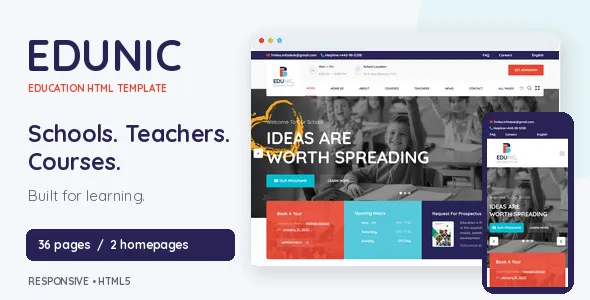
Edunic – Education School HTML Template for Teachers & Courses
Edunic – Education School HTML Template for Teachers & Courses is a website template designed for schools, teachers, tutors, educational institutions, and online learning providers looking to establish a professional presence on the web. With an education-focused design direction, Edunic can serve as a foundation for presenting courses, introducing instructors, sharing academic information, and helping students discover learning opportunities. Whether you are building a website for a private school, an independent educator, a tutoring service, a training center, or an online course provider, this HTML template offers a starting point for organizing educational content into a clear and accessible website experience.
A well-designed education website should make learning opportunities easy to understand and explore. Students and parents often want to find course details, review teaching approaches, learn about instructors, and understand how to register for classes. Edunic can be customized to organize this information into relevant sections, helping educational organizations communicate their offerings and guide visitors toward useful next steps. Its final appearance and functionality will depend on the included template files, the selected page layouts, and any additional integrations implemented during development.
What Is Edunic Education School HTML Template?
Edunic is an education-focused HTML template intended for websites that provide academic information, teaching services, training programs, and course-related resources. HTML templates give developers a structured starting point for building websites without requiring them to create every page layout from scratch.
For a school, the template can provide a foundation for presenting institutional information, academic programs, faculty details, announcements, and contact information. Independent teachers can adapt the design to introduce their expertise, describe their lessons, and promote available classes. Online education providers can organize course descriptions, learning categories, instructor profiles, and enrollment information.
Because Edunic is an HTML template, its implementation differs from a complete learning management system. HTML, CSS, and JavaScript files generally define the website’s structure, presentation, and supported front-end interactions. Features such as student accounts, course progress tracking, payment processing, enrollment databases, and learning dashboards may require a backend application or compatible third-party service if they are not included in the supplied package.
Before choosing Edunic for a project, review its live demo, included pages, technical requirements, documentation, and available components. This helps establish whether the template matches the website’s design goals and whether additional development will be necessary.
Education-Focused Website Design
An education website should communicate information clearly while creating a welcoming environment for prospective students, parents, teachers, and other visitors. Its design needs to balance visual presentation with practical navigation and accessible content.
Edunic can be used as a starting point for arranging educational information into meaningful sections. A homepage might introduce the institution, highlight featured courses, present teaching staff, and direct visitors toward admissions or contact information. Additional pages can provide more detailed information about academic programs, class schedules, teaching methods, and learning resources.
A structured design can also help visitors understand the relationship between different educational offerings. For example, a training center may separate beginner courses from advanced programs, while a school may organize information around grade levels, departments, or extracurricular activities.
When customizing the template, use clear headings, concise descriptions, relevant photographs, and consistent visual elements. Avoid filling every section with unnecessary content. Each page should help visitors answer a question or complete a specific task, such as finding a suitable course, understanding admission requirements, or contacting a teacher.
Responsive Layout for Desktop and Mobile Devices
Students and parents may visit an education website from desktop computers, tablets, or smartphones. A responsive layout helps content adapt to different screen sizes and makes the website more convenient to use across devices.
Edunic is positioned as an HTML template for education websites, so its documented responsive behavior should be checked in the current demo and source files. When the supplied layout supports responsive design, developers can use it as a foundation for presenting navigation, text, images, course information, and contact sections across different screen widths.
Mobile usability is especially important for visitors who discover a school or course through search engines or social media. Text should remain readable, buttons should be easy to select, and navigation should allow visitors to reach important pages without unnecessary scrolling or confusion.
Responsive testing should cover the complete website rather than only the homepage. Course listings, instructor profiles, admission forms, image galleries, and other detailed pages can behave differently on smaller screens. Custom CSS, external scripts, and third-party components may also affect the final layout.
Before launching the website, test it on common device sizes and browsers. Check for overlapping content, unreadable text, horizontal scrolling, misplaced buttons, and forms that are difficult to complete. These checks help create a more consistent experience for prospective learners.
Course Listings and Learning Program Presentation
Course information is one of the most important elements of an education website. Visitors need to understand what a course covers, who it is designed for, and how they can take the next step toward joining it.
Edunic can be adapted to present course-related information through organized content sections, depending on the layouts available in the template. A course listing page might introduce several programs, while individual course pages can provide additional details about learning objectives, duration, prerequisites, teaching methods, and intended audiences.
A language school could display beginner, intermediate, and advanced classes. A professional training center might organize programs by industry or skill level. An online educator could group lessons into subjects, learning paths, or specialist topics.
Useful course descriptions should be specific and informative. Instead of relying on vague promotional language, explain what learners can expect to study and what knowledge they should have before enrolling. If course dates, prices, schedules, or certification details are available, keep that information accurate and up to date.
If the website needs searchable course catalogs, automated enrollment, or dynamic filtering, these capabilities should be verified in the supplied files. Advanced functionality may require JavaScript customization, server-side development, or integration with an existing course management platform.
Website Solutions for Schools and Educational Institutions
Schools need websites that communicate their identity, academic approach, facilities, activities, and essential information to families and the wider community. A well-organized website can make it easier for parents to understand the institution and find information about enrollment or school services.
Edunic can serve as a starting point for a school website that includes an introduction to the institution, academic programs, faculty information, school activities, announcements, and contact details. The exact page structure should be adapted to the institution’s requirements and the layouts included in the template.
A primary school may focus on its learning environment, teaching philosophy, student activities, and admission process. A secondary school might emphasize subject offerings, academic resources, examinations, and extracurricular programs. A private educational institution may also provide information about facilities, policies, and student support services.
School websites should prioritize accuracy and straightforward navigation. Parents should be able to locate admission instructions, office contact details, academic calendars, and other important information without searching through unrelated pages.
When publishing information about students, staff, or school activities, obtain the necessary permissions and follow applicable privacy requirements. Keep announcements current and remove outdated notices so visitors can rely on the information provided.
A Practical Foundation for Teachers and Tutors
Independent teachers and tutors often need a simple way to explain their services, demonstrate their expertise, and attract suitable students. A professional website can provide a central location for information that might otherwise be spread across social media profiles or separate communication channels.
Edunic can be customized for educators who teach academic subjects, languages, professional skills, creative disciplines, or examination preparation. A teacher’s website may include a biography, qualifications, teaching experience, available lessons, course descriptions, testimonials, and contact information.
A mathematics tutor could describe the topics covered and the age groups served. A language teacher might present conversational classes, grammar lessons, and exam preparation. A professional instructor could explain workshops, training sessions, and specialist learning programs.
Personalized content is important for building trust. Explain the teaching approach, identify the intended audience, and clarify whether lessons are offered online, in person, individually, or in groups. Any claims about qualifications, results, or experience should be accurate and supported by genuine information.
If students need to book appointments, choose time slots, or pay for lessons online, additional functionality may be required. A booking service, payment gateway, or custom backend can be integrated where appropriate, provided it is compatible with the final website implementation.
Online Learning and Digital Course Websites
Online education allows learners to access teaching materials and courses without attending a physical classroom. Websites in this category often need to explain course options, introduce instructors, and provide a convenient path from discovery to enrollment.
Edunic may be suitable as a front-end starting point for an online learning website that presents course catalogs, instructor profiles, subject categories, and educational information. Developers can customize the content to match the provider’s teaching model and intended audience.
For example, an online academy might organize its courses into technology, business, language learning, creative skills, and personal development. Each category can lead to more detailed course information that explains the intended learner, topics covered, and available study options.
It is important to distinguish a course presentation website from a fully functional learning platform. Displaying course information does not automatically provide user registration, lesson delivery, quizzes, certificates, student dashboards, or progress tracking. These functions require suitable existing services or additional development unless they are explicitly included in the template package.
If the project requires a complete learning management system, evaluate the available technical options before implementation. A compatible LMS, membership platform, or custom backend may provide the required functionality while allowing Edunic to serve as the visual foundation for the public-facing website.
Instructor Profiles and Teaching Expertise
Instructor profiles help prospective students understand who will guide their learning. They can introduce teaching experience, professional qualifications, subject expertise, and the approach used to explain difficult concepts.
Edunic can be adapted to present teacher profiles where suitable page layouts or content sections are available. A profile may include the instructor’s name, photograph, professional background, subjects taught, relevant certifications, and a short teaching philosophy.
For a school, faculty pages can help parents identify staff members and understand their responsibilities. For an online academy, instructor profiles can help learners compare courses and choose educators whose expertise matches their interests.
Profiles should remain concise while providing meaningful information. Use consistent formatting across instructors so visitors can compare relevant details easily. Avoid publishing personal information that is unnecessary for the educational purpose of the website.
Where the template does not include a dedicated instructor directory, developers can create one by adapting existing layouts. If the website needs automatically managed instructor records, searchable profiles, or relationships between instructors and courses, a content management system or database-backed implementation may be more appropriate than static HTML alone.
Homepage Structure and Educational Content
The homepage should provide a clear introduction to the school, teacher, or learning platform. Visitors should quickly understand the website’s purpose and know where to find the information they need.
An Edunic-based homepage can be organized around several relevant sections, depending on the supplied design. These might include an introductory banner, a short overview of the institution, featured courses, instructor highlights, educational benefits, recent announcements, and a contact section.
The opening headline should communicate the primary offering in plain language. Supporting text can explain who the courses or services are intended for and what visitors can explore next. Calls to action should direct users toward relevant pages, such as viewing courses, learning about the school, or contacting an instructor.
Featured course sections should display only the information that helps visitors make an initial decision. Course names, subject categories, brief summaries, and suitable links can make the options easier to understand.
Avoid adding every possible section to the homepage. A small tutoring service may need only an introduction, lesson information, and a contact form. A larger institution may benefit from more extensive navigation and separate sections for admissions, academics, faculty, and campus life.
The most effective homepage is one that supports the needs of its audience while maintaining a clear visual hierarchy.
Customization and Educational Branding
A consistent visual identity helps schools and educators present a recognizable and professional image. Colors, typography, photography, icons, and page layouts should work together to reflect the institution’s values and audience.
Edunic can be customized according to the capabilities of its included HTML, CSS, and JavaScript files. Developers may be able to adjust colors, fonts, spacing, images, buttons, navigation, and other visual elements by editing the relevant source files. The available customization options depend on the template’s implementation.
A school serving younger learners may choose friendly imagery and approachable colors, while a professional training organization may prefer a more restrained and structured design. A private tutor might emphasize personal branding, and an online academy may use visual categories to distinguish different subjects.
Consistency matters across the complete website. Use a defined color palette, a limited set of typography styles, predictable spacing, and a uniform approach to buttons and links. Replace placeholder text and stock imagery with content that accurately represents the institution.
Before modifying source files, create a backup and identify the styles or scripts responsible for the relevant components. Test substantial changes in a development environment before publishing them to the live website.
SEO-Friendly Structure for Education Websites
Search engine optimization helps prospective students and parents discover relevant educational services through search engines. Edunic can provide a starting point for page presentation, but search visibility also depends on content quality, technical implementation, competition, and the needs of the target audience.
Begin by giving each important page a clear purpose. A school may need separate pages for admissions, academic programs, facilities, and contact information. A teacher may benefit from dedicated pages for different subjects or lesson types. An online academy can organize its courses into descriptive categories and individual course pages.
Use descriptive page titles, meaningful headings, clear URLs, and original content. Write naturally about the subjects and services offered rather than repeating keywords excessively. Each page should answer relevant questions and provide information that helps visitors make decisions.
Internal links can connect related educational resources. A course description might link to the instructor’s profile, while an informational article can direct readers to a relevant program. This helps visitors navigate the website and understand how its content is organized.
Image optimization is another useful consideration. Choose suitable dimensions, compress image files, and provide descriptive alternative text for meaningful images. Ensure that important content remains accessible when JavaScript is disabled or when certain visual elements fail to load, wherever practical.
For static HTML websites, developers should also check page metadata, canonical URLs where needed, XML sitemap configuration, robots directives, HTTPS, and mobile usability. If the site uses dynamic course data or server-side rendering, the SEO implementation should be tested in that environment.
No template can guarantee first-page rankings or a particular volume of organic traffic. Sustainable SEO depends on relevant information, sound technical practices, and ongoing improvement.
Website Performance and Loading Speed
Performance influences how easily visitors can access educational information. Slow pages can create frustration, particularly for mobile users or people connecting through limited bandwidth.
The speed of an Edunic website will depend on the supplied files, image sizes, fonts, scripts, hosting environment, and any third-party integrations added during development. A well-structured template can provide a useful foundation, but actual performance should be measured after customization.
Start by reviewing large images and replacing oversized assets with appropriately compressed versions. Load images at suitable dimensions and avoid including unnecessary visual effects or external scripts. Review web fonts and other resources that may delay the first visible content.
JavaScript should be used where it adds meaningful value. Remove unused libraries and avoid adding multiple plugins or scripts that perform the same function. If the website contains video content, consider an implementation that does not require every video asset to load immediately.
Test important pages individually, including the homepage, course listings, instructor profiles, and contact pages. These sections may have different performance characteristics because of their content and interactive elements.
Use performance testing tools to identify the most significant issues before attempting optimization. Measured improvements are generally more reliable than adding caching or optimization tools without understanding the underlying problem.
Accessibility and User-Friendly Navigation
An education website should be understandable and usable by visitors with different needs, devices, and levels of technical experience. Clear navigation and accessible content are especially important when users are trying to locate admission details, course information, or educational resources.
When customizing Edunic, use a logical heading hierarchy and descriptive link text. Provide appropriate alternative text for meaningful images, maintain sufficient color contrast, and make form labels easy to understand. Interactive elements should have clear focus states and support keyboard navigation where applicable.
Navigation menus should use familiar terms and avoid unnecessary complexity. A school website might organize its pages around About, Academics, Admissions, Faculty, News, and Contact. A course provider may prioritize Courses, Instructors, Learning Resources, and Registration.
Forms should explain which fields are required and display understandable validation messages. Important information should not depend exclusively on color, animation, or hover interactions.
Accessibility depends on both the original template and the changes made during implementation. Test the customized website with keyboard navigation, different screen sizes, and suitable accessibility evaluation tools. Manual checks are important because automated tools cannot identify every usability issue.
Contact Forms, Admissions, and Student Inquiries
A school or education provider often needs a straightforward way for visitors to request information. Contact opportunities can help prospective students ask about course availability, admission requirements, fees, schedules, and teaching methods.
Edunic can be adapted to display contact details and inquiry forms if appropriate components are included or added during development. A school might use an admissions inquiry form, while an independent tutor may prefer a simple form for lesson requests.
Keep forms focused on the information needed to respond. Common fields may include a name, email address, course of interest, and a short message. Additional fields should be included only when they serve a clear purpose.
A visual form in an HTML template does not necessarily submit data to a working destination. Functional submission usually requires a configured form service, server-side script, or suitable third-party integration. Developers should verify that submissions are received, errors are handled correctly, and users receive a clear confirmation.
Because educational websites may collect information about children or students, forms should request only necessary data and follow applicable privacy and data protection requirements. Protect submitted information appropriately and explain how inquiry details will be used.
Before launch, test the complete process on desktop and mobile devices. Confirm that messages reach the intended recipient and that validation, spam protection, and confirmation messages work as expected.
HTML Template Benefits for Web Developers
HTML templates can reduce the time needed to establish a website’s initial structure and visual design. Instead of building every component from the beginning, developers can start with existing files and customize them for the project’s requirements.
Edunic may be useful for web developers and agencies creating websites for schools, teachers, tutors, and education businesses. Its education-focused positioning can help guide the organization of course-related information and academic content, subject to the layouts included in the package.
Developers can adapt static pages, modify styles, replace imagery, update navigation, and connect suitable services according to the project’s needs. The source code also provides a foundation for adding custom components or integrating the front end with a backend application.
An HTML template can be particularly useful when a project needs a custom-coded website rather than a website built entirely through a content management system. However, the development team should assess how the client intends to update content after launch.
If school staff need to publish announcements or update course listings without editing code, a content management system or database-backed solution may be necessary. Selecting the right implementation early can help avoid unnecessary redevelopment later.
Integration and Additional Functionality
Educational websites may need functionality beyond static pages, including booking systems, online payments, student registration, course management, analytics, and email communication. The appropriate tools depend on the size of the institution and its operational requirements.
Edunic can be used as a visual starting point for selected integrations, provided the template’s structure and the chosen services are compatible. Contact forms may connect to a form-processing service, while a booking feature may use a scheduling platform or custom application.
An online course provider may require a learning management system for lesson access, student accounts, assessments, and progress tracking. A school may need a separate system for admissions or student administration. These systems should be evaluated independently rather than assumed to be included with an HTML design template.
When integrating external services, review their documentation, security practices, privacy requirements, costs, and ongoing support. Test each integration after implementation and verify that it works correctly on different devices.
Use only the components needed for the website’s purpose. Too many overlapping integrations can make the website more difficult to maintain and may introduce performance or compatibility problems.
Security and Website Maintenance
A professional education website requires ongoing attention after launch. Maintenance helps keep information accurate, links functional, and the technical implementation dependable.
For an Edunic-based website, developers should maintain backups of the customized source files and document any significant changes. Keep external libraries and dependencies updated where appropriate, and review third-party scripts for compatibility and security considerations.
If the website uses a backend, database, student accounts, payment processing, or form submissions, apply suitable security measures to protect data and control access. Use HTTPS, validate submitted information, and ensure that sensitive information is not exposed through public pages or client-side code.
Static HTML websites can still face risks from insecure integrations, outdated dependencies, compromised hosting accounts, and improperly configured services. Choose reputable hosting and manage administrative credentials carefully.
Content maintenance is equally important. Review course descriptions, school announcements, instructor profiles, admission dates, and contact information regularly. Remove outdated notices and update pages when programs or services change.
A planned maintenance routine helps keep the website useful for prospective students, parents, teachers, and administrators.
Who Should Use Edunic Education School HTML Template?
Edunic may be worth evaluating for a range of educational website projects, depending on its included layouts and the amount of customization required.
Schools and academies: Present institutional information, academic programs, school activities, and admission guidance.
Teachers and tutors: Introduce teaching experience, explain lesson options, and provide a convenient contact pathway.
Online course providers: Organize course descriptions, subject categories, instructor details, and learning opportunities.
Training centers: Promote professional development programs, workshops, certification preparation, and specialist classes.
Language schools: Present language courses, lesson levels, teaching methods, and enrollment information.
Private educational institutions: Communicate their approach, facilities, faculty, and academic offerings.
Educational consultants: Introduce advisory services, workshops, and learning-related professional support.
Web developers and agencies: Use an education-oriented HTML starting point for client projects that require custom styling and development.
The right choice depends on the project’s technical and operational requirements. Before using the template, review the current demo, included source files, responsive behavior, documentation, licensing terms, and any stated dependencies.
Tips for Building a Successful Education Website with Edunic
A successful educational website needs more than an attractive design. It should make important information easy to find, explain learning opportunities clearly, and provide a reliable way for visitors to take the next step.
Begin by identifying the main audience. A school website serves different needs from a private tutor’s portfolio or an online course catalog. Decide whether the primary objective is to provide academic information, attract new students, promote courses, or receive inquiries.
Prepare the essential content before customizing the pages. This may include institutional information, course descriptions, instructor biographies, schedules, admission instructions, and contact details. Accurate content makes it easier to determine which layouts are useful.
Customize the visual presentation to reflect the educational brand. Use appropriate colors, readable typography, relevant photographs, and consistent spacing. Replace placeholder material with original content and ensure that images are suitable for the intended audience.
Keep navigation simple and organize pages around visitors’ most common questions. Make courses, admissions, teaching information, and contact options easy to locate. Use clear calls to action that explain what visitors can do next.
Test the website thoroughly before publishing it. Review responsive layouts, page speed, accessibility, links, contact forms, and any connected services. Confirm that the website works across the browsers and devices used by its audience.
Finally, establish a maintenance routine. Update academic information, check links, back up source files, and review technical dependencies periodically. Regular maintenance helps preserve a consistent and dependable user experience.
Final Thoughts on Edunic – Education School HTML Template for Teachers & Courses
Edunic – Education School HTML Template for Teachers & Courses is an education-oriented website template that can be considered by schools, teachers, tutors, training centers, and course providers looking for a foundation for their online presence. Its intended use makes it relevant to projects that need to present academic information, promote learning programs, introduce instructors, and help prospective students discover educational services.
With suitable customization, an Edunic-based website can communicate course offerings, institutional details, teaching expertise, and contact information in a structured way. Developers can adapt its source files to match a school’s identity, a teacher’s personal brand, or an education business’s content strategy.
The template should not be confused with a complete learning management system. Features such as student accounts, enrollment processing, payment handling, course progress tracking, and online assessments may require additional software or custom development unless they are explicitly included in the supplied package.
Before implementation, check the current demo and documentation to confirm the available pages, responsive behavior, dependencies, and supported features. A well-planned website should also prioritize useful content, search optimization, accessibility, performance, security, and regular maintenance.
For education professionals seeking an HTML-based starting point, Edunic can be evaluated as part of a broader website development plan. By combining the appropriate design with accurate educational information and reliable functionality, developers can create an online experience that helps students, parents, and learners explore relevant courses and connect with the right educational provider.