
 My Account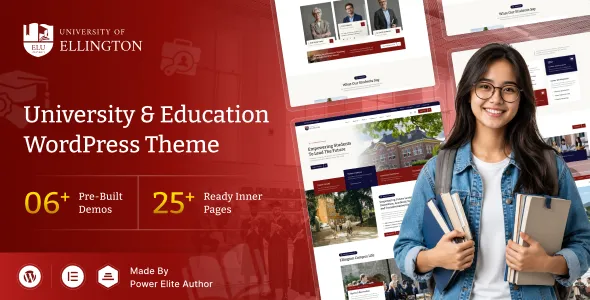
Ellington – University Education WordPress Theme
Ellington – University Education WordPress Theme is a modern website solution designed for universities, colleges, schools, educational institutions, training centers, and online learning platforms that want to establish a professional and informative online presence. With an education-focused design direction, this WordPress theme can help institutions present academic programs, introduce faculty members, share campus information, publish important announcements, and communicate effectively with prospective students, current learners, parents, and alumni. Whether you are creating a website for a higher education institution, a private college, an academic department, or a specialized learning center, Ellington provides a foundation for developing an organized and visually appealing education website.
An educational website plays an important role in shaping how students and families perceive an institution. Visitors often look for admission requirements, available courses, tuition information, campus facilities, academic calendars, and contact details before deciding to apply. Ellington – University Education WordPress Theme is intended for institutions that want to bring this essential information together in a clear and accessible online environment. By organizing academic content into dedicated sections and maintaining a consistent visual presentation, your website can help visitors explore educational opportunities and understand what your institution offers.
Introduction to Ellington – University Education WordPress Theme
The Ellington – University Education WordPress Theme is suited to educational organizations that need a website capable of communicating academic credibility while remaining welcoming to a broad audience. University websites typically serve several groups at once, including prospective students, enrolled students, parents, teaching staff, administrative teams, researchers, and graduates. Each audience has different priorities, so a successful website should make important information easy to locate without overwhelming visitors with unnecessary complexity.
An education-focused WordPress theme provides a useful starting point for building this kind of digital experience. Institutions can organize their content around academic departments, degree programs, admissions, campus life, research activities, faculty profiles, events, and student resources. With an appropriate configuration, Ellington can be adapted to match an institution’s branding, communication goals, and information architecture.
WordPress also offers a familiar content management environment for maintaining website pages, publishing articles, updating announcements, and managing other digital content. This can be particularly useful for educational organizations where information changes throughout the academic year. Instead of relying on static information that becomes outdated, administrators can update relevant pages as admission periods, course offerings, events, and institutional priorities change.
Modern Design for Educational Institutions
A university website should communicate trust, clarity, and academic professionalism from the first visit. Its design needs to support the institution’s identity while helping users understand where to go next. Ellington – University Education WordPress Theme provides an education-oriented foundation that can be customized to reflect a university’s visual identity and communication style.
A well-structured educational website may combine welcoming introductory sections, informative content blocks, academic highlights, photographs, and clear navigation. These elements can help visitors understand the institution’s educational environment without requiring them to search through multiple unrelated pages. When used thoughtfully, visual hierarchy makes important information easier to recognize and encourages visitors to explore additional sections.
Institutions can personalize the website with their own logo, brand colors, typography, campus photographs, department information, and academic messaging. A consistent presentation across pages helps establish recognition and creates a more unified browsing experience.
The overall design should also accommodate different types of educational content. A page introducing a university may require a broad overview, while a department page may focus on specific academic subjects, faculty members, facilities, and research opportunities. A suitable page structure allows these different content types to coexist while maintaining a consistent design language.
Ideal for Universities and Colleges
Ellington – University Education WordPress Theme can serve as a starting point for a range of educational websites. Its suitability depends on the institution’s content requirements, chosen plugins, theme configuration, and the functionality included in the version being used.
University Websites
Universities need to communicate a broad range of information, from institutional history and academic leadership to departments, research initiatives, student services, and admission procedures. A university website can use Ellington to organize these resources into logical sections that help visitors understand the institution and discover relevant opportunities.
Dedicated pages can introduce the university, explain its academic philosophy, highlight campus facilities, and present information about student life. Additional sections can direct visitors toward admissions, academic departments, research resources, and official contact channels.
College Websites
Colleges often need a professional online presence that presents their programs, faculty, facilities, and application process. Ellington can provide a foundation for creating a college website that introduces the institution and makes essential academic information available to students and parents.
College administrators can develop pages for undergraduate programs, postgraduate opportunities, departments, student activities, examinations, and campus updates. Organizing these resources clearly can make the website more useful throughout the academic year.
Academic Departments
Individual faculties and academic departments may require websites that focus on a specific field of study. Departments can present their educational objectives, faculty members, curriculum information, research interests, facilities, and student achievements.
A department-focused website can also include academic notices, seminar announcements, research updates, and links to relevant institutional resources. These pages help students and researchers understand the department’s activities and areas of expertise.
Training Centers and Learning Institutes
Professional training centers, coaching institutes, certification providers, and specialized learning organizations can use an education-oriented WordPress design to explain their programs and services.
Their websites may include training descriptions, instructor biographies, schedules, enrollment information, frequently asked questions, and contact forms. Depending on the required functionality, suitable plugins can extend the website to support additional learning or registration workflows.
Online Education Platforms
Organizations that offer digital courses may need pages for course descriptions, instructor introductions, learning pathways, and enrollment information. Ellington can serve as a presentation layer for such a website, while a compatible learning management system may be required for structured lessons, student accounts, assessments, certificates, or course progress tracking.
Specific learning management features should be confirmed before implementation rather than assumed to be included in the theme itself.
Academic Program and Course Presentation
Academic programs are among the most important parts of an educational website. Prospective students want to understand what they can study, what each program covers, which qualifications are required, and how to apply. A clear course information structure helps institutions answer these questions in an accessible format.
With a suitable page structure, Ellington – University Education WordPress Theme can be customized to present undergraduate degrees, postgraduate programs, professional certifications, research opportunities, and other academic offerings.
Dedicated Course Pages
Individual course pages can provide detailed information about each academic offering. Depending on the institution, these pages may explain program objectives, eligibility criteria, duration, curriculum structure, teaching methods, assessment procedures, and potential career pathways.
Clear headings and descriptive text help students scan the information and identify the details most relevant to their goals. Course pages can also include links to related departments, faculty profiles, application instructions, and official academic policies.
Program Categories
Institutions with many courses can organize them into categories such as business, engineering, science, technology, arts, humanities, medicine, education, and social sciences. The categories should reflect the institution’s actual academic structure.
A logical classification system makes it easier for prospective students to compare related programs and discover subjects they may want to study. Institutions can also provide search or filtering functionality when appropriate plugins or custom development support these features.
Program Information and Entry Requirements
Course information should be accurate, current, and easy to understand. Institutions can use dedicated sections to explain prerequisites, application deadlines, required documents, available study modes, and other relevant requirements.
Because academic policies may change, administrators should maintain these pages regularly and link to official documentation when more detailed information is necessary.
Admissions and Enrollment Information
The admissions process is a major reason visitors arrive at a university website. Students need a straightforward path from discovering a program to understanding the application process. A well-organized admissions section can reduce confusion and help prospective applicants take the appropriate next step.
Ellington can be adapted to present admission-related information in a dedicated area of the website. Institutions can structure this section around application steps, eligibility, important dates, documentation, fees, financial assistance, and contact information for the admissions office.
Application Process
A dedicated admissions page can explain how students should apply, which forms they need to complete, and how supporting documents should be submitted. Numbered steps, concise explanations, and clearly labeled links make complex procedures easier to follow.
If the institution accepts applications online, a suitable form solution or admissions platform may be integrated where supported. The selected system should be tested to ensure that submissions reach the correct administrative team and that applicant information is handled appropriately.
Important Admission Dates
Application periods, entrance examinations, interviews, counseling sessions, and enrollment deadlines should be easy to find. Institutions can publish these details through announcements, calendar pages, or event listings, depending on their website setup.
Clearly presenting dates can help applicants plan ahead and reduce repeated inquiries to administrative staff.
Tuition and Financial Information
Students and families often need information about tuition, additional fees, scholarships, grants, and payment arrangements. An organized financial information section can explain the institution’s published policies and guide visitors toward the relevant administrative department.
All financial details should be verified by the institution before publication. If costs vary by program or student category, the website should explain those differences rather than presenting incomplete figures.
Faculty and Academic Staff Profiles
Faculty members contribute to an institution’s academic reputation and help prospective students understand the people behind its programs. Dedicated staff profiles provide a useful way to present academic expertise, teaching responsibilities, research interests, and professional achievements.
With appropriate page customization, Ellington – University Education WordPress Theme can support a structured presentation of faculty and staff information.
Individual Faculty Pages
A faculty profile may include the person’s name, professional photograph, academic title, qualifications, department, research interests, publications, and official contact details. These details should be published with the institution’s approval and kept up to date.
Individual profiles make it easier for students to learn about instructors and identify faculty members whose academic interests align with their own.
Department-Based Staff Listings
Universities can group faculty members by school, faculty, or department. This organization helps visitors navigate large academic teams and discover the staff responsible for particular courses or research areas.
Where appropriate, department pages can link directly to individual biographies, academic publications, research projects, and official institutional profiles.
Academic Achievements
Faculty achievements can be highlighted through news articles, research summaries, award announcements, and publication information. These updates help demonstrate the institution’s ongoing academic activities and give visitors a clearer understanding of its expertise.
Campus Life and Student Experience
Choosing an educational institution involves more than comparing courses. Prospective students may also want to learn about campus facilities, student organizations, sports, cultural activities, accommodation, libraries, and support services.
An engaging campus life section can help present these aspects of the institution. Ellington can be customized with informative pages, photographs, announcements, and other content that reflects the real student experience.
Campus Facilities
Institutions can introduce libraries, laboratories, lecture halls, computer facilities, recreation areas, cafeterias, student centers, and other available resources. Each facility page can explain its purpose, location, accessibility, and relevant usage information.
Authentic photographs and accurate descriptions are especially useful because they help visitors develop a realistic understanding of the campus.
Student Clubs and Activities
Student clubs, academic societies, sports teams, cultural organizations, and volunteer programs contribute to campus life. Dedicated pages can describe these opportunities and explain how students can participate.
Institutions can also publish updates about competitions, festivals, workshops, student projects, and extracurricular achievements.
Student Support Services
Information about academic advising, counseling, accessibility support, career guidance, accommodation, and student welfare should be organized carefully. A clear student services section helps current and prospective students identify available support and locate the appropriate contact information.
News, Announcements, and Academic Updates
Educational institutions communicate regularly with their communities. They may publish examination schedules, admission notices, scholarship announcements, research news, faculty achievements, campus updates, and changes to academic policies.
WordPress provides a content publishing environment that can help administrators maintain these updates. Ellington can be configured to present relevant news and announcements in a consistent format, depending on its available layouts and the site’s setup.
University News
News articles can highlight institutional developments, academic achievements, research projects, partnerships, student accomplishments, and major events. Each article should have a descriptive title, a clear introduction, and relevant supporting information.
Organizing articles into suitable categories can help visitors distinguish general university news from department-specific updates and student announcements.
Notices and Important Announcements
Important notices should be easy to identify and access. Institutions can create dedicated pages for examination notices, registration updates, holidays, timetable changes, and administrative announcements.
Time-sensitive notices should include publication dates and, where necessary, expiration or replacement information. This helps prevent visitors from relying on outdated instructions.
Research and Academic Publications
Universities involved in research can use their websites to communicate discoveries, ongoing projects, conferences, publications, and collaborative initiatives. Research content should be accurate and should link to official publications or project pages when possible.
These resources can support communication with students, researchers, prospective collaborators, alumni, and the wider academic community.
Events and Academic Calendars
Events are an important part of campus communication. Universities and colleges may organize orientations, lectures, workshops, seminars, conferences, career fairs, cultural festivals, examinations, and graduation ceremonies.
Ellington can be adapted to present event information through dedicated pages or compatible event-management functionality.
Event Listings
An event listing can include the title, date, time, venue, description, organizer, and registration instructions. If an event is available online, the page can also provide the relevant meeting or streaming information through an approved link.
Consistent event details make it easier for students, staff, and visitors to understand what is happening and decide whether to participate.
Academic Calendar
A calendar section can present semester dates, examination periods, registration windows, holidays, and other major academic milestones. A suitable calendar plugin may be necessary for interactive calendars or advanced scheduling features.
The institution should ensure that the published calendar matches its official academic schedule and that changes are communicated promptly.
Event Registration
If visitors need to register for workshops, conferences, campus tours, or open days, an appropriate form or event-management plugin can provide the required workflow. Before launch, the institution should verify confirmation messages, capacity limits, attendee records, and any payment or cancellation processes.
These capabilities depend on the selected integrations and are not guaranteed by a theme alone.
Responsive Design for Modern Browsing
Students, parents, and faculty members may visit an educational website from desktop computers, laptops, tablets, and smartphones. A responsive layout helps content adapt to different screen sizes and makes essential information more accessible to users on the move.
Ellington – University Education WordPress Theme is positioned for an education website, but its actual responsive behavior should be checked using the current theme demo and installed version. During setup, administrators should test navigation menus, text readability, images, forms, course information, and calls to action across common device sizes.
Mobile usability is especially important for admissions pages and contact forms. Small buttons, crowded layouts, or difficult-to-read instructions can make it harder for prospective students to complete essential tasks. Appropriate spacing, readable typography, and simple navigation help create a smoother experience.
Responsive design should also be considered when adding plugins, custom page sections, large images, and third-party forms. A layout that works well before customization may need further testing after new elements are introduced.
Customization and Institutional Branding
Every educational institution has its own identity, academic priorities, and communication requirements. A school, university, business college, and professional training center should not necessarily present themselves in the same way.
Ellington provides a starting point for building an education website that reflects an institution’s individual character. The extent of available customization depends on the theme’s included settings, supported page builder, WordPress configuration, and any additional tools installed.
Logo and Brand Colors
The institutional logo and color palette help establish a recognizable visual identity. Administrators can align the website with official brand guidelines, including approved colors, logo variations, and typography.
Brand consistency across the header, buttons, headings, links, and footer creates a more professional presentation.
Typography and Readability
Educational websites often contain detailed information, including program requirements, academic policies, faculty biographies, and admission instructions. Typography should support comfortable reading across short and long pages.
A suitable font size, clear heading hierarchy, readable line spacing, and sufficient contrast can make the content easier to understand. Decorative fonts should be used selectively so that important academic information remains legible.
Page Layouts and Content Sections
Different pages require different structures. A homepage may emphasize the institution’s identity and major academic opportunities, while an admissions page may prioritize deadlines and application instructions.
A department page may need faculty profiles, program listings, and research highlights. A campus life page may benefit from photography and practical information about facilities and student services.
Organizing each page around its main purpose helps visitors find relevant information quickly.
WordPress Content Management
WordPress is widely used to manage websites because it provides an administrative interface for creating pages, publishing posts, and organizing content. For educational organizations, this can simplify the process of keeping website information current.
With an appropriate configuration, website administrators can update course descriptions, faculty biographies, institutional news, event details, announcements, and other information without rebuilding the entire site for every change.
Organized Website Content
A clear content structure helps administrators maintain a consistent website as the institution grows. Core pages can be organized around admissions, academics, departments, research, campus life, news, events, and contact information.
The institution should establish an editorial process that defines who can publish content, who reviews important announcements, and how outdated information is archived or removed.
Multiple Contributors
Larger institutions may have separate teams responsible for admissions, communications, academic departments, student services, and research. WordPress user roles and permissions can help control who may edit or publish content, subject to the installed configuration and institutional policies.
Content approval procedures are particularly important for official announcements, academic policies, fee information, and other sensitive or frequently updated material.
Content Maintenance
Regular maintenance helps keep an educational website reliable. Administrators should review links, update staff details, verify deadlines, remove expired notices, and check that program descriptions match current institutional information.
A planned content review process can prevent outdated pages from creating confusion for students and applicants.
SEO-Friendly Content Structure
Search engine optimization can help prospective students discover an institution’s programs and resources through relevant search queries. A well-organized website provides a foundation for creating useful content that search engines can understand and users can navigate.
Ellington – University Education WordPress Theme can be part of an SEO strategy, but search performance depends on many factors beyond the theme, including content quality, technical configuration, competition, site speed, internal linking, and external authority.
Relevant Academic Keywords
Institutions should identify the terms their audiences are likely to use. These may include the institution’s name, location, department names, degree titles, subject areas, admission information, and specific educational opportunities.
Keywords should be included naturally in page titles, headings, descriptions, and useful body content. Repeating the same phrase excessively can make pages less readable and does not guarantee better rankings.
Descriptive Page Titles and Meta Descriptions
Each important page should have a distinct, descriptive title and a useful meta description. For example, a department page can explain the subject area and academic opportunities, while an admissions page can summarize application information.
An SEO plugin may be used to manage metadata, XML sitemaps, canonical settings, and other search optimization options when appropriate.
Internal Linking
Internal links connect related pages and help users move through the website. A course page can link to its department, faculty profiles, admissions instructions, and related programs. News articles can link to relevant research projects or institutional pages.
A logical internal linking structure improves discoverability and makes the website more useful to visitors.
Structured Information
Clear headings, descriptive URLs, meaningful image alt text, and well-organized content help support accessibility and search engine understanding. Structured data may also be relevant for certain content types, depending on the implementation and applicable search guidelines.
No WordPress theme can guarantee indexing, rankings, or search traffic. Results depend on the quality of the website and how it is maintained and promoted.
Website Performance and Loading Experience
Website performance matters because visitors expect educational information to load efficiently. Slow pages can make it difficult to explore programs, complete forms, and access important announcements, particularly on mobile connections.
The actual performance of an Ellington website will depend on the theme implementation, hosting environment, image sizes, installed plugins, caching configuration, third-party scripts, and overall page complexity.
Optimized Images
Campus photography, academic banners, faculty portraits, and event galleries can improve the visual experience, but large image files may increase loading times. Images should be resized appropriately and compressed while maintaining acceptable quality.
Modern image formats, responsive image sizes, and lazy loading where suitable can help reduce unnecessary data transfer.
Caching and Hosting
A suitable hosting environment and properly configured caching can contribute to a more responsive website. Administrators should evaluate hosting resources based on expected traffic, website size, plugin requirements, and any learning or registration systems in use.
Performance tools can help identify slow pages, oversized assets, and scripts that delay rendering. Changes should be tested to ensure they do not interfere with important forms or interactive functionality.
Lightweight Page Design
Using a clear content hierarchy and avoiding unnecessary visual effects can help maintain a more efficient browsing experience. Every additional plugin, animation, embedded service, and custom script should serve a clear purpose.
Regular performance checks are useful after major design changes, plugin installations, or WordPress updates.
Accessibility and Inclusive Education
An educational website should be usable by as many visitors as reasonably possible, including people who use assistive technologies or navigate primarily with a keyboard. Accessibility also improves the experience for users on mobile devices and people viewing content under different conditions.
The theme’s accessibility should be evaluated rather than assumed. Institutions can improve usability by using descriptive headings, sufficient color contrast, meaningful link text, appropriate image alternatives, and clearly labeled form fields.
Navigation should be predictable, and interactive elements should be usable with a keyboard where applicable. Video and audio resources should include captions or transcripts when appropriate, while downloadable documents should be made accessible whenever possible.
Forms should explain required information and identify errors clearly. Important academic announcements should not rely solely on color or images to convey meaning.
Institutions should test the complete website, including menus, plugins, forms, and custom content, because accessibility depends on the implementation as a whole.
Security and Website Reliability
University and college websites are public-facing resources that need ongoing maintenance. Even when a website mainly publishes information, it may include contact forms, user accounts, event registration, or integrations that require careful handling.
Security depends on the complete website environment, not only the theme. Administrators should use reputable hosting, keep WordPress and supported components updated, choose trusted plugins, and follow suitable access-control practices.
Regular backups can help recover website content if an update or configuration change causes problems. Updates should be tested when possible, particularly on websites with custom functionality or important enrollment workflows.
If the site collects personal information through inquiry forms or registration systems, the institution should publish an appropriate privacy notice and follow applicable data-protection requirements. Access to submitted information should be limited to authorized personnel.
A maintenance plan should include monitoring, backups, software updates, broken-link checks, and periodic testing of important website functions.
Integration with Useful WordPress Plugins
WordPress plugins can extend a website beyond its core theme functionality. Educational institutions may need different integrations depending on whether their website focuses on institutional information, course promotion, student registration, or online learning.
Compatibility should always be checked before installing a plugin. The theme version, WordPress version, plugin requirements, and any existing customizations can affect how integrations behave.
Learning Management Systems
An LMS can support online courses, structured lessons, student enrollment, quizzes, assessments, and learning progress. If these functions are required, the institution should select a compatible learning management solution and verify how it integrates with the website.
A theme may provide the visual presentation for course-related pages without including the complete functionality of an LMS.
Contact and Inquiry Forms
Contact forms allow prospective students, parents, staff, and other visitors to ask questions. Institutions may create separate forms for admissions inquiries, course information, campus visits, partnerships, and general communication.
Forms should request only necessary information and should be tested for successful delivery, spam protection, confirmation messages, and mobile usability.
Event Management
Event plugins can support event calendars, registration workflows, and event details where these functions are needed. Before choosing an integration, administrators should confirm whether it supports the required registration rules and whether it works with the site’s design.
SEO and Analytics Tools
SEO plugins can assist with metadata and technical search settings. Analytics tools may help administrators understand which pages visitors use, how users arrive at the website, and which content receives attention.
Analytics should be configured responsibly, with suitable privacy disclosures and consent mechanisms where required.
Backup and Security Tools
Backup and security plugins can complement hosting-level protection and maintenance procedures. They should be selected carefully to avoid overlapping functions or unnecessary performance overhead.
The current theme documentation and plugin documentation should be consulted before implementation.
User Experience and Website Navigation
An effective university website helps visitors complete common tasks with minimal effort. Prospective students should be able to discover programs and admission instructions, while current students should be able to locate calendars, notices, and support resources.
Ellington can be customized around the institution’s most important user journeys. Navigation labels should use familiar language, and major sections should be grouped logically.
A practical menu might include About, Academics, Admissions, Campus Life, Research, News and Events, Student Resources, and Contact. The exact structure should reflect the institution’s size and priorities.
Important actions, such as exploring programs, applying for admission, contacting the institution, or registering for an event, should be easy to identify. Calls to action should use descriptive wording so visitors understand what will happen when they select them.
Search functionality may be helpful for large websites with many academic departments and documents. If the default search experience is insufficient, an appropriate plugin or custom implementation can be considered.
Suitable for Small and Large Educational Organizations
Educational websites vary significantly in scale. A small college may need only a homepage, an about page, a few program pages, an admissions section, and contact details. A large university may require hundreds of pages across faculties, research centers, student services, and administrative departments.
Ellington can provide a starting point for either type of project, provided that the chosen setup supports the institution’s requirements. The design and content architecture should be planned around the actual volume of information rather than simply adding more pages over time.
For smaller institutions, a focused website with concise information may be sufficient. For larger organizations, consistent templates, content ownership, search functionality, and governance procedures become increasingly important.
Before launch, administrators should evaluate whether the theme and the wider WordPress setup can support the anticipated page structure, traffic, integrations, and maintenance workload.
Benefits of an Education-Focused WordPress Theme
Choosing a theme designed around educational content can make it easier to plan a university website than starting with a completely unrelated design. The key advantage is the ability to organize institutional information around common educational needs.
Potential benefits of using Ellington include:
- A foundation for a professional university or college website.
- A structured way to present academic programs and departments.
- Opportunities to introduce faculty members and institutional leadership.
- Dedicated content areas for admissions and student resources.
- A platform for publishing university news and announcements.
- Flexible content management through WordPress.
- Opportunities to customize colors, typography, imagery, and page content.
- Potential integration with suitable forms, event tools, and learning platforms.
- A starting point for developing an institution-specific search optimization strategy.
- A website structure that can evolve as institutional communication needs change.
These benefits depend on the theme’s actual functionality, configuration, supporting plugins, and the quality of the implementation. Buyers should review the live demo, included documentation, and current feature list before making a purchasing decision.
Who Should Choose Ellington – University Education WordPress Theme?
Ellington may be worth considering for organizations that want to create an education-oriented website using WordPress. It can be evaluated by universities, colleges, academic departments, private education providers, training centers, and organizations that publish educational information.
It may also be useful for web designers and development agencies building websites for education-sector clients. A dedicated educational design direction can provide a starting point for presenting academic programs, staff profiles, admission information, and campus resources in a consistent format.
The theme may be less suitable as a complete solution when a project requires specialized functionality that has not been confirmed, such as a complex student information system, advanced examination platform, custom application processing, or a fully featured LMS. Such projects may require third-party software, custom development, or a separate institutional platform.
Before choosing the theme, compare its current feature list with the project’s requirements and determine which functions are included and which need additional tools.
Customization Ideas for a University Website
A successful educational website should reflect the institution’s identity rather than looking like a generic template. The following ideas can help shape a more useful and distinctive implementation.
Highlight the Institution’s Main Academic Strengths
The homepage can introduce the institution’s primary programs, notable departments, research areas, or distinctive educational opportunities. These highlights should be based on verified information and should guide visitors toward relevant pages.
Create Clear Admission Pathways
Prospective students should be able to find application instructions without navigating through unrelated content. Use clear links to eligibility requirements, application dates, course details, and admissions contacts.
Use Authentic Campus Photography
Real campus photographs, facilities, classrooms, and student activities can help visitors understand the learning environment. Images should be current, appropriately sized, and used with the necessary permissions.
Keep Academic Information Updated
Course details, faculty profiles, application dates, fees, and policy pages should be reviewed regularly. An editorial calendar can help departments and administrators maintain accurate information.
Prioritize Mobile Visitors
Test the website on smartphones and tablets, especially the admissions process, course pages, contact forms, and navigation menus. Essential actions should remain easy to complete on smaller screens.
Make Student Resources Easy to Find
Important information such as academic calendars, examination notices, support services, and student policies should be organized into clear sections. Existing student portals can be linked where those services are managed separately.
Installation and Setup Considerations
A careful installation process helps establish a stable foundation for the website. Before beginning, confirm the theme’s requirements and follow the instructions provided with the purchased version.
Start by preparing a compatible WordPress installation and taking a backup if the site already contains important information. Install the theme using the recommended process and activate only the plugins needed for the intended website.
If demo content is available, it may help establish an initial layout, but the imported content should be replaced with accurate institutional information. Remove placeholder text, sample contact details, demonstration events, and unrelated images before publishing the site.
Next, configure the logo, colors, menus, page structure, and relevant website settings. Build and review the primary pages, including the homepage, admissions, academic programs, departments, faculty, news, events, and contact information.
Test the site across desktop and mobile devices. Confirm that links work, forms submit correctly, important pages are accessible, and any external integrations function as expected. Review the theme documentation for details about included layouts, supported plugins, and any setup-specific requirements.
Final Thoughts on Ellington – University Education WordPress Theme
Ellington – University Education WordPress Theme offers an education-focused starting point for creating a website that introduces an institution, presents academic opportunities, and communicates with students and other visitors. A carefully planned implementation can bring together program information, admissions guidance, faculty profiles, campus resources, research updates, news, and events in one organized online destination.
Its value for a particular project will depend on the included features, available customization options, compatibility with the selected WordPress environment, and the additional functionality the institution requires. Reviewing the current demo and documentation before installation is the best way to confirm whether it meets those needs.
For universities, colleges, academic departments, and training organizations seeking a WordPress-based web presence, Ellington can be considered as part of a broader website strategy focused on clear communication, accessible information, consistent branding, and maintainable content.
By combining a suitable education-oriented design with accurate academic content, thoughtful navigation, responsible maintenance, and carefully selected integrations, an institution can develop a website that supports prospective students, serves its existing community, and presents its educational mission professionally.


