My Account
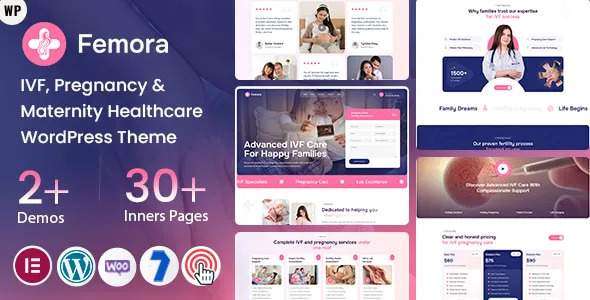
Femora – IVF, Pregnancy & Maternity Healthcare WordPress Theme
Femora – IVF, Pregnancy & Maternity Healthcare WordPress Theme is a specialized website design solution for fertility clinics, IVF centers, maternity hospitals, pregnancy care providers, gynecology practices, and healthcare professionals who want to establish a professional online presence with WordPress. Healthcare websites play an important role in helping patients understand available services, explore treatment information, learn about medical professionals, and find convenient ways to contact a healthcare provider. Femora offers a potential foundation for creating a welcoming and informative website focused on fertility, pregnancy, maternity, and women’s healthcare.
People looking for fertility or maternity services often need clear information before contacting a clinic. They may want to understand available consultations, explore the experience of healthcare professionals, review clinic facilities, or learn how to arrange an appointment. A well-organized website can make this information easier to access while presenting the clinic in a professional and reassuring way.
Femora can be considered for healthcare projects that need dedicated sections for medical services, doctor profiles, clinic information, educational articles, and patient inquiries. Its final layouts and functionality depend on the installed theme version, available customization options, and compatible WordPress plugins. By combining a suitable design with accurate medical information, accessible navigation, and responsible communication, healthcare providers can create a website that supports patient awareness and clinic communication.
What Is Femora IVF, Pregnancy & Maternity Healthcare WordPress Theme?
Femora is a healthcare-focused WordPress theme intended for websites related to fertility treatment, IVF services, pregnancy care, maternity support, and women’s health. It provides a potential design foundation for clinics and medical organizations that need to explain their services and make essential information accessible to visitors.
An IVF clinic may need to introduce fertility consultations, explain its treatment approach, provide information about medical specialists, and share clinic contact details. A maternity hospital may prioritize pregnancy care, childbirth services, prenatal consultations, and postnatal support. A gynecology practice may require pages covering women’s health consultations, preventive care, and specialist services.
Femora can be evaluated for these different website requirements. Its healthcare-oriented positioning makes it relevant to organizations that want their website content to focus on patients and medical services rather than general business promotion.
WordPress provides content management tools for publishing pages, updating articles, organizing media, and maintaining navigation menus. The exact editing experience, templates, appointment functionality, and customization controls available with Femora should be confirmed through the current product demo and official documentation before installation.
Designed for IVF Clinics and Fertility Centers
IVF clinics need websites that communicate medical services clearly and help prospective patients understand how to begin the consultation process. Fertility-related decisions can involve many questions, so a website should provide accurate, organized, and easy-to-understand information.
Femora can serve as a starting point for an IVF clinic website with sections for clinic introductions, fertility consultations, treatment information, specialist profiles, frequently asked questions, and appointment inquiries.
A clinic may use dedicated pages to explain its services, such as fertility assessments, IVF consultations, reproductive health evaluations, and other procedures offered by its qualified medical team. Each page should describe the service in clear language and avoid suggesting that a particular treatment is suitable for every patient.
Information about the clinic’s medical professionals can also help visitors understand the expertise available. Doctor profiles may include qualifications, professional experience, areas of practice, and consultation details, provided that all information is accurate and authorized for publication.
A clear contact section can guide visitors toward the next step, whether that involves requesting an appointment, asking a general question, or contacting the clinic directly.
Website Solution for Pregnancy Care Providers
Pregnancy care providers need websites that communicate services and practical information to expectant parents. Visitors may be searching for prenatal consultations, routine pregnancy monitoring, maternity services, or information about preparing for childbirth.
Femora can be considered for pregnancy care websites that organize these services into accessible sections. A dedicated pregnancy care page can introduce the clinic’s approach, explain the types of consultations offered, and provide relevant contact information.
Healthcare providers can publish general educational content about prenatal visits, pregnancy nutrition, routine monitoring, and preparation for maternity care. Such content should be reviewed by qualified medical professionals and should not replace individual medical advice.
A pregnancy care website can also include information about clinic facilities, available specialists, consultation schedules, and patient support services. Visitors should be able to find important information without navigating through unnecessary pages.
The overall communication should remain supportive, respectful, and medically responsible. Avoiding unrealistic promises and providing clear explanations helps create a more trustworthy online experience.
Suitable for Maternity Hospitals and Women’s Healthcare Clinics
Maternity hospitals and women’s healthcare centers often provide a variety of services that need to be presented in a structured way. These may include pregnancy consultations, maternity care, gynecology services, preventive health checkups, and postnatal support.
Femora can be evaluated as a WordPress foundation for organizations that want to introduce these services through dedicated pages. A maternity hospital may prioritize its facilities, medical departments, doctors, and patient information, while a smaller clinic may focus on consultations and specialist care.
A well-organized homepage can introduce the healthcare organization and direct visitors toward important sections. Service pages can provide more detailed explanations, while doctor profiles can introduce the professionals responsible for patient care.
A contact page should provide accurate clinic details, including the address, telephone number, email address, and relevant appointment information. If the organization has multiple branches, each location should have its own clearly presented details.
Professional Homepage for Healthcare Websites
The homepage is often the first point of contact between a healthcare organization and a potential patient. It should communicate the clinic’s purpose and make important information easy to locate.
A Femora-based website can be organized around an introductory section, healthcare services, medical professionals, clinic information, patient resources, and contact opportunities, depending on the available theme layouts.
The opening section should clearly identify the organization and the type of healthcare services it provides. Supporting content can introduce the clinic’s approach and guide visitors toward relevant service pages.
Service summaries can help visitors understand the main areas of care. Doctor introductions may provide additional context about the medical team, while clinic information can explain facilities and consultation arrangements.
A homepage should not attempt to provide every medical detail. Its purpose is to introduce the organization and guide visitors toward more specific information. Dedicated pages can explain services in greater depth without overwhelming the main page.
Dedicated Pages for IVF and Fertility Services
Fertility clinics may offer multiple services, each requiring clear explanations and accurate medical information. Organizing these services into individual pages can help visitors understand the available options.
Femora can be considered for websites that need dedicated sections for fertility consultations, IVF information, reproductive health assessments, and other services offered by the clinic.
Each service page should explain the purpose of the consultation or procedure, the professionals involved, and how visitors can request further information. Medical explanations should be written or reviewed by qualified healthcare professionals.
It is important to distinguish general educational information from individual treatment recommendations. Fertility care varies according to personal medical circumstances, and website content should not imply that a particular procedure guarantees pregnancy or a specific outcome.
A clear structure helps patients locate relevant information and prepare questions for a consultation. It also allows clinics to keep service descriptions organized and easier to update.
Doctor Profiles and Medical Team Presentation
Medical professionals are an important part of a healthcare organization’s identity. Patients may want to learn about a doctor’s qualifications, professional experience, specialization, and consultation availability before making contact.
Femora can provide a potential foundation for introducing doctors and healthcare teams through dedicated profile sections or pages, depending on the theme’s available layouts.
A useful doctor profile may include the professional’s name, verified qualifications, area of practice, relevant experience, and clinic consultation information. Professional photographs can make the presentation more personal, provided that the images are current and authorized for use.
Healthcare organizations should ensure that all credentials and professional claims are accurate. Profiles should not exaggerate experience or suggest qualifications that the practitioner does not hold.
A well-organized team section helps visitors understand the people responsible for providing care and gives the clinic an opportunity to communicate its professional standards.
Pregnancy, Prenatal, and Postnatal Information
Pregnancy care often involves different stages, from early consultations to postnatal support. A healthcare website can organize general information around these stages so visitors can find relevant resources more easily.
Femora can be evaluated for websites that publish educational sections covering prenatal appointments, routine pregnancy monitoring, preparation for delivery, maternity services, and postnatal consultations.
An educational article might explain what patients can generally expect during a prenatal visit. Another page could introduce the maternity services available at a particular hospital or clinic.
Postnatal content may cover general information about recovery, follow-up appointments, and available support services. All medical content should be reviewed by qualified professionals and should encourage readers to seek individual advice when appropriate.
These resources can make a clinic website more useful beyond its service descriptions. They also provide an opportunity to answer common questions in a clear and accessible format.
Patient-Friendly Navigation and Website Structure
Healthcare websites should make essential information easy to find. Visitors may be accessing the website while looking for a particular service, doctor, clinic location, or contact number.
When configuring Femora, website owners should prioritize a simple navigation structure. Common sections may include Home, About Us, Services, Doctors, Pregnancy Care, IVF Information, Blog, and Contact, depending on the organization’s requirements.
Important information should not be hidden behind complicated navigation. Appointment details, clinic addresses, and telephone numbers should be accessible from relevant pages.
Service descriptions should use clear language and avoid unnecessary medical jargon. When technical terminology is required, it should be explained in a way that general visitors can understand.
Consistent navigation across desktop and mobile devices helps visitors move between pages without confusion. A practical structure also makes the website easier for clinic staff to maintain.
Appointment Inquiries and Contact Forms
Making contact with a healthcare provider should be straightforward. Visitors may want to request a consultation, ask about available services, or obtain general clinic information.
Femora can be configured with contact opportunities through supported layouts, buttons, and compatible WordPress form plugins. Depending on the installed setup, a clinic may include a general inquiry form, consultation request form, or appointment-related contact section.
A basic inquiry form may collect a patient’s name, contact information, preferred consultation details, and a short message. However, healthcare organizations should avoid collecting unnecessary medical information through ordinary website forms.
Sensitive health information requires appropriate privacy, security, access controls, and handling procedures. Clinics should use suitable systems designed for patient information when collecting or managing medical records.
Contact forms should include clear instructions, appropriate consent language where required, and a confirmation message after submission. Website owners should test form delivery and ensure that inquiries reach the correct staff members.
If online appointment booking is required, the clinic should verify whether a compatible scheduling plugin or external booking platform is needed. The theme itself should not be assumed to include a complete appointment management system without checking its documentation.
Healthcare Branding and Visual Customization
A healthcare website should communicate professionalism, clarity, and a welcoming environment. Its visual identity needs to support patient confidence without relying on exaggerated promotional language.
Depending on the current version and supported tools, Femora may provide customization options for colors, typography, layouts, spacing, images, and other presentation elements. The exact controls should be verified in the official documentation.
A fertility clinic may prefer a calm and organized visual presentation, while a maternity hospital might use warm photography and clearly structured service sections. A women’s healthcare center may choose a consistent visual style that supports its broader range of services.
Color choices should maintain suitable contrast so that text remains readable. Typography should be comfortable for visitors across different devices, and important buttons should be visually recognizable.
Images should be relevant to the clinic and its services. Authentic facility photographs, professional team portraits, and carefully selected healthcare visuals can help visitors understand the organization. All photographs should be used with appropriate permission and should respect patient privacy.
Responsive Design for Mobile, Tablet, and Desktop
Many people use smartphones to search for nearby healthcare providers, check clinic information, and contact medical practices. A healthcare website should therefore remain convenient across different screen sizes.
Femora is positioned as a WordPress theme for modern healthcare websites, where responsive presentation is an important consideration. A responsive layout should adapt to the available screen space while keeping information readable and accessible.
On mobile devices, service descriptions should remain easy to read, contact information should be visible, and navigation menus should be straightforward to operate. Buttons and form fields should be comfortable to select.
Responsive testing should cover the entire website rather than only the homepage. Doctor profiles, service pages, blog articles, image sections, and contact forms may each require separate adjustments.
Custom CSS, third-party widgets, embedded media, and additional plugins can affect the mobile experience. Testing after major design changes helps identify layout issues before the website goes live.
SEO-Friendly Structure for Healthcare Websites
Search engine optimization helps search engines understand website content and can improve the opportunity for relevant pages to appear in search results. A healthcare theme can provide a useful design foundation, but SEO performance depends on content quality, technical configuration, competition, and other factors.
A practical SEO strategy begins with a logical website structure. Each page should have a descriptive title, a clear heading hierarchy, useful content, and a specific purpose.
A fertility clinic may create separate pages for important services rather than placing every offering on one general page. A maternity hospital can organize content around its departments and patient services, while a gynecology practice can publish relevant information about its areas of care.
Local SEO is particularly relevant to clinics serving specific cities or regions. Website owners should maintain accurate clinic addresses, telephone numbers, business hours, and location information. Consistent business details across relevant online platforms can help visitors identify the correct organization.
Descriptive URLs and internal links help connect related pages. For example, an educational article about fertility consultations can link to the relevant clinic service page.
Images should have suitable file sizes and meaningful alternative text where appropriate. Compatible SEO plugins may assist with metadata, XML sitemaps, canonical settings, and other supported tasks.
Healthcare content requires particular attention to accuracy and credibility. Medical articles should be reviewed by qualified professionals, avoid unsupported treatment claims, and include appropriate context. No theme can guarantee search rankings or patient inquiries.
WordPress Blogging and Patient Education
A healthcare blog can provide useful educational information and help clinics answer common questions from visitors. WordPress offers publishing tools that allow healthcare organizations to create articles and organize them into relevant categories.
Femora can be considered for websites that want to combine clinic information with educational content. The exact blog layouts and archive options depend on the installed theme version and available templates.
An IVF clinic might publish general articles about fertility consultations, reproductive health, and questions patients can discuss with their specialists. A maternity hospital could provide educational content about prenatal visits, pregnancy care, childbirth preparation, and postnatal support.
A gynecology practice may publish articles about routine consultations, preventive care, and general women’s health awareness.
All medical articles should be written or reviewed by appropriately qualified healthcare professionals. Content should provide general education rather than diagnose conditions or recommend individualized treatment. Readers should be encouraged to consult a qualified medical professional for personal concerns.
A consistent publishing schedule can help maintain an informative resource library. Focus on accuracy, clarity, relevance, and responsible medical communication rather than publishing large amounts of repetitive content.
Accessibility and Readable Healthcare Content
Accessibility is especially important for healthcare websites because visitors may have different visual, physical, and cognitive needs. Clear content and practical navigation help make medical information easier to access.
When configuring Femora, use logical heading structures, readable font sizes, suitable color contrast, descriptive links, and meaningful alternative text for informative images. Form fields should have clear labels, and error messages should explain how to correct missing information.
Navigation should use familiar wording and remain consistent across pages. Important contact information should be easy to locate, while buttons and links should be visually distinguishable.
Avoid relying only on color to communicate important information. Interactive elements should be usable with appropriate input methods, including keyboard navigation where supported.
Accessibility depends on the theme, the content, and the configuration of individual components. Automated tools can identify some issues, but manual testing and practical usability reviews are also valuable.
Privacy and Responsible Handling of Patient Information
Healthcare organizations should treat patient privacy as an essential part of website planning. A clinic website may collect contact details, appointment requests, or other information that requires careful handling.
Before publishing contact forms or integrating third-party services, determine what information is necessary and how it will be stored, accessed, and protected. Avoid collecting detailed medical histories through basic forms unless the system has been designed and approved for that purpose.
Use HTTPS, reputable hosting, strong administrator passwords, and appropriate user permissions. Review the privacy practices of form plugins, analytics services, appointment platforms, and other integrations.
A privacy policy should explain the types of information collected, the purposes of collection, relevant third-party services, and how visitors can contact the organization about privacy concerns. Healthcare providers should ensure that their website practices comply with applicable privacy and healthcare regulations.
Do not publish patient photographs, testimonials, or treatment stories without appropriate authorization. Protecting confidentiality is essential to maintaining trust.
WordPress Plugins and Healthcare Website Integrations
A healthcare website may need additional WordPress plugins for contact forms, appointment scheduling, SEO, analytics, security, backups, and performance.
Femora should be used with extensions that are compatible with the installed WordPress version and the theme’s documented requirements. Before installing a plugin, review its compatibility information, update history, documentation, support arrangements, and privacy practices.
A contact form plugin may help manage general inquiries. An appointment scheduling system can provide booking functionality when supported by the clinic’s workflow. SEO tools may assist with metadata and sitemap management, while security and backup plugins can support ongoing maintenance.
Healthcare organizations should be particularly careful when selecting plugins that collect or process patient information. A general form plugin should not automatically be treated as a secure medical records or patient management platform.
Avoid installing multiple plugins with overlapping functionality. Too many extensions can increase maintenance work and create compatibility issues.
After adding or updating an integration, test the relevant pages and user journeys. Check contact forms, appointment links, responsive behavior, and the handling of any information submitted by visitors.
Website Performance and Image Optimization
Website speed contributes to a convenient experience, especially for visitors using mobile devices or slower internet connections. Large images, unnecessary scripts, and excessive third-party integrations can affect page loading.
The performance of a Femora website depends on its implementation, hosting environment, media files, theme configuration, plugins, and external services. A healthcare website should balance a welcoming visual presentation with practical loading performance.
Use images with suitable dimensions and compressed file sizes. Clinic photographs and healthcare visuals should retain sufficient quality without being unnecessarily large.
Review scripts, animations, embedded content, and external widgets to determine whether they provide meaningful value. Remove unnecessary elements and use reputable performance tools where appropriate.
Quality hosting, caching, and image optimization plugins may help improve performance depending on the website’s setup. Test important pages such as the homepage, doctor profiles, service pages, and contact sections after configuration.
Regular performance reviews can help identify oversized images, inefficient integrations, and other issues as the website grows.
Security and Ongoing Website Maintenance
A healthcare website requires ongoing maintenance to remain reliable and protect the information it handles. WordPress, the theme, and compatible plugins should be updated carefully, with backups available before significant changes.
Use reputable hosting, enable HTTPS, maintain strong administrator credentials, and assign user roles according to staff responsibilities. Access to website administration should be limited to authorized individuals.
Themes and plugins should be obtained from trustworthy sources. Review compatibility before installing updates, and remove unused components when appropriate.
Regular backups provide a recovery option if a technical issue or accidental change disrupts the website. Website owners should understand how to restore those backups and verify that recovery procedures work.
Maintenance should also include reviewing medical and clinic information. Doctor profiles, service descriptions, clinic addresses, contact details, consultation information, and educational articles should remain accurate and current.
A planned maintenance routine supports website reliability and helps healthcare providers maintain a dependable digital presence.
Who Should Use Femora IVF, Pregnancy & Maternity Healthcare WordPress Theme?
Femora can be evaluated for several healthcare-related website projects.
IVF clinics: Fertility centers can introduce consultation services, treatment information, medical professionals, and appointment contact details.
Fertility specialists: Reproductive healthcare professionals can create websites that explain their areas of practice and provide general patient information.
Maternity hospitals: Hospitals can organize pregnancy care, maternity services, facilities, medical departments, and contact information.
Pregnancy care centers: Clinics can present prenatal consultations, general pregnancy resources, and available support services.
Gynecology clinics: Women’s healthcare practices can introduce specialist consultations, preventive services, and relevant educational resources.
Women’s health centers: Healthcare organizations can create a central website for their services, medical team, and patient information.
Obstetricians: Medical professionals can introduce their qualifications, practice information, and consultation arrangements.
Healthcare consultants: Professionals working in maternity and women’s healthcare can establish an informative professional website, provided the content accurately represents their services.
Medical organizations: Healthcare groups can use a structured website to communicate departments, facilities, services, and general information.
The right choice depends on the organization’s needs. Before purchasing or installing Femora, review the current demo, documentation, available templates, plugin compatibility, and customization options.
Tips for Building a Successful Website with Femora
A healthcare theme provides a starting point, but the quality of the finished website depends on accurate information, patient-focused organization, and responsible communication.
Begin by identifying the website’s main purpose. Determine whether it will introduce an IVF clinic, explain maternity services, present a gynecology practice, or provide general women’s healthcare information.
Prepare essential content before customizing every page. This may include a clinic introduction, verified doctor profiles, service descriptions, facility information, contact details, and educational articles.
Use a consistent visual identity that supports readability and professionalism. Select suitable colors, typography, imagery, and button styles. Replace placeholder content with original information that accurately represents the healthcare organization.
Organize services into clear sections. Visitors should be able to understand what the clinic offers, which professionals provide the services, and how to request further information.
Prioritize patient privacy. Collect only the information necessary for the intended purpose and use suitable systems for sensitive health information. Obtain permission before publishing patient stories, testimonials, or photographs.
Before launch, test the website on desktop, tablet, and mobile devices. Review navigation, contact forms, appointment links, loading performance, accessibility, and the accuracy of all published information.
Finally, establish a maintenance routine that includes backups, software updates, security checks, and regular medical content reviews. These practices help keep the website useful and dependable over time.
Final Thoughts on Femora IVF, Pregnancy & Maternity Healthcare WordPress Theme
Femora – IVF, Pregnancy & Maternity Healthcare WordPress Theme is a potential option for fertility clinics, IVF centers, maternity hospitals, gynecology practices, and other healthcare providers seeking a specialized WordPress website foundation. Its healthcare-focused positioning makes it relevant to organizations that need to present medical services, introduce professionals, share patient information, and provide convenient contact opportunities.
A well-organized healthcare website can help visitors explore services, understand clinic information, and find appropriate ways to request a consultation. Dedicated service pages, verified doctor profiles, educational resources, responsive layouts, and clear navigation can contribute to a more useful patient experience.
The final capabilities of a Femora website depend on the theme version, its documented features, customization settings, and compatible plugins. Reviewing the current demo and documentation before installation helps confirm whether the available layouts and tools meet the organization’s requirements.
Long-term website quality also depends on accurate medical content, privacy protection, accessibility, search optimization, security, and regular maintenance. A theme alone cannot guarantee patient inquiries, search rankings, or healthcare outcomes, but it can provide a useful foundation for professional online communication.
For healthcare organizations seeking a WordPress design starting point focused on IVF, pregnancy, maternity, and women’s healthcare, Femora can be evaluated as part of a broader digital strategy. With careful customization, medically reviewed information, patient-friendly navigation, and responsible website management, a clinic can build an online presence that supports awareness, communication, and access to relevant healthcare information.