My Account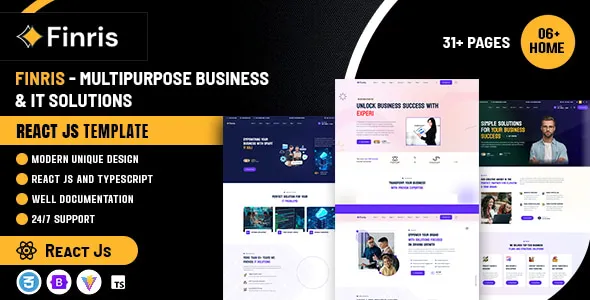
Finris – Multipurpose Business & IT Solutions React JS Template
Finris – Multipurpose Business & IT Solutions React JS Template is a modern website design solution for businesses, IT service providers, technology companies, digital agencies, consultants, and professional organizations looking to establish a strong online presence. A multipurpose React JS template provides a reusable front-end foundation for building business websites that communicate services, introduce company expertise, showcase projects, and guide potential customers toward meaningful actions. Finris can be evaluated for a variety of business and technology-related projects that require a professional visual presentation and a flexible website structure.
Businesses increasingly rely on their websites to explain complex services, demonstrate technical capabilities, communicate their brand identity, and attract potential clients. A well-organized website can make it easier for visitors to understand a company’s offering, compare its services, explore relevant case studies, and find contact information. For IT companies and technology consultants, clear service descriptions and practical explanations are particularly important because prospective customers may need help understanding technical solutions before making a purchasing decision.
Finris – Multipurpose Business & IT Solutions React JS Template offers a starting point for developers who want to create a business-focused website using React. Its design can be assessed for corporate websites, IT consulting platforms, software service providers, digital transformation companies, startups, and other professional businesses. The actual layouts, components, dependencies, and available customization options depend on the specific product version. Reviewing the current demo and documentation before implementation helps ensure that the template aligns with the project’s technical and design requirements.
What Is Finris – Multipurpose Business & IT Solutions React JS Template?
Finris is a React JS website template positioned for multipurpose business and IT solutions websites. React is a JavaScript library used to build component-based user interfaces, allowing developers to organize pages into reusable elements and maintain consistent behavior across a website.
A React template can help reduce the time needed to establish the initial front-end design. Instead of creating every page structure and visual element from scratch, developers can customize the supplied interface to match their business requirements. This can be useful for companies that need a professional website to present their services, describe their expertise, and communicate with prospective clients.
Finris can be considered for IT service companies, software development agencies, business consultants, technology startups, digital marketing firms, and corporate organizations. The final website can be tailored to the company’s industry, audience, brand identity, and business goals.
A front-end template does not automatically provide every function required for a complete business application. Features such as database connectivity, customer account management, payment processing, appointment scheduling, or content administration may require additional development or third-party integrations. Developers should verify which components are included and which functions need to be implemented separately.
Multipurpose Design for Business Websites
Businesses in different industries need websites that communicate their offerings clearly while maintaining a professional appearance. A multipurpose template provides a starting point that can be adapted to different audiences without requiring a completely new design for every project.
Finris can be evaluated for websites belonging to corporate service providers, technology companies, consultants, software agencies, startups, and other organizations that want to establish or improve their digital presence.
A corporate website may focus on company information, services, team profiles, and business achievements. An IT solutions provider may prioritize software development, cloud services, cybersecurity, technical support, and systems integration. A consulting firm might emphasize professional expertise, case studies, and consultation requests.
The most effective approach is to adapt the website structure to the actual needs of the business. Generic text and unrelated sections should be replaced with relevant content that explains what the company does, whom it serves, and how its services address customer challenges.
A multipurpose design is most valuable when it provides flexibility without sacrificing clarity. Every page should have a clear purpose and help visitors move naturally from discovering the business to understanding its services.
React JS Architecture and Reusable Components
React uses reusable components to organize interface elements into manageable parts. These components can represent navigation menus, buttons, service cards, content sections, forms, and other interface elements, depending on how the project is structured.
Finris can be evaluated as a starting point for a component-based business website. Developers can review its supplied React files and determine how to reuse or modify the available components across different pages.
Reusable components help maintain consistency. If several pages use the same button style, navigation structure, or service card, a shared component can reduce duplication and simplify future updates. Changes to common elements can then be applied more consistently throughout the project.
A well-organized React application should also separate reusable interface elements from page-specific content where appropriate. This makes it easier to manage the codebase as the website grows and additional sections are introduced.
The actual architecture of Finris depends on the included source code and build configuration. Developers should review its React version, dependencies, project structure, and setup instructions before making substantial changes. Compatibility with a particular development workflow should be confirmed through the current product documentation.
IT Solutions and Technology Service Websites
IT service providers often offer a range of technical services that can be difficult for prospective clients to evaluate without clear explanations. A dedicated business website can help organize these services and communicate their practical value.
Finris can be considered for IT companies that provide software development, cloud consulting, infrastructure management, technical support, cybersecurity services, systems integration, or digital transformation solutions.
Each service can be presented through a dedicated section or page, depending on the available layouts. A software development company may explain its application development process, while a cloud consultancy could describe infrastructure planning and migration support. A technology support provider might focus on maintenance, troubleshooting, and system reliability.
Service pages should explain the intended audience, the problems addressed, and the general approach used to deliver the service. Avoid relying exclusively on technical terminology that visitors may not understand.
Where appropriate, businesses can include process diagrams, project examples, technical capabilities, and frequently asked questions. These elements can help potential customers understand the service before contacting the company.
The final presentation should reflect the actual capabilities of the business rather than promise solutions or outcomes that it cannot reliably provide.
Corporate Website Layout and Page Organization
A business website needs a logical structure so visitors can find relevant information quickly. Common sections include a homepage, company profile, services, industries, projects, insights, and contact information.
Finris can be customized to support a corporate website structure using the page layouts and components available in the selected version. Developers should review the current demo to determine which page types and layout variations are included.
The homepage should introduce the business and communicate its primary offering. Service pages can provide detailed descriptions, while the About page can explain the company’s background, values, and expertise. A projects or case studies section can demonstrate relevant experience where genuine examples are available.
Navigation labels should be clear and familiar. Visitors should not need to guess where important information is located. Related services can be grouped together, while less frequently used information can be placed in secondary navigation areas.
Consistent headings, spacing, buttons, and content patterns help create a cohesive user experience. Developers should avoid adding unnecessary sections simply because the template makes them available. A focused structure is often easier to use and maintain than a crowded website.
Homepage Design and Calls to Action
The homepage is often the first major introduction to a business. It should communicate the company’s purpose and direct visitors toward useful information.
Finris can be assessed for a homepage that introduces the company, summarizes its services, highlights relevant projects, and provides clear contact opportunities, depending on the included components.
The introductory section should explain what the company does and whom it serves. Supporting text can describe the value of its services, while a clear call to action can invite visitors to explore solutions or request more information.
Additional sections may highlight service categories, company experience, project examples, client feedback, or educational content. Each section should support the main business message rather than compete with it.
Calls to action should reflect the visitor’s likely next step. An IT consultancy may encourage users to discuss a technical challenge, while a software development company might invite prospective clients to describe a project.
Avoid vague calls to action that do not explain what will happen next. Clear labels such as “Explore Services,” “Discuss Your Project,” or “Contact Our Team” can make navigation more understandable when they match the actual destination.
Responsive Design for Desktop and Mobile Devices
Potential customers may visit a business website from desktop computers, laptops, tablets, or smartphones. Responsive design helps maintain readability and usability across different screen sizes.
Finris’s responsive behavior should be verified through the current demo and documentation. Developers should test the supplied layouts and confirm that navigation, text, images, forms, and interactive components adapt appropriately to different viewports.
A responsive website should prevent important content from becoming difficult to read or access on mobile devices. Buttons should be easy to select, headings should fit the screen, and navigation should remain intuitive.
IT and business websites may include detailed service descriptions, project galleries, statistics, and contact forms. These elements can require additional adjustments on smaller screens. Tables, multi-column layouts, and large illustrations should be reviewed carefully to prevent horizontal overflow or cramped content.
Testing should cover every important page rather than just the homepage. After adding custom CSS, third-party components, or new sections, developers should retest the affected layouts across different screen sizes.
A consistent mobile experience helps visitors explore the company’s services and contact the business regardless of the device they use.
Customization and Brand Identity
A professional business website should reflect the company’s brand rather than look like an unmodified template. Customization helps create a recognizable identity and makes the website more relevant to its target audience.
Finris can be adapted according to the styling options and source files included in the selected version. Developers can review the available structures before modifying colors, typography, spacing, imagery, buttons, and page layouts.
A software company may prefer a clean and technology-focused visual style, while a consulting business might use a more restrained corporate presentation. A digital agency may choose a more expressive approach that emphasizes creative work and project examples.
Consistency is essential. A defined color palette, heading hierarchy, spacing system, and button style can help maintain a professional appearance across the website. Images should also support the business’s message rather than serve as generic decoration.
Before making extensive changes, developers should keep a backup of the original project and use version control where practical. This makes it easier to review changes, identify issues, and maintain the website over time.
Customization should preserve usability and accessibility. Brand colors and decorative elements should not reduce text contrast or make important interactive controls difficult to identify.
Service Pages for Business and IT Solutions
Dedicated service pages help businesses explain individual offerings in enough detail for prospective customers to understand them. They also provide a clear structure for organizing multiple services.
Finris can be evaluated for websites that present business consulting, software development, IT support, cloud solutions, digital strategy, cybersecurity, or other professional services.
Each page should explain the service, identify the types of customers it serves, and describe the process or deliverables where relevant. A cloud services page, for example, might discuss infrastructure assessment, migration planning, and ongoing management if those services are actually offered.
A business consulting page may focus on strategy, operational efficiency, organizational planning, or process improvement. A software development page could explain project discovery, design, development, testing, and maintenance.
Practical details help visitors determine whether a service is suitable for their needs. These may include the engagement process, project scope, support arrangements, or information required for an initial discussion.
Avoid duplicating the same generic text across every service page. Unique, useful descriptions provide a better experience for visitors and support a more meaningful content strategy.
Portfolio, Case Studies, and Project Presentation
Project examples can help business and IT companies demonstrate their experience. A well-presented case study explains the challenge, the work performed, and the results that can be supported by evidence.
Finris may be customized to present project portfolios or case studies if the available layouts and components support these content types. Developers should confirm the included options before planning the final website structure.
A case study can describe the client’s initial problem, the proposed approach, the implementation process, and the outcome. For a software development company, this may involve explaining a website or application project. An IT consultancy could present a system integration or infrastructure improvement engagement.
Where measurable results are available, include them with enough context to explain what was measured and how the project contributed to the outcome. Avoid inventing statistics or implying that results are guaranteed for every customer.
Client names, logos, screenshots, and project details should only be published when the company has the necessary permission. Confidential business information must be protected.
A carefully selected portfolio helps prospective customers understand the company’s expertise and provides context for the services described elsewhere on the website.
Lead Generation and Contact Forms
For many business websites, one of the main goals is to generate qualified inquiries. Visitors need a convenient way to ask questions, request a proposal, or discuss a potential project.
Finris can be adapted to include contact opportunities through supported layouts and compatible form integrations. The actual form components and their functionality should be checked in the current template documentation.
A project inquiry form might request a name, business email address, company name, service of interest, and a brief project description. The form should collect only the information needed to respond effectively.
Clear labels, understandable validation messages, and useful submission confirmations improve the experience. Visitors should know which fields are required and what happens after the form is submitted.
React-based forms require suitable handling of input state and validation, while reliable delivery may require a backend service or external form provider. If the application uses PHP or another server-side environment, the submission process should be integrated securely.
Developers should test successful submissions, invalid inputs, email delivery, spam protection, and error handling before launch. A visually attractive form is not sufficient if inquiries fail to reach the business.
SEO-Friendly Structure for Business Websites
Search engine optimization helps potential customers discover a business through relevant searches. A React template can provide the front-end foundation, but search visibility also depends on content quality, technical configuration, competition, and the overall website experience.
Finris can support an SEO-focused website when its pages are customized with clear content and a suitable technical implementation. Each important page should have a defined purpose, descriptive title, logical heading hierarchy, and information relevant to the intended audience.
An IT company may create separate pages for software development, cloud services, IT support, or cybersecurity. A consulting business can organize its website around individual service areas and industries.
Use natural keyword placement and descriptive internal links. Blog articles can link to related services when the connection is useful to readers. Avoid repeating the same phrase excessively or creating pages with little original information.
React websites may require additional attention to rendering, metadata, routing, and indexing. Developers should check how the chosen setup delivers page content to search engines and configure titles, descriptions, canonical URLs, and other relevant technical elements as appropriate.
Images should use suitable file sizes and meaningful alternative text when they convey important information. The website should also be checked for broken links, mobile usability issues, and performance problems.
No template can guarantee specific rankings or traffic. SEO requires a sustained effort to publish useful content, maintain technical quality, and respond to the needs of the target audience.
Content Marketing and Business Insights
Content marketing allows companies to explain their expertise, answer common questions, and share useful information with prospective customers. For IT and consulting businesses, educational content can make technical subjects easier to understand.
Finris can be evaluated for a website that combines service pages with blog articles, company news, industry insights, and educational resources. The actual content management workflow depends on the supplied project structure and whether a CMS or backend integration is added.
An IT service provider might publish articles about cloud migration, cybersecurity awareness, software maintenance, or digital transformation. A business consultant could discuss strategic planning, operational efficiency, team management, or business growth.
Useful content should answer a specific question or help readers understand a problem. Articles can explain processes, compare approaches, outline common challenges, or provide practical checklists.
Publishing should be consistent with the company’s expertise and resources. It is better to produce a smaller number of accurate, useful articles than a large volume of repetitive content.
Internal links can guide readers toward relevant services or case studies. This creates a natural connection between educational information and the company’s professional offerings without making every article overly promotional.
Performance Optimization for React Websites
Website performance affects how quickly visitors can access information and interact with the interface. A fast, stable website can make it easier for prospective customers to explore services and submit inquiries.
The performance of a Finris-based website depends on its assets, component structure, JavaScript bundles, external libraries, hosting environment, and implementation choices. The template itself does not guarantee a particular loading speed.
Developers should review image sizes, remove unnecessary dependencies, and optimize how resources are loaded. Code splitting and lazy loading may be useful where supported by the project’s build configuration and where they improve the user experience.
Avoid adding large libraries for simple features that can be handled more efficiently. Unnecessary animations and third-party widgets should also be reviewed for their impact on page loading and responsiveness.
Performance testing should cover the homepage, service pages, portfolio sections, articles, and contact forms. Different pages may behave differently depending on their content and interactive elements.
If the website uses server-side rendering or static generation, developers should review the appropriate configuration and deployment requirements. Performance improvements should be guided by actual measurements rather than assumptions.
Accessibility and User-Friendly Navigation
An effective business website should make information easy to find and understand. Accessible design can improve usability for visitors with different abilities, devices, and browsing preferences.
When customizing Finris, use logical heading levels, readable text, sufficient color contrast, descriptive links, and clear labels for form fields. Interactive components should be distinguishable and usable with appropriate keyboard navigation.
Navigation should prioritize the pages that matter most to the intended audience. A typical business website may emphasize services, company information, projects, insights, and contact details.
Buttons should clearly communicate their purpose. Form errors should explain what needs to be corrected, and success messages should provide useful confirmation.
Images that communicate important information should have appropriate alternative text. Decorative images should not create unnecessary noise for assistive technologies.
Accessibility testing should include keyboard navigation, form interaction, and manual reviews of important pages. Automated tools can help identify issues, but they cannot fully replace practical usability testing.
Integrations and Dynamic Website Functionality
Business websites may need features that extend beyond static page presentation. Examples include content management, customer relationship management, analytics, appointment scheduling, newsletter subscriptions, or online payments.
Finris can be assessed as a starting point for integrating these services, depending on its architecture and the requirements of the chosen provider. Developers should verify compatibility before adding third-party packages or external services.
A content management system may be useful when non-technical staff need to update service descriptions, publish articles, or manage company announcements. A customer relationship management integration can help route inquiries into an existing sales workflow, while analytics tools can provide insight into website traffic and visitor behavior.
Online payments or customer accounts require particular care because they involve sensitive information and application security. Such functionality should be implemented through suitable, well-documented services rather than relying on front-end components alone.
Keep integrations focused on actual business needs. Adding unnecessary tools can increase complexity, introduce compatibility issues, and make ongoing maintenance more difficult.
After each integration, test the affected pages and workflows. Verify that forms submit correctly, links work as expected, and the website remains usable across desktop and mobile devices.
Security and Ongoing Maintenance
A business website should be maintained regularly to protect its reliability and keep its content accurate. Security becomes particularly important when the website accepts form submissions, connects to APIs, or handles user information.
React-based front-end code should be maintained alongside its dependencies and build tools. Developers should review updates, address known vulnerabilities, and test changes before deploying them to a live website.
If Finris is integrated with a backend, developers should implement appropriate server-side validation, access controls, and data protection measures. Sensitive operations should never rely solely on front-end restrictions.
Contact forms should be protected against spam and common web vulnerabilities. API credentials and other secrets should not be exposed in client-side code. Any private data should be handled according to applicable privacy requirements.
Maintenance should also include content reviews, link checks, performance testing, and verification that contact forms continue to work. Backups and version control can help developers recover from accidental changes or deployment problems.
The specific maintenance process depends on the selected framework, hosting environment, and integrations. A planned routine helps keep the website dependable as the business grows.
Who Should Use Finris – Multipurpose Business & IT Solutions React JS Template?
Finris may be suitable for a variety of business and technology website projects, depending on the available layouts and technical requirements.
IT solutions companies: Present technical services, support offerings, infrastructure expertise, and technology consulting.
Software development agencies: Introduce development services, showcase completed projects, and explain the software delivery process.
Business consulting firms: Communicate advisory services, professional expertise, case studies, and consultation options.
Digital agencies: Present marketing, web development, branding, and other digital services when they match the agency’s actual offering.
Technology startups: Establish a professional website that explains the product, service, business model, or technical capabilities.
Corporate service providers: Organize company information, service categories, team profiles, and business contact details.
Cloud and infrastructure consultants: Explain cloud-related services, infrastructure planning, and systems integration where applicable.
Independent professionals: Build a professional online presence that highlights expertise, selected projects, and contact opportunities.
Growing businesses: Develop a structured website that can be expanded as services, content, and customer needs evolve.
Before choosing Finris, review the current demo, documentation, license, React version, dependencies, and deployment requirements to confirm that it suits the intended project.
Best Practices for Building a Website with Finris
Begin by defining the website’s purpose and the audience it needs to serve. Determine whether the main goal is to generate inquiries, present technical services, showcase projects, introduce a company, or support several related objectives.
Prepare accurate content before extensively customizing the design. This includes company information, service descriptions, project examples, team profiles, contact details, and any articles planned for launch.
Keep navigation simple and organize related services logically. Each page should have a clear purpose and help visitors move toward relevant information or a suitable next step.
Maintain consistent branding through typography, colors, spacing, and imagery. Replace all demonstration content with information that accurately represents the business, and avoid unsupported claims about results or capabilities.
Test the website on different screen sizes and browsers. Review loading performance, navigation, contact forms, accessibility, and any integrated services. Check that the selected React setup supports the intended SEO and deployment strategy.
Finally, establish a maintenance plan. Keep dependencies updated, monitor performance, verify form delivery, review published content, and improve the website as the business’s needs change.
Final Thoughts on Finris – Multipurpose Business & IT Solutions React JS Template
Finris – Multipurpose Business & IT Solutions React JS Template is a potential starting point for businesses, IT service providers, technology companies, consulting firms, and digital agencies looking to create a professional website with React.
A well-planned business website can combine clear service descriptions, consistent branding, responsive layouts, project examples, useful content, and practical contact options. These elements can help visitors understand the company and evaluate whether its services match their requirements.
The final capabilities of a Finris-based website depend on the template version, its documented components, the React project structure, and any additional integrations. Features such as content management, customer portals, online payments, advanced lead tracking, or appointment scheduling may require separate services or custom development.
Before implementation, review the current product demo and documentation to verify the available layouts, dependencies, licensing terms, and compatibility requirements. With thoughtful customization, accurate content, performance testing, appropriate SEO practices, and ongoing maintenance, Finris can provide a useful foundation for a professional business and IT solutions website.