My Account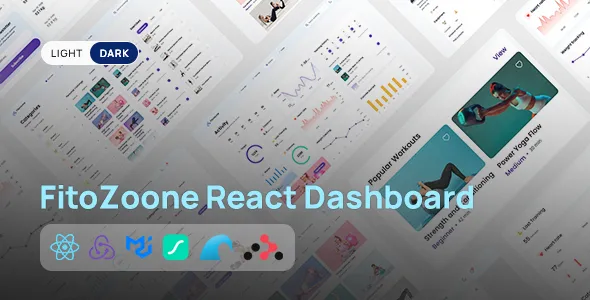
FitooZone React Fitness Dashboard UI
FitooZone React Fitness Dashboard UI is a modern dashboard interface designed for fitness applications, workout tracking platforms, personal training systems, gym management solutions, and health-focused digital products built with React. Created as a user interface starting point for fitness-related web applications, FitooZone can help developers organize workout information, fitness statistics, activity summaries, and user-focused dashboard content within a structured digital environment. Whether you are developing a fitness tracking platform, a gym member portal, a personal training dashboard, or a wellness application, this React fitness dashboard UI can be evaluated as a foundation for creating an organized and visually consistent user experience.
Fitness applications often need to present several types of information in a way that users can understand quickly. Workout history, training schedules, activity summaries, progress indicators, and personal fitness goals can become difficult to manage when they are scattered across disconnected screens. A well-planned dashboard brings relevant information together and helps users understand their activity at a glance. FitooZone can provide a starting point for arranging these interface elements, subject to the components and layouts available in the actual product version.
React is a widely used JavaScript library for building component-based user interfaces. Its reusable component approach allows developers to organize interface elements into manageable sections and maintain consistent design patterns across an application. A React fitness dashboard can be customized to support different user roles, fitness workflows, and application requirements. The precise components, charts, layouts, dependencies, and integration options available with FitooZone should be confirmed through its official demo and documentation before implementation.
What Is FitooZone React Fitness Dashboard UI?
FitooZone React Fitness Dashboard UI is a frontend interface solution intended for developers and product teams creating fitness-related web applications. Rather than designing every dashboard screen from the beginning, developers can evaluate an existing UI framework as a starting point for arranging information, presenting statistics, and building a consistent application interface.
Fitness dashboards serve different purposes depending on the target audience. Individual users may need an overview of their workouts, activity records, and training goals. Personal trainers may need a way to review client progress and organize training information. Gym operators may require interfaces for member activity, class schedules, and service-related information. A fitness technology startup might use a dashboard interface as the frontend foundation for a broader subscription-based platform.
FitooZone can be considered for these types of projects when its available layouts and components match the intended application. The final implementation may include a dashboard overview, navigation menu, workout-related sections, progress visualizations, and other interface elements supported by the product.
It is important to distinguish between a user interface and a complete fitness application. A dashboard template primarily provides frontend presentation and structure. Features such as authentication, persistent workout records, user profiles, payment processing, wearable-device synchronization, and database operations require suitable application logic and integrations unless they are explicitly included in the product documentation.
Before using FitooZone in a production project, review its source structure, React version requirements, dependencies, included components, licensing conditions, and setup instructions. This helps determine how well the UI fits your development workflow.
React-Based Architecture for Fitness Applications
React provides a component-based approach to building interactive web interfaces. Developers can divide an application into reusable elements such as navigation menus, statistic cards, progress indicators, forms, charts, and content panels. These components can then be assembled into different screens while maintaining consistent behavior and visual styling.
A React fitness dashboard can benefit from this approach because many screens share common interface patterns. For example, a workout overview and a personal progress page may both use statistic cards, section headings, filters, and data visualizations. Reusable components reduce duplication and make it easier to update shared elements across the application.
FitooZone can be evaluated as a frontend starting point for projects that benefit from reusable React interface patterns. The actual component organization and coding conventions depend on the source files included with the purchased or downloaded version.
Developers should review how the project separates components, pages, styles, assets, and supporting utilities. A clear structure makes the codebase easier to understand and maintain. It also helps developers identify which parts of the UI can be reused and which need to be modified for the application’s requirements.
React applications may also use additional tools for routing, state management, form validation, charts, or API communication. The need for these tools depends on the existing implementation and the planned features. Check the package configuration and documentation before adding new libraries, and avoid introducing dependencies that duplicate functionality already available in the project.
A well-organized React foundation can make a fitness dashboard easier to customize as the application develops.
Dashboard Overview and Fitness Statistics
The main dashboard is often the central screen of a fitness application. It provides users with a convenient overview of important information without requiring them to open several separate pages.
Depending on the layouts included with FitooZone, a dashboard overview may be adapted to display activity summaries, workout counts, training schedules, goal progress, or other fitness-related information. The specific cards and visualizations should be confirmed through the current product demo and documentation.
A useful overview prioritizes the information that matters most to the intended user. A personal fitness dashboard may highlight completed workouts, recent activity, weekly training consistency, or progress toward a defined goal. A trainer-facing interface may focus on client sessions, upcoming appointments, or progress reviews. A gym management dashboard may prioritize membership activity or class-related information when those workflows are part of the application.
Statistic cards should use clear labels and understandable units. For example, a workout count should indicate the period it covers, while a progress indicator should explain which goal it represents. Numbers without context can confuse users or encourage incorrect interpretations.
Developers should also consider how the dashboard behaves when data is unavailable. Empty states, loading indicators, and error messages help users understand whether information is still being retrieved, has not yet been entered, or could not be loaded.
A thoughtfully organized overview helps users understand their current activity and navigate toward the information they need next.
Workout Tracking Interface Design
Workout tracking is a common use case for fitness applications. Users may want to review training sessions, organize exercise routines, record completed activities, and monitor changes over time. A clear interface can make these tasks easier to complete consistently.
FitooZone can be evaluated as a UI foundation for workout-related screens, depending on its available components. Developers may adapt supported layouts to display workout summaries, exercise lists, training schedules, session details, or activity history.
A workout record may contain information such as the session date, workout type, duration, exercises performed, sets, repetitions, or other metrics relevant to the training plan. The appropriate fields depend on the application and the needs of its users.
Interface design should prioritize clarity and ease of use. Important workout details should be easy to locate, while secondary information should not overwhelm the main screen. Consistent labels and familiar interaction patterns can help users understand how to review or enter information.
If the application allows users to record workouts, the interface must connect to suitable application logic and data storage. A frontend template alone does not guarantee that workout records are saved or synchronized. Developers must implement the required data model, validation, API communication, and persistence mechanisms.
A practical workout tracking interface should also account for incomplete sessions, editing mistakes, empty history, and other ordinary situations. Clear feedback helps users understand the status of their activity records and improves the overall experience.
Fitness Progress Monitoring and Data Visualization
Progress monitoring can help users understand patterns in their training and review changes over time. Fitness applications may display weekly activity, completed sessions, exercise frequency, goal completion, or other metrics that are meaningful for the user’s objectives.
FitooZone can serve as a starting point for progress-focused dashboard screens if the relevant layouts and visualization components are available in the selected version. Developers should verify whether charts, graph libraries, progress indicators, or sample data are included before planning the implementation.
Charts are most useful when they communicate a clear message. A weekly activity chart, for example, should label its time period and measurement. A progress indicator should explain the goal it represents and distinguish actual recorded values from targets.
Avoid presenting numbers without meaningful context. A change in workout duration does not automatically indicate improved fitness, and a higher activity count may not be appropriate for every user. The interface should present information neutrally and avoid suggesting medical conclusions from general activity data.
When integrating real data, developers should ensure that visualizations update correctly as records change. Filters for dates or activity types may be useful in more advanced applications, provided they are supported by the interface and connected to appropriate logic.
Accessible chart alternatives are also important. Use labels, summaries, or tabular representations where practical so that important information is not communicated only through color or visual shape.
Effective data visualization makes fitness information easier to interpret and helps users explore their activity records without unnecessary complexity.
User Profiles and Personal Fitness Goals
User profiles help fitness applications organize personal preferences and relevant training information. Depending on the intended product, a profile may contain a display name, preferred activities, training interests, workout preferences, or other details needed for the service.
FitooZone may be adaptable to profile-related screens if the required interface components are included or can be created using its existing design patterns. Developers should review the available pages and determine which profile elements need to be implemented.
Fitness goals can also be presented through a dashboard interface. Users may want to define a target number of weekly workouts, establish a routine, or monitor progress toward a personal activity objective. A useful interface should explain how each goal is measured and show the current status clearly.
The application should distinguish between user-entered goals and automatically calculated values. It should also handle situations where a goal has not been set or where there is insufficient data to calculate progress.
Personal information should be collected only when it is necessary for the application’s purpose. Sensitive details require careful handling, appropriate access controls, and clear information about how the data will be used.
A profile interface should remain easy to update and should communicate validation errors clearly. If users can change preferences or personal information, the application needs appropriate backend support to save and retrieve those changes.
By organizing profile information and goal-related content carefully, developers can create a more coherent and personalized fitness application experience.
Responsive Dashboard Layout for Multiple Devices
Fitness users may access web applications from desktop computers, laptops, tablets, and smartphones. A responsive dashboard should adapt to different screen sizes while keeping essential information easy to understand.
When evaluating FitooZone, developers should test the actual interface at multiple viewport widths. A layout that looks organized on a large desktop may become crowded on a mobile screen if it contains several statistic cards, large charts, tables, or a fixed navigation panel.
Responsive behavior may involve stacking cards vertically, adjusting spacing, simplifying navigation, resizing charts, and changing how dense data tables are displayed. The exact implementation depends on the CSS framework, layout system, and responsive styles included in the project.
Navigation deserves particular attention. A desktop sidebar may need a compact or collapsible presentation on smaller screens. Buttons and form controls should remain large enough to interact with comfortably, and important actions should not become difficult to reach.
Charts should resize without clipping labels or hiding important data. Long names and values should wrap or truncate in a predictable way, with a suitable method for viewing the complete information where needed.
Responsive testing should cover the main dashboard, workout pages, profile screens, forms, and any other important views. Developers should also test orientation changes and different content lengths.
A consistent responsive experience helps make the fitness dashboard practical for users who access it through different devices.
UI Components and Reusable Design Patterns
Reusable components are an important part of maintaining consistency in a React application. They allow developers to define common interface elements once and use them across multiple pages.
A fitness dashboard may use components such as statistic cards, navigation items, buttons, form fields, progress indicators, tables, tabs, charts, and notification panels. Whether these components are already included in FitooZone must be confirmed through the product files and documentation.
Reusable design patterns help ensure that similar actions look and behave consistently. For example, primary buttons should use a predictable style, form fields should follow a consistent labeling pattern, and dashboard cards should share appropriate spacing and typography.
Developers can extend the interface by creating additional components that follow the existing conventions. Before adding new elements, review the project’s current component library and styling approach to avoid unnecessary duplication.
A consistent design system also makes future updates easier. If the application needs a different color palette, button treatment, or spacing scale, centralized styles or shared components can reduce the number of changes required.
However, reusable components should remain flexible enough to support different content needs. A statistic card displaying a workout count may require a different format from a card displaying a duration or percentage. Clear component properties and sensible defaults can help manage these differences.
A carefully structured component system supports maintainability and makes it easier to expand a fitness dashboard over time.
Customization and Visual Branding
A dashboard interface should match the identity of the product or organization using it. Branding choices influence how users perceive the application and help establish a consistent visual experience.
Depending on the source code and styling system included with FitooZone, developers may be able to customize colors, typography, spacing, icons, card styles, navigation, and other interface details. The available customization options should be verified in the current product version.
A fitness startup may choose a bold visual identity that emphasizes activity and energy. A wellness platform may prefer a restrained interface with softer visual elements, while a professional gym management system may prioritize clarity and information density.
Consistency is more important than adding decorative effects to every screen. Establish a color palette, typography scale, spacing system, and set of interaction styles. Use these choices consistently across the dashboard and supporting pages.
Charts and progress indicators should use color thoughtfully. Ensure that labels and values remain readable and that important information is not communicated through color alone. Buttons should have clear visual states for default, hover, focus, disabled, and active conditions where applicable.
Custom icons and images should serve a purpose rather than distract from the information. Avoid replacing functional clarity with unnecessary animation or complex visual effects.
By customizing FitooZone according to the product’s requirements, developers can adapt the interface to a brand while preserving a coherent user experience.
React State Management and Interactive Behavior
Interactive dashboards need to manage changes in user input and application data. A fitness interface may allow users to select date ranges, filter workout records, switch between views, update preferences, or open detailed information.
React provides mechanisms for managing component state and responding to user interactions. The appropriate approach depends on the complexity of the application and the patterns used in the existing codebase.
FitooZone should be evaluated to determine which interactions are already implemented and which are visual placeholders. A button that appears in the interface does not necessarily perform a complete business action. Developers should test each interactive element and review the source code before relying on it in a production application.
For smaller interfaces, component-level state may be sufficient. More complex applications may benefit from a shared state strategy or dedicated data-fetching tools. The choice should reflect actual requirements rather than adding libraries without a clear need.
Interactive states should be designed carefully. Forms need validation and understandable feedback, filters should update the displayed content, and loading states should communicate when data is being retrieved. Errors should be handled without leaving the interface in a confusing or unusable state.
When the application relies on remote data, developers should also consider request failures, slow responses, duplicate submissions, and outdated information. Appropriate handling helps maintain consistency between the interface and the underlying data.
A well-implemented interaction model makes the dashboard more useful than a collection of static screens.
API Integration and Backend Connectivity
A frontend fitness dashboard usually needs a data source if it is intended to display real user information. This may involve a custom backend, REST API, GraphQL service, or another supported data layer, depending on the application architecture.
FitooZone can potentially serve as the presentation layer for such a system, but the presence of a React interface does not automatically mean that a production backend or API integration is included. Developers should confirm the included functionality in the official documentation.
A connected fitness application might retrieve workout history, profile information, activity summaries, or training schedules from a server. It may also send updates when users create or edit records. These operations require suitable endpoints, data models, authentication rules, and error handling.
When integrating an API, keep network requests organized and handle loading, success, empty, and error states consistently. Validate incoming data before using it to populate interface components, and avoid assuming that every request will return complete or correctly formatted information.
Authentication and authorization are particularly important when different users have access to different records. The backend must enforce permissions rather than relying only on frontend navigation or hidden controls.
Developers should also avoid embedding private API keys or sensitive credentials in client-side code. Configuration secrets should be handled through appropriate server-side mechanisms.
With a suitable backend and carefully implemented data flow, a React dashboard interface can become part of a functional fitness application.
Authentication and User Access Considerations
Many fitness platforms need user accounts so that individuals can access their own activity records and preferences. A trainer portal or gym management system may also require different permissions for members, trainers, and administrators.
FitooZone can be assessed as a UI foundation for login, registration, profile, or access-related screens if those elements are included or can be built using the existing components. Developers should not assume that complete authentication functionality is available without checking the source files and documentation.
A functional authentication system requires more than a login form. It needs a suitable identity service or backend, secure session handling, validation, password recovery where applicable, and access control for protected resources.
The interface should provide clear feedback when credentials are invalid, a session expires, or a user does not have permission to access a page. Protected screens should not expose private information simply because a user can reach a frontend route.
Role-based access can be useful when the application serves different audiences. A member may view personal workout records, while a trainer may have authorized access to assigned client information. Administrative permissions should be limited to users who require them.
Security decisions should be based on the actual backend architecture and the sensitivity of the data involved. Review the authentication approach carefully before deploying a fitness application to real users.
Accessibility and User-Friendly Dashboard Design
Accessibility helps make a dashboard easier to use for a broader range of people. A fitness application should present information clearly and provide consistent interaction patterns without relying exclusively on visual cues.
When customizing FitooZone, use readable typography, sufficient color contrast, meaningful labels, and a logical heading hierarchy. Interactive controls should have accessible names, and form fields should communicate their purpose clearly.
Keyboard navigation should be tested for menus, buttons, forms, dialogs, and other interactive elements. Focus indicators should remain visible so that users can understand which control is currently selected.
Charts and other visualizations should provide labels or summaries that make their information understandable without relying solely on color. Status messages, validation errors, and notifications should be presented in a way that users can identify and interpret.
Avoid excessive animation and unnecessary motion, particularly when it does not contribute to understanding the interface. Where appropriate, respect user preferences for reduced motion.
Accessibility also requires attention to real content. Long labels, empty states, error messages, and unusual data values should be tested to ensure that they do not break the layout.
Automated accessibility tools can help identify some problems, but manual testing remains important. Regular reviews can improve usability and help the application maintain a more inclusive interface.
Performance and Optimization for React Dashboards
Performance is important for dashboards that display several cards, charts, tables, and interactive controls. A responsive interface should remain usable while loading information and responding to user actions.
The performance of FitooZone depends on its source code, dependencies, assets, styling, data-handling approach, and deployment environment. Developers should inspect the actual implementation and measure performance before making assumptions about its efficiency.
Large images and unnecessary assets should be optimized. Review dependencies and remove packages that are not needed by the application. Where appropriate, code splitting and lazy loading can help reduce the initial amount of JavaScript required for some screens.
React rendering should also be considered. Components that process large datasets or receive frequent updates may need optimization, but changes should be guided by profiling and measurable problems rather than guesswork.
Charts and tables can become expensive when they display large volumes of data. Consider pagination, filtering, summarization, or other appropriate strategies when the application requires them.
Performance testing should cover realistic usage scenarios, including slower connections, smaller devices, and pages that contain substantial amounts of information. Developers should also review loading states and ensure that the interface remains understandable while data is being retrieved.
A measured optimization process helps maintain a balance between useful functionality, visual quality, and application responsiveness.
Testing and Development Workflow
Before using a React dashboard in a live application, developers should understand the project’s setup process and test its main workflows. A successful local build does not guarantee that every screen, interaction, or integration will work correctly in production.
Start by reviewing the included documentation, package configuration, required runtime versions, and installation commands. Follow the documented process for installing dependencies and starting the development server.
Inspect the main routes and components to understand the interface structure. Test navigation, forms, filters, buttons, and other interactive elements. Determine which components use sample data and which are connected to real services.
Check the dashboard at different screen sizes and with content of different lengths. Test empty states, loading indicators, validation errors, and failed data requests where applicable.
If the project uses environment variables, confirm how configuration values are provided in development and production. Avoid exposing secrets in client-side bundles or public repositories.
Use version control to track changes and make it easier to review or reverse modifications. Before deploying updates, run the relevant build and test commands and verify that the application works in the target environment.
A structured development workflow helps teams customize FitooZone more confidently and reduces the likelihood of introducing avoidable problems during implementation.
Who Should Use FitooZone React Fitness Dashboard UI?
FitooZone can be evaluated by developers, startups, and organizations creating fitness-related web applications.
Fitness app developers: Teams building activity tracking or workout management applications can assess the dashboard as a frontend starting point.
Gym management software providers: Businesses creating gym-related digital platforms can evaluate whether the available layouts suit their member or administrator interfaces.
Personal training platforms: Developers can adapt suitable dashboard patterns for presenting training schedules, session summaries, and client-related information.
Health and wellness startups: Teams developing general wellness tools may find a dashboard interface useful when its design and components match the intended product.
Fitness technology companies: Organizations building digital fitness services can assess the UI as part of a larger application architecture.
React developers: Frontend developers can use an existing interface as a starting point for customization, subject to the code structure and licensing terms.
UI/UX designers: Design professionals can review the available screens and adapt their visual structure to match a product’s user experience requirements.
Software development agencies: Development teams can evaluate the dashboard for projects requiring a fitness-oriented interface, provided the source code and licensing conditions support the intended use.
The suitability of FitooZone depends on the actual included components, technical requirements, customization needs, and intended application. Review the demo and documentation before selecting it for a commercial project.
Tips for Building a Successful Fitness Dashboard with FitooZone
A dashboard UI provides a starting point, but the quality of the final application depends on how well the interface supports the needs of its users.
Begin by defining the target audience. A dashboard for individual fitness enthusiasts may prioritize workout history and personal goals, while a trainer-facing platform may require client records and scheduling information. A gym management system may need different navigation and administrative workflows.
Review the existing components before building new screens. Identify reusable cards, tables, forms, navigation elements, and charts, then determine which can support the application’s requirements. This helps maintain consistency and reduces unnecessary duplication.
Use realistic content during development. Sample names, workout records, and activity values should reflect the range of information the application may display. Test long labels, missing values, empty lists, and unusually large numbers so that the interface remains readable.
Implement real functionality deliberately. Connect forms and controls to suitable application logic, validate user input, and ensure that important data is saved correctly. Clearly distinguish sample information from live data during development.
Prioritize responsive behavior, accessibility, and performance. Test the dashboard on multiple screen sizes, check keyboard interactions, optimize assets, and measure performance under realistic conditions.
Finally, review security, data handling, licensing, and deployment requirements before launch. A polished interface is only one part of a successful fitness application; the underlying architecture must also support reliable data access and appropriate user permissions.
Final Thoughts on FitooZone React Fitness Dashboard UI
FitooZone React Fitness Dashboard UI is a potential starting point for developers and product teams creating workout tracking platforms, gym-related software, personal training systems, and other fitness-focused web applications. Its React-oriented approach makes it relevant to projects that need a structured frontend interface for organizing fitness information and presenting dashboard content.
A well-planned fitness dashboard can bring activity summaries, workout records, progress indicators, profile information, and other relevant data into a coherent user experience. Reusable React components can also help developers maintain consistent interface patterns as the application grows.
The final capabilities of FitooZone depend on the included source code, supported components, React version, dependencies, and documentation. Features such as authentication, API connectivity, persistent records, chart interactions, and user permissions should be verified rather than assumed from the dashboard’s appearance.
Long-term application quality also depends on responsive implementation, accessibility, performance testing, secure data handling, and ongoing maintenance. A UI template cannot independently guarantee a complete fitness platform, but it can provide a useful foundation when its components align with the project’s requirements.
For developers seeking a React-based fitness dashboard interface, FitooZone is worth evaluating as part of a broader development strategy. With appropriate customization, reliable backend integration, thoughtful interaction design, and thorough testing, the interface can support the creation of a more organized and user-friendly fitness application.